

Is there any benefit to restarting your phone regularly?
Here's how it helps. And how it doesn't.
There are plenty of myths and superstitions about smartphones that continue to persist in 2026. Some are based on things that were once true about mobile devices, like the idea that leaving them plugged in is bad — a concept that predates the advent of USB power delivery. Others are urban legends that were never rooted in fact, like the extremely false claim that submerging a water-damaged device in rice will salvage it. Seriously, don't do that.
One claim that has more legs is that you should routinely power cycle your smartphone. While the technological logic behind it is nuanced and varies between iOS and Android, it's hard to think of a scenario in which rebooting your mobile phone is a bad idea. At worst, it's a placebo fix, and at best, it genuinely solves minor performance issues your device may be experiencing. In rare instances, it can even be a powerful security tool.
With that said, there's rarely a benefit to ritually rebooting your phone on a fixed schedule. Having long ago reached maturity, mobile operating systems include plenty of under-the-hood processes to support long uptimes. Android phones can benefit more than iPhones from regular reboots, but most people using either don't need to bother. Here's what you should know in order to determine whether you should be rebooting your phone more regularly.
Power cycling your Android smartphone or iPhone has some performance benefits
Smartphones operate on modern ARM processors with mobile operating systems designed for long uptimes. In general, you can leave a smartphone continuously powered on for weeks at a time without issue. In some ways, long uptimes even help a phone to run faster. During use, your phone builds up a temporary cache of files needed to run your most-used apps. You might look at a diagnostic tool and see your RAM filling up as your phone runs, but that's by design. Android considers unused memory to be wasteful. When a complex app like Instagram is cached, it will open instantly and run smoothly. When loaded fresh, it may initially feel sluggish and janky. Therefore, the more cache-filled, the more responsive things will feel.
iPhones are more aggressive with cache management. iOS uses clever compression and more aggressively squeezes apps out of the RAM cache when needed. iOS also benefits from a library of apps that mostly run natively on Apple hardware, whereas Android apps run through a Java virtualization machine since there are far too many Android configurations that developers cannot be expected to keep track of. Android itself also runs differently on devices from various manufacturers, each of which makes bespoke tweaks to the OS.
Smartphones can reach a point after enough uptime and use at which apps encounter issues, or when the RAM management processes fail to work efficiently. Apps may crash or struggle to run. Battery drain may occur. While these problems are often more pronounced on Android, they're not foreign issues for iOS users. Rebooting your phone will clear your running cache, allowing you to start over with a fresh slate.
Rebooting your phone can have mild security benefits
Security has been cited as another benefit of rebooting your phone. The National Security Administration (NSA) claims that rebooting your phone at least once a week can have marginal security benefits, providing a partial defense against spear phishing and zero-click attacks. These are puzzling claims with only a modicum of truth to them.
Whereas normal phishing can involve wide-scale attacks designed to lure the most unsuspecting people into divulging private data, spear phishing is targeted toward a specific target, not a random victim caught in a criminal dragnet. It's therefore extremely rare to be targeted with a spear phishing scheme. Likely targets include investigative journalists, political dissidents and high-net-worth individuals.
Zero-click malware means that it works without requiring a user to take action, such as by downloading a malicious package. Zero-click vulnerabilities like the DarkSword iOS attack a few months ago are rare and generally get patched quickly. Even so, they have been found in everything from iMessage to Chrome. But, like spear phishing, zero-click malware attacks are likely to be deployed against adversaries of nation-states or other high-value targets. They often involve software that lives in volatile memory — the same memory being dumped when you reboot — which means that it gets cleared out along with everything else stored in the cache during a power cycle.
Even so, rebooting your phone will do very little to prevent either type of attack. In both cases, you are likely being targeted by a determined and resourced attacker whose efforts will persist after a simple reboot. It is far more effective to harden your security in other ways, including by keeping your phone's software up to date, vetting packages before you install them and learning to identify the warning signs of an attack.
Rebooting your phone without unlocking it adds a security layer
There is one way in which rebooting your phone can offer a protective edge, and that's to do with the security state of a freshly booted phone. After a reboot but, crucially, before you've unlocked your device with a PIN or password, both iPhones and Android phones are in an enhanced security posture known as Before First Unlock (BFU). Modern smartphones are heavily encrypted in a BFU state, but once you unlock them, encryption keys move into the RAM cache we discussed above.
The upshot of this is that, if your phone is stolen by sophisticated thieves or taken by government officials such as the US Customs and Border Patrol, it will be much harder to crack from a BFU state. Forensic tools deployed by state actors will have a more difficult time extracting data from your device, lessening the chances that a forensic search of the device will prove fruitful. You stand a much higher chance of sheltering your JD Vance memes if your phone is taken while in a BFU state, so it's a good idea to reboot your phone without unlocking it before going through border security or a TSA line.
Restart your phone once a week, if you want. Or don't. Whatever.
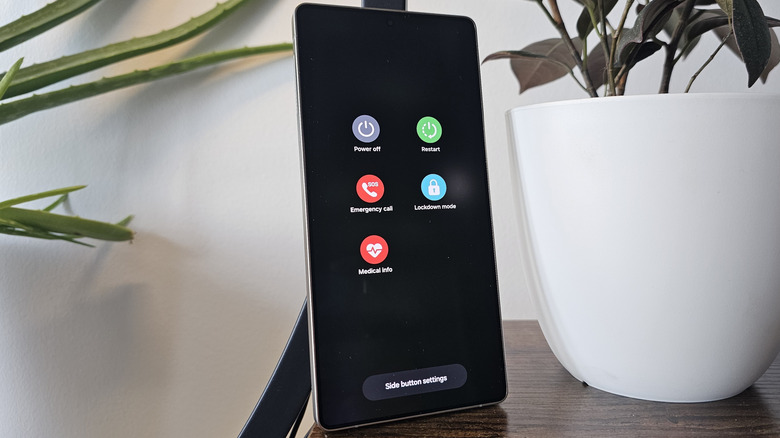
Rebooting your phone semi-regularly is a good idea to ensure consistent performance and connectivity, with marginal effects on security. But how often should you actually be cycling power? The answer is more or less whenever you want, or whenever your phone seems to have minor performance or connectivity issues. But if you insist on a specific answer, you don't generally need to reboot more than once a week. That's the rule of thumb you'll find from most manufacturers and tech enthusiasts, if they have any recommendation at all.
Some manufacturers, most notably Samsung, include settings that can automatically power cycle your device and are user-configurable so you can ensure that it only reboots at convenient times. Other devices, such as Google Pixel phones and iPhones, will automatically reboot after a 72-hour period of inactivity, which may indicate your phone has been stolen or seized. These settings are worth enabling if not turned on by default. Configured properly, you'll rarely even notice your phone rebooting, but you'll keep it feeling performant and gain some marginal security benefits. You'll also stand a better chance of keeping prying eyes, whether criminal or governmental, away from your data.
If you don't feel like rebooting often, though, don't feel pressured to. It's a matter of personal preference, and the restart button is always there if you encounter a performance slowdown or a temporary bug. Restarts are often more useful as a troubleshooting step than as a maintenance routine.