

Turtle Beach Afterglow review: A Switch 2 controller with the full RGB treatment
This is for the gamer who wants RGB everything.
- Customizable RGBs, baby
- Comfy size and weight
- TMR analog sticks and low-latency play
- Transparent body is rad even without lights
- No haptics
- No ability to wake up the Switch 2 console
- A few illegible small buttons
Maybe I'm feeding into a stereotype, perhaps it makes me a basic gamer, but dang it — I love RGB lighting. I want it in my keyboard, mouse, PC case, headphones, game consoles and behind every screen in the house, layering a subtle sci-fi glow over my entire space. At night, I want to fall asleep beneath shifting rainbow galaxies. I want to cradle an LED prism in my hands. Even better if it can control my video games, too.
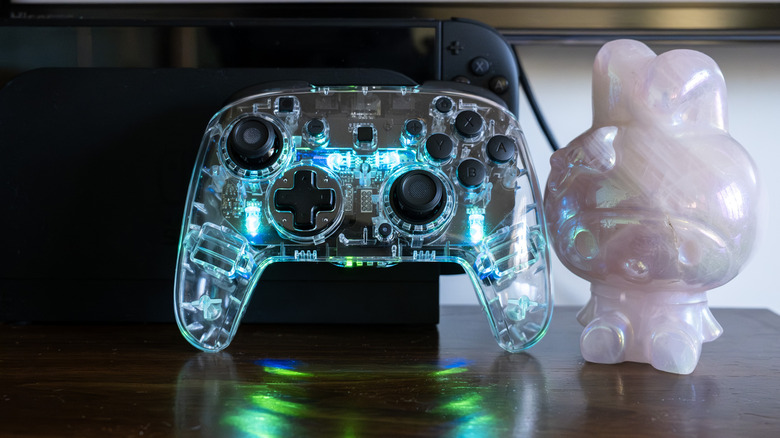
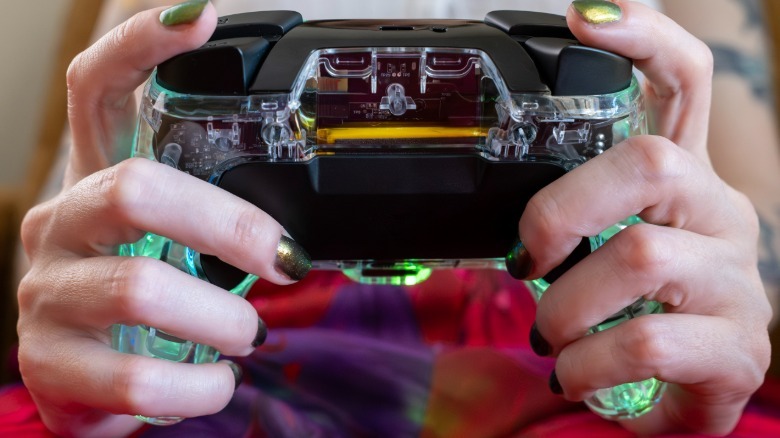
You see where this is heading. The Turtle Beach Afterglow Wireless Controller for Nintendo Switch 2 is a transparent gamepad with variable RGB light settings, and it looks like a handheld cosmic gemstone. On top of its aesthetic allure, the Switch 2 Afterglow is a responsive, low-latency controller with a wireless range of up to 30 feet and ultra-precise TMR thumbsticks, which provide a long-term drift-free guarantee. In action, the gamepad is nicely reactive and comfortable to hold for hours on end, with hard, clicky face buttons, cushioned trigger pulls and mappable rear paddles that can be super satisfying fidget toys when not actually in use. The back buttons function independently, but they're connected by a matte black bridge, adding a secondary sensory pop beneath the opposite fingertip with each press.
 Engadget
Aside from an additional strip of shiny black between the triggers and shoulder buttons, housing the USB-C charging point and bluetooth connection, the controller chassis is clear plastic. Even the grips aren't textured, lending the whole thing a crisp, crystalline look whether the lights are off or on. Switch 2 controllers tend to be rather small and light, a fact that I personally love, and the Afterglow fits this description. It's similar in size and weight to the official Switch 2 Pro Controller, the console's reigning standard. Of course, the Pro costs $90 while the Afterglow costs $65 and is often on sale for far less.
The lack of texture on the grips hasn't been an issue for me, even after playing Resident Evil Requiem for a few hours to really test out the sweat factor. The Switch 2 Afterglow is comfortable to hold for long periods of time; it's never unexpectedly slipped out of my hands or threatened to throw off my zombie-hunting game in first- or third-person. It also handles Hello Kitty Island Adventure like a champ.
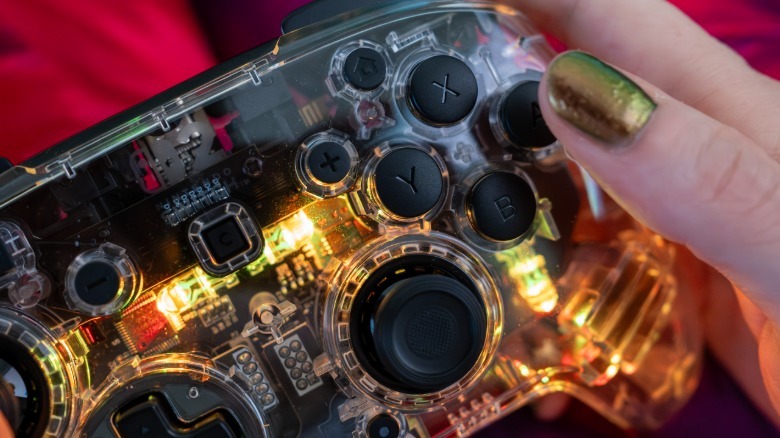
The Afterglow's buttons are black with symbols and letters etched into the faces, which brings me to a gripe I have with nearly all Switch 2 controllers, including Nintendo's own: The minus, plus, home and other small face buttons are nearly impossible to read. This fact is particularly frustrating when you're using a gamepad for the first time and getting used to its layout. The Switch 2 Afterglow, for instance, has a dedicated GameChat button in the center of the array, plus and minus buttons above that, and Home and Capture above those. I accidentally took a handful of random screenshots while reaching blindly for the minus button to open the map in Requiem, and I was never quite able to shake off the incorrect muscle memory. I'd love if the icons were highlighted to make the small buttons more readable at a quick glance.
 Engadget
The Switch 2 Afterglow has motion-control capabilities but it doesn't feature any haptics, so there's no rumble here. Its analog sticks use top-of-the-line TMR technology, which promises long-term accuracy without the risk of drift, and they make a nice clacky sound when they hit the sides of their enclosures. The tops of the Afterglow thumbsticks have fairly high, defined edges with a textured divot for your thumbpad, and they're easy to press in even at an angle.
In the box, the Afterglow comes with a 1-meter charging cable and it boasts a battery life of 40 hours — but that's with no RGBs (why?). Turtle Beach's Switch 2 controllers generally get 12 hours of playtime with RGB lighting effects on, and that's likely to be the case here, too. This particular model isn't able to wake up the Switch 2, but it connects seamlessly to the console once it's on.
Now, let's talk about those RGBs.
 Engadget
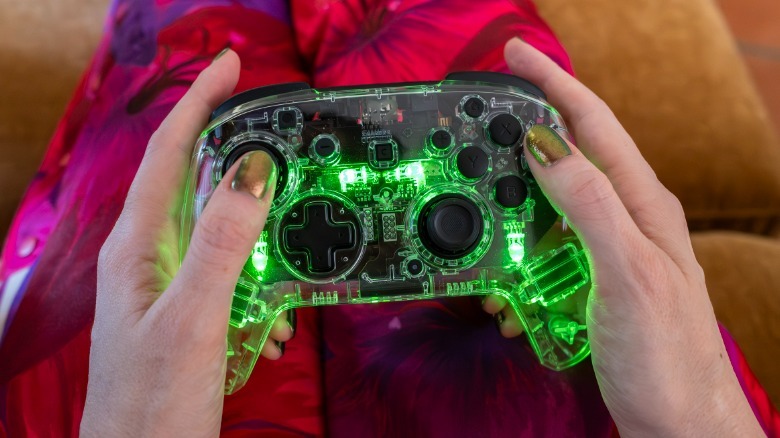
The Afterglow has four lighting modes, adjustable by holding the small circle beneath the right thumbstick, and then pressing the L or R bumpers. The LED settings are as follows: On and steady, pulsing in one color, cycling through all colors, and reactive to stick movement. You're able to set the colors and adjust brightness on the fly as well, and it's all super simple. The lights are vibrant and fill the entirety of the gamepad with a clean radiance. The RGB instructions live right here, for quick reference.
My favorite setting is the input-responsive one, where the controller lights up in a specific color depending on which direction the analog stick travels, generating a rainbow light show as you play. But truly, the Afterglow makes me smile no matter which mode it's set to. Even off, it's a slick-looking gamepad.
But again, I'm a sucker for this stuff. I love transparent gadgets with their motherboards and mechanical guts exposed, and I adore RGB lights. The Turtle Beach Afterglow for Switch 2 combines these styles in a delicious way, and it happens to be a precise and responsive gamepad, to boot. I'm happy to have one, here in my crystal kingdom.