Amelia Wong

Engadget Editorial Policies

The unique content on Engadget is a result of skilled collaboration between writers and editors with broad journalistic, academic, and practical expertise.

In pursuit of our mission to provide accurate and ethical coverage, the Engadget editorial team consistently fact-checks and reviews site content to provide readers with an informative, entertaining, and engaging experience. Click here for more information on our editorial process.

Stories By Amelia Wong

  • The Drone User Experience and Design

    DRONE ENTHUSIASM Drones have been taking the nation by the rage. In the last few years, drones have been used to take photos for news publications. Recently, the New York Times even published an article about how drones are now being used for agriculture --to water vineyards for wine. Foreign nations are also planning to use drones to drop lifesaving rings in case of maritime accidents. Because drones are starting to be more accepted, people have more commonly began to play with drones as recreational hobbyists. THE PHANTOM EXPERIENCE The DJI Phantom was one of the first "serious hobbyist" drones that popped up. Originally, it retailed at over $1000, but could be found used for $300-$400. Although I had never played with a drone, I had the opportunity to test the Phantom. The Phantom came with an extremely large and heavy remote with two joysticks, which I found to be extremely unaccessible. I did not understand which button lifted the drone and which button moved the drone right to left. The DJI Phantom's navigation system was not functional. The drone's propellers would flit around quicker and lift off the ground. Because the propellers were unguarded, the drone would lift off or land unbalanced. The drone imbalance break off propellers, which had to be replaced. This created a usability problem. As I was testing the drone, the owner (a developer) who had played with the drone multiple times, took control of the remote and sent the drone higher into the air. After a certain height, the drone owner lost control of the drone as it flew into the skyline of downtown Manhattan and disappeared. This was a bad user experience because even an experienced drone owner could not use the drone --the Phantom is not user friendly. PHANTOM v. BEBOP 2 The "serious hobbyist" drone competitor to the DJI Phantom was the Parrot Bepop 2. The Bebop 2 came with an HD camera feature and was smaller, lighter, and cheaper alternative to the Phantom. But the Bebop 2 did not solve the problems of drone imbalance or accessibility. THE MAVIC PRO EXPERIENCE Recently, the DJI Mavic Pro was released which had bloggers raving about it. The Mavic Pro is advertised to fly for up to 27 minutes, includes FlightAutonomy technology to land where it takes off, have a great camera, and is foldable. I was able to gain some user experience insight from an owner of a Mavic Pro. He took it for a spin on his Manhattan rooftop, lost control, crashed it in the street, and it was run over by a car. DJI did not manage to address the user experience problems that Phantom faced with the Mavic. BEST DRONE DESIGN? So what is the best drone design? For imbalance, ideal drones would include steady propellers that fly for long periods of time (longer than 27 minutes) that are able to maneuver back to home once the user loses control of the drone. Although Mavic Pro included FlightAutonomy, the technology does not account for error prevention --where users may lose control of the drone due to imbalance. In terms of accessibility, drones that are at a cheaper price point are ideal. Cheaper drones are better for hobbyists because not all drone enthusiasts can drop $1000 on a drone for fun. Nor is it economically prudent for enthusiasts to drop $1000 on drones that are not steady and end up crashing. The Skeye Mini Drone was released by TRND Labs for drone enthusiasts. Although the mini drones are not "real" drones, they are introduction models for people who are interested in learning more about drones and perhaps eventually moving towards the Bebop 2 or Phantom. The mini drones are ideal in terms of accessibility --affordable and can be used by anyone from grandpa to coworkers, and a great present that provide a fun user experience.

    By Amelia Wong Read More
  • Google Daydream and Cardboard: VR User Experiences

    GOOGLE DAYDREAM: USER-FRIENDLY Google Daydream is a beautiful, soft headset with a usable remote control. The Daydream provides interactive, virtual reality (VR) video experiences. By just dropping in their phones, users can alter their realities. As it is much less bulky, strappy, and developer-focused, Daydream is a minimalist's dream in terms of physical design. It provides the user with a trendy feeling —the ultimate "cool" user experience. Daydream costs $79.99 on the Google store, which is pretty affordable for a VR hobbyist. Daydream has a user-friendly, accessible design. WHAT ABOUT GOOGLE CARDBOARD? But Google also released the Google Cardboard that is compact, fun, and user-friendly. Google Cardboard is cheap (or free), created through a few folds, and lighter than Daydream. Cardboard also allows anyone to capture the world in VR —and is accessible to more users than the Daydream. USER ANALYSIS: Daydream and Cardboard's users are different. Daydream's users are technology and VR enthusiasts who are interested in actively creating or interacting with VR. Cardboard's users are anyone —your grandmother to best friend. Google Cardboard is usable for anyone. HOW IS DAYDREAM DIFFERENT? Daydream and Cardboard seem similar on the surface-level but are completely functionally different. Cardboard's function is to provide a fun, novelty introductory VR experience. Daydream provides high-level VR experiences that users can customize, without needing hardcore developer skills required for the Oculus Rift DK2. Daydream is far more user-friendly to the average hobbyist than the Oculus DK2. WHY IS DAYDREAM BETTER? So what are the benefits of the Daydream? I had the chance to test the Daydream in the Google Pop-Up Store in SoHo. Scrolling around with the remote, I accessed the "Fantastic Beasts" game. Daydream's remote allowed users to select buttons on the screen easier than on the Cardboard. Also, Daydream's VR features were pixel perfect and far more interactive, in terms of video, compared to Cardboard. Daydream has VR social apps, whereas Cardboard's function focuses mostly on VR games. Overall, Daydream is far more sophisticated and offers more of a technological range than Cardboard.

    By Amelia Wong Read More
  • Smart Tech, Bad User Experiences

    Technology is designed to make life easier for its users. At the same time, technology comes with the risk of causing bad behaviors and user experiences. 1) The Notifications Ball and Chain: Notifications pop up and alert users about anything form Amber Alerts to Messages received. When notifications pop up on a mobile device, users often glance immediately at their phones to check if it is important. If the user is in conversation with another, both individuals will glance at the phone because of familiarity. Notifications have a Pavlovian effect: mobile users' eyes immediately scan the notifications upon immediate receipt. The Notifications Pavlovian Effect stretches across platforms as well. I performed contextual inquiry on users with Apple iWatches and noticed that every single user glanced at their iWatch when they received a message. Many users would also completely stop the conversation to read or respond to the message. The watch created friction and a bad user experience for the in-person conversation. As a test, I wore a Fitbit device with the notifications feature turned on for a day. Ever single time I received a message or phone call, the device would vibrate and I would be inundated with information. After the 5th text from my mother, I had to turn off my notifications. The notifications included too much information and created friction to disrupt my life, which I found to be an overall bad user experience. 2) Email ADHD: Email ADHD has become a common trend. Working professionals receive anywhere from 100-1000 emails a day (perhaps some people receive more) and are constantly checking their emails. Although it may be impossible to read all the emails, professionals are still expected to constantly be up to date with their inboxes or be fired. Supposedly, there are only two types of email users: "Inbox Zero" people and people who never clean out their inboxes. Performing contextual inquiry, I analyzed the behaviors of friends who worked at various law firms and consulting firms in Manhattan. In a span of an hour lunch or two hour dinner, I watched these friends whip out their phones to check their emails around ever 10 minutes. Although most users' phones were on silent and did not receive notifications, they claimed to "just know" that they had received emails --and in all cases, the users were correct. Many times, these professionals would respond immediately to their emails because it was a client or a partner. Was this really necessary? Perhaps in certain cases or immediate projects. Overall, I found that email checking disrupted the meal experience, similar to notifications. 3) Iphone Dependence: "I can't live without my phone," is probably a phrase that we have all uttered. Because mobile phone users are so used to having their devices on them at all times, losing, misplacing, or not having your phone is perhaps a fear comparable to death or social suicide. Recently, I had the chance to contextually analyze a 17-year old high school student who left his phone at home. He seemed withdrawn, unengaged, despondent. "Sorry, I don't have my phone," was his response to my question about whether apples were healthy or not. When he went home to get his phone, he returned, energized, excited, and ready to engage because he felt "connected to the world." As a test, I decided to leave my iPhone in my apartment for a day. Initially, my thoughts were focused on worry about who was looking for me and whether friends and family knew I was OK. At the same time, I noticed that I felt freer and able to think without the habit of pulling my iPhone out to check it, even if I did not have notifications, messages, or calls. The biggest drawback to my experience was the lack of camera when I saw an interesting image. The inability to instantly Google for information was annoying, but not completely problematic because I could wait until going home to use my laptop. By the end of the day, I found the digital detox to be a great change of pace and comfortable to know that I was not wholly dependent on my iPhone. 4) Excess Gadgetry: Can a techie have too many gadgets? When does one have too many gadgets? In terms of user experience, a techie has too many gadgets when he doesn't use them. If an Alexa is sitting around dormant for 8 months, a usability gap exists. If the Oculus Rift DK2 has been sitting in a closet for 2 years because the techie hasn't figured out how to use it, an accessibility problem exists. Having new hardware and software is exciting, but when these technologies are not being used, there are underlying user experience problems. Duplicative devices also make for a diminished user experience. If the techie has two devices that perform the same function, he probably could do with just one. The functionality problem arises in the fact that user is doing the same thing twice, being half as productive as having one device and performing the function once. In large cities like New York, duplicative hardware also takes up excess real estate in one's small apartment and decrease space functionality. If excess gadgetry is causing usability, functionality, and accessibility problems for a techie, it may be time to "KonMari" these gadgets for 2017.

    By Amelia Wong Read More
  • The Smartwatch vs "Smarter" watch User Experiences

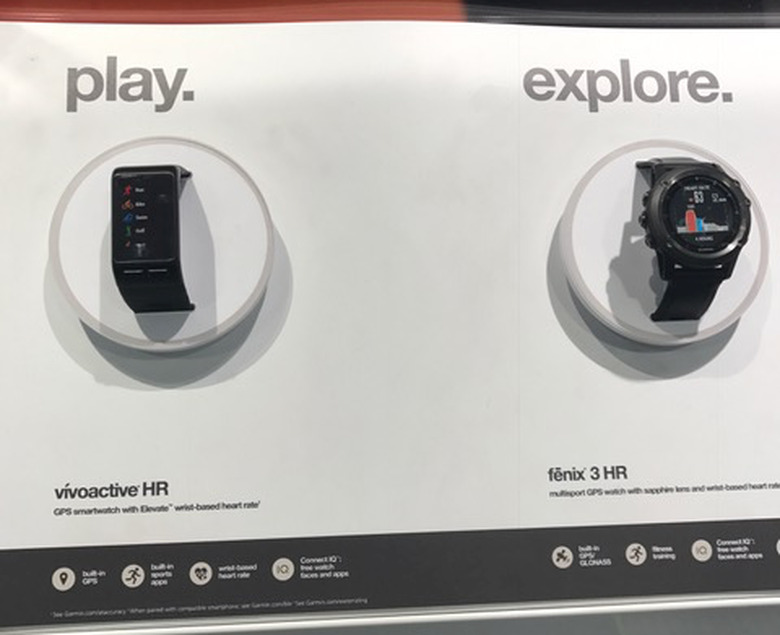
    What's the difference between a smartwatch and a "smarter" watch? A smartwatch is a new type of device with unique interfaces that happen to tell the time. A "smarter" watch retains the essence of a watch by primarily focusing on telling time, but adds interesting features. Usability: Smartwatches are great, interesting gadgets but people often do not use them for their many purposes. Garmin offers the Vivoactive and Fenix​​​​​​ smartwatches with GPS tracking and heart rate sensors. While these features are useful, most users who purchase watches are familiar with checking the time and may not necessarily need to know exactly where they are and their heart rates. Users may not care to "play" or "explore" more with the watches because they are familiar with the few features of a watch. Many users may just want the watch for a "cool" factor, rather than care about the smartwatches' other functions. Further, these features are similar to that of the Fitbit --which has established its brand identity firmly in the fitness area. Although Garmin is trying to target Fitness users, Garmin's target is unclear because of the multiple products being launched that do not differentiate much between each other or provide a clear value proposition in comparison to Fitbit. If Garmin does not clarify its users or purposes of its products, how will they be usable? ​​​​​​ In comparison, "smarter" watches are functional because people are familiar with using watches to tell time. Adding a new feature to a watch is easily understood by users who wear watches because there is a much lower onboarding barrier. From a usability perspective, "smarter" watches are better than smartwatches. ​​​​ Accessibility: Accessibility is another problem smartwatches face. Because of the small interfaces, smartwatches often face issues in onboarding users. An example of this is the Huawei Watch. The watch has a digital interface where words pop up. There is not a lot of space to read the words, and the user may not understand what to press next, or which buttons correspond to what. As a user, I was immediately confused by seeing the digital screen and gave up using the watch. This demonstrates a high barrier to entry. A "smarter" watch would not have this problem. Because the "smarter" watch's primary function would be to tell time, users would understand that they would read the time first before considering secondary features. Because time is immediately accessible due to user habits, the "smarter" watch is more accessible. Error Prevention: Because the smartwatch is an entirely new product, the user is not sure what to expect when errors pop up. Do the smartwatches crash entirely? Does the digital screen blank out? Does it freeze like the digital Casio watches? How do users know when to charge the phone before it crashes? Are there warnings? All of these questions vary from watch to watch and creates a large potential for user confusion. There is no standard or system to figure out error prevention without reading a smartwatch's user manual. But which user actually reads a user manual? A user is familiar with the "smarter" watch's crash settings. If the watch hands stop moving or the digital screen freezes, the user understands that she has to change the watch's battery. After changing battery, the user, a watch wearer, knows how to reset a watch by tuning buttons to move the arms or changing the numbers on a digital screen. Error prevention is understood because of familiarity with the device. Physical Design: Smartwatches can be customized to the user's desires. The personalization level of smartwatch design is the ultimate benefit of the device. The user can make the smartwatch look as cool and trendy as the user wants it to look. Trendy brands such as Kate Spade are also jumping on the smartwatch trend to ride the cool factor and target brand audiences. Ultimately, smartwatches target a very specific audience: trendy users. ​​​​ However, users still enjoy collecting old watches. The design and values of old Rolexes are highly extolled by watch wearers who collect these items. There is a sentimental trend towards an established time-telling device --collectors spend thousands, even millions on old watches or pocket watches. The current fashion trends are classic, well-made leather wristwatches with arms by Daniel Wellington or Shinola. The physical design of these watches target not only the young, trendy crowd, but also appeal to the older, established watch wearers. ​​​​​​Samsung was quick to jump on this trend with their "smarter" watch. It has a traditional movable arms interface and a leather strap. The Samsung "smarter" watch's user interface is a digital screen and also provides additional features. By bringing a new twist to "make what is old, new again", Samsung achieves appealing to a wide audience in terms of design.

    By Amelia Wong Read More
  • Google Pixel/Pixel XL User Experiences

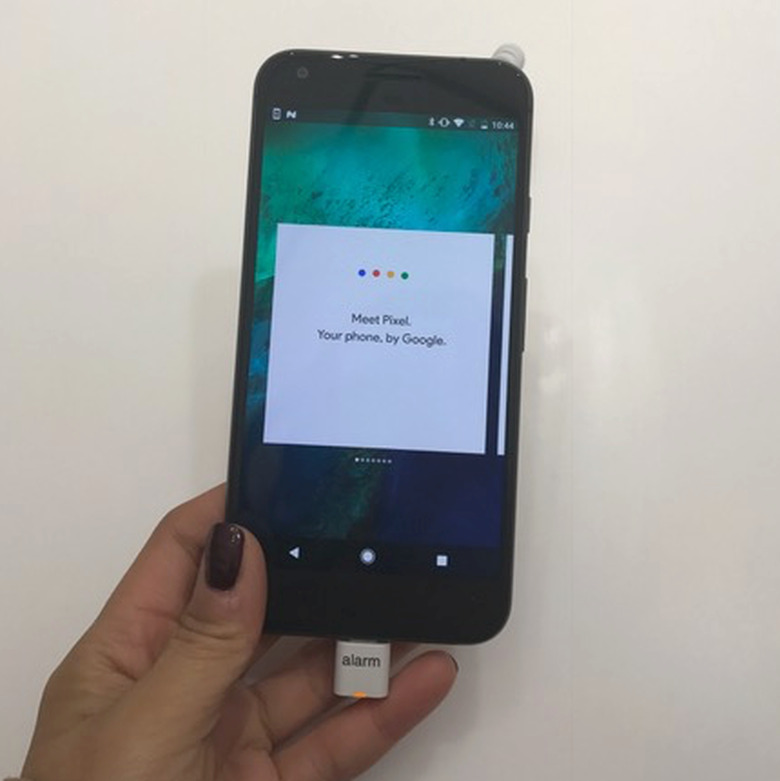
    The Pixel and Pixel XL have been all the rage in 2016. At the Google Store in Soho, I had the opportunity to test both the Pixel and Pixel XL to learn more about the user experiences. SIZE: The Pixel is roughly the size of the iPhone 7. Pixel XL mirrors the size of the iPhone 6+. For users accustomed to the iPhone 6, the Pixel is a better experience. For those with larger hands or prefer bigger screens, the Pixel XL will provide a more optimal experience. The overall verdict was that size did not matter much in terms of the Pixel and Pixel XL user experiences. TOUCH BUTTON ON THE BACK: ​​​The button on the back received a lot of attention because it was a new, different feature for security and unlocking. Surprisingly, when playing around with the Pixel, I did not find it to be very engaging. The back button experience was marred by the giant lock attached to the phone. However, this design decision is actually brilliant on Google's part. The user does not need to constantly be reminded about phone security and having a "secret key" in allows the user to feel secrecy, cool, and exclusive. USER INTERFACE: The Pixel's User Interface is very similar to that of the iPhone. There are four buttons at the bottom menu, which expand into a larger menu. The search bar is located at the top. The Pixel's Menu is not the best user experience. When the menu pops open, the user is greeted by loads on loads of Google Apps. Although having all Google Apps available is great in terms of usability, the information overload is unpleasant. GOOGLE ASSISTANT/ALLO: Google Assistant is accessible through the Search feature. I found this to be far more usable than Siri and enjoyed the fact that it provides possible search keys and trends. Allo is also a very functional app, so having the Assistant/Allo available to the user's fingertips is an optimal user experience. ​​​​​​ CAMERA: The Camera is really high quality and has great zoom and menu options at the top. There are five buttons at the top, and the user may not understand what these buttons represent. Also, there is a hamburger menu on the left, which the user may not use at all. In terms of accessibility, the camera could be a lot simpler and as effective. However, the camera certainly takes high quality pictures and makes up for the information overload by including a lo-fi Pixel Forest in their store where users had the opportunity to test the Pixel camera. ​ OVERALL USER EXPERIENCE: The Pixel is a great competitor to the iPhone. Both phones are similar sizes and physically look alike. Pixel wins on the security back button feature, digital assistant accessibility, and access to Google Apps. However, the iPhone still holds steady for its camera and user interface simplicity. If Pixel can streamline the information in its menu and camera, the iPhone may have it coming.

    By Amelia Wong Read More
  • Alexa v. Google Home: User Experiences and Design

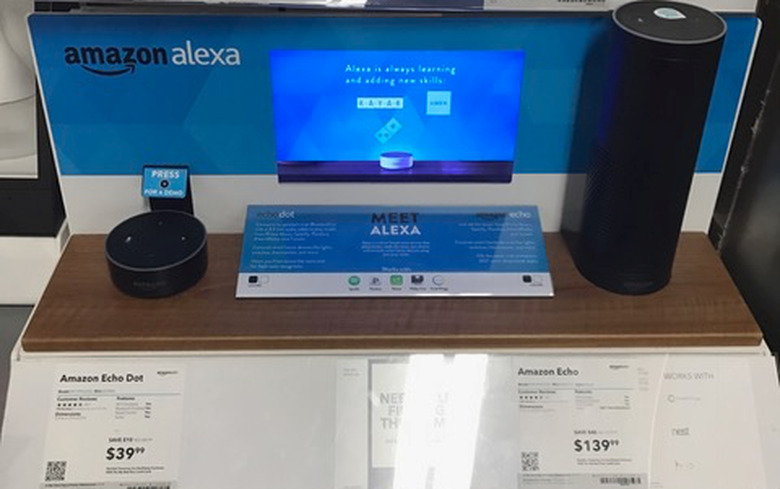
    Alexa and Google Home are head to head in the Artificial Intelligence Sphere. Which should you get your tech enthusiastic family member for Christmas? Price: Google Home currently retails online for $129-$135. The Amazon Echo retails for around $180, but comes with the cheaper alternative of the Echo Dot at $50. In terms of accessibility, Amazon wins this round. With the more affordable option, Christmas Shoppers can now purchase an Echo Dot for the favorite teenage techie nephew without feeling guilty. Amazon: 1, Google: 0. Development: Because Amazon's Alexa has been around longer, Amazon has a strong Alexa Development Tool Kit and Skills in play. In fact, Amazon has been hosting Alexa hackathons and is offering free Alexa and Echo dots to developers who make 5 functional Alexa Skills and publish them on the Alexa site. Because Google Home is still new, its development potential is still questionable. Google is also not giving out Homes to enthusiastic developers. Amazon wins the development round. Amazon: 2, Google: 0. Shopping Experience: One thing Google Home has that Amazon lacks is a Brick-and-Mortar store. I visited the Google Home store in SoHo in New York City and was blown away by the trendiness of the store. First impressions were that it was a Scandinavian interior design store. The Google Home store also has top quality assistants ready to answer questions and help interested shoppers --top quality customer experience. You can pick up an Amazon Alexa to play with at Best Buy or Target, but it's not the same as having your personal Google Home assistant teach you how the Home will change your life. Amazon, where is your lo-fidelity Pixel room and giant Photo Globe? Amazon: 2, Google: 1. Design: Amazon's Alexa is black, sleek, and sexy. Echo is small, cute, but also exudes the same cool factor that Alexa offers. In fact, because of size, Echo might be aimed at a younger, trendier crowd than Alexa. On the other hand, Google Home looks like it belongs in your home. Google Home is comfortable, looks like a lamp, and includes customizable colors. Depending on taste, both Google and Amazon's products are designed well. Amazon: 3, Google: 2. Audio Functionality: Amazon Alexa can link to your Spotify account and play music. Google Home can play music from Youtube videos. Both Alexa and Google Home can connect to your speakers. Being linked to both Spotify and Youtube come with issues. Alexa can only stream certain music and can only play 30-second samples of certain artists' songs. Youtube pauses/shuts off and eats up the user's data because of the video function. But Spotify is the lesser evil because users may pay for a Spotify account and already have personalized playlists to play through Alexa. Amazon: 4, Google 2. Ultimately, Google Home is a great competitor to Alexa but Alexa still takes it away (4-2). If Google offers a smaller, cheaper version of Google Home that may appeal to a wider audience, Google may give Alexa a run for her money. But for now, Alexa is the younger, trendier, audio-friendly developer's dream.

    By Amelia Wong Read More
  • Complaints and the Customer Service Experience

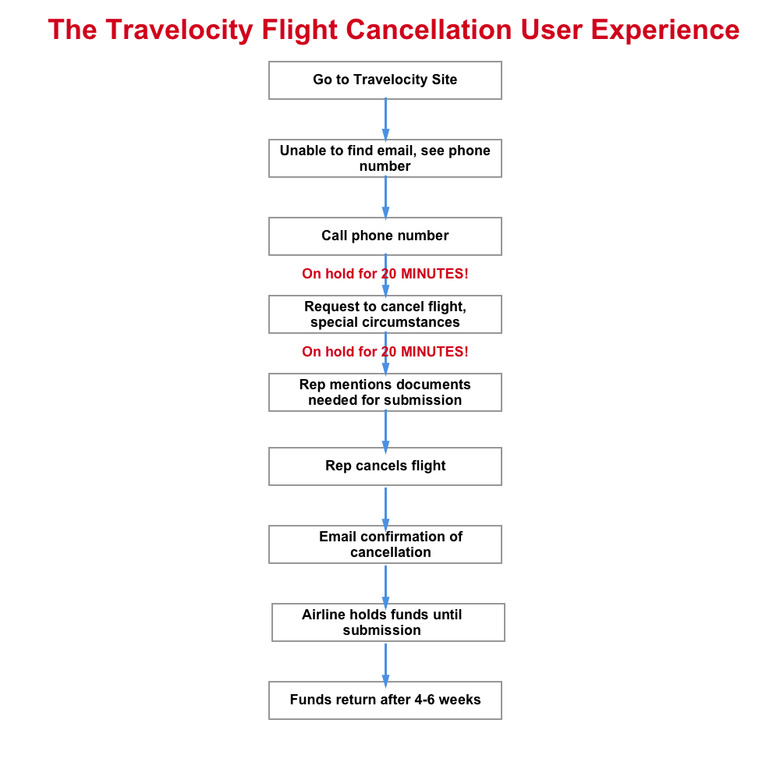
    Last week, I had to cancel a flight on Travelocity. The customer service was awful and here is an example of the userflow: 1) Go to the Travelocity Website. 2) Cannot find email address, only see a phone number. 3) Call the phone number. 4) On hold for 20 minutes. 5) Request to cancel a flight for Special Circumstances (funeral). 6) On hold for 20 more minutes. 7) Representative starts talking about Special Circumstances and emails documents to submit. 8) Cancels flight on Travelocity 9) Airline holds my funds until documents are submitted 10) Representative mentions 4-6 weeks until funds will be refunded. The Three Big User Experience Problems I faced were the time lag, length of process, and lack of empathy. 1) The Time Lag A user should not have to be on hold for 20 minutes for every 1 minute she speaks to a representative. My phone call was 50 minutes, and I was on hold for 20 minutes. 20 minutes was actually speedy because my friend traveling with me had to wait over 40 minutes per time she was put on hold. Representatives should know where to locate information quickly and be able to tell the caller what the caller wants to know quickly. Users may be prevented from receiving important information because of the lag --they may just hang up instead of sitting on the terrible user experience! 2) Long Process It took about an hour from finding the information, getting on the phone, to receiving a cancellation confirmation. For my friend, it took over 2.5 hours to go through the process. This is a huge usability problem. A potential solution to the problem is to include a section/form on the website to complete and have a representative call the user on the user's schedule. If cost is an issue, a bot should be able to direct the user or take the user complaints at the moment and bounce it back to another bot or human who can form a solution. Also, Travelocity requested special documents that it would send to the Airline. The user also has to send the same documents to the Airline before penalty funds can be returned. This is extremely confusing because if the user had booked directly through the Airline, the funds would be returned directly from the Airline. The process can easily take 2 weeks from receipt of documents. Because the length of the Special Circumstances submissions is so long, it lacks accessibility and users will likely forget to submit documents of ignore it. Perhaps this is one of Travelocity's goals! 3) Lack of Empathy The customer service representative did not seem to understand requests for immediate refunds. In my experience, she was unable to break out of her script and "make an exception" or please the user. Even if she was unable to meet the request for an immediate refund, she was unable to provide an explanation besides "company policy". As previously mentioned, I cancelled a flight under Special Circumstances of a funeral. Initially, the representative was uncomfortable with even mentioning that I was cancelling because of a funeral. I had to ask bluntly, "Do I need to PROVE I have a death certificate?" The representative began reading the documents that the user would need to submit. She specified the urgent need for the documents to be submitted within 2 weeks. Not once did the representative mention a condolence or "Sorry for your loss." The experience of speaking to the Travelocity representative was like speaking to a robot: monotone and apathetic. Results? My friend and I re-booked our flight for later December. We both decided to use Expedia instead. After speaking to a monotone robot who couldn't empathize and waiting for 2.5 hours, users get frustrated and turn to competitors. Providing a good user experience in customer service is essential --or you will lose your customers.

    By Amelia Wong Read More