Dave Cox

Engadget Editorial Policies

The unique content on Engadget is a result of skilled collaboration between writers and editors with broad journalistic, academic, and practical expertise.

In pursuit of our mission to provide accurate and ethical coverage, the Engadget editorial team consistently fact-checks and reviews site content to provide readers with an informative, entertaining, and engaging experience. Click here for more information on our editorial process.

Stories By Dave Cox

  • Should the DMCA be revised?

    In June 2016, a group of over 180 musicians started a new battle with websites like YouTube and the government to revise the DMCA. For years the music industry has been fighting with Google's service over copyright issues. But what is the DMCA, and should it be revised? Digital Millennium Copyright Act The Digital Millennium Copyright Act (DMCA) is a copyright law in the United States. It carries out two different treaties of the World Intellectual Property Organization (WIPO). WIPO is a patent office, except for the entire world. The DMCA makes it illegal to share or produce technology, devices, or services meant to go around digital rights management (DRM). DRM controls access to copyrighted content, like books, movies, and music. For example, many ePub files in Google Play books have Adobe DRM. Supporters of DRM say that it stops people from copying protected content. Opponents of DRM say that there is no evidence that it prevents copyright infringement, and instead lets big businesses stifle innovation and competition while hindering legitimate users. Both the Electronic Frontier Foundation and Free Software Foundation say that using DRM is an anti-competitive practice. Safe Harbor The DMCA gives services like YouTube "safe harbor". In general, safe harbor "is a legal provision to reduce or eliminate liability as long as good faith is demonstrated." In relation to the DMCA, safe harbor means that YouTube is not held liable for copyright infringement from its users, as long as the company responds to takedown notices from rights holders. Music labels and publishers claim that this gives YouTube an advantage in negotiation, a power that music companies like Spotify do not have. In March of this year, the Recording Industry Association of America (RIAA) called this a "value grab." Safe harbor laws are relevant for everyone. Companies like LiquidVPN, rely on the safe harbor to create privacy services that don't track what people do online. If safe harbor laws did not exist, these companies would either have to shut down, move to a different country or log everything that users do. As you can imagine, this would be a huge blow to companies that support privacy. However, it seems that safe harbor is not good enough for the music industry anymore. The Petition RIAA manager Irving Azoff has made the reform of DMCA a priority. By "reform" what he really means is forcing services like YouTube to pay more in music royalties and removing the safe harbor liability exemption. This would have significant consequences for many companies, not just YouTube. YouTube lashed back, saying that its Content ID system makes it easy for content owners to identify uploaded music. However, the rightsholders say that it isn't enough, and claim they are losing millions. Whatever the case, the fate of DCMA should not be left in the hands of the music industry. They are notorious for anti-competitive, anti-user stunts. On April 1, 2016, hundreds of artists, along with labels like Universal Music, Sony Music, and Warner Music, signed a petition calling for this reform. In part, the letter states: "DEAR CONGRESS: THE DIGITAL MILLENNIUM COPYRIGHT ACT (DMCA) IS BROKEN AND NO LONGER WORKS FOR CREATORS. As songwriters and artists who are a vital contributing force to the U.S. and to American exports around the world, we are writing to express our concern about the ability of the next generation of creators to earn a living. The existing laws threaten the continued viability of songwriters and recording artists to survive from the creation of music. Aspiring creators shouldn't have to decide between making music and making a living. Please protect them." Black Box In a way, this situation is almost laughable. The music industry itself takes millions from their musicians, yet they are using the artists almost like pawns. The term for this is "black box" royalties, and the industry makes no secret of it. Essentially, money from music held in worldwide escrow accounts is the black box. Many musicians do not even know it exists. Here's how it works: A songwriter earns royalties when one of their songs is played on the radio, television, or streamed/downloaded from the internet. Entities called performance-rights organizations (PROs) calculate and collect this money according to different rules in almost every country. They act as middlemen and receive/disburse the payments. If the songwriter is in a different country, a PRO in that country gets the payments. This PRO then gives the money to the writer's music publisher, who then gives it to the songwriter. But this process is slow and inefficient, and lacks transparency as money passes hands. The black box part comes into play when the flow of royalties passes from different countries. PROs hand out the money after a certain period, and most of it goes to the publishers. So unfortunately, it is entirely legal. The Numbers & the MTV Mistake It can be hard to feel sympathy when the music companies use millionaires like Taylor Swift and Paul McCartney, but it's still a problem. But the music industry isn't going about this the right way. The International Federation of the Phonographic Industry (IFPI) provided some statistics. In 2015, 68 million paid streaming music subscribers made up $2 billion in revenue to record labels. In contrast, $900 million users of ad-funded services generated $634 million. The biggest ad-funded service is YouTube and makes up the bulk of that revenue, but the music industry says this isn't enough. According to The Guardian, much of this battle with YouTube comes from "the MTV mistake", a big example of a bad deal that the music industry made. It created expensive music videos for MTV and used them as a promotion for song and album sales, and not money makers themselves. Later everyone found out that Viacom, MTV's parent company, made a bunch of money because of how popular these videos were, and were not paying royalties. The crux of the issue is that no matter how much the music industry complains over YouTube, they would complain even more if YouTube suddenly went under. There is a mutual relationship here. Record labels are loath to admit that they need YouTube more than YouTube needs them.

    By Dave Cox Read More
  • The Art of Avoiding Identity Theft and Scams At The Olympics

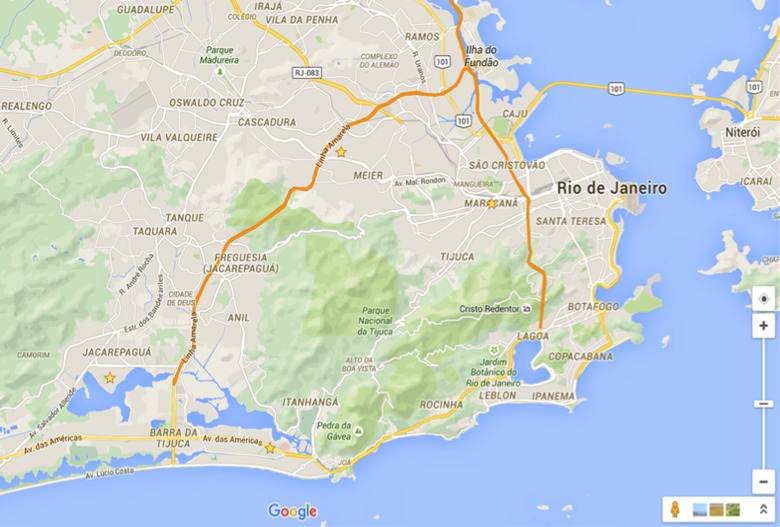
    Although the 2016 Olympics ends tomorrow, it's important to ensure your safety while you're there. The Brazilian government has 85,000 armed soldiers and police to protect the physical safety of visitors, but what about online security? What is identity theft? Wikipedia defines identity theft as "the deliberate use of someone else's identity, usually as a method to gain a financial advantage or obtain credit and other benefits in the other person's name, and perhaps to the other person's disadvantage or loss." Hackers and other malicious parties often use scams and/or social engineering attacks to steal identities. Scams often take the form of phishing, spear phishing, using malware to steal information, etc. A phishing attack is when a person uses email, malicious websites, spam SMS messages and other tools to trick people into giving them personal information. A phisher will usually try to get your bank or credit card information. In other instances, they might try to trick you into revealing your username and password for an online account like Facebook. Norton provides some tips to recognize a phishing attack: Phishers, pretending to be legitimate companies, may use email to request personal information and direct recipients through malicious websites. Phishers tend to use emotional language using scare tactics or urgent requests to entice recipients to respond. The phish sites can look remarkably like legitimate sites because they tend to use the copyrighted images from legitimate sites, like official logos. Requests for confidential information via email or Instant Message tend not to be legitimate. Fraudulent messages are often not personalized and may share similar properties like details in the header and footer. Spear Phishing Spear phishing is a twist on a regular phishing attack. Phishing emails affect millions of people, but spear phishing is a little more personal. If a hacker discovers your name or other personal information, they can make the email seem even more legit. For example, the email says "Dear Bob" instead of "Dear Sir". Maybe the email references a friend of yours or discusses an online purchase you recently made. Since the message sounds like it came from a person, you know, or your friends know it appears to be legit and has a better chance at being opened by the target. These targeted attacks are dangerous. How do they get your information? Hackers can search randomly across Facebook to look for profiles with emails publicly shown. Maybe they attacked a company and stole email addresses - it happens all too frequently. Another example is if they saw a tweet or post by you talking about a recent purchase. Scams at the Olympics Some examples of Olympic-specific scams could be counterfeit merchandise, fake Olympics websites, or lottery scams. Your information is often vulnerable on public Wi-Fi. Kaspersky Lab traveled to Rio to map out and assess the security of Wi-Fi networks that visitors may encounter. They found that nearly a quarter of Wi-Fi networks found in public venues were unsecured. The researchers found more than 4,500 access points in areas around Olympic Games venues. 18% of these networks were open. Data traveling across open networks is not encrypted and can be easily compromised. Kaspersky Lab recommends using a Virtual Private Network (VPN) in Rio. A Fortinet report says that the country saw an 83% increase in malicious URLs, compared to 16% in the rest of the world. Phishing activity found globally spiked 76% between April and June. The US State Department's Overseas Security Advisory Council (OSCAC) said earlier this year that, "Brazil continues to rank as one of the most pervasive cybercrime environments worldwide. Brazilian cybercriminals have grown more brazen, stealing billions of dollars annually despite new legislation and official reports to stop malicious activity online." Even if you did not go to the Olympics, you could still be at risk. The Better Business Bureau noted in 2014 that counterfeit merchandise was rampant after the Sochi Olympics. Searching on eBay found 5,693 items, like a fake "Olympic Torch Sochi 2014) priced at $7,000. Prevention So, how to prevent these crazy scams? First, if you want to buy Olympics merchandise, buy it from the official website. Companies mass produce these items, and they rarely increase in value. Second, on your social media pages, especially Facebook, make sure you lock down your information. Facebook has a Privacy Checkup tool where you can quickly check what information is publicly shown on your profile. When you travel to the Olympics or anywhere else, use a VPN. Services like LiquidVPN have great options to keep your data safe, even on a public Wi-Fi network. Check out the guide on security tools while you are at it. As for phishing/spear phishing, most if not all companies will never ask for your personal information in an email. If you need to update your account information, they will direct you to their website. Make sure that the operating systems and software you use are fully updated. Companies routinely update their products to fix bugs and vulnerabilities. Tools Once you are on the website, first make sure that your browser is using HTTPS. Next, if you think it might be a fake website, take a look around. See if there are any spelling errors, look at the logo to check for mistakes. If you are still unsure, there is a free service called VirusTotal that may help. It is a subsidiary of Google that can scan URLs and uploaded files. If you see a suspicious email from a "friend" or bank, you can call them to verify if the email was from them. Use two-factor authentication for your online accounts wherever possible. Although there have been a couple of rare instances where attackers compromised 2FA accounts, it is still much more secure than an account without it. When you're buying things online, like Amazon, it can be tempting to have the website save your credit card information, so you don't have to enter it each time. However, what if hackers attack the website and steal your information? A service called Privacy can help. You link it to your bank account and create virtual credit/debit cards. It's even possible to use a "burner" card only good for one use or set limits on how much a merchant can charge. Finally, if you think you have already been the victim of identity theft, the government has a website - Identitytheft.gov. It offers specific steps to take: Call the companies where you know fraud occurred. Place a fraud alert and get your credit reports. Report identity theft to the FTC. File a report with your local police department. The police probably can't do very much, but it's still important to file a report and get your name and incident on file. However, the police could also help you get an attorney or advocate, depending on the severity of the situation. The FTC also has free information to help businesses protect customers and meet their legal obligations. How do you secure your personal information when you travel? Let us know in the comments.

    By Dave Cox Read More
  • How To Block Third Party Tracking Cookies In Chrome

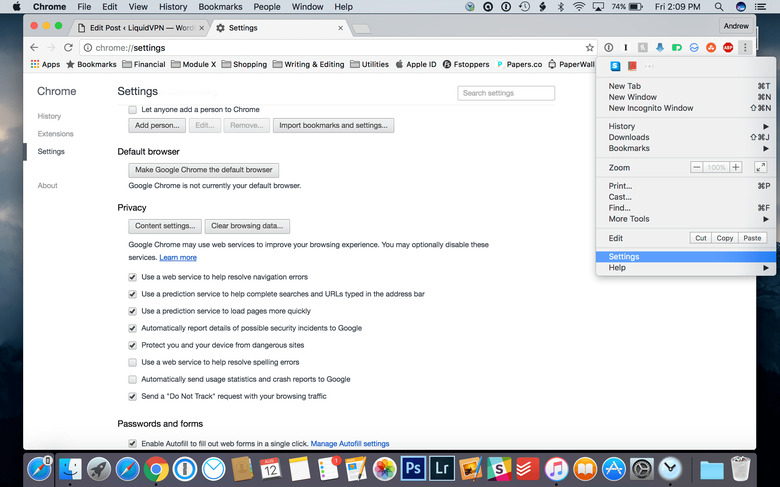
    When you browse the web, websites often store bits of information in your browser called cookies. Although not inherently dangerous, some websites use cookies to track you. Here's how to disable them in Chrome. What Is a Cookie? A cookie is a small piece of data that websites store in your browser. Some functions of cookies include saving stateful information like items in your Amazon cart or remembering passwords for you. Another kind of cookie that serves a meaningful purpose are authentication cookies. Web servers use these to determine if a user logs in or not, and which account they use. Without authentication cookies, a website can't tell if it's safe to display sensitive information or require users to re-authenticate. Websites and browsers encrypt these cookies, but if certain vulnerabilities exist, hackers can access their data. Another type of cookie is tracking cookies. Third-party services like advertising companies insert these into your browser without your knowledge. They use these cookies to track the websites you visit and even what links you click. If a cookie's domain attribute matches the domain shown in your browser's address bar, it's a first-party cookie. If the domain attribute is different from the one in your browser, it's a third party cookie. To put it in different words: websites that you consciously visit store information in your browser, and this is a first-party cookie. Web sites and services you do not visit, like an ad company, store cookies without your knowledge, and this is a third-party cookie. Examples First-Party: You visit www.amazon.com and put two items in your shopping cart. You decide to leave them in your cart to see if the prices change. Amazon stores a cookie in your browser so that you don't have to re-add those items when you visit again. Third-Party: You visit www.example.com. This website has a banner advertisement from ad.trackingcompany.com. It automatically downloads and sets the cookie as belonging to ad.trackingcompany.com. You visit a second website, www.contoso.com. This also has an ad from the same company and downloads another cookie. The company then collects the cookies from your browser. Now they know which websites you visited that contained their ads. Supercookies If regular tracking cookies were not bad enough, there are also supercookies. The name is misleading because a supercookie is not a cookie. Your browser doesn't store the data, so it is not possible to remove them. Rather, it's a piece of information unique to your internet connection. Some ISP's inserts this information into your browser's HTTP header, which is in the network layer. It's not possible to delete supercookies, and ad blockers cannot remove them either. In 2014 Verizon notoriously injected supercookies into the web traffic of its customers to improve its advertising business. The Electronic Frontier Foundation (EFF) gives an example of how a supercookie tracks you: "Suppose an ad network assigned you a cookie with the unique value "cookie1", and Verizon assigned you the X-UIDH header "old_uid". When Verizon changes your X-UIDH header to a new value, say "new_uid", the ad network can connect "new_uid" and "old_uid" to the same cookie value "cookie1" and see that all three values represent the same person. Similarly, if you subsequently clear cookies, the ad network will assign a new cookie value "cookie2". Since your X-UIDH value is the same (new_uid) before and after clearing cookies, the ad network can connect "cookie1" and "cookie2" to the same X-UIDH value "new_uid". The back-and-forth bootstrapping of identity makes it impossible to truly clear your tracking history while the X-UIDH header is enabled." Blocking Cookies Thankfully, Chrome makes it easy to block cookies. Some cookies, like first-party cookies, aren't bad, and you may actually need to enable them in some cases. If you want an automatic solution there are privacy extensions available for your browser. Step 1: Open Chrome and navigate to the menu button in the upper right corner. Go to Settings. Step 2: Now you're in Chrome settings. Scroll all the way down until you see a button that says Show Advanced Settings. Step 3: Under the Privacy section, click the button that says Content Settings. Step 4: Once you click on Content Settings, a window pops up that gives you various blocking options. Clicking on All cookies and site data lets you see all the cookies in your browser. You can clear the cookies in one fell swoop, or clear out only the third-party cookies. Sometimes it's hard to differentiate between first-party and third-party cookies, so I just delete them all. I also enable the setting to keep local data until I quit the browser.

    By Dave Cox Read More