Ryan O'Donnell

Engadget Editorial Policies

The unique content on Engadget is a result of skilled collaboration between writers and editors with broad journalistic, academic, and practical expertise.

In pursuit of our mission to provide accurate and ethical coverage, the Engadget editorial team consistently fact-checks and reviews site content to provide readers with an informative, entertaining, and engaging experience. Click here for more information on our editorial process.

Stories By Ryan O'Donnell

  • Buy or Sell: Windows 10

    On July 29th 2015, Microsoft released Windows 10 to the world. It came with brand new features, such as a redesigned Start menu, Continuum (for detachables that support it), Cortana, a new Universal Windows application platform and a lot more features which are beneficial to both the average consumer and enterprise users. However, as with many other releases of any operating system. Windows 10 didn't go swiftly with many reviewers. The upgrade process was one which people called "adware" when Microsoft started notifying Windows 7 and WIndows 8.1 users about the free upgrade to Windows 10. This consisted of a popup box in the lower right part of the screen, saying "Windows 10 is here". People wanted to know how to stop the notifications, and there really wasn't a way to remove the notification, except editing the internal system registry. Personally for me, I like Windows 10 as a whole. I've been a Windows user almost all of my life, since the days of Windows 98. I recently even upgraded my MacBook Pro (Late 2011) from its Windows 7 Boot Camp partition to a Windows 10 one (even though Apple say it's unsupported!) and it works just fine. Let's go through my top three reasons why I would recommend Windows 10. 1. Cortana If you're not aware of Cortana or if you haven't used a Windows Phone device before, Cortana is a personal assistant which can help you do web searches, tell jokes and much more, such as personal reminders such as "the next time I talk to John, remind me to tell him about the engagement". I don't use Cortana much, but when it's there, I just press the Windows key + C and ask my question, sometimes I even get it to sing a song, tell me a joke or just that I need to send a text message. The best part of Cortana though it the Microsoft account linkup. As it is powered by your account, if you have a Windows 10 Mobile device, you can use your PC/tablet to send text messages from your PC without having to be near your phone, and you also get missed call notifications, pretty sweet, eh? 2. Speed and Performance Windows 10 comes with a whole load of improvements regarding speed and performance. Like I stated earlier, I installed a copy of Windows 10 Home on my Late 2011 MacBook Pro with no difficulty, with 4GB RAM and Intel Core i5 Dual Core, it runs like clockwork, it's superbly fast. Say if you are a gamer, and you're considering the upgrade to Windows 10, I would definitely say go for it. I play many games on Steam, such as Train Simulator 2016 and Grand Theft Auto V and they all work amazingly well, so gamers will not have issues running their games as far as I know. 3. Low cost machines run it well You see that old computer, sitting in the corner of your room that you never use anymore? It'll probably run Windows 10 just fine! It's not just the old compatibility of machines that work with Windows 10, it's also brand new, low cost machines. You can pick up a brand new WIndows 10 tablet, such as the HP Stream 7 for only £79.99 or you could pick up a brand new Windows 10 laptop for under £199, most of which include Intel Atom or Intel Celeron processors with 32GB or 64GB eMMC storage. The final verdict So, Windows 10 has been out in the wild for us almost a year on, so should you take advantage of the free upgrade? Yes, I certainly do. Just a quick reminder though, you only have until July 29th 2016 to claim your free upgrade!

    By Ryan O'Donnell Read More
  • Wileyfox Swift review: the flagship budget smartphone

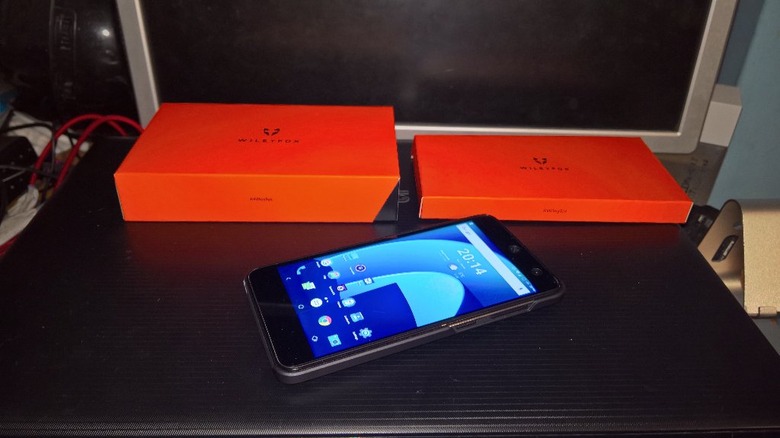
    Late last year, a brand new British brand called Wileyfox announced and released the Wileyfox Swift, a £130 budget smartphone running Cyanogen OS 12.1, which is based on Android 5.1.1 Lollipop. I ordered the Swift from Amazon UK (you can get it here) for approximately £130 including free delivery by Amazon Logistics. So, what exactly do you get for £130? You get a 5" inch IPS display, 2GB RAM, quad core Snapdragon 410 processor and Android 5.1.1 (Cyanogen 12) phone. Now, let's start talking about the different aspects of the phone. Design The design of the phone has a sandstone back, which is reminiscent of the OnePlus One device, and it is definitely nice to hold and touch and you can definitely grip it. It has a nice design, with a orange tint on the outer ring of the camera along with an embedded 'fox' animal emblem on the back centre of the device, which is a nice addition to the orange 'Wileyfox' text. The actual look of the phone as a whole isn't original though, with the phone following Qualcomm Reference Design, hence looking exactly like this General Mobile device and this Cherry Mobile Android One device. Display The display on the Wileyfox Swift is, hands down, one of the best displays I have seen in a while. It has a 5" inch, fully laminated IPS display along with vibrant colours and a very responsive touch screen. It's not one of those displays where you can use it with gloves, although I haven't tried this out myself. The Wileyfox Swift also features on screen buttons rather than physical buttons on the bottom of the device. This can allow for quick swipe up from the "Home" circle to access Google Now (personally, I have mine set to use Cortana!). It is also worth mentioning that you can change the display temperature to suit whatever fancies your taste. It is also a very bright display and is easily viewable when you are outside in direct sunlight. At the time of writing this review, Wileyfox offer a one year screen replacement program which costs £9.99! OS & Performance Out of the box, the Wileyfox Swift comes with Cyanogen OS 12.1, which is based on Android 5.1.1 "Lollipop". As the software/firmware for this phone aligns with the Cyanogen release schedule, we can expect to see Cyanogen 13.0 on this device, which should be based on Android 6.1 "Marshmallow". Running an AnTuTu Benchmark on this phone provides it with a score of 21713, and I don't know much about these types of benchmark scores, but from what I can tell, this seems to be pretty damn good. The Wileyfox Swift really does live up to its name, as the phone swiftly surges through anything you can throw at it, with the exception of heavy 3D gaming. Of course, for £130, you're not getting a highly powerful phone, but games can easily be played, mostly without lag on this device. I tried playing Grand Theft Auto: San Andreas with the graphics on the lowest and the game seemed to cope just fine, maybe with a few, but very short lags. Camera Image taken during visit to a Microsoft event in London, UK (Credit: Ryan O"Donnell) The Wileyfox Swift sports the Samsung ISOCELL 13MP sensor, allowing to take clear, crisp images. Happily, results from the Swift don't disappoint as you may be able to point out from the image above. Colours are well produced, detail is well resolved too with the centre of most images having decent sharpness. The focus works extremely well, focussing on the one object and then blurring the background, which is what I like in close up photos, in my own personal opinion. Connectivity The Wileyfox Swift is a Dual SIM device, which is perfect for the business person who likes to have two numbers, but one device. Both slots support 4G LTE data connections with a Micro SIM, which is definitely welcoming. There is also a Micro SD card slot for expansion up to 32GB, which is considerbly less than my old phone, the Microsoft Lumia 535, which could expand up to 128GB, but it's still a reasonable size for this price point. I have been using two SIM cards in this device, one on the T-Mobile network and one using EE's 4G network and I'm still over the moon at how I can use two SIMs at the same time, one for unlimited data and one for calls and texts. Battery life The battery life on this device certainly impresses me. Whilst I wait for the much anticipated Marshmallow release of Android for its "Doze" feature, I've been trying this Doze app (free from Google Play) which I highly recommend to keep on top of my battery whilst the phone is in sleep mode. The app promises for a better battery life whilst the phone is sleeping, and it certainly does that. With the Wileyfox Swift, I can get an average of six hours screen on time with medium brightness, WiFi connected with mobile data off and doing several things like web browsing, the occasional game and messaging on Facebook. Overall verdict For the price range the Wileyfox Swift sits in, I would definitely recommend this phone to everyone who is willing to come into Android for the first time. You can buy the phone direct from Wileyfox at www.wileyfox.com or go on Amazon UK and purchase the device over there.

    By Ryan O'Donnell Read More