

How to add Bluetooth to a TV that doesn't have it
Look, we're all tired of hearing your shows echo through the house.
We may receive a commission on purchases made from links.
With the right audio upgrades and a streaming device that unlocks the world of on-demand content, most televisions can last a very long time. Of course, there are certain upgrades that are harder to ignore — wireless connectivity being one of them. Bluetooth has become mainstream in most televisions now, with many infrared remote controls relying on the technology too. If you've purchased your TV in the past decade, there's a good chance it comes with Bluetooth support. Head to the settings menu and look for connectivity options that mention Bluetooth, wireless devices or accessories.
If you do own a television without support for Bluetooth, you're not necessarily out of luck. Pretty much all popular streaming devices, like the Apple TV, Roku or Fire TV Stick, feature Bluetooth as a standard feature. If you own a pair of wireless headphones or a keyboard, you can connect them directly to the streaming device. At $30, the Roku Streaming Stick HD is one of the most affordable ways to not just add Bluetooth support to your TV but also breathe some new life into it with a modern OS.
The only big downside of going the streaming device route is that your Bluetooth accessories will only work when your TV is set to that particular input source. If you switch back to any other device that's also connected to your TV, the sound will once again play from the TV's speakers. If you're looking for a more universal solution, picking up a dedicated Bluetooth transmitter is the better option.
How does a Bluetooth transmitter work?
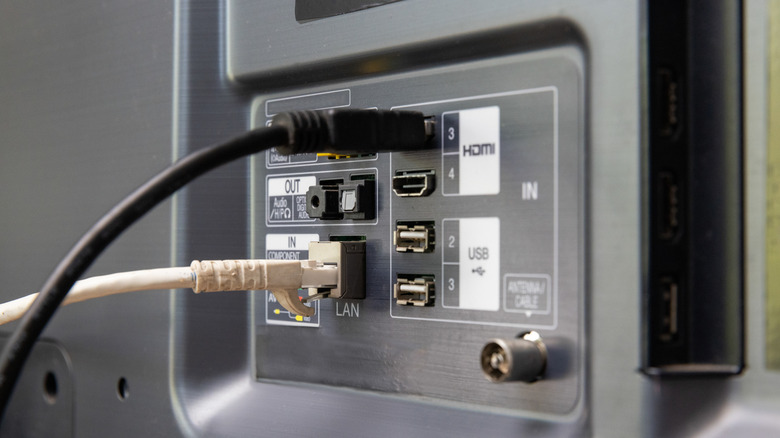
Bluetooth transmitters do exactly what you'd expect — they carry over the audio from a device that doesn't have native Bluetooth support to a pair of wireless headphones or earbuds. The setup process is relatively straightforward. You plug the Bluetooth transmitter into your TV's audio output, put both the transmitter and your headphones into pairing mode, and wait for them to connect. Your TV then feeds its audio signal into the transmitter, which converts it into a Bluetooth signal that your headphones receive.
Depending on your TV model, you can find Bluetooth transmitters that accept audio through the optical port, a 3.5mm headphone jack or RCA outputs. You'll also need to plug the adapter into a power source — an available USB port on your TV usually does the job. You can find these adapters at various price points online, with decent options at around $25.
Look for transmitters that come with newer codecs like aptX Low Latency, which can help reduce the delay between what's happening on screen and what you hear through your headphones.