

How to use GPT-6 Astra when it rolls out to you
Here's where to find GPT-6 Astra and what to know before its usage limits catch you off guard.
OpenAI began rolling out GPT-6 Astra on September 3, but access is not as easy as opening ChatGPT and searching for a button that says "Astra." In regular ChatGPT, the model is known as GPT-6 Pro and is rolling out for the $100 and $200 Pro plans, Business, and Enterprise. For now, Free and Go users are excluded, with Plus subscribers getting Astra via ChatGPT Work and Codex instead (not regular Chat) as the rollout reaches their accounts.
Availability may vary between Chat, Work and Codex. OpenAI says the rollout will be gradual, so being on an eligible plan doesn't mean Astra will be waiting for you today. OpenAI hasn't specified when eligible accounts will receive Astra.
How to use GPT-6 Astra in ChatGPT
If you have an eligible Pro, Business or Enterprise account, open the model picker in a regular ChatGPT conversation and look under Pro for GPT-6 Pro. That's the one powered by GPT-6 Astra, so don't get too caught up in the menu looking for its flashier name. Enterprise users have another possible obstacle: access also depends on workspace model-access permissions.
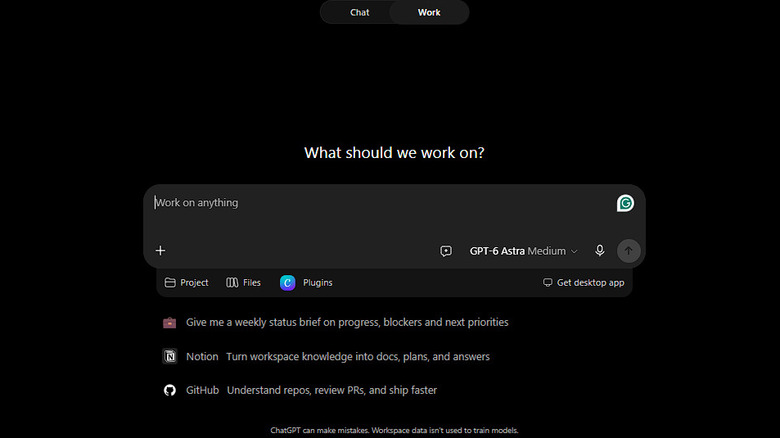
If you're on Plus, open Work on the web or mobile app and select Astra from the available models once it rolls out to your account. In the desktop app, select ChatGPT, switch from Chat to Work and choose Astra there. Codex users can also choose Astra, but OpenAI says the Codex CLI requires version 0.153.0 or newer.
Still nothing? Even if the desktop app has recently updated itself, OpenAI suggests manually checking for updates by going to Menu > Check for Updates. Work is rolling out separately, so Astra might be available on one platform before another.
If you are using Work with local files or desktop apps, there is also a privacy aspect. Even when Work runs locally, messages and task context may still be stored in the cloud.
Watch how quickly Astra uses your allowance
When Astra does arrive, there's another factor to keep an eye on: your usage allowance.
According to OpenAI, Astra can use up your allowance more quickly than GPT-5.6 Sol, depending on the complexity of the task, the amount of context, the reasoning required and other usage settings. So a big coding assignment that requires more reasoning can use more of your allowance than a quick question.
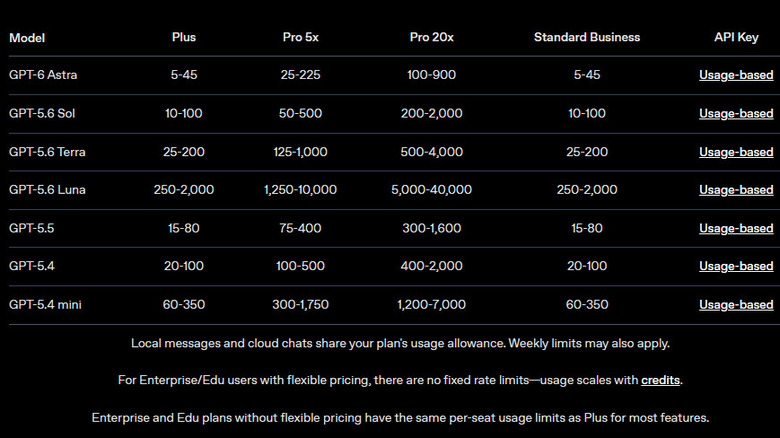
OpenAI estimates that Plus users can send approximately five to 45 local Astra messages per five-hour period. The $100 Pro plan is estimated at 25 to 225 messages, while the $200 tier gets 100 to 900. You can check your current limits and reset times in ChatGPT's usage dashboard.
Chat has separate limits. On the $100 Pro plan, GPT-6 Pro shares a 50-message weekly allowance with GPT-5.6 Sol Pro, while the $200 plan allows 200 GPT-6 Pro messages per week.
If your allowance is going down quicker than you'd like, reserve Astra for the tasks that require it. OpenAI advises keeping prompts focused, including only relevant files and defining the output format and length. Telling Astra what reasonable assumptions it can make may also reduce unnecessary back-and-forth.
GPT-6 Astra is available for developers via the API. The standard price is $10 per million input tokens and $50 per million output tokens. Requests that rack up more than 272,000 input tokens in total are charged at twice the input and cache rates, and output rates at 1.5x.