

Framework Laptop 12 (2026 upgrade) review: Intel's Core Series 3 fixes a key flaw
The upgraded silicon solves a major performance hurdle.
- Outstanding performance
- Modular and repairable
- Chunky plastic design is robust and charming
- RAMpocalypse premium still hurts
- 8GB RAM on the base model is painful
When I learned Framework was bringing Intel's Core Series 3 chips to the Laptop 12, I was excited. I'm a fan of the kid-friendly edition of this modular, repairable machine but it had one major technical flaw. Like almost all of Framework's other laptops, it couldn't keep its chip cool enough to wring good performance out of its silicon. But Intel's new Series 3 chips are so fast and so power efficient that it may eliminate those thermal issues entirely. So, with a low power chip in one hand, and an already great (if pricey) laptop in the other, surely this is a match made in heaven.
What's Changed
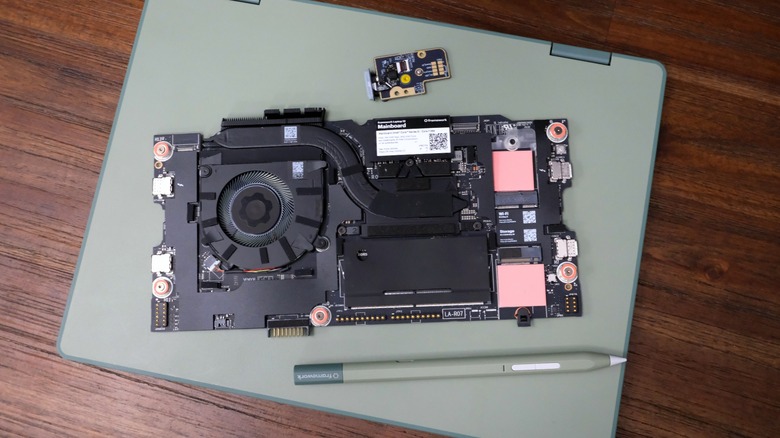
Framework's policy of constantly iterating on components means it's not just the mainboard that's changed here. The 2026 model ships with a fingerprint scanner and backlit keyboard, correcting the omissions from the first-generation version. Naturally, all three are backwards-compatible with the earlier version, which can be upgraded for feature parity with its newer self. As usual, my focus here is just on the upgrade process and performance of those new components. If you'd like to know more, please read last year's full review which covers everything else.
The one other difference is Framework developed its own MPP / USI 2.0-compatible stylus. Much like the third party models it used to this point, the Framework Stylus charges over USB-C, has an 80mAh battery and weighs 15 grams. It supports 4,096 levels of pressure sensitivity and has two programmable buttons. Oh, and you can buy it in the same color as your laptop, so it's all matchy-matchy.
Hardware
The first-generation Laptop 12 came with the choice of a 13th generation Intel Core i3 or Core i5 CPU. That kind of fit the general ethos of a lower-cost, lower-power machine aimed at the education, kid and the second-computer markets. Given Intel's 18A/Panther Lake/Core Series 3 chips are so much brawnier, and yet so much more power efficient, it's no surprise you can now equip this machine with a Core 7-series CPU. This time, you have the pick of the Core 3 304, Core 5 320 and a Core 7 350 — the latter of which is what I'm testing.
Naturally, the new silicon comes with some other benefits, such as the maximum RAM increasing to 64GB and the rear expansion card slots now supporting Thunderbolt 4. It's now possible to hook up an eGPU or a pair of 4K monitors to this machine, because Framework can't just cater to the kid market. After all, a big number of Laptop 12 buyers were developers and Linux users who fell in love with the 12, according to the company. Not to mention the fact that the 12 was already too pricey to be solely a children's machine, and the RAMpocalypse has not helped matters one bit.
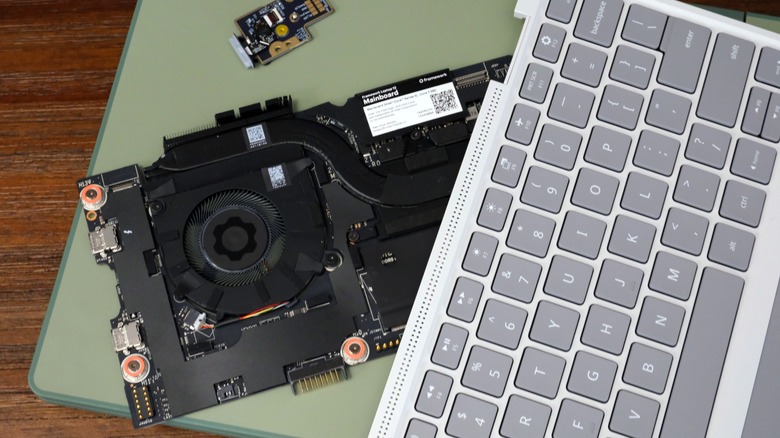
I've got less to say about the new input cover, which is just the old one with backlit keys, and that's a good thing. Framework CEO Nirav Patel knows better than to mess with a good keyboard, and the 12 already had a rock solid one. As for the fingerprint reader, it slots into the side of the chassis where the old power button lived, and retains its wake light. One of Framework's biggest strengths has been to incorporate new technology like this without it causing any disruption to its machines.
Upgrading
As I said last year, Framework clearly learned a lot from the upgrade processes for the Laptops 13 and 16. The company made it far easier to tinker with the 12, eliminating ribbon cables and screws in favor of pogo pins and clips. Even if you didn't have access to the company's step-by-step, iFixit-style guides, you could probably work out how to repair this thing from sight. The one major change, if you can call it that, is that the RAM DIMM now faces up, rather than down, as found on the older board.
Swapping out the mainboard requires you to disassemble most of the machine, but don't feel daunted. Taking it all apart and putting it back together took me 13 minutes and 42 seconds, hardly a crimp in your day. Sure, I've done this enough times that it's muscle memory but it's basically a fancy Lego set with screws (or, you know, Meccano). Compare that time to the 32 minutes it took for me to install all the new drivers and get Windows working.
One thing to note: If you don't have the foresight to download the updated Wi-Fi drivers before your install, you'll have an issue. You can either be prepared, use another machine or pick up one of Framework's ethernet adapters. I actually think the latter option is an essential purchase anyway, given the ease of throwing one into the chassis for big downloads and installations. And it'll save your bacon on those days when the Wi-Fi drivers elude you.
In-use
Last year, the Framework 12 was powerful enough to get plenty of routine stuff done, and that hasn't changed this time out. If all you want to do is write a term paper, watch YouTube or whatever else the youth do these days, it was fine. But the constrained thermals meant that as soon as it was asked to do anything even remotely strenuous, it started wheezing.
It had a surprisingly low performance ceiling, too, where it struggled to play Fortnite, surely table stakes for a computer aimed at kids. Thankfully, the power efficient, cool and muscular grunt of the Core Series 3 has taken a sledgehammer to that ceiling. This is not the same underpowered machine that went on sale for too much money over a year ago.
Fortnite hums along on high-res graphics, as does Hardspace: Shipbreaker, hardly a low-power title despite its age. The acid test, however, was Cyberpunk: 2077, which I'm delighted to say it was able to run perfectly well. Of course, it was using the lowest graphics settings available, but there wasn't a single skipped frame or stutter. I'm not a hard-nosed gaming aesthete, so I found it eminently playable, and if this was the only machine I had, I'd be happy with the performance.
Sadly, while the performance issues are solved, the usability ones aren't — at least not for heavy loads. While I've had this machine on my lap for much of testing and writing this review, I wouldn't dare to have it there while gaming. Putting this on a table to test Cyberpunk 2077, it took less than ten minutes before the underside of the chassis was roasting.
As for battery life, I was able to wring five or so hours from a full charge while just writing and listening to Spotify. Do anything more strenuous, like gaming, and you'll find that figure starts to fall quite sharply, to the point where I'd need to plug in at the three-hour mark.
Price and the competition
For years, the PC industry has been content dumping out leftover crap for the education and budget markets. It amuses me to think that both Framework and Apple both looked at the low end of the market and became outraged as to what they saw. The Framework Laptop 12 was one approach to tackling the issue, producing a sturdy, repairable and upgradeable machine. The MacBook Neo was the other, and while it was neither sturdy, repairable or upgradeable, it matched the 12 in the fact it was made by people who cared. Two companies, with a focus on real engineering, both trying to tackle the issue of access at the very bottom of the market.
Both, of course, were also blighted by the financial crunch caused by the AI bubble over the last few years. The Framework 12 was clearly a few hundred dollars pricier than its makers intended and the MacBook Neo contended with a price bump shortly after its debut. This is an industry wide malaise — look at the grief Valve's endured with its hardware pricing this year — and one that nudges both machines out of the markets they were conceived for.
The lowest-spec pre-built Framework 12, for instance, with a Core 3 304, 8GB RAM, 512GB SSD and four USB-C Expansion Cards costs $799. Boost that to a Core 5 320, 16GB RAM, 512GB SSD and Windows 11 Home, and that figure leaps to $1,199. You can't actually get the same spec that I'm testing — but if you want the Core 7 350, 32GB RAM, 512GB SSD and Windows 11 Pro, you'll be handing over $1,549. It's worth noting you can shave $100 from the price of a Framework machine if you opt for Fedora Linux instead of Windows. And I'm actually curious if, given the age we live in, there's a cohort of people who are seriously considering making the switch to escape Windows.
Over on the other side of the fence, the base MacBook Neo costs $699, but for that you get a far weaker machine. macOS has plenty of benefits in terms of RAM and power efficiency, but it's not going to be able to tackle the more muscular jobs, especially not with an A18 Pro with just 8GB RAM and 256GB storage. And it can't be upgraded, leaving you at Apple's "mercy" if anything breaks. It's one of the best low-end machines on the market, but comes with its own suite of caveats.
Wrap-up
It's increasingly hard to recommend any laptop from any manufacturer given the current pricing woes. The Framework Laptop 12 remains as charming as it was when it launched, but the higher prices really do bite. Thankfully, the performance inherent in Intel's Core Series 3 chips at least remedies the machine's major technical flaw. As long as you don't want to use it on your lap, you can do plenty that would otherwise be the province of beefier, pricier machines. That you can even run AAA games (at low power) shows that the Framework 12 means business. That's a lot of capability to come from a toy computer.
8GB RAM isn't going to do brilliantly with Windows, but I suspect that the $799 base model is going to sell well because it's one of the better deals available right now. Buy one now and hope that 16GB DIMMs get cheaper in the near future, which is when the real power of this machine will make itself known to you. Or, you know, run Linux on it and see if the way it handles RAM allocation makes it tolerable enough to live with having to micromanage it.