Amy T.

Engadget Editorial Policies

The unique content on Engadget is a result of skilled collaboration between writers and editors with broad journalistic, academic, and practical expertise.

In pursuit of our mission to provide accurate and ethical coverage, the Engadget editorial team consistently fact-checks and reviews site content to provide readers with an informative, entertaining, and engaging experience. Click here for more information on our editorial process.

Stories By Amy T.

  • Top 10 Popular Tech YouTube Channels

    I love to keep myself updated with all the new Smartphone, tablets, wearable's and really all kinds of gadgets so I am always in the best position to get the real reviews and news about the latest happenings in the technology world. These days, unlimited gadgets are in the market and it is great to get all the details and information about a particular device or gadget you are going to buy so you can check if it has all the features you are looking for. If you are a tech guy then you should subscribe to these YouTube Tech Channels now to make yourself aware about all new technologies. MKBHD (Marques Brownlee) – My first choice is MKBHD youtube channel, run by Marques. He is a 21 years old tech guy who is renowned for his reviews and the quality of his videos are excellent. His camera work and eminence is really very professional that you can't leave a single video without learning something new. **If you look at his reviews, you'll find they all have massive YouTube Views. ** Austin Evans – If you are looking for content related to gaming pc builds than you must go to Austin Evans YouTube tech channel. Anyone can find a lot of information relating to budget gaming pc builds or high end builds. You can also find interesting content about Smartphone and other cool stuff. Unbox Therapy – As its name suggest that you can find here everything related to unboxing (or unpacking) of consumer electronics like phones, laptops, consoles and more. Basically these videos show how's the first impression of the product will be as you open the packaging. This channel got more popularity after they uploaded a video about bending iPhone 6 plus. You can also check reviews and comparisons of latest phones and gadgets here with best quality camera work and latest information. This channel is run by Lewis Hilsenteger. The Verge – It is not only a high quality tech YouTube channel but also they have a renowned tech related website. You can find everything related to technology but also provide the latest science, art and culture news. You can find information about every single gadget from hoverboards and smartphones, to games and virtual reality. Google Tech Talks – As we all know google is most popular search engine but now they have launched their tech youtube channel GOOGLE TECH TALKS that provides each and every bit of tech world updates.You can find vast variety of content here ,with individuals lecturing and groups discussing all manner of diverse tech-related subjects. PocketNow – If you are confused as to which of the latest smartphone you want then you must visit pocketnow. This YouTube channel provides all latest update about each and every phone lunched in market till date from Xperia Z2 to One Plus One and the rest. You can not only find reviews but also can read comparison between latest phones. TechSmartt – It is one of the best tech youtube channels in sense of best camera quality as well as for content also. They upload content and new videos very often about drop tests, scratch tests, top 25's and also some device reviews. TechnoBuffalo - This is one more good option to reach a YouTube tech channel with good camera work and quality content. This channel also supplies content on a regular basis and is very motivating to look at. My first visit on this channel was when I was in dilemma to pick a new phone and confused between SAMSUNG note 5 and Iphone 6 Android Authority - If you want to know everything about Google's mobile operating system, these guys are the..Well, authority. Reviews, comparisons, rumor rants, giveaways, apps any many more can be found here. PCWizKid - It is only for the truly geeky. There is no tech news or views on the newest iPhone here. Instead this is a YouTube channel dedicated to getting under the hood of your machine, with reviews of individual components, as well as tips, tweaks, and tutorials for those who know their computers. This channel has 67,000 subscribers and over 27 million video views.

    By Amy T. Read More
  • Simple Steps To Solve Privacy Error Message In Chrome

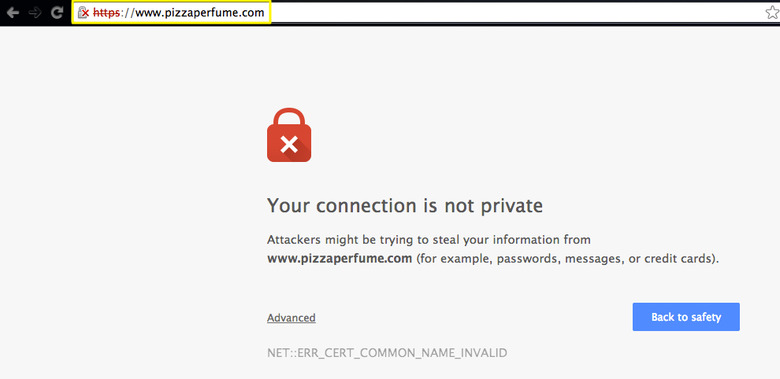
    It's really frustrating to have "Your Connection is not private. Attackers might be trying to steal your information...."appearing on screen as you are in a hurry to log in to an important website. With cyber crime and internet fraud on a menacing rise today, such messages are really scary and makes you doubt the safety of your privacy online. No wonder, as soon as you find such message popping up, you will try to fix the issue and the post below offers simple steps to solve the problem. Why such a message? Now, you must be wondering why such a message appears. Well, it's all because of SSL error. The SSL or "secure sockets layer", generally, is deployed by sites to keep information (entered by visitors like you) secure 7 private. When you get something like "SSL error Net::ERR_CERT_DATE_INVALID" on Chrome, it signifies your computer or internet connection is limiting Chrome from actually loadinf the web pages privately & securely. Why such errors? There can be different reasons behind SSL errors- A recognized 3rd party has not issued the certificate Certiicate has not ben updated Insecure connection between browser & website Different methods to fix the issue Check date & time Mostly, inaccurate date & time on your computer could be the primary bug behind such issues. So, if you detect any such inaccuracy with your computer, simply, update your computer's clock & correct date & time. Check Antivirus software If the date & time are perfect yet you're still having the error message, it's time to check your antivirus software. At times, such software programs can actually block a site's security certificate which pops up such privacy error statements on the web browsers. Here are the steps to follow- If you are using Avast Antivirus, just turn off the HTTPS scan in the software. Click on Settings, followed by Active Protection to Web Shield to Customize. Then you will uncheck "Enable HTTPS scanning". If you have got Bitdefender antivirus program in your computer, turn off the SSL scan. Open Bitdefender's main interface, click on Settings, followed by Privacy Control to Antiphishing tab and finally turn off Scan SSL. Clean up Chrome Browser If none of these processes are working, then maybe you need a Chrome Browser clean up. You have to delete cache, history & other forms of junk browser data. Click on Settings, followed by Show advanced settings and Clear Browsing data (from Privacy options). If the above process does not help then one would need to reset the browser settings into default settings. Click on Chrome menu, followed by Settings, Show advanced settings, Reset settings and finally Reset. Check & proceed to your site When you are confirmed that the website that you have to check-in is completely secured, you can proceed to that website. It's because, when Chrome assures that security certificate belongs to same domain that you are trying to login- then you need not bother about when that privacy error appears. Now, to proceed, you will- Click on "Advanced" link Then, click on "Proceed to <website link> (unsafe)". Prevent the warning Won't it be great if you can actually prevent the frustrating warning? Certainly yes. You can actually prevent that warning for some specific period of time and here is how- Enter "chrome://flags" on address & press on Enter. Look down and you will see something like "Remember decisions to proceed through SSL errors for a specified length of time". Then, go to drop-down menu & select your desired setting as per your wish. Next time as you get the error message, go to Advanced, followed by "Proceed to <website link> (unsafe)". N.B. However, this method would only work when you can be sure that the sites you are trying to check-in is completely "Secured" & there won't be any internet connection issue between the website & the browser. So, you see, it's actually really easy to solve the privacy error message problem. Next time, you encounter the same, you obviously know what to do. All the best.

    By Amy T. Read More
  • The Different Types That Define Cloud Hosting

    When it comes to premium hosting services, there are mainly two types running in the market today. One is dedicated hosting services which is excellent for big businesses facing huge volumes of traffic everyday and in need of premier security- which cannot be assured by shared servers. However, though unlimited dedicated hosting power assures quality web hosting yet it's pricey. Thus, the tech experts often advise for cloud hosting service which seems to be the order of the day now with the promise of excellent scalability and reliability at a rate cheaper than dedicated hosting. In simple words, cloud hosting refers to hosting service for websites on the virtual servers, with computing resources sourced from interconnected physical servers. This way, your website gets the power from multiple servers working in a cluster or "cloud" and each of the servers carry out specific tasks. The great bit is that in case any of the servers face an issue, there are other servers to back up and eliminate downtime glitches for your website. Different types of cloud hosting services- Public cloud hosting When it comes to most popular & cheapest cloud hosting solutions, you cannot look past public cloud services. In this case, you have a magnum cloud with unlimited resources & that cloud is shared with many web projects- and hence the name "public". It's somewhat similar to shared hosting plans where the cloud computing infrastructure would be shared between several organizations. Such hosting plans would be good for small business website with limited traffic. Private cloud hosting As the name suggests, with private cloud hosting plans, you will have full access to the entire cloud. Thus, you will several servers working for your website and your customers only, It promises exceptional security & very stable performance. Besides, private cloud hosting services also assures better flexibility and you have the facility to negotiate some special adjustments with your plan. It's quite natural that private cloud services would be more expensive compared to other options. Hybrid cloud hosting Hybrid cloud hosting services refers to a balanced blend of both public and private cloud hosting services. These hosting plans also include the best of dedicated servers. Together, these 3 technologies will assure you the great pay-as-you-go scalability, improved security & definitely ultra-fast performance. Managed cloud hosting If you have no time or lack the technical ability to manage your servers on your own, the managed cloud hosting services would be the ideal plan for you. In this case, your plan comes with not just the servers yet also a whole team of tech specialists – like systems administrator, cloud specialist, support engineer and database admin- to help you with the server management. This way, you can dedicate all your time into your major business operations and marketing plans without worrying about the servers. Community cloud hosting As the name suggests, community cloud hosting plan refers to a service where the whole cloud computing infrastructure is shared in between several organizations of same community. Say for example, all the government organizations of one State can go for community cloud hosting services for easy data management on citizens of that particular State. All the types mentioned above refer to the types of cloud hosting services based on location of the cloud. There are 3 more models when it comes to cloud computing based on services- IaaS (Infrastructure as a Service) Here you have a 3rd party provider hosting software, hardware, servers, storage as well as other needed infrastructure constituents on part of the users. These IaaS providers would even host the users' applications & tackle tasks like system maintenance or backup & resiliency planning. SaaS (Software as a service) Here you have a 3rd party provider hosting applications & making them available for the customers over internet. This way, the user organizations are relieved from the need to install & run the applications on the companies' own computers or data centers. You are saved from the expenses of the hardware acquisition, its maintenance, software licensing as well as installation & support. PaaS (Platform as a Service) The PaaS providers offer software and hardware tools necessary for the application development of a company. The users here won't have to install any in-house software or hardware as the PaaS provider only will do the hosting job for him, in his own infrastructure.

    By Amy T. Read More