Jesse Casman

Engadget Editorial Policies

The unique content on Engadget is a result of skilled collaboration between writers and editors with broad journalistic, academic, and practical expertise.

In pursuit of our mission to provide accurate and ethical coverage, the Engadget editorial team consistently fact-checks and reviews site content to provide readers with an informative, entertaining, and engaging experience. Click here for more information on our editorial process.

Stories By Jesse Casman

  • How Playstation VR has Changed

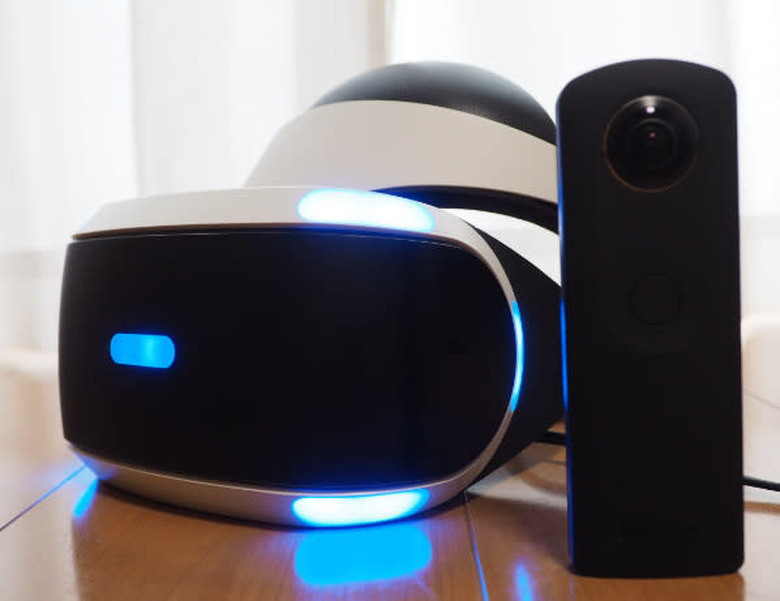
    TL;DR The new Playstation Media Player 2.51, just released on December 6, 2016, allows you to switch data on the fly and view RICOH THETA 360 images and videos easily within the Playstation VR goggles. The ease of use uploading your own 360 content is fantastic, and viewing them in Playstation VR goggles is a giant leap forward. Intro to the RICOH THETA Unofficial Guide I run the RICOH THETA Unofficial Guide, a free resource for RICOH THETA developers and power users that focuses on the camera's open API and making projects and products that are fun and innovative. It's a community-driven site that's been around for almost a year. The community covers topics like the API Guide, the Media Guide, Live Streaming and tons more. We covered the recent Playstation VR announcement that supports showing RICOH THETA images and videos in the Sony goggles. We looked into it in detail, since how you display your images is as least as important as how you take them. There was lots of interest. Last week, I had a chance to demo the full rig in front of 20 people. I know firsthand how easy and fun the Playstation VR goggles can be. If it works right when it's supposed to for a demo, then it really works. VR is Becoming More Personal The Unofficial Guide is all about DIY and hacking things together. For the community site, "good enough" is great. One example is A-Frame, an open source JavaScript library for building easy 360 content for VR goggles. What that entails is taking 360 pictures, building some simple Javascript code, and running it on a web server. It depends on a new technology called WebVR which provides support for virtual reality devices, such as the HTC Vive, Oculus Rift or Google Cardboard, in a web browser. In other words, WebVR will easily take your 360 images, split them and display them in VR goggles. All the hard work is done for you. You have just created your first navigable 360 environment, jumping from one image to the next, just using the goggles themselves to point and move. Spending More, Getting More But Google Cardboard really is "just good enough." For $15, you're up and running. And that's incredible, mind you. But if you want to show off your 360 pictures and videos, Google Cardboard has "just good enough" issues that will kill the experience for someone like your grandmother who's not interested in the tech, just interested in the memories. Latency, pixelization and more can be annoying. Worse, you can experience nausea. And Google Cardboard is not good if you wear glasses. The Playstation VR setup is a completely different experience. The base part, Playstation 4, is a polished consumer product with millions of fans around the world. You pay extra to get the VR goggles. Since I have been using a RICOH THETA S for the past year, I have tons of pictures and videos already in memory on my camera. With the Sony Playstation 2.51 Media Player, I can switch on the fly, uploading directly from a RICOH THETA over just one USB cable. Or, I can transfer my 360 images and videos onto a USB thumbdrive and view those. It's incredible. To Spend or Not to Spend Yes, viewing your 360 images and videos in Playstation VR costs hundreds of dollars more than a just good enough setup. But if you already own a Playstation 4, you're more than halfway there in covering costs. You will be fully transported inside your vacation photos. You could be watching your 360 video unfold around you. Man, oh man, viewing your RICOH THETA images and videos on the fly in Playstation VR is really worth considering if you've already got a Playstation 4.

    By Jesse Casman Read More
  • Directional Sound With RICOH THETA 360° Video Conferencing

    The winners of the RICOH THETA x IoT Developers Contest were announced on Nov 7. There were 13 total winners, in multiple categories. The grand prize winner was Shotoku Tamago which developed an omnidirectional microphone that allows live 360° video streaming to automatically point to the person who is talking. From their description: Existing video chat applications often cater to the needs of one-to-one chat only. It is often difficult and awkward to show many people at the same time in a meeting room. Using Shotoku Tamago, you can display the remote video in real time, covering the wide area of the meeting room at once using RICOH THETA S, and show the speaker automatically by identifying the person (sound source) using a microphone array consisting of multiple microphones. Help from the RICOH THETA Unofficial Guide Here at the RICOH THETA Unofficial Guide we looked at Shotoku Tamago to try and get some more details than are provided in the official release. On our site there are many resources and featured projects for working with RICOH THETA and the Open Spherical Camara API. Our informational site is free and open to all. We do not have the Shotoku Tamago "egg" microphone hardware and so have not tested the setup ourselves yet. We are not affiliated with Infocom Corporation, but if you are interested in more details, please contact @jcasman on the RICOH THETA Unofficial Guide site, and we will try to help as much as possible. Main Features The video automatically pans to the person talking When there are multiple speakers at the same time, a series of smaller sub windows will open up for each speaker It's possible to omit constant noise from a particular direction It's possible to pan the video feed manually, by overriding automatic mode Main Technologies Implemented The Honda Research Institute Japan Audition for Robots with Kyoto University (HARK) robot vision technology WebRTC for real-time transmission/reception of 360 degrees video and voice RICOH THETA API to control the 360 video feed Three.js System Requirements OS Windows7 (32/64bit), Windows 8 (64bit), or Windows 10 (32bit) Memory 4GB or more Google Chrome 52 or higher Python v2.7.10 or higher Node.js v0.10.29 HARK for Windows v2.2.0.7 When using HARK Designer: HARK Designer is a browser-based config tool for HARK network files. Installation not required. Extra Notes Infocom's "microphone array" egg is on sale and available by mid-December. The "TAMAGO-03" is available online for 29,800 yen (approx $270) and 7000 yen (approx $63) shipping. Order form in English is here: https://www.sifi.co.jp/en/contact Microsoft's Kinect can be used to approximate the hardware egg part of the project The name Shotoku Tamago is a play on words, combining the name of a famous Japanese statesman and the word "egg." Sort of like naming the product after one of the US founding fathers, known to be good at communicating and bringing people together, approximately like "Thomas Jeffers-egg." Video Overview and Explanation A video overview (2 mins) has been provided but it is in Japanese. It's relatively easy to follow along. To help, we've done a translation of everything in the video. Toda: Hello. Kaneko: Hello. I was told there is an interesting app in use today. Kaneko: Oh, yea? Mr. Toda, are you the only one in this meeting? Where is Mr. Takagi? Takagi: Here I am! Kobayashi: Mr. Kaneko, I am here, too! Kaneko: Oh, the screen moves to the person speaking. Kaneko: What happens when multiple people speak at the same time? All 3: This is what happens when we all speak at the same time. Kaneko: Oh, I see. Small windows are displayed on the top. Kaneko: By the way, what do I do, if I want to see a person who is not speaking? Toda: If you don't want the camera to move automatically, you can fix the position by pushing the "pin button" at the bottom. Toda: While doing so, drag the screen with the mouse in the direction you want to see. Kaneko: Ah, like this. Kaneko: I see. Kaneko: Hey! Mr. Ohta, there you are! Explanation of how this works This egg shaped device is called a "Microphone array." It has multiple microphones included. [red arrow points to microphone] This enables receiving spacial information relating to sound. It is possible to substitute something like Microsoft's Kinetic, which is also equipped with a microphone array. Place a THETA nearby and record in 360 degrees. First, utilizing this app, set the direction of the sound, based on the 360 degree recorded sound and image information. Send the direction specified sound information to the viewer by using 360 degree image and P2P communications. [viewer: red, P2P communications: green, sender: blue] Using this app, the viewer will send images that are coming from the same direction as the sound. When there is a constant sound, that becomes the main image, and the other sounds and images are shown on sub screens. Furthermore, the focus of the display can be changed based on the viewer's desire. USAGE Two way web meeting between point A and point B Conversations with family living apart You can discover your own special way to use Shotoku Tamago Credits: Infocom Inc. Technology Planning Office https://lab.infocom.co.jp/2016/08/theta.html BGM : MusMus Figure Illustration: Designed by Freepik and distributed by Flaticon For more information please see: Shotoku Tamago Winners page [English] User Manual [Japanese] Application description [Japanese] The Honda Research Institute Japan Audition for Robots with Kyoto University (HARK) [English]

    By Jesse Casman Read More
  • Top 6 GitHub Repos for RICOH THETA

    The Unofficial Guide for RICOH THETA is a free and open collection of resources for users of the low-cost 360 degree camera. It has built up over the past 9 months in the spirit of exploration and mutual support. No one really knows where 360 imagery will go or if VR will become mainstream. But it's an exciting time for developers and gadgetheads to experiment. Low-cost devices like the RICOH THETA allow an easy entry point into 360 degree content and VR. The RICOH THETA comes with an open source API based on Google's Open Spherical Camera (OSC) API. This means the camera can be accessed and manipulated remotely. Many companies and individual developers are building applications and services utilizing 360 images and video in a wide range of areas from entertainment, security, real estate and construction, car sales, travel and more. GitHub repos are especially useful. You fork it, change it some - or none - and you've got working code. It can be incredibly useful for getting started. The Top 6 GitHub repos for RICOH THETA are listed on the main page of the main THETA Developers Unofficial Community page on GitHub. Here's a quick overview: THETA-S-LiveViewer-P5 A great open source example of live streaming 360 degree video with the RICOH THETA S. Though live streaming stretches the camera's specs and is ultimately too low resolution for most apps, you'll probably want to scratch your live streaming itch first. javascript-api-samples Many developers think in JavaScript first. These two API samples utilizing JavaScript and Node.js will get you up and running fast. theta-s-api-tests This repo shows three examples of controlling the camera in Python. pyTHETA, from the Python command line; deskTHETA, a desktop example using the Pygame library; and a second Python desktop example using the Kivy library. THETA_GL WebGL is a popular JavaScript API for rendering interactive 3D computer graphics and 2D graphics within any compatible web browser without the use of plug-ins. Translated from Japanese, this repo is a WebGL viewer for RICOH THETA utilizing three.js. ThetaWifiStreaming This repo very nicely gets around a limitation of the camera - no live streaming over wifi, just over a USB connection - by utilizing Unity game development platform and its Sphere100 material. ESP8266-THETA-S-SimpleRemoteControler This repo help you build your first real gadget. It takes advantage of the ulta-cheap Switch Science ESP-WROOM-02 dev board and creates a single button remote control app. These Top 6 repos should give you the foundation for starting off building 360 degree content quickly. For a broader look at what's available, Here's a more comprehensive list of RICOH THETA focused repos on GitHub.

    By Jesse Casman Read More