Martha Hill

Engadget Editorial Policies

The unique content on Engadget is a result of skilled collaboration between writers and editors with broad journalistic, academic, and practical expertise.

In pursuit of our mission to provide accurate and ethical coverage, the Engadget editorial team consistently fact-checks and reviews site content to provide readers with an informative, entertaining, and engaging experience. Click here for more information on our editorial process.

Stories By Martha Hill

  • A Beginner's Guide to Encryption

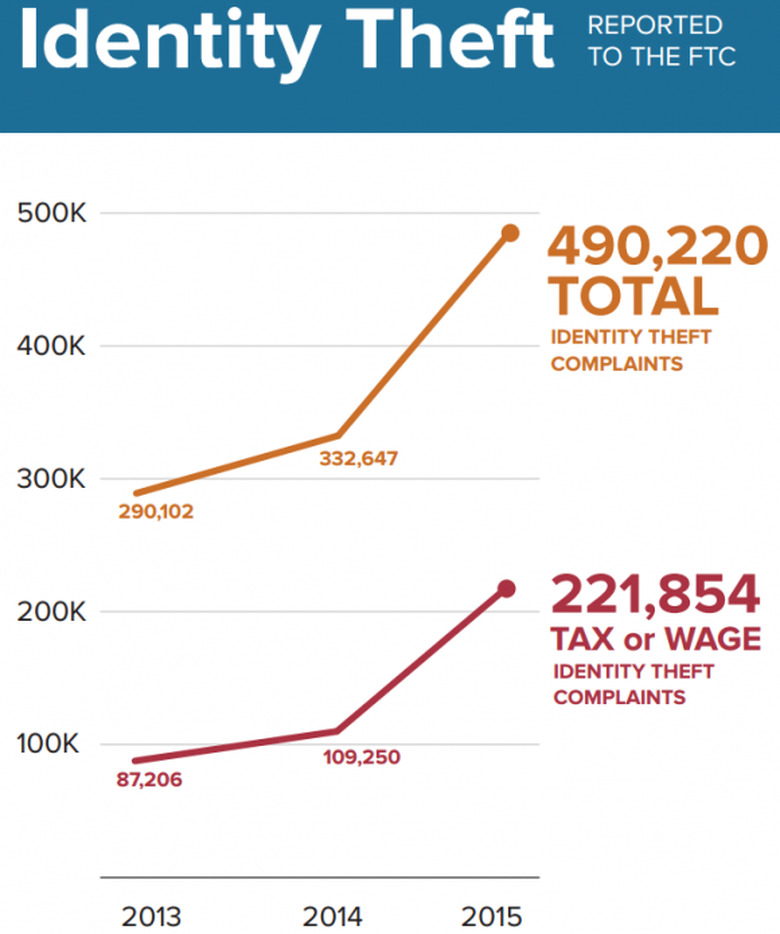
    Mobile apps have replaced texting. Cloud storage have replaced pen drives. Hardly anything exists in the offline mode. Everything is online, interconnected and also increasingly prone to security attacks. Even if you have nothing to hide, cyber security threats can cause serious damage in the form of identity theft or forgery. Here you can see the dark side of cybercrime report. In fact, the US Federal Trade Commission says that it has tracked nearly 50% increase in online identity thefts since 2013. High-profile hacking and cyber attacks have also been reported on several entities including popular eCommerce stores like Target, HomeDepot, eBay, etc. IT security measures help prevent enterprise-grade data loss. However, for regular and routine Internet safety, the need for a specific made security measure was felt. Such a measure must be capable of keeping miscreants out while giving legitimate users safe access to data. Thus was born, Encryption. What is Encryption? Encryption is a proven way to protect information on the Internet. It scrambles text into something that only someone with a key or special password can read. Anyone else who manages to get the data will not be able to use it or read it without decoding. Decoding an encrypted message is literally impossible since there will be hundreds of combinations and permutations that can be formed by the scrambled text. Encryption has become to be accepted as a reliable way to slow down and even prevent cyber security threats. It is now considered to be the cornerstone technology in cyber security that even government security agencies are deploying to protect national digital treasures. How does Encryption work? Encryption is grounded on the age-old practice of cryptography. In the past, scholars used to decipher sacred texts and documents in scrambled language that only those with the knowledge of decoding it can read it. Today, in the digital era, encryption is done using computers and algorithms which convert plain text into incorrigible text. The text which looks like jumbled code can be decoded back to plain text using an encryption key. Encryption key An encryption key is a string consisting of several bits which act as the key that decodes the scrambled code or text into readable content. Workflow of an encryption key (Source: https://docs.oracle.com/cd/E19693-01/819-0997/images/pcrypt.gif) The encryption key ensures that any unauthorised individual who accesses the data, sees only nonsensical text from which no meaningful information can be derived. Thus, an encryption key ensures that exchange of information over the Internet happens only between trusted and authorised individuals. In a real-life scenario, it encrypts the flow of information between the server and the web browser used by the client. Only such users who have the key to encrypt and decrypt data will be able to access it. Types of Encryption There are three main types of encryption: Hashing, Symmetric and Asymmetric encryption. Hashing: In this form of encryption, a definite-length signature set is created for each data. Data which is deciphered using hashing cannot be reversed or changed. Thus, this ensures that data remains encrypted and protected at all times. Symmetric method: The symmetric method of encryption uses a public key to encrypt and decrypt data. Refer image below. Image Source: ico.org.uk Asymmetric encryption: In asymmetric encryption, a different key is used for encryption and for decryption. The key used for encryption is known as a public key and the one used for decryption is known as a private key. Image Source: ico.org.uk Each method of encryption is best suitable for given scenarios. There is no one fit solution for all. For instance, hashing may be perfect for signups and logins, for websites and asymmetric encryption for high-level websites where login credentials need to be guarded heavily (For eg: banking and finance companies.) How can businesses embrace encryption to ensure data security? Encrypting cloud and email servers With cloud becoming easily available and affordable, most small and medium enterprises are resorting to cloud solutions instead of having owned network solutions. Combined with that they use third party email services, which may not have the best security features at all times. This causes a precarious condition giving an opportunity for hackers to penetrate the system and make way for sensitive information. The key is to encrypt cloud networks and email servers with an SSL certificate. An SSL certificate will ensure that all the data flow between the Internet and the browser is encrypted and safe from unauthorised infiltration. Encrypt operating systems Unlike in the earlier versions, the recent versions of Windows, Apple OS X and Linux come with system-level encryption. In Windows, it is referred to as BitLocker and in Apple systems, it is popular as FileVault. These applications are encryption and ensure high-level data security, similar to online banking websites for the exchange of data from and to the system. Needless to say, upgrading to the latest OS with system-level encryption is a great start to ensure data security. Set up minimum password strength Strong passwords are the launchpads for encryption. In fact, history of data breaches pinpoints poor password strength as the main cause. According to a study by Lastpass, passwords are still the weakest links which hackers break to gain access to sensitive areas. The remedy for this common trap is to raise the bar for password health. Passwords that satisfy minimum password strength like a combination of capital, small letter or special characters will help data breaches at bay. Alternatively, users may also be asked to change the password compulsorily every 30 days or such period as deemed fit for the organisation. Finally.. Since 2016, the average number of ransomware attacks per day has increased to 4,000. Security is no longer a topic that businesses can bother less about. It is the only ray of hope to keep data secure in an increasingly complex and sophisticated digital environment. Encryption is the first foot forward to ensuring data security. Encrypting email servers, cloud servers and operating systems can help reduce the number of data leaks that are bound to happen in an organisation. Depending on the organisation and its business model, the business can adopt encryption to stash away data from hackers.

    By Martha Hill Read More
  • Tips to Keep Your Small Business Secure from Data theft

    Data theft is a serious concern that gnaws at the peace of mind of an e-commerce business. The small companies who are novices in the digital world are more vulnerable to prowling cyber criminals. Data theft thwarts the growth of a budding company. Novice or not, each online business must shield its company from the harm of a potential security breach. With the need of securing a company rising in the digital world, there has been an emergence of a lot of security measures. Some measures apply well to some businesses while some others do not make a difference. When deciding on what a company needs to secure itself with it is important that it assesses what works for it. Here, I present to the readers' with the basic and time-tested security tips that can keep small businesses secure from suffering the repercussions of a data theft. #1 Encrypt Data Encrypting Data is one of the best ways to keep off data theft. Encryption of data translates all data into an undecipherable code. There are many ways that one can encrypt data. One of the most popular methods used is the installation of an SSL Certificate. The market has a wide range of SSL Certificates to choose from with Thawte SSL certificate being the most popular and time-tested choice. #2 Train Employees Employees of a company need to be trained on security measures. A lack of knowledge about how to handle security information also leads employees to unknowingly put a company's security in a jeopardy. It is important that a business trains its employees about their role and importance of keeping company information safe. To make this step more effective, a company can also include repercussions in its company policies for employees who breach security. #3 Secure Gadgets Gadgets like computers, laptops, mobile phones and even printers store a host of confidential information. It is important that these gadgets are properly secured. Many people secure the network and overlook to secure mobile phones and printers. This loophole leads one to expose confidential information to cyber criminals. #4 Install an Anti-virus The effectiveness of an anti-virus is often overlooked because of the simplicity of its usage. It is a very common way to secure a company's network. The simplicity of anti-viruses make it easy to use and implement but it also makes it something that people take for granted. Installing a good antivirus can save a company from many sources of data theft. #5 Update Softwares Many people think that it is enough to put security software in place. It is one thing to install security software and quite another to keep an out-of-date software. Cyber criminals are good at what they do and with all innovative software that are designed to secure a company website also comes a cyber criminal who knows how to break through its security. It is important for companies to keep a watch on the effectiveness of software and update it as and when needed. #6 Strong Passwords The effectiveness of an undecipherable password cannot be denied. Secure company information by using strong passwords. To make this step more effective, replace each password at intervals. So if someone who tries to break the password, the next time he/she tries to gatecrash into a company's network. #7 Carefully Dispose Company Information Every employee and business owner must be careful about how they dispose of the company information. It is not safe for company information to be lying around exposed just because it is no longer needed in a paper format. Many people print information and when this information is saved digitally they dispose of the paper. It is important that one does not dispose of paper with company information in the dustbin. Shred them. This will make sure that no disposed information falls into the wrong hands. #8 Prohibit Use of Personal Gadgets inside the Workplace One can secure its network and all the gadgets that are being used in a workplace, but it is impossible to monitor the personal gadgets of everyone who uses the company network. Make it a rule to restrict the usage of personal gadgets inside a company. Users who access gadgets occasionally, they should be provided an authorised identity and password so that his/her activities can be tracked. #9 Install a Firewall Enable the company's operating system's firewall or install a firewall software. Next, configure a VPN to provide employees with secure means of accessing the company network when working remotely. #10 Watch Out for Third Party Vendors A company needs to associate with third party vendors. It is not wise to trust them without any evaluation. This is because a third party vendor has serious access to a company's sensitive information. It is important that these third party vendors are evaluated well before confirming a business association. Have strong security policies in place when interacting with them. Track their activities. Know about the standard of their security policies. All these measures will make sure that third party vendors are kept away from a potential security breach. Data theft is something that when overlooked can really put a company's image to a risk. It is important that every small business that is serious about its company's unhindered rise to success is well secured against potential data theft. The fact that cyber criminals can break through all innovative security measures makes it ever more important for companies to stay a step ahead from them when it comes to protecting its information. The best way to stay ahead of them is to shield a company's network with the basic security measures. One can then build on its security from a strong and secure foundation. Shield a company's foundation with the basic security measures and keep cyber criminals miles away from the possibility of accessing a company's information.

    By Martha Hill Read More
  • Top 6 Computer Threats That Can Steal Your Computer Data

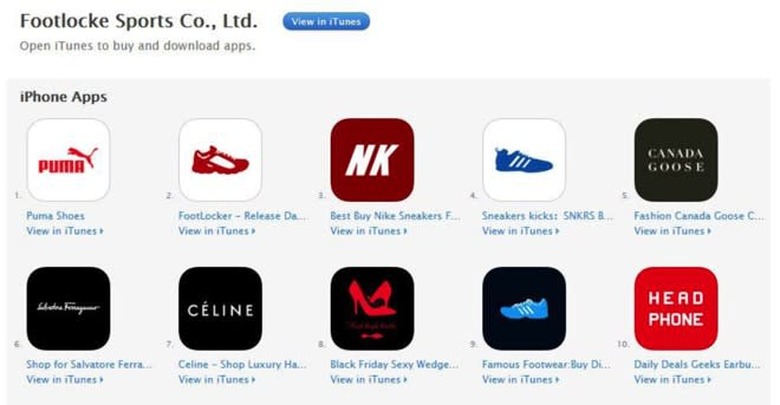
    You are not as secure as you think. System security has evolved into a massive threat to the world. It has the size that overshadows global terrorism and every other threat that we are facing in real-world today. An estimated $400 Billion worth of damage was caused on a global scale due to cyber attacks. ~ Forbes Tech leaders like Microsoft and national agencies like National Security Alliance have joined hands to identify and take counteractive measures to prevent instances of computer threats. Before delving into the details of that, it is essential to know what kind of information that hackers often target and steal from unaware users. Personal information that hackers often target: Credit card information Sign in credentials to online banking or retirement benefit accounts Copyrights/Patents Personal medical records Business secrets System information Confidential organizational data Top 6 computer security threats to be aware of While there is no end to the kind of security threats you will be facing on any day, here are the 6 top computer security threats that you could fall prey to if counteractive measures are not taken. 1. Malicious code Global brands like Puma, FootLocker, etc. are facing a new threat that is threatening their very existence. Hackers are now writing codes and building apps that are identical to the original apps. (Source: 9to5Mac) These 'fake apps' contain malicious code which when installed by the user, steals and relays user information like credit card numbers, personal identification number, Social Security Numbers, etc. back to the server. Image Source: Appleinsidercdn.com Traditional hacking methods using Trojans, worms, and similar virus programs are declining and giving way to these inventive forms of malicious code. The best possible way to stay immune to these malicious codes and programs is to avoid using cracked software, pirated downloads or using software originating from unverified publishers. 2. Phishing Phishing is a form of computer threat where an attacker makes a deceptive attempt to rob the user off sensitive information like username, password, log in credentials, etc. through fake emails, social media or instant messaging channels. A study conducted by Intel Security on 19,000 users from 144 countries found that 97% of respondents were unable to identify phishing emails from authentic emails. (Source: McAfee) Phishing is primarily used by hackers to steal user's banking credentials or financial information like investment trading accounts. Phishing is also used by attackers to rob sensitive organizational data. In February 2016, an employee of Snapchat fell prey to phishing which led to the release of the company's payroll data. (Source: Mashable) 3. Unaware employees Unaware employees are the primary reason for most data leaks in US corporations. ~ Forrester Research Report. Untrained employees often have the habit of leaving their passwords unguarded which leads to breach of security protocols, loss of corporate assets, access to digital records and much more. Writing down passwords to crucial networks and using sticky notes to attach them to desktops or server systems is also a common practice amidst employees which has cost several enterprises serious trouble. The only counteractive measure to thwart this form of employe-induced security threat is to train and make them aware of the pitfalls of publicizing passwords and login credentials. 4. Wireless networks While wireless networks have increased the level of flexibility with which work and personal life can be carried around, they have also become weak links in the data security chain that can be easily exploited. Public networks without encryption are targeted by hackers for stealing information that users share across the network. Countermeasure: Enterprises, self-employed users, and private users can resort to using VPNs (Virtual Private Networks) that secure every byte of data that is sent or received over the network. VPNs are also the best bet for enterprises who want to manage remote employees who connect using the Internet. VPNs can also double up as the first line of defense for enterprises who have adopted the BYOD work philosophy. 5. Mobile menace At least 58% of corporate employees use their mobile devices like smartphones or tablets to save sensitive information related to their personal life or employers. (Source: Security Mentor) With the growing profusion of mobile devices for both corporate and private use, the scale of mobile device targeted cyber attacks have also increased substantially. Hacked mobile devices create a direct entry to hackers to access call logs, SMS, emails and even mobile browsing habits of employees. In fact, lost smartphones also double up as sources from where private and confidential information about users/employees are lost. Fortunately, there are plenty of apps from security service providers that can be used to thwart attacks targeted towards mobile devices. These apps will alert users why suspicious activity takes place on their devices or any alteration is made to the native OS configuration. 6. Portable devices Portable devices have remained the primary source for wide-spreading virus programs and Trojan viruses. Portable devices like thumb drives, smartphones, music players, external hard disks can get easily affected by virus programs if they are connected to infected systems. Corporations have gone to the extent of blocking USB port access in their systems mainly due to the increase in virus attacks originating from employee-owned portable devices. The best way out to use encryption for portable devices. Encryption will ensure that data is not accessed or downloaded without prior permission from the user. The USB drive will remain locked for any file overwriting or creation. In a Nutshell Computer threats have grown in quantum and methodology over the course of time. Today, they originate largely from Internet sources and target innocent users who have little idea of how their private data can be stolen and put to malicious use. Malicious codes, phishing, untrained employees, wireless networks, unguarded mobile devices and portable devices are the most common computer threats that can leave a hole in your profitability and professional reputation. It pays to take preventive action well before disaster strikes. Google, Microsoft, WordPress and the entire web industry as such is migrating to SSL certificates enabled HTTPS encryption to protect themselves from the growing menace of cyber attacks.

    By Martha Hill Read More