Richard Gaywood

Engadget Editorial Policies

The unique content on Engadget is a result of skilled collaboration between writers and editors with broad journalistic, academic, and practical expertise.

In pursuit of our mission to provide accurate and ethical coverage, the Engadget editorial team consistently fact-checks and reviews site content to provide readers with an informative, entertaining, and engaging experience. Click here for more information on our editorial process.

Stories By Richard Gaywood

  • The Nodus Access Case: It doesn't suck (but it does have micro-suction)

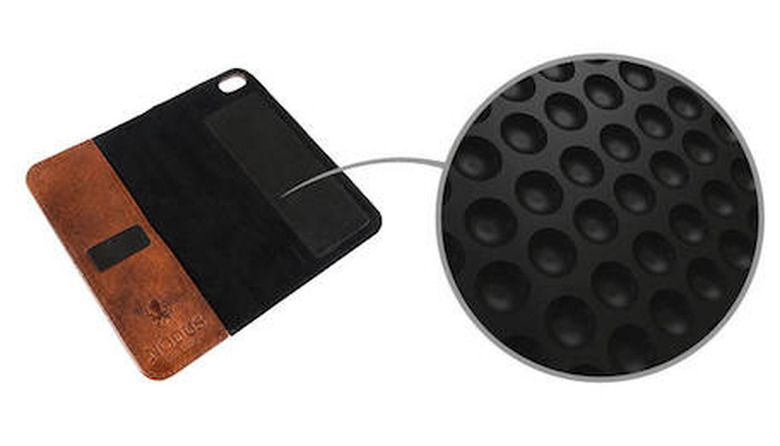
    So here's a common dilemma. You've dropped a cool chunk of change on an iPhone or an iPad and you want to protect it from life's bumps and thumps, but you don't like the conventional case options. Perhaps you want something a little more premium-feeling than the traditional plastic. Perhaps it bothers you that Apple's cases have narrow cutouts that won't work with your favorite headphones. Perhaps you'd like something that protects the screen of your iPhone in your pocket, but most cases only wrap around the sides and back. Perhaps you find all cases a problem, because you also like to use accessories that rely on a naked device, such as docks, car mounts or the Olloclip. Most cases that grip the device snugly enough to be secure also end up being tricky to remove the device from, so simply pulling it in and out of the case isn't ideal. What if there was an answer to all this, a case that offered good protection, a premium feel, and yet could let you remove your device instantly for those times when you need it to be naked? Nodus, a company founded by two British designers, have an answer for your consideration: the Nodus Access case, which is soon-to-be-funded on KickStarter. A tour of the Access Case Let's do the boring conventional stuff first. Like most of these sort of "wallet-folio" style cases, the Access is made out of a single piece of leather that wraps around the front and back of your phone or tablet, providing front-and-back protection. When you want to use the device, you open the wallet up, and either leave the flap to the one side, fold it right around the back, or (in the case of the iPad version) fold it into a stand. Then there's the unique bit: the attach mechanism by which the Access Case holds your device. Most of these sorts of cases use a hard shell glued into the leather that clips around your phone, which sometimes are tricky to remove the phone or tablet. The Access Tablet swaps this for a sheet of micro-suction material. To the touch, this feels only slightly tacky; but the surface is actually made up of tiny suction cups. Offer up a flat surface such as the aluminum backing of an iPad or iPhone and the suckers grab on with astonishing force. When you want to take the device off again, just grab the device in one hand, the case in the other, and pull - surprisingly hard. I remember Marco Arment writing about an iPhone dock that used this tech to great affect, but until I handled it for myself I hadn't really realized how well it works. The Nodus video has a quite dramatic demonstration of swinging the iPhone around held on only by the suction pad, and I was initially skeptical but the first time I tried it (and realized how much force it takes to remove the iPhone again) I realized it isn't showmanship: it really does hold your phone perfectly securely. Nodus assure me that the suction pad doesn't wear out and should last indefinitely. It can lose stickiness if it becomes gummed up with fluff or dirt, but a simple wipe with a damp cloth or a dab of a piece of sticky tape to remove lint brings it back. One thing to be aware of: the case provides no protection for three of the edges of your phone. It's not something you'd want to throw into a pocket alongside keys and change that could scuff your iPhone's bezel. Evaluating the case Disclaimer: my opinions below are based on a pre-production sample of the Access Case for iPhone 5 that Nodus's Alex Jack was kind enough to loan me. Obviously, the design may change between this prototype and the final product. Also, as you can see in the pictures above, my case has been in my pockets for a couple of weeks and has picked up a little pocket lint; I deliberately left that in place to show how the case looks after some use. The good: The Access Case is made out of very high quality materials; Nodus says it is using "the best Italian leathers" and I can believe it. Stitching is flawless and the velvety microfiber inner coating is just as pleasant to the touch as the buttery leather. Alex told me that on my prototype the micro-suction pads were cut by hand rather than with a production laser cutter, but I've examined it minutely and I honestly cannot tell: the workmanship is very precise. My prototype was in black leather with a shiny finish; I also like the look of the more weathered-looking brown leather shown on the Kickstarter page. Alex tells me this is probably, although not definitely, the leather Nodus will use if it meets the first stretch goal and unlocks the black color. I also liked how you can use it for impromptu headphone storage by winding the cord around the leather hinge and leaving the actual headphones dangling out of the end. Note, however, that although this works fine with Apple's newer EarPods it doesn't with the older style headphones -- the cable on the latter is slightly too short to wrap neatly. Most of all, I was impressed by how, well, stylishly grown up the Access Case feels. It's been mentioned by the Men's Style section of FHM Magazine and I can see why. Everyone I've shown the case to has been very impressed by it. I didn't get to go hands on with the iPad version of the Access Case but I can imagine it's very useful. It offers sleep/wake magnets in the front cover and can support the iPad at three different angles, from a shallow rake good for typing to an upright position for watching video. It can also work with the iPad in portrait or landscape orientations; you just detach it from the micro-suction pad, rotate it, and re-attach it. The bad: Although I really liked the case overall, there are some small things you should be aware of if you're thinking of backing the Kickstarter. I initially found the case very reluctant to stay shut, because there was a lot of "spring" in the still-new sheet of leather where it was folded around the phone. This wore off after a couple of days. However, I then found the small suction pad that sticks to the front of the iPhone had lost a bit of stickiness. I think it picks up finger grease from the front of the phone and thus gets dirty, whereas the rear suction pad doesn't. A quick wipe with a damp cloth was enough to restore it though. The small pocket on the front of the iPhone case is large enough to store a single bank card or a few folded banknotes, but probably not much else; I found it bulged a bit with two cards and stopped the closing suction pad from making good contact. You won't be able to replace your wallet unless you're extremely minimalist in what you carry. When placing the iPhone into the case, I initially found it quite difficult to get the cut-out in the back lined up with the camera lens and flash. Alex tells me they are looking at tweaking this however and may make the cut-out larger in the final version so pinpoint accuracy is less important when placing the phone into the case. In any event, I quickly adapted and can now do it without trouble (you just need to get your eye in for exactly where to put the phone down onto the micro-suction pad). One final caveat: the Access Case does make your iPhone a little tricky to use one-handed, especially with the left hand, or to do two-thumb typing where you hold the base of the phone. Initially I found both of these almost impossible. I would fold the front flap around behind the phone but it wouldn't sit flat; then while using the phone it would bounce around uncontrollably. Again, this was exacerbated by the newness of the case and the corresponding springiness of the leather where it folds around. That's become a lot better with use but I still occasionally find myself taking the phone out of the case for prolonged one-handed use (mostly when I'm in the supermarket using OurGroceries). Wrap up The Nodus Access Case is something genuinely new, which is pretty rare in the iOS device case game. Its use of micro-suction pads are a genuinely useful innovation over traditional means of attaching a case to your iPhone or iPad. Nodus is certainly a firm to watch and I wish it every success with its Kickstarter campaign. The Access Case is currently on Kickstarter, with 25 days to go until it closes. It's already met its primary funding goal and is making good progress on its stretch goals. An Access Case for iPhone or Samsung Galaxy 4 will cost you £39 (approx $64) from the Kickstarter -- that's a big discount for backers; the RRP after launch will be £70 (approx $115). The iPad mini version is £69 ($113) and the full-size iPad case, which works with the 2/3/4 and Air, is £79 ($130).

    By Richard Gaywood Read More
  • Thoughts on the Google Nexus 7 from the perspective of a longtime iOS user [updated]

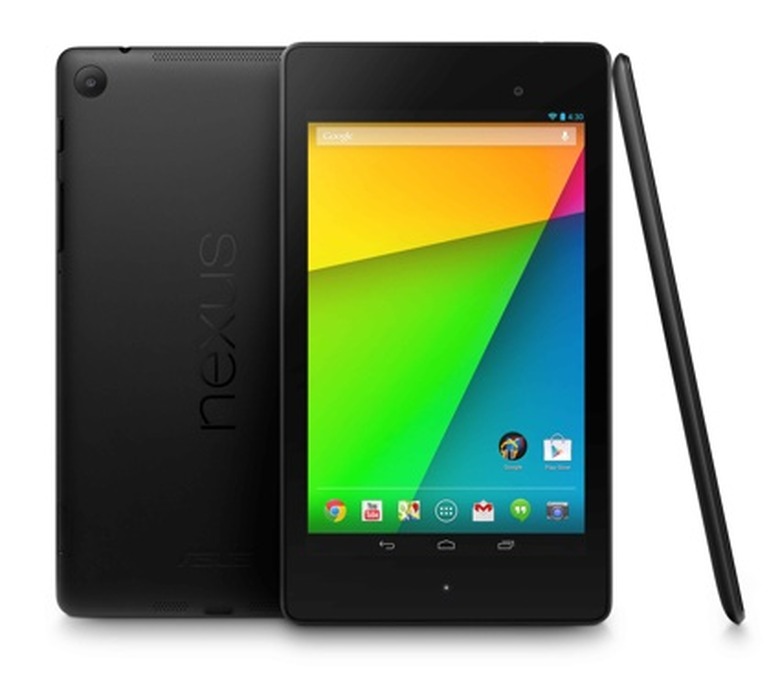
    I bought my first iPhone in 2008 and my first iPad in 2010, and I've upgraded both devices several times since then. Over the last five years, iOS has easily been my second-most used operating system by hours of usage after Windows (which I have to use for my day job as a Java developer). I've never seriously looked at any alternative mobile OS, as I have a substantial commitment to Apple's ecosystem in terms of app purchases, content storage, and sheer muscle memory. So it was something of a plot twist for me when I recently landed a job offer from Google London, working on one of Android teams. As I don't have a great deal of hands-on time with Android, I was nervous that I didn't have a very deep idea -- or even a fairly shallow one -- of what's what on the other major mobile OS. The Google recruiter assured me I wasn't expected to have prior knowledge, but even so, if I rocked up on my first day next year not knowing anything, I'd feel like a complete chump. I figured that I should pick up an Android device and get my feet wet. Having made that decision, and already owning an iPhone 5 and an iPad 3 that I was happy with -- and not wanting to spend any more money than I had to -- the logical decision was clear: a Nexus 7, Google's flagship small tablet device. It's relatively cheap, at $229/£199 for a 16 GB device (compared to $399/£319 for the forthcoming iPad mini with Retina display). In addition to being an Android testbed it also fills a role that I don't currently have matched up with a device: a small, semi-pocketable, one-handable tablet. My life will soon contain a fair bit of commuting via busy London public transport, so I thought a device that needed less elbow room to use than my 9.7" iPad might be a good idea. During my first few days with the device, I kept some detailed notes on what I saw that I liked, as well as what I didn't. I present these notes now for your consideration. I'm not going to pretend that this is any sort of a review; I don't use enough different tablets to be a capable judge. It's just my personal take after a few days of intensive use, from the perspective of a long-term iOS loyalist. Screen and form factor In any tablet, which generally consists of little more than a screen plus a thin bezel, these two subjects are intrinsically linked. Unlike many Apple-centric writers, I've long been intrigued by the 7" tablet size. I picked up a first-generation Kindle Fire from the US for a friend in 2011, long before the release of the iPad mini that legitimized the small tablet form factor for many people. Although the Fire was in many ways a deeply iffy device, my first impression on using it for an hour or so was that a tablet light enough to be comfortably held in one hand is a qualitatively different device to one that cannot. Subsequently, using my wife's iPad mini and now this Nexus device has further cemented this belief. Firstly, in terms of display quality, the Nexus 7 is top notch. Anandtech reports it has terrific color calibration, it's pin-sharp with a better-than-Retina-display dots-per-inch, it's simply lovely all around -- the equal, to my eyes, of any of my iOS devices. One minor gripe though: even at the lowest setting, it's too bright to read at night without illuminating the entire room. The Nexus isn't going to displace my Kindle Paperwhite for that. And of course, the Kindle enjoys battery life that any LCD-packing device could only dream of. So display quality is very similar. In contrast to Apple's offerings, however, the Nexus 7 adopts a very different aspect ratio. The iPads, both mini and traditional, have a 4:3 ratio, so the overall tablet is squarish. To my mind this is an aesthetically pleasing ratio; balanced, if you will. Neither too tall nor too short. There's a reason that 4:3 is a common proportion in photography stretching back over many decades; it's just nice to look at. The Nexus 7, however, has a 16:10 screen; relative to an iPad the screen is narrower but much taller -- like the iPhone 5. This brings some significant advantages. It makes the device itself narrower, which I found made it easier to carry -- the Nexus 7 will fit in the inside pocket of most of my jackets and the back pocket of my jeans, whereas the iPad mini does not. It also means I can more comfortably "span" the device with one hand, with my left thumb curled around the left edge and my fingers curled around the right edge. I find this a bit of a stretch on the mini (I have smallish hands, though). The reduced screen width is also a good fit for some reading tasks. Apps that reflow text to fit the screen (such as Kindle or Pocket), using a font size I find comfortable, and with narrow margins, end up adhering pleasingly close to the typographical rule of thumb that 66 characters per line gives optimum readability. On the iPad mini, I'd need wider margins or a larger font to achieve that. And of course the screen is a natural fit for 16:9 video content. The Nexus 7's screen is 16:10, so widescreen video has just a very small top and bottom letterbox. It's 178 mm across the diagonal, which means it's 151 mm along the long edge and 94 mm on the short edge. With the letterboxing applied, a 16:9 video will therefore be 151 mm x 85 mm in size. By contrast, on an iPad mini with its more expansive 4:3 screeen with a 201 mm diagonal, widescreen video content will be 161 x 91 mm -- barely larger because of the letterboxing. It's not a big deal, but now I've done all the math to prove it's not a big deal I'm damned well going to include these results! However, it's not all sunshine and roses in widescreen land. I found many web pages to feel somewhat cramped. In portrait mode, the text of a typical desktop-layout web page is often a little small until you zoom to just the content column, but now you've sacrificed visibility of the navigation tools and any other horizontal content. An iPad mini would be able to show the whole width of the page without bother. Perhaps tellingly, Google's Chrome browser defaulted with the option to "request desktop sites" set to false, thus preferring mobile sites. Some mobile sites, however, looked a little odd to me on the 7" screen -- sparse, somehow, as they are blown up into an amount of space they were not designed for. Then there's landscape mode, which exacerbates these problems; I feel like I'm peering at the world through a letter box, condemned to scroll every few seconds as I reach the bottom of the screen again and again. The keyboard occupies over half the screen, leaving only six to eight lines of text visible in even a smallish font -- hopeless for text editing. Fortunately the Nexus, like the iPad mini, is narrow enough to make thumb typing in portrait mode quite practical. I wrote most of this article that way and found it reasonably agreeable, although I wouldn't want to write a novel on it. It's no substitute for my iPad paired with my trusty Logitech Ultrathin keyboard cover. A tale of two app stores Much has been written about the relative sizes and quality of Google's and Apple's competing app stores. Perhaps too much emphasis is placed on this, in fact. Consider Apple's recent boasts that is has paid $13 billion to iOS developers across the lifetime of the platform, and that lifetime sales of iOS devices now stand at 700 million. Big numbers, to be sure. But divide one by the other and you calculate that the total amount spent on apps across the lifetime of the average iOS device is just $26.52 -- so perhaps 15 or 20 paid apps purchased, in total. I do wonder if the typical person simply doesn't care about apps as much as we power users do (or, perhaps, that they gravitate toward only free or freemium apps). I must also note that anyone's experience of an app store is going to be highly personal. For example, I have it on good authority that music production tools (of which GarageBand is merely the most visible tip of the iceberg) flourish on the Apple App Store, whereas the Play store has little to compete. I don't make music beyond some therapeutic drum playing occasionally, so I cannot comment on that with authority. Likewise, there are many other categories of app, and doing a detailed comparison across the hundreds of thousands of apps across the two stores is impossible. But I will add a few notes on how I fared with the apps I care about, most of which are (I think) pretty mainstream. I was pleased to find that most such apps are on Android, even less famous ones like OurGroceries (an outstanding cloud synced shopping list app, by the way) and Paprika (my favourite recipes app). Flipboard synced my subscriptions over from iOS. Common services like Flickr, Foursquare, Simplenote, Pocket, Tumblr, Yelp, iPlayer, BBC News, the remote control for my Sky DVR, and more were all present and correct. The financial impact wasn't very large, either: I'll have to spend about £10-15 or so ($15-20) to replace all my must-have premium apps. It wasn't all great, though. The most glaring casualties, however, were the very top tier of iOS apps: I've tried a few but found no Twitter client that's even in the same league as Tweetbot. (To be completely fair, I must acknowledge that my love for Tweetbot is so great that it has come to mold how I use Twitter, and no other client on any platform can compete with it for my affections either.) The field of Dropbox-powered Markdown-supporting text editors, whilst not completely barren, is much reduced on Android; I can't find anything to challenge Editorial or Writing Kit. Although niche, these are tools I rely on for writing on my iPad. Alternative calendar apps also seem to be thinner on the ground than on iOS; I can't find anything to challenge Calendars+, Calvetica, or my personal favourite, Fantastical. There seems to be rather fewer interesting games on Android, although the big names like Where's My Water, Candy Crush Saga, and Angry Birds are of course all there. This strikes me as a shame as the Nexus 7 would probably be a better gaming device than either my iPad 3 (too heavy) or my iPhone 5 (too small a screen). Several bigger games I would have liked to have tried on it were missing, like XCOM, Civilization Revolution, and Baldur's Gate (although the latter is "coming soon"). On the other hand, the Play store has emulators in it for various consoles, which opens up the intriguing idea that I could play Advance Wars DS on my tablet. I intend to investigate this at some point. The idea of playing action games intended for physical controls on a tablet via touch screen controls doesn't thrill me (and using a PS3 controller with the Nexus, whilst possible, seems fantastically clunky) but more sedate games should survive the transfer relatively unharmed, I think. Related to the topic of app store size is also media store size: music, TV shows, books, films. I don't watch a lot of video on my tablet so I'm not best placed to draw conclusions from the brief look I did have at. However, anecdotally, I've heard many people say that Google's Play media store is rather smaller than Apple's, particularly outside the US where the tangled web of international video distribution rights makes it hard to get a good range of content. Of course if you mostly use independent services anyway -- Netflix, Kindle, and so forth -- then you'll find an equivalent experience on any platform; I find that a reason to prefer that sort of service, personally. Openness Much tedious squabbling has been done about the openness or otherwise of the Android operating system, and I do not intend to retread that tired ground here. However I must note that there are real, practical advantages to Android's willingness to allow users to customise aspects of the user experience that can make iOS feel a bit chafing and oppressive by comparison. Keyboards can be swapped out, a feature that has allowed experimental alternatives like Swype and Swiftkey to become established. Alternative browsers and mail clients and PDF viewers and photo galleries and so forth can be installed, as with iOS, but then can also be configured to be used as the default choice throughout the operating system. [Google's "shadow ecosystem" on iOS allows Chrome to launch Google Maps along with similar interactions among Google-branded apps, but does not change the wider experience. –Ed.] The home screen can be populated with a variety of information-rich widgets for at-a-glance access to whatever you care about most. I must admit I found this less compelling than I thought I would, but it's early days and I'm still experimenting with the large range of options available to me. I think I'll come to value this more as I find a mixture of widgets I'm happy with. The arrangement of app icons on the home screen, whilst snapped to a grid, does not need to be filled from the upper left corner first -- a small point, but I found this particularly liberating. The "sharing" feature works properly, which is to say it works like the Services menu in OS X. Once an app is installed, it appears throughout the operating system; so in Chrome, for example, I can send a URL directly to my Twitter client, or to Evernote, or to Pocket, or Tumblr, or any number of other apps I have installed. This is much more useful to me than the situation on iOS where only services Apple blesses (so just Twitter and Facebook) can get into the system-wide sharing options. There are further intriguing possibilities for customisation on the horizon, like the forthcoming app Cover. Cover adds to your touchscreen a strip of icons for the apps it thinks you're most likely to want right now, based on data culled from various sensors on your device, like location and travel speed. So if you're in work, you get options for your corporate mail and your calendar; if you're at home, you might see icons for Flipboard and Facebook; if you're driving, you might see Google Maps and Spotify. I think this trend of smartphones becoming better at predicting our needs by harnessing their rich trove of data about where we are and what we're doing is going to be important in the future. Apps with this anticipatory computing backbone are becoming more prevalent in both Google and Apple's ecosystems. Voice recognition Much the same as Apple, Google integrates voice recognition deeply into the operating system. Voice prompts can be found in various search boxes and in any text entry field via a dedicated button on the keyboard, very similar to iOS. You don't get many spoken responses back like Siri provides (or at least, I didn't -- there is a setting somewhere for a car mode so it must exist), which makes it seem rather characterless. You don't get Siri's jokes and Easter eggs either. But it can do many of the same tricks, like setting reminders and alarms, creating calendar entries, and so forth; getting information about sports scores or actors or movies works by shunting you to a Google search. More importantly, however, than the fine-grained features is how fast and accurate Google's voice transcription is. It's like night and day compared to Apple's offering. If you've never seen it, find someone with an Android phone and try it out -- then think about how much more often you'd reach for Siri if it was this good. Lightning port vs micro USB Apple's introduction of the Lightning port produced a lot of heat and noise across the blogosphere, mostly focussed on how expensive the charging cables were. Defenses of the standard usually hinged on the fact that it's a much more capable port than micro USB. However, via its micro USB port my Nexus 7 can: be charged quickly from the supplied 7 W charger (by comparison, the iPad mini comes with a 5 W charger and the iPad Air a 12 W one) be charged slowly from any USB port, over a generic cable I can buy for a few cents; spare Lightning cables cost $19 or $29 depending on length be connected to a USB card reader via a $1.38 adapter; the equivalent Apple adapter costs $29 be connected to a HDMI television via a $15 adapter; the Apple equivalent costs $49 Lightning has theoretical advantages, particularly in terms of future expansion, and the bidirectional plug is a pleasure to use. But I'm struggling to see meaningful practical advantages here. What I found in the Nexus was a tablet that can connect to everything I want it to connect to and save me a decent chunk of change into the bargain. Online services and lock-in My Google email, calendar and contacts list all work on iOS just fine. Yet my iCloud email, calendars and contact lists are inaccessible to Android. Hence, if I want to be free to access my data on all my devices, this asymmetry means I'm much better off with all my data in Google's hands than in Apple's. I wonder if, in the long term, that's a good thing for Apple; is it driving people who care about interoperability into the hands of competing providers? Certainly, I find myself giving serious thought to moving my primary calendar over from iCloud to Google now. [Update: numerous commenters below and elsewhere have pointed me to various Android apps that can bridge this gap, allowing you to access iCloud calendars and reminders on Android. SmoothSync seems to be the most common recommendation. Also, iCloud mail of course supports standard IMAP (which had entirely slipped my mind) so can be directly access through standard Android apps.] On the other hand, several times I wanted to reply to an iMessage, or tick off a completed task in Reminders, and I found myself reaching for the Nexus before realising that wasn't going to work and picking up my iPhone instead. My reminders list is shared with my wife, so I can't easily leave that behind. Many of my friends use iMessage, so when messaging with them I enjoy free texts (sometimes internationally), high quality images, and the ability to see when they have read a message and when they are typing a reply. (Plus sometimes iMessage even delivers all my messages promptly and in the correct order. Bonus!) All these Apple-only integrations create little patches of friction that stand in the way of me leaving iOS behind, and in aggregate they provide a powerful disincentive for me to try and run a mixed environment where some of my devices run iOS and some run Android. But another option I have is to entirely abandon iOS and embrace competitor devices and platforms wholesale. If it's easier for me to bypass this friction forever by dropping iOS than endure the hassle of mixing my devices across platforms... well, let's just say I'm not sure that's what Apple wanted to achieve. [Update: I neglected to add, photo syncing is a major pain point for me. I'm fully committed to Apple's infrastructure: Aperture for post-processing and storage, various albums synced to iPhone and all my photos synced to my iPad via iTunes, and Photo Stream for ad hoc sharing with friends. Integrating Android into that workflow in any meaningful way has so far defeated me. I had high hopes for an Everpix Android app, which would be perfect, but the company's sad demise has scuppered that option.] The "hardware" back button I say "hardware" because on the Nexus 7 it is actually a strip on the bottom of the touchscreen, albeit one that is almost omnipresent. Video playback apps and full screen photo viewing sometimes reduce it to a blurred-out dot, presumably to be less intrusive; apparently in the next release of Android they will be able to hide it entirely. I found the back button to be a mixed bag. About 80% of the time, it did exactly what I thought it would: took me out of a full-screen image viewer and into the app that opened it, say. Or if one app had just loaded another, it went back from the second app into the first; that was disconcerting at first but came to feel natural. But some apps were less consistent and I find myself agreeing with John Gruber's spot-on observation. In the Twitter app Carbon, for example, you swipe between three panes showing your timeline, @-replies, and private messages. Many times, I would move from one of those views to the other, then instinctively press the back button to move back to the previous view: but that would usually exit the app entirely instead. This was maddening, and I can't seem to reprogram my expectations so I'm still pressing that dratted back button! Now, you could argue that this was an isolated example of an app that implements this feature clumsily. Or, as Gruber posits, you could equally argue that this is an idea that's ripe to accidental misuse by devs and is simply never going to work right across every app in the Play Store. I'm not sure which side of that line I sit on yet. Miscellany A few extra small observations that didn't deserve a section of their own. The good: You can easily create a Google account without attaching a credit card -- something which requires arcane incantations on iOS. Free apps can also be downloaded without entering your Play password. Screenshots go into their own gallery -- far preferable to the iOS approach where they are mixed in with your photos. Apps can have free trials -- for example SwiftKey allowed me to install a feature complete version of the software that will work for a month. That's not allowed under Apple's App Store rules. All my full-size iPads have been Wifi-only models, and that's never bothered me. But the sheer portability of the Nexus 7 make it somehow jarring that I have the Wifi-only model of that. I expect I'd feel the same way about the iPad mini if I owned one myself rather than just borrowing one occasionally. A curious psychological effect: you know how the iPhone 5's larger screen makes the iPhone 4 feel cramped and constrained when you go back to it? The Nexus 7 made me feel that about my iPhone 5, like the screen was suddenly too small. What's curious is that my 9.7" iPad has never done this; I think it's because it feels like a totally different device (due to the weight, mostly) whereas the Nexus 7 and the iPhone 5 are somehow more similar. It makes a little bit more sense to me now why massive smartphones like the 5" Nexus 5 seem to be popular with my friends. The Nexus 7's stereo speakers are on the left and right of the device when it's held in landscape mode, whereas the iPad mini's are on the left and right of the device when it's held in portrait. I most care about getting stereo sound out of my tablet when I'm watching video, which means it's in landscape mode; I find Apple's decision here highly questionable. The Nexus doesn't sound bad, either, by the standards of tiny tinny tablet speakers. (Disclaimer: I'm a speaker snob. 5.1 floorstanders in my lounge and I disabled my TV's built-in speakers immediately after installing it.) [Update] Craig Grannell reminded me of something I liked but forgot to write about: on any web browser signed into your Google account, a single click of a button in the Google Play store can remote install an app to your Android device. That's something I wish Apple would copy. [Update] The notification center has a "remove all" button. C'mon Apple, throw me a bone. Bad stuff: Jerky/laggy/hesitant scrolling -- particularly bothersome in the Tumblr app, but I've seen it in lots of places, including official apps like Play. Pages with large graphics or embedded videos seem to be particularly grevious offenders. Somewhat baffling given the very high specs of the Nexus 7 (a quad core CPU and 2 GB RAM). I've heard some reports that the experimental ART runtime that can optionally replace Dalvik in KitKat can help with this. Android seems to have no equivalent to iOS's scroll-to-top tap-the-clock feature. I miss that dearly. Flinging a long list like a Twitter client again and again to get to the newest content is clunky. Some apps include it as a button or menu option, but not many. After I installed the BBC iPlayer app, I tried to watch something and was confronted by a dialog saying "to watch BBC programmes you need to install the BBC media player from the market place." I had to download this second app from the Play store before it would work. Could be something specific to the BBC, although I can't help but think that anything that clunky would never make it through Apple's app guidelines. Duplicated versions of apps -- for example, out of the box, I was confronted by "Photos" and "Gallery". I believe the former is an older, less powerful app that is part of the Android Open Source Project, whilst the latter is a closed-source official-Android-only more powerful app, but it's confusing to have the duplication and the difference isn't made explicit anywhere. [Update: Apparently I had this backward; Gallery is the older app, and "Photos" -- which was "G+ Photos" until recently -- is the newer. The general feeling seems to be that Photos will replace Gallery in time, as has happened with Chrome replacing the older Browser app.] The .com popup button on keyboard when entering URLs offers .net and a few other alternatives -- but it doesn't have .co.uk, despite my keyboard being set to "English (UK)." Apple gets this right. No AirPlay -- there's some sort of open standard equivalent, Miracast, but I don't have any compatible receivers to test it with. I don't use AirPlay a lot for TV watching but it does get a reasonable amount of use in our house for my wife and I to share content or shunt short YouTube clips and the like to our lounge TV. Of course, the Google Way would be to pick up a Chromecast for this use case. [Update: commenters below have pointed me to several options on the Play store for third-party apps that can stream to AirPlay receivers.] The camera's mediocre at best, but that doesn't bother me at all. I've taken no more than a dozen photos with my iPads in years of use. [Update] I miss my red badges on app icons. I think that, enabled sparingly on only those apps you care about, they are an elegant way to draw your attention to the stuff that matters most to you (whereas the iOS notification center is a cacophony of things I don't care about that I mostly ignore). I suspect that careful selection of homescreen widgets is a more Android-ish way of addressing this use case, so perhaps this feeling will pass. Stuff where I was tripped up because of my unfamilarity: It took me ages to find the rotation lock -- repeated Google searches returned conflicting information relating to different versions of Android and various other devices. Turns out the answer is to pull down from the upper right of the screen to access a quick settings panel (as opposed to the upper left, which is the notification centre.) The setting to turn off the odious key click sounds is found under "keyboards" and not "sounds", which confused me briefly. Swiping keyboards -- all my Android using friends are nuts about these swiping 'boards, and I gave Swiftkey a good go, but I can't seem to get on with it. I'm going to persevere as it's supposed to adapt to your writing style over time. I must admit to getting a rather queasy feeling when installing it, however, and clicking through a warning dialog that pointed out that third party keyboards could "see anything you type, including passwords and credit card numbers". Food for thought, for sure, and I daresay one of the reasons that Apple doesn't offer user-installable keyboards under iOS. Text selection semantics are different to iOS -- the way in which you position your cursor and select blocks of text is different. This has consistently driven me crazy when drafting this article. The bottom line The Nexus 7 is a really nice little bit of hardware. I'm very pleased with how portable it is and the quality of the screen. On the software side, there were some rough edges in adapting to Android -- some of them rooted in my own unfamiliarity rather than any outright badness, to be fair -- but overall this has definitely been a positive experience. If you find yourself torn between an iPad Air and an iPad mini with Retina display, if you really want both the big screen and the ultimate portability but both iPads is more than you want to spend -- well, you could do worse than consider an iPad Air with a Nexus 7 as a sidekick. It's working for me. [Update: One striking thing, as I have noted in some updates throughout the body of this article, is how many of my observations can be addressed through third-party apps that would be impossible on iOS. Background services that sync iCloud calendars to the Android calendar list, for example, or third party apps that install AirPlay services. This is, it seems to me, a key strength of the Android offering -- that third party apps have more control over the operating system, more flexibility to serve your needs. Of course with great power comes great responsibility; this very control leaves the door open to all manner of malware. I've certainly been wary of installing random apps from the store, rightly or wrongly, finding myself scrutinising the trustworthiness of an app in a way I never would on iOS. I am greatful to anyone who took the time to leave a comment and point me in the direction of apps that solve my problems. Many thanks to you all. --Rich]

    By Richard Gaywood Read More
  • Gauging the scale of the post-PC opportunity: "Mobile Is Eating The World"

    Speaking at All Things D in 2010, Steve Jobs famously predicted that "PCs are going to be like trucks": specialised devices that only appeal to people with particular demands of their computing experience while ordinary people would come to prefer smartphones and tablets for all their computing activities. Last month, Enders Analysis consultant Benedict Evans gave a presentation at BookExpo America entitled "Mobile Is Eating The World." In it, he laid out a thorough series of metrics that suggest, when taken as a whole, that the scale of the post-PC opportunity is somewhere between 'ginormous' and 'staggering' -- and that Jobs's vision is coming inexorably to pass. Now, I don't want to spoil the whole thing. I urge you to read the slide deck for yourself. But I am going to cherry pick a few of the figures I found most interesting to whet your appetite, and add in some of my own ideas as to what this all could mean for the future. Before that, though, an aside about analysts. There's a strong meme circulating amongst Apple blogs that analysts are idiots and their writing to be universally shunned. Like most strong memes, this one presents a simple narrative; like most simple narratives, this one is wrong. Reality is far more nuanced than that. There are good analysts and bad analysts, as with people in all walks of life. Certainly, I cannot understand why Gene Munster is obsessed with the Apple TV, an idea that makes no sense to me. Evans is one of the good guys though. The scale of the post-PC opportunity Evans starts out by talking about just how big the post-PC device market could be in the future. Total global PC sales in 2012 were 350 million; there are 1.6 billion PCs in use, most of them shared between multiple users, and they are replaced every 4-5 years. For mobile devices (including smartphones, feature phones, and tablets), 2012 saw 1.7 billion sales -- almost five times as many as there were PCs -- to a total of 3.2 billion users, almost always used only by one person, and typically upgraded every two years. In other words, mobile is a whole different ballgame to computers, and it always has been. Dwell on those figures for a moment -- 3.2 billion means almost half the planet has a mobile device today (almost all of them low-end feature phones, of course). Still, mobile sales have outnumbered PC sales for decades; that's old news. What's changed about mobile is the rise of the smartphone and (to a slightly lesser extent, because it started later) the tablet. Since 2007, although feature phone sales have been declining slightly, smartphone and tablet sales have grown very quickly. Today, smartphones make up about one in every three phones sold, and that ratio is continuing to move in smartphone's favour. Furthermore, unlike PC sales -- broadly stagnant for several years now -- there is no sign of growth in phone sales slackening off. There's still half the planet to go, after all. So where does this lead? Evans predicts that in the next five years, we'll see no change in the size of the PC market -- but explosive growth in the smartphone and tablet space, three to four times bigger than where they stand today. That'll put tablet sales well above combined sales of desktop and laptop PCs, and smartphone sales far above that again. So it seems Jobs was right. The scale of opportunity in mobile technology is huge. But how well positioned is Apple to benefit from this? And what of its competitors? Is Microsoft withering on the vine? In a slide entitled "the irrelevance of Microsoft", Evans paints a stark portrait. As little ago as 2009, almost all online access was done via PCs and as almost all PCs run Windows that meant Microsoft's share of the "connected device" market was pretty large: 80% or so. But as more and more smartphones and tablets have been sold, which almost entirely run non-Microsoft OSs, so that share has steadily declined ever since. It's now down to 25% or so. Certainly, in terms of things like determining web standards, Microsoft is a much diminished influence. Does that bode ill for the company, however? Don't forget that although Microsoft's share of the connected device market has declined, that's mostly because the overall market itself has grown. PC sales, as I remarked above, have been largely static through this era, and therefore so has Microsoft's revenue from Windows licences. It had a revenue of $18.8 billion in the first quarter of 2013, and $6.06 billion in profit. Not too bad, right? This is because most of the mobile growth has been in smart phones, and very few people are buying a smart phone to use as a PC, so (so far) the affect of the growth in mobile tech haven't been felt in Microsoft's markets. However, in the last two years, tablets have also been growing explosively (although far behind smartphones) and this is a product category that can replace a PC. So PC sales have, finally, switched from stagnating to declining, and there's the real threat to Microsoft's bottom line. There's also another element to this story, which is Microsoft's other cash cow: Office. Office sales largely work through a sort of institutional inertia: the main value is that everyone uses it, so everyone shares files around in its formats, and no third party app has ever managed to do a flawless job of opening and working with those formats without munging the layout, breaking the fonts, or some other irritation. But today we're in a world where less than a quarter of people are using Microsoft devices online, and so less than a quarter of people online can choose to work on Office. Most of those of those people are on phones, of course, where it doesn't matter much -- only the brave and foolhardy are doing complex word processing on a smartphone. But many of them are also on tablets, and that could be a problem for Microsoft as tablets eat into laptop and desktop PC sales. Now, this is a line of reasoning that leads you to the conclusion that Microsoft should port Office to the iPad. I used to have a hunch we'd have seen this happen by now, but so far, it's chosen not to do so, and instead use the existence of Office as an extra selling point for its Windows RT and Windows 8 tablets. In other words, Microsoft is prioritising protecting Windows PC and tablet revenue over protecting Office revenue. It remains to be proven if that was a smart call or not; perhaps the release of Office 365 for iPhone means Microsoft's resolve is weakening, although I'd argue that's not quite the same thing. Few people would choose to use a smartphone rather than a PC for document editing, so the two products don't really compete; whereas people might well perfer to use a tablet to a PC, so the competition has more direct consequences. The "Four Horsemen" Evans's lists "four horsemen" of the post-PC world: Apple, Google, Samsung, and Amazon. (He sees RIM and Microsoft as rapidly becoming irrelevant and never gaining relevance, respectively.) How does Evans see competition between these companies today, and how does he see it playing out in the future? Consider the business of selling devices. In this, Apple and Samsung rule supreme: not in terms of units (Apple and Samsung combined sell less than 30% of all handsets), but in terms of profit (Apple and Samsung hold more than 95% of the profit in the entire handset industry, with the lion's share of that going to Apple). Note that it's a mistake to believe that this somehow means Android is a failure because Google doesn't make any money on it. Remember that from the very outset Android was supplied by Google to the handset OEMs (HTC, Motorola, Samsung, etc) for free. If one's plan is to make a lot of money, one doesn't generally start by giving things away. Android was never supposed to generate any direct revenue for Google. Google makes money by serving up ads, and to do so effectively it needs people using its various products -- search, email, maps, coughReadercough. Android was designed to ensure that no-one like Apple could establish a stranglehold on the future mobile market and freeze Google out. Or, as Erick Schonfeld wrote for our sister site TechCrunch, "search is Google's castle, everything else is a [defensive] moat [around it]". Evans also believes there will be significant growth in low-end Android tablets, with 7" screen sizes and prices below (often far below) the $330 price point for a poverty spec iPad mini. There could be as many as 125m cheap Android tablets sold in China alone in 2013, he claims -- compared to 120m tablets sold in the entire world in 2012 (of which 66m were iPads). However, as many others have pointed out, Evans underscores that Apple products seem to lead the market in usage, far out of proportion to sales; depending on the exact metric you believe, anything up to 80% of all tablet web traffic comes from the iPad. I've yet to find an explanation that entirely addresses this. It's easy to list factors -- some Android tablets are shipped but never sold to end users; some of them are awful, and after a few weeks end up gathering dust; some of them are used regularly, but for much smaller amounts of time per day than iPads; some of them are mostly used for purposes other than web surfing (e.g. in-car satnav and entertainment centers); some of the metrics are biased towards English-language sites, whereas Android is huge in China. But to my mind, none of that convincingly adds up to the size of the difference in the stats. Perhaps I'm wrong, though, and that's all it is; or perhaps there's some other factor I've overlooked. Please let me know your thoughts in the comments. The ecosystem is key Selling devices isn't the whole of it, though. For Google, Android devices itself are only a means to an end -- a way to make Google services more accessible and attractive to end users. It's about building and supporting an ecosystem. Evans finishes on differentiating between ecosystem types and sizes between the key software platform players: Apple with iOS, Google with Android, but also Facebook and Amazon with its as-predicted-by-me (why yes, I am still smug about this; thanks for asking) Android fork. He (rightly) points out that Apple is qualitatively different from the other companies discussed here. For Google, Facebook and Amazon the platforms are designed to facilitate and increase customer engagement with their services -- ultimately, to either serve them adverts or enable them to buy things. Apple, however, remains primarily a hardware company that uses a strong software ecosystem as a hardware differentiator rather than a end in its own right. If you're inclined to disagree with that, remember that iOS updates are free and OS X updates are cheap -- but iPhones and Macs are neither. Apple's main profit driver and main focus remains hardware sales. The bottom line Three years ago, Jobs predicted that mobile devices would come to compete with and ultimately domainate over PC sales, coining the phrase "post-PC" to cover mobile devices that overlap with PCs -- so, smartphones and tablets, as opposed to feature phones. He tied a significant chunk of Apple's future to this vision, by concentrating much of its effort onto iOS and the hardware that runs it. There's plenty of evidence that Jobs was right, and as these trends continue, so companies that are involved in this space -- Apple and Samsung being the most obvious -- will continue to thrive. If you like his data, I humbly urge you to follow Benedict Evans on Twitter and subscribe to his weekly newsletter, where he routinely shares his insight and data like this. I would also like to extend my personal thanks to Mr Evans for allowing me to reprint some of this slides in this writeup.

    By Richard Gaywood Read More
  • On the eve of WWDC: What are Apple's three greatest innovations?

    An awful lot has been written recently about whether Apple is has lost its spark. "Does Apple have an innovation problem?" asks the Washington Post. Forbes claims to lay out "Apple's innovation problem", although that piece is so muddled and lacking in specific details I came away more confused than illuminated. "Apple hasn't created an innovative product in years", claims inc.com. "Has Apple's innovation engine stalled?" asks USA Today. Fox News tells us "Why Apple is ailing." The Telegraph reports that "three in four investors [say Apple is] losing [its] innovative edge." There are hundreds, if not thousands, of posts like this, and many of them come from the mainstream media -- so it's possible that this is becoming, or is already, the view of the man in the street. It seems Apple has been stung by some of this criticism; Tim Cook took the time to reassure investors that "we're unrivalled in innovation," as reported by ZDNet. Phil Schiller slammed Android in an interview with the WSJ just hours before Samsung launched the Galaxy S4. And the "Why iPhone?" page added to apple.com has a tinge of defensiveness to it, at least to my eyes. Other people agree; Apple was named "most innovative company" in a wide-ranging poll late last year, for example. John Gruber wrote about how strong narratives can displace the facts. I think this is particularly true in tech reporting, which (let's be honest) isn't all that dramatic a lot of the time. As the sublime @NextTechBlog put it: "REVIEW: New Telephone Is A Black Rectangle That Provides Phone Calls, Text Messages, The Internet, And Other Applications, Plus A Camera" and "I'm Replacing My Old, Black Rectangle With This Brand New, Black Rectangle Because This One Is New". That's a pretty neat meta-story for almost every smartphone launch ever. You and I like to obsess over the details, sure; but most people don't care that much. People like you and I read tech blogs. To hook those other people in, though, the mainstream media needs a little drama, and if it doesn't have much to work with; well, it has to sex up whatever it can lay its hands on. Hence, Gruber suggests, the virulence of the "Samsung steals Apple's crown" meme. I think there's a related meme afoot also, though. It comes in two parts. Firstly, the idea that Apple under Jobs was an innovating powerhouse, constantly turning markets upside down or creating them from whole cloth with unexpected new gadgets. And secondly, that those days ended with Jobs's passing, and that Apple's innovating days are over. I think this is pretty risible, but to explain why I'm going to have to dig a bit deeper into what innovation, exactly. For Apple's critics, such as those writing the articles I linked to above, "innovation" seems to be defined mostly as "entering or creating new markets" and Apple's innovation showreel is the iPod, the iPhone, and the iPad. Consider the Fox News piece, which seems to be pretty typical to me: Since October the price of Apple shares have fallen from $700 to about $425. No one should be surprised -- the company has been misstepping for a long time. Without the genius of Steve Jobs for neat, wholly-new products, it is going to take tougher management, and a change in the company's core business strategy to match its past record of profitability. Apple's remarkable success was premised on being first and better with a succession of new products, dating back to the earliest computers to smartphones and tablets. It was greatly aided by a superior operating system, which provided a more elegant and user friendly experience than rival Microsoft offerings, and the fact Apple both wrote the software and designed its products. This thinking leads to people pondering "what fields could Apple enter next" and in turns leads to people calling for Apple to prove its innovation credentials by releasing a smartwatch or a television, to name but two of the Rumours That Will Not Die. However, I strongly believe this view of 'innovation' is reductionist -- I think concentrating on innovation at the product level glosses over too many details. If we're really going to seriously look at whether Apple has become less innovative we're going to have to be a bit more clear about exactly what we're discussing. Defining innovation Let's start by considering what we mean by innovation in the first place. The concept of innovation is a bit like art: everyone knows it when they see it, but ask five people to define it precisely and you'll get a dozen different answers. The Mirriam-Webster Dictionary defines innovation as "the introduction of something new; or a new idea, method, or device" and defines innovate as "to introduce as or as if new". Merely defining it as "making changes", however, is rather shallow and overly broad. When Apple released speed-bumped MacBook Pros in February, for example it had certainly changed something old into something new; but few would put that in the same sort of class as the release of the iPad mini. It seems to me that if we're to debate the merits of innovations then we're going to need a framework to weigh up the qualities and quantities of very different kinds of changes. When I first started drafting this post, the Wikipedia page quoted a set of multi-faceted definitions I liked; they've been removed now by some capricious editor so I'll summarise them here instead: Innovation as novelty: Most people would agree that for something to innovative it has to be new in some way, either in and of itself or the application of an old idea in a new way or a new context. Innovation as change: The most potent innovations provoke changes, perhaps opening new doors for the user to work with. In the best cases, they might change whole industries, creating new product sectors or new ways of thinking that entirely replace the old. Or to put it another way: these are the changes that a company will be remembered for in fifty years. Innovation as advantage: Assuming anyone actually wants the innovation, then it seems reasonable to conclude that it'll convince people to buy the innovating product. Hence the company will sell more stuff than it would have done so otherwise. The most significant innovations, I claim, will be those that score highly on all three of these fronts. Bubbling under: candidates that didn't make the cut There were a number of possible things I considered for inclusion in this post but ruled out for various reasons. I dismissed the iPhone, iPod, and so forth because I believe it's more interesting to say "no whole products." To say "the iPhone is innovative" is, to my mind, reductionist and frankly not that interesting. I want to dig into which specific bits of it are innovative, and why. So I ruled out entire products and instead chose to focus more closely on the individual features of products. I ruled out the graphical user interfaces, something which certainly caused industry change and Apple certainly played a crucial role in the history of. As with entire products, I think it's perhaps a little sweeping to count "GUIs" as one innovation -- I think it would be more interesting to dig deeper into individual elements. However, I must confess that most of the real cutting edge early stuff predates me; my involvement in computing only goes back to the mid '80s and I don't want to overreach by claiming I'm familiar enough to be a good judge of what is "most innovative" from that era. If your memory is longer than mine, I'd love to hear your thoughts in the comments on what you think might be the biggest innovations from Apple of that era. I'm going to confine the scope of my article to the last fifteen years or so. I've also ruled out iOS itself (or, as we called it when it first arrived, "iPhone OS"). Like Harry McCracken, I also think the first iPhone owes a significant debt to Palm OS: the full-screen apps and app launcher comprised of a regular grid of icons are both very similar concepts, and notably different to how Apple designed the Newton. To my mind, the greatest innovation iOS offered was how it brought a large number of features together and made them work in a brilliantly accessible way; but I think that accomplishment, as significant as it was, is eclipsed by the things I list below. So here's what I did come up with, after some hard thought and bouncing ideas around in the TUAW newsroom. Third place: Retina/HiDPI displays Apple introduced the "Retina display" with the iPhone 4 in June 2010, since when it's rolled it out across various iPhones, iPads, and MacBooks. Defining "retina" as "a screen where the pixels are too small to be individually perceptible at typical usage distance" (which is a claim that stands up to scientific scrutiny), these screens were immediately very popular, offering a degree of visual fidelity that few had seen before. Now it must be noted that this was not the first ultra-high-density display in the world. I remember salivating over the IBM T220, a 21" monitor from 2001 with a breathtaking 3840×2400 screen and a $22,000 price tag. At 200 pixels-per-inch, at a distance of 17" it was a true "retina" display, with a pixel density only slightly below today's MacBook Pro with Retina display. The T220's resolution even tops the now-cutting-edge 4K format. It required three DVI cables to drive it to an even remotely sensible refresh rate of 41 Hz, because of the sheer data rate necessary to keep this monstrous screen fed. It was sold to a handful of customers, mostly for use in medical imaging, physics labs, and other specialised applications. Still, this behemoth is (clearly!) in quite a different category to a smartphone retailing for under $1000. The Retina display's innovation was not just skin deep, either. Quadrupling the number of pixels on the display means you also need four times the graphics memory and four times the bandwidth, just to maintain performance parity; then you also need a correspondingly more powerful graphics chip, and you have to do all that without compromising battery life, or weight, or making a device you can't sell for a reasonable price tag. This is why many of Apple's devices like the space-compromised iPad mini don't yet have retina displays. Apple was the first to climb this technological mountain -- but far from the last. Since the iPhone 4's release in 2010, no high-end smartphone has dared to arrive without a similar pixelicious screen. As Apple has spread Retina-quality (or HiDPI) screens beyond smartphones and into tablets and laptops, so other manufacturers have followed also, with devices like the Chromebook Pixel arriving with rMBP-class screens. So, to sum up: novel? Certainly in terms of consumer level devices. Change? A big fat check. Advantage? Difficult to gauge -- sales of Retina-equipped devices are high, for sure, but then the iPhone and iPad were already wildly successful before they were introduced. I think it's hard to imagine that retina displays didn't help, however. Second place: Capacitive multitouch I think the iPhone was a good deal less innovative than many people believe. You might have seen this snarky image by Josh Helfferich doing the rounds on forums and Twitter, purporting to show how the iPhone changed the phone market. The inconvenient truth it glosses over is that the iPhone's basic design -- a black touchscreen slab -- was far from unheard of at the time. To name just one example, consider the HTC TyTN, which was the smartphone I had before my first iPhone, and predates the latter by six months. But there was one piece missing, one thing no-one else had, and it was key to massively increasing the appeal of this design with consumers. The clue is in the two elements of that HTC that are radically different from the iPhone: it has a stylus, and it has a physical keyboard. It needed both of those because it lacked a screen that worked when you touched it with a fingertip. The TyTN's resistive touchscreen worked only on pressure, and needed the precision of the device's stylus to function. To my mind, the capacitive multitouch screen was by far the most innovative feature Apple brought to the market with the first iPhone, enabling an intuitive UX built around touch, swipe, and natural gestures such as pinch-to-zoom. There were compromises though. Fingers splodge over a much larger screen area than a tiny stylus tip, so on-screen buttons had to get bigger to compensate. That meant screen size had to increase too, by quite a lot. iPhone early adopters will probably remember friends asking how we carried phones that were "so damned big", a puzzling attitude now in this world of 5.5 inch smartphones -- but it made sense in the context of a time when for many years the fashion was for ever-smaller phones. (An aside. A common meme in the Appleverse is that the original iPhone 3.5" screen size was some sort of platonic ideal for one-handed use, as proposed by Dustin Curtis. I think this is bunk, if only because it only works for people with fairly large hands and quite flexible thumb joints, which can only be some small proportion of Apple's desired target audience for the device. I think it's much more likely that the way Apple designed the screen was as follows: (1) work out the minimum width that can hold a QWERTY keyboard and still have the keys wide enough to be typeable on (2) multiply width by 1.5, desired screen aspect ratio, to calculate height (3) There is no step three. Look at an iPhone keyboard some time -- it's hard to imagine typing on it if those keys were even just a few pixels narrower. Just a personal theory. Any Apple engineers reading this are quite welcome to let me know off-the-record if I'm correct.) Novel? I've never encountered any prior devices that used capacitive touch, so if anything did exist I'm pretty sure it was very obscure. Change? This is where Hefferich's picture does have a point -- although all-screen smartphones were not unheard of before the iPhone, they were rare. Now there's very few models that aren't cut from that cloth. So yes. Advantage? Arguably, this was the iPhone's biggest unique selling point -- and Apple has sold nearly half a billion of them now, plus the iPad. I think that's a yes too. First place: Microtransactions Now for the big one. For decades, e-commerce experts were crying out for some feasible way to charge consumers for small amounts ($1, $2 and such) without being eaten alive by the credit card fees and transaction costs in the process. What new forms of commerce could be enabled, they would wonder, if this was achievable? We could unbundle albums, and sell consumers individual songs. We could sell them individual TV show episodes instead of box sets. We could unlock all sorts of interesting economic models that simply cannot exist with microtransactions. Then Apple quietly built exactly that for music, turning that industry on its head in the process, and then changed everything again by rolling it out for apps. Think of the impact that this has had. Without microtransactions, the App Store would be far less vibrant; with no middle ground between free and (say) $10, there would be orders of magnitude less developer interest. That bracket between free and how much apps used to cost before the App Store is where almost all of the interesting stuff is. And that's before we talk about the revolution in the music industry, now shifting to an almost entirely digital model, powered by microtransactions, and other digital content distribution channels, undergoing the same seismic shift. Novel? I think so -- I cannot find any substantial adoption of microtransaction commerce before iTunes, with the arguable exception of e-cash systems which skirt the issue of card fees by loading a smart card with some sort of alternate currency. Not really the same thing, in my opinion. Change? Without a doubt. Microtransactions enabled the app market, which everyone has copied, and dramatically changed how we can buy other kinds of digital content. Advantage? Content lock-in to the vibrant App Store ecosystem is probably Apple's greatest asset in terms of encouraging customer loyalty at phone contract re-up time. I'd say for sure this is a compelling advantage. So why does Apple bore people now? Wall Street seems to define Apple's innovation according to a simple narrative: Apple enters an existing product category (portable music players, smartphones, tablet PCs), turns it upside down, redefines it, and a few years later, ends up owning it. So all Wall Street wants to see is Apple doing that again and again, to new categories: televisions, smart watches, who knows what else. But when we examine Apple's track record in more granular terms, I think we come to the conclusion that genuine, feature-level innovation is very hard and consequently very rare. I don't think there's any evidence at all that Apple has become less innovative. Sure, Apple hasn't produced anything breathtaking new for a little while now, but when we look back over the last fifteen or so years, it's always a few years between the real big-hitting innovations anyway. So something's probably on its way -- many of you said as much in our recent TUAW poll. But! These are only my opinions, and this is a highly subjective topic. Perhaps you disagree entirely with how I've defined innovation, or perhaps you agree with my framework but think I'm an idiot for overlooking Feature X. Comments are open. Have at it!

    By Richard Gaywood Read More
  • I bought a fake Mophie Juice Pack (so you don't have to)

    I find it wryly amusing that the first phone I ever owned with a sealed-in, non-swappable battery -- the iPhone, of course -- was also the first phone with a battery life so short as to warrant the ability to swap the battery. Hence the commercial popularity of battery cases like the various Mophie products. These are particularly handy when travelling, as the need for a phone when navigating foreign climes is greater and access to charging points is less frequent. That's why, in December 2011, I ordered two Mophie Juice Pack Plus battery cases for the iPhone 4 handsets my wife and I were about to take on a vacation to America. The Mophie models have plenty of fans amongst the TUAW staff, and had received a good review from Macworld's Lex Friedman too, so it seemed like a safe bet. However, unknown to me, the cases were fake, and could potentially have been very dangerous (fortunately, they weren't). I've written the story up to let you know what you should be looking out for and help you to avoid repeating the mistakes I made. %Gallery-176498% The tale of the fake In hindsight, I should have guessed right away, but I'd never heard of fake battery packs before so it simply didn't occur to me. I've heard plenty of stories of other types of accessories being riddled with fakes -- notably, Sandisk SD cards are a common target, and I once bought a 2 GB "Sandisk" SD card that turned out to be rebranded 512 MB fake. (There's an excellent in-depth look at fake SD cards by famous hacker-activist Andrew Huang.) But fake battery packs was a new experience for me at the time. It wasn't the packaging that should have tipped me off. I examined that very closely after uncovering the true nature of the counterfeits and it was absolutely perfect; high quality glossy cardboard, well printed, with a flap on the front held closed with magnets -- impressively elaborate. I suppose that when the counterfeits are sold in a retail setting, consumers can examine the packaging, and thus will be tipped off if the packaging isn't perfect. It wasn't anything about the transaction, either. These pseudoMophie cases came from Amazon Marketplace, from a "Fulfilled by Amazon" seller, so the order was packed by an Amazon staff member. I paid £34.99 each for the cases. Now, that's cheap -- around half the price of the Apple Store -- but it wasn't too-good-to-be-true cheap; as I recall, there were several other sellers in the £35-40 range, and the cases were around the £40-45 mark from most online sellers. At the time of writing, Amazon stock is £39.99. No, what should have clued me off was the poor fit the cases made with my phone. If you haven't seen one up close, the Mophie battery cases consist of one large piece you slide the phone into from the top, then a smaller piece that clips over the top and holds the phone in place. This part sits on the phone's power switch, with a small plastic pass-through button so you can turn the phone on and off. The top part on my two cases made quite loose contact with the main part of the case, meaning it rocked back and forth a little. Not much, but just enough to cause the occasional spurious power button press. With the case on, a few times a day I would pull my phone out of my pocket, press (usually without looking first) the Home button to wake it from sleep, and find myself taking a screenshot of my lock screen instead as the battery case was simultaneously pushing on the power button. I wasn't particularly impressed. Other than that, the cases worked fine... at first. After we came back from our vacation, we took them off our phones and didn't use them for a few months. Then I had to travel for work, so I got them back out, only to find they'd both Gone A Bit Strange (technical term there). One of them had developed a loosely fitting USB jack, and I had to fiddle with the cord when plugging it in before it would charge up. The other one wouldn't charge the phone correctly, as if it was flat, even though its own little indicator lights claimed it was fully charged. Plus, I noticed, both of them had somehow accumulated noticeable cosmetic damage, despite being very lightly used. Mophie cases have a kind of soft-touch rubberised coating over a hard plastic shell, and on my pseudoMophies, that coating had worn off in a number of places. I still didn't think "fake!" though. I just assumed they weren't very good, and tossed them back in a drawer until I eventually got around to emailing a warranty claim to Mophie, several months later. In fact, I remember glancing over the one-star Amazon product reviews and seeing people complaining about all the problems I had -- poorly fitting cases, problems getting the case to charge up, problems getting the case to connect to the phone, excessive cosmetic wear -- and assuming that Mophie's quality control had gone downhill since the glowing reviews were written. Looking back now, a small number of these reviews mention that they were dealing with counterfeits; but at the time, no-one had said anything like that. One seller even pinned the blame on the iPhone 4S being different from the iPhone 4, which I find rather suspicious. Eventually, my irritation at being sold what I thought was a couple of lemons overcame my reflexive procrastination, and I contacted Mophie customer support. I did the usual dance of filling in my product serial number and describing my problems, but then had an unusual request come back: "In order to move forward with your replacement, we need to gather some information. First we need a copy of your receipt. Please reply to this email with a scanned copy. If you purchased your item through our website, we can look your order up internally. If you have not already submitted your mophie (sic) order number, please reply to this email with the number. "We also need a clear picture showing the product label and serial number on the inside of the product." (Emphasis mine.) Slightly baffled -- I'd already provided the serial numbers, so why did Mophie need these pictures? -- I complied, only to receive a terse message back: "Judging by the serial number, and the label itself, you have two counterfeit devices. As such, we cannot offer you a replacement and urge you to seek a refund through the seller as soon as possible." At this point I became rather concerned. Poorly made lithium-ion batteries can be quite dangerous, and while there's plenty of no-name battery cells that are perfectly safe the fact I'd been stuffing a blatantly counterfeit product in my trouser pocket was rather worrying. Angry now, I emailed my Amazon seller, but after 48 hours I still hadn't heard anything. I followed up with Amazon itself, and it almost immediately agreed a refund and issued me an RMA to return the cases, saying:- "This order was purchased from 'REDACTED' and was 'Fulfilled by Amazon'. As we dispatched this item to you directly from an Amazon.co.uk fulfilment centre on behalf of this seller, we can process the return of this item, in exchange for a full refund." (I have redacted the seller's name as I have no way of knowing if the seller was knowingly selling counterfeits, or itself a victim of an unscrupulous supplier. I have attempted to contact the seller directly for comment, but the details I have are too generic to let me find them, and Amazon would not pass along a message from me. The seller's Amazon Marketplace account appears to be defunct now, although feedback on its profile page indicates it was still trading as recently as November 2012.) Lessons learnt So, how could I have prevented this sorry story from happening in the first place? I contacted Mophie and Amazon UK's press office for comment on this case and to ask them that question directly. I asked what advice they would give consumers when shopping. Ross Howe, Vice president of Marketing for Mophie, said "mophie takes counterfeits very seriously. In order to try and combat this problem, we have developed a page that solely address this issue, offering purchasing tips to the consumer. Additionally, our internal legal team works to monitor the selling of mophie products by unauthorized retailers, taking appropriate action if it is determined counterfeit items are being sold." Howe went on to offer consumers the following advice: Purchase at mophie.com or one of its authorized partners. The authorized partners page provides a breakout of all approved retailers globally. Customers should avoid the 'too good to be true' deals of eBay and the Amazon Marketplace. Even the stores that are "fulfilled by Amazon" are known to sell low-quality knockoffs. Sign up for the brand newsletter to receive the latest information on new products and sales. Suzi van der Mark replied on behalf of Amazon, and of course was keen to stress that buyers are protected (contrary to Mophie's stance of pushing you to its retail partners): "Amazon.co.uk does not allow the sale of counterfeit items on its Marketplace platform. Any seller found doing so will be subject to action from Amazon including removal of their account. Occurrences of counterfeit products on Amazon.co.uk Marketplace are rare and we have an established process in place which enables third parties including rights holders to provide us with notice of counterfeit product. We respond rapidly to any such notice. Every customer who orders on Amazon.co.uk is covered by our A-Z guarantee and if they do receive counterfeit goods from a Marketplace seller we will provide a refund. For more information on our A-Z Guarantee please visit this link." The old adage that "a price that's too good to be true means it probably isn't" applies, of course, as Howe says. But of course a clever seller of counterfeits can easily overcome that by simply pricing their goods just below the genuine ones, which was the case with my purchase. If I'd registered the cases with Mophie as soon as I'd received them, I might have been alerted if the serial numbers hadn't matched up. However, I'm guessing the counterfeiters can use real serial numbers (perhaps duplicated from genuine products), as otherwise my initial attempt to request product support would have failed. Other Amazon commenters mentioned that they had successfully registered their counterfeit case with Mophie, which supports this hypothesis. The bottom line is that I'm not sure there's anything I could have done upfront to avoid being taken in by this, except perhaps paying top dollar from the Apple store. I was lucky that Amazon stood by me and refunded my money promptly, or I would have been out the cost of the goods. In future, when using "market" style reseller services like eBay or Amazon Marketplate, I'm going to pay rather closer attention to retailer terms & conditions, as well as its reputation for aftersales customer care. Notably, Amazon (at least in my case) offered considerably more protection that eBay offers, in substance if not in policy. Many people have written about the difficulties of getting a refund for a counterfeit eBay purchase; stories abound of people having a rough time from Paypal's dispute resolution system. Probably most famously, Paypal forced a buyer to destroy an antique violin worth $2500 that may or may not have been fake. The seller was out the $2500 and the violin at the end of the transaction. Still, it could be worse. Counterfeit products aren't just a headache for consumers, either. At least I didn't buy a job lot of fake military grade processors...

    By Richard Gaywood Read More
  • Lifehack: Use a to-do app for cooking inspiration

    I'm a pretty keen amateur cook; perhaps unusually so (I have a sparsely updated food blog, Objection: Salad!, if you want to see the gory details). However one aspect of my cookery that is probably utterly typical is running low on inspiration for the daily grind of weekday dinners. I've been tried a few things to solve this to this, including recipe apps with "why not make this?" suggestions and food blogs with stunning photography of intricate creations. But to be honest, after a long day at work, I don't want to think too hard about what I'm making. I usually just want to crank out one of my standby dishes. You probably know what I mean -- the two dozen or so quick meals you've made lots of times before and you know you can always turn to to find something you fancy eating on any given day. The problem is, I'm forgetful. I do my grocery shopping during my lunch breaks and I often find myself heading out to the supermarket with no idea what I should be picking up. I forget entirely what I've eaten lately or what I haven't had for ages. I've even tried proper week-ahead full-on meal planning, but that is, frankly, not a lot of fun. I don't particularly enjoy being that organised. It feels too much like work. I needed something less formal. So that's my problem, which perhaps you share. And here's my solution, for your consideration: I created a list in my favorite to-do app, Realmac Software's Clear (you can use any to-do app for this, I just happen to like Clear). That list stores my rotation of standby meals: the ones I know I can cook in a reasonable amount of time, and the ones I know my wife and I will always enjoy eating. That's a screenshot of my current list up at the top of the article. The trick is, I never mark any of those meals as "complete." I'm not using the app to track what I've done. Instead, after cooking any particular meal, I merely drag it down the priority order to the very bottom (you can do this with a simple tap-and-drag in Clear, which is one of the reasons I really like the app). Then, when I find myself pondering "what am I making for dinner tonight?", I look at the top of the list for my inspiration. That way, I get a natural reminder of the things I haven't cooked in a while. When I cook something new that fits in, I add it to the bottom of the list, so I'm naturally expanding my repertoire as time goes on. Occasionally, I go a little further, and where I have some specific ingredients to use up before they go off I add extra annotations to the top of the list. That's as close as I get to formal meal planning. I've also added specific one-off reminders of recipes I see that I want to cook soon but know I'll forget about, and sometimes I delete those rather than move them to the bottom if they didn't turn out great or if they were too much work to be reasonably tackled in a weeknight after work. I'm all about the practical compromises. Since adopting this technique, I've rarely run dry for inspiration, and I've found that there were a surprising number of recipes I cooked once and promptly forgot about that were actually things I wanted to be cooking every few weeks. It's only a small thing -- I'm not claiming this is going to change anyone's life -- but I thought I'd share it with you in in the hope that you might find it useful too.

    By Richard Gaywood Read More
  • A possible explanation for the iOS New Year's Do Not Disturb bug

    If you've been living under a blissfully silent rock for the last couple of days, it may have escaped your notice that an annoying bug in iOS means scheduled Do Not Disturb periods don't automatically end. Apple's response was a rather weak KB article that amounts to a shrug and a claim that the problem will "resume normal functionality after January 7, 2013." [UPDATE: as pointed out by Liam Gladdy in a comment written an embarrassingly short period of time after this story going live, there's something wrong with the reasoning below. The period of January 1st-6th is actually the first ISO week of 2013, not the last week of 2012, so (at least as written here) the explanation cannot be correct. The bug could be related to the ISO week calculation, or it might not; however the working out in this article is definitely flawed in several ways. The blogger responsible has been taken out the back and shot.] Digging into the problem I did some manual testing by winding my iPhone's clock forward several years and setting different times to turn DND on and off again. You can replicate this easily by scheduling one minute of DND, changing your iPhone's date and time, and watching to see if DND correctly switches on and then off again. If you try this too, note that you'll get some scary-looking warnings about mail server SSL certificates, not having backed your iPhone up for several years, and some nagging about app updates. It should be safe to click through those. To me, it seemed that in the years I tested (2013, 2014 and 2015), as long as the "Enable from..." time set in the Do Not Disturb schedule settings fell after midnight on the first Monday of each year, then it would work correctly. Conversely, I would see wonky behaviour (a technical term, there) until that first Monday. A similar pattern was recorded by MacRumors forum poster "stevem1981," who tested all the way up to 2024. Note that he talks about the "fix date" being Sunday, rather than Monday, because he's scheduling the DND after midnight, as he says in the last sentence. But stevem1981 recorded some weirdness, too; like in 2016, when the bug doesn't occur even though the week starts on a Friday. Or 2017, when the bug happens through as far as January 8 even though the year starts on a Sunday. So it's not as simple as "it doesn't work until the first Monday of the year." More on that in a moment. This is enough information that we can theorise how DND works, and what is going wrong. A possible explanation Firstly, note that the bug is related to DND switching off, not on. The device always moves into DND mode successfully, but never comes back out of it. Secondly, note that the bug occurs when the "Enable from..." time is before the first Monday in the year. That suggests that the way DND works, under the hood, is that when it switches on through a schedule, a timer is kicked off (in some background daemon) in iOS; that timer is responsible for turning DND back off again at the appropriate time. The timer has problems during something a bit like, but not exactly, the first calendar week of the year. Now, to programmers who've done a lot of work with date and time handling (like me; I write airline flight systems for a living, which require a lot of heavy timezone math) "it's broken during something like the first week of the year" immediately suggests a moderately obscure problem related to the ISO week date. This is a slightly weird definition of the year that you get from many date manipulation libraries by specifying that you want the year as "YYYY", as opposed to the more common "yyyy". It's derived from an ISO standard that defines the first week of the year as starting on "the Monday that contains the first Thursday in January". Under this definition, the first few days of the year that we write as "2013" are actually counted as being part of 2012 instead; 2013 doesn't begin until Monday, January 7. It's the sort of thing accountants like to use to keep things neat and tidy. Interestingly, January 7 is exactly when Apple says the problem will go away. Ah hah! So, for 2013, the 1st-6th of January will show as being part of 2012 if the developer specifies "YYYY" in his or her date string, rather than being part of 2013. This means that when DND automatically switches on, it will have a calculated switch off date of sometime in 2012, which is now in the past so it will never turn off. I once made this mistake in my own code, as it's very easy to type "YYYY" instead of "yyyy"; it seems some nameless Apple engineer has done the same in iOS's Do Not Disturb function, but only in the automatic switch off time, not the switch on time part. In my case, the problem was caught in automated testing and never went live. The Apple engineer has been less fortunate. I'm not the only one who is thinking along these lines. iOS dev Patrick McCarron mooted it on Twitter, and MacRumors forum poster "akac" had the same theory. Charles Arthur wrote the story up for the Guardian and linked to a code sample by Chris Cieslak that clearly reproduces the issue using Apple's NSCalendar and NSDateFormatter libraries. Apple's response On the one hand, I feel sorry for Apple. Presumably this issue had gone completely unnoticed until January 1, and even if the fix is merely changing "YYYY" to "yyyy" there's no way it can get a patch written for iOS, run through internal testing to ensure nothing else was accidentally broken, then released to the world before January 7. So all Apple can really do here is say "sorry, but the problem will go away by itself"... whilst also putting a permanent fix into some future iOS release, of course. On the other hand, Apple's response is rubbish. Coming on the heels of high-profile problems with Daylight Savings in 2010, 2011 and 2012 (plus some oddity with Siri), and most recently Calendar.app crashes if you have an all-day appointment on April 1 2013 (link via Charles Arthur), it wouldn't be unfair to describe Apple's reputation for date and time handling as "rather poor." Seeing as how Apple has basically all the money in the world, and seeing as how bugs like this are quite easily caught with thorough unit testing, you'd hope that this isn't the sort of thing that Apple would put in a shipping release of iOS. Having allowed this rather silly bug to slip through anyway, I think the least Apple could offer us was some crumb of embarrassment or apology. I'm not expecting or demanding it prostrate itself with wailing and gnashing of teeth; just suggesting a little bit of humility might not have gone amiss here. Instead we get a Gallic shrug of a KB article that blandly says, in essence, "scheduled DND is broken. Stop scheduling it that way." I think that's a poor show, and an example of how Apple's minimal attitude to corporation communication will end up making this a bigger story than it should have been because it simply irritates people.

    By Richard Gaywood Read More
  • The Human Face of Big Data: an unlikely subject for a great book

    Big data is, like many trendy IT buzzwords, an increasingly nebulous term. The Wikipedia definition, for example, is rather jargonistic and impenetrable. If you read big data conference information you'll typically see a lot of naked commercial stuff that might be terribly important to bigwigs but perhaps looks a little... dry... for the layman. Indeed, an awful lot of the hype around big data is very commercial in focus. At its heart, big data is concerned with how modern technology allows us to generate, store and process information on a massive scale. For example, Eric Schmidt, executive chairman of Google, said in 2010 "there were five exabytes of information created between the dawn of civilization through 2003, but that much information is now created every two days, and the pace is increasing." (one exabyte is a staggering 1,073,741,824 gigabytes.) As is so often the case in human endeavour, a lot of this ends up being about selling people things: think of Google's ad sensing network or Amazon's "people who bought this also liked..." engine, for example. You might be forgiven for thinking that's not the most logical subject for a high-production-value coffee table book, but that's exactly what creators Rick Smolan and Jennifer Erwitt have produced in The Human Face of Big Data; the book is also available as a US$2.99 iPad app, and all the profits from the tablet edition will be donated to charity. Through their crowd-sourcing firm Against All Odds and a team of more than 200 researchers, photographers, writers and illustrators, this is a project that aims to illuminate and explain the parts of big data that matter to people who aren't the CTO of a Fortune 500 company. So we get writeups of earthquake detection systems in Japan; of Shwetak Patel's sensor devices that can accurately calculate how much power each individual device in your house costs (and help inform you about which devices to replace with energy efficient ones); and of Nick Felton's obsessive gathering of personal data from how many miles he walks to how many hours he sleeps each year. We learn about Intel-GE Care Innovation's "Magic Carpet" prototype, which is a passive sensor net woven into the flooring of an elderly person's home that can learn the person's habits and routine and alert a relative or caregiver if it suddenly changes -- say, the person can no longer walk as fast, or starts spending long periods in bed. We hear from researchers John Guttag and Collin Stultz, who processed discarded EKG data of heart attack patients and identified subtle new early warning patterns to improve doctor's risk screening. It's full of interesting things, then, and it makes a good case that big data could be the first step towards the Internet developing a "nervous system" of sorts; a detailed sensor network generating reams of data, plus the ability to meaningfully process and act on that data in real time. You may now jump to the comment box and make a Skynet joke. It's worth pointing out that this is a most certainly a coffee table book, rather than an in-depth treatise, and as such it's more about the imagery than it is about the text. Most subjects get only a brief overview of a few hundred words, punctuated by some short essays of 1,500 words or so. This isn't the place to go for a lot of detail on each individual project, although of course most of them are covered in detail elsewhere on the web. The book is going to be delivered free to 10,000 "key influencers" around the globe, as part of Smolan and Erwitt's mission to "start a global conversation about Big Data, and who owns the data all of us generate it." Indeed, one of their concerns is that most of the conversation around big data is being driven by commercial interests, but it inherently affects all of us -- it is, in a very real way, made of us -- and this book attempts to redress that. It's a noble goal, for sure. The Human Face of Big Data is available in book form from Barnes & Noble internationally and from Amazon and IndieBound in the US. It costs around $35 and (in my opinion) would make a nifty gift for any CTOs you just happen to have in your social circle. The photography is attractive and enticing, the infographics are informative and in general it's the sort of book you flick through then end up reading half of as one thing after another catches your eye. The iPad app should be available now for $2.99, with all profits going to charity: water. It has content rather like most iPad magazine apps -- swipe to page through the book, scroll up and down to read each article, tap on various zones in some pictures to drill down into the detail -- that sort of thing. It's a nice app that uses the iPad Retina display to show off the great imagery from the print book, although inevitably some of the impact is lost in the transition to a much smaller canvas (the book measures 14 x 11 inches). Notably, the book also seems to have quite a bit more content -- partly, I think, because some of the more detailed illustrations like the stunning BibleViz (my personal favorite) won't scale down to the iPad's relatively small screen.

    By Richard Gaywood Read More
  • Everything Everywhere, Explained: the UK gets LTE

    Following the recent regulatory approval, UK telecoms operator Everything Everywhere today announced its new LTE service under the new EE brand name. The network is currently running in engineer testing mode in four cities (Birmingham, Bristol, Cardiff and London). With few users to congest the network, EE are demonstrating speeds of as much as 35 Mbps downstream and 21 Mbps upstream, about five times faster than existing 3G services can manage on a really good day. With a tail wind. Downhill. Before the end of the year, the company is promising a further 12 cities will be live -- Belfast, Derby, Edinburgh, Glasgow, Hull, Leeds, Liverpool, Manchester, Newcastle, Nottingham, Sheffield and Southampton. In all, as many as 20 million people could be sending their "Happy New Year!" messages through EE this year. Which would almost certainly collapse the new-born network, of course, but let's not rain on its parade just yet. Initial devices that will go on sale "in the coming weeks" include the Samsung Galaxy S III, the HTC One XL, a couple from Huawei, the Nokia 820, and an exclusive on Nokia's not-actually-out-yet Lumia 920. There's also going to be Mifi-style devices and USB dongles, to get older devices online through the new network. EE also teased that "more devices will be announced shortly"; I wonder what hot new LTE enabled device it could be hinting at? EE will also offer fibre home broadband; it promised to cover 11 million households initally, but didn't share any details about where this would be. It hasn't shared any information about tariffs yet, but I wouldn't imagine either LTE or fibre service is going to be cheap. The company isn't offering pay-as-you-go plans and is advising that existing Orange or T-Mobile customers moving to LTE will need to "agree to a new minimum term on EE." Everything Everywhere was formed back in 2010 as a holding company following the merger of two existing cellular operators, Orange and T-Mobile. Slightly confusingly, the announcements today form a new customer-facing brand, EE, which will sell only high speed services: LTE cellular and fibre optic home connectivity. The existing T-Mobile and Orange brands will remain in place for the time being. Customers moving from 3G to 4G service will upgrade from the older brands onto the EE infrastructure. Ofcom's recent decision to approve EE's existing 1800 MHz spectrum for LTE use has effectively handed EE a monopoly on 4G cellular networking within the UK for the time being; everyone else has to wait for a spectrum auction later this year before they can begin constructing networks for rollouts expected in 2013. This first-mover advantage could prove to be a huge competitive edge for EE, particularly if the iPhone 5 turns out to be, as widely expected, A) LTE capable and B) more popular then puppies and kittens combined. That would position EE as the de facto best network for the iPhone 5. EE's competitors aren't at all happy about this situation; Vodafone said that "(Ofcom) has shown a careless disregard for the best interests of consumers, businesses and the wider economy through its refusal to properly regard the competitive distortion created by allowing one operator to run services before the ground has been laid for a fully competitive 4G market." EE is accepting pre-release signups now via its website.

    By Richard Gaywood Read More
  • Making money in a crowded App Store: it's dog eat dog and Spy vs Spy

    On the 25th of July, a shiny iOS remake of the 8-bit classic Spy vs Spy launched on the App Store for $1.99. The next day, the price dropped to $0.99 in a launch sale. On the 30th, it went up briefly, then developer Robots and Pencils announced that "to show our appreciation, we are extending the sale price indefinitely." It remains at $0.99 to this day. I'm annoyed by this. Now, please note that this is not a complaint about sale pricing per se. As it happens, I bought Spy vs Spy a few hours after it launched (I'm a sucker for a well-done 8-bit remake) so I paid $2; I suppose from a miserly point of view I'm out a buck. I'm fully capable of spending seven times that for lunch without blinking, however, so I can't claim with a straight face that I'm annoyed about the money. I'm annoyed because Robots and Pencils has just taught me a lesson: don't buy iOS games for $2+ because they'll be cheaper soon. I do not intend this to be any sort of slight against Robots and Pencils, however. If it was the only outfit doing this it wouldn't matter, but the same lesson is being taught to us all, over and over again, by many of the most successful devs in the App Store. For example, it feels like EA puts its entire back catalog on sale for $0.99 roughly every other week. Free App a Day has been enduringly popular for years. Gameloft has regular sales and giveways of its apps. And so on, and so on. It's sale pricing all the way down. App Store consumer valuations: hopelessly broken? So here's my hunch: I think the constant sales are training consumers to avoid "expensive" apps, where "expensive" has taken the seemingly ludicrous definition of "anything more than a dollar." Furthermore, I think this will be to the detriment of us all, in the end: devs and users alike. Before I detail my reasoning, a quick poll: please be honest with me now. How many of you cruise AppShopper's price drops page for bargains when looking for a new game to while away a boring commute? Or how many of you, when someone recommends an iOS app to you, find the first thing you do is load the AppShopper app to check the "price history" section... and if the app routinely goes on sale for less than it costs now, add it to your wishlist to buy the next time it's cheap? I've done both of these things. I suspect many of you have too. This is perfectly rational, Economics 101 behavior: experience has taught all of us that apps do, frequently, drop in price. If we wait it out, we can save a buck or two, and who doesn't like to save money? Suckers, that's who, and I'm no sucker! With the iOS apps market -- particularly the games bit -- teeming with competition, it's not like the pressure to acquire some hot new release right now is very great. There's always something else to buy, something else that's cheap or on sale. So I think some people (most people, perhaps?) take a wait-and-see approach. Insidiously, this is self-sustaining and self-reinforcing; once people are trained to wait for sales, devs can only generate revenue when they put apps on sale, which further encourages consumers to avoid expensive apps. And if you're the only dev trying to swim upstream, people will ignore your app forever waiting for a sale that never comes. It's a vicious circle. For example, consider the case of App Cubby's Timer, an app I liked when I reviewed it recently. App Cubby recently cut the price of the app from $0.99 to free, resulting in downloads going up from 13 per day to around 25,000. That's a not-inconsiderable number of people who, presumably, wanted the app enough to go to the effort to download it but not enough to pay a buck. Now, perhaps Timer's relatively small (but beautifully formed!) feature set meant people were put off. But is that fair? It does one thing well, and it cost a tiny amount of money. Just how much do people expect for $1? I think near-constant sales and price cuts are at the root of at least some of the "but $2+ is soooo expensive!" world view for app pricing, which is (on the face of it) so utterly counter-intuitive as to be baffling. But it does make sense from some angles, and this is one of them. Talking to developers and marketers The acquisition of the Sparrow email client by Google kicked off an extensive dialog between lots of bloggers on the subject of app pricing, App Store economics, and whether or not current "mainstream" pricing clustered around $0.99 leaves enough room for most devs to earn a living or not. Interesting posts from active iOS developers abounded and covered a wide spectrum of opinions; for a few of the more thoughtful, look to App Cubby's David Barnard, Instinctive Code's Matt Gemmell and Instapaper's Marco Arment. It's a problem that's on a lot of people's minds right now. I reached out to a few folks to gauge what they thought of my hypothesis above. First of all, I approached Robots and Pencils itself. Company spokesperson Michael Sikorsky declined to comment, saying "I've polled the team of 5 [who wrote Spy vs Spy] and we got back 8 opinions. So, we're not even all on the same page [ourselves]." However, his wife and co-founder Camille did share her personal opinion: "I think Apple screwed everyone by offering games at $0.99. I think our game is easily worth more but it's a race to the bottom dollar in the App Store. And yes, the users' expectations reflect Apple's choice which is good for them but not good for the devs who spend a ton on production." David Barnard of App Cubby agreed to chat with me and said a few interesting things. Firstly, he urged me not to "lambast" Robots and Pencils for the price cut -- as he said, "They did what worked and are raking in the cash. Better for them to make great money than stand by some sort of principle and lose their shirt." I think he's absolutely right here. Although Robots and Pencils wouldn't tell me directly, I strongly suspect that sales at $2 were simply too disappointing to be sustainable, and the company acted out of desperation. I'd have done the same in its place. He went on to say: The thing is, the ship has already sailed on premium one-time pricing on hit apps. Some apps can survive in a niche at a premium price, but as I showed in my post about Sparrow, you still need to rank relatively high even at a "premium price" to make much money. More and more I just think the App Store has completely shifted the reality of making money on software. Apps that could be hits should try the 99¢ route, and others should just look for other ways to make money. I'll be writing a blog post about this in the next few weeks, but I'm thinking about doing a complete strategy shift for App Cubby. And I'm definitely not going to be working on any new apps without carefully weighing the monetization options. I'm not sure exactly what the long term solution is, but I'll be thinking a lot more about that as I work on my next blog post. (Emphasis mine.) It's that emphasized part that most worries me as an iOS user: I have this nagging feeling that there are great apps I could be using, great ideas that devs have in their heads, that will never see the light of day because the dev isn't confident of a return on the investment. We cannot know for sure just how significant that factor is, though it's not hard to find devs who'll admit they've stopped pursuing ideas because of concerns about profitability. Or, as Keith Shepherd of Imangi Studios (Temple Run, Harbor Master) put it, "I think even one year projects on iOS are too risky from a business standpoint." It's also noteworthy that David isn't specifically talking about games here -- App Cubby's products are utilities. I also spoke to Brian Akaka, CEO and founder of Appular -- a mobile app marketing and consulting services firm. Brian's experience with App Store pricing goes back right to the very beginning (and before; he was a director of Mac gaming outfit Freeverse before moving to iOS projects), so his insight is particularly valuable: I have a unique perspective, as I was working with apps on the day the App Store launched in July 2008, and have seen how prices have reached a downward spiral towards free. While I agree with your idea that the consumer is a culprit in this, I think that the root blame lies with Apple and [the] design of the App Store. A bit of history: When the App Store opened, no one really knew how to price their apps. As I was working with games at the time, the only points of reference we had was pricing for handheld devices like the Nintendo DS ($20-$45) and casual downloadable games from companies like Popcap (approx. $10-$20 at the time). Prior to the App Store launch, someone at Sega was interviewed who mentioned that the price of Super Monkey Ball would be $9.99. So that's what we charged for our iPhone games. And so it went... we would watch our competitors, and when they adjusted their prices, so did we. One day someone at Pangea (who was one of the leading iPhone developers in the first year) decided to cut the price of all their games to $0.99. They immediately shot to the top of the charts. And stayed there. I recall a conversation I had with our CFO at the time. He argued that they weren't maximizing their revenue by charging so little. I rebutted him with, "if they aren't making more money at the lower price point, they would raise their price back." Within a few weeks, we had lowered our prices to $0.99 as well. This price drop, combined with some Apple love (they featured one of our games in their TV campaign for "the funnest iPod") got us to the #1 position in the App Store and several million units sold. Fast forward to 2012, and the situation is worse. The App Store is incredibly crowded and competitive, and additionally Pricing is the one marketing tool (of the 5 P's of marketing) that developers can adjust at a moments notice. This means that developers have (over)-relied on pricing as a tool to promote their app. This leads to frequent price drops, sales, and all kinds of frequent price changes. As you mentioned, this has led to consumers coming to expect that an app will go on sale. And if it doesn't, it's ok, because a similar app will go on sale. An additional issue is that Apple's App Store has suffered from a huge issue since 2008, which is that it is too difficult for a consumer to find the best, most useful app for what they are looking for. As a result, a vast amount of app sales are being decided by what is on the Top Paid charts, which ranks by # of units sold. Any Econ 101 student will know that you will sell more units at a lower price. At this time, many game developers have given up on trying to charge even $0.99 for their app, instead going for the "Free to Play" model. As evidenced by the download numbers as well as the headlines and acquisitions by these "freemium"/"social"/"casual" game developers (such as Zynga, TinyCo, Funzio, GREE, DeNA, etc), the consumer will overwhelmingly pick a "free" game versus one that you have to pay for (upfront). Fixing the problem Brian was kind enough to continue with three pieces of advice to developers launching an app. I'll take them one by one: Be realistic, not idealistic. Even if you know your app is worth more than $0.99, based on your time, costs, blood, sweat, tears, failed relationships etc. It doesn't matter. Remember that the market decides the fair price, not you. There's no getting away from this one. A common problem when economics amateurs consider at what level to price products is getting tangled up in the idea of how much money (or time) it cost to make; but the laws of supply and demand are cold and uncaring. If competitors are selling for $0.99, and your app isn't clearly better than the competitor's offerings, then you're not going to do well selling at $3 -- even if that's what you need to cover your costs. Look at the competition. Is there a similar app out there? Is it priced at $0.99 (or free)? Then so should your app. Until you've developed a reputation as having such outstanding quality that you can charge a "premium" for your product over competing products, you need to be price-competitive. Even Apple struggled through most of it's life by trying to charge a higher price for its products. Consider being freemium and monetizing off of advertising or in-app-purchases. With thousands of games that are available for free, it's a very rare iOS game that can charge more than $1. Typically these are games with enormous brand appeal (such as Tetris) or are well-known for having something truly unique, such as the best graphics (such as Infinity Blade). Josh Lehman's post "Stop Using The Cup of Coffee vs. $0.99 App Analogy" made a number of points. Some of them have been well rebutted by David Chartier and Joe Cieplinski, but the one I really liked, especially for gaming, was "Free Apps Are Often A Great Alternative." In theory, games on the App Store are not fungible; if I want to play Swordigo then 10000000 is not a substitute because it's a different game. In practice, however, for the more casual gamers that make up the bulk of the App Store market I think games purchases are fungible because people just want some entertainment and aren't too fussy about exactly what form it takes. I think consumers looking for a new game probably have a mental shortlist of dozens of "might buy" titles to look into -- the sheer scale of the App Store contributes here -- and one of them is almost inevitably going to be free or $0.99, so the more expensive titles might not even get a look-in to the purchasing decision. Brian touches on the idea of alternative monetization strategies, like freemium games and IAP. As a gamer, however, I am less convinced than him by either approach. I'm wary of freemium games because, fundamentally, I believe extensive use of IAP actively encourages developers to adopt bad game design. Many freemium titles work by being attractive at first, then requiring the user to gradually do more and more amounts of boring tasks -- "grinding", in gamer slang -- to progress... unless the user buys, with real money, some sort of bypass option. Think buying Tower Bux in Tiny Tower, or gold coins in Infinity Blade, or the "do the farming for you" power ups in Farmville. The more boring the grind, the easier it is to lure motivated players into forking out to bypass it. I'm not against developers making money, but I'd much rather pay upfront for a well-designed game that's fun all the way through. I'm not saying all IAP is bad, but I do feel that it's a disappointingly rare dev who can avoid its siren call to the dark side. Still, I cannot deny that freemium games are very popular, so it seems likely I'm simply on the wrong side of history here. So it goes. Non-grind-avoidance use of IAP might not be the ticket to riches either. Consider the sad story of Gasketball, an iOS game that released for free with a $2.99 in-app purchase to unlock the rest of the content. It managed 200,000 downloads, and at one point was close the top of the iTunes games chart -- but only 0.67% of customers paid for the IAP. After two years of work, the two developers behind the game ended up homeless, staying with friends while trying to address the reasons the app didn't sell well and recoup their investment of time. Whither Apple? Brian's last point was: Pray that Apple changes the App Store. (Just don't hold your breath). Apple definitely knows the criticism about the way that apps are discovered, and has shown signs of trying to address the issue, from redesigns of the layout, to the purchase of Chomp (a startup focused on app discovery). However, it's important to remember that Apple's main goal is to create profits for itself, not developers. Something like raising the prices of apps will benefit developers, but not necessarily consumers. And remember that the sheer volume of iOS apps is an important selling point for the iPhone and iPad versus other platforms. So what about Apple? It keeps 30% of all App Store sales revenue, after all. Surely it would try and keep app prices high to make more money? Well, I'm not so sure. Consider Horace Dediu's deduction that app developers receive $12 for each iOS device sold. That implies that Apple makes $5.14 per device from app sales. Apple never discusses margins, of course, but I think I'm on safe ground if I suggest it makes at least ten times more profit from the hardware sales of the cheapest iOS device. I therefore contend that Apple doesn't have much reason to care about how much software is sold for. Profits from the App Store are insignificant compared to hardware sales. An alternative viewpoint is that proposed by "revorad" in this Hacker News post. As Joel Spolsky wrote in his seminal post on software economics, "smart companies try to commoditize their products' complements." Some products naturally fit together and complement each other, and wherever possible, you want to try and engineer the market to force down the prices of things that complement your product. In other words, if you're Microsoft and you sell PC operating systems, you want to create a market with hundreds of OEMs driving down prices of PC hardware; that way, more people can afford to buy a PC and can then be sold your software. If you're today's IBM, you work hard to foster Open Source software, so that enterprise software can be commodized and the market for your profitable consultancy services grows. If you're Google, you release Android to OEMs under permissive, almost-Open-Source licences, so as to commoditize Internet access from mobile devices; then you have a bigger pool of users using Google services, looking at ads and earning you revenue. And if you're Apple? Well, Apple benefits from a crowded App Store marketplace where developers cut prices to the bone in an attempt to stand out from the crowd. Every single app uploaded to the App Store adds value to every iOS device in existence; every single app a customer buys is another reason for them not to migrate away from iOS in the future. Apple is certainly motivated to keep the App Store busy, and sales high; these things help iOS stand out from competitors like Android. But it's not motivated to keep prices high. In fact, lower prices for apps help to attract consumers to iOS as a platform, selling more of the hardware devices from which the bulk of Apple's vast profits flow. The bottom line: I don't think it's likely Apple will do anything of consequence to help struggling smaller devs. Be the change So, let's recap what we know for sure: Numerous iOS devs are reporting that they are struggling to make enough money to stay afloat because consumers won't buy "premium" (i.e. more than a buck or two) apps. Apps that cut their prices report very high sales boosts. Apple makes much more money from iOS hardware than it does from its commission on App Store sales. I believe that points one and two together are rooted in consumer psychology; we're locked into a feedback loop, where about the only way for a dev to get attention is to cut the price of an app, but that only further encourages users to avoid expensive apps. And I believe point 3 means we can't count on Apple to do anything to fix this. If we don't fix it, I don't forecast doom and gloom. I'm not suggesting devs are going to flee the App Store in droves. However, I do think we'll see less interesting apps and less indie devs, as the excess risk scares away the people who can't deal with it and causes risky ideas to be shelved before they are developed. Meanwhile, the big players like EA and Rovio will churn out mostly bland, risk-adverse titles. I think that would be a shame. Devs could play a part by sticking to their guns and refusing to lower premium prices, but realistically I suspect that ship has sailed. Another option is greater exploration of what freemium can offer, as this thoughtful post from David Barnard (yup, him again!) outlines. This is where I really do hope we see Apple play a part: I'd like to see more flexible monetization options added to the App Store, including paid upgrades and trial/demo modes. As for users, the people who ultimately stand to lose the most if the vibrant, lively App Store we all know and love declines? What can we do? I don't see an easy answer, sadly. I'm going to do the only two things I can do: publish this post and hopefully get people talking, and be the change I want to see by buying apps that I want immediately -- not waiting for sale pricing to come around. Sincere thanks to the people who took the time to respond to my interview requests: Michael and Camille Sikorsky, David Barnard, and Brian Akaka.

    By Richard Gaywood Read More
  • OS X Mountain Lion: The TUAW review

    It's here! Following a surprise announcement in February, OS X Mountain Lion has arrived (to use its full and formal title, sans the 10.8 version number). Barely a year after the release of Lion, this new OS nevertheless boasts an impressive list of new features. The overriding theme is unchanged from the release of OS X 10.7 before it: "Back to the Mac." In other words, a selective migration of the best bits of iOS to its big brother. I am not going to attempt to exhaustively work my way through all two hundred plus features and write in detail about each and every one. The plan is to hit the highlights, tell you what's changed, and let you know why that's a good thing -- unless it isn't. In which case, I'll tell you why not. Think of this as the amuse-bouche to Ars Technica and John Siracusa's no-expense-spared tasting menu. Everyone sitting comfortably? Do you have a tasty beverage and/or the read-it-later service of your choice to hand? Then I'll begin with these basic facts: Mountain Lion costs $20, but is free if you bought a Mac after June 11, 2012. It's available through the Mac App Store. You don't need to have installed Lion -- you can upgrade from Snow Leopard (but only the very last 10.6.8 sub-version) to Mountain Lion directly. First up: the bottom line There's some ways in which Mountain Lion is undeserving of big excitement -- or a full-on review. Since OS X 10.5 Leopard, Apple has changed its process for OS X upgrades; we're now getting vaguely-annual upgrades with healthy numbers of extra features for relatively modest $20-30 costs, rather than the near-biennial major upgrades of the past that cost more than $100. As such, there's barely a decision matrix for the upgrade; if even a small number of the significant new features will be useful to you, Mountain Lion is a no-brainer. Similarly, the second some hot app you want ships that won't work on Lion, that's a no brainer too (for me, that'll be Tweetbot for Mac, which will be 10.8-only once it leaves public alpha). So if your question is "is Mountain Lion worth the twenty bucks?" then the answer is "yup." You likely all guessed that, which is why I thought I'd put it up here and not leave you in suspense. If your question is "what should I expect from Mountain Lion?" then keep reading. Hopefully I'll show you a few things to get excited about. It's a great update. If your question is "should I install it right now?!" then read the next section very carefully. Safety first Apple's routine updates to OS X might have lulled you into a false sense of security. Don't let that happen. This isn't iOS; Macs aren't backed up to an always-on iCloud safety net and Macs can be customised in a hundred thousand ways (yay!), which means there's a hundred thousand ways for an OS upgrade to go wrong (boo!). I have two pieces of counsel, from someone who's had to recover a lot of data from broken computers over the decades. [If you don't want to take it from Rich, take it from Steve and Erica who have been prepping our readers for Mountain Lion since April. -Ed.] First, consider waiting, for a few days if not longer. Some nasty problems have been known to slip past Apple's testers and into the wilds, and something you rely on -- some small utility or a printer driver or somesuch -- may not yet be updated to work with the new OS. 10.8 isn't that different from 10.7, so you're unlikely to have significant problems; nevertheless it might be worth looking through the Roaring Apps Wiki to check your apps will still work. If you make any part of your living with your Mac, upgrade this advice from "consider" to "I strongly urge you to consider." Second, backup, backup, backup. You should be doing this anyway, but I like to take a second backup before installing major operating system upgrades. On the Mac, my process is: Using Carbon Copy Cloner or a similar app, take a snapshop of my Mac's drive to a USB device. Reboot the Mac, holding down the Option key to make the "select boot device" menu appear. Select the USB device to boot the freshly backed up copy of OS X. Make sure it's all fully working. Reboot back to my normal OS X disk. Disconnect the USB drive, and maybe even your Time Machine drive too. Proceed with the upgrade. If you follow this process, you can have peace of mind that the upgrade can't permanently damage any of your data. Spec wars Not every Mac can have Mountain Lion. As with all of Apple's upgrades, some older hardware has fallen by the wayside and will never advance past OS X 10.7 -- unless some enterprising hackers come up with workarounds, that is. Specifically, the oldest supported model, by family, is: iMac: Mid 2007 (first aluminum-bodied model) MacBook (Polycarbonate): Early 2009 (the one with the Nvidia 9400M graphics card) MacBook (Aluminum unibody): Late 2008 (the only model there was) MacBook Pro: Mid 2007 (the first ones with Nvidia graphics) Xserve: Early 2009 MacBook Air: Late 2008 (again, the first model with Nvidia graphics) Mac mini: Early 2009 (and again!) Mac Pro: Early 2008 (the second ever model, the first to offer quad core processors; for the first model, you can investigate this workaround) There's some weird non-linear stuff at work here, with iMacs as old as 2007 working while Mac minis as recent as 2009 don't. Ars Technica suggests this is down to graphics cards that have 64-bit compatible drivers. This theory aligns with the most common distinguishing characteristic of the Mountain Lion-capable models; they are the first of their range to use Nvidia graphics, with the model immediately that came before them using ATI or Intel graphics. Your Mac will also need a minimum of 2 GB of RAM, although we'd suggest that 4 GB is a more workable amount these days. Apple's spec sheet says Mountain Lion needs 8 GB of disk space, but again it's wise to have some extra headroom. You're also going to be downloading the 4.4 GB Mountain Lion installer from the Mac App Store so you'll need still more disk space to put it in, and hopefully a fast Internet connection too. There's also a few features that are reliant on specific hardware. AirDrop, which is also in Lion, doesn't work on a few of the older Macs that appear on the above list; it requires a modern Wi-Fi chipset. There is a workaround for Lion machines with nominally incompatible networking, but it's not clear yet if it continues to work on Mountain Lion. More annoyingly for most people, AirPlay Mirroring has much tighter requirements, because it requires a beefy graphics chipset for reliable realtime encoding, and to create the encrypted video stream that's sent to the Apple TV. It won't work on MacBook Pros before the Early 2011 model or other Macs from before Mid 2011. Our own Erica Sadun has some tips on working around these limitations. i(can see clearly now the)Cloud is here %Gallery-160865% At the WWDC keynote in 2011, Steve Jobs said: "We're going to demote the PC and the Mac to just be a device. We're going to move your hub, the center of your digital life, into the cloud." That vision comes a good deal closer with Mountain Lion, which drives iCloud deep into the operating system. It's almost everywhere you look, in fact. Firstly, there's settings and metadata syncing. A single sign-in with your Apple ID when you first boot Mountain Lion can immediately configure a wide range of settings and preferences in the following list of apps: (deep breath) Mail, Contacts, Calendar, Messages, FaceTime, Game Center, Safari, Reminders, iTunes, the Mac App Store, and Notes. Phew. This works exactly how you'd think it would; any of those apps that have content in the cloud, whether from your iOS device or another Mac running Mountain Lion, have access to that content. So immediately after booting 10.8 for the first time, you can pull up Reminders and see your to-do list, or Contacts and see your friends. Your Mail signatures, rules, account settings, etc are synchronized. Any Safari instance can see all the pages open on every other Safari instance -- across iPad, iPhone, or Mac. And so on. It's... well, it's all very much like iOS, in the best possible sense of the word. Fuss-free and frictionless and, when you stop to think about it, probably how we all wanted these bread-and-butter productivity apps to behave along. One thing I'd like to put on my wishlist for future iOS/OS X versions: I don't particularly care for the actual apps for either Reminders or Notes. When Apple opened up the fully-featured Event Kit API for working with calendar entries on iOS, it encouraged the creation of an entire subcategory of alternate calendar apps (I'm partial to Calvetica, myself). All of these apps still use the built-into-iOS calendar, so they get iCloud sync for free. I'd like to see similar APIs for the reminders and notes facilities, so that we can see a similar ecosystem of alternate apps for these too. iCloud isn't just about settings and preferences though... You got your cloud in my documents A number of Mountain Lion apps, such as Preview and TextEdit, will offer to store your documents over there somewhere (waves hands vaguely in the direction of North Carolina) and enable you to access them "from anywhere", where "anywhere" really means "a Mac or iOS device signed in to your Apple ID running the same app as you used to create the file in the first place." For example, as far as I can tell, documents synced to the cloud from TextEdit and Preview don't appear to be accessible by any apps on iOS 5 or 6, so that syncing is only meaningful between Macs running Mountain Lion. (An aside: Apple's website clearly shows screenshots of Pages with the same iCloud support. As I write this iWork still doesn't support Documents in the Cloud, although it seems a safe bet that Apple will push an update to the iWork apps the day Mountain Lion goes live. You also can't see TextEdit or Preview files in the iCloud.com web interface -- only iWork ones are visible. Similarly, though, I can't rule out Apple updating that site when Mountain Lion is released.) Documents in the Cloud has a very iOS-style interface. In supported apps the normal Open File dialog has an alternate view with a linen backdrop, chunky thumbnails, and a simple one-level-deep-only folder system for grouping files, just like app folders in iOS and Launchpad. Syncing is done in the background, so you can work with your files even if your Mac is disconnected from the Internet; changes will be uploaded when you next connect. It's certainly simpler than the full hierarchal folder system us Mac users have been accustomed to until now, and it's a very different approach to that taken by cloud syncing solutions that look like a normal folder, like Dropbox and Apple's older iDisk. Working with Mountain Lion installs on both my MacBook Pro and my iMac, I put Documents in the Cloud through its paces. First, I created a document on one Mac; within seconds, it was visible on the other. Leaving it open in TextEdit on the first Mac, I made some edits on the second. Within a couple of seconds, I saw the first Mac's TextEdit window automatically update with the latest text. Then I got sneaky. I disabled Wifi on both Macs, and made conflicting edits in both files. When I reconnected them, a dialog window appeared pointing out that my modifications were out of sync, giving me the timestamps of each file, and asking me which one I wanted to keep. Once I selected my preferred version, however, the other was deleted. If I wanted to keep both sets of edits -- suppose it was a blog post I'd been writing and I wanted to manually merge parts of both documents into one new one -- I'd be out of luck. If I was using Dropbox instead, then I'd be protected in two different ways; firstly, Dropbox's default behavior is to create "(conflicted copy)" duplicate files, so you can retrieve other copies of the file. Secondly, Dropbox maintains version history for all files through its web interface, so you can recover older versions of files. Documents in the Cloud offers neither of these niceties. Another area where things get less clear-cut is if you want to open a file created in one app (e.g. TextEdit) in another (e.g. Pages). As it stands, you have to open the file in TextEdit first, then save it to the Mac's filesystem. Then open it in Pages again, and save it back to iCloud, but within Pages. Now you have two copies of the file in iCloud and a third on your Mac, all in mutually incompatible silos; you have to manually track which one is the current version. Similarly, if you download a document from iCloud through the web interface (perhaps to edit it on someone else's Mac or a Windows machine), you have no means to upload it again -- you have to do something clunky such as emailing it to yourself so you can re-add it from one of your own devices. In seeking to make "the computer for the rest of us" simpler for basic Mac users, Apple has perhaps made things more complicated for the rest of us experienced OS X operators. Documents in the Cloud also doesn't address my biggest gripe with this sort of lightweight app-oriented file system, which is that I can't group together related files of different types (say, a spreadsheet with some financial calculations and a word processor document with the report that summarises the figures). Is this because I'm a stuck-in-my-ways curmudgeon? Yeah, very possibly. Of course, the traditional filesystem is still there (and alternative cloud syncing solutions exist), so we're all free to each make up our minds. One final note -- Documents in the Cloud support is restricted to Mac applications distributed through the Mac App Store. That's a defensible decision on Apple's part; iCloud gives every user a generous 5 GB of space for free, which is certainly not free for Apple to host, and commercial App Store apps generate some income for Apple to offset that. However, with Apple's sandboxing rules leading to some devs removing their apps from or never putting their apps into the App Store, that could turn out to be an irritating limitation for end users. isn't really important." "iMessage: because message delivery order %Gallery-160866% As you are doubtless aware, the previously-available-in-beta Messages app is now baked into OS X. It has had some UI re-arrangements and tweaks, but it's not fundamentally different; if you used the beta you won't be surprised by anything you find here -- although it certainly seems to crash less. If you didn't use the beta, it's pretty much exactly what you expect anyway: functionally equivalent to iChat with the addition of New! And! Improved! iMessage support. Messages has noble goals. It tries to unify your send-short-pieces-of-text-to-friends into one app, whether the friend is using is a traditional instant messaging system (it supports AIM, Yahoo!, Google Talk, just like the old iChat) or the newfangled iMessage (that semi-replaced SMS in iOS 5). Like most multi-protocol instant messenger clients, Messages does a decent job of to unifying these different protocols behind a neat interface. For example, the indication of which network a chat uses is handled via light grey text in the message field itself, just like how Messages on iOS says "Text Message" or "iMessage" before you start typing. Video calling is also supported, with all chats having a "start video" button at the top right, with one tiny oddity. For AIM, Jabber, Google Talk and Bonjour, you chat within the Messages interface. But for iMessage contacts, the standalone FaceTime app launches instead. So far, so good. Messages is somewhat let down by wrinkles in the iMessage backend though, and I don't think Apple has all those problems licked yet. Consider my initial experiment on starting Messages for the first time. I was already chatting with two of my friends via my iPhone. I happen to know that these two friends have their "caller ID" setting in iOS to be their phone number -- not their Apple ID email address. So when I am chatting with them on the phone, the iMessage servers are routing messages based on that number. Being a sneaky sort, I started a Messages conversation on my Mac using their email addresses instead. It went wrong in exactly the way I thought it would -- on both my iPhone and my Mac, I now had two separate message threads, both with the same participants. If you don't understand the technicalities of what's going on behind the scenes, this is confusing; if you do understand them, it's still annoying. In my time with 10.8, I couldn't reproduce the other rare-but-too-frequent ways I've seen iMessage freak out on my over the last nine months -- the missing messages; the delayed messages; the messages I'm told haven't been delivered but have; the messages I'm told have been delivered but haven't; and on one particularly memorable instance the messages that arrived in a different order than how they were sent. However, these are symptoms of issues on the backend iMessage service rather than the client, so there's no reason to believe the release of Mountain Lion is going to change anything. I live in hope that Apple is working behind the scenes to improve matters. Finger on the pulse: Notification Center %Gallery-160867% Notification Center is another of those "back to the Mac" features that was clearly derived from iOS, with a little bit of Growl mixed in for good measure. It's designed to be a unified system for every app that has to attract your attention to something, although the "unified" part is debatable because Notification Center, like iCloud, can only be used by apps distributed through the Mac App Store. Notification Center is divided into two types of UI elements. The first are the pop-ups that appear when an app is trying to tell you something. Although conceptually similar to iOS, these are visually more like Growl -- small floating boxes that appear in the upper right corner of your screen. On an app-by-app basis, you can either turn these off, set them to "banners" (disappear on their own after a few seconds) or "alerts" (stay on the screen until you acknowledge them), as well as the option to play an alert sound or not. Thus, you can create tiers of apps, giving the power to interrupt you only to those you value the most. When you really need to focus, you can drag the top bar of the Notification Center sidebar downwards to reveal a "turn all notifications off until tomorrow" setting. This is a thoughtful feature, although I wish it was a little more obvious; I overlooked it throughout most of my Mountain Lion testing. The second part of the UI is the Notification Center itself, which is analogous to the pull-down display that iOS has. A click of the button in the menu bar icon in the top right corner of the screen, or a two-finger swipe leftwards from the right edge of your trackpad, will slide the whole of OS X to the left and let you peek at a long list of the various alerts and alarms and notifications that your Mac is asking you to see. As on iOS, there's a slightly-too-small close button to dismiss notifications on an app-by-app basis. A quick aside about that two-finger-swipe gesture -- it feels very natural on a MacBook, where you can place your fingers on the casing of the laptop itself and swipe onto the trackpad. It initially feels a bit weird on a Magic Trackpad, however, as there's no casing to start from. To address this, Apple has made it fairly forgiving of what it considers to be "from the edge"; you can put two fingers anywhere on the rightmost half-inch or so of surface and swipe and it'll work. It feels awkward at first but stick with it and that'll soon pass. One downside to Notification Center is the dreaded Beepocalypse. As I type this, I have my iPhone and iPad on my desk next to my iMac, where I am running Mountain Lion (with its built-in Twitter client -- more on that later) and Tweetbot for Mac. Every @-reply I receive on Twitter therefore results in four separate notifications. Or at least, it should -- only about 1-in-5 seems to be making it to Notification Center right now, although Mountain Lion isn't live yet so I'm not going to read anything into that. It's really not clear what Apple could do about beepocalypses (beepocalypsii?). Perhaps future Apple hardware will incorporate something clever like NFC, or leverage Bluetooth in some manner, to sense when devices are close together and suppress extra notifications. That's not much of a solution, however. If my iPhone is in my hand and my iPad in my bag, I want notifications on the iPhone; if my phone is in my pocket and I'm looking at my iPad, the converse is true. Proximity doesn't really tell the devices enough to work out where my attention is, and hence where notifications should go. Something involving iCloud syncing that removed "read" notifications on all devices when they were dealt with on one would help a lot, although there are still edge cases (such as Twitter notifications that come from mismatched clients). For now, I found that Notification Center encouraged me to re-evaluate exactly which apps were allowed to interrupt me, on which platforms, and in which ways (transient banners versus persistent alerts). I turned a few of the less important but chattier apps off and I've been a good deal happier since. Notification Center also doesn't interact very well with Growl at the moment. At several points I saw overlaid Growl and Notification Center pop-ups appear on the screen, with one obscuring the other. Growl 2 will enhance support for this scenario, and doubtless we'll see more elegant support as 10.8 beds in and apps are updated, but for now it can get a little ugly, and you might want to move Growl's notifications from the default top-right corner. One final curious footnote about the Notification Center UI: the drop shadow on the edge of the screen suggests that, on the Mac, Notification Center is "underneath" the main OS display -- whereas on iOS, it's rendered as if it's "over" it. This addresses Jake Marsh's insightful complaint that the use of linen as an "on top" texture in iOS in inconsistent. The rain in Spain falls mainly on the plain %Gallery-160862% Yet another fresh-from-iOS feature is Dictation, the Mac's new "take a letter, Maria" feature that promises high quality voice-to-text transcription throughout the operating system. The first thing to note is that Dictation requires a live connection to the Internet to work. Indeed, as soon as you turn it on (it defaults to off), it warns you that "what you say is sent to Apple to be converted to text." Behind the scenes, it'll be using the same voice recognition algorithms as Siri. It works in all apps; anywhere you can enter text, you can press the shortcut key (by default you double-tap the Fn "function key") to activate it and talk away. Once you're done, it thinks for moment and then your text appears. Or, at least, some approximation of your text. So how good is it? I used the built-in microphone on my iMac, so there was no special hardware -- no fancy headset or similar -- and read the start of this section aloud in my mild Welsh accent. This is what came out: Yet another fresh from iOS feature is dictation the maxim you take a letter Maria feature that promises voice to text transcription. The first thing to know is the dictation required Connected to the Internet to work. Indeed, as it is usually on it defaults to off, it was you that "what you say centre apple to be converted to text. Quote be home At that point, it cut me off -- it seems it has a limited buffer size. As you can see, accuracy isn't brilliant for me out of the box, but I've only been playing with it a little so it's had no opportunity to train to my voice yet. Apple claims it will improve with use. I'm also a difficult subject; I have a relatively uncommon regional accent and (even when I'm trying not to) I'm told I tend to talk fast and blur words together. Let's have another go! Sorry about the port was the colour of television, teams to invest channel. "It's not like I'm using," case you someone say, as he shouldered his way through the crowd around the door of the chat. "It's like my policies are developed this massive drug deficiency." That's supposed to be the opening sentences of Neuromancer by William Gibson: The sky above the port was the color of television, tuned to a dead channel. "It's not like I'm using," Case heard someone say, as he shouldered his way through the crowd around the door of the Chat. "It's like my body's developed this massive drug deficiency." It was at this point that I had the idea of taking the output of Dictation and looping it back through OS X's say command to feed it back into Dictation again, then feeding that output into say again, and so on to see what successive voice transcriptions would produce. I'm hoping to get purple monkey dishwasher out of it. The skybox airport was the colour of television to intimidate shower The skybox airport was the colour of televisions raising a shower The skybox airport was the colour of televisions raising a shower That was with the default Alex voice for the text-to-speech part, which is no longer the best OS X has to offer. Let's try another, using the higher quality "Daniel" UK English voice. This is the same synthetic voice as is used for Siri in the UK, that of voiceover artist Jon Briggs. (Bonus marks to any commenter who knows this quote.) The house stood on a slight rise just on the edge of the village. It stood on its own and looked out over a broad spread of West Country farmland. But I'll still likewise just unusual age is still has a look at overruled spread out west country farmer Well still likewise just unusual ages still have a look at the morale spread out west country file Well the likewise just unusually you still have a look at them all spread out west country file I think Daniel speaks rather too quickly for Dictation...! Despite that bit of fun, I could see Dictation being genuinely useful to anyone who doesn't feel a bit weird talking aloud to a computer (although I still haven't gotten over that), and extremely valuable to users who have difficulty typing due to physical impairment. I would particularly like to see Dictation expanded in the future to allow at least some modest amounts of control of the OS itself, rather than pure text entry; if Siri can send a text message, there's no fundamental reason my Mac can't create an entire email for me, not just the body text. Dictation currently supports English (US, UK and Australian dialects), French, German, and Japanese. By a non-astonishing coincidence, these are the same languages Siri supports. Of course, if you're needing voice-to-text input in a scenario where you can't depend on your Internet access, Nuance's Dragon for Mac is available for $199.95 and will run on Mountain Lion (although apparently you have to temporarily turn Gatekeeper to 'low' to install it). Sharing is caring %Gallery-160868% Hey, look! A new feature in OS X that's been directly copied from iOS! Shocker. In a roundabout way, though, Share buttons predate iOS and even OS X -- they come from NeXTSTEP, the Unix operating system that Apple acquired in 1997. The Services menu lurking in every menu bar of every app you have on your Mac was an early attempt to civilise the prehistoric Unix pipe (|) and bring it into the GUI age. The idea was to allow any app to generate data in some format (a word, a chunk of text, a file, an image, ...) and allow the user to send that data to any other app that could do something meaningful with it (look it up in a dictionary, spellcheck it, email it as an attachment, upload it to Flickr, ...). The Services menu has generally skewed towards power users rather than civilians -- it's often filled with barely-coherent geek talk that make it not particularly approachable. The near-ubiquitous Share buttons in iOS are an attempt to further refine the idea by making it more obvious what it does, and to make that functionality more visible. As of 10.8, now they are on your Mac, too. Every compatible app in Mountain Lion -- including Finder, Safari, Contacts, Notes, Photo Booth and Preview -- has a prominent, always-visible Share button. We can probably assume that updates to the iLife and iWork app suites that add Share buttons will be pushed out via the Mac App Store when Mountain Lion goes live. Clicking this new button displays a small menu of options that are linked to the content you are manipulating. (Interestingly, the 10.8 version of the menu is rather more staid than the jazzed-up iOS 6 version.) So, if you click the button in Safari, then by default you are working with a link to the page you are on right now; the options that appear are Add to Reading List, Add Bookmark, Email this Page, Message, and Twitter. In Finder, however, you are by default working with one or more files so there, the options are Email, Message and AirDrop. If you select an image file, that menu has two extra options: Twitter and Flickr. Photo Booth has a particularly rich set of options: all the same file transfer methods as Finder, plus it offers Add to iPhoto, Add to Aperture, Set Account Picture, Set Buddy Picture, and Change Twitter Profile Picture. As you can see, much of the functionality of the Share button relies on having pre-set account details for various online social sharing services. Out of the box, Mountain Lion supports Twitter -- just like iOS -- and adds Vimeo and Flickr. These accounts are configured in the Mail, Contacts & Calendars pane in System Preferences, where they appear as new account types. Apple says Facebook will be added to this list "in the fall." As with iOS though, support for Twitter (and, soon, Facebook) goes deeper than just the Share buttons. Once you've added your account, Notification Center will start alerting you to direct messages and @-replies you receive on the service, and will gain a "Click to Tweet" button at the top of its UI that, unsurprisingly, allows you to sent a tweet. Similar features are promised for Facebook, sending status updates and so forth, with an important extra feature: contact synchronization. But again, this won't arrive until the fall, so we can't be sure how well it'll work yet. One small annoying thing about the Twitter notifications: clicking on them (e.g. on a direct message you want to reply to) opens the Twitter web site. I could find no way of making them open in any native client, not even Twitter's own one. In light of Twitter's recent rumblings about becoming less third-party-friendly, that worries me a little because it feels like a strategy, rather that an oversight. Another notable downside to this otherwise appealing feature is the lack of third party support. If you use Flickr then you're fine, but if you prefer, say, 500px or Smugmug then you're out of luck. We can theorise that Apple will, in time, expand the sharing functionality to allow third parties to add their own data handlers in there; otherwise, we'll be forever stuck with just Apple's pre-approved choices, which will inevitably miss out some smaller sites that someone, somewhere wants. AirPlay: video almost everywhere My thesaurus is exhausted, spent, consumed. I'm going to say it plain: this is another new Mountain Lion feature lifted directly from iOS and grafted into OS X. AirPlay Mirroring, as Apple is careful to refer to it, gives your Mac the same ability to route its display to a second- or third-generation Apple TV on your network that you already enjoy on your iPad or iPhone. It's absolutely trivial to set up: if you have compatible devices, an AirPlay icon should show up on your Mac menu bar automatically. Click it, select the device you want to mirror to, and you're all set. AirPlay performed well in my testing, with source and receiver devices on a strong Wifi signal from my Airport Extreme Base Station. As soon as I switched mirroring on, my iMac's desktop was downsized to 1920×1080 (which is itself curious, as I have an older, 720p-model Apple TV), and a mirror of all the windows on my primary display appeared on the TV. The display was a little fuzzy, so in accordance with Apple's instructions I used the Displays pane of System Preferences to set my screen to "best for Apple TV"; this set my iMac to 1280×720. Using the Mac desktop felt fairly smooth, although there was an unsurprising hint of lag on cursor movement. Playing back a high definition MKV video file in VLC looked sharp, but there was some jerkiness to the motion; it also made my iMac run powerful hot after less than ten minutes of use. Windows on my secondary monitor weren't mirrored, which is probably what you'd expect (and almost certainly what you'd want). Of course, when I quit AirPlay Mirroring, all my windows were now crammed into the top-left of my screen as they had all been resized for the lower resolution. That's a pain. Apple is probably careful to call it "AirPlay Mirroring" rather than "AirPlay" because it's missing the logical second feature: sending an AirPlay stream to be displayed on a Mac. Perhaps of less interest to owners of portable Macs, but my 27" iMac makes a pretty good secondary television, so I would find that functionality occasionally useful. If you would too, there are a number of third-party tools that you may find useful. How valuable you find AirPlay Mirroring depends a lot on the sorts of things you do with your Mac. My wife and I have found having an Apple TV quite useful for the ability to easily share photos or videos with each other without huddling around an iPhone; it'd be nice to be able to do that from our MacBooks too. Sadly, both our portable Macs are too old for AirPlay's stringent hardware requirements. Mac-toting road warriors might get some mileage out of AirPlay Mirroring to deliver wireless presentations. However in my experience you can't rely on projectors in random conference rooms supporting HDMI or DVI input, and the Apple TV lacks VGA output (although adapters are available). All work and no play means Jack has less skeumorphic UI to endure %Gallery-160863% Game Center is here. It still has that beyond-tasteless skeuomorphic UI, only now you can make it fill the screen of a 27" iMac if you really want to. It lets you compare achievements and high scores in supported games with a dedicated-to-Game-Center friends list, acts as a multiplayer hub for you to start games from, has in-game voice chat support in supported apps, and supports cross-platform gaming between iOS and OS X. It's not yet clear if achievements or rewards will sync between iOS and OS X versions of games, however; on the Talkcast this week, game publisher Gedeon Maheux said that he's not aware of a mechanism to handle that. Game Center only works in supported games and as it's brand new there aren't many of those yet. In fact, as I write these words there is exactly one, Apple's venerable Chess; I expect more will appear soon. Dedicated "core" gamers will likely continue to feel it's a pale imitation of Xbox Live or Steam, but for the casual crowd it's perfectly fine. And that's all the news that's fit to print. Maximum lockdown %Gallery-160864% For a long time on the Mac malware scene, nothing happened. And then, without warning and despite speculation to the contrary, nothing continued to happen. There are still very few (although not zero!) credible malware threats that target OS X. This hasn't stopped Apple from doing something about it though, which is commendable. [In fairness, the logical time to install security cameras and deadbolts really is before the bandits and looters set up shop in the middle of town, not after. -Ed.] [I agree. I wasn't being sarcastic there, for a change! -RG] The core change in Gatekeeper is an innocuous-looking setting in the Security & Privacy pane of System Preferences. You can set your Mac to run all software; only Mac App Store software; or software from the Mac App Store and "identified developers" by which Apple means developers enrolled in the Mac Developer Program who digitally sign their apps. The default is this last choice, whereas all OS X versions before Mountain Lion were equivalent to the first option. This new setting confers extra protection. You can be reasonably confident that the Mac App Store has no active malware (or that any malicious app would be extremely short-lived there), so there's not much chance of infection on that front. Signed apps you download from anywhere on the web that are later found to be doing bad things can have their signing key revoked by Apple. This stops them from running on everyone's Macs. On the face of it, it sounds like that middle option also means that none of your old software works, and that if you want to run just one unsigned app you're stuck having to turn it off. Fortunately, Apple thought of this. Gatekeeper stores a whitelist of apps that, even if they don't have the digital signature and even if you're using the "only run identified developers" default setting, will still run. By default, that whitelist contains every app that is on your system when you install Mountain Lion, so you won't immediately plagued by thousands of "this app is unsafe" messages the minute you upgrade. If you download a new app, when you try to run it you get a "this app may be unsafe, so I'm not going to let you" message. However, you can get around this with a semi-obscure trick. If you right-click the app and select "Open" from the menu, you get a different dialog that allows you to open the app and add it to the whitelist. Does this provide any meaningful extra security? Time will tell. If most users immediately switch to the most permissive setting, or if they become so accustomed to whitelisting apps that they don't stop to think before doing it, then arguably Gatekeeper will be of little value. However, it's noteworthy than you can lock the Gatekeeper setting so it can only be changed from an Administrator account. This means it can provide a useful way to lock novice or untrusted users of your Macs to proven-safe software. System administrators of large Mac networks may appreciate that feature, as will parents and lab managers. Gatekeeper isn't the only new trick that Security & Privacy knows. A new tab, Privacy, shows a comprehensive list of permissions granted by you to allow apps to access your data -- your current location, your contacts, your Twitter account, and so on. When you first load an app that needs access to this potentially confidential data, you get a notification dialog, and you can choose to forbid the app the access. It's another idea that's came over from iOS. Some of the permissions are a little bizarre -- it wasn't clear to me why Apple's Pages word processor package was asking for me for access to my contacts -- but all in all it's a welcome change. I was initially concerned that Mountain Lion might start to feel a bit like Windows Vista's bothersome User Account Control nag-dialogs, but even during my first hours it wasn't particularly annoying and that quickly faded as I approved the apps I use regularly. Everything old is new again %Gallery-160869% As usual, Apple has also taken the opportunity to make a raft of improvements to the core system apps. Safari has probably seen the most changes. It's faster, for a start; rendering webpages felt snappier than before. The old school split top bar -- where URL and search box were separate fields -- is gone, replaced by something Apple is calling the "smart search field" which offers unified URL and search string entry. It's a concept you probably recognize from Chrome and modern-day Firefox, although it dates back at least as far as 2008's AwesomeBar plugin for Firefox. It works great, although I'm not a fan of the new graduated blue "load progress" bar that runs in the background of the text field. For some reason I can't put my finger on I found it visually distracting in a way that the old one wasn't. Tab management has some new options. There's the much-publicised iCloud sync, for one thing; every device signed in to your Apple ID can browse a list of all the open tabs open in any copy of Safari, whether it's another Mac or an iOS (6 or later) device. This is very useful for the "I know I left that page open on my Mac, but now I want to read it on my iPad and I can't find it" scenario. There's also new gesture support and a new UI for tab selection, called Tab View. I was initially confused by the little button on the far right of the tab bar; it pops up a sort of slide-though-tabs-as-pages interface, not dissimilar to the iPhone's interface. I didn't immediately appreciate why this was any better than simply clicking the tab directly, until I realised that it's intended to be used by gestures. A two-finger pinch zoom-out gesture, when the page is already at the normal zoom level, switches to Tab View. Two finger swipes left and right moves through your open tabs, and a pinching zoom-in gesture brings the selected tab to the foreground. It's slick, fast and feels natural. It really comes into its own when you have a lot of tabs open and the tab title has become too small to contain useful text. Mail gets Notification Center support (of course), Share buttons (ditto), and the new "VIP" system, which behaves the same was as it does on iOS 6. You mark a given contact as a VIP, and they then appear in your special VIP Inbox; additionally, any conversation thread in any folder will have a little star (rather than the usual dot) if one of your VIP contacts has contributed to it. It's vaguely similar to Gmail's Priority Inbox feature except that Gmail attempts to guess your important contacts automatically and Apple requires you to select them manually. Depending on how well Google's guesswork does for you, that could be a good or a bad thing. Mail also has a few other smaller tweaks. One I particularly liked was that clicking on the grey "sort by" bar at the top of any mail folder jumps up to the top immediately, just like tapping the clock on iOS does. Preview gets iCloud document syncing, as does TextEdit, as previously discussed. Preview can also handle dynamic PDF forms, plus it has the ability to search notes and highlights you add to PDFs. Calendar and Contacts have some new UI elements, including a useful "group" column in Contacts, and they've both been renamed to match their iOS cousins (so no more "iCal" and "Address Book"). Launchpad has a new search field, but I won't be jettisoning Alfred for it any time soon. Smaller stuff There's a grab-bag of miscellaneous changes too, including some stuff that's been removed. Web sharing is ostensibly gone from the base Mountain Lion install, having been banished to the OS X Server add-on (which costs an extra $20). This is slightly annoying, as I don't need the rest of the server stuff but I do sometimes use Web Sharing. The underlying apache executable is still installed on Mountain Lion -- I could go to http://127.0.0.1 in a web browser on a fresh install of 10.8 and see the default "It works!" page -- but some parts seem to be missing, like support for the Sites directories under each user directory. I doubt it's anything that can't be fixed with a little hackery. RSS support is gone from Safari and Mail, Software Update has been removed, although confusingly the menu entry is still under the Apple icon -- it just opens the Mac App Store instead, which is where all future OS X updates will come from. The official X11.app is gone, too, although the project lives on as the open source XQuartz. Full screen mode has been made very slightly less annoying on multi-screened Macs; you can now choose which of your displays will be used for full screen apps. When you click the "full screen" button, the app expands to fill whichever monitor it's currently on, whereas previously it would always move to the "primary display" (i.e. the one with the Dock and menubar.) People using laptops docked to big monitors will be happy about this. There's no sign of any more meaningful support, though, like being able to put one fullscreen app on each display; you still end up with one screen full of linen. Unless, that is, you're using a rare app that supports multiple screens in full screen mode -- Aperture is the only one I can think of that does, but it proves that it is a solvable problem. Unfortunately I was unable to test Power Nap because it only works on very specific Macs -- Retina display MacBook Pros and Late 2010 (see below) or newer MacBook Airs (i.e. the ones that only ship with solid state drives). It promises to do three things while you Mac is in sleep mode: sync your emails and your iCloud data and documents, download updates to OS X (and possibly all Mac App Store apps; the documentation isn't clear), and perform Time Machine backups. As such, it's useful, though unlikely to change your life. (UPDATE: At almost literally the last second, Apple updated the Mountain Lion Tech Specs page to remove support from the Late 2010 MacBook Air. It now requires a Mid 2011 or newer model.) Time Machine has gained the ability to rotate backups between drives. Basically, you can now have more than one Time Machine disk attached; Mountain Lion will back up to all of them, seamlessly. This is useful if you want to keep one backup drive somewhere other than your house -- say, at a friend's or your workplace -- as your off-site backup. Online services like Crashplan make that seem a little old-fashioned, but the multiple-physical-disc approach still has value for people with a huge amount of data or very poor Internet connections. Great OSs stick together The overall impression I get from Mountain Lion is one of cohesion, on several fronts. Apple is certainly bringing iOS and OS X closer together, at least superficially in terms of the user interface. Common elements like Notification Center and Share buttons are making these two very different operating systems start to feel like two sides of the same coin. That's a good thing, although I'll change my mind if Apple ever starts bringing the restrictions of iOS over as well. I believe this to be very unlikely, though. iCloud syncing, both of documents and preferences, also brings greater cohesion to the process of using multiple devices, whether they are Macs or iOS or any combination of the above. As long as app support is there -- which is thin right now, admittedly, but it'll improve -- then access to your data is seamless. Having bookmarks, open tabs, email accounts, and all the rest sync between Macs is much appreciated. Mountain Lion is certainly a worthy upgrade that, whilst it doesn't contain any life-changing upgrades over Lion, makes OS X a more productive operating system than ever before in a value-for-money package. #next_pages_container { width: 5px; hight: 5px; position: absolute; top: -100px; left: -100px; z-index: 2147483647 !important; }

    By Richard Gaywood Read More

  • One-bit Internet: The iPad is/isn't a content creation device

    In the conclusion to my Retina MacBook repairability post, I wrote: "on the Internet, it often seems that everything must be compressed to a one-bit image: black or white, triumph or catastrophe, the very best or the absolute worst." So it goes for the eternal debate over whether the iPad is a "content consumption" or "content creation" device -- a debate given fresh impetus by the new round of starting to sound a bit credible rumors of a 7.85" iPad. The theory goes is that the 10" iPad will be for content creation and the 7.85" one for content consumption, like there's some sort of absolute line in the sand you cross at 9" screen size. This is, as I am sure you are aware, a debate as old as the iPad itself. "A computer without a mouse or keyboard," went the argument when the iPad was announced, "is no kind of computer at all." Then people started using iPads to write books, paint pictures, make music, and much, much more. Harry Marks recently summarised the position of most of the Apple blogosphere when he dismissed the "iPad is made for consumption" idea as "thoroughly-debunked". Is Harry right? Frankly, I don't think it's that simple. I think this is another instance of the Internet compressing a nuanced issue down into an ill-fitting soundbite, and I'm hoping to convince you of the same. Drawing up battlelines First, we need to define exactly what we might do with an iPad. The "consumption" part is pretty easy to define -- reading books, browsing websites, watching Netflix, and so forth. Anything with minimal interactivity. I think most people will agree the iPad is fine for these tasks -- you might say the screen could be a bigger for video, the speaker certainly isn't fantastic for music, and you may prefer an e-ink screen for novels. By and large, thought, the iPad is a good choice. Other apps have a lot of interactivity (so aren't passive, like consumption) but where you aren't making anything new either (so unlike creation). Games are the most obvious example of this, and again, games are enormously popular. "Creation" is trickier to nail down. We can all agree that writing a novel in Pages or sketching a design in Paper counts. Call that "macrocreation". But what about writing a Facebook status update, or adding an item to a to-do list, or sharing a quick snap on Instagram? Clearly, some content has been created, but these "microcreation" tasks take far less time and effort. Some apps, like Mail, can be used for consumption, microcreation, or macrocreation as the situation demands. This differentiation is important because any inadequacies of the iPad's input devices will be far less annoying when doing microcreation, so those types of creation aren't less interesting for us to consider. Even if you despise touchscreen keyboards with the nuclear fuelled heat of a thousand suns, you can probably manage to peck out a tweet without killing anyone. As such, I'll be focussing on macrocreation tasks in the rest of this post, as that's where the rubber really meets the road. Before we dive in, though, a brief survey of the App Store might be illuminating. In the UK's top 50 iPad apps, I counted 41 games, five content creation apps (iPhoto, GarageBand, Pages, iMovie, and Numbers), and four miscellaneous apps. Thinking that content creation apps might be more expensive, and hence skew towards lower sales, I then checked through the first 100 entries on the Highest Grossing Apps list instead, which included the following content creation apps: 5th place -- Pages 21st place -- QuickOffice 24th place -- Numbers 37th place -- GarageBand 40th place -- iPhoto 41st place -- Keynote 58th place -- iMovie So, depending on how you measure, 7-10% of the iPad's top apps are for content creation. I don't think that's a lot, and futhermore, I contend this is representative of people's interests when they buy an iPad -- heavily skewed towards, but not entirely about, consumption. Why might that be the case? The iPad's shortcomings as a content creation device The iPad has one primary input mechanism: a capacitative touchscreen. This compares to traditional computer's two mechanisms: a keyboard plus a mouse (or trackpad or similar pointing device.) As such, the iPad has definite downsides: When you're typing, you're hammering your fingers against an unyielding and undifferentiated sheet of glass; this is objectively less comfortable than a mechanical keyboard. The keyboard hides number keys and uncommon punctuation on a second screen, making numeric data entry or programming tedious. The keyboard takes up more than half of the screen, leaving you squinting at your content through a truncated letterbox. When tapping, you're using a squishy and imprecise fingertip rather than a pixel-perfect pointer. Finally, the iPad's relatively small 9.7" screen can be a limitation for some tasks. That's not to say that people haven't successfully written novels on an iPad, or made artwork with it. People have also made sculptures from scrap iron, cityscapes from toothpicks and written novels by blinking their eye. Great content can be produced with even the most awkward of tools, but it's clearly silly to suggest this intrinsically means that all interfaces are equal. Other creation tasks are less impeded by the iPad. If the primary interaction is with a custom UI made up of buttons -- such as GarageBand or iPhoto -- then the iPad doesn't have many downsides. The screen's a bit small, which can be a pain; I love to see as much as possible when I'm working, which is why I bought a 27" iMac. Still, though, that's usually a minor point. There's an upside, too: interacting with an app by tapping on-screen buttons feels viscerally satisfying in a way that indirect clicking with a mouse pointer can't quite match. I'm very fond of mind-mapping software iThoughtsHD for this reason; most of my longer TUAW posts start life with me sprawled in a comfortable chair, iPad in hand, noodling away creating a detailed outline., intuitively dragging boxes around to re-order content. My MacBook simply can't bring that sort of ease to that sort of use case. However, it's worth noting that these kinds of tasks are rather less common that typing and tapping on things. In particular, I don't think it's a particularly strong argument to use GarageBand as some kind of absolute proof that the iPad is capable of Serious Business. I think that for the vast majority of iPad users, GarageBand is a no more than a toy -- not because it isn't powerful, but because what it does is of limited interest for serious creation unless you are blessed with musical abilities. I own GarageBand, like a lot of people; I played with it for a few hours before growing bored and moving on, and I suspect that's like a lot of other people too. It's also worth noting that some tasks can squeeze without serious compromise into the iPhone's 3.5" screen, let alone the iPad. The popularity of photo editing apps clearly demonstrates this principle. Even the iPhone can be effectively used for content creation, within its own constraints. The Bluetooth factor "Ah," you may have thought when you read the last section, "but what about Bluetooth keyboards? Doesn't that solve the typing problem? Lots of bloggers are forever writing about how an iPad and a keyboard is their perfect mobile setup." It's certainly true that a Bluetooth keyboard helps. For example, I've written chunks of this very post on my iPad, coupled with the Logitech Ultrathin Keyboard Cover which I bought after Steve's positive review. I like it a lot. But it's not without its own downsides; in my own review, I noted that the keys are rather small (my typing accuracy is noticeably lower when I'm using it) and when it's attached to my iPad you end up with a composite device that's barely thinner or lighter than the 11.6" MacBook Air that I would better off using. This is even more of an issue for accessories like the Incase Origami Workstation, which combine an iPad with a full-size Apple Bluetooth keyboard. There's also difficulties with text selection, cursor movement, and operations like formatting text via button bars. The usual keyboard functions work for jumping around, but when you want to precisely select or move through large blocks of text there's no substitute for a mouse or trackpad. Tapping on the screen, by comparison, feels clumsy and slow (I find the little pause before the cut/copy/paste menu appears particularly maddening when I'm trying to work quickly). It's also tough on the arms to keep reaching up to the screen. "Touch surfaces don't want to be vertical... it's ergonomically terrible," said Steve Jobs in 2010, when explaining why Apple wouldn't launch a touch-enabled MacBook or iMac. Of filesystems and multitasking Writers are also peculiar in the demands they place on a device in terms of storage of work: we mostly just need to keep a handful of text files around, one per project we are working on, perhaps some fragmentary notes. There are some huge number of Dropbox powered text editors that are really good at this, which has led some bloggers to declare the premature demise of the user-visible file system. However, other people have other demands. Some people need to keep tens of thousands of files in a structured archive. An accounts team might store invoices (in a wordprocessor format) with related to calculation records (in a spreadsheet). Pretty much everyone benefits from being able to search all of their files for a given word or phrase, but iOS's Spotlight is closed to third-party apps so it can't see most of your data. Most people need to print stuff from time to time. iOS is beyond awful at all of these things. Files are locked inside an app; users cannot slice across apps to show, say, all the files related to a specific project, or all the files from May 2010. If you start running low on disk space and want to make room, you need to delete files -- most apps don't support any sort of off-device storage. Someone who used an iPad as their only computer for processing photographs would appear to be completely out of luck once the iPad is full, as the Photos app offers no facilities to help. Printing is fiddly; AirPrint support is confined to a handful of models and other solutions involve having a PC or Mac around to act as an intermediary. A solution to these problems could take the form of a Files.app for iOS, as Rene Ritchie suggests. Or perhaps Apple has something else in mind altogether -- something involving tagging files and powerful searching functions, say, as proposed in numerous research projects over the years. Nevertheless, it is my belief that until something changes there are significant content creation tasks that the iPad will remain woefully clumsy at. Battery life Harry McCracken, who wrote one of the canonical "my iPad is my primary computer" posts, said: And it was one specific thing about the iPad that made it so useful on the trip: I could use it for ten hours at a pop without worrying about plugging it in. ... I can't overemphasize how important this is to my particular workdays. Even when I'm not traveling, I spend a lot of time bopping around San Francisco and the Bay Area, attending conferences, visiting tech companies, working out of hotel lobbies, and generally having spotty access to power outlets. So, hands up: who here spends their working life, or their personal life for that matter, "bopping around San Francisco", jumping from conference to tech company to hotel? There's a quorum of superstar bloggers and CEOs who will tell you the iPad is perfect because it perfectly suits what they do -- they prize portability, battery life, and ubiquitous cellular Internet over all other concerns. These people are not normal, and no matter how big a pulpit they preach from -- no matter how amplified their voice is in the debate -- their argument doesn't extend to most people. Sure, more battery life is always welcome; but for most people it's just one factor amongst many, not the overriding concern. And who knows, maybe one day Apple will finally give us a MacBook with 4G networking. Multitasking and distraction Many, many pixels have been expended praising iOS for being a "distraction free" writing environment. It's great, people say, because it's "focused" and has nothing "competing for [your] attention". I can only assume these people are using some strange version of OS X where the Twitter and email clients don't have quit buttons. On my Mac, I can close all the apps I don't want to see and remove distractions without doing anything as drastic as changing OS. Lion even has a button that can make most apps take up the entire screen, in case one's ADD becomes so bad that one cannot risk glancing at even one small corner of a Finder window. Meanwhile, like many of the people who use computers, a lot of what I do cannot be served by a single app, which means iOS's weak multitasking becomes an issue. Blogging is fine -- Writing Kit integrates a text editor with a browser, so I can quickly do fact checking or find source links as I write without having to hop out of my app. I presume that's why you don't hear many bloggers complaining about this. Other tasks are complicated by the way you can only see one app at once and because switching back and forth is relatively slow and relatively laborious (which is why many bloggers have asked for cmd-tab support on iOS.) Try making a calendar entry from details sent in an email, for example -- if the automatic tap-to-make-entry fails you, lots of tedious back-and-forthing between two apps becomes necessary. Try collating data from a dozen disconnected cells in a spreadsheet into a wordprocessor document. Try cross-checking two spreadsheets against each other. Try following a tutorial in a web page about how to carry out a task in your presentation software. Try plagiarising a Wikipedia page by subtly rewording it into a high school paper. And so on, and so forth. These are all mundane content creation tasks that are much harder on an iPad than on a traditional computer, by virtue of iOS's sandboxed, one-app-at-once nature. To add insult to injury, not all apps perfectly maintain state when you switch away from them and then back. Even Apple is guilty of this -- if you pull up the "tweet this" dialog in iOS 5, then switch over to Safari to check something in your half-written tweet, when you switch back the tweet draft vanishes. This has enraged me on several occasions. Content creation is a niche I cannot prove this, but I suspect for some of the more dedicated Apple pundits the debate about whether the iPad is a content creation device or not has bigger implications. Steve Jobs famously declared that the iPad was the future of computing, that traditional computers would become "trucks" and gradually fade away, left only to specialists. If the iPad is just a "toy", of course, then Jobs would be wrong; and I think some people are, for whatever reason, emotionally invested in Jobs being right. This is why this argument won't die. Any suggestion that the iPad isn't a content creation device is perceived a challenge to the glorious "post-PC future". However, there's an aspect to this debate which is rarely touched on, but was brought up by Jared Earle on Twitter recently: some large proportion of traditional computers are also content consumption devices. How many laptops spend their lives on a living room coffee table, used to browse Facebook and Amazon? Of the millions of laptops sold each year, how many are used primarily for the sort of tasks the iPad isn't great at? Surely not that many. So it's my opinion that we can disconnect these two arguments. Suggesting that the iPad has its shortcomings as a content creation device doesn't imply that it won't be the future of computing, because I think the appetite that most people have for content creation on home computers has been somewhat overstated by people eager to portray the iPad as an underpowered novelty. Work computers are different, however (and of course make up a lot of sales volume.) I think the iPad has a long way to go before it can supplant the workhorse office PC, but that's a debate for another day. A choice, with side of compromise It is my contention that the conclusion to the above analysis must be that the iPad is, at best, a compromised device for content creation tasks. Typing is inherently awkward and pointing is inherently imprecise, and most content creation involves quite a bit of those two things. Adding a keyboard can partly address the typing issue, but you end up with a device that's only minimally more portable than an 11.6" MacBook Air. Compromises. If you can't afford to buy everything (who can?) and you spend more time reading than writing (most do), an iPad might serve you better than a MacBook. If you're (say) liveblogging an Apple keynote, where typing speed is absolutely paramount, you'll be wanting a physical keyboard, as Mat Honan says. If you're processing lots of photos and video, you'll probably want the CPU grunt of an iMac if mobility doesn't matter or a high-end MacBook Pro if it does. Again, compromises, everywhere you turn. No device is one-size-fits-all, including the iPad. It's fine to acknowledge the shortcomings of an iPad for content creation, whilst keeping in mind that these are only shortcomings -- not hard limits. What's important is understanding your needs and the ways different devices can fulfil or frustrate them. What's important is the nuance; the shades of grey between the "the iPad is a toy" and "the iPad is the future of computing" extremes.

    By Richard Gaywood Read More
  • The whys and wherefores of a shrunken Dock connector (Updated)

    Rumours that Apple would be switching the next iPhone to a new, smaller connector than the venerable 30-pin Dock connector go back a long way -- as far as iMore's writeup from February. They resurfaced recently following a claim by TUAW's sister site TechCrunch that a source had confirmed this was definitely happening. Now, I'm not one to put too much stead in rumors -- the Apple rumormill is too fast, frantic, and frequently fictional for that (thanks for the lulz, Digitimes!). But I do believe that if you apply some common sense, and if you see a rumor pop up multiple times, well, it often suggests there really is something afoot. So let's assume there's some substance to the rumors, the spy shots of leaked case pieces are real, and Apple is at least prototyping (if not releasing) a smaller Dock connector. Does this make any kind of objective sense? What will it mean for users? Let's see what we can puzzle out. Before we begin -- this article contains some supposition on my part about exactly how some existing devices work when plugged into the Dock connector. Apple's official documentation is all locked up behind ironclad NDAs, and none of the OEMs we reached out to were willing to comment off-the-record on the fine details of making peripherals for iPods and iPhones. Update: after publication of my original article, I was contacted by Brian Klug of Anandtech. He shared with me this picture of an internal iPhone component board, which clearly shows a smaller Dock connector and a bottom-mounted headphone jack. The board picture pre-dates the case leak shown in the picture above, so taken together, each component leak corroborates the other. This makes it more likely the rumors are genuine. The argument for shrinking the Dock connector It's pretty clear why Apple would want to do this: to save space inside the device, which it could then fill with goodies like more battery or LTE chips or a stash of powdered unicorn horn. There's an obvious counter argument, however. Surely the Dock connector isn't that big? Can Apple really save enough space to be worth the time and effort? Well, let's ponder this for a moment, with the aid of some admittedly hand-wavey mathematics. If you (as I just did) take a ruler to the plug part of a Dock connector, you'll find it measures 21 mm ×— 2 mm ×— 6 mm. (Yes, gentle reader, I used a ruler rather than a micrometer. I'm afraid TUAW's budget doesn't push to precision engineering instrumentation. I also offer no apology at all for using millimetres, which are so very clearly better than the arcane and baffling "sixteenths of an inch" that I cannot begin to describe how ridiculous the Olde World units look to those of us in the metric haven of the actual Olde World.) Anyway, digression aside, that works out to 252 cubic millimetres, and that's just the volume of the part of the plug that goes into the phone. There's additional space taken up within the handset, of course, by the surrounding metal shield, connection points, and so forth. Hang on to that number for a second. Now, consider the micro SIM that Apple uses in all current iPhone and iPad models. It's 15 mm ×— 12 mm × 0.76 mm -- 135 cubic millimetres. The little tray it sits in adds some size though; on my iPhone 4, that's about 19 mm ×— 14 mm ×— 1 mm, or 266 cubic millimetres. Famously, of course, the iPhone 4 was an early device to adopt micro-SIMs; before that, Apple used mini-SIMs, which are about twice the volume (25 mm ×— 15 mm ×— 0.76 mm). The switch to micro-SIMs wasn't without pain for consumers. I bought my iPhone 4 on launch day, and although I could have had a new SIM with a new contract that day, I couldn't convince my carrier to send me a micro-SIM attached to my existing account for a few days later. Similarly, there were no pre-pay micro-SIMs to be had for several weeks. By foisting that inconvenience on me, Apple saved something like 300 cubic millimetres, give or take. Again, I am fudging slightly to account for the extra room taken up within the phone by the mechanism the drawer slides into, but for the general point I am making I only need approximate figures. That wasn't enough, though, but it's OK -- Apple can rebuild it. Smaller. Sleeker. Even easier to misplace. Yes, it's the nano-SIM, coming soon to a phone near you. It's taken Apple since May 2011 to get ETSI to approve the new standard, and it took some horse trading with Nokia, but approve it it has. The new standard is 12.3 mm ×— 8.8 mm ×— 0.67 mm -- or 72.5 cubic millimetres. So, let's recap. We saw Apple cause consumers some minor pain by switching to an as-yet-unused standard, the micro SIM, to save about 300 cubic millimetres. We've seen Apple go through a year-long standards fight to shave about another 100 cubic millmetres away (including the space saved with a smaller drawer). Clearly, Apple believes every single scrap of space inside an iPhone is worth working for. Now let's look at that Dock connector again: 252 cubic millimetres, plus the space for the metal housing within the phone that it connects to. If Apple was prepared to fight as hard as it has to save space on the SIM card, I think it's credible that the potential savings from a smaller Dock connector are also on its roadmap. Looking at the size of the rumored new connector, it looks like it's around a third the size of the current Dock plug. That implies a saving of something like 160 cubic millimetres from the new design. How could Apple do it? If you glance over the Dock connector pinout, you'll see the 30 pins in the existing connector break down as follows: 5 pins for miscelleneous ground and reserved wires. 9 pins for AV out, in various formats (line-level audio, composite, S-Video, video formats). 4 pins for the iPod accessory connectivity (e.g. for add-ons like Nike+, the TomTom standalone GPS, iPad Camera Connection Kit, and so on.) Includes a 3.3 V power line, so the accessory doesn't need its own battery. 8 pins originally used for Firewire, now presumably unused on newer devices. 4 pins for the USB connection (for both syncing and charging). It's easy to see that Apple could slim this down to the rumoured 19-pin connector without causing significant loss of functionality, simply by ditching the long-deprecated Firewire and then either some of the older video-out formats like composite or some of the "reserved for future use" connections. Then, because the new connector would be electrically compatible with the old one, Apple could supply cheap mechanical adaptors that would allow any older Dock cable to accessory to work with the new iPhone. Standards, standards, everywhere, but not a port to use One criticism often levelled at Apple's industrial design is that it has never adopted the industry standard micro-USB for the iPhone. If Apple is going to change ports, wouldn't it be a good idea to change to the same one everyone else is using? Let's examine the arguments in favour, first of all. Micro-USB is inarguably popular; practically every other mobile device now uses it, including other smartphones, Kindles and every iPhone battery case I've ever handled. It can do charging and syncing, and cables are cheap and ubiquitous. It's good for users, who can purchase accessories cheaply and share them between devices; and the reuse angle mean it's also good for the environment. Update: as several commenters have pointed out, the environmental angle drove the 2010 decision by the EU to mandate that all chargers should be universal, following the voluntary trade agreement by 14 cellphone manufacturers in 2009. However, Apple is already compliant with this ruling. Note that the EU's FAQ explicitly states that "[t]he agreement allows for the use of an adaptor", and Apple have just the thing. As long as Apple issued a similar adaptor for any micro Dock standard -- and there's no reason why it couldn't -- then there would continue to be no need to put micro-USB on the device itself. Why might Apple want to avoid micro-USB? Because charge and sync is about all micro-USB can do, on the face of it; the accessory support, line-level audio out, and video out features the current-day Dock connector sports aren't possible down a four-wire connector. There's a nascent standard called Mobile High-definition Link which can be used for video out but it's rather clumsy, involving three-tailed pass-through cables on existing Android phones. Note that, unlike with Apple's AV connector, the MHL adaptor cannot draw power from the handset and so has to be plugged into a USB charger to function. It's possible that Apple could address this by using a software layer to multiplex different data types on top of the USB connection, but that would require rather more complex controllers on either side to unpick the data again and do something sensible with it. In fact, something similar is already in place -- several car stereos, for example, connect to the Dock port via a USB cable, then retrieve music, track data, and other information from it. Multiplexing digital 1080p video streams is a harder problem, however, and even if Apple solves it, it still couldn't maintain backwards compatibility with existing Dock-equipped accessories. Why not Thunderbolt? Thunderbolt is a sophisticated interface that achieves never-seen-before bus speeds; 20 times faster than USB2, twice as fast as USB3, three times faster than eSATA. To manage that, no expense was spared on any aspect of the design, which is why the cables alone cost $50, with even more money spent on the chips inside the computer to make all those bits whizz around. Meanwhile, the NAND flash memory Apple uses for the iPhone is about a third as fast as USB2's maximum speed, or less than 2% of Thunderbolt's capacity. Adding Thunderbolt to an iOS device needlessly and greatly inflates the cost of production for absolutely no practical benefit. It's nonsense. The outlook for gadgets So, yes, that vexing backwards compatibility angle. There's no escaping the fact that a new Dock connector will, on the face of it, immediately invalidate every single cable, add-on, and charger you own. There's no escaping the fact that this sucks, either. For cables, at least we will (presumably) quickly be able to get cheap ones from eBay to replace all our existing Dock USB cables. That's assuming Apple doesn't do anything funky like adopt a standard that is rigidly patent-protected like MagSafe, anyway -- let's all sincerely offer a silent prayer of hope that we won't have to buy every microDock cable from Apple for $19 a pop for all eternity. And of course, chargers that have a USB port will still work if we exchange the cable. For peripherals the picture looks less rosy. The best we can hope for is that the rumours are correct and we get a 19-pin connector which is electrically compatible with the existing one, then at least Apple could throw us a bone, in the form of a physical dongle, not unlike the new MagSafe to MagSafe 2 adaptor. That would work for most devices, but perhaps not all -- some speaker sets, for example, have a cradle that won't be physically capable of supporting the phone with it propped on a dongle that adds a half-inch or so of height. Devices like Nike+iPod will look a little ungainly sticking even further out of the device. Of course, these adaptors won't be free, and I'm sure Apple won't object to making a little extra scratch from them -- particularly if people choose to buy one adaptor for each of their legacy devices, to save the hassle of moving them around from device to device. Households with lots of iOS devices of mixed generations will be inconvenienced too. Right now, I have three Dock cables next to my bed -- for my iPhone 4, my wife's iPhone 4, and my iPad. I have one in the office, a couple downstairs that float around between chargers in various rooms when we need it, one at my desk in work, a couple in my travel kit, and two in my car. We're used to being able to use any charger and any cable with any of our devices. A new port means I'll be back to having to think about where and when I might need a cable again, which is going to be a low-level annoyance until I finally snap and order half a dozen cables from eBay. Or, I'll have to buy a handful of adaptors, then keep attaching and detaching them as necessary -- and trying not to lose them when they are detached. The bottom line If I were a gambling man, I'd wager that we were getting a new, smaller Dock port on the new iPhone. I don't think it's certain, by any means, but I think it's more likely than not; the reasoning I've outlined in this post strongly suggest to me that Apple has the means, the motive, and the opportunity to put the old timey Dock port to sleep. The work Apple has put in to forcing through the nano-SIM standard shows just how ruthlessly focused it is on space-saving within the iPhone, and the fiddling it has done with micro-SIMs and the new MagSafe 2 port shows it isn't scared to inconvenience us users to achieve these goals.

    By Richard Gaywood Read More
  • Timer: a single-serving iPhone app for timing stuff

    The guiding principle behind the Unix command line lurking underneath the GUI of every Mac you own is a collection of simple programs that co-operate to enable you to achieve complex tasks. That co-operation part is missing from iOS, due to tight app sandboxing, but the idea of simple, small apps that do one thing well is very much alive. The latest from this school of design thought is App Cubby's $0.99 app, Timer. It comes highly recommended -- with a 4.5-star average review in iTunes and featured-by-Apple App Store spot. I almost don't need to explain the functionality; a screenshot alone may be enough, although there are some neat, subtle touches that don't immediately meet the eye. Timer gives you twelve buttons, each corresponding to a distinct count-down timer. Some are pre-filled with values; some are not. Tap on a pre-set button to start the countdown timer for the appropriate time. Tap it again to pause the timer. Tap the other buttons to enter a one-off custom time to count down to: Tap and hold on any button to configure a pre-set in that slot, with options for colour (which you can use to visually group timers) and alert tone: When the timer goes off, your choice of alarm tone sounds and a notification pop-up appears, in the usual fashion: Like most reminder apps since the edition of local notifications in iOS 4, you don't need to leave Timer running to make the alarm sound. If the phone is muted, you get a vibrating alert instead. However, note that it does not continue to vibrate -- it's one buzz, and the screen lights up, and then the device goes back to sleep a few seconds later. Similarly, audible alarms play only for a short period -- ten or so seconds, depending on the tone you choose -- before shutting off. Depending on what you want, the non-repeating nature of the alarm could be perfect, or an annoying limitation. If you don't respond to an alarm, it transforms into a count-up timer instead. When you return to the phone you can use this to see how long it's been since the alarm sounded. Why this and not any other timer? I can think of at least two specific scenarios Timer is perfect for. The first is where you want to time a specific interval over and over again. For example, the Pomodoro productivity technique calls for you to single-mindedly concentrate on a task for 25 minutes, then have a five minute break, then repeat the pattern. Every fourth break, take a bit longer (15-20 minutes). This requires timing the same three intervals over and over -- Timer is perfect for this. The second activity I've found Timer to be spot-on for is complicated cooking. I have a little standalone digital timer in my kitchen, but once I have a few different elements on the go -- all with their own end-points -- I find it all too easy to lose track of where I am. With Timer, I was able to configure multiple clocks for each element of the meal, and see at a glance if I had time for another glass of wine before I had to remove the chicken from the oven to rest. Why Timer instead of Siri? In my case, because I'm still rocking an iPhone 4, so I don't have Siri; but that's a fatuous answer. There's also no way to coerce Clock to track more than one countdown at once on the earlier iPhones that can't access Siri's special area. You can use Reminders, although then you have to do mental arithmetic to work out the end points of your various timers and set a reminder for the corresponding time. Even if you are using an iPhone 4S, however, you still can't easily get a glance over up to a dozen timers without re-invoking Siri, and setting timers over and over again for the same block of time ("remind me to stir the ragù every 20 minutes" was my most recent use case) isn't as easy as tapping a single button. Future changes I spoke with Dave Barnard, of App Cubby. He told me they are already hard at work on v1.1 of Timer, which they are aiming to release "really soon" now they are done with Launch Centre Pro. This version will bring optional names for timers, some extra UI polish (I can't imagine where; it's a very slick app already), and a few bug fixes. Is it worth the money? This, of course, is the $64,000 question. Or, more accurately, the $0.99 one, as that's what Timer costs. On the one hand, there's apps that do this sort of thing for free, and you can get by with the built-into-iOS stuff too. I can't really claim that Timer will change your life. On the other hand, it's $0.99, and it's legitimately more convenient than the built-in stuff -- or any other timer app I've looked at. It's nice to use, has a nice UI, and genuinely useful. How much time does it have to save you to justify that paltry cost? To my mind, not much at all. Recommended. Timer is available on the iOS App Store for $0.99, or your local currency equivalent.

    By Richard Gaywood Read More
  • More MacBook Maintenance Malarky: examining the arguments that none of it matters

    Last week I wrote a rather, shall we say, "robustly worded" post discussing the lack of upgradability in the new MacBook Pro with Retina display (MBPwRD). This contentious post turned into one of my highest-traffic articles for TUAW ever, and certainly my highest-commented one (possibly helped a bit by Livefyre being the best comment system we've ever had). I am grateful to everyone who took the time to write one of the 192 (and counting) comments on my original post, even the ones who voted for "Gaywood is an idiot!" in my tongue-in-cheek poll. Many of you disagreed with me, and in so doing, raised a number of counter-arguments again and again; I want to dig a little deeper into those counter-arguments in this post and explore some of the issues I hadn't fully thought through when I wrote my first one. Since my post there has been a wave of great articles around the web exploring the same topic: some decrying the MBPwRD, others asking what the fuss is about. Kyle Wiens (co-founder of iFixit), writing for Wired, boldly dismissed the MBPwRD as "Unfixable, Unhackable, Untenable" and OWC asked "was the 15-inch MacBook Pro with Retina display originally a MacBook Air?" Many people, like John Gruber, dismissed these posts because both iFixit and OWC have a financial stake in repairable Macs, leading to an undeniable conflict of interest. Personally, I felt both posts were written from the heart, rather than the wallet, but I urge you to read them and judge for yourself. Felix Salmon for Reuters picked up on my post and responded, calling the MBPwRD "Apple's strategy of built-in obsolescence." He said: [This] means that the Apple ecosystem has just closed in much further - while on every previous Pro machine consumers could fiddle around quite a lot, this one is a completely inaccessible box. It's about as far as you can get from the Apple 1, which came as a kit. The control-freakery which started in the operating system and then moved into software is now very much built into the hardware as well. Matthew Yglesias for Slate dismissed Salmon's argument, however, and defended Apple's alleged price protectionism as part of its "relentless war against commoditization and the total collapse of profits." Meanwhile, Christina Warren, formerly of this parish, kept it really simple: "Screw Upgrades: The New MacBook Pro IS the Future." Garrett Murray shrugged and said "It's just progress, folks," and Andre Torrez waxed philosophical: "I give up... Being cynical about any new bit of technology that doesn't fit into my view of how stuff should work has been a dragging anchor in my life." Counterbalance Before we dive into the detailed arguments, I'd like to say some conciliatory things that should probably have been in my original post. Yes, the MacBook Pro with Retina display has some rather unusual choices: soldered RAM integrated onto the logic board, a proprietary SSD, extensive use of near-permanent glue in the battery assembly and the screen housing. All of these impair repairs and prohibit upgrades, it's true. But each one of these is also totally defendable from an engineering standpoint, if we imagine that Apple's brief to its engineers as "make the thinnest, lightest desktop replacement laptop you can without compromising battery life" -- which is a noble goal, for sure. The oddball, tiny, bare-board SSD saves considerable space over a standard 2.5" unit. Leaving the optical drive out entirely saves even more space. Even the soldered RAM and the glued battery saves space, because there's no need for housing and slots and reinforcing struts and other gubbins. It might not save that much -- but look at the iFixit teardown again; there's barely a cubic millimetre to spare in there. Apple made every scrap count. I'm not sure the space saving alone is that significant a step forward. Sure, the MBPwRD looks great because it's a quarter-inch thinner than the standard one, but if we're all honest with ourselves isn't that more about aesthetics than practicalities? It's not like the standard-issue MBP, at less than an inch, was exactly unwieldy to start with. It's not like the Air, which is thin enough to put itself in an entire different product category. Put it this way: when have you ever said to yourself "if only this laptop was a quarter of an inch thinner, then I could fit everything I wanted into this bag"? But the weight... Ah! Having now played with a MBPwRD, and felt the heft of it (under the watchful eye of the Apple Store staff), I must concede that the loss of a half-kilogram (one pound) of mass is a really useful upgrade. I imagine it'd be more comfortable used in your lap (although maybe the heat it can put out might be off-putting). I'm certain your shoulder would thank you for choosing an MBPwRD after a particularly fraught cross-terminal dash to make a connecting flight. I undersold this point in my first post. Mea culpa. Plus the screen absolutely rocks my world. I'm not remotely tempted to buy one -- like Marco Arment, I'm going through a period in my computing life where I am uninterested in desktop replacement laptops. I have a 27" iMac, an iPad 3, and a very-much-secondary-computer 2009-era MacBook Pro and I'm perfectly happy with that combination for the time being. However, a brief spell in the Apple Store gawping at a Retina display did make me really, really want a HiDPI iMac. Oh, finally, one last thing: the MBPwRD has a standard HDMI port right there on the side of it, no awkward dongle needed or anything. Can we all take a moment to say a silent prayer of thanks for this sudden outbreak of common sense? OK, let's move on. The Tinkerer's Curse There is a school of thought that says you don't truly own a thing if you can't take it apart, change some of the bits, then put it back together again. This is particularly prevalent amongst computer nerds, because not so very long ago, these abilities were absolute prerequisites to owning any sort of computer at all. I am exactly such a person, and this is how I feel about computers, as well as lots of other stuff. It makes me uneasy about the sealed-up buttoned-down MBPwRD, and somewhat less uneasy about the MacBook Air and the iPad -- the latter devices being considerably cheaper, I'm more accepting that they might have a shorter lifespan because I can't retrofit some upgrade that I didn't know I'd need. This mentality has driven me to try custom firmwares on ADSL routers and televisions; to experiment with jailbreaking my iOS devices; to do my own car maintenance; to cure my own corned beef; to shun jarred marinara sauce in favor of making my own. Sometimes, this sort of thing saves me time or money. More often it doesn't, and that's fine because deep down I'm doing it for fun, not profit. I wrote my earlier post from the gut and off the cuff, and it was largely driven by this sentiment. Many of you don't share these concerns. Nor should you! I accept that I'm unusual in this regard. I cannot reasonably expect my feelings on this matter to sway many folk. My imp of the perverse wants to ask one question though: if you guys are all so dead set against tinkering, why do our jailbreaking posts get so much traffic? So, now that I've come clean about my biases, I'd like to address the specific counter-arguments that were repeatedly levelled at my last post. "This is just progress." Possibly the most common response. "It's newer and better, this is what the world looks like, get used to it. Apple made it this way because this was the best way to make it. Go away and stop bothering me with your conspiracy theories, you nutcase." On the one hand, I can see this. As I noted above, this is absolutely an extraordinarily powerful laptop for its size and weight, and Apple couldn't have managed that without making it this way. On the other hand... As Macworld senior contributor Glenn Fleishman put it, 'Glue and pentalobe screws and unnecessary solder are not "tradeoffs that go into product development".' Put it this way. Let's give Apple the benefit of the doubt and suppose the managers simply told the engineers: "go make the best damn laptop you can." The engineers came back and said "we did that, but there's one thing -- the users can't change the RAM or the drives any more. They'll have to pay us for our premium-rate BTO models instead." I think you'd be very naive indeed to imagine the managers did anything other than give a wide grin and say "that's quite alright, boys. Win/win!" "I don't care about fiddling with upgrades." "Pro doesn't mean upgradeable," many people said, "it means powerful. I'm a pro, and I don't want to think about upgrading my computer; I just want to get things done with it." This is a perfectly valid line of reasoning, to my mind. I'm a software engineer by day, with 20 years experience of bending computer software to my will; when I think "pro" I think of my profession, and the demands we place on hardware -- that we can adapt it to new software, for example. But of course there's legions of professionals -- photographers, video editors, designers, artists, musicians, writers, and on and on -- for whom a Mac is merely a tool. A vital one, but still just a tool, to be used until it wears out and then discarded. Still, though. My 2009 MacBook Pro has had two drive replacements (from the stock 320 GB to 500 GB when my Aperture library grew too large, and then to a 64 GB SSD), a RAM upgrade (to compensate for Lion's memory hunger), and a replacement battery (the old one simply wore out). Without those changes, I'd probably have given up on it; as it is, it's still rocking along. None of this was in any way difficult to fit. It's a bit of a dirty secret in the PC industry that anyone with the ability to manage IKEA flatpack furniture or a middling compexity LEGO model can manage most computer modification. Plus, the upgrades bought several years into the computer's life were significantly cheaper years later than if I'd bought them up front, which is an important point that's been overlooked in much of this debate. Like most people, I'm always happy to not spend any more money than I have to. There's also the cost of some of Apple's BTO upgrade options. When I bought my iMac in January 2012, it came with 4 GB of RAM. Upgrading to 8 GB cost £160 ($251) and to 16 GB cost £480 ($754). Instead, I kept the 4 GB it came with, and bought an additional 8 GB from Crucial for £35 ($55). In the last round of product launches, Apple halved those prices... so it's now charging a mere $250 premium to do a laughably easy task for you. If that doesn't strike you as egregious, you must earn a lot more money than I do. "I don't know how to repair my laptop, so I don't care about repairability." The main problem I see with this line of reasoning is that the MacBook Pro with Retina display isn't just harder for you to fix; it's harder for anyone to fix, including independent specialists you may be used to using. Sure, you can always pop into an Apple Store... unless you can't. Some people live hours and hours away from their nearest store; some people live in countries where there are no official stores at all, just a handful of authorized service centers. With the older Unibody MacBooks (which offer above-average repairability), you could go to Apple, or you could save a good chunk of change going to an independent shop, or you could save even more buying the parts yourself and asking any expert you know to do the work for a case of beer. There was a big market, and markets create competition and keep everyone honest. The smaller that market shrinks, the more Apple can charge what it wants for aftermarket work. That's not in anyone's interests, except Apple's. Think I'm being alarmist? My MacBook is powered by an aftermarket battery, purchased for less than a third of Apple's price. How many of you would snicker at someone who paid $19 for an official Apple cable, when far cheaper alternatives exist and work just as well? It's the same principle, just for parts on the inside of your computer. Or how about this: this week, Macworld's Lex Friedman suffered a MacBook/glass of water intersection incident that destroyed the hard drive. Apple quoted him $180 to replace the 500 GB hard disk, generously saying there would be "no labor fee." That's a $100 premium over a $70-80 off-the-shelf part that can be safely fitted in minutes by a total amateur armed with nothing more exotic than a screwdriver. In the end, Lex spent slightly more than Apple wanted and bought an OEM SSD instead, which he successfully fitted himself. In the process, he's significantly upgraded his system. If Apple can charge that sort of fee today, what would it charge if no-one had the choice to go elsewhere? However, I must concede an important point: it seems likely the MBPwRD won't break very often. It's true that RAM and SSD can fail, yes; but neither thing happens particularly often, and certainly a well-designed SSD should be far more reliable than the spinning mechanics of a HDD. About half the RAM problems I've seen have been due to thermal creep loosening the memory in its slot, requiring it to be removed and replaced ("re-seated", in tech jargon); clearly Apple's soldered-on RAM is immune to this. The new MacBook also represents Apple's final solution to the lousy reliability track record of the SuperDrive. There's that glued-in battery, of course. It's one of Apple's fancy new ones, but it's still not going to last forever. "1000 full charge and discharge cycles before it reaches 80 percent of its original capacity" and "a lifespan of up to 5 years" (emphasis mine) is what Apple promises you. This battery tech is too new to know if Apple's marketing claims are accurate or not, so it must remain something of an unknown quantity for now. "I only keep my computers for two years, so it doesn't matter to me." A valid answer, but perhaps a little short-sighted I think, unless you literally throw the machine away when you're done with it. In my experience, Macs have always enjoyed a rather longer lifespan than PCs; whether through reselling or hand-me-downs or simply clinging to life, I think you'll find far, far more five year old Macs in use today than you would PCs of a similar vintage. Indeed, I know more than one person who has rationalized the higher purchase price of a Mac by saying "it's OK, it'll still fetch a good price on eBay in three years." I think compromised repairability risks eroding this part of the Mac value proposition, by making it more likely that a middle-aged Mac would suffer a failure that rendered it beyond economic repair. "Apple has always been this way." I don't agree with this one at all. Apple shipped the first tool-less tower chassis I'd ever seen, in the form of the PowerMac G3 Blue & White; to this day, the Mac Pro has an elegant, flexible design that invites modifications and add-ons. The latest Mac mini design is the most internally-friendly Apple has ever shipped, with simple user access to the hard drives and RAM. All the Unibody MacBooks have been easy to work on too, supporting users who wanted to change drives and memory. The more consumer-ish Macs -- the iMac, the MBA -- have tended to be rather more sealed-up, but the "Pro" models have definitely not. "I have AppleCare, so repairability doesn't matter to me." It's certainly true that if you don't mind the expense ($349 for a MBPwRD, as much as 16% of the purchase price) AppleCare provides a fantastic service. I've always been very, very well taken care of when I've had to avail myself of the facility. Still, I (predictably) have two objections to this argument. Firstly, AppleCare doesn't last forever. It's two years on a Mac, on top of the year you get for free. As I mentioned earlier, my 2009 MacBook Pro is still marching along. Had I bought AppleCare for it, it would have expired by now, but I'll get a year or so more use out of it as a secondary machine before recycling it as a test box for beta OS X versions, or a OS X Server box, or something of that ilk. If I'm spending $3,000+ on a top-of-the-line MacBook Pro today, I'd like to hope it'll still be of some use in three or four years, even if it's no longer my main computer. Secondly, did I miss a memo somewhere that we all decided that extended warranties were a good deal now? We all scoff when Best Buy tries to sell us warranties on TVs, right? Why is AppleCare any different? Whenever I bring this up, I am rebuffed by dozens of anecdotes of great experiences with AppleCare -- and in the spirit of full disclosure, I have to admit that I have some myself. AppleCare has replaced my iPad once, my iPhone twice, and paid for two repairs on my wife's MacBook. But ponder for a moment what AppleCare covers. It's not accidental damage (except for the newfangled AppleCare+, which isn't available in the UK anyway). It only pays for instances where a device stops working in the second or third year of ownership. Shouldn't we be taking it for granted that Apple devices that haven't been accidentally damaged be capable of lasting three years without suffering random failures? Should we really be boasting that Apple sells us insurance for this? If Apple Care is such a great deal, doesn't that mean Apple products break too often? Oh, and finally, AppleCare doesn't cover accidental damage, and accidents happen. "It doesn't matter because it's going to sell in huge numbers." Cannot argue with this one. If I was an Apple shareholder (I'm not), I'd be extremely pleased with the MBPwRD, which appears certain to be a runaway success and pile even more money onto the mountain of bills Apple has tucked away in Cupertino. People vote with their wallets; they voted for the MacBook Air and they're voting for the MBPwRD. But don't forget -- McDonalds, Justin Bieber, and Windows all sell in huge numbers too. It doesn't make them laudable, tasteful, or, fundamentally, any sort of good idea. Popularity suggests the retina MacBook Pro is good, for sure -- but it doesn't mean it's flawless. People don't buy the perfect thing, because the perfect thing doesn't exist; they buy the best thing they can, but there's always room for improvement. It doesn't mean we shouldn't stop to examine the pros and cons of the new MacBook from all angles. "It's just like with cars." "Cars changed just like this. They stopped being user serviceable and everyone got used to it. Get with the program, Grandpa." This was an extremely common reply. I also feel it was one of the weaker responses, on numerous levels. One: practically everyone I know has a story about a dealer franchise ripping someone off in some dubious manner, having used the trust people have in the brand to convince people they need to pay over the odds for basic maintenance or repairs. I don't see anything to celebrate about Apple moving closer to this model. Two: actually, what happened to cars was that most of the oily bits stopped requiring user maintenance. That's not the same thing. I've set points gaps (rotor gap, to you Americans) and greased nipples and tuned carburetors, and that stuff went away because it stopped being necessary, not because the car manufacturers hid it away behind proprietary screws and glued-on panels. The process for maintaining stuff that still has to be changed regularly -- tyres, brakes, oil, filters, batteries -- hasn't changed much in decades. In contrast, there's nothing about the MBPwRD's innards that makes it any less likely to break or be accidentally damaged than other laptops. It's not magically proof against spilled liquids or electromigration. Three: the government doesn't keep releasing new roads that make different demands of your car, but that's exactly what happens with computers. As I've already mentioned, I found after upgrading to Lion that my MacBook was struggling with 4 GB of RAM. Unless you think the MBPwRD is literally the fastest computer that will ever exist, the metaphor is fatally flawed. "I can't upgrade my 50" TV to an 80" model either." This one is just silly. No-one's complaining about being unable to upgrade their television's size because that's not physically possible. Making computers with upgradable RAM or replaceable drives is physically possible. Citation: almost every computer ever made. "Apple does say the RAM isn't replaceable!" In my original post I whined that Apple doesn't tell people that the RAM is soldered. Several commenters pointed out I was wrong, but it took me a while to work out why. It doesn't say it on the landing page or the tech specs page or the store page. Where it does say it is on the BTO specification page, but only if you click the "Learn more" link next to the Memory section. That's... not exactly obvious, in my opinion. Similarly, when I was in the Apple Store looking at the MBPwRDs, I overheard two customers ask two different sales representatives about the soldered RAM issue -- "so, I can't upgrade the memory later, right?" Neither rep understood the question, and neither of them could answer it. I'm still not convinced Apple is doing enough to come clean with people here, or to train its frontline staff. I can forgive this on the Air, but this is a "MacBook Pro", and every MacBook Pro since the line launched in 2006 has had replaceable RAM. It would be perfectly understandable for users to simply assume this one is the same, and feel let down when they discover their mistake too late. The twist is that being more upfront with shoppers could only encourage upsell to the 16 GB option, making more money for Apple in the process. So I'm sure this is an oversight, rather than due to any sinister motives. TL;DR On the Internet, it often seems that everything must be compressed to a one-bit image: black or white, triumph or catastrophe, the very best or the absolute worst. It is my position that the MacBook Pro with Retina Display, like almost everything once you think about it hard enough, is neither. It's an extremely nice laptop with a first-of-its-kind screen and a reparability downside that ranks somewhere between "utterly irrelevant" and "a bit worrying", depending on your prejudices and desires. Almost 4,200 words later, do I expect any of you to have changed your mind about this? Well, probably not. Confirmation bias is a funny old thing. But if I have made you think twice about the complexities here -- even if I've just convinced you there are complexities where before you saw none -- then please let me know in the comments. If I'm really lucky, someone buying a MBPwRD will be able to make a more informed decision after reading this -- about the laptop itself, or about the BTO options they should be selecting. That's really all I want to happen.

    By Richard Gaywood Read More
  • Attention world: the MacBook Pro with Retina display does have optical audio out

    Please stop saying it doesn't. Despite it not appearing on Apple's specs page, there is no conspiracy, and Apple hasn't dropped the feature. The MacBook Pro with Retina display has the same combination 3.5mm-analog-and-S/PDIF-digital output port all other Macs have used for several years now. Thanks to TUAW reader Patrick Perini (and his shiny new MacBook Pro, iCarus) for sending us the screenshot above, and to the Guardian's Charles Arthur for also confirming this to be true.

    By Richard Gaywood Read More
  • The contentious case against the MacBook Pro with Retina display

    Here's a list of all the proprietary stuff Apple has shoehorned into the "best Mac it has ever made", the MacBook Pro with Retina display (henceforth referred to as "MBPwRD"), taken from the iFixit teardown: Irritating pentalobe screws, which don't stop anyone determined to disassemble their MBPwRD but mean you need to waste time buying special drivers on eBay. RAM soldered to the motherboard, as we all suspected. No ability to upgrade it after purchase. I couldn't find anywhere on apple.com that makes this limitation clear to shoppers, either. That strikes me as disingenuous. Proprietary -- though removable -- SSD. We can hope for third-party upgrades in the future. Impressively, it's not even the same as the other new proprietary SSD in the new MacBook Air, which is also not the same as the one in the old MacBook Air. Standards! Battery glued firmly into the case, making removing it potentially hazardous (lithium ion cells can explode if pierced). Battery glued over the delicate trackpad cable, which you run the risk of breaking if you do get the battery out without killing yourself. Display assembly permanently fused together, with no protective outer glass sheet. If you have to replace any part of it (e.g. a scratch on the outer surface), you have to replace the entire upper lid, at great expense. Overall, iFixit gave the machine a dismal 1/10 for repairability. I don't like this one bit. I didn't care for the MBA's approach to sealed-in no-user-serviceable-parts computing, but I can just about see the justification on a product level when you're talking about a relatively low-cost, low-powered computer aimed mainly at consumers. I can also understand that most of these elements are necessary to achieve the MBPwRD's svelte lines. Removable RAM or a standard 2.5" SSD or even battery screws would all take up more room inside the case. However, the higher end market feels different to me. My last MacBook Pro saw a little over 2.5 years as my primary computer, and I would expect no less of any computer I was paying in excess of $2200/£1800 for. In that time, I upgraded the memory once, the hard drive three times, and replaced the battery once. None of these options would be available to me with a new MBPwRD. SSDs, batteries, and RAM can degrade or fail in time -- is a $349 AppleCare purchase a hard requirement now? What if I want to keep my MacBook longer than the three years coverage AppleCare offers? This would be a smaller problem if it wasn't for Apple's upfront upgrade costs, which could be reasonably described as daylight robbery. It charges $200 to upgrade the RAM from 8 GB to 16 GB -- that costs around $85 on the open market. Changing the SSD from 256 GB to 512 GB is $600 (including a modest CPU upgrade from 2.3 GHz to 2.6 GHz). Upgrading from 512 GB to 768 GB is a further $500. Meanwhile, in off-the-shelf land, an entire top-of-the-line 512 GB SSD can be had for $415 today, with 256 GB models around $280. If this is the price you pay for a thin laptop, I want no part of it. The MBPwRD is 21% lighter and 25% thinner than the corresponding non-Retina-display model. Those aren't life-changingly better numbers, and to my mind, they aren't enough of an upgrade to justify all the features Apple has removed to make them possible. This new laptop isn't a MacBook Pro at all; it's a MacBook SuperAir. Now the interesting part comes, though: how many people agree with me strongly enough to avoid the MBPwRD? The opposing view: how many will dismiss my concerns and buy the MBPwRD for the (apparently fantastic) display and improved portability? What would have happened if Apple had offered a Retina display on the older, thicker chassis? And worst of all: what do I do in a year or so, if (as seems to be widely expected), the "classic" MacBook Pro disappears and it's soldered RAM all the way down? %Poll-75795% Responses on this topic: Mashable's Christina Warren offers her take on the serviceability issue.

    By Richard Gaywood Read More
  • iOS 6: On partners and partings, sources and sinks, and the dreaded word "open" [Updated]

    At yesterday's keynote to the 2012 WWDC conference, Apple made a number of simultaneous moves in its global chess game with partners and rivals. Let's try and unpack what we can of Apple's overall strategy by analyzing the tactical choices it has made. The biggest loser from yesterday's announcement, clearly, was Google: the new Maps app will bite into Google's traffic and revenues. Mobile is a huge growth area for search, and "where am I and what is near me" is clearly a crucial part of that. Make no mistakes, though: this isn't a black-and-white win for users. Cartography is a complex area and the devil is in the details: the quality of realtime traffic monitoring (which Apple apparently intends to crowdsource), the up-to-dateness of road layouts, the speed of the pathfinding algorithm. Apple has much to prove here, even with the cooperation of license provider TomTom. The current beta of Maps in iOS 6 loses Street View as well as public transport and on-foot routing support, all of which Apple has presumably been unable to source alternative partners for (yet). Apple claims that public transport will be added later, according to Macworld editor Dan Frakes, although we don't know if "later" means before or after iOS 6 launches in the fall. Update: according to several commenters below, walking directions are indeed present in the beta iOS 6 Maps app. As I am not in the developer program (and hence not under NDA), I couldn't check that for myself. Street View could be more problematic for Apple, though, as Google clearly owns all the data outright. This is, of course, why Google spent so much money outfitting cars and even backpacks with expensive cameras. It remains to be seen how much users will care about this. I fully expect a Google Maps app to appear in the iOS App Store, too, so the users who do care will have something to fall back on; albeit something that isn't at such an advantageous position within the OS (more on that in a second). Moving away from Google as the sole provider of geocoding on iOS also means that developers won't be bound by the separate Google Maps API agreement when their apps use location services and display maps. Oh, and neither the 3D "Flyover" view or turn-by-turn directions will be available to iPhone 4 users (it's in the small print at the bottom), although users of the iPhone 4 and 3GS will maintain their free and paid options for TBT wayfinding. This is another part of the reason I expect Apple to approve any Google Maps app from Google directly -- to mollify any users who miss the old features. You'd be forgiven for thinking that makers of third-party satnav apps like Garmin were obvious losers too, particularly based on the chat I saw on Twitter during the event, but that remains to be seen (and Garmin gave TUAW a predictably bullish statement). As long as I'm driving places without 3G coverage -- quite common in rural Wales, which I drive through quite often -- or travel to countries where I cannot afford swingeing roaming data charges -- which is all of them! -- there'll be room on my iPhone for a satellite navigation system that stores maps offline and doesn't rely on a data connection. I suspect I am not alone in this (although Dave Chartier of AgileBits thinks I'm in a minority), which suggests satnav app makers like Garmin, Navigon and TomTom will still have a market, albeit perhaps a shrunken one. I've seen a few comments along the lines of "of course Apple cut Google out; Apple doesn't like to depend on others" but that line of reasoning ignores that there were also winners in the keynote. Siri has been upgraded, offering deeper integration with Yelp, as well as new links to display results from Rotten Tomatoes, OpenTable, and a whole heap of sports data from a currently undisclosed partner or partners. The new Maps app pulls in data from TomTom as well as, no doubt, other suppliers; world-wide coverage for maps, satellite views and traffic data would be logistically tough for even a company as rich as Apple to assemble alone. So what we see, then, is an Apple that is picking and choosing which companies it works with. It elevates some to premium positions within the OS, whilst demoting others to the comparative hinterlands of an unprivileged App Store app. Why does this matter? What is Google so scared of here that it invested heavily in an entire mobile OS and then (more or less) gave it away to counter? It's all about Siri, which is the pivot all this turns around, but not for the reasons you might think. It's nothing at all to do with the voice support. The importance of data sinks to iOS As a computer scientist, I was trained to think about data flow through systems in terms of sources and sinks. The source is where the actual search query comes from; in the case of a web search entered into the mobile or desktop version of Safari, for example, it's the search box the user types in. The sink is where the search query is consumed and processed; Google, say, or Bing. Then the search results reverse the flow: the search engine becomes the source, and the web browser's content pane becomes the sink. We're not concerned with this secondary step here, however. Traditionally, ever since web search boxes appeared in browsers, users have been able to select their own sinks. Safari bucks this trend a little by only offering a restricted selection of Google, Bing or Yahoo! on both mobile and desktop (although there are extensions for desktop Safari that address this). Chrome and Firefox, however, allow users to add any search engine they like. This is good for smaller search players like DuckDuckGo, as it elevates them onto a level playing field with the likes of Google. It also means users can write custom searches for, say, Amazon Kindle book titles in one step. There's a lot of flexibility here for users and site owners. I'd argue that this democracy, this absence of hierarchy, was an essential part of the early success story of the web, too -- that any blogger with a domain name was, in a sense, on a par with the largest media organisations in the world. iOS doesn't offer this flexibility. Mobile Safari has only the three options on offer, the user can't install any extensions to change that behaviour, and custom web browsers from the App Store are second-class citizens on iOS because all web links in other apps will always fall back to Safari. This makes a search engine's presence in that little list in the Settings app really important to its viability on iOS -- which, if we really are moving to a "post-PC world", is really important to its viability overall. Sources and sinks: beyond web search The obvious other source to consider in iOS today is Siri. The importance of Siri is that is aggregates multiple search engines together, but the user cannot choose which ones; Siri itself selects based on the type of query. So restaurant searches automatically go to Yelp, navigation requests to Maps, general factual lookup to Wolfram Alpha, and so on. TripAdvisor, Navigon, and DuckDuckGo are out in the cold because the list of possible sinks is baked into iOS. This makes Apple a kingmaker in terms of iOS user's web traffic; it can (and just did) cut off longstanding "obvious" choices like Google from vast chunks of traffic whenever it wants. Siri puts lower-rung options like Yelp on an equal or higher footing than Google's search. This is what Google is scared of. This is why Android exists -- it's an attempt to keep Apple honest. This is also why Google gives Android away -- it doesn't need to make money on Android itself, it only needs it to have a significant enough installed base to use as a lever against Apple. It's a moat, not a castle. We can only guess at the terms these partner firms agreed to to get a privileged place on the largest (by traffic) mobile platform. It seems safe to assume Apple secured a good deal for itself, though, and likely applied the same hardball bargaining to its software partners as it does in negotiations with hardware component suppliers. It reminds me of the famous adage that a deal with Walmart can be the best and worst thing a small farmer can do -- the farmer get exposure to a massive market, but at terms strictly dictated by a powerful entity that doesn't have the farm's best interests at heart. This is the commercial argument as to why we might never see the mooted Siri API. There are technical arguments, too; the level of integration Siri demands makes it hard for third parties to integrate to without risking the slickness of the end product. But technical difficulties are always resolved over time. My weak hunch is the commercial argument is strong within Apple, and it's unlikely that Apple will relinquish absolute control over Siri anytime soon; I certainly don't think we'll see it before iOS 7 at the earliest, now, and (I contest) we might never see it. Like the iron grip Apple has over the App Store, this control brings power of significant strategic value, and I imagine it's loath to give that up. That all sounds rather negative. I should note that this is, generally, what's best for iOS users. Arguably the single biggest factor in Apple's rise to strength over the last decade or so has been its impeccable taste -- its sense of what people want to see. Siri's deep integration into various search providers is key to it working as well as it does. Still, I find it hard not to be concerned about the distorting affects Apple's concentrated power might have on the online services market in all sorts of segments. So far, Apple has handed out competitive advantages to chosen partners in social (more on that in the next section), search, mapping, restaurants, and cinema bookings. Who knows which ones come next? Sources and sinks: the post-PC play Factory-standard iOS is strongly sandboxed, meaning that applications have very few opportunities to bridge data or settings between themselves. One app can't open a file saved from another; the only way to move data around is copy/paste (text and images) or the Camera Roll (images only). This makes the built-into-the-OS services even more important than they would be otherwise, because they are easily the smoothest path a user can choose to move data from source to sink. As with Siri, though, Apple has absolutely control over these. Tumblr, for instance, cannot offer the user a "post this link" option via the action button in Mobile Safari. Only services blessed by Apple get into the default sharing options, which is why Twitter and soon Facebook get a competitive advantage over other social networks. Users who prefer more obscure sites -- don't forget about the fans of Google+! -- are left out in the cold. Users can work around this, of course, but it inevitably feels clunky. To share a link on Twitter on my iPhone 4: tap Share, tap Tweet (slight pause, there, probably because of my older iPhone), and enter some optional commentary. To share on Tumblr (assuming I'm not posting by email): tap and hold Address Bar, pause for the menu to appear, tap "select all," pause for menu, tap "copy" and hit Home. Locate Tumblr app, load it up, select Post, select Link, tap and hold on URL field, pause for menu, select "paste" -- and now I can write some commentary if I want. Like I said, clunky, comparatively speaking. This isn't just for social network sharing, either. It's inherently easier to add a web page to Safari's built-in Reading List than it is to put it in competing apps like Instapaper or Pocket. Apps can work around the limitations, to some extent. For example, Tumblr offers a Javascript bookmarklet that accomplishes the same task, as does Instapaper -- although Tumblr's one uses popup windows so it doesn't work very well on iOS. One can also post to Tumblr by email, but that's neither as obvious nor as accessible; the process for adding tags to posts isn't very discoverable, for example. Apps can also pass data around via URL schemes but only if the data sending app is explicitly programmed to connect to a specific receiver app. Apple could, of course, release an API for this, and allow users to permit apps to add themselves to the Sharing menu. It could also add a "default app" bit in Settings to allow, say, all web links to be opened in iCab, or all mail links in Sparrow. Calls for these things to be added into iOS date all the way back to the birth of the App Store but we're yet to see it. It's perhaps something Apple simply hasn't gotten around to yet, or -- and this is just baseless speculation on my part -- maybe something it's not planning on doing. As with Siri, this is an aspect of iOS that puts Apple into an enviable kingmaker position, and maybe Apple wants to hang on to that control. (It's very possible Apple will make an announcement in the future that makes me look stupid for saying that, but hey: nothing ventured, nothing gained.) I'd argue this is somewhat more toxic to at least some users than the Siri thing, though. This lack of flexibility, of control, of (dare I say it...) openness feels significant to me when I ponder the idea of using an iPad for the majority of my computing tasks. I suppose, in a way, my iPad never really feels like mine. It's rather more like a games console for apps than a computer, which is (of course) a well-worn simile. This makes me feel uneasy. I must accept, however, that I am a curmudgeon in these regards -- I've been using computers for almost three decades and I came to OS X after a long spell of using Linux as my primary desktop OS. I like lots of control over my environment. I frequently feel like iOS's limitations get in my way. I miss Alfred and the Services menu and having lots of windows open at once. However, I don't think my feelings on this matter represent those of the majority, and therefore I don't think they spell any sort of doom for the idea that the iPad is the post-PC future of computing. (I do see problems that I believe stand in the way of the mainstream user moving to iPad, particularly for work rather than play; but that's a subject for another day and another overlong post.) Wrap up As our own Dave Caolo said, "Begun, these map wars have." Apple's announcements, in aggregate, speak to me of a company positioning itself strongly against Google -- and unafraid to align itself with numerous smaller partners to do so. I would prefer to see Apple to move to an iOS model that allows more user configuration of the wiring from source to sink, but that doesn't seem to be on the cards. It's possible that it may surprise us with some extra features when iOS 6 is formally released but that seems unlikely to me because such features would only work with developer support, so WWDC would have been the perfect time to announce them. As we're entering iOS's sixth major iteration without these customization options, I think there's some reason to believe that such openness is simply not part of Apple's plan for the platform. That weakens it a little bit, in my eyes; but many will disagree. Photo by Lori C. | flickr cc

    By Richard Gaywood Read More
  • Platter: novel photo-sharing social network for keen cooks

    How do you launch a social networking site in this day and age, long after the likes of Facebook and Twitter seized the world? One answer is "micro-social networks": designed with a clear and specific purpose in mind, they can fulfill that purpose better than any of the generalists like Facebook. Platter is a new micro-social network app dedicated home cooking. It allows you to take pictures of food you make and upload them to show the world, tagging them with the you used ingredients. You can then search through those ingredient tags, finding inspiration for something to make with the ingredients you have to hand. As you'd expect, you can also do the usual social networking things, like follow people whose food you find interesting, and post comments and "likes" on pictures. "Why do I need this?" you might ask. "I have Instagram and Twitter, Facebook and Foodspotting. Why do I need another app?" Well, the Platter team cleverly identified that in fact none of these apps are exactly what you need if you're a home cook looking to show off. Instagram has plenty of food pics, but lacks the ingredient tagging feature. Twitter and Facebook are more general purpose. Foodspotting is designed around the idea of taking pictures of food when eating out, not for home cooking. Platter is complementary to these services. To underscore this, it has (as you'd probably expect) the ability to cross-post pictures to Facebook and Twitter. These cross-posts are in the form of links to Platter's attractive web interface (self-promotion alert: that's my own Platter page), from where you can drill down into individual pictures. This web view feature is already fuller-featured than Instagram's pared-down approach, as you can navigate from users to pictures and back again, and the Platter team are planning on expanding this further in the future. %Gallery-156011% Technically, Platter works pretty well. It's been developed by a small team of five people (for both iOS and Android versions) alongside their day jobs, and early on there were some rough edges that betrayed the app's homespun origins -- the occasional layout glitch or failed post. Subsequent patches have mostly fixed the problems. There's still the odd interface quirk -- I didn't find it particularly easy to navigate through the app at first, and sometimes tap targets seem to be frustratingly unresponsive -- but nothing too annoying. I couldn't test the Android version, but I must at least note that it has one -- so your Android-toting friends aren't left out in the cold. There are some usability decisions that are quite refreshing, too. There's no fancy/hackneyed (delete according to your biases) photo filters, for one thing; if you're suffering from Instagram Fatigue you may find this a relief. The app also doesn't enforce a trendy square crop on photos; when users view your images, they'll see the aspect ratio you took them in, giving you the flexibility to compose shots as you see fit. However, note that the layouts in-app often use square thumbnails, which can result in some weird cropping. Of course, the app can import pictures from the Camera Roll as well as take them live, so if you'd prefer you can use any app already on your camera to shoot, crop, and post-process images. Image compositing app Diptic seems to be a particularly popular choice. Platter's approach to tagging us also interesting. Unlike Twitter or Instagram's free-form approach, the ingredient tags are set by the system, and you can't add to them yourself; this promotes a clean hierarchy of tags that isn't littered with duplicates or misspellings. However, so far, the tag names are resolutely Brit speak rather than American orientated; so it's "coriander" and not "cilantro", "aubergine" rather than "eggplant", "courgette" over "zucchini". My Colonial cousins may find this jarring. Update: a full complement of US-style food words have now been added to Platter's ingredient tags. As for the actual content, the food, I've definitely found Platter to be inspirational. Not only on a "what can I make with this level" but also simply from a presentation point of view. And it's particularly good to know, when looking through pictures, that these are all shot at home in an amateur's kitchen. Looking at professional dishes on Foodspotting inspires me to eat; looking at amateur dishes in Platter inspires me to cook. Platter is also building a fun community. The developers of the app are all very active on the network, commenting on dishes and running competitions. There's a sub-type of user who delights in naming their dishes with the most groan-inducing puns you can imagine, such as my personal best, "steaks on a p(l)an(e)". Chatting with Platter I spoke with Will Hodson, director of Platter, about the future plans for the app. How did the idea for Platter come about? "Platter occurred to me as I developed another project with Channel 4's 4iP scheme. They were looking for ideas that could drill down into people's food habits; I thought of something like food Twitter... but didn't want to share it with a media giant!" What sort of team put Platter together? Is this a full time thing, a sideline gig, or what? How many of you are there, what are your backgrounds, and how long did it take? "Platter was co-founded by me and four developers. Most of us are fairly recent Cambridge graduates, working in software and programming. I met these guys as a client for another job, was struck by their competence, and we all got on." How do you feel the launch has gone? Are you finding a good audience? "Our press coverage is a testament to the appeal of the concept. We've been featured or recommended in all UK broadsheets as well as Evening Standard and Stylist. ABC News in the US recently named us as the number two app for food photos in the world (just behind Instagram). "Launch has gone well. I wanted to give this a serious food-loving hardcore and we have it. Our featured cooks read like a who's who of British food blogging: we have two of MSN's Most Influential Foodies on board, a Masterchef Finalist and most of London's top bloggers." Some of the food bloggers Will mentioned include Food Urchin, Gin and Crumpets, Meemalee and Leluu. I forgive him for not mentioning my own sparsely-updated food blog, Objection: Salad!, which has won precisely zero awards from MSN's Most Influential Foodies. It must have slipped his mind. What are your immediate plans for the app? New features? US localisation? Bugfixes? "We are in discussions with investors now. There are big plans afoot. First, expanding tags to cover dishes' influences as well as their ingredients. So if my dish inspires you to try something similar, you can tag my influence in your photo. This is almost a new currency of approval in social media. It also means communities can form around cookbooks and suppliers, taking Platter way beyond Instagram into food-specific functionality. Second, we'll open up our website for logged-in use. It will also enable curation of one's favourite dishes. And third, we'll look to put down some roots in the States. "Finally, we are looking into Instagram integration, via a similar solution to that used by Foodspotting -- users post pictures to their Instragram feed with a special hashtag, and we pick that up and re-post the picture to Platter." You lead on both iOS and Android at once. That's somewhat unusual. Was that tricky to manage? Did it definitely bring in more users than if you'd led with one platform at a time? "Android was fine to develop for because our Android guy has been fantastic. Marketing it has been a nightmare however. If you type in Platter on Google Play, it assumes you mean 'Plate'. So it's tricky to find our app. You'd expect better from Google. We're still committed to the Android App but most users are on iPhone." Anything else you'd like to say to our readers? "We've got this far with no budget and limited time, yet we've still established Platter as a great place for food photos. As we push out to embrace more home cooks making fantastic dishes around the world, Platter will become the place you go to decide what to eat." I can't say any more than that, really. One of the privileges of writing for TUAW is being able to help smaller apps find a wider audience. I've really enjoyed Platter in the six or so weeks I've been using it, and I wish it every success for the future. You can download Platter for iPhone for free from the App Store.

    By Richard Gaywood Read More
  • Instacast pricing raises hackles: are apps bought or rented? [Updated]

    Update: I made a mistake about Instacast's support for notifications in the original draft of this article. Please read my corrections at the end. My apologies, readers. --Rich The release of Instacast v2.0 ruffled some feathers recently. Vemedio, publishers of the popular podcasting app, have taken the unusual step of switching business models with the new release. The old version of the app cost US$2.99; now it's $0.99 for the basic version, with an in-app purchase (IAP) to upgrade to Instacast Pro for a further $1.99. However, several features that used to be in the v1.0 app, like push notifications (update: see note at end of post) and the ability to re-order podcasts in the list, have moved to the Pro version. This means existing customers who upgrade to the new releases have to pay again to access them. (I'm going to dub this tactic the Instacast Maneuver.) Unsurprisingly, this hasn't gone down too well with some longtime customers, who feel they are being unreasonably double-dipped. Angry one-star reviews for the latest version are accumulating in iTunes -- although, to be fair, they are far outnumbered by positive reviews by people who like the new interface. I think this is an interesting story, and it ties into something I've been meaning to write for a long time about the non-intuitive meanings of "ownership" in our increasingly on-demand all-digital world. "It's only two bucks!" One of the most common reactions to the criticism is that it really isn't much money and, basically, people should stop whining. As accurately stated by Harry Marks, we spend more money than this on bad coffee without blinking. Software upgrades of OS X cost $29, and Windows or Photoshop (amongst many others) can cost hundreds of dollars -- does two bucks matter? Certainly, I think it's absolutely fair to say that it's not a lot of money to anyone who can afford an iPhone or even an iPod touch in the first place. We're talking about devices that cost hundreds of dollars -- thousands when often-mandatory cellular contracts are added on. But... Between my iPhone and iPad, I have at least 250 third-party apps. Many of those were free, but if just a fifth of my apps dinged me $2 via the Instacast Manoeuvre, I'd be looking at $100. That's not chickenfeed to me and it probably isn't to you either. So it's my contention that even if you think $2 for Instacast 2.0 is fantastic value, there's still a debate to be had here about value to the end user. If, like Seth Clifford, you don't love Instacast but merely think it "sucked the least of all the [podcasting] apps"; well, then that conversation takes on a different tone. "Support the devs" A similar argument commonly advanced to silence critics is that Instacast is a written by a small dev who needs the money; if you like the app, is it going to kill you to pay a little more for a new version? This is the angle the Vemedio company blog takes and it's certainly one I have some time for. Instacast isn't a top-tier app; many iOS users don't care about podcasts and most of the those who do are satisfied by Apple's built-in support. By definition of what the app does, Instacast is chasing a quite small niche of users and it shares those users with a number of high quality competing apps. So Vemedio needs to establish a regular income stream, hopefully enough to support the firm and permit future development of the app. Presumably, the users want that, so surely it's churlish of them to complain about being asked to chip in a few bucks? The problem is that many of them feel ripped off. Firstly, Vemedio took the unusual step of moving existing features into the extra-cost Pro version of the app. That's a questionable decision. Secondly, because of the App Store rules, there's no way for Vemedio to charge upgraders a reduced fee; it's all or nothing. Which brings us to... "It's all Apple's fault!" The App Stores both Mac and iOS restricts developers to well-defined ways to make money from their software: charge upfront, charge via In-App Purchase for add-ons, and/or charge subscriptions for ongoing services. Notably missing, as veteran Mac developer Wil Shipley of Delicious Monster has written extensively, is any sort of paid upgrade option. Imagine you're GadgetSoft and you've just released WidgetThing v1.0 to great acclaim. All ten of its main features are popular. You have some great ideas for how to expand and improve it, but it's going to take a good chunk of time and effort to do so. At the end of that effort, you'll be able to release WidgetThing v2.0 with five new features in only one of two ways: as an in-place upgrade, meaning all your existing customers get it for free. Or as an entirely new app, in which case your existing customers have to pay all over again. Economics theory tells us that WidgetThing v2.0 should be priced for new customers according to its 15 features, but priced for existing customers according to the extra five features it has over v1.0. It has different values to those two groups of customers, so should have different prices too. Apple, for whatever inscrutable reason, doesn't let app makers do this. Charging longstanding customers full whack for upgrades is likely to be perceived as gouging; giving them upgrades in perpetuity for free is no way to run a business. Inevitably, some app makers simply won't bother. Chances are there are some fantastic v2.0 or v3.0 apps that have never left the drawing board because the developers simply couldn't justify it economically. But why is it so bad to just give updates away for free? Isn't that a bit greedy? The answer is... The race to the bottom We only have ourselves to blame. Picture the dawn of the App Store back in 2008 as a group of users in the middle of a big circle of developers. No-one knew how much to charge for anything; these were untested waters, an entirely new business model for consumers and creators. Nervous developers stepped up and pitched price points and users started buying apps. The savviest developers watched each other like hawks, nudging prices up and down in response to each other -- but mostly down, and down, and down. About nineteen metaphorical seconds later, the nervous circle had turned into the bellowing hustle of the NYSE's trading floor, with everyone hollering lower and lower prices until many apps hit rock bottom: $0.99. The average price of an app today is $2.00, and the modal price is surely the dollar-store low water mark. Look at the initial iTunes reviews of any app costing more than three bucks and someone will inevitably call it expensive. We know that many apps lose money; I have my doubts about the survey those results were drawn from but I think the general conclusion that only a lucky few devs make serious money from the App Store is a pretty common sense one. The race for the bottom -- the race we all subconsciously encourage whenever we held out to buy a $1.99 app in case it goes down to $0.99 in a sale -- means devs of even moderately successful apps are often left struggling for revenue. Is it any wonder developers need to resort to every method they can think of to make ends meet? The workaround Surely this is all a storm in a teacup. Why can't existing users of Instacast v1 simply not upgrade to the new version? Well, Apple doesn't make that very easy. There's no way to mark a specific version as "unwanted" in the App Store upgrade screen. If you accidentally hit Upgrade on that app just once, there's no way back -- unless you have manually extracted a backup of the older version of the app from iTunes, which is less likely than ever in this era of iCloud-powered backups. Worst of all, you have to resign yourself to never again using the Update All button. If you don't have many apps, it might not be that much of a bother to manually upgrade, one by one, every one except Instacast. Other people, however, have hundreds of apps (I'm one) and receive dozens of updates a week (yo). Particularly given the App Store app's baffling habit of kicking you out to the home screen after each press of the upgrade, it quickly moves through tedious and into downright irritating. The bigger picture So far I've mostly been talking about Instacast, but the issues I'm describing affect more than just that one app. Consider Tweetie, Loren Brichter's beloved Twitter app. I paid for Tweetie twice -- once for version one and again for version two, at a cost of $2.99 each time. I was delighted with each purchase, as Tweetie was easily the best-of-breed Twitter client at the time. Until, that is, Twitter bought it, relaunched it as "Twitter for iPhone", and eventually "blessed" it with dubious UI decisions and ads (later withdrawn) and more ads. From the second I upgraded from Tweetie to Twitter, the app I'd cherished and paid for (twice!) was gone, with no easy way to get it back. For another example, consider the recent rumors that Rock Band for iOS would be shut down. EA claim this was "an error", although how that's possible is yet to be explained (particularly given this entry in the company FAQ which has since been removed). Looking beyond iOS, EA is also famous for disabling online support in its console games, sometimes for games as little as seventeen months old. Once the servers are turned off, the entire online portion of the game stops working. The game you paid for is gone for good. These tricky issues of ownership aren't even just about software. Sony removed the OtherOS feature from PlayStation 3 consoles after it emerged that people were using it as a jailbreak vector. A firmware update appeared, and boom -- just like that, my PS3 could no longer run Linux (and unlike many people, I'd actually installed Linux on my PS3). I could refuse the update, as long as I never wanted to play another game online. Not a great choice. There are almost endless examples of these, and things are only getting more complicated as companies think of new ways to use and abuse the power that over-the-air updates and digital downloads give them over consumer purchases. Sooner or later, someone is going to push the envelope too far, and we're going to have some juicy class-action lawsuits over it. Until then, caveat emptor. But let's return to the matter at hand -- the Instacast Maneuver. I think it arose from the limitations Apple has imposed on the App Store combined with the sometimes precarious finacial situation that some app devs can find themselves in. Vemedio are far from the only developers in this situation, so I am sure other app devs are watching how this goes closely as they ponder if they will follow along this path. Overall, though, I have to come down against Vemedio on this one (update: please see the update below.) Not for the use of In-App Purchase itself; I think that was a fairly reasonable way around the lack of paid upgrades on the App Store. What I can't get away from the moving of features, including big ones like push notifications, away from the normal version and into the Pro. I've already bought a version of Instacast that does push. I don't think it's right to charge me, or anyone else, twice for that feature. Update: I have accidentally propogated a common misunderstanding about Instacast, for which I must beg your forgiveness, reader. V1 of the app didn't have true Push notifications; it used local notifications only for some basic alerting. As several of my commenters below and Raphael Fetzer on Twitter have pointed out, the more dynamic Push notificaitons in Instacast Pro are genuinely new. I am grateful for the correction. Vemedio has also announced since this post was drafted (but before it went live) that the forthcoming Instacast v2.0.1 will make Smart Playlists available for free, i.e. in the base-level, non-Pro version of the app. Finally, the In-App Purchase upgrade to Instacast Pro is currently on sale for $0.99. In light of these changes, I humbly withdraw -- and apologise for -- my criticism of Vemedio above.

    By Richard Gaywood Read More
  • Faux G: New "4G" indicator on iPhone 4S is the tip of a standards iceberg (Updated)

    Update: See discussion of the ITU's "sliding scale" of 4G below. Commenters have pointed out that since 2010 the standards organization has acknowledged that 3G evolutions can reasonably be called 4G. References to 4G vs. IMT-Advanced have been clarified. In a rare move of capitulation to a carrier, Apple caved to pressure from AT&T and made a controversial change in iOS 5.1 last week: an iPhone 4S on AT&T now reports a "4G" network rather than the old 3G signal. This change has been expected since October of 2011, but that doesn't mean it was uncontroversial. Reactions to the switch were mixed. Some people suggest that the terminology is largely meaningless anyway, so the relabeling doesn't matter; a wireless standard by any other name will still download as sweetly. Others were affronted by Apple failing to stand firm and stop iOS being infected by AT&T's marketing pixie dust. Some easily swayed folk even took to Twitter to congratulate Apple on delivering a 4G upgrade to their existing handsets, apparently not understanding that this change is nothing other than nomenclature. The iPhone didn't get any faster in this update; all that changed was the graphical indicator on the phone. So who's right? I suspect it's probably obvious, but I'm in the "this is wrong and annoying" camp, and I think the people on Twitter overjoyed at an upgrade they didn't get are supporting my point. I'm going to set out my argument; please feel free to wade in in the comments and make your opinion heard if you disagree. A small disclaimer In order to give you some context around what has happened here, I'm going to briefly summarise the history of how wireless communications standards are created. This necessarily involves some alphabet soup, I'm afraid, as everyone in the wireless game dearly loves their TLAs (three letter acronyms), ETLAs (Extended Three Letter Acronym), and DETLAs (Doubly Extended Three Letter Acronym). Bear with me, or if it gets too much, skip the next section. Readers with experience in this area will notice me glossing over all sorts of details. I'm just trying to provide enough background to make the rest of the story comprehensible, but if you think I left out anything important, please leave a comment and tell me. For clarity, note that I am concentrating on GSM and its derivative technologies, and omitting the various CDMA flavours used by Verizon and Sprint in the USA and a modest number of other wireless firms world-wide. Suffice it to say that the roughly the same standards process happened on the CDMA side of the fence. Standards & speeds: a brief history of wireless There is a famous quote misattributed to Albert Einstein which goes like this: "you see, wire telegraph is a kind of a very, very long cat. You pull his tail in New York and his head is meowing in Los Angeles. Do you understand this? And radio operates exactly the same way: you send signals here, they receive them there. The only difference is that there is no cat." Since the first analog wireless telephones appeared in the 1980s (retroactively called "1G"), there have been many attempts by various bodies to design standards for the non-existent cat. The idea was for everyone to be using the same cat; that way, manufacturers could exploit economies of scale. This would mean cellphone companies could make fewer models that worked in more places in the world, infrastructure vendors could manufacture interchangeable cell towers and radio stacks, and end users could move their cellphones between countries or between operators within the same country. As Patrick Bateman and Gordon Gekko were yakking on brick-sized Motorola DynaTacs connected to 1G networks, the European Telecommunications Standards Institute were looking ahead and developing Groupe Spécial Mobile, which would later be renamed Global System for Mobile Communications (GSM). GSM was by far the most successful second-generation wireless (2G) standard. Even as consumers were becoming familiar with the technology, however, the next global standard -- Universal Mobile Telecommunications System (UMTS) -- was being developed. This time, the process was world-wide (as opposed to GSM, which was developed by European companies) and led by the International Telecommunication Union or ITU. The ITU is the United Nations agency charged with coordinating standards for digital communication among all member nations. Lather, rinse, repeat: as gadget blogs filled up with brand new 3G handsets in the early 2000s, the ITU pushed on and defined target goals for next-generation networks to hit. These were defined in a standard called IMT-Advanced, which was finalised in 2008. (The standards process churns slowly; the actual specification for IMT-Advanced was finally adopted early in 2012.) IMT-Advanced specified some aggressively high targets for bandwidth: 100 megabit/sec downloads when the mobile device is moving fast (e.g. in a car) and 1 gigabit/sec when stationary or moving at a walking pace. Even Apple's mighty new hardware interface standard, Thunderbolt, can only manage 20 gigabit/sec -- and that has a wire. IMT-Advanced, the true successor to 3G technologies, is what we originally thought 4G would be... but 4G turns out to be a marketing sticker rather than a technical standard. Where the rubber meets the road The original IMT-Advanced standard put out by ITU wasn't a fully fleshed-out, technically implemented solution. Rather, ITU standards are sort of like aspirational goals for technology vendors to achieve. While ITU's busy brains were drafting the IMT-Advanced standard, telecoms companies and consortiums like the 3rd Generation Partnership Project were beavering away on new solutions like LTE and WiMAX. The first generations of these technologies didn't meet the requirements for IMT-Advanced, but new versions known as LTE-Advanced and WiMAX Release 2 will eventually hit the numbers. Meanwhile, of course, mobile vendors have mouths to feed so they need to keep selling us shiny geegaws. We saw lots of intermediate standards pop up between vanilla UMTS 3G and true IMT-Advanced. I've already touched on current generation LTE and WiMAX, which were new technologies; these come in between 3G and 4G, but closer to the latter. There were also a few "UMTS-on-steroids" solutions developed, such as HSDPA and HSPA+. Again, these enhance data speeds over and above what the initial versions of 3G could offer, but far short of the requirements for IMT-Advanced -- and rather closer to 3G performance than they are to "4G." An iPhone 4S on HSPA+ has a maximum theoretical download speed of 14.4 megabit/sec; that's just 1.5% of the speed that IMT-Advanced demands of 4G. The new iPad with LTE tops out at 73 megabit/sec; fast, but still only 7.3% of the original target for IMT-Advanced ("4G"). All this has happened before These intermediate standards are a replay of what happened with 2G. Initially, GSM's data component, General Packet Radio Service (GPRS), could only offer a paltry 9.8 kilobit/sec of data speeds -- no one saw mobile data coming when GSM was being laid down, so it wasn't a priority. When smartphones started to appear and it became clear this wasn't enough, but before 3G standards were anywhere near complete, we saw mobile vendors design and deploy High Speed Circuit Switched Data (HSCSD) and then the torturously-named Enhanced Data rate for GSM Evolution (EDGE). HSCSD boosted download speeds to 57.6 kilobit/sec and EDGE as high as 386 kbit/sec. This led to EDGE often being referred to as "2.5G", as it was said to be a halfway house between 2G and 3G. Apple coded the original iPhone OS releases to communicate to the customer if they were on a GPRS network (with a dot) or a EDGE one (with an 'E') -- the difference is significant, and the user has a better experience if he or she knows what performance to expect before using the device. Enter the marketers Following this pattern, we could reasonably expect the faster-than-3G slower-than-4G standards like HSPA+ to be called "3.5G", or even "3.1G". Some people do that, but it wasn't enough for the marketing departments at some big cellular operators. It's always easier to sell things to people when you don't have to make them read a post as long as this one before they understand what they are buying, and it's even easier still when you've taken the last number and turned it up one louder -- hence digital camera's megapixel myth. AT&T and Verizon were quite keen, to say the least, on warping the term "4G" to apply to these new 3.5G standards. So they did just that, without as much as a by-your-leave, starting in 2008. Sprint Clearwire was the first to jump the 4G hurdle, then Verizon and Metro PCS, and eventually T-Mobile (branding similar HSPA+ technology to what AT&T now offers in the iPhone 4S as "4G"). None of these networks met the IMA-Advanced speed threshold, nowhere near it -- but that did not stop the carriers from taking advantage of the lack of a technical standard for "4G" to gain some branding bonus. There are any number of Android handsets supporting HSPA+ that now are branded and marketed as 4G; last year's Samsung Focus S continued this into Windows Mobile 7. Now Apple has joined in, in a surprising move, seeing as how it is normally lauded for being immune to carrier interference. Update: As commenters have correctly pointed out, in 2010 the ITU let out a heavy sigh and acknowledged what carrier marketing had already done to confuse the marketplace. The organization allowed that 4G, while not formally defined, might as well be used to refer to upgraded 3G technologies like HSPA+ rather than only to the IMT-Advanced superspeed standards. Since 4G has no official meaning within the standards process, one can't say authoritatively that the indicator is technically wrong; only that it is decidedly confusing. Make no mistake -- what's happened in iOS 5.1 on the iPhone 4S is an AT&T change only. If you're anywhere else in the world, on any other network, and enjoying a full-speed HSPA+ download to your iPhone 4S, the indicator will say "3G" and not "4G." Only AT&T gets this treatment (so far). Even worse, Brian Klug of Anandtech discovered that even plain-jane UMTS 3G reports as 4G now -- so the new "4G" indicator can't even be used as a meaningful guide to when you are getting HSPA+ speeds. It just means you're on AT&T's network and you're getting better than EDGE speeds. The disappearing "Enable 3G" slider That's not the only thing that changed in iOS 5.1/iPhone 4S settings to suit AT&T, as it happens. The "Enable 3G" toggle in Settings.app has disappeared for AT&T customers on the iPhone 4S too, despite having been present in previous versions of iOS. This switch allowed device users to force the phone off the 3G network and on to the older EDGE standard; this was used for a couple of reasons, including improved battery life or getting "lifeline" data service in highly congested cell environments. Older iPhones demonstrated noticeably better power performance on EDGE versus 3G. This is another piece of carrier politics in action, in my opinion. AT&T wants to clear customers from its old 2G/2.5G networks as fast as possible, so it can potentially close down old cell sites and prepare to re-use the cell bands for something else. As such, it's not in the company's interests to allow customers to disable 3G data altogether, as that binds them to the 2G/2.5G network. I should note that this customisation isn't exclusive to AT&T iPhone 4S units, however. I use Three here in the UK, which (unusually) has no 2G network of its own; it rents 2G capacity from a rival operator to fill in coverage holes, and runs a (pretty substantial) 3G network of its own. This means that customers with "Enable 3G" set to off cost Three money, as they are effectively roaming onto a secondary network for all their data. I can't remember when I last saw this slider in my Settings.app, but it was some time ago. Granted, I've never been terribly eager to use that on/off switch anyway. I've occasionally used it to try and eke out the last 10% of my battery, but it's not a setting I've found much reason to toggle. If this adjustment is going to put a major crimp in your iPhone usage, please let us know. Wrapping up Hopefully, I've convinced you of one of two things in this post. Either a) you are affronted that AT&T's marketing folks can redfine the capabilities of the iPhone 4S like this or (more likely) b) you just don't care very much about technical definitions and think I'm talking rubbish -- or perhaps c) you skipped over most of the article on your way to the comment box to tell me I'm a nerd. Let me put it another way: until last week, an iPhone 4S on AT&T showed 3G; today, it shows 4G instead, even though the speed hasn't changed. That's highly confusing to users, which is the exact thing Apple is supposed to be great at never doing. On those grounds alone, this is an objectionable change. Even worse, Apple now sells an iPhone 4S that reports itself as 4G and an iPad that's directly marketed as 4G... but the iPad's download speeds are five times faster than the iPhone's. Obvious! I can certainly understand that Apple wants to show users whether they are connected to a vanilla 3G network or a fancy HSPA+ one; the speed difference is considerable. Other handsets (like my ancient 2006-era HTC Tytn, which runs Windows Mobile 6) handle this by switching the network indicator to 'H', analogous to the 'E' that iOS shows for EDGE. I think it's disappointing that Apple made this change, particularly as we've all been so positive in the past at how it has successfully resisted carriers' habits of fiddling with things. Hat tip to Jon Silva for the image

    By Richard Gaywood Read More
  • Retina display Macs, iPads, and HiDPI: Doing the Math (updated)

    Love Apple gear? Like math? TUAW's Doing the Math series examines the numbers and the science behind the hardware and software. The rumourmill has been busy lately with claims that we might get "Retina display" Macs soon -- and of course, a Retina display iPad 3 on March 7, probably, maybe, definitely. For an example of the sort of speculation, consider Bjango developer Marc Edwards, who tweeted: "Retina 27" Thunderbolt display: 5120×2880 = 14,745,600 pixels. 4K film: 4096×2160 = 8,847,360 pixels. Retina iPad 3: 2048×1536 = 3,145,728 pixels". This prompted me to dust off my Retina display iPad post from a year ago and revisit the mathematics I applied there to dig a little deeper into what a Retina display Mac might entail. Is Edwards right -- would a Retina display Thunderbolt display really need almost 15 megapixels? Isn't this all just marketing? Before I launch into a long-winded diatribe ("surely not!" -- everyone who's ever read any of my other TUAW posts), I need to address a surpisingly common point of view. Some people say that as "Retina display" was a term Apple made up, it can mean whatever it wants it to mean. If Apple wanted to, the theory goes, it could just declare the current iPad to be a Retina display and be done with it. I think this argument is asinine. Firstly, although Apple invented the term out of whole cloth, it does offer a definition: "the Retina display's pixel density is so high, your eye is unable to distinguish individual pixels." That has meaning, and if Apple were to weaselly dilute the definition for the sake of marketing some future product I think we should absolutely hold its feet to the fire. Secondly, this isn't just about Apple. High DPI screens are starting to appear on other devices, like this Android tablet from Asus. The precise phrase "Retina display" might belong to Apple but the advantages of high resolution screens do not. As this is an emerging trend across the whole industry, it behooves us to strip away the marketing pixie dust and take an objective look at what this technology can offer. Defining "Retina display" So what does it mean to say that a screen's individual pixes are indistinguishable? The launch of the iPhone 4 and the first Retina display was, of course, accompanied by a jump in the screen resolution from 480×320 to 960×640 -- from 163 pixels-per-inch (ppi) to 326 ppi. This in turn lead many people to label some arbitrary resolution as "Retina display" -- typically 326 ppi itself, or 300 ppi. The latter number is a common rule-of-thumb baseline in the print industry for "photo resolution". It's not that simple, however. Hold a small-print book at arm's length. Notice how it's hard to read the text. Now bring the book up to a few inches from your nose. Notice how much easier it is to read now. Clearly, if Apple is defining a "Retina display" as "one where users can't see the pixels" then any discussion of whether a given display qualifies or not needs to take into account the distance between the screen and the user -- and that differs according to the device. An iMac on a desk, a MacBook in your lap, and a hand-held iPhone all have different viewing distances. So, how do we determine how small a pixel has to be to be bordering on invisible? To answer this we need to think about subtended angles. Consider the following scenario: The viewing angle in this diagram, a, is called the angle subtended by the inter-pixel spacing, s. Whether or not a given detail is too small to be discerned by the eye is down to the size of this angle. This is how the size of an object is related to the viewing distance -- as you move an object of a given size closer or further away from the eye, so the size of this angle changes. Conversely, at given distance, a larger object will also subtend a bigger angle. The size of the image on the retina is intrinsically derived from the object size and the viewing distance, linked by this formula: So what subtended angle is too small to see? The average person has 20/20 vision. This was historically defined as the ability to read letters on a standard eye chart that subtend 5 arcminutes of angle (an arcminute is 1/60th of a degree). What does that mean in pixel terms? Consider that just about the smallest legible fonts, Tinyfont by Ken Perlin and Tiny by Matthew Welch, uses five pixels of height (including descenders for Tiny) for each letter. This suggests the smallest resolvable detail for an average eye is around one arcminute. Indeed, one arcminute is an accepted value amongst academics for the resolution limit of a typical human retina. Retina-ness of Apple's current displays With the data above in mind, and applying the mathematics from my previous post, we can take some typical viewing distances for different Apple devices, combine it with the screen size and resolution, and calculate how close the screen comes to the definition of a Retina display we have arrived at above. You can view a Google spreadsheet that shows the details of how this data is calculated. Update, 2012-03-02: I've had quite a bit of feedback that many people sit closer to their devices than I do. I'm not sure if it's personal preference, or because I've used multi-monitor for many years (my 27" iMac is flanked by a 26" Samsung monitor, so I have to sit a little way back to fit it all in my vision). Either way, I've added a few rows to that spreadsheet that aren't shown on the table above to reflect these scenarios. Update 2, 2012-03-04: The original version of the above table contained an error; I had forgotten that the screen sizes of the MacBook Air 11", 13" and MacBook Pro 15" are actually 11.6", 13.3", and 15.4", respectively. I used the wrong version in the calculation. This has now been fixed. This changes some of the pixel-per-inch figures slightly. Just for fun, I threw in a couple of non-Apple devices for comparison -- a 50" TV at a distance of six feet, playing back a Blu-Ray and a DVD; and the announced Asus Transformer Prime Android tablet, which has a 1920×1200 display. This table shows some things that surprised me. Firstly, it shows that Apple's definition of Retina display aligns quite closely with my mathematic derivation. The iPhone 4 screen at a typical distance of 11" is just barely above the threshold for a Retina display. I believe this justifies my methodology. Secondly, it repeats my previous conclusion that a pixel-doubled iPad running at 2048x1536 is easily enough definition to count as a Retina display -- even at a 16" viewing distance, which is on the close side from my experimentation with an iPad and a tape measure. Similarly, that Asus tablet is a Retina display too. It also shows that many current Mac displays are a lot closer to Retina display levels than you might have thought. The 27" iMac at a distance of 28", a 17" MacBook Pro at 26", an 11" MacBook Air at 22" -- these screens all have pixels small enough to border on invisible. Furthermore, the 480×320 iPhone screen is notably worse than everything else Apple makes today, at 53% of a Retina display. Even the second-worst 1024×768 iPad screen has finer detail at 61%. The worst Mac display is the 24" iMac at a distance of 28", at which distance its pixels are one-third too large to be individually indistinguishable. Finally, this also shows why BluRay looks so good. On a largish TV at a shortish distance (50" at 6'), a 1080p image is at 92% of Retina level, whereas a DVD is a downright poor 36%. There are two very important points here. The first is that in order to achieve, or even handily exceed, the threshold for a Retina display, Apple does not need to double resolutions on most of its displays. Far from it. It would suffice to boost a 27" Thunderbolt Display from 2560×1440 to something around 2912×1638. (But note that there could be image quality issues from this -- see "The pixel doubling argument" below.) The second point is that people shouldn't get their hopes up for how much better a Retina display Mac would be compared to the current offerings. The iPhone 4 was a huge step forward from the iPhone 3GS mostly because the 3GS's screen was comparatively poor. Existing Macs have much better screens to start with, so any improvement will be much more modest. Looking beyond one arcminute From the above, you might think that there is hardly any reason to Apple to change anything, because the benefits of higher resolution screens are so modest. But clearly HiDPI mode exists, and specialist medical imaging screens are between 508 and 750 ppi. What's the benefit to these high pixel densities? The answer is that our definition of the limits of human vision -- details that subtend an angle of one arcminute -- is rather simplistic. There's a lot more to think about when considering how real human vision interacts with computer display technology, including atypical viewing distances, different sorts of patterns, and so forth. Reading words, for example, is possible at smaller sizes than reading random letters, because your brain has more context to guess at the characters. Your brain is a sophisticated pattern matching tool and it will use information from the surroundings to try and interpret details your eyes can't quite make out clearly. Here's a number of test patterns for you to try this out on your own display. If you want to try this on an iOS device, you need to get the appropriate file for your device -- iPhone or iPad -- and save it to the Camera Roll. This is because iOS will helpfully try and zoom and pan images but we want to ensure that one pixel in the test image takes up one pixel on your display. Once you have them in the Camera Roll, view them full screen through the Photos app with your device in the portrait position. If you compare your Mac, iPad, and iPhone, you should see quite a difference in how well each screen performs. The pixel doubling argument Rene Ritchie for iMore makes a solid argument for why an iPad retina display must be pixel-doubled -- i.e. 2048×1536 -- and not some intermediate resolution (just as was the case for the iPhone 4 before it). Anything else means every single existing app either has to re-scale art assets -- resulting in a fuzzy display -- or let them appear at a different size on-screen -- resulting in usability problems as the tap targets are resized. This is because every single existing iPad app is hard-coded to run full screen in 1024×768. The situation is fuzzier on desktop, however. Apple's current displays already vary between 92 and 135 pixels-per-inch. Users are more tolerant of UI element resizing, within reason. Consider the 109 ppi 2560×1440 27" Thunderbolt display, and let's suppose Apple wanted to Retina it up. It could up the resolution to 4192×2358 -- which works out to 178 ppi -- and achieve a display with finer details than the iPhone 4. This is one-third less pixels than the native pixel-doubled resolution (which would be 5120×2880). UI elements would look proportionally larger -- but no more than they do on the 24" iMac display today, so it wouldn't look clumsy or odd. Update, 2012-03-02: David Barnard of App Cubby wrote a great followup post with some mockups comparing a 27" 168 ppi screen in HiDPI mode (at a resolution of 3840×2400) and the current 109 ppi one. He also makes an interesting point that he find Apple's more dense modern displays harder to use: What you should notice is that the text and UI elements are physically smaller on the current 109ppi iMac than they'd be on the hypothetical 84/168ppi 27″ iMac. This may be frustrating to some users, but I actually prefer my old 94ppi 24″ Cinema Display to any of Apple's higher PPI displays. I like that the system default 12pt text is larger. The sacrifice is in the usable workspace, and that's a matter of taste. I've been hearing from more and more people on Twitter that the 11″ Macbook Air is surprisingly usable with OS X Lion, even though the workspace is a scant 1366x768 pixels. Wrapping up Hopefully, I have convinced you of several things in this post. "Retina display" carries more meaning than pure marketing. The definition of what is, and what isn't, a Retina display must consider viewing distance. The improvement you'd see from a Retina display Mac is significant, but less than the improvement the iPhone 4 offered over the 3GS. A 2048×1536 iPad would be a Retina display and would look quite a bit better than the current model (but, again, be less of an improvement than the iPhone 4). Still not convinced? Sound off in our comments! I'd like to thank fellow TUAWers Brett Terpstra and Erica Sadun for helping me with the Retina Tester graphic.

    By Richard Gaywood Read More
  • Does Gatekeeper point the way to an App Store-only OS X?

    Apple's announcement of Mountain Lion included many promised new features, including a stronger focus on the Mac App Store than ever before. Two significant new features, iCloud document syncing and Notification Center, are only accessible to App Store apps, and the new Gatekeeper security tool will include a setting to lock a Mac down so it can only run software purchased from the App Store. All this has (probably inevitably) got people wondering if this is the first step towards a version of OS X that will only run programs from the App Store -- a world where indie developers who cannot or will not use the App Store as their distribution platform will be frozen out altogether. I think that's an unlikely end state (making my headline fully Betteridge compliant), and so do some prominent indie developers, but I also think the issue is worth examining. A brief recap of the App Store When Apple added the App Store to iOS in 2008, it was a revolution in more ways than one. For the first time, we had a major general-purpose computing platform where software developers could not freely distribute their work to a wide audience; a platform where users could only purchase and download approved programs from a central, controlling authority. This wasn't a new idea -- gaming consoles have been using this "walled garden" model since the earliest Atari and Mattel consoles -- but it's the first time it had been applied to a device that some might consider a successor to the personal computer. So powerful and successful was this idea that we had to invent neologisms -- "jailbreak", "sideload" -- to describe processes that we had taken utterly for granted for the first thirty-five years of personal computing. Now, I'm not suggesting that the App Store is bad. Although it undeniably introduces new restrictions on how we use our expensive devices, the upside is a frictionless user experience for discovering, installing, upgrading, and uninstalling apps that had never been seen before outside of console gaming. Coupled with Apple's economically viable micropayments infrastructure, this spawned a sprawling "appconomy." Hundreds of millions of users spending billions of dollars on apps from millions of developers; a fluid, dynamic software market the like of which the world has never seen the like of which. Back to the Mac In early 2011, Apple brought some of these principles to the Mac with the release of the Mac App Store. Like its iOS ancestor, this also promoted app discovery and management -- but with one key difference: it's not the only game in town. OS X on the Mac still has its traditional ability to download and install software from... well, anywhere. The Mac App Store also brought some restrictions to what an App Store-purchased app could do, but nothing too onerous. At the same time, it offered access to Apple's payment processing engine, meaning indie devs could spend less time looking after financial transactions and more time cranking out great code (at the cost of the familiar 30% "rake" of Apple fees). Everybody wins. Many developers found that their users quickly moved to accept and then prefer the Mac App Store. Reports of great success with their early releases were plentiful. For example, graphics manipulation program Pixelmator grossed $1 million in 20 days after announcing it would be an App Store exclusive. The authors of the Sparrow email client were very happy with the App Store. Other success stories abounded. Confined to the sandpit For the best part of a year, everything was happy in App Store land... but as of March this year, Apple was going to require all App Store apps to run in a "sandbox" (although this deadline was recently extended to June). This means, amongst other limitations, that each app's access to the underlying system is sharply curtailed, to the point where an app can only read and write to approved directories within the user's home folder -- and it requires explicit permission to do even that. An app has to specify which "entitlements" it needs (specific system permissions and capabilities) to get its work done; Ars Technica's book-length Lion review by John Siracusa has a great sandboxing section examining how this is managed. This set of restrictions affects many existing apps for the worse. Craig Hockenberry of the Iconfactory reported that the company successfully ported xScope (after having problems with a bug relating to symlinks in home directories). He noted, however, that some apps would never be effective in a sandbox; the example was Panic's Transmit, an FTP client, which requires wide filesystem access and probably couldn't be meaningfully ported to the App Store under the sandboxing rules. Hockenberry also told me that two other pieces of popular Iconfactory software, CandyBar and IconBuilder, could never work with sandboxing. The former modifies system files and the latter is a Photoshop plug-in. Some developers, seeing the sandbox writing on the wall, are being forced into difficult decisions regarding their App Store offerings. Manton Reece of Riverfold Software has announced that his ClipStart video library tool will be withdrawn from the App Store altogether because of incompatibility with sandboxing. This is particularly troublesome for users who have already bought the App Store version of his app; Reece cannot easily identify them to give them an upgrade to a non-App Store version, nor can he offer them new versions of the app within the App Store's framework. To his enormous credit, Reece is willing to "honor Mac App Store receipt files" -- presumably via a tiresome manual process -- and provide extra serial numbers for customers migrating to new computers. For similar reasons, and with similar problems for users, Atlassian Software's SourceTree is also leaving the App Store. Even apps that don't seem to require system-wide file access can fall foul of sandboxing. Any sandboxed app can open any file anywhere on the system via the File > Open menu, because the sandbox presents the standard OS X dialog window to the user with special elevated permissions. But Gus Mueller of Flying Meat, father of the image editor Acorn, tweeted "just discovered you can't use AppleScript to tell (sandboxed) Acorn to open an image it hasn't opened already." All this has provoked some understandable bad feelings. As Red Sweater Software's Daniel Jakult forcefully put it, "Shame on you, Apple. Your developers shed blood, sweat, and tears to succeed on the Mac App Store. Now you drop them with misguided policy." Jakult elaborated on his position in a blog post where he outlined the changes he'd like to see made to sandboxing to make it more workable for everyone. Mountain Lion Mountain Lion, the next version of OS X, will add further fuel to the fire. It adds a new security system, Gatekeeper. On its highest setting this will only allow programs downloaded from the App Store to run. This isn't the default, however; on the out-of-the-box medium setting, the Mac will run apps from the App Store and those digitally signed by a process carried out between the dev and Apple. This process doesn't cost the devs anything (beyond their existing $99 annual developer membership fee) and doesn't restrict what the app can do. It is designed to offer a halfway house solution between the locked down App Store and the anything-goes wild blue Internet. After all, Apple might not have a malware problem today, but that could change in the future. Finally, Gatekeeper's lowest setting allows all apps to run unfettered -- just like all previous versions of OS X. It's possible that Apple planned this split approach all along -- although if so, it was rather mean-spirited to not start off requiring sandboxing for all App Store apps. Yanking the rug out under existing apps isn't good for developers or users. It seems more likely to me that these changes are the result of a genuine strategy shift within Apple, or possibly the sandboxing/entitlements infrastructure was simply not fully baked enough in 10.7 Lion to permit most apps to work with it effectively (including those using Apple's own AppleScript interapplication framework). Still, after a somewhat winding road, we're arriving at a good place with Mountain Lion. Users who don't adjust the default setting will be able to run apps from the App Store and elsewhere with a degree of malware protection, and devs can distribute apps that fit the App Store's slightly simplistic model there whilst also distributing signed apps via other channels. Great, right? Well, I still see a few problems with this. Mixed feelings about the App Store Firstly, as it stands, every third-party app on your Mac today won't run on Mountain Lion, as they are not digitally signed. This means if you upgrade you're going to be plagued with "this app is not trusted" messages (you can enable Gatekeeper on OS X 10.7 to get a taste of how annoying this is). If you have a lot of apps -- particularly older apps that might not ever receive digitally signed updated versions -- this might become the Mac equivalent of Vista's hated User Account Control prompt. If so, many existing users might end up turning Gatekeeper off altogether, rather defeating the point. The second problem is the ongoing FUD being generated around the Mac App Store as a result of the ongoing painful process of enforcing sandboxing. Apple has twice extended the deadline to switch it on -- it was originally last November. In the mean time, I and other Mac users I've spoken to have found ourselves holding off on App Store purchases, or actively sought out non-App Store versions of apps, to avoid getting into a state where we have a licence for an app that is removed from the store. The third issue is commercial pressure. What if, in the future, users come to view programs not on the App Store with disdain for missing features or even outright suspicion at a perception of lower software quality? So far I don't think this has happened, but it's a possibility in the future. If sales outside the App Store begin to drop, devs will come under a covert pressure to move to distributing their wares via Apple. They might then face an unpalatable choice between dwindling sales or neutering their programs to comply with sandboxing. App Store only APIs With Gatekeeper and app signing, Apple seems to be proposing a three-tier system -- App Store apps in the first tier, digitally signed apps in the second, other apps in the third. In theory, apps in tier two and three are equal, but the ones in the App Store are limited by the sandboxing requirements. It's not that simple, however. A subtlety arises from the existence of features that are only accessible to the App Store apps. Two big new parts of Mountain Lion -- iCloud document syncing and Notification Center -- are described as being only useable to App Store programs. This widens the gap between the first and second tiers, particularly if the hunches of a few developers I spoke with are right and Apple continues to make marquee OS X features App Store-exclusive. Now to be fair to Apple, there is a big mitigating factor, because both of these services use server-side resources Apple has to maintain with no direct income. iCloud, for one, clearly relies on cloud storage to work and cloud storage doesn't come cheap. Notification Center is more puzzling. At first, I thought it worked primarily like Growl -- in other words, it was a way for an app already running on my Mac to bring something to my attention. Fellow TUAW writer Chris Rawson and Iconfactory's Craig Hockenberry told me I was wrong, so I dug deeper and talked to a few developers. Anand Lal Shimpi's investigation showed that, in the current developer beta, Mountain Lion has two types of notifications -- local ones, that can be sent by any app, and server-side push notifications, which can only be associated with App Store programs. Jonathan George, CEO of Boxcar, told me that for his company the push notifications are far preferable, even on OS X. On iOS, any app that wants to notify the user arbitrarily (except Apple's apps like Calendar and Mail, which can use private APIs) needs server-based push notifications as a workaround for the lack of always-on backgrounding. It initially seemed to me that this is less important for OS X. Consider my Twitter client, which is always running on my Mac. It's checking every few minutes for new messages and can send a ping to Notification Center without any external servers. This, however, can take a few minutes -- a server-side push is realtime, or at least, really really fast. This is clearly better for some types of apps than local-based notifications coming from a polling loop. So what about App Store-only? To come back to the question I opened this piece with: could/would Apple mandate, in a future release of OS X, that the App Store would be the only game in town for getting software onto the Mac? Well, perhaps "could" is the wrong word. Apple certainly could, but I think we're a long way away from a world where most users would approve -- and for those who are comfortable with it, they'll be able to switch Gatekeeper into full-on paranoia mode and achieve the same end. Furthermore, if Apple was planning it for the future, I don't think we'd have seen Gatekeeper's middle setting introduced at all. The mere existence of this feature underscores that Apple is serious about giving users some extra malware protection via code signing without mandating the App Store. Indeed, Panic's Cabel Sasser asked an Apple representative about this when he was briefed on Mountain Lion and he reported that "for what it's worth, they told me point blank that they value independent apps and do not want them gone." This code signing option is not only a technical solution, but also grants indie devs working outside the App Store a veneer of respectability that might help make some less experienced users more comfortable doing business with them. There's also the question of professional-level software. It seems rather unlikely that the Adobes, Avids and Microsofts of this world would be happy to hand 30% of the sales of high end programs like Creative Suite or Office to Apple, as would be required if these apps were put in the App Store. Do those companies need OS X more than Apple needs them? It's debatable, but it's a game of chicken Apple would perhaps be wiser to stay away from. It's not dissimilar to the row about in-app purchases under iOS and apps like Kindle, and Apple lost that one. A tale of two app stores I think Apple, in simultaneously watering down the existing App Store via sandboxing and giving a non-App Store mechanism for developers to bless apps, has created a segmented market. It seems to me we're going to end up with the App Store populated by smaller apps from smaller developers (who will find the support of Apple's payment processing infrastructure compelling) and larger but relatively simple apps for which sandboxing doesn't chafe too much. Meanwhile, we will hopefully still see a vibrant indie dev scene outside of the App Store. Indeed, by enforcing sandboxing, Apple might have just given the alternative channels a lifesaving boost... but by locking key OS X features up to only be accessible to App Store software, it's simultaneously making it harder for non-MAS indie devs to compete. It's too early to tell which of these factors will come to dominate over the others. This is assuming, of course, that Apple sticks by its guns. The slipping schedule for essential sandboxing suggests Apple is perhaps a bit uncertain or conflicted about the way forward here and maybe we will see sandboxing significantly relaxed or expanded before it becomes mandatory. I'll end with one piece of wild speculation, because I'm a blogger and because I'm under my House of Crackpot Theories quota for this month. If an existing sort-of-an-app-store service like MacUpdate took Apple's digital signing certificate and ran with it, it's not impossible we could see an Unofficial App Store emerge. One which requires digital signing of all the apps, and offers developers a payment processing and download hosting service, but does not require sandboxing or unpredictable app approval processes. I think Apple's sandboxing policy may create a gap in the market by wilfully narrowing the scope of the App Store. I don't know if that gap is big enough for someone to wedge an entire new product into, but I'd throw money at anyone who's willing to try. The author would like to thank everyone who helped compile the information in this article: Jonathan George, Craig Hockenberry, Chris Rawson, Erica Sadun, Anand Lal Shimpi, Fraser Speirs, Steve Troughton-Smith, and the other devs I spoke with off the record.

    By Richard Gaywood Read More
  • In pictures: AirPort Utility 6.0's missing features

    Apple's new AirPort Utility 6.0 for OS X was released yesterday, bringing over the slick UI from its pre-existing iOS version -- but as my colleague Chris reported, it also removes access to a number of features in the process. At the same time, Apple are still hosting downloads for the older version of the tool which still has the full feature set. Predictably, there's been some indignant fallout from this admittedly curious decision, but what sorts of features are missing, and should you care? I loaded up the old and new version of the tools side-by-side to see what I could find out. Here's the "Wireless setup" page for my AirPort Extreme under the older AirPort Utility: And hiding under that "Wireless Options..." button, you get more settings: Here's the corresponding page on the newer tool: And under the "Wireless Options..." button: We've lost access to quite a few settings there: Multicast rate Transmit power WPA group key timeout Wide channels option The page where you define DHCP server options is rather better laid out in the new version. Here's the older one first: And the newer, which folds in some settings like NAT enable and port mapping which were hidden behind other tabs in the older UI: But again, there are options missing -- you can no longer specify a DHCP message or set an LDAP server. And the tiny scrolling lists for DHCP reservations and port maps that show only two lines at once are laughably inadequate. I have eight mapped ports, and reading through them to find one I want to adjust is unnecessarily difficult in this new UI. The Logs and Statistics section of the old tool is completely missing too, and that has helped me out of a few jams. In particular the signal strength graph is useful: This is really handy for tracking down that one stray device on your 802.11n network that is dragging you down to 802.11g speeds, or for working out where to best position an AirPort Express to get that extra signal boost you need. You can get some information via a tooltip in the wireless clients list in the main screen, but it's not exactly obvious, and it doesn't convey how things change through time: Also missing from the logging facility is the ability to configure a remote SNMP server to collect and collate logs from lots of AirPort devices to a single central server. It's not all bad, though. The new UI has this really handy topography display which shows you how your network is plugged together: For example, this is telling me that my living room AirPort Express isn't connected to the AirPort Extreme via Ethernet, like it should be -- it has a dashed line instead of a solid one. It's also telling me it's offline, presumably for the same reason. Disk Sharing seems to have lost the ability to set a Windows workgroup and allow/disallow guest access: The new AirPort Utility is also missing the printer sharing tab altogether, although it might just have become entirely automatic as the old screen mostly only displayed a list of connected printers anyway: This extra "Options..." screen is also missing from the new tool: So we can no longer set the metadata for the AirPort device's location (useful for larger-scale installations in offices, where there may be lots of access points used at once) or set the status light to blink on activity. The old tool also offers support for RADIUS authentication of clients which is absent from the newer software: Some people are reporting that MAC address access time control is missing. It appears to be functionally intact, just re-arranged. Old tool: New tool: IPv6 settings are also entirely absent from the new AirPort Utility. So in summary, then, unless you're a systems administrator for a complex office install with multiple AirPort devices and demanding technical requirements, you're probably not going to notice the missing bits in the the new AirPort Utility. And if you are...? Almost as if it's acknowledging the missing bits and pieces, Apple is hosting downloads for the old and new versions of Airport Utility side-by-side. There's nothing stopping you from installing both on your Mac, and it's absolutely fair to say that the features I've noted above are missing are entirely advanced ones that are of little interest to normal home users. As well as configuration features that are missing, support for older stuff has also been decreased in AirPort Utility 6.0. The 802.11g versions of the AirPort Express, which was on sale from 2004-2008, and pre-2007 AirPort base stations simply don't work with the new tool at all -- the device doesn't appear in the management UI. The new tool requires Lion, so Snow Leopard or Windows users are out of luck (yes, the old version is available for Windows, to my surprise). And one final limitation: the new version of the tool locks you out when it's upgrading firmware for any device on your network, as Chris noted yesterday. That's not exactly something you do every day, though. It seems unlikely that you are going to care very deeply about these changes, and if you do, you can easily get the older version of the utility. Still, though, I think it's both peculiar and curious that Apple is requiring users to choose between a nicer UI and access to the full feature set of their AirPort devices. It's as if AirPort Utility 5.5 is now "AirPort Utility Pro" and AirPort Utility 6.0 is "AirPort Utility Home". It just seems so... uncharacteristically inelegant. Have you noticed any other missing features that I've overlooked? Please leave a comment!

    By Richard Gaywood Read More
  • Will the iPhone 4S overtake the Kinect as the fastest selling consumer product device?

    In 1951, Sir Hugh Beaver, managing director of Guinness Breweries, was involved in a drunken argument about which of Europe's many game birds could fly the fastest. Unable to settle the argument even after consulting a well-stocked library, he commissioned a new reference book that would be filled with the sort of facts that people routinely argue about over beer -- the fastest, furthest, most expensive, largest, and so forth. Thus was Guinness World Records born, and it has continued to this day. Last year it announced that Microsoft's Kinect was the "Fastest Selling Consumer Electronics Device" ever. The Xbox 360's motion-sensing controller sold an impressive eight million units in its first 60 days on sale. However, let's look at some other numbers relating to another consumer electronics device you may have heard of -- the iPhone 4S. The 4S was announced on October 4 and went on sale on October 14. Leading up to this, we know that iPhone 3GS and 4 sales were down based on the widely circulated rumours of the 4S release. So we know that most of Apple's iPhone sales for the quarter would have happened after the 4S was released. We also know that Apple sold 37 million iPhones in total in the fourth quarter of 2011 -- in other words, from October 1 to December 31. Furthermore, survey firm Consumer Intelligence Research has produced credible analysis that suggests that 89% of those 37 million sales were of the iPhone 4S model. This is corroborated by the high average selling price of the iPhone reported in Apple's quarterly earnings report. An average of $659, above the iPhone 3GS and 4 price points, suggests that the majority of sales must have gone to the more expensive iPhone 4S models. Finally, we know that Apple sold four million iPhone 4S handsets in the first three days it was available. Oh, and that there's 78 days between the date the iPhone 4S went on sale and the end of Apple's quarterly reporting period. So to recap: the Kinect holds a genuine world record for selling eight million devices in 60 days. The iPhone 4S definitely sold four million devices in three days, and went on to sell as many as 33 million devices in 78 days. It seems extremely likely that somewhere between those two numbers Apple comfortably eclipsed Microsoft's 60-day sales record. The only fly in the ointment I can see might be Guinness World Record's definition of "consumer electronics device." I'm not sure if cellphones are included, or if they perhaps have their own category. Several media sources such as the Telegraph took care to point out that Kinect outsold the iPad and the iPhone 4, which suggests that these devices were considered as part of the same category. If so, come the publication of the next volume of the Guinness World Records book -- the 2013 edition, due towards the end of this year -- we can expect to see Apple take Microsoft's place as the record holder.

    By Richard Gaywood Read More
  • AT&T's iPhone "sales" versus "activations": Doing the Math

    Love Apple gear? Like math? TUAW's Doing the Math series examines the numbers and the science behind the hardware and software. Several sites -- including TUAW -- reported yesterday that 80% of all smartphones AT&T sold in Q411 were iPhones, based on AT&T's quarterly earnings report. On closer inspection, however, there's a subtle but important detail that we overlooked in AT&T's wording. It reported "9.4 million smartphone sales" but "7.6 million iPhone activations" (emphasis mine). So, consider the following series of events. Alice buys an iPhone 3GS back in 2009 on a two-year contract. In late 2011, she treats herself to a new iPhone 4S -- that's both a sale and an activation for AT&T. She gives the 3GS to her husband, the long-suffering Bob, who can finally ditch his flip phone. Bob needs service though. His "new" 3GS is locked to AT&T -- unlike in many other countries around the world, most American carriers won't voluntarily unlock even out-of-contract handsets. Even if it were unlocked, though, it's not compatible with either the CDMA networks used by Verizon and Sprint, nor the oddball 3G frequencies used by T-Mobile USA. Finally, AT&T refuses to support iPhones on its pay-as-you-go GoPhone plan (although if Bob read TUAW he'd know he could work around this). So, with no other choices, Bob rings up AT&T and starts an iPhone contract so he can use the old handset as more than just an oddly-shaped iPod touch. At the end of this process, AT&T has closed one new sale -- but counted two activations, one for Alice's new iPhone 4S and one for Alice's old iPhone 3GS in Bob's name. This means the 7.6 million activations includes some double counting, and can't directly be compared to sales. We reached out to AT&T's Seth Bloom to confirm whether our reasoning was true. He said "You're right that activations are a bit different than sales -- and activations includes things like gifted iPhones as you suggest." However, he also added that "In this quarter, the number of activations from things like gifted iPhones doesn't change the math much. We aren't sharing a number, but gifted phones is a relatively small portion of total activations." How much might a "relatively small portion" be? Let's revisit those numbers: 9.4 million smartphone sales and 7.6 million iPhone activations. Suppose that 10% of all those iPhone activations were to used handsets. In other words, out of all of those brand-new iPhone sales AT&T made in the last three months, about one in ten of them (a virtual cookie to any commenter who spots why I had to say "about" there) were made to a person who a) already had an older iPhone and b) then proceeded to sell or give that handset away to someone else, who reconnected it back to AT&T's network. That would mean that AT&T activated 6.84 million new iPhones and 760,000 old ones. In turn, that means that the iPhone took 73% of AT&T's overall smartphone sales. The other 27% will be split between Android, Blackberry, and Windows Phone 7. More generally, we can plot a graph of how the iPhone's market share changes as a function of the recycle factor or the proportion of activations which went to reused handsets: If we revisit AT&T's statement we can also see that "82 percent of postpaid sales were smartphones." This means, remarkably, that unless 25% of iPhone activations went to reused handsets (which seems unlikely in light of Bloom's comments) then over half of all contract phones AT&T sold were iPhones. This story is repeated on Verizon too. The bottom line is: Apple kicked all kinds of posterior in the smartphone market during the last three months of 2011. Can it continue to do so in 2012? It might not be able to maintain quite this stupendous a lead. The timing of the iPhone 4S launch (in autumn, versus the previous summer iPhone introductions) likely boosted sales by causing some greater-than-usual pent-up demand. Supporting this hypothesis, Tim Cook admitted that sales of the older models waned between July and September. It'll be fascinating to see what this massive quarter does to the overall smartphone market share of iOS versus Android in the coming months.

    By Richard Gaywood Read More
  • Apple's plans for your living room: On Apple TV, "iTV", Siri, and all the rest

    The "iTV" rumourmill -- speculation that Apple will be releasing a full-size television, screen and all -- is back to full speed again. I've long been skeptical about this possibility, but even I have to concede that we reached the "no smoke without fire" level some time ago. The rumours are too numerous and too persistent to not have some sort of substance to them. Nevertheless, there's a few aspects of the most frequently repeated speculation that don't make sense to me; I'll explain which ones, and why, below. Want to add your own voice to the discussion? Jump into our comments section! The future of video distribution The big-picture issue that drives many of the rumours is the coming battle over how we, the viewers, will receive and pay for television content. On the one hand, we have the status quo: "conventional" broadcast and subscription TV (over the air, cable, digital terrestrial or satellite). Pay TV income today is about $300 billion world-wide, with about $100 billion of that in the USA alone; that's a roughly equal split between advertising and subscription fees. It's a highly incestuous market, in which content producers and content delivery firms are often owned by the same parent companies or bound to each other in complex webs of cross-licensing deals. However, cable TV firms acknowledge the tough times ahead as their business models are placed under threat by the wave of Internet based streaming. Still, though, no one's going to be keen to place the current huge incomes under any threat without some clear payoffs to a new business model. And then there's the other hand. There's a common view that existing services like iTunes, Netflix, Hulu and other "over-the-top content" streams are glimpses of the future. A future where people pay for the individual shows or episodes they want and watch it whenever they choose, rather than being restricted by channel packages and schedules. If that's to be the future, though, there's massive uncertainty over how the giant media companies can get from here to there without going broke in the process. Smoothing over the disruption of a $300 billion industry isn't easy. Making turkeys vote for Christmas is even harder. Will Apple be part of the efforts to push this change through, or will the Apple TV remain a "hobby"? Apple TV vs "iTV" Much of the recent speculation has focused on Apple's alleged plans to expand its existing Apple TV set-top box into a full blown screen-and-all television. I'm going to call this mythical device "iTV" here, for clarity, although I doubt it would ever ship with that name because that might cause confusion with UK broadcaster ITV. I must confess, the idea of the iTV doesn't make much sense to me. First, the big downside as I see it: Apple TV is, famously, barely more than a "hobby" for Apple because of low sales -- but a $1000+ premium HDTV is necessarily going to be a far harder sell than a $99 add-on. Plus, people simply don't change their living room TVs as often as they change most other gadgets in their life. What are the potential upsides, though? Firstly, remember that most of the (slightly breathless) benefits that are being attributed to the iTV -- cord-cutting, disrupting existing pay TV business models, iTunes streaming, and so forth -- are just as applicable to the Apple TV as the iTV. Hence these are not reasons for Apple to create an iTV. It could tick all those boxes with some new Apple TV software or a new hardware version. The list of unique-to-iTV features is non-zero but makes for a far less compelling product. Second, cabling. It's true that wiring in a TV isn't simple at all -- in fact it's one of those complicated areas of tech that Apple seems to delight in turning upside-down. However, I have reservations about Apple's ability to revolutionise here because people (I contend) expect to be able to plug all sorts of stuff into their TVs. Can you imagine a successful iTV that shipped without multiple inputs for component, HDMI, composite, and so forth? A TV which didn't allow the addition of a games console or a DVR or (shudder) a VHS player for the (double shudder) family's home movie collection? But if a TV has all those ports, how can it be any simpler to set up or use than existing ones? Second, UI. I've used a few brands of HDTV and it's probably fair to say the on-screen displays are often workmanlike at best. Apple could bring some slick polish to this area. But... how often do you use these screens? Personally, I tweak the brightness levels on my TV a few times a week to account for changes in the ambient light level. That's about it. I don't think most consumers use these interfaces often enough to muster any wallet-opening enthusiasm about what they look like. Third, AirPlay. Something that happens quite a lot in our household is for one of us to be viewing content, on a Mac or an iOS device, and want to share that with other people in the room. The ability to seamlessly shunt videos, pictures, and audio onto a television via AirPlay is extremely useful for this (although the lack of baked-in AirPlay support in OS X is a puzzle). However, it relies on the television already being on the right HDMI input. It would be more useful still if the AirPlay client was built into the TV itself so you could use it regardless of what was currently showing, or even if the TV was in standby. This is why we suggested that the Apple TV is a compelling accessory for the iPhone and iPad. Does all of this add up to a solid set of reasons to junk an existing HDTV and buy an Apple iTV? I'd say not -- not for most people, anyway. The benefits are just too slim. Apple might find it an easier sell to target people who don't yet have an HDTV, but that by definition will be the less affluent and least tech-focused consumers; that's not a great market segment to pitch a premium device at. Apple could negate some of the disadvantages if it launched a cut-price device, but with margins generally pretty thin in the mainstream HDTV market it'd be left not making any money -- in which case, why bother? Another minor point to finish off with: having watched someone wrestle a 27" iMac out of an Apple Store and across a 10 minute walk to his car recently, I'm not convinced Apple retail stores are really set up for such large-box purchases. Yet retail is such a significant part of Apple's success story that it's hard to imagine it being sidelined for iTV sales. However, I could be wrong; Apple's a lot smarter than I am, so maybe it's found a compelling angle I've overlooked. Or perhaps the rumours are half-right, and Apple is going to revolutionize the world of video distribution -- but via the Apple TV, rather than an iTV. What forms might that revolution take? The UI challenge If over-the-top is to be the future of TV, there is a significant challenge coming regarding how that content is organised and presented to the user. Existing "browse" type UIs, whether the genre-based structure of iTunes or Netflix or the channel-centric nature of a traditional pay TV set-top box, don't really scale well to having hundreds of thousands of titles for a user to choose from. I'm also dubious about any "search" type UIs that rely on the user hunting-and-pecking an on-screen QWERTY keyboard via a remote control with an up/down/left/right block. It simply feels ungainly and awkward to me. Steve Jobs famously said he "cracked it"; do we really think he could be talking about something so kludgy? One possible answer is to rely more heavily on personalised recommendations, rather like Amazon or TiVo. Indeed, I wouldn't be surprised to see this become an area Apple looks to innovate in -- perhaps by acquiring a startup, as they did for Siri. But no amount of recommendation smarts can hope to ever fully replace the search box, which will always require the user to somehow enter free-form text. The Boxee Box solves this problem with a two-sided remote; the upper surface resembles the sparse Apple remote, with just seven buttons: up/down/left/right, select, play/pause, and menu. The flip side has a micro-sized QWERTY keyboard. It's alright, but the keyboard is tricky to type on and isn't backlit, presumably for battery life reasons. It's consequently very difficult to enter text in a dim home theatre room. So how can Apple drive this forward, then? The iPhone as a controller Many people believe that iOS devices will be the answer. As they are blank slates for software to project a flexible and changing UI upon, the reasoning goes that they are perfect for this. They can display a five-way pad for basic UI navigation, transport controls during playback, and switch to an on-screen keyboard when that's a better choice. The existing Remote app for the iPad/iPhone that works with the Apple TV is a good example of this context-sensitive control. This solution isn't without its charms, but I have some reservations. For one, there are households with more people than iOS devices -- particularly those with young children. If your son or daughter wants to watch cartoons, are you really going to hand over your iPhone so they can turn the TV on? Are you going to be happy to buy a $300 iPod touch to go with your $99 Apple TV? Secondly, there's a growing demand these days for so-called "two screen viewing"; the TV showing a movie or program, viewers each with a smartphone in hand or computer in lap -- perhaps checking Facebook during ad breaks, or doing quick IMDb lookups to answer "who's that guy?" queries (I must confess, I do this a lot). Some broadcasters are starting to pick up on this and launch companion apps, such as the deal between Sky TV and zeebox; sporting leagues like the NBA or MLB in the States already produce such 'sideview' apps, and third parties like Yahoo's intoNow have similar capabilities. iOS devices, of course, don't have deep multitasking. Are you going to be satisfied with having to switch away from your Twitter app halfway through writing a tweet so you can channel hop, mute an annoying advert, or -- even worse -- pause playback when the doorbell rings? Also, you can't use an iOS device as a remote control without looking at it, because it's a flat sheet of undifferentiated glass. If you don't think that's a problem, next time you watch TV for an hour, make a point of always looking directly at the remote before every single button press. It sounds minor but it's surprisingly annoying. Moreover, if you watch movies in a darkened room then your iPhone will default to eye-searing brightness levels. It's long annoyed me that the "adjust brightness automatically" setting doesn't go far enough in either direction. For this reasons, whilst I accept that an iOS device can be a useful ancillary controller for a home audio-visual setup, I don't think it can be a compelling primary controller. Siri Much fuss has been made about the possibilities of using Apple's Siri voice-recognition technology for TV control, both for and against. I see upsides and downsides. There's no doubt that voice recognition could be compelling for the "I want to watch the latest episode of Breaking Bad" use case -- in other words when you turn the television on knowing exactly what you want to do. It also appears that Siri's recognition engine is easily sophisticated enough to cope. Microsoft's Kinect for Xbox already supports this sort of thing, and is reasonably successful at it. As with the iOS-device-as-controller scenario, however, there are some ways in which Siri would be a step back from a traditional remote control. Again, next time you watch TV, try speaking each command aloud as you press the button. "HDMI one... Volume up... Volume up... Volume up... Channel down..." It feels ridiculous and clumsy. There is one use case I see where voice control is superior -- "pause playback so I can deal with this emergency." If the dog just knocked your New Yorker all over your cream carpet, not having to fumble for the remote whilst also running for a towel and shouting at the hound is useful. Apart from this, though, I simply don't think Siri for routine television UI navigation is compelling. There are physical downsides also. Kinect's voice control only works because it has a good quality directional microphone built in to the sensor bar, which is always placed near to the screen. Siri, of course, is on a device you naturally speak in to and hold at close range. Building a pickup into the body of an Apple TV might not work very well, as people often tuck them into AV racks where the sound would be muffled. Having a small microphone on a wire would be ugly, and requiring the user to talk into an iOS device would incur the disadvantages covered in the previous section. An iTV could solve this problem, of course, by integrating the microphone into the housing of the device. Overall, although I could see a place for Siri, and although it seems to attract a lot of attention from bloggers, I'm not sure it's the most interesting part of the puzzle. I think the really juicy stuff is: what would we watch on an iTV? Content sources Along with the user experience difficulties, Apple faces commercial ones if it is to push iTunes streaming as a mainstream alternative to (as opposed to supplement to) existing pay TV solutions like cable and satellite. Namely, content. So far, the Apple TV has been a slightly odd halfway house. The primary focus of the device is undoubtably iTunes content, but iTunes doesn't have everything. There's some limited concessions in the form of baked-into-the-OS apps for Netflix and NHL/NBA/NFL streaming, as well as some Internet services like Youtube, Vimeo, and Flickr. Compared to the wide variety of streaming services out there, though, this is just a drop in the ocean. The big question here is whether or not Apple will open Apple TV up with an App Store for streaming content. On the one hand, it seems to make perfect sense. It seems unlikely that, going forward, we are going to have one source to rule them all for over-the-top content. Most content producers and distributers are keener on controlling at least some of the customer relationship via their own apps. So we have current episodes on dedicated apps like HBO Go, the BBC's iPlayer, or Hulu whilst older archival content appears on Netflix or Amazon Video. If the content players won't simply put everything they have into iTunes (perhaps because they are afraid of giving Apple too much control), why not allow them to ship their own apps for the Apple TV? This approach seems to be working OK for other iOS devices. Apple could mandate in-app payments and take a cut from them, exactly as it does on the mainstream App Store, so it'd make some money too. If Apple wanted to do this, though, I think it already would have done. The Apple TV is five years old and it's been an iOS device for almost 18 months now. So why might it not want to open the platform up? One explanation I can think of is that it doesn't want the user experience to be fragmented. Consider the Boxee Box. Boxee does a reasonable job of aggregating content across many of its sources; so, for example, if I do a search for Memento I might see a single result that offers me multiple ways to watch the film: a premium streaming service like Vudu, perhaps a free ad-supported service, and the DVD ISO stored on my file server (I love that film). But, crucially, Netflix content is not aggregated outside the interface of Boxee's dedicated Netflix app, so it doesn't appear in search results. Similarly, even though Vudu content is reachable from the generic Boxee UI, the actual Vudu app has a nicer experience that does a better job of highlighting new releases and sale titles. I suspect, eventually, Apple will buckle and we'll get an App Store for the Apple TV. I certainly hope so, at least. It'd be a much more useful device. I don't think that shipping apps for iOS and using AirPlay to stream them to an Apple TV is a really convincing answer to this problem, either. Many of the disadvantages listed under "the iPhone as a controller" apply to this model, plus battery life becomes an issue from the constant Wifi streaming. Do you really want to have to routinely put your phone on charge before you can settle down to watch a movie? There's also little clarity about the fundamental business model. So far, we have iTunes, Vudu, and the link with the pay-per-episode model, bolstered with season passes, while Netflix, Hulu and others have a monthly-fee, watch-all-you-want model. The latter model might be more comfortable to consumers as its basically how pay TV works today. There are rumours going back to 2009 that Apple is seeking to adopt a subscription plan. However, Reuters reported recently that Microsoft scrapped its online TV subscription business before launch because it couldn't agree a price with content providers that matched the price it felt it could charge consumers for the service. There's certainly a large discrepancy between the costs most people will pay for a monthly cable subscription and the cost of a Netflix or Hulu Plus account, for example. Dan Frommer speculates that unless the large content companies agree to simply make a lot less money than they do at the moment -- and why would they? -- this is going to be a huge roadblock to subscription-based service offering fresh content. International iTunes As a native of Britain, I am painfully aware that iTunes video content outside the US is drastically truncated -- an issue that sometimes doesn't receive the attention it deserves from the often US-centric tech blogs. Even worse, Netflix only works in the US, Canada and UK. TV shows are only available in six countries, and even movie rentals are only available in 50. By comparison, the iPhone is available in more than 120 countries. The bottom line is, the Apple TV isn't anywhere near as attractive a device around the world as it is in the US. If Apple is going to fulfill the grandiose dreams many people have for it to revolutionise video distribution, it's going to have to get to the bottom of this somehow. I don't mean to gloss over the stupendously complex world of international distribution rights for TV shows and movies, but for it to still be so poor five years after the product launched suggests Apple isn't giving this matter top priority. That won't do at all. There's a lot of world outside America's borders. Wrapping up I think what the future holds is cloudy and far less obvious than many people are painting it. Yes, the sheer volume and persistence of the rumours surrounding Apple's ambitions in the TV market make it likely that something is coming... but from where I'm sitting, it doesn't look clear-cut that Apple are going to change the world again, either. To finish up, I'd like to return to the famous quote given to Walter Isaacson by Steve Jobs; that Apple had "cracked it" regarding the future of TV. Less attention has been paid to this followup statement by Isaccson in an interview with CNet (thanks to Yoni Heisler for pointing this out to me): Q: How far along were they on the TV? Did you get any indication of that when talking to Jobs? A: They weren't close at all. He told me it was very theoretical. These were theoretical things they were thinking about in the future.

    By Richard Gaywood Read More