Microsoft Surface Duo: lousy tablet, okay phone, great device
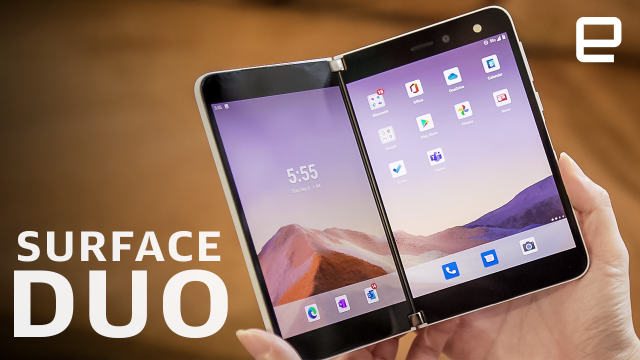
Microsoft's Surface Duo is the first phone we've seen from the company in a while, and it's a strange device. Sleek and stylish, the Surface Duo looks like nothing so much as two phones stuck together, folding with a visible hinge down the middle, and that's essentially how it feels. The seam makes the Duo questionable as a tablet - most apps that span both screens don't format properly or have gaps - but the Duo makes using two apps at once a breeze. Tasks like emailing while updating your calendar, watching video while scrolling twitter, or making a video call while taking notes make you wonder how you ever managed with a single screen. And then the software glitches out and makes you wonder what's even the point. Unfortunately, the Duo is still pretty buggy, and needs a lot of work to fulfill it's dual-screen promise, but it's a look at a foldable phone that doesn't just feel like a gimmick.
Video Transcript
[MUSIC PLAYING]
CHERLYNN LOW: A new class of devices is rising, a type of device that wants to be both a phone and a tablet. The Surface Duo is one of the more exciting attempts to straddle that divide.
Instead of going for a foldable screen, like Samsung, Motorola, or Huawei, Microsoft simply connected two screens together. That makes sense, given the company's experience with surface tablets and their hinges. Plus, since the Duo can rotate 360 degrees, it offers a few more orientations, or what Microsoft likes to call "postures" then the Galaxy Z Fold 2.
But software has always been Microsoft's Achilles' heel on the mobile front, so for the Surface Duo it teamed up with Google to offer a version of Android 10. These two giants collaborating could succeed where other dual-screen phones have failed before, and the early results seem promising.
[MUSIC PLAYING]
Whether it's open or shut, the Surface Duo is impressively thin, unlike the Galaxy Z Fold 2 or older dual-screen phones, like the ZTE Axon M. It's 9.9 millimeters, or about 0.38 inches thick when closed, and 4.8 millimeters wide open. While the Z Fold 2 is almost twice that.
At 250 grams, or 8.8 ounces, the Duo is also light enough to hold for long gaming or reading sessions, and a hair lighter than the 282-gram Z Fold 2.
On the Duo's right edge sits power and volume buttons, as well as a fingerprint sensor, and slightly off center on the bottom is the USB-C charging port. When closed, you'll see the silver Microsoft logo on one side of the Duo's glossy, white cover, which pairs nicely with the silver hinge.
I love the clean, minimal aesthetic. Although, the device does get smudged up pretty easily. Thankfully, it's gorilla glass coating is more resistant to scratches and survived a couple of falls from my couch without a mark.
The Duo's hinge is sturdy, but it moves effortlessly, like a knife through softened butter. It also rotates a complete 360 degrees, while Samsung's foldable, for obvious reasons, can only open up to 180 degrees flat. That freedom to open all the way allows the Surface Duo to be set up in a variety of modes, like tent and laptop. But you can also flip it so that both screens are facing outside, so you've essentially got a pretty wide phone.
The Surface Duo experience differs greatly across all its postures. As a smartphone, it is decent. Each of its 5.6 inch AMOLED screens has a 4:3 aspect ratio and requires two hands to maneuver. The Full HD-ish resolution delivered crisp text and images, and I was impressed by how sharp and colorful the vibrant music video for Blackpink's "How You Like That" looked.
I wasn't sure the solo 11-megapixel camera, both in right display, would take good photos. Images looked slightly cloudy as I framed them up, but when I view the shots after, they were surprisingly clear and rich.
While image quality may be similar to most smartphones, the Duo's single-camera setup takes some getting used to. Because this one sensor will serve as both your regular and selfie shooters, Microsoft had to build software that detects which direction you're pointing the phone. Then it will enable the corresponding screen.
When I first started using the Duo, this was insanely finicky. My selfie-taking attempts were thwarted, because I could never get the screen with the camera facing me to stay on. After a software update on September 5th, this became much more reliable, but it's still quite slow. Honestly, if you're trying to capture fleeting moments, you might miss most of them with the Duo.
First, you had to take out the Duo and turn on the camera, which can take a while if you don't already have the screens facing outwards. Then you'll have to wait for the software to figure out which display to activate and hope it's right. I always had to futz around for at least five seconds before I could snap a picture, by which point, you're smiling baby or prancing pup may have already stopped what they were doing. This is one of the things about the Duo that requires some learning and a lot of patience.
For those with smaller hands like me, you'll also have to adjust to the fact that the Duo needs two hands for typing. Surprisingly, it's actually easier to use with one hand when opened up, since the SwiftKey keyboard shifts towards the screen's edge, so the letters are easier to reach. I generally prefer Google's Gboard for its better swipe typing and predictions, but only Microsoft's SwiftKey adapts to the different postures right now.
I see why Microsoft hesitates to call the Duo a phone, because it doesn't really feel like it's engineered to be that. Although if you want to, you can still make and take calls. It looks a little odd, but the Duo isn't so why that I can't hold it up to my ear with one hand. And it's only slightly broader than the Galaxy Mega from 2013.
Someone on Twitter said they made their own version of the Duo or Z Fold 2 by sticking two smartphones together with tape. Frankly, that's the best way to think of the Duo, a pair of connected phones. The hinge between the two screens is minimal, but it still creates separation. This is bad for doing things in tablet mode, but it's perfectly fine when running apps side-by-side. This book-like configuration is the perfect posture for multitasking.
I went on a solitary binge on the right screen, which I used most of the time, and relegated the left side to things I didn't need to actively engage in, like Twitter. But I also had a YouTube video going on the left and Google Keep on the right to note timestamps of important moments. Or went through a list of shows leaving Netflix on one screen, while adding them to my watch list on the other. Artists could have a reference photo on the left, while drawing with the Surface Pen on the right.
There is a lot you could do with the dual-screen setup, and it gets even more useful with a drag-and-drop feature. Pull up a recipe, and copy its ingredients to a shopping list on the other screen, for example. Drag-and-drop currently only works with Microsoft tools like Word, To Do, Edge, and PowerPoint though. Developers need to set their apps as targets before you can pull from or paste into them.
One of the features Microsoft promised was that links you clicked in apps or browsers would open on the other screen if it was empty. While that sort of worked in Edge, only if you select the open in other window option when you long-pressed the links, it didn't in Instagram's [? internet ?] browser. That's not a huge deal, but it does seem like developers also need to tweak their codes to better support this.
My biggest trouble with running apps simultaneously was when trying to move them between screens. You can launch an app from the display where you want it, but when you want to move it to the other side, you'll have to flick up from the bottom to find the handle, then hold down on that bar until the device vibrates, before carefully dragging it over. The gesture itself is easy enough to learn, but the problem was the finicky software. A software update improved the overall reliability, but before that, apps would disappear when I tried to move them or expand them.
In fact, a lot of the Duo software is buggy, but Microsoft said it plans to roll out updates for the Duo every month. So hopefully, the most glaring issues will get fixed soon enough. But there are some things that might not change.
For example, the notification shade here is the same size as on a regular smartphone, so on a screen that's as wide as a Duo's, it feels very narrow. A Microsoft spokesperson told me that they were aware of this, but kept the width so as not to fork Android. And it doesn't sound like that will be changing anytime soon.
Another issue with the notifications panel, when you have it down, you won't be able to use either screen. So if you slide it down to see your alerts on the left display, you won't be able to type a reply on a messaging app on the right until you dismiss the panel. This is another one of those things that Microsoft didn't change, because again, it didn't want to fork Android.
Two things to note when using the Duo in this half-folded setup, you'll mostly want to stick to portrait orientation. In landscape, where the device is more like a mini laptop, the software doesn't quite know how to make use of the screen space.
When I tried to log into Google Drive on the bottom screen, while a video was playing up top, the keyboard appeared and took over the entire bottom display. So I couldn't see what I was typing, which turned out to be nothing, despite me having definitely pressed the letters. If you're using the Duo's screens in landscape, you'll want to save the bottom half for the keyboard instead of running two apps at once.
Though I also had an issue with Telegram jumping to the lower display after I was done replying a message and dismissed the keyboard. Again, this is something that could be fixed by a software update.
What can't be fixed though is the Duo's speaker. It sits behind the left display, so if you're watching a video on the right, it can be slightly jarring. It's a relatively minor issue though. Just make sure if you want to open a video in this setup, keep it on the left panel.
My favorite way to use the Duo was actually to fold it halfway with both panels facing out for a more traditional tent mode. But instead of propping the device up on its edges, I laid down one of the displays face-down with the other looking at me. This turned the Duo into a mini second screen, so I could use it to keep an eye on a YouTube chat during a livestream or play hours of solitaire.
This is something the Z Fold 2 can't do, since it can't bend outwards. But Samsung's advantage over Microsoft is as a tablet. The Z Fold 2 may have a slight crease running down its face, sure, but the Surface Duo's hinge straight up eats content. When you run an app across the Duo's combined 8.1 inch screen in what Microsoft calls "span," words and pictures get broken up and lost.
I missed parts of my friend's tweets and messages, as well as articles I was reading full screen. Although, the Kindle app was optimized to avoid this issue. Android apps also continued to be lousy at making use of a bigger screen, with Instagram being the classic example of simply morphing into a stretched out phone app.
Though there are lots of kinks that Microsoft has to iron out, I am happy to report that when things worked, the Duo ran smoothly. The Snapdragon 855 processor and 6 gigs of RAM was enough for multitasking in all the different modes. There is some lag when switching between apps or sending something to a different screen, but that feels more like a software struggle than a slow processor. I was concerned that the Duo has a tendency to run more, even when it wasn't doing much, like opening an app or two, but it never got searingly hot.
For a device that's basically two phones, the Duo's battery life is impressive. It generally hung around for a full day after being unplugged the night before. Our regular battery test assumes a single display, so I had to modify it slightly. I ran a looping video on one screen, while displaying the Android home screen on the other, and clocked 10 hours and 32 minutes. Obviously, your results may vary if you use both screens more intensively.
It's best not to think of the Surface Duo as a phone or a tablet. It's adequate as the former and pretty bad is the latter. It is, however, fantastic as two phones stuck together, like a laptop with an external monitor. While there are plenty of bugs and software troubles, that's not surprising when Microsoft is basically trying to invent a new hardware category. And so far at least, the company has been pretty good about delivering fixes and updates, but that's not guaranteed to last. And not everyone will feel confident in splurging $1,399 on a promise and some potential.
For in-depth coverage on all of the dual-screen phones and foldables and laptops, tablets, wearables, what have you, in the world of consumer technology, make sure you subscribe to Engadget. And as always, thank you for watching.
[MUSIC PLAYING]