How to make your dumb home smarter without spending a fortune

If you go all out connecting your house, you can end up spending as much upgrading a smart home as it costs to build a dumb one. But you don't need a ton of proprietary gear to pimp your crib with 21st-century tech. Your smartphone and tablet already serve to consolidate your digital life, and they can do the same with your lights, power outlets, air conditioning and nanny cam -- even your door locks and Crock-Pot can be app-controlled, if you so please. Join us below to explore affordable options for your entire home, all of which can be installed yourself.


Amazon's a great place to start. The e-tailer stocks dozens of different USB-equipped receptacles. Pay very close attention to the USB port amperage -- the product name may include the total output, including the standard power outlets, but you'll want USB ports that support at least two amps in order to charge larger gadgets, such as tablets and cameras, more quickly. Leviton's outlets are available both online and at brick-and-mortar retailers for about $25, but regardless of which manufacturer you pick, opt for a receptacle with two USB ports and two standard outlets, so you don't end up with fewer slots to use with traditional gear.
[Photo credit: Amazon]

Making changes to your home's electrical system may sound intimidating, but assuming your wall box can accommodate the slightly larger footprint of a USB-equipped receptacle, it takes five minutes or less to make the swap. You don't need to replace every outlet in your house, but even if that's what you want to do, you should be able to accomplish the task in a single day.
[Photo credit: Aol]

If you'd prefer to avoid swapping out a power outlet, you can opt for a device that sits on top of your existing outlet, instead. Amazon sells a variety of wall plates with USB ports built-in, and while that solution isn't quite as elegant, it's very easy to install.
[Photo credit: XTG Technology]


Logitech's Harmony Smart Control is available on Amazon and at BestBuy.com for just under $130. It's also currently in stock at many Best Buy retail locations.
[Photo credit: Logitech]

Even though you don't need to screw anything into the wall here, setting up this Harmony rig can require a fair amount of patience. You'll need to complete the process using an Apple or Windows laptop, which involves adding in each device and setting up macros to automatically turn on your gear and select inputs for certain activities, such as watching a Blu-ray movie or regular TV. Budget at least an hour to get up and running.
[Photo credit: Logitech]


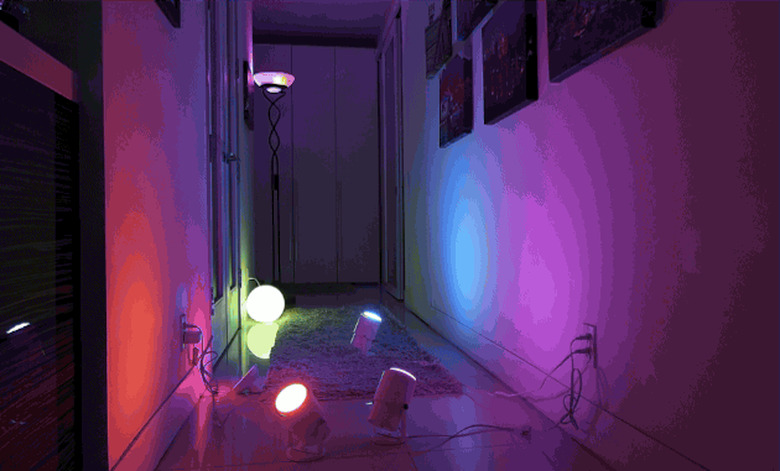
The Philips Hue Starter Pack, which includes three standard bulbs and the mandatory wireless bridge (you only need one per home) will run you $200. It's available at a wide variety of retailers, such as Staples and the Apple Store, or online at Amazon, where you can also order individual standard bulbs ($60), flood lights ($60), Lightstrips ($90) and Bloom ($80).
[Photo credit: Philips]

Hue is more expensive than some of its simpler counterparts, but Philips' product comes along with a developed ecosystem, enabling seamless integration and control with other smart home products. You could spend thousands of dollars swapping out all of your light bulbs, but if you're willing to get up and running with just three at first, the $200 kit is a reasonable purchase. Other connected options include Belkin's WeMo switches and outlets, or Emberlight, which is currently available for pre-order on Kickstarter -- both products let you turn bulbs on and off and set up macros and timers, but they don't support color control.
[Photo credit: Belkin]


There's no shortage of places to acquire Nest. Regardless of which retailer you choose, you'll pay $249 for the latest version. It's available at home improvement stores, including Home Depot and Lowe's, big-box retailers, like Best Buy and Target, and online stores, including Amazon. And because the company is now part of Google, you can even buy one through Play.
[Photo credit: Quirky]

According to Nest, three out of four customers install the thermostat in 30 minutes or less. But first you need to make sure your system is compatible using the compatibility checker on Nest's site. If you're good to go there, you should be able to get up and running quickly. Nest's handy installation video makes it easy to get the wires hooked up, at which point you'll be able to connect the thermostat to your WiFi network.
[Photo credit: Nest]

Honeywell is another big name in this space, with several WiFi and Z-Wave thermostats available that can connect directly to your smartphone or other smart home products. The company's new Lyric device was created to compete directly with Nest -- it has similar functionality and a familiar design, though it's a bit pricier at $279.
[Photo credit: Honeywell]


Crock-Pot's WeMo-enabled slow cooker ships beginning August 1st for $130. Amazon has confirmed that it will have the device in stock, but it's not yet clear which retailers will offer it in-store. LG's WiFi fridge can be ordered on Best Buy's site for $2,500, while Samsung's equivalent is available for the same price. The WiFi washers are a bit tougher to come by, but they're available through smaller distributers for about $1,400 each.
[Photo credit: LG]
Wireless appliances are a bit gimmicky at this point. Sure, it would be nice to get a push notification when your laundry is done, but it's easy enough to listen for the chime or drop by to check the display. Having WeMo in a coffee maker would be convenient, since you'll be able to set a timer in advance or start a brew from bed. You could also accomplish the same with a Belkin WeMo switch, though, which you can buy now for about 50 bucks.
[Photo credit: Belkin]

You can absolutely count on your pet to take your connected home for granted, but that's ultimately what you want -- technology that makes life easier without getting in the way. And fortunately for cats and dogs (or unfortunately, depending on how much they enjoy interacting with you), a handful of smart pet products will help you automate their lives, too. I swear by ScoopFree's self-cleaning litter box, which does a good job containing my cat's waste and only requires a thorough cleaning every few weeks. There are also several automatic feeders to choose from, which dispense kibble according to a pre-programed schedule, to mixed reviews from pet owners.
[Photo credit: SEBASTIEN BOZON/AFP/Getty Images]

An automated litter box doesn't come cheap, at $160 with an optional plastic hood (you're going to want the hood) plus $15 for each disposable litter tray, which lasts up to a month depending on your cat's size and diet (basically, how much he or she poops). Automatic pet feeders run about $50 each, depending on the model and capacity. All of these devices are available on Amazon's website or at select pet stores.
[Photo credit: Amazon.com]

The litter box is a pleasure to set up the first time. It takes only a few minutes to unpack and assemble, and it's a lot of fun to watch your pet discover their new toy. After the first month, though, things can get pretty gross, and after a year or two of use, you'll want to throw the entire unit away and start fresh. For feeders, it depends on the model you choose, but you can count on creating a schedule using a tiny display to be just as much fun as programming a VCR.
[Photo credit: Getty / Vstock LLC]

I'm going to go out on a limb here and say that you should probably just scoop the poop and fill the kibble bowl yourself. Caring for a pet isn't tremendously time consuming. If you travel frequently and need to leave your cat behind for a few days (with friends checking in!), then an automated litter box is an acceptable addition, but pets and electricity generally shouldn't mix, so keeping technology away from your furry friends isn't such a bad idea.
[Image credit: Getty]

If you're planning to buy a keyless deadbolt or lever lock, it makes sense to spend a few extra bucks and get a connected version that interfaces with other Z-Wave devices. Kwikset and Schlage are the most trusted names here, with each lock costing about $200. You can pick one up at home improvement stores today, or place an order at many e-tailers, including Amazon.com.
[Photo credit: Schlage]

If you're concerned about securing your home, it may make sense to pair a connected lock with a traditional deadbolt. This renders the Z-Wave lock useless for access control, but you can lock the deadbolt only on extended trips. Alternatively, you could hide the deadbolt key nearby, and tell your guests where to find it -- it's like two-factor authentication for your house.
[Photo credit: Hide-a-Key]


Dropcam is probably the biggest name in the connected camera space. That company's basic WiFi camera is available from retailers and websites for about $150, while Dropcam Pro, which adds better optics and an improved field of view, will run you $200. Piper (also $200, available at getpiper.com) is another solid option. This all-in-one device adds integrated motion and environmental sensors, and it works seamlessly with some other Z-Wave accessories, such as outlets and door sensors.
[Photo credit: Dropcam]

Again, depending on your ability to secure your network and web experience, the safer option here may be to avoid adding a WiFi camera altogether. And if you do install one in your home, make sure sensitive areas like bedrooms and bathrooms are not within the field of view. Also, keep in mind that even if your camera is currently secured, it may be recording your movements, and accidents do happen. It's best to keep sensitive footage far away from the cloud.
[Photo credit: Alamy]

With the exception of USB power outlets and pet appliances, which don't connect to the web, adding WiFi devices to your home does create an opportunity for hackers. Depending on the level of integration and your sensibility when it comes to choosing passwords, someone could gain complete access to your home if they get their hands on your login info. That means unlocking doors, watching live footage, and even turning up the heat, powering on lights and activating appliances. In other words, a very expensive mess that could even end up injuring a pet stuck at home.
That's a worst case scenario, of course, and if you take care when it comes to securing your login credentials, you should be in the clear. Since account information stored on a server under someone else's control (like your email or credit card credentials) may be vulnerable, select a unique login for accessing your home, with a password that you haven't used anywhere else ever before. And avoid emailing it to family members and friends -- you can create a unique code that they can use to unlock a door, so there's no need to share your login at all.
[Photo credit: Getty / Moment Editorial]