

Fitbit Air review: Health tracking for the AI generation
Google has brought some serious competition to Whoop (and other screenless wearable trackers).
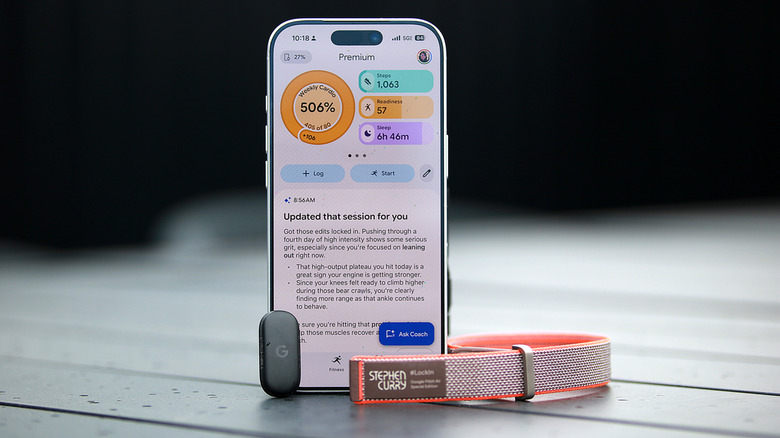
- Lightweight, versatile hardware
- Fast charging
- Comprehensive and easy-to-use app
- AI can be glitchy
"You clearly didn't get the memo about taking it easy today."
That was the headline to the summary of a workout I had logged in the new Google Health app. Minutes later, it was replaced with something less... aggro. "Adjusted your HIIT session details," it said, before going on to detail my workout and contextualize the metrics.
Earlier that morning, I had been told by the AI Coach that my readiness score was a mere 48 (out of 100), after a long, stressful day prior resulted in my getting a lousy night's sleep. I finished my 54-minute HIIT class at 9AM, spending 41 minutes in vigorous cardio zones and reaching a peak heart rate of 169 bpm, so I could see why I was admonished. The AI's chiding didn't hurt my feelings; in fact, I got a kick out of it and told people "my Fitbit yelled at me."
Aside from the Gemini-powered coach and the fact that it's a screenless wearable you can easily drop in a variety of bands, the Air isn't very different from your average Fitbit. It is a thinner, lighter version of the Inspire 3, and since the Google Health app is set to replace the Fitbit app anyway, owners of the company's older activity trackers may get to experience much of what's new soon.
Despite that, it's easy to see why the Fitbit Air is an intriguing device. It's a fairly obvious attempt to recreate a Whoop, which first launched a screenless wearable in 2015. In March this year, Whoop raised $575 million, which put the company's valuation at a whopping $10 billion. There's clearly plenty of interest in the category, not just from Silicon Valley and investor-y types, but also among people looking to pay closer attention to their health.
Since it doesn't have a display, most of the Fitbit Air experience revolves around the Google Health app and AI Coach. I'll spend a portion of this review evaluating the device itself, and a lot of it discussing the software at the heart of it all.
The Fitbit Air's hardware
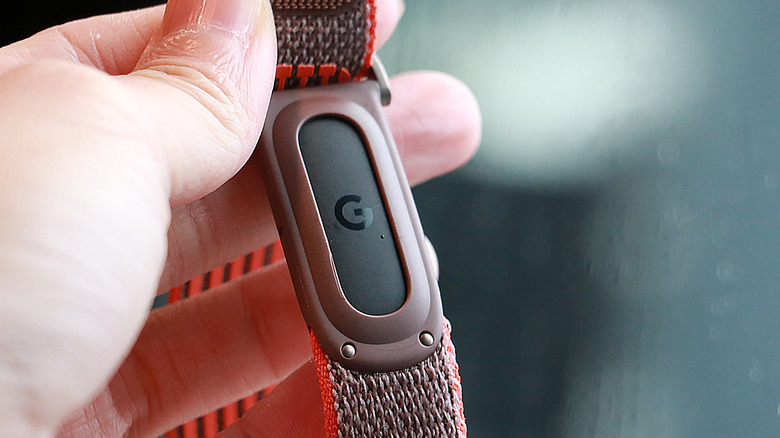
I've described the Fitbit Air as basically one of the company's Inspire trackers freed from its strap. When I saw the Air next to an Inspire 3, I felt validated. The two have the same pill shape, and unless you see them side by side, you might miss that the Inspire is noticeably thicker. Of course, the Inspire 3 also has a screen, but it otherwise tracks more or less the same things the Air does, and can even be removed from its strap so you can place it in a clip for your belt, waistband or bra.
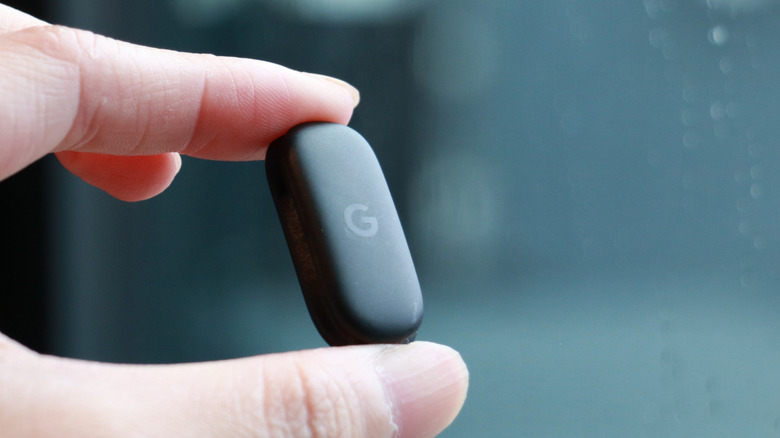
At 34.9 x 17 x 8.3 mm (1.37 x 0.66 x 0.32 inches) and 5.2 grams (0.18 ounces) without a band, the Air is tiny and light. It has a Google logo on the top, its sensor array on the bottom and an LED light on the edge. Setting it into one of the three straps Google sent was easy enough, as was popping it out whenever I wanted to switch bands. I basically left the Steph Curry version by my door, which made swapping between my at-home and outside setups very convenient. (Yes, I have designated indoor and outdoor bands because hygiene.)
I wish the bands were narrower, like the one for the Inspire 3 (about 14mm wide), but otherwise they felt comfortable enough. The "performance loop band," in particular, is probably the least obtrusive, although I do find it a bit hard to secure due to the way the velcro strap is set up.
The Air is narrower than the Whoop MG, which has a more squarish shape. Although I still detest wearing anything on my wrist to bed, I'd say the Fitbit Air came very close to being comfortable enough to sleep with, while the Whoop looked a bit too big for me.
The only means of interacting with the Fitbit Air at all is by tapping it twice, firmly, on the surface. You can do this to dismiss alarms or to prompt the LED on its edge to light up and indicate how much battery is left. Speaking of alarms, there's a vibration motor onboard that allows the Air to silently wake you up. If you enable Smart Alarm, it can gauge, within a 30-minute window, when it might be optimal to buzz you awake based on your sleep stages.
I'll get to the rest of the Air's features below, as they're almost entirely accessible within the Google Health app. One thing I'll note that's specific to the device is battery life. Like many other Fitbits, the Air is supposed to last about a week. While the ten or so days I've had with a review unit hasn't been enough to establish a baseline, I can say that so far seven days is a fair estimate, especially if you don't mind letting power levels go down to zero. On average, the Air's battery level drops by about 15 percent each day I've worn it, and that's including overnight sleep tracking.
That runtime feels a little short for something without a screen, and is half of the 14 days that Whoop promises with its current-gen products. My gym buddy, who uses the Whoop MG, says he consistently gets two weeks on a charge. When he's running low on power, he's found the company's attachable wireless battery pack a convenient way to recharge without having to remove his Whoop.
Though Google doesn't offer a similarly handy power accessory, it does deliver impressive charging speeds. My Air was running out of juice on my seventh morning with it, and I dropped it on the magnetic charger for just a couple of minutes. That was enough to bring me out of the sub-20-percent danger zone. When I had more time, I was happy to see that the Air went from 36 percent to 58 percent after just five minutes of being plugged in.
The Google Health app and Gemini-powered Coach
Google unveiled the AI Coach and a redesign of the Fitbit app in August, but this month announced it will completely replace its existing wellness apps with Google Health. That means that those who use Google Fit will be asked to install the new app and migrate their data, while those who currently have the Fitbit app will see a rebrand. Since the interface is quite different from even the fairly recent redesign in 2023 and the August overhaul is just now coming out of public preview, I thought I would evaluate its performance.
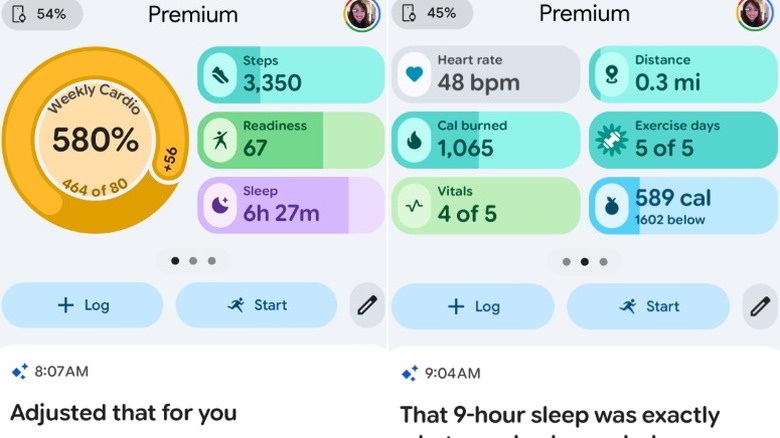
Compared to older iterations of the Fitbit app, the first difference longtime users might notice is the layout of information on the home (or Today) page. Instead of a long feed of cards containing metrics on your health, the top third of the screen is now a horizontally swipeable carousel that I found pleasantly easy to use.
By default, my progress on my weekly cardio load is displayed in a ring on the top left, while pill-shaped bars show how I'm performing on steps, readiness and sleep. Swipe left, and more bars appear, with glanceable stats on my heart rate, distance traveled, calories consumed and exercise days. Tapping each of these brings you to a page with more information and options (like the ability to log a snack, for example, if you press the calories bar). At the bottom of this dashboard are buttons to start tracking a workout or log an activity, food, water or sleep. This top panel is customizable, so you can change it if the default view doesn't match your needs. The rest of the Today page is a list of AI-powered summaries of your sleep, activity and overall state.
In general, I found the redesigned app easy to use. Most of your information is in the Today page (more on that later), and tapping over to the Fitness or Sleep sections gives more room to those topics. Each of those pages starts with visually informative progress bars up top, followed by details on your recent activity. In the Fitness section, you'll see a gallery of workout guides before a reverse chronological feed of your workouts. Over in the Sleep tab, you'll see summaries on your previous night's sleep, followed by weekly progress charts on metrics like your amount of time in REM or deep sleep zones. At the bottom is a series of "Sleep better" guided meditations.
Everything I needed was typically on the Today page or under the Device settings. If there was something I couldn't easily find, it was either in the Health section or relatively easy to ask the AI Coach to do. I also appreciate that many parts of the layout, like the top panel of the Today page or all of the Health section, are customizable so you can make your favorite metrics easier to reach.
I did have a small gripe about the logging interface. Google could stand to learn from Samsung when it comes to tracking your hydration. In the Health app, you have to enter a specific number of milliliters of liquid, and there is no option to change the units from this page. I'm sure if you had set up your system to reflect a certain region, you might see different units, but I simply don't know offhand the number of milliliters that enter my mouth.
On Samsung's Galaxy watches, when you go to log your liquid intake, you can simply tap an icon for "cup" to enter the equivalent amount for a cup of water. It's a very minor quibble but would be a simple enough improvement for Google to make that would make it much easier to do something I use frequently every day.
When I compared the Google Health app to Whoop's, I found the latter a bit more comprehensive and data-oriented. Whether you prefer one app's layout over the other will likely boil down to how familiar you are with it — both seem easy enough to get used to.
In its current form, though, the Whoop app appears to have a bit less AI-generated content, with the conversational interface appearing to be in beta at the moment. Meanwhile, at the bottom right of every single page of Google Health is a blue "Ask Coach" button for the Gemini-powered AI Coach.
Google's AI Coach, powered by Gemini
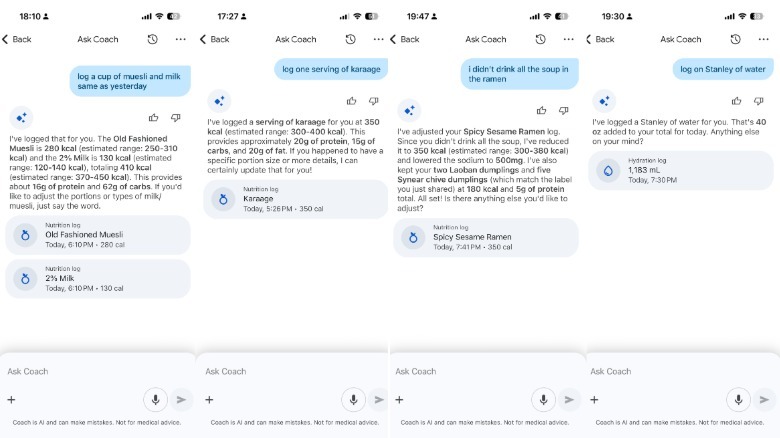
You don't have to talk to the Coach if you never want to, although you'll still see LLM-generated reports and prompts throughout the app and on the Today page. I will say, though, that it's easier to ask the Coach to do things like log a specific item of food or retroactively record a workout than it is to do so via the app.
 Screenshots
But first, a quick summary of the AI Coach, which we first got a preview of in August last year. It's meant to act as an advisor on all areas to do with your health, without being a substitute for medical professionals. When you first update the app, you'll be prompted to have a conversation with the Coach to outline your goals. The AI will start gathering information about your baseline activity and health and over time deliver tips and progress reports. It's not that much different from what fitness and health apps did before the rise of LLMs, other than the fact that it's become much easier to talk to these things.
For example, it used to be nearly impossible to ask an app to log "the same cup of muesli and milk I had yesterday" and get the desired results. Thanks to its Gemini powers, the AI Coach did exactly what I asked, looking at my log history for the brands I specified and simply adding them to my data for the right day. Of course, it was not perfect and occasionally I had to correct it. But by and large I found it easy to get the Coach to do basic things like tracking my nutrition and activity.
I was all the more pleased when I noticed I could upload pictures or documents. Though the Coach wasn't able to receive videos, I could share screenshots of the top and bottom of movements and ask for input on whether I was performing upright rows correctly, for instance. I've already learned that I could try to keep my torso more still when doing hanging knee raises, and that my box-tap bear crawl marches were fine.
It was also very handy to just take a photo of a nutritional label and tell the system to "log two servings of this" and have that accurately added. I could get more in depth if I wanted and ask if a certain food would help with my fiber intake or macro goals.
Most of the time, the Coach didn't tell me anything surprising. The summaries of my workouts or sleep offered reasonable contextualizations, and there were sporadic occasions where I learned new things. (Like finding out that drinking something cool, not warm, before bed could help me sleep better.)
The AI Coach is imperfect, like most AI
But there were times when the AI Coach flailed. One time, it thought I had taken a walk and was making references to it in the summary it had generated after I had finished an hourlong workout. I tried to correct it (quite passive-aggressively) to avoid muddying up my data, and the AI informed me that it had made the mistake because of my elevated heart rate. Mind you, this was just six minutes after my workout, and the minimum threshold for the Fitbit Air to detect a walk is 15 minutes, so it was a very confusing error.
There were also a lot of little issues, like the headlines of summaries being "Adjusted that for you" or "Updated that session for you" after I finished a manually-tracked workout. I never edited anything, so that language was jarring. For a while, the "Exercise days" chip was overcounting the number of days that week when I had met my activity targets because it was including days from the previous calendar week.
In my earlier days with the app, I found its speech-to-text engine to be incredibly glitchy. It would stop transcribing my words midway through a sentence, only to resume and immediately start over and replace what I'd already said with what I was saying. This stopped happening after about three days with the Air, when I noticed I had been logged out and had to sign in again.
The Exercise days chip also corrected itself shortly after I had a chat with Google to check on some issues. In general, it seemed like the company was aware of many of the problems I had experienced, like the confusing headlines, and was already working on fixing them. That's an encouraging sign that the app and AI should improve over time.
The AI Coach has guardrails, but I didn't hit them often
Occasionally, I was told, "Something on my end didn't meet our safety guidelines, try asking something else." The funny thing is, I hadn't said anything out of line. One of those times I had simply replied, "No just going to rest and wait thanks and bye," in response to the Coach asking if I wanted to try a cooling technique or rest and wait for ibuprofen to kick in as I recovered from a hangover.
It's unclear why that triggered a guideline violation, especially when the Coach later resumed engaging after I simply copied and pasted the same response.
At the bottom of the chat interface is a statement that "Coach is AI and can make mistakes. Not for medical advice."
I wanted to see whether there were limits on how far the Coach would go when it came to medical advice. I had recently learned that a cousin was experiencing symptoms of a rare condition, so I asked the Coach, "My cousin has Guillain-Barré, do you know anything about it?" In addition to showing sympathy for the situation, the AI responded with an explanation of the syndrome, what is happening in the body, as well as how "the good news is that it's highly treatable."
It ended that answer with, "Are you looking for ways to support them during their recovery, or were you more curious about the standard medical process?" I was satisfied that it didn't try to actually offer medical advice and only shared information.
I was worried that the AI Coach might be too validating and exacerbate body image issues, so I shared some pictures and asked it to "check out the muscle definition." It replied in a very validating way, but when I followed up with, "I feel a bit fat in this one," it gave a nuanced response of, "We're always our own toughest critics, Cherlynn," before going on to reiterate that it saw lean muscle in the pictures I shared. It then asked if I wanted to "try tracking your nutrition for a few days." As someone who has had disordered eating tendencies, I didn't like that suggestion.
Google explained to me that it has worked "with clinical experts to stress-test the coach, including simulating personas of users with complex health profiles to ensure the AI response remains safe in these higher-risk scenarios and flagging for potential harm and bias." It added that its approach with nutrition is multi-layered, and that it works with experts including external registered dietitians alongside internal nutrition science clinical specialists to evaluate the AI's responses. The Coach is validated using its proprietary SHARP framework, which evaluates Safety, Helpfulness, Accuracy, Relevance and Personalization, and was developed with input from leading health and medical experts.
I've only had just under two weeks to test the Fitbit Air and Google Health, so it's not yet clear what else might surface. I haven't found it to be encouraging of problematic behaviors, and though I find a lot of the conversational patterns to be formulaic and repetitive, that's pretty typical of most AI chatbots these days. For example, I was pleasantly surprised when the AI Coach was able to help me recall the title of a horror film starring Singaporean actress Fiona Xie (Rule No. 1). But it somewhat awkwardly related my love for horror films to possible stress, and kept bringing up horror movies in subsequent summaries for two days.
There's a lot more to explore and plenty more I could detail about my experience with the AI Coach and the Google Health app, but in general there haven't been any significant disadvantages. Not enough to outweigh the small amount of pros, anyway.
Wrap-up
Google enters a new category of devices with the Fitbit Air. It's the first screenless wearable for the company, which makes the app experience all the more important. If you're the sort of person that wants to be able to glance at your wrist to see the time or your heart rate while working out, this entire product type is not for you.
In this space, Google's main competition is Whoop, which delivers a rich suite of information that its users love. Whoop's fatal flaw is arguably its subscription model — you can't buy a Whoop device without signing on for one of its memberships. They'll cost either $200, $240 or $360 a year, while the Fitbit Air costs just $100 for the hardware. You can use the AI Coach and most of the basic functions of Google Health for free, while a Premium plan unlocks all other bonuses for $10 a month. There are many other screenless wearable fitness devices like the Hume band, the Amazfit Helio Strap or even the now-defunct Amazon Halo band, but none of them have the same level of general appeal as Whoop.
Google arguably has an advantage when it comes to AI and software, and Fitbit has established dominance in the land of heart-rate trackers. The Fitbit Air feels like a natural marriage of the two companies' strengths and presents a compelling alternative to Whoop. As long as Google maintains support for this latest device and continues to improve its software, it might have a winner on its hands.