

iPhone 18 Pro review: The standard setter
The yardstick that all phones, including the Duo, will be measured by.
- Excellent, versatile cameras
- Beautiful new colors
- Thoughtful photo and video features
- Siri AI is still in beta
The iPhone Duo may have hogged the limelight at last week's "Surprise and Shine" event, but it won't be available for a while. And as there was no mention of a standard iPhone 18, the iPhone 18 Pro and Pro Max became the de facto new handsets for anyone considering a "candybar" smartphone from Apple right now.
If I can bring back that somewhat retro term, I feel I can resurrect another: The "S" year. Compared to the redesign on the iPhone 17 Pro, this year's release feels iterative — reminiscent of when the company made "S" versions of iPhones that tended to deliver smaller improvements.
In addition to a tinier Dynamic Island, the iPhone 18 Pro's updates largely revolve around photography, performance and battery improvements. Oh, and of course, there are the new features coming with iOS 27, including Siri AI and that whole shebang. I've spent almost a week with the new phone and have done my best to put all these features to the test to see how they perform in the real world.
Design and display: Three is not a crowd on Dynamic Island
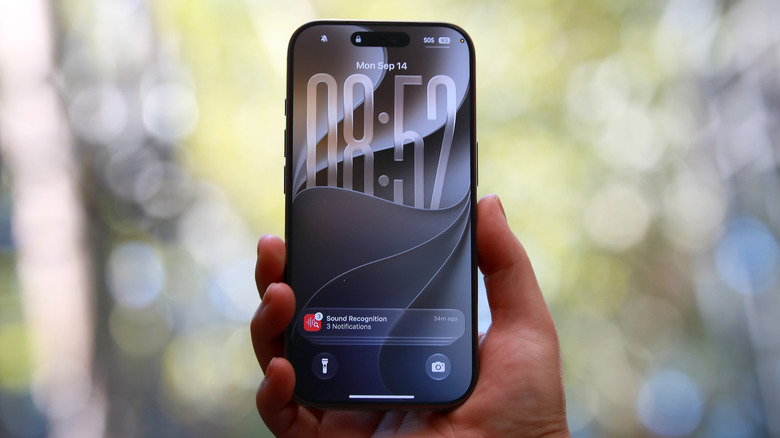
Let's start with what's most obviously new. The Dynamic Island on the iPhone 18 Pro is noticeably smaller than the one on its predecessor. Yet despite that, it's able to cram one more ongoing live activity in. Apple achieved this with some clever display engineering, which it showed us under a microscope at a demo last week. It was able to create a region of brighter pixels that would allow just enough infrared light through for Face ID to work beneath it. That way, the "cutout" that is Dynamic Island's black space doesn't have to be as big.
Meaningfully, though, it has yet to hugely improve my life. It's nice to have a shortcut for ongoing activities, and to be able to keep three up at a time. Most often, I rely on the Dynamic Island for music playback controls or to keep an eye on timers or Instagram uploads. While I don't frequently have three tasks happening at once, it is nice to know that I can quickly access or keep tabs on them whenever I do.
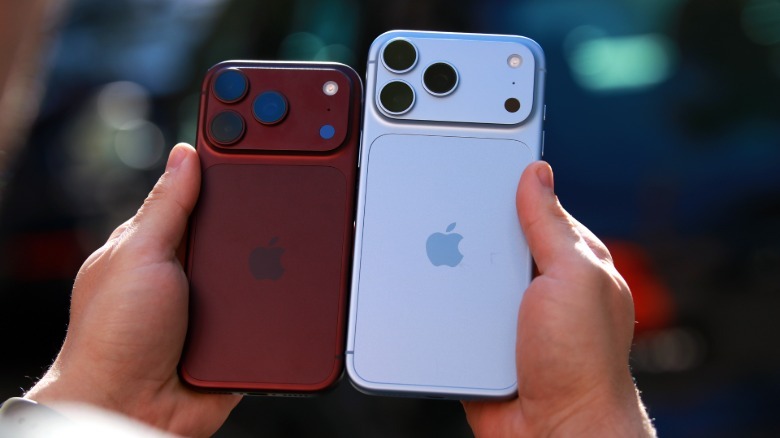
Aside from the smaller Dynamic Island and the lovely new Burgundy and Glacier color options, you'd have a hard time spotting any physical differences between the iPhone 17 Pro and 18 Pro (and their Max variants).
 Cherlynn Low for Engadget
I have to say, I adore the Burgundy and Glacier hues of my iPhone 18 Pro and Pro Max respectively. But from my experience with the burnt orange iPhone 17 Pro, it's probably worth noting that their aluminum frames are likely more prone to scratches and nicks than the titanium of the iPhone 16 Pro and older. If you're as clumsy as I am, I'm sad to say it, a case is probably your friend.
That said, the new iPhones are just as durable as their predecessors, with the same IP68 rating for dust and water resistance. Nothing much has changed here. The iPhone 18 Pro and Pro Max have the same 6.3-inch and 6.9-inch displays as their predecessors, with Ceramic Shield 2 protective glass coverings and ProMotion support for refresh rates up to 120Hz.
They also have the same triple 48-megapixel rear camera system as the previous models, though the iPhone 18 Pro and Pro Max do have variable aperture and Pro controls (which we'll get into a bit later). Even on physical dimensions, the two generations of phones are basically identical, with the new one weighing just 5 grams (0.17 ounces) more. That difference is slightly greater between the Max handsets, with the 18 Pro Max coming in at 8.78 ounces (249 grams) compared to the 8.22 ounces (233 grams) of last year's.
That little bit of added heft might be because of the slightly larger camera array on the iPhone 18 Pro series, which has moving parts to enable some of its new (and most noteworthy) features.
Camera and photography updates
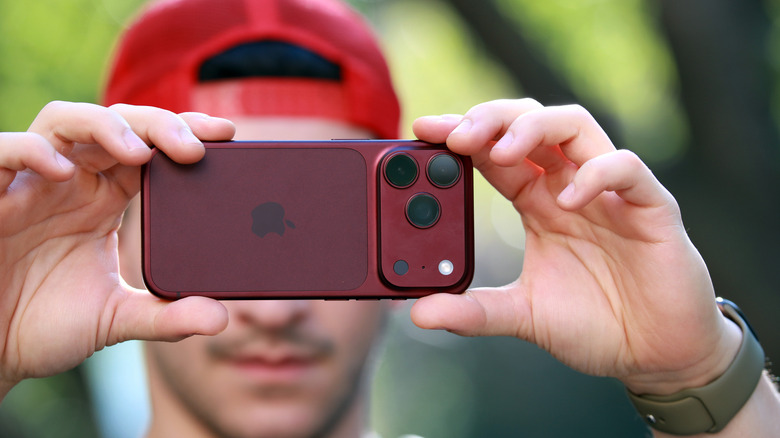
Probably the most outstanding of the iPhone 18 Pro's updates are related to its cameras. There is a bit of a laundry list here, so bear with me.
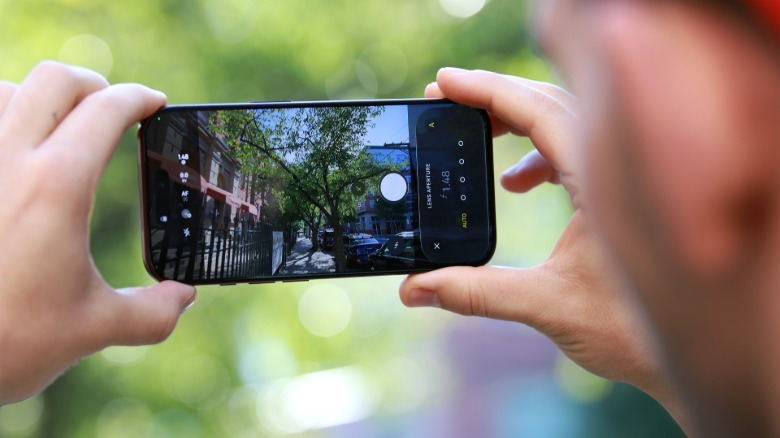
The highlight of the lot is variable aperture, which involves six blades that are controlled by a rotor mechanism to cover and expose the camera sensor. These can be controlled by the user from the Camera app, which offers four aperture settings: f/1.48, f/1.8, f/2.8 and f/4.0. Apple said last week that developers can access a more granular aperture range, so third-party photography apps may eventually have other options.
The other features I will list in order of how excited they make me: Cinematic effects on regular videos, Apple Reference Image, Photographic Styles 3 and Audio Mix for music.
In the interest of staying on topic, I'll focus this section on these new features. But before that, I'll quickly tell you that the Pro continues to have the best camera performance of any iPhone. Photos I took were bright and vibrant, and I particularly loved being able to adjust them after the fact. They still fall short of Google's Pixel series when it comes to Portrait and Night shots, but the addition of variable aperture has meaningfully narrowed the gap. That is, in my experience so far anyway.
Variable aperture's impact lies beyond point and shoot
I've long complained about the rigidity of Apple's Portrait mode, because it forces you to be a certain distance away from your subject and you can't really achieve the effect unless the phone deems you're far enough away. While Variable Aperture doesn't specifically fix Portrait mode on the iPhone 18 Pro, it does offer an alternative means to get a pleasant-looking soft focus effect.
After setting up the redesigned camera app to feature easy access to the new aperture and shutter speed settings, I tried out the iPhone 18 Pro on any subject that seemed suitable. For instance, I stood for a while in front of a plant along a hallway at the San Francisco airport, switching between all four aperture settings to see just how much of the long walkway in the background would come back into focus.
 Cherlynn Low for Engadget
As expected, the difference between shots taken at f/1.48 and f/4.0 (the current ends of the spectrum) isn't very stark. In fact, there's only a very subtle softness in the background in the f/1.48 sample, but the picture was still lovely to look at, thanks largely to the amount of light.
Before I get too far ahead, it's worth noting that by default the camera app will automatically adjust aperture settings on the fly, based on what it thinks is right for the scene. I didn't pay very much attention here, again since the difference between the four currently available levels is so subtle. Plus, upon looking back through all the pictures I took on auto, the settings were almost always at f/1.48, which seems odd in hindsight.
Things got significantly better when I paired the aperture controls with shutter speed tweaks. As most people who shoot in manual mode on any camera will know, being able to have full control over ISO, shutter speed and aperture gives you much more leeway in determining how your shots appear.
The fastest available shutter speed of 1/6000s and slowest of 1 second brings a lot more versatility to the iPhone camera app, and I was able to pair the f/1.48 aperture setting with a 1/250 second shutter speed to capture the twinkling shape of sunlight peeking through some foliage at dusk. By the way, in case you were wondering, the shape of the very subtle bokeh on display here is somewhat off-circle and almost like a wonky heart.
I also like that the manual controls allow me to finally capture lowlight shots to my exact preference. Before this, I had to choose between complete darkness, using the flash or enabling Night mode, which frequently makes scenes seem lighter than they really were. With a fast shutter speed and larger aperture, I was able to make a single light bulb look clear and stark against the white wall it was in front of, without the flare obscuring the filament inside. As a bonus, you can control these settings for video as well, though you'll have to set them before hitting record.
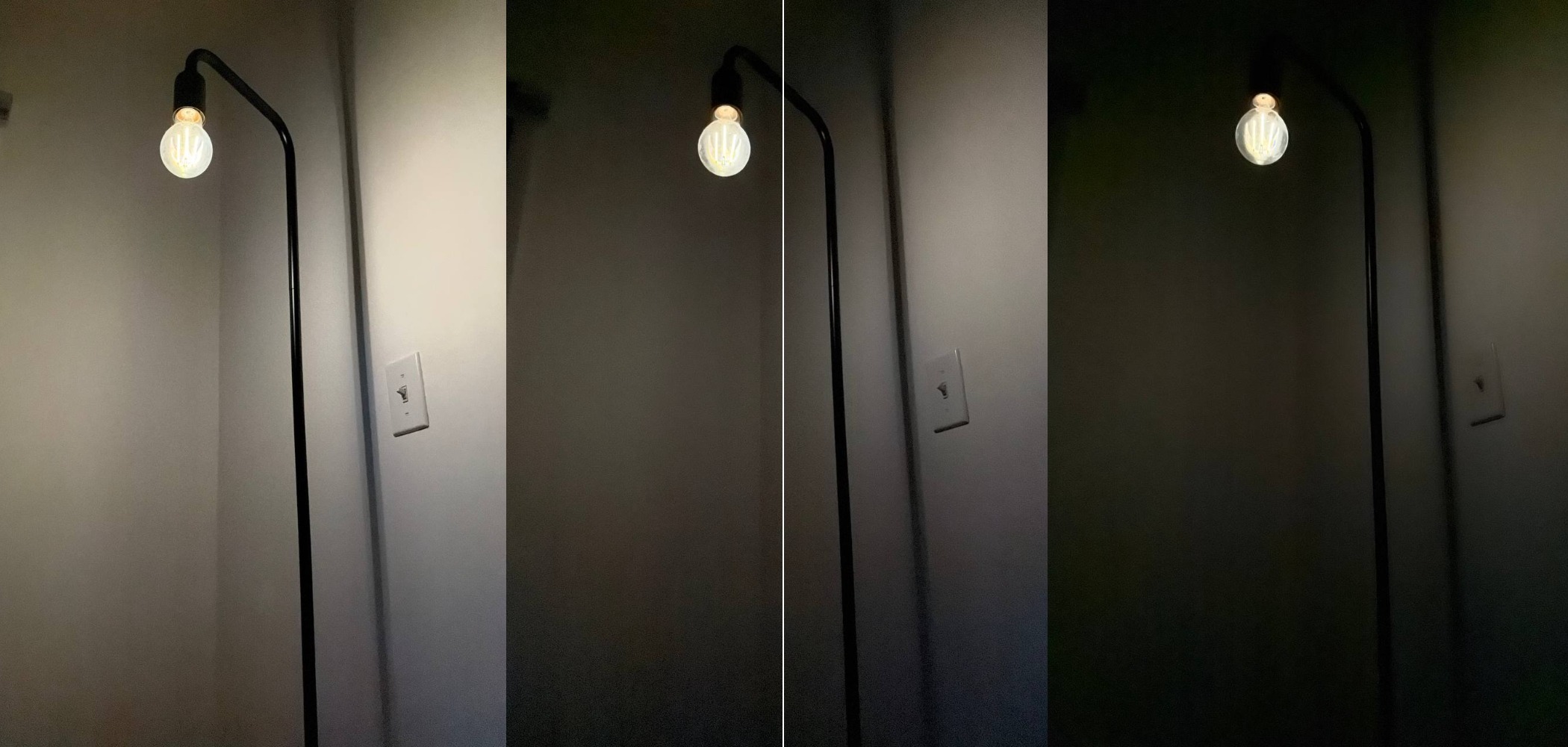 Cherlynn Low for Engadget
While the redesigned, customizable Camera app will be coming to all phones that can upgrade to iOS 27, these Pro tools will be exclusive to the iPhone 18 Pro as they require the variable aperture to work.
Cinematic effects on regular video is hit or miss
I loved the idea of applying cinematic effects to any video after the fact, because I genuinely like the look of Apple's Cinematic videos. There's something about their lighting and slight blur in the background that appeals to me, so I thought I'd like that effect in all my footage.
The problem is, the execution, at least in my testing so far, is quite subtle and unpredictable. First, it's worth noting that this will only work with videos shot on the iPhone 18 Pro. Sadly, that meant that all my hands-on videos with the iPhone Duo that I took with my iPhone 17 Pro Max were not eligible for the cinematic effects.
Even when I was able to apply them to clips I took of a singer in a low lit room at Apple Park or that plant in the airport hallway or even my partner riding an e-scooter along our driveway, the results were mixed. I think I was the right distance away from the musician, so the cinematic effects were clearer (side note, the stage lights sparkled thanks to the aperture setting) and thus easier to tell when on or off.
My partner, meanwhile, was moving closer and farther away from the camera throughout, so things never really stayed in the same setup long enough. Finally, I suspect I was too close to the plant, because the blurry effect was applied to the background, but at times switched to some of the leaves in the foreground.
This is less a criticism of the new feature that lets you retroactively add cinematic effects to a video and more a clearer look at what scenarios work best for cinematic videos in the first place. And with the ability to apply Cinematic after recording a video, even if you forgot to switch to the right mode at first, users do gain a bit more flexibility and freedom, which is always nice.
Apple Reference Image is a step in the right direction
I'm a fan of any tool added to our arsenal in the fight against AI-exacerbated misinformation, and I think that Apple's Reference Image is not just a useful feature, but also an important signal to the rest of the world. It's basically a mode in the camera app that appears when you enable it, and is one swipe away from the default Photo mode. When photos are captured in that mode, two versions of the image will be saved. One is the picture that typically shows up in your gallery, with the usual HDR, lighting or other tweaks made based on your settings (if you've picked a specific Photographic Style, for example).
The other is a RAW file (DNG, if you're interested) that has to be developed within the Photos app, using the sensor-signed data recorded when you pressed the shutter button. After it's developed, the reference image can be shared to others, but is only viewable on iPhones, iPads or Macs running iOS 27, iPadOS 27 or macOS 27.
In my experience, the reference images developed almost instantly, though it's worth noting here that you'll need an internet connection to develop a reference image. In the Photos app, you can tap on the picture to compare and contrast the two versions and see if anything has changed.
I should point out that by default, there will be some differences between the Reference Image and what is saved to your gallery. The Reference Image is very close to the original RAW file, with minor processing for lens correction and tone mapping, while the version in your camera roll was processed by the camera with specific color treatments and other "computational photography" enhancements.
I used Apple's new Clean Up tool to delete some lines of text in a picture of a Slack conversation on a laptop screen. Then I went into the Reference Image by tapping the "Reference" label on top of the picture in the Photos app. The app prompts users to tap the Reference Image to compare differences and it was easy to see where I had deleted the messages.
It's a pretty basic tool. And while I wish I didn't have to go into a specific mode to create Reference images, I can appreciate the impossible storage demands if reference data was saved every time I took a photo (too many times a day). And though other services and approaches like SynthID and Content Credentials exist, the general public might find it easier to use something as simple as a one-click compare-and-contrast that's right within the Photos app. It could potentially be useful in situations where you were documenting a protest, and you have to somehow prove that something you photographed was not actually edited by AI. A lot of education would still be necessary to make sure the public is aware how this tool works, but of all the verification means out there, Apple Reference Image might be the easiest to use.
Photographic Styles 3 effects are subtle
The last big update to Photography is Photographic Styles. Apple has added a new layer of edits to its well-received filters, so there's one more dimension (in addition to the existing color/light effects) to play with.
On older iPhones, the Photographic Styles options ranged from color treatments like Amber, Rose Gold, Bright and Cool Rose to vibes like Ethereal, Dramatic, Cozy, Luminous Black and White and Stark Black and White. Basically Instagram filters circa 2015.
With the iPhone 18 Pro, you'll be getting additional options to pair with the first group of the above. So you can choose from Rose Gold and Glow, Amber and Glow, Gold and Soft Skin, Bright and Soft Skin etc.
Tap any of these, including the vibey options, and you can access a new Texture edit window that lets you add Glow, Soft Skin or Film effects. Under each of these sits a slider to edit the intensity of its effect. I dragged the soft skin slider all the way to its maximum on a selfie, and was pleased to see that even at its extreme, the effect was relatively mild.
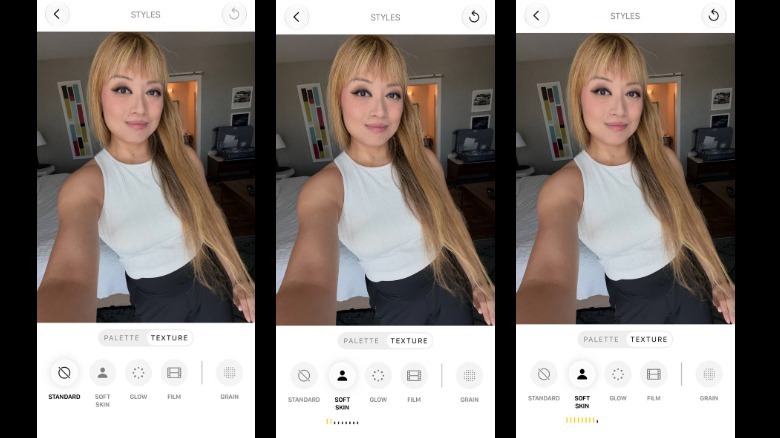 Screenshots
Glow was even subtler, and the only difference I saw when playing with its slider was the lightening of some shadows. I also could barely tell there was anything done when trying out Film, although when you enable Film, you can also toggle on the additional "Grain" filter at the right. This adds some noise to the image, which sounds a bit counterintuitive, but does lend a certain nostalgic effect.
The intensity of the grain depends a bit on the picture, as photos in darker environments naturally have the propensity to show more noise. My daytime pictures of plants definitely showed little change, but the picture I took of that light bulb in low light had a more pronounced difference.
Performance, heat and battery life so far
The iPhone 18 Pro and Pro Max are powered by Apple's A20 Pro chip, which uses 2nm transistors like the M6 in some Macs. The design allows for greater efficiency, which should mean improvements in battery life. The A20 Pro also has the widest memory interface in an iPhone yet, and thanks to its new packaging that places the memory next to the system-on-chip (SoC) rather than stacked on top, there's better heat flow.
In the week or so I've had the iPhone 18 Pro, it has kept up with everything I've thrown at it. That includes all the things I've done to test the new features, including video recording in rapid succession, general Siri AI queries, photo edits and Genmoji generation, as well as endless gaming.
I noticed the iPhone 18 Pro run hot just once in all that time — when I was shooting that plant while testing variable aperture and cinematic effects. And while I do need more time to better gauge how this will hold up over time, my experience with the iPhone 17 Pro, which was the first iPhone to have a vapor chamber, told me a few things.
While the iPhone 17 Pro did get warm quite frequently in my year or so with it, it never got to the burning levels that the iPhone 16 Pro did. I certainly had to put the iPhone 17 Pro down to allow it to cool, and it did get hot inexplicably quite a lot.
In my limited experience with the iPhone 18 Pro so far, my main observation is that it did get hot, but in that one instance the heat dissipated so quickly that I had forgotten about it about a minute later.
This could be down to what Apple calls its "next-generation vapor chamber." That's certainly a feature I'll need much more time with to better evaluate, but it's nice not to have to put your hot phone away as much or for as long of a cooldown period.
Another aspect of the iPhone 18 Pro I'd like more time to test is battery life. So far, I've been measuring the new device against the iPhone 17 Pro Max, since Apple said the two should be comparable in spite of their size differences. Generally speaking, this has held true so far, and my iPhone 18 Pro and iPhone 17 Pro Max often clocked in at about the same power levels at the end of the day with similar amounts of activity.
So far, I'm getting about a day and a half to two days out of the iPhone 18 Pro, so long as I haven't been gaming while watching YouTube picture-in-picture for hours on end. Your experience, of course, may vary depending on your lifestyle.
Other updates: Siri AI and iOS 27
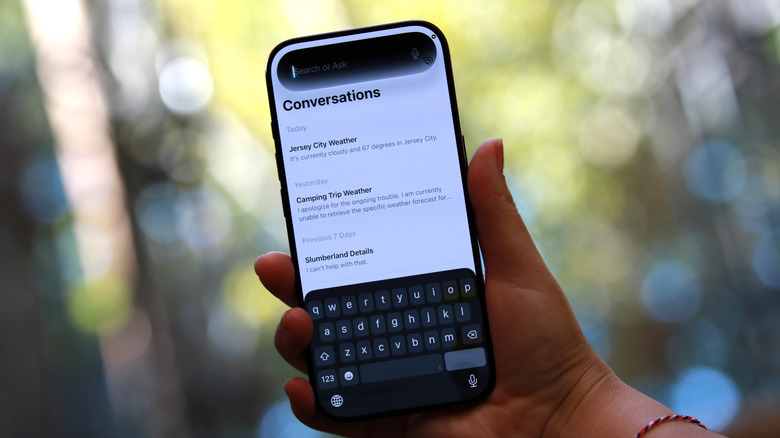
Most of the Siri AI and iOS 27 updates will be coming to devices other than the iPhone 18 Pro, so I won't dwell too long on them. I was hoping for a marked improvement in Apple's dictation engine, since I've felt frustrated and misunderstood by the iOS keyboard a lot in the past. Apple Intelligence on the iPhone Air and iPhone 17 Pro models and newer are supposed to have "more accurate dictation using an on-device model." So far, I haven't noticed any of the ridiculous errors I've encountered in the past when voice typing into Messages, for instance.
But I've certainly found Siri AI to be lacking in its understanding. I asked it to come up with a list of ideas for meals my partner and I can prepare in our attempt to be vegan (with exceptions made for fish and mayonnaise). It made some suggestions involving salads, sandwiches, pitas or wraps. I followed up, asking for a list of recipe ideas and it gave me the recipes for the following three meals:
-
Chickpea "Tuna" Salad
-
Classic Tuna Salad
-
Tofu "Egg" Salad
I had to ask for ideas that weren't salads or mashed things, followed by a request for stuff with "Asian flavors" before it came up with suggestions with a greater variety. Not once did it recommend plant-based meat, though, which I found odd. It wasn't until I was grocery shopping later that I remembered how much broader my options were with the likes of Beyond, Impossible and Gardein.
I also asked Siri (and Alexa+, for that matter) for some movie recommendations over the weekend. I wanted something whimsical that was currently streaming. Alexa+ completely failed, not showing any actual titles. It just kept saying versions of "Okay so you want a supernatural adventure with a lighthearted tone? Those often have that perfect mix of whimsy and thrills that you seem to enjoy!" Then when I asked for some actual recommended titles, it thought I said "recommended pills" or "high dolls" or "high tolls." I finally spelled out "titles" and after Alexa+ realized what I was saying, it proceeded to ask if I was looking for "movie or show titles with high tolls or expensive themes."
Siri was a huge improvement because it was able to not only give me some titles, it also served up movies I already liked that fit the description. I kept asking for more because I wasn't getting anything I really wanted to check out, until Siri mentioned the movie Slumberland. I thought I had heard it wrongly, but Siri kept pronouncing it "Slumberbairnd." I questioned it a few times on the pronunciation of that word, which it was never able to answer.
That was a fairly small quirk that didn't get in the way of actual comprehension and accuracy, so I let it slide. I also played with Siri mode in the Camera app, using it to determine the nutritional value of my meals before I ate them. Now all my food photos will actually serve a purpose!
All kidding aside, I did enjoy using Siri AI to verify that oatmeal and cranberries were indeed of more nutritional value than waffles and syrup, but I was surprised to see it found scrambled eggs to be low in nutritional value, too.
That said, these aren't features unique to the iPhone 18 Pro (nor Siri AI, for that matter), and I'll have to perform a dedicated side-by-side evaluation of tools like Gemini and Siri to see which modern AI assistant is more accurate, responsive and helpful.
iPhone handoff could be useful for a small group of people
I'll also be spending a bit more time with iPhone handoff, which feels like it would be very helpful for reviewers like me who frequently need to switch between multiple devices within a short window, to see how easy and useful it is. You'll just need two devices that can run iOS 27 or later and service from a carrier that supports the feature. At the moment, the list of compatible carriers is barely a list: just T-Mobile in the US at the moment (and Telekom in Germany). I am, luckily, a T-Mobile user so I'll update this review later with any noteworthy impressions that might impact my evaluation of the iPhone 18 Pro but as it stands, it's not unique to the new phone.
Wrap-up
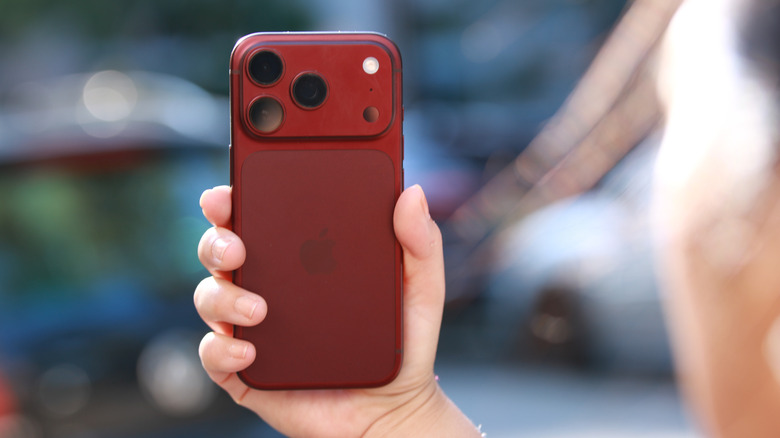
In the iPhone Duo's shadow, the iPhone 18 Pro certainly feels like an "S" device. But S-year iPhones were never bad iPhones. They were simply unexciting. Similarly, while none of the iPhone 18 Pro's latest features are things you should run out the door to spend money on, it's certainly a meaningful improvement for anyone on an iPhone 16 Pro or older. Of all the iPhones you can buy now, it has the best camera setup, and anyone with the slightest interest in manual photography will appreciate the new variable aperture controls.
Though the iPhone 18 Pro does start at $100 more than the iPhone 17 Pro did last year, Apple also added $100 to the current retail prices of the older iPhones that it still sells. That means the delta between the iPhone 18 Pro and the current base iPhone (which would normally be the iPhone 18 but is the iPhone 17 at this time) is the same. The iPhone 17 Pro launched at a starting price of $1,099, which was $300 more than the iPhone 17. The iPhone 18 Pro will retail from $1,199, but the iPhone 17 now costs $899.
I don't believe you're getting more phone for the money, considering the relative lack of upgrades compared to previous years where the price of a Pro phone remained the same as its predecessors. But the purchasing decision between an iPhone 18 Pro and the next most premium non-folding iPhone is still quite clear cut. If you care about the best cameras and performance from Apple's current product lineup, the iPhone 18 Pro series is the way to go.