Shawn Boyd

Engadget Editorial Policies

The unique content on Engadget is a result of skilled collaboration between writers and editors with broad journalistic, academic, and practical expertise.

In pursuit of our mission to provide accurate and ethical coverage, the Engadget editorial team consistently fact-checks and reviews site content to provide readers with an informative, entertaining, and engaging experience. Click here for more information on our editorial process.

Stories By Shawn Boyd

  • Algoriddim releases djay Pro for the Mac with Spotify Integration

    Just in time for non-stop holiday parties, last minute mix-tapes for your friends and family or an always appreciated compilation of road-trip standards, the world's best-selling DJ app just got a whole lot better. Algoriddim, creators of the Apple Design Award-winning app djay, today released djay Pro. Yes, there is finally a professional version of the ever popular djay app for the desktop. This new desktop version has been totally purpose-built for OS X as djay Pro now can take full advantage of desktop class architecture and 64-bit processing. Earlier this year in May, Algoriddim released djay 2 for the iPhone and iPad adding Spotify integration. Now with djay Pro for the Mac, the desktop jock has access to the same 20 million tracks and growing (minus a few Taylor Swift ditties.) I've been a professional Dee Jay for over 20 years. Gone are the days of stuffing a mini van full of milk crates jam-packed with records, not to mention time-consuming equipment setups. What's worse is to have a party-goer request a random, off-the-wall song backed by a neatly folded Hundy, which you must decline because finding it will be nearly impossible. With djay Pro for the Mac, you can just run a quick search on Spotify and Musica Obscura is a success. "Cha-ching!" I'll be the first to admit when apps in this class first came out I thought they were useless and underpowered. I spouted the typical vinyl curmudgeon mantra, "No self-respecting DJ would ever get caught using a computer, tablet or phone for their set." After falling in love with djay 2 for the iPad I did a complete turnaround on that position. A quick look at the all new user interface and all the professional features one would expect are in djay Pro. Features like beat detection, looping, slipping, scrubbing, multi cue point, non destructive FX, live sampler, beat matching and the killer recommendation engine powered by The Echo Nest that made djay the number one app in its class with over 15 million downloads. What a surprise when I loaded up my library on djay Pro for the Mac, discovering all my metadata like cue point, grid adjustments and FX all carried over from the iOS version of djay via iCloud syncing. The new layout features standard turntable view, and enhanced waveform views that can be adjusted to 2 deck or 4 deck configurations, and even further with horizontal or vertical views of those tracks. It is almost as if Algoriddim set out to create a software version of some of the more elaborate hardware DJ control surfaces on the market. On that note djay Pro supports a wide range of hardware controllers from top makers like Native Instruments, Numark, Vestax, Reloop and Pioneer. If you're a long time DJ professional, enthusiastic hobbyist or just starting out, djay Pro for the Mac is hands down the best application out there for the job. Available in the Mac App Store for any machine running Mac OS X 10.9 or later, djay Pro is available today for limited time introductory price of $US49.99 (regular price will be $79.99.)

    By Shawn Boyd Read More
  • Fujitsu ScanSnap iX100 Delivers Best In Class Mobile Scanning

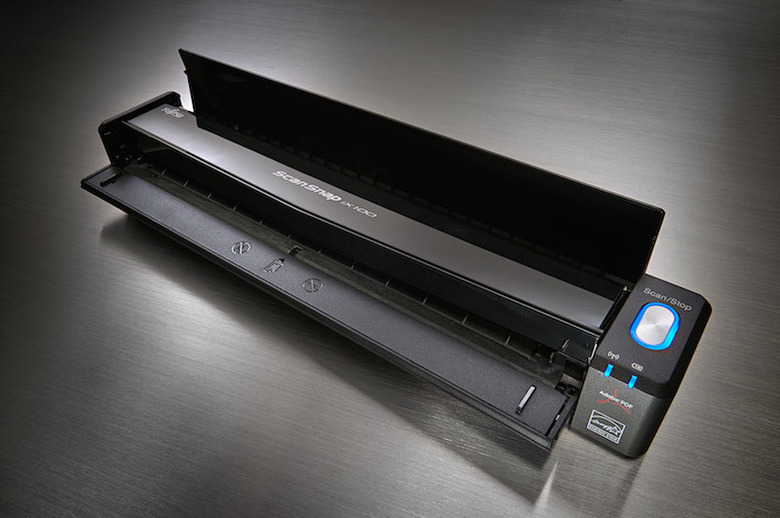
    Are you still chasing the "paperless" dream? If you are anything like the millions of us who dream of a clear inbox with simplified capture and filing system, today is your lucky day. Today Fujitsu introduces the ScanSnap iX100, the 2nd generation of its world-renowned mobile scanning solutions. The dream of going paperless has been sold to us neat freaks and organization nuts for decades now. The idea has always been very enticing; however, the practical execution of getting all the paper we collect throughout the day into your computer has always felt somehow daunting and incomplete. This is never more evident than a bag-dump post trade-show, business trip or networking mixer. Fujitsu and its award-winning ScanSnap line have been making strides in the paperless movement for years now and aim to slingshot that movement with the brand-new ScanSnap iX100. Key Features of the iX100 Compact Portable Lightweight at 14.1 oz. Battery operated via Integrated Lithium Battery Scan Anywhere via 2 Wireless Scanning Modes Simple Home/Office WiFi Setup with WPS configuration Direct Connect Access mode when WiFi access not available Fast 5.2 Seconds Per Letter Page Scan to Mac, PC, iOS, Android or Kindle Fire Dual Scan Mode Automatic Image Stitching Custom GI Processor First Impressions Upon receiving the ScanSnap iX100 I immediately tore into the box and was pleasantly surprised by the extremely compact size of the device. Measuring in at a svelte 10.74 x 1.87 x 1.42 inches and weighing just a hair over 14 ounces, this scanner is small. Construction seemed pretty sturdy and up to par with previous Fujitsu ScanSnap products. In the box was the scanner, a USB cable, Setup DVD and documentation. Setup for Mobile Scanning I wanted the test the "no PC needed" mode of the iX100 and decided to do a mobile only setup first. Getting the scanner to work with my iPhone and iPad were amazingly easy. Initially I installed the ScanSnap Connect Application and launched it. To power on the iX100, the paper feed door is opened; to activate the Direct Connect mode there is a small WiFi toggle switch on the back of the scanner. Within a few seconds the scanner was ready to go and was emitting a private WiFi SSID that my iPhone and iPad were able to connect to via the standard iOS WiFi settings menu. Login information for this private WiFi network is found on the bottom of the scanner. Returning to the ScanSnap Connect Application, I saw that the scanner was discovered, connected and ready to scan. Having recently returned from a business training trip, I had a pretty nice stack of business cards, flyers and receipts I wanted to capture. With a quick press of the scan button on the app, the scanner woke up and started to purr. Dual Scan Mode The Dual Scan mode of the iX100 meant I was able to feed business cards into the scanner one after another without pause and from any position on the paper feed -- even without waiting for the previous card to completely exit the flat path. The continuous document feed (CDF} saves time by allowing the user to keep feeding documents to the scanner, letting the Auto Deskew, Auto Orientation, Auto Color and Auto Paper Size Detection features do the work. The Secret Sauce Fujitsu's custom GI Processor is amazingly fast at intelligently making all the adjustments and corrections that have plagued scanners up until now. Gone are the days of trash and rescans and manual image manipulation after scanning a pile of documents. The small footprint of the iX100 means it is a simplex scanner, but don't let that sway you if you're used to duplex scanners. This scanner is so fast with its continuous document feed mode that you can scan a page, flip it over, scan the second side and auto-process the documents faster than most competing duplex scanners. Another amazing feature of the iX100 is the Automatic Image Stitching. If some sales person hands you a letter sized folded brochure with an image that crosses the centerfold, simply fold the pages backwards and scan both sides -- the iX100 automatically stitches the pages back together. Battery Life The iX100 battery lasts surprisingly long when you consider the speed, power and compact footprint of the scanner. I was able to tote the scanner around in my bag for about a week on a single charge doing causal scanning of business cards and handouts at meetings (watching jaws drop on clients was secretly pleasurable). According to Fujitsu, the iX100 can continuously scan about 260 sheets on a single charge and about 140–160 per charge for normal casual operation. My favorite part about this mobile scanner is that it can be charged by a standard USB to 6micro-USB cable. No special adaptors or power supplies are needed. This is very convenient, as most users already carry such a cable in their go bags. Back at the Desk This superstar mobile scanner, believe it or not, is full of even more surprises once it meets the home or office WiFi network. Once back at my desk, I installed the ScanSnap Manager software on my Mac and fired off the ScanSnap Wireless Setup Tool which made setup a piece of cake via the WPS button on the scanner. Typical of Fujitsu, the ScanSnap iX100 comes with some pretty powerful yet easy to use bundled software. The iX100 ships with: ScanSnap Organizer - search, view, edit, organize scans CardMinder - captures and OCR business cards, merges duplex cards ScanSnap Receipt - scans and extracts pertinent information off of receipts Abby FineReader for ScanSnap - OCR package that allows direct scanning and conversion to Microsoft Office apps like Word, Excel and PowerPoint ScanSnap Manager - Profile manager that allows one button scanning to folder(s), email, PDF, Dropbox, Evernote, Google Docs, Salesforce and more Continuing to process the expense reports from my trip, I fed the iX100 about 15 receipts. ScanSnap Receipt quickly processed all the stubs and through some wicked voodoo plucked data off of the receipt and filled a ledger with information including Vendor, Amounts, Payment Type, Card suffix and more. Thanks to the iX100, tax season this year may be tolerable. Scanning items directly to my favorite cloud apps was a huge time saver from the old AppleScript processing I have doing for years. Again, the iX100 GI processor made the process fast and seamless. I found ScanSnap Organizer very powerful and easy to use; however, in the end it was not for me as my workflow is to scan directly to Evernote. In the frenzy of overzealous button pressing, I inadvertently scanned a few receipts into the organizer while testing. Just before I expunged the mistakes ready to start all over, I tried to drag and drop the mistakes from ScanSnap Organizer to ScanSnap Receipts. Amazingly this action worked -- the misfiled items were imported into the appropriate place and were auto-processed as if they had been scanned correctly. Final thoughts The Fujitsu ScanSnap iX100 does exactly what it says, delivering high quality scans quickly regardless of whether you are at the office or on the road. Up until now, CIS Scanners (contact image scanners) were mostly low quality, cheap scanners designed as a stopgap for road warriors wanting to capture data on the move. The iX100 seems to have ironed out all of the kinks in mobile scanning. It is light, easy to carry, fun to use and is feature packed. I can honestly say that I don't know how I managed to work thus far without an iX100. The ScanSnap iX100 is available today for US$229.

    By Shawn Boyd Read More
  • Ask TUAW Live is on the air at 5 PM ET today!

    "Ask TUAW Live" will air today, Tuesday, July 29, 2014 at 5:00 PM EDT. You can check here for showtimes in your area. We're taking your questions now via the Ask TUAW feedback form, Twitter, Facebook or Google+. Today will be our final episode as all of the podcast for TUAW are sunsetting. To watch the live feed and participate in the chat, jump over to the TUAW page on Google+. There you will find links to this Google Hangout. Bring your questions, ideas, tips and tricks, or recipes for craft cocktails to share with the rest of the TUAW community. NOTE: Due to the way Google handles Hangouts for Pages, you will need to add the TUAW page on Google+ to your circles so we can circle back. Is that what they call it these days?

    By Shawn Boyd Read More
  • Ask TUAW Live is on the air at 5 PM ET today!

    "Ask TUAW Live" will air today, Tuesday, July 8, 2014 at 5:00 PM EDT. You can check here for showtimes in your area. We're taking your questions now via the Ask TUAW feedback form, Twitter, Facebook or Google+. To watch the live feed and participate in the chat, jump over to the TUAW page on Google+. There you will find links to this Google Hangout. Bring your questions, ideas, tips and tricks, or recipes for craft cocktails to share with the rest of the TUAW community. NOTE: Due to the way Google handles Hangouts for Pages, you will need to add the TUAW page on Google+ to your circles so we can circle back. Is that what they call it these days?

    By Shawn Boyd Read More
  • TUAW TV Live: Wearables and World Cups

    This week show will be taken over by Doc as Steve is away. Being the Futbol geek that Doc is the show will also be delayed by an hour due to World Cup match. Join in today as we talk about the latest in Apple tech news and do a quick roundup on the current state of wearables. To watch the show and take part in the chat, just scroll down a tiny bit, log into the chat room, and be sure to press the "play" button on the video window around 5 PM to watch the stream. If you don't have time to watch the complete show today, come back to this post later or first thing tomorrow when we'll have the recording available for your viewing pleasure.

    By Shawn Boyd Read More
  • Ask TUAW Live is on the air at 5 PM ET today!

    "Ask TUAW Live" will air today, Tuesday, July 8, 2014 at 5:00 PM EDT. You can check here for showtimes in your area. We're taking your questions now via the Ask TUAW feedback form, Twitter, Facebook or Google+. To watch the live feed and participate in the chat, jump over to the TUAW page on Google+. There you will find links to this Google Hangout. Bring your questions, ideas, tips and tricks, or recipes for craft cocktails to share with the rest of the TUAW community. NOTE: Due to the way Google handles Hangouts for Pages, you will need to add the TUAW page on Google+ to your circles so we can circle back. Is that what they call it these days?

    By Shawn Boyd Read More
  • Ask TUAW Live is on the air at 5 PM ET today!

    "Ask TUAW Live" will air today, Tuesday, June 24, 2014 at 5:00 PM EDT. You can check here for showtimes in your area. We're taking your questions now via the Ask TUAW feedback form, Twitter, Facebook or Google+. To watch the live feed and participate in the chat, jump over to the TUAW page on Google+. There you will find links to this Google Hangout. Bring your questions, ideas, tips and tricks, or recipes for craft cocktails to share with the rest of the TUAW community. NOTE: Due to the way Google handles Hangouts for Pages, you will need to add the TUAW page on Google+ to your circles so we can circle back. Is that what they call it these days?

    By Shawn Boyd Read More
  • Ask TUAW Live Summer School is on the air at 5 PM ET today!

    "Ask TUAW Live" will air today, Tuesday, June 10, 2014 at 5:00 PM EDT. You can check here for showtimes in your area. We're taking your questions now via the Ask TUAW feedback form, Twitter, Facebook or Google+. Today's shows is the "Summer School" edition. We will discuss improvement projects for your digital life. To watch the live feed and participate in the chat, jump over to the TUAW page on Google+. There you will find links to this Google Hangout. Bring your questions, ideas, tips and tricks, or recipes for craft cocktails to share with the rest of the TUAW community. NOTE: Due to the way Google handles Hangouts for Pages, you will need to add the TUAW page on Google+ to your circles so we can circle back. Is that what they call it these days?

    By Shawn Boyd Read More
  • Ask TUAW Live is on the air at 5 PM ET today!

    "Ask TUAW Live" will air today, Tuesday, June 3, 2014 at 5:00 PM EDT. You can check here for showtimes in your area. We're taking your questions now via the Ask TUAW feedback form, Twitter, Facebook or Google+. Today we are doing a recap of the announcement at WWDC 2014. To watch the live feed and participate in the chat, jump over to the TUAW page on Google+. There you will find links to this Google Hangout. Bring your questions, ideas, tips and tricks, or recipes for craft cocktails to share with the rest of the TUAW community. NOTE: Due to the way Google handles Hangouts for Pages, you will need to add the TUAW page on Google+ to your circles so we can circle back. Is that what they call it these days? Panel Ben Roethig Charles 'ChUber' Akimoto Hal Sherman Kelly Guimont Mikel Potts Richard Drummer Josh Centers (TidBits) Jesse Grosjean (Hog Bay Software) Shawn 'Doc' Boyd (Host) Folding Text Folding Text Hog Bay Software WWDC: iOS8/Mac OS X 10.10 Yosemite Apple Event Video Swift OS X Beta Program Apple iCloud Pricing Family Sharing Casper Suite (Jamf Software) Dilbert: Things I can't do Seamless How to create a test Partition for the OS X Yosemite Beta Picks Ben: Focus@Will Kelly: Two Dots Charles: Kami Hal: OS X Beta Program Josh: Parallels 9 Mikel: Talking to Siri Patrice: TestFlight and TheTech Hangout Richard: Waterlogue Doc: PNY 256GB Turbo Flash Drive (TigerDirect) and Folding Text

    By Shawn Boyd Read More
  • Ask TUAW Live is on the air at 5 PM ET today!

    "Ask TUAW Live" will air today, Tuesday, May 27, 2014 at 5:00 PM EDT. You can check here for showtimes in your area. We're taking your questions now via the Ask TUAW feedback form, Twitter, Facebook or Google+. Today we are expecting guests Ken Case from the Omni Group, developers of OmniFocus and Jon Lewis of Elevate, the brain training app currently sitting at number 3 in the iTunes App Store. To watch the live feed and participate in the chat, jump over to the TUAW page on Google+. There you will find links to this Google Hangout. Bring your questions, ideas, tips and tricks, or recipes for craft cocktails to share with the rest of the TUAW community. NOTE: Due to the way Google handles Hangouts for Pages, you will need to add the TUAW page on Google+ to your circles so we can circle back. Is that what they call it these days? Panel Ken Case (OmniGroup) Jon Lewis Hal Sherman Kelly Guimont (TUAW) Mikel Potts Patrice Brend'amour Shawn 'Doc' Boyd (TUAW) Barney Lund two-step verification for your AppleID Apple KB Article Authy Omnigroup Omnigroup Omnifocus OmniOutliner Inside Omnifocus Screencasts Online on Omnifocus 2 Omnifocus 2 launch (Mac Observer) Do stuff (David Sparks) Elevate Elevate - Brain Training Elevate Site Picks Barney: Word Morph Hal: USBCondom Jon: Massimo Vignelli Helvetica (Movie) http://www.theverge.com/2014/5/27/5755158/massimo-vignelli-nyc-subway-map-designer-dies-at–83 Kelly: Using Siri with OmniFocus for iOS Ken: Hidden configuration options in OmniFocus 2 Mikel: PCalc update Patrice: IFTTT FitBit channel Paul: RadarScope Richard: All Access US App Doc: djay 2 for iOS

    By Shawn Boyd Read More
  • Djay 2 for iOS gets 20 million song update via Spotify

    Just in time for summer pool parties, beach bashes and wild wedding receptions, one of the best full-featured DJ apps for iOS just got cranked up to eleven. Algoriddim's award wining djay 2 application for iOS has just been upgraded to version 2.5, and now includes seamless Spotify integration. If you have djay 2 and a Spotify Premium account, you can DJ anything. Don't have Spotify Premium? There's a free 7-day trial included with djay 2. The limitations of device storage and pre-purchased music in your iTunes library are now things of the past with djay 2. Users can choose from over 20 million tracks via Spotify including their existing playlists, starred tracks and inbox. DJs from all skill levels can appreciate that awkward moment when somebody asks you to play a song that's, shall we say, not in your wheelhouse. Now just use the powerful Spotify search, instantly add the requested song to your inbox and wow the crowd with your best Rock Lobster remix. Don't know what to play next? No problem, djay 2 now features harmonic song matching technology from Echo Nest, which looks for solid matching tracks that go with what you're playing. The team from Algoriddim demoed the new Spotify integration for a couple of my TUAW colleagues last week at Spotify's US office in New York. Even over 4G or 3G, the Spotify-sourced songs loaded in quickly and played with no hitches or hiccups. Company founder Karim Morsy (who has 15 years of DJ experience under his belt) showed how easy it was to search the full Spotify database, including some non-traditional tracks like stand-up comedy or famous speeches. Using those tracks as part of a DJ set would certainly get the crowd's attention. What about those times when you don't want to keep your hands on the device all night? Taking full advantage of song matching and a vast catalog of music, iOS devices can be the DJ using the Automix Radio feature. The live mix will feature perfectly beat-matched music complete with seamless DJ style transitions. For the professionals Algoriddim has a wide selection of compatible controllers from hardware partners like Numark, Pioneer DJ, Vestax and Reloop. Desktop-class audio effects by Sugar Bytes are available via in-app purchase; they are available for a limited time at a 50% discount. Djay 2 2.5 is available today in the iTunes App Store for iPad and iPhone. This is a free update for existing users. New users can purchase djay 2 iPad for $9.99 ($4.99 during launch week) and djay 2 for iPhone for $1.99 (free during launch week). Spotify integration is available only to users with a premium subscription.

    By Shawn Boyd Read More
  • Ask TUAW Live is on the air at 5 PM ET today

    "Ask TUAW Live" will air today, Tuesday, May 20, 2014 at 5:00:00 PM EDT. You can check here for showtimes in your area. We're taking your questions now via the Ask TUAW feedback form, Twitter, Facebook or Google+. To watch the live feed and participate in the chat, jump over to the TUAW page on Google+. There you will find links to this Google Hangout. Bring your questions, ideas, tips and tricks, or recipes for craft cocktails to share with the rest of the TUAW community. NOTE: Due to the way Google handles Hangouts for Pages, you will need to add the TUAW page on Google+ to your circles so we can circle back. Is that what they call it these days?

    By Shawn Boyd Read More
  • Ask TUAW Live is on the air at 5 PM ET today!

    "Ask TUAW Live" happens today, Tuesday, May 13, 2014 at 5:00:00 PM EDT. You can check here for showtimes in your area. We're taking your questions now via the Ask Tuaw feedback form, Twitter, Facebook or Google+. To watch the live feed and participate in the chat, jump over to the TUAW page on Google+. There you will find links to this Google Hangout. Bring your questions, ideas, tips and tricks, or recipes for craft cocktails to share with the rest of the TUAW community. NOTE: Due to the way Google handles Hangouts for Pages, you will need to add the TUAW page on Google+ to your circles so we can circle back. Is that what they call it these days? Panel Charles Akimoto Hal Sherman Mikel Potts Patrice Brend'amour Paul Gans Shawn Boyd (Host) Doc's Kickstarter corner Blink Cloud storage Everydisk Everydisk (Kickstarter) Dropbox AirStash iUSBport 2 HyperDrive LaCie FUEL SanDisk Wireless Portable Carriers and throttling AT&T (Twitter) AT&T Customer Care (Twitter) Hot to see your cellular data usage Net neutrality (Youtube) Picks Hal: Dataman Pro Mike: Reeder 2 Mac beta Patrice: Newsify for iOS Doc: RadBeacon

    By Shawn Boyd Read More
  • Ask TUAW Live is on the air at 5 PM ET today!

    "Ask TUAW Live" happens today, Tuesday, May 06, 2014 at 5:00:00 PM EDT. You can check here for showtimes in your area. We're taking your questions now via the Ask Tuaw feedback form, Twitter, Facebook or Google+. We will be joined by special guest Dave Peck, developer of Cloak, the ever-popular Virtual Private Network (VPN) app designed specifically for Apple devices. To watch the live feed and participate in the chat, jump over to the TUAW page on Google+. There you will find links to this Google Hangout. Bring your questions, ideas, tips and tricks, or recipes for craft cocktails to share with the rest of the TUAW community. NOTE: Due to the way Google handles Hangouts for Pages, you will need to add the TUAW page on Google+ to your circles so we can circle back. Is that what they call it these days? Panel Dave Peck (Cloak) Shawn Boyd (Host) Patrice Brend'amour Mikel Potts Hal Sherman Charles Akimoto Kelly Guimont Cloak & Security Cloak OpenVPN Wifi Pineapple Cloak and Heartbleed Imperial Violet 1Password Watchtower 1Password 4 Keychain Design Dropbox (LA Times) Paranoia for beginners Diceware OverCloak in the Settings (Mac) Pick Chuck: Samsung 840 EVO 1TB Dave: Monument Valley Hal: Scio (Kickstarter) Kelly: Star Wars Cantina Band Auditions Mikel: Tales of Honor: The Secret Fleet Patrice: Mortified Nation Doc: Logitech Anywhere MX for PC and Mac

    By Shawn Boyd Read More
  • Ask TUAW Live is on the air at 5 PM ET today!

    "Ask TUAW Live" happens today, Tuesday, April 29, 2014 at 5:00:00 PM EDT. You can check here for showtimes in your area. We're taking your questions now via the Ask Tuaw feedback form, Twitter, Facebook or Google+. To watch the live feed and participate in the chat, jump over to the TUAW page on Google+. There you will find links to this Google Hangout. Bring your questions, ideas, tips and tricks, or recipes for craft cocktails to share with the rest of the TUAW community. NOTE: Due to the way Google handles Hangouts for Pages, you will need to add the TUAW page on Google+ to your circles so we can circle back. Is that what they call it these days?

    By Shawn Boyd Read More
  • Ask TUAW Live is on the air at 5 PM ET today!

    "Ask TUAW Live" happens today, Tuesday, April 22, 2014 at 5:00:00 PM EDT. You can check here for showtimes in your area. We're taking your questions now via the Ask Tuaw feedback form, Twitter, Facebook or Google+. To watch the live feed and participate in the chat, jump over to the TUAW page on Google+. There you will find links to this Google Hangout. Bring your questions, ideas, tips and tricks, or recipes for craft cocktails to share with the rest of the TUAW community. NOTE: Due to the way Google handles Hangouts for Pages, you will need to add the TUAW page on Google+ to your circles so we can circle back. Is that what they call it these days?

    By Shawn Boyd Read More
  • Ask TUAW Live is on the air at 5 PM ET today!

    "Ask TUAW Live" happens today, Tuesday, April 15, 2014 at 5:00:00 PM EDT. You can check here for showtimes in your area. We're taking your questions now via the Ask Tuaw feedback form, Twitter, Facebook or Google+. To watch the live feed and participate in the chat, jump over to the TUAW page on Google+. There you will find links to this Google Hangout. Bring your questions, ideas, tips and tricks, or recipes for craft cocktails to share with the rest of the TUAW community. NOTE: Due to the way Google handles Hangouts for Pages, you will need to add the TUAW page on Google+ to your circles so we can circle back. Is that what they call it these days?

    By Shawn Boyd Read More
  • Ask TUAW Live is on the air at 5 PM ET today!

    "Ask TUAW Live" happens today, Tuesday, April 8, 2014 at 5:00:00 PM EDT. You can check here for showtimes in your area. We're taking your questions now via the Ask Tuaw feedback form, Twitter, Facebook or Google+. To watch the live feed and participate in the chat, jump over to the TUAW page on Google+. There you will find links to this Google Hangout. Bring your questions, ideas, tips and tricks, or recipes for craft cocktails to share with the rest of the TUAW community. NOTE: Due to the way Google handles Hangouts for Pages, you will need to add the TUAW page on Google+ to your circles so we can circle back. Is that what they call it these days?

    By Shawn Boyd Read More
  • Fujitsu shows ScanSnap SV600 Contactless Scanner at Macworld 2014

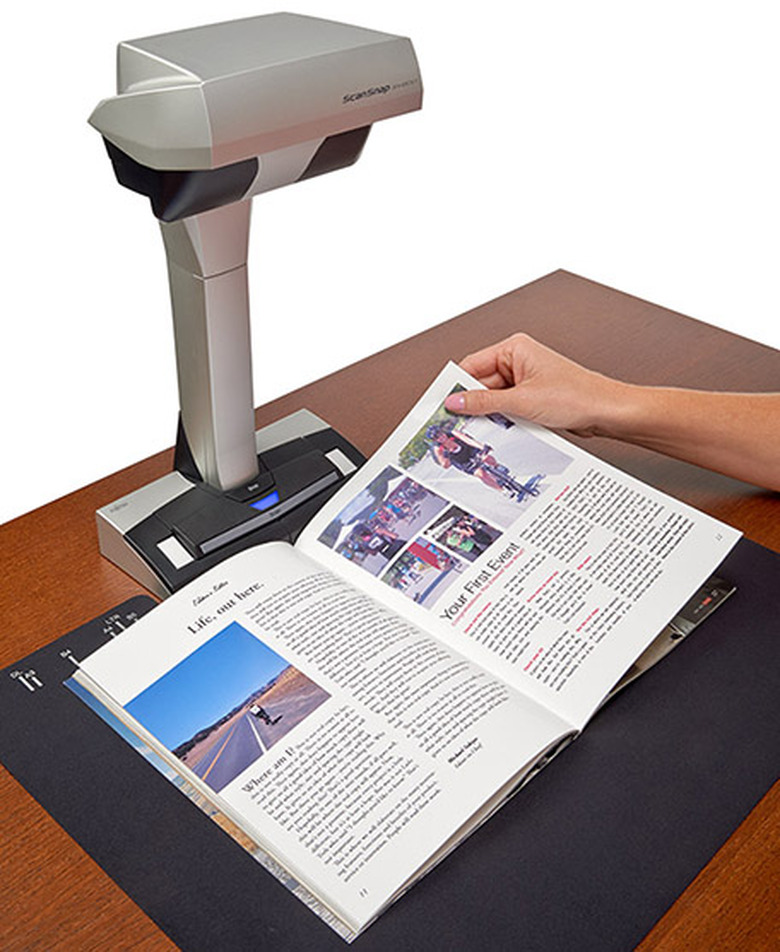
    Fujitsu has been manufacturing world-class scanners for business and personal use for about three decades, including the popular ScanSnap line of auto-feeding desktop scanners. I had a chance to interview Fujitsu's Director of Product Marketing, Michael Sidejas at Macworld | iWorld 2014 where he introduced me to the latest edition to the ScanSnap lineup. For a long time, scanning items like large tabloid documents, books or hand-crafted artwork has been a challenge for desktop scanners. The ScanSnap SV600 overhead scanning system addresses this issue. The ScanSnap SV600 Contactless Scanner was designed to be a "flatbed alternative" and it looks more like a lamp than a scanner. The floating head assembly contains an impressive array of LED CCDs that scan documents from a top down perspective. With a whole arsenal of auto detecting, analyzing, skew correcting and image correction capabilities, the SV600 takes the pain out of scanning books and magazines. The SV600 is available now and more information can be found on the ScanSnap Community site.

    By Shawn Boyd Read More
  • Ask TUAW Live is on the air at 5 PM ET today!

    ​ Yesterday was World Backup Day. Just in case you missed it, today Ask TUAW will be dedicated to getting your data in a safe place so you can be confident when and if your storage malfunctions you'll be able to get it back. "Ask TUAW Live" happens today, Tuesday, April 1, 2014 at 5:00:00 PM EDT. You can check here for showtimes in your area. We're taking your questions now via the Ask Tuaw feedback form, Twitter, Facebook or Google+. To watch the live feed and participate in the chat, jump over to the TUAW page on Google+. There you will find links to this Google Hangout. Bring your questions, ideas, tips and tricks or recipes for craft cocktails to share with the rest of the TUAW community. NOTE: Due to the way Google handles Hangouts for Pages, you will need to add the TUAW page on Google+ to your circles so we can circle back. Is that what they call it these days?

    By Shawn Boyd Read More
  • Ask TUAW Live is on the air at 5 PM ET today!

    "Ask TUAW Live" happens today, Tuesday, February 11, 2014, at 5:00:00 PM EDT. You can check here for showtimes in your area. We're taking your questions now via the Ask Tuaw feedback form, Twitter, Facebook or Google+. To watch the live feed and participate in the chat, jump over to the TUAW page on Google+. There you will find links to this Google Hangout. Bring your questions, ideas, tips and tricks or recipes for craft cocktails to share with the rest of the TUAW community. NOTE: Due to the way Google handles Hangouts for Pages, you will need to add the TUAW page on Google+ to your circles so we can circle back. Is that what they call it these days?

    By Shawn Boyd Read More
  • Ask TUAW Live is on the air at 5 PM ET today!

    "Ask TUAW Live" happens today, Tuesday, February 11, 2014, at 5:00:00 PM EDT. You can check here for showtimes in your area. We're taking your questions now via the Ask Tuaw feedback form, Twitter, Facebook or Google+. To watch the live feed and participate in the chat, jump over to the TUAW page on Google+. There you will find links to this Google Hangout. Bring your questions, ideas, tips and tricks or recipes for craft cocktails to share with the rest of the TUAW community. NOTE: Due to the way Google handles Hangouts for Pages, you will need to add the TUAW page on Google+ to your circles so we can circle back. Is that what they call it these days?

    By Shawn Boyd Read More
  • Ask TUAW Live is on the air at 5 PM ET today!

    "Ask TUAW Live" happens today, Tuesday, February 11, 2014, at 5:00:00 PM ET. You can check here for showtimes in your area. We're taking your questions now via the Ask Tuaw feedback form, Twitter, Facebook or Google+. To watch the live feed and participate in the chat, jump over to the TUAW page on Google+. There you will find links to this Google Hangout. Bring your questions, ideas, tips and tricks or recipes for craft cocktails to share with the rest of the TUAW community. NOTE: Due to the way Google handles Hangouts for Pages, you will need to add the TUAW page on Google+ to your circles so we can circle back. Is that what they call it these days?

    By Shawn Boyd Read More
  • TUAW TV Live: Open-mic edition

    This week on TUAW TV Live, I am still covering for Steve Sande who is now doing the mambo with penguins in Antarctica. Today I'll be doing an open-mic edition otherwise known as "what a slow week for tech news, so let's wing it." To join in to watch the live feed and participate in the chat, just click here. You'll join us on the AOL On Network. If you can't watch the entire show today, come back to this page within 24 hours to see the latest video below. Past shows are also available on the TUAW YouTube channel.

    By Shawn Boyd Read More
  • Ask TUAW Live is on the air at 5 PM ET today!

    "Ask TUAW Live" will be happening Tuesday, February 11, 2014, at 5:00:00 PM ET. You can also check here for showtimes in your area. This week, our special guest is Michael Zaletel of i4software. Mike will stop by to discuss Vizzywig and Fastcamera apps for iOS. We're also taking your questions now via the Ask Tuaw feedback form, Twitter, Facebook or Google+. To watch the live feed and participate in the chat, jump over to the TUAW page on Google+. There you will find links to this Google Hangout. Bring your questions, ideas, tips and tricks or recipes for craft cocktails to share with the rest of the TUAW community. NOTE: Due to the way Google handles Hangouts for Pages, you will need to add the TUAW page on Google+ to your circles so we can circle back. Is that what they call it these days?

    By Shawn Boyd Read More
  • TUAW TV Live: Apple goes to school

    This week on TUAW TV Live, I am covering for Steve Sande while he is sailing the ocean blue. Today I will talk about Apple's big plans for education and some of our favorite apps and accessories we use to be life-long learners. Time to dust off the old Scooby-Doo lunch box and pocket protectors and come chat with us. To join in to watch the live feed and participate in the chat, just click here. You'll join us on the AOL On Network. If you can't watch the entire show today, come back to this page within 24 hours to see the latest video below. Past shows are also available on the TUAW YouTube channel.

    By Shawn Boyd Read More
  • Ask TUAW Live is on the air at 5 PM ET today!

    Did you set a New Year's resolution to become more proficient in your digital life? Is there a pressing question about any of your Apple devices you've been dying to ask? Are you just Apple curious in general? If any of these scenarios fit you, we have just the thing. "Ask TUAW Live" will be happening Tuesday, February 4, 2014, at 5:00:00 PM ET. You can also check here for showtimes in your area. This week we have a special guest Michael Zaletel of i4software stopping by to discuss Vizzywig and Fastcamera apps for iOS. We are taking your questions now via the Ask Tuaw feedback form, Twitter, Facebook or Google+. To join in to watch the live feed and participate in the chat, jump over to the TUAW page on Google+. There you will find links to this Google Hangout. Bring your questions, ideas, tips and tricks or recipes for craft cocktails to share with the rest of the TUAW community. NOTE: Due to the way Google handles Hangouts for Pages, you will need to add the TUAW page on Google+ to your circles so we can circle back. Is that what they call it these days? Show Notes: Mail attachments DropDav Cargo Lifter Michael Zaletel FastCamera on AppStore iExplorer iFunbox Vizzywig Vizzywig on Vimeo Podcasting on iPad Zoom iQ6 iOgrapher Smapzoom Ebooks Calibre Baen Project Guttenberg Send to Kindle 

    By Shawn Boyd Read More