projects
Latest
Kickstarter has fewer video game projects, and that's a good thing
Video game projects may have found their stride in the crowdfunding world. According to ICO Partners, fewer games are being pitched on Kickstarter, but a greater percentage are reaching their goals. And the total amount raised by gaming campaigns is up year-over-year.
Kickstarter warns creators against calling projects 'the world's best'
Kickstarter is asking its users to tone down the hyperbolic language and to layoff the misleading imagery. In an attempt to promote transparency, the now 10-year-old platform issued new rules and guidelines aimed at "honest and clear presentation."
Netflix engineers dream up a way to search your queue with Morse code
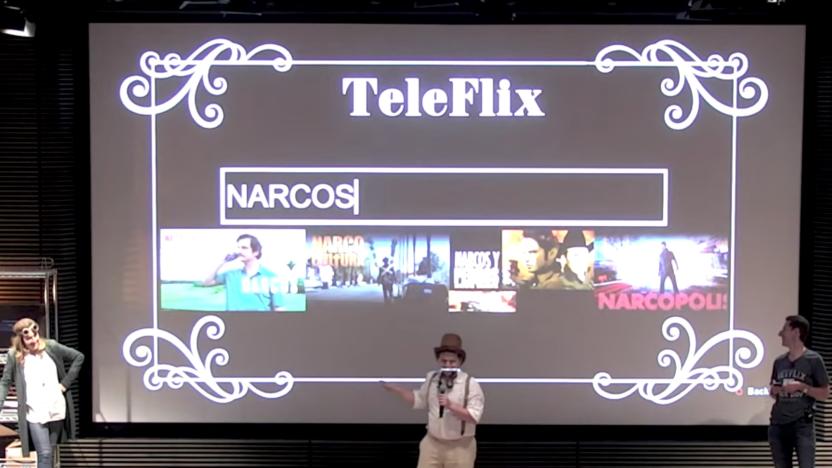
Netflix's annual Hack Day event saw a host of funky projects this year, including a Redbox-style Netflix vending machine, a spooky new interface that makes eyes and heads of characters in thumbnails follow your cursor, an interface to track your binge watches and an audiobook mode that plays Audio Descriptions from movies so you can listen to your Netflix queue instead of watch it. The most interesting project, though, is called TeleFlix, which uses a Raspberry Pi and an old telegraph key to search Netflix with Morse code.

This Arduino Basic Kit has everything a newbie maker could ask for
It's easy to think about tinkering around with Arduino, but take more than 30 seconds to look at the platform, and suddenly it becomes daunting: not only do you need an Arduino itself, but to get started you need resisters, wires, LEDs, screens and a host of other components that are almost always sold separately. Have no fear, newbies: there's a new Arduino Basic Kit in town, and it has all the spare parts a beginner could want.

Build a DIY secret iPhone case inside an old book
Here's a fun weekend project we found on YouTube: building your own DIY secret iPhone case inside of an old book. YouTube user Ela Gale has put together a nice tutorial featuring easy to follow steps. You may ask yourself "why would I want such a thing?" First of all, it's adorable. Secondly, there are a few odd situations where such a thing might actually be useful. For example, if you're walking home late at night a mugger is probably not going to go after the guy walking around with a novel. Outside of that, maybe it'd be useful at the library if you'd like to leave your phone behind while you go to find a new book. If you've got some free time this weekend, a craft knife, and a book you no longer care about, consider giving this project a spin. Here's what you'll need. An old unused book (thicker than an iPhone and not too big) Craft knife Ruler Pen Scissors Glue (i used PVA) And if you want to decorate the book, you will also need: Colored paper Colored pens

City of Titans team discusses following and evolving from City of Heroes
There's a hole in the heart of every City of Heroes fan, a hole that City of Titans intends to fill. With the game's Kickstarter quickly moving toward half a million dollars of funding (for an unknown team of volunteer developers), a lot of attention is being focused on the project. Project lead Chris Hare sat down to discuss some of the team's goals in a recent interview, both in terms of mirroring and building upon the foundation laid by Paragon Studios. Hare explains that while the team at Missing Worlds Media wants to recapture the spirit of City of Heroes, there's also a desire to do things that the original game could or would not do. The active combat of Champions Online is cited as an inspiration, as are the public quests of Warhammer Online. At the same time, promising too much and underdelivering is a trap no one wants to fall in. Take a glance at the full interview for more details about how the game promises to evolve while keeping true to its roots.

The Daily Grind: How do you handle your in-game projects?
I have an overarching goal in Final Fantasy XIV: be level 50 everything. All crafts, all gathering classes, all combat classes. It's a worthy goal, but it's also the sort of thing that's going to take me roughly forever to accomplish. So I don't tend to work on the big project; I pick little goals along the way, like getting one level on a specific class every day. When I get bored with one, I move on to another. Not everyone works like that. Some people would rather not have little goals, preferring one big goal to just push on. Get to the level cap with one class, then on to the next one, no breaks to risk distraction. So which do you prefer? Do you like to have sidelines or do you find them distracting? How do you handle your in-game projects, especially ones that you know are going to take quite some time? Every morning, the Massively bloggers probe the minds of their readers with deep, thought-provoking questions about that most serious of topics: massively online gaming. We crave your opinions, so grab your caffeinated beverage of choice and chime in on today's Daily Grind!

Storyboard: Brother from the same mother
An awful lot of characters seem to be only-children. In some countries this is pretty normal, but it's certainly not normal where I'm living. Pretty much all of my friends and contemporaries have at least one sibling. So it seems a bit odd that your roleplaying characters don't have any fellow family members to talk to. The realistic reason, of course, is that most of us don't spend a whole lot of time thinking about those siblings. And in some cases it's entirely reasonable to say that your character might not know her several half-siblings. But in the interests of verisimilitude, it's worth thinking about this, even if you never want siblings to become a major focus of roleplaying. You can come at this topic from two angles. You can talk about how to handle siblings, or you can talk about the impact of siblings. For this column, I'm going to focus on the former. What are the options for including your character's siblings?

Neverwinter unveils the Campaign system
The first major content addition to Neverwinter isn't just bringing new dungeons, it's bringing a new way to experience the game's content. The new Campaign system will see its debut in the region of Sharandar. This isn't just another name for a series of quests, but rather a new way for players to unlock both new rewards and new areas simply by adventuring and completing larger goals. The Campaign window is a new UI element that lists a number of Projects players can undertake. Questing in the area, running solo instances, or diving into the new dungeons will provide new rewards that can be spent on clearing projects, unlocking new regions, new dungeons, and so forth. Players can also earn new equipment by completing other Projects, which offers several methods to reap the benefits of hard work. The new system, like the rest of the content, is still due out for sometime this summer.

Apple seeking engineers for 'next generation' Apple TV development
A new job posting on Apple's website shows that the company is seeking a software engineering manager to "help deliver the next-generation features for Apple TV." Alright, sure, they probably didn't need that article in there. But still -- Apple is clearly trying to put together a team to build up the software on the Apple TV, and it even asks applicants for the job to have experience managing several "high-priority projects." "High-priority" isn't how Apple has described its TV unit in the past, but if they're assembling a new team for a new era, we can probably expect to see some changes in the future around Apple's living room device. A job listing is of course just a job listing -- this just means it's a position that Apple wants to fill at some point in the future, not that Apple's halfway done with all of the R&D it wants to do. But I think it is fair to say that the Apple TV has a long future in Cupertino, and that we'll definitely see it move up on the priority scale over there very soon. [via 9to5Mac]

World of Midgard opens up Kickstarter campaign
All right, so you've probably seen your fair share of Kickstarters for MMORPGs by now. Including ones aiming at being an old-school revival. And you've seen a lot of them offering to let you play on both mobile devices and on your desktop... Wait, that part is kind of new. And if it appeals to you, you should probably take a look at World of Midgard's new Kickstarter project. The game is currently running in a beta state, but the development team wants to move forward and complete the game in a suitable fashion. That means a need for money, and that's why the game is opening the doors to crowdsourcing. The project offers an exclusive mount for players who donate just up to the $15 level, with increasingly extravagant rewards for those who offer more. If it sounds like your cup of tea, take a look at the project and consider sending a few dollars along to help development.

Storyboard: The RIFT project - conclusion
The RIFT project was a complete and utter failure. I'd like to say that this was something that I came to conclude very late in the project, but honestly it happened early on. Both Ms. Lady and I knew that the project had failed irrevocably, and while I'd like to think we tried gamely to keep running it as if the project were ongoing, I think we failed even at that. So, yes -- this is a project that ended in failure. But it ended in failure in the best way possible. Even with that having been said, the project didn't take off in the direction I had hoped and certainly didn't have the results I'd conceived of when I first came up with the project. So it's worth examining what worked, what didn't, and what advice I can give anyone else attempting a similar project in the future. I think it's a worthy idea, but I think that ultimately it just doesn't quite work.

Storyboard: The RIFT project - week 1
While I had expected this project to get shoehorned into a footnote over the next few weeks, the majority vote was in favor of seeing this recapped every week. So it's time for the first recap of the RIFT project, which will cover just about a week of time spent in the game as of Wednesday. That means recapping characters, giving a brief summary of events, and giving everyone an idea of how well the project is working out thus far. I'm going to go on the record stating two things, just in case they weren't clear from the first column. The first thing is that this project is not an official Massively thing by nature, just something that I had dreamed up and figured would be interesting to read about. Second, I'm well aware that I'm probably going to have one or two enormous lore holes in my recaps or character summaries. Those of you who read regularly probably already know that I lose precisely no sleep over this fact, and you should not either. It's just a game; we should all really just relax. With the preamble out of the way, let's get into the story so far.

Storyboard: On roleplaying projects
Roleplaying projects are great. They're good for avoiding burnout, good for stretching your roleplaying muscles, and good for giving you reason to explore something you'd otherwise ignore. Not every project works out all that well, but I'm a big fan of the idea, and I'd encourage everyone who likes to roleplay to try a major project. The problem is that roleplaying projects are a lot of extra work and sometimes don't produce a lot of worthwhile results. Restrictions can breed creativity, sure, but sometimes they're just limiting. Roleplaying a character who never moves, for instance, is certainly possible but probably not a lot of fun, unless you really like sitting in a chair in-game while you sit in a chair in real life. So while I'm not kicking off my own little project just yet (it would take time away from my latest round in Choose My Adventure, and that would be terrible), I thought it'd be a good idea to look at how to create and work within a project so that the experience is a fun break rather than an oppressive fun-sucking nightmare. Hopefully, even if it doesn't work out, you can at least have some fun with the concept.

Kickstarter talks to us about product 'pre-orders,' won't force refunds when creators flake
Kickstarter has proven an incredibly effective venue for connecting project creators with monetary support -- inventors pitch directly to consumers, indie filmmakers meet indie producers and food trucks get the financial push necessary to take their restaurants to the road. With the latter two, backers don't necessarily expect goods in return, save for an overvalued t-shirt, bumper sticker or film credit. When it comes to electronics, however, funders are often promised a first-off-the-line gadget -- one that may never arrive at their door. One oft-overlooked, yet critical detail should help curb expectations, while also serving to filter out pledges that are motivated by the pre-order promise, from those that offer financial support without a guaranteed return. Like it or not, all transactions fall into that second category. Pre-order offers may go unfulfilled, and some pledges may be reduced to donations, if a project creator ends up unable to deliver an item as intended. And such situations may not prompt a refund, souring the experience for an increasing number of hopeful device owners. Join us past the break for an explanation from the Kickstarter team, and a closer look at some recent examples.

DIY Cellphone has the footprint of an ice cream sandwich, definitely doesn't run ICS (hands-on)
Building your own wireless communications device isn't for the faint of heart, or the law-abiding -- the FCC tends to prefer placing its own stamp of approval on devices that utilize US airwaves, making a homegrown mobile phone an unlikely proposition. That didn't stop a team at the MIT Media Lab from creating such a DIY kit, however. Meet the Do-It-Yourself Cellphone. This wood-based mobile rig, while it's currently in the prototype phase (where it may indefinitely remain), would eventually ship with a circuit board, control pad, a fairly beefy antenna and a monochrome LCD. Sounds like it'd be right at home at some kid's garage workshop in the early '80s, not showcased at an MIT open house. The argument here is that people spend more time with their phone than with any other device, so naturally they'd want to build one to their liking. Nowadays, folks expect their pocketable handset to enable them to not only place and receive phone calls, but also store phone numbers, offer a rechargeable battery, and, well, in some cases even send and receive email, and surf the web -- none of which are available with such a kit. The prototype we saw was fully functional. It could place calls. It could receive calls. There was even Caller ID! The phone does indeed feel homemade, with its laser-cut plywood case and a design that lacks some of the most basic gadget essentials, like a rechargeable battery (or at very least some provisions for replacing the 9-volt inside without unscrewing the case). Audio quality sounded fine, and calls went out and came in without a hitch -- there's a SIM card slot inside, letting you bring the nondescript phone to the carrier of your choice. Does it work? Yes. Is it worth dropping $100-150 in parts to build a jumbo-sized phone with a microscopic feature set? No, there's definitely nothing smart about the DIY Cellphone. If you want to throw together your own handset, however, and not risk anyone questioning the legitimacy of your homemade claim, you might want to keep an eye out for this to come to market. The rest of you will find everything you need in the video just past the break. We're just happy to have walked away without any splinters.

The Daily Grind: What in-game project made you the happiest to complete?
MMOs give players a lot of freedom and a lot of different potential projects. That means players get to pick a goal and get to it, whether or not it's the "intended" play pattern for the game. Sure, you might have a clear progression from low levels to endgame, but you can just as easily decide that you want to see all of the task forces in City of Heroes or clear all of the World of Warcraft dungeons on-level or level in Final Fantasy XIV with only store-bought equipment. That's not to imply that game-provided projects like clearing all endgame content are somehow easier or less relevant. So out of all the game projects you've experienced in MMOs, which project was the one that gave you the best feeling after clearing it. Was it something you were "supposed" to do or just a challenge that seemed interesting at the time? Has it shaped your play subsequently, or was it fun then and never again? Every morning, the Massively bloggers probe the minds of their readers with deep, thought-provoking questions about that most serious of topics: massively online gaming. We crave your opinions, so grab your caffeinated beverage of choice and chime in on today's Daily Grind!

Storyboard: Lore -- what is it good for?
Over the course of the long holiday weekend, I took the opportunity to apply to a guild. (That's right -- I don't get free passes; I have to apply just like everyone else. On a related note, keep an eye out for my list of guilds that I'm not in that are also horrible.) Among the many questions on the application was one that immediately made me sit up and take notice. To summarize, the question was asking how important it was to the applicant that all RP remain grounded in the game's lore. In my mind, lore has a strange relationship with roleplayers. On the one hand, it's rare that you'll start playing in the world if the lore doesn't interest you at least somewhat -- no one wants to play in a game that doesn't feel like a remotely plausible world. (Yes, we're using "plausible" in the sense that dragons, alien invasions, and human-like robots can all be accepted. Plausibility for unreal settings is an odd concept.) Yet at the same time, the lore is its own creature, not really actively supporting roleplayers and sometimes ruling out cool stuff. How do we deal with our simultaneous friend and enemy?

Second Life's Emerald client facing obsolescence
Recent months have not been wholly kind to Second Life, and those circumstances don't seem finished just yet. The Emerald client, one of the most popular third-party viewers -- estimated to be used by as many as half of all players -- has fallen out of favor with Linden Labs and is no longer an officially endorsed option. Scott Jennings has posted a full rundown of the client's history, charting its progress from the earliest inception of the project to its current status of having fallen from grace. The short version (or as short a version as you can get for drama four years in the making) is that Emerald's coders included some rather... hack-tacular backdoors in the client's coding. This is a downside for reasons that should not need to be specified, but does add up to some major problems for the large playerbase still using Emerald. Second Life has had a hard time getting its users to switch to the 2.0 viewer, and about the only upside may be that the removal of Emerald will change that... but the overall drama isn't going to be kind for either the Emerald project or Linden Labs itself.

Former Blizzard dev starts Atomic Operations game studio
Industry veteran Chris Millar has been around -- he's been with Blizzard since the WarCraft II days, and has worked on everything from Black and White 2 to Fat Princess – but now he's off to head up his own company called Atomic Operations. In this quick Q&A with Gamasutra, he says that the company will be a grab-bag of methods and products, all using "an evolved production method similar to that of movies." They've already got a project out the door, too: Atomic is the company that's supporting Fat Princess, with the bugfixes released the other day and presumably more to come. Millar and Atomic Operations join the multitude of other Blizzard veterans off working on their own companies. Let's see, there's Keith Lee and his crew at Booyah, the ex-Blizzard folks at Red 5 Studios, the unfortunate souls at Castaway Entertainment and Flagship Studios (now Gravity Bear and Gargantuan Studios), new WoW TCG licensees Cryptozoic, and a few other little developers and divisions headed up by ex-Blizzard devs. Whew, that's a whole lot of babies -- Blizzard is like the Zeus of gaming studios lately. What are they serving in the cafeteria over there, startup cola?


