

Everything announced at The Android Show: I/O 2026 edition

Google I/O, the company's big annual developer conference, is almost upon us. But the company isn't waiting until then to reveal what it has in store for Android. There was just far too much news on that front to squeeze into the I/O keynote, so Google revealed the details in the latest edition of The Android Show today. And, my goodness, were there a lot of details to reveal.
From Gemini Intelligence and new laptops in the form of Googlebooks to an AirDrop-related update and Instagram editing tools in Android, Google had plenty of announcements to make.
So, without further ado, here's an overview of everything Google announced during The Android Show: I/O edition.
Googlebooks
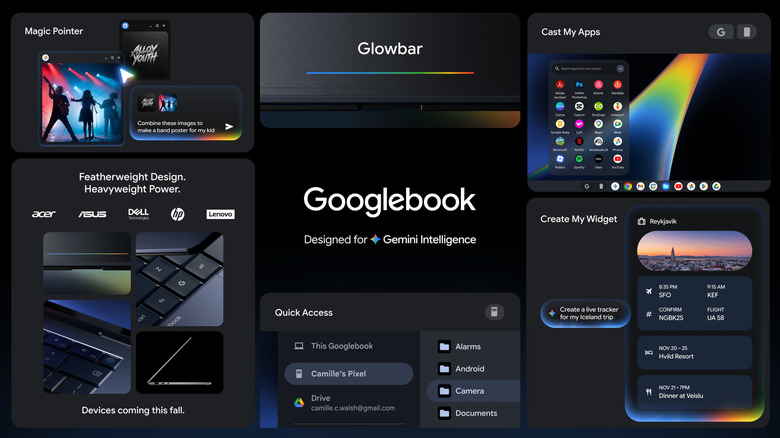
Somehow, next month marks the 15th anniversary of the first Chromebook. Google is now looking to build on that device family with a new lineup: Googlebooks. Not to be confused with Google Books, I presume.
These systems are built for Gemini Intelligence, a suite of fully integrated generative AI features (more on that in a moment). If this sounds a little familiar, you might be thinking of Copilot+, an initiative Microsoft debuted in 2024 to highlight a wave of Windows laptops that can handle more Copilot tasks locally rather than in the cloud. The concept didn't exactly catch fire — data indicated consumers weren't rushing out to buy Copilot+ PCs in grand numbers.
In fact, Microsoft has started stripping Copilot features out of Windows apps after users revolted against the company for cramming generative AI junk into every possible part of the operating system. Whether folks will be more accepting of Gemini Intelligence and Googlebooks is something to keep an eye on over the next couple of years.
In any case, Googlebook laptops will be "seamlessly compatible with Android phones," the company said. Google has been working on a platform that unifies ChromeOS and Android, and this is the next step. For one thing, you'll be able to access files on your Android phone from the file browser on your Googlebook. Google is far behind Apple when it comes to interoperability between its products, and it's trying to catch up.
Google will reveal more details about Googlebooks in the coming months. The first such laptops will be made by the likes of Acer, ASUS, Dell, HP and Lenovo, and will hit shelves this fall.
Gemini Intelligence
Google is injecting even more Gemini into Android and ChromeOS devices with Gemini Intelligence. "It integrates premium hardware and innovative software to help you stay a step ahead by working proactively to get things done throughout your day — all while keeping your data private, and keeping you in control," the company said in a press release. It's an attempt to bring more agentic AI features to more devices that run on Google software.
Google is pitching this as a more streamlined way to get things done. It suggests that, when you long press on a grocery list in your notes app, you can ask Gemini to create a shopping cart with all of the items so you can check out faster. The company says Gemini will work in the background to do things like locking in a spot in a spin class. You'll still need to confirm actions before Gemini, for instance, books a trip for you.
There's more to Gemini Intelligence than that, though. For Googlebooks, the Google Deepmind team helped build a tool called Magic Pointer, which is a gesture-based feature baked into your cursor. Every time you wiggle your mouse at something on your display, Gemini-powered contextual suggestions for what to do with it will pop up. For instance, wiggle at a date in an email, and Magic Cursor might suggest that you set up a meeting. It sounds like Clippy, but potentially 1,000 times more annoying.
Google is doubling down on widgets as well, including by bringing them to Googlebooks and Wear OS. Using the Create My Widget tool, you'll be able to generate custom widgets with a Gemini Intelligence prompt. You might use this to deliver fresh recipe suggestions to your phone every week or to bring all of the information about a trip from sources like Gmail and Calendar into one place.
One other thing that Gemini Intelligence will be able to do is connect to Autofill with Google (the company says this is entirely optional and you can opt back out at any time). The AI system will fill out forms for you using relevant details from connected apps. Google suggests this will come in useful when you're faced with punching in details into tiny text boxes on mobile devices to complete a form.
Gemini Intelligence will bring a refreshed look to your devices as well. Google says this builds on the design language of Material 3 Expressive, which debuted last year.
Google is promising that you'll have granular control over Gemini Intelligence, including the ability to disable certain features and what data is shared with Gemini and certain apps. Gemini Intelligence will only run in apps that you permit it to and won't start automating any tasks until you tell it to.
Along with Googlebooks, Gemini Intelligence is coming to devices running Wear OS, Android Auto, Android XR and, of course, Android. These features will first appear on the latest Samsung Galaxy and Google Pixel phones, and Google will start deploying them starting this summer.
Gemini for Chrome in Android
As desktop users may be well aware by this point, Chrome isn't sheltered from Gemini. The company will soon bring Gemini in Chrome to the web browser on Android devices as well.
It says this tool, which is built on Gemini 3.1, "can help you research, summarize and compare content across the web." You can tap the Gemini icon at the top of the screen to bring up a chatbot and ask it questions related to the webpage or get explanations for complex issues. Gemini in Chrome can also connect to other apps, so it will be able to dig up information from Gmail, create events in Calendar and make notes in Keep. Gemini in Chrome features Nano Banana integration as well, so you can generate images right in your browser or customize images from the web.
An auto-browsing option is said to be able to carry out certain tasks for you, like reserving a parking spot close to an event you're attending. This will initially be available for AI Pro and Ultra subscribers in the US. As with other Gemini Intelligence agentic features, you'll be prompted for a confirmation before the tool purchases something or carries out another sensitive task, like posting something on social media.
The auto-browsing tool will start rolling out at the same time as the rest of Gemini in Chrome. Google said it will start deploying these at the end of June to select devices in the US that are running at least Android 12.
Android 17 updates
Google has largely shifted away from big annual operating system updates in favor of more frequent Pixel Drops. Still, the pre-I/O edition of The Android Show gives the company a chance to give you a peek at what's coming via Android 17.
The most exciting update for many will be the introduction of 3D emoji. Google is calling this collection Noto 3D. Pixel phones will be the first to gain access to these emoji later this year. Google says they'll be available across its products.
A new Gemini Intelligence-powered speech-to-text feature called Rambler will aim to remove filler words and clarify what it seems you're trying to say. "You can speak naturally and it will take the important parts, then fit them all together into a concise message," Google says. The company claims that Rambler will even account for switching between languages mid-sentence. The tool won't save or store your speech, which is only used for transcription.
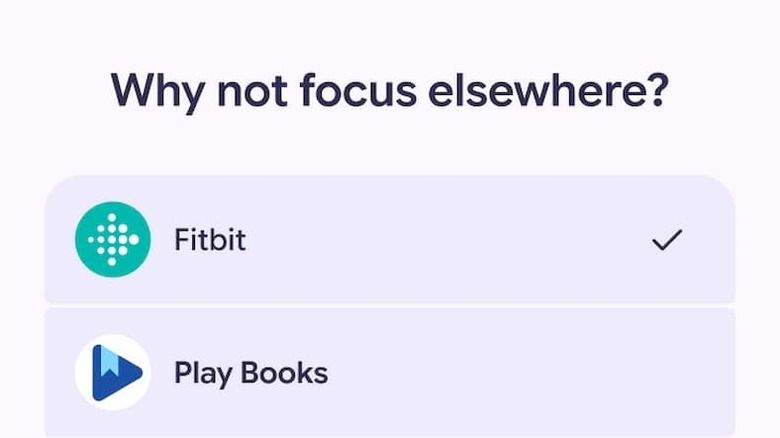
A feature called Pause Point is designed to help you use your phone more intentionally, given how easy it is to dismiss things like app timers. If you enable Pause Point and a time-sucking app, there will be a 10-second delay during which you'll be prompted to consider just why you're trying to use it. Pause Point might suggest a breathing exercise, setting a timer, some photos for you to look at or a different app that might ultimately be more edifying.
It won't be super easy to turn off Pause Point entirely either. You'll need to restart your phone to do so, which could be enough of a sticking point for many people to consider whether that's a good idea. Anything that can help more people reduce the time they spend doomscrolling has to be a positive step.
There are features on the way for creators too, including Screen Reactions. The idea with this is that you'll be able to record yourself and your screen simultaneously. This could make it easier for you to react to a new song or something interesting on the web and post a video about it. Pixel devices will first get access to Screen Reactions this summer. Also in the coming months, expect to see an Adobe Premiere app hit Android. This will feature exclusive templates and effects, Google says, along with the option to post YouTube Shorts without having to switch apps.
Elsewhere, Google says it teamed up with Apple to make the process of switching from iOS to Android easier by wirelessly transferring data including passwords, photos, messages, apps, contacts and even your eSIM. Pixel and Samsung Galaxy devices will be the first to support this option, starting later this year.
In addition, Google is making Quick Share compatible with Apple's AirDrop across Android handsets from partners including Samsung, Oppo, OnePlus, Vivo, Xiaomi and Honor later this year. Plus, starting today, you'll be able to generate a QR code on any Android phone via quick share, and use this to share information to iOS devices via the cloud. It's a workaround, but it could do the trick for now. On top of that, Quick Share will soon be available in more apps, including Whatsapp.
Instagram editing tools in Android

There was plenty of news for Instagram users in The Android Show. Google says the Instagram app is now fully optimized for Android tablets. It took Meta 15 years to make a proper iOS app, so it's good to see that the Android version has been given the same treatment.
Google and Meta have also brought Instagram capture and editing tools to Android as well. You'll be able to capture and view ultra HDR video on higher-end Android devices, and the app will offer built-in video stabilization. There will be night sight features too.
The Instagram Edits app for Android is also getting an upgrade. AI models running on your device will be able to upscale photos and videos with a single tap. One other neat feature in the app will create separate audio tracks so you can, for instance, increase the volume of music and take out wind noises.
Android security updates
As companies like Google continue to nudge us toward using agentic AI systems and expand their capabilities, concerns regarding privacy and security continue to grow. The company claims that many of the Gemini Intelligence features harness the same systems that protect other Google products, and that your data will remain within its ecosystem.
It said that it's adding additional protections to Android for when the AI systems carry out actions on your behalf to add more protection against risks like prompt injection. Google added in a press release that it's using "technologies like Private Compute Core, Private AI Compute or protected KVM to safeguard ambient data processed by proactive assistance features, like Magic Cue." The company also said that third-party experts have audited "key parts of our AI security architecture," which are open source.
The company is touting transparency into what Gemini Intelligence is doing for you as well as how your data is used. For instance, when you're using Rambler speech-to-text, there will be an indicator that makes it clear the feature is enabled. In addition, you'll be able to see when Gemini Intelligence is running (thanks to an icon in the notification bar) and watch its progress on a task in real-time by opening the app it's automating. What's more, you'll soon be able to see on Android Privacy Dashboard which AI assistants were enabled and the apps they tapped into in the previous 24-hour period.
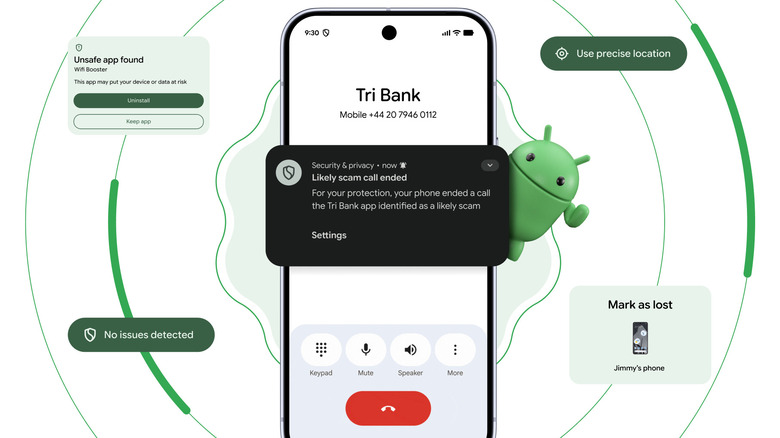
Google is also enhancing security in other ways on Android, such as with stronger protections against spoofed phone calls that appear to be from a financial institution. The company has partnered with some banks and other institutions to develop a feature that verifies whether a call is actually from one of them and automatically hangs up if not. Android will use several methods to verify such calls if you have an app from an eligible institution installed and you're signed into it. Google's initial partners for this feature are Revolut, Itaú and Nubank, with more to follow. It will be available on devices running at least Android 11.
The company is also expanding its live threat detection tools, including with warnings about potentially harmful actions. For instance, on Android 17, a feature called dynamic signal monitoring will be on the lookout for apps that engage in suspicious activity "like changing or hiding their icon and then launching from the background or abusing accessibility permissions," Google said.
Those who sideload apps by downloading them on Chrome on Android should be better protected if they have Safe Browsing turned on. Google will scan the file for known malware and stop you before downloading the app if it detects any.
On the device level, Google is reducing the number of times someone can incorrectly enter a password or PIN on an Android 17 phone or tablet and adding a longer wait between attempts after failures. By default, the device's IMEI will be accessible through the lock screen on devices running Android 12 and above (though you can switch this off if you prefer). Manufacturers, network operators and police can use this number to verify that you're the owner of a device and hopefully return it.
You'll have more granular control over how apps use your location in Android 17. It'll be possible to only enable your precise location for certain tasks when the app is open to minimize its knowledge of where you are and what you're doing. Google is also finally giving developers a way to ask for a specific contact to help you find a certain friend in their apps, rather than you having to fork over your entire contact list.
Android Auto
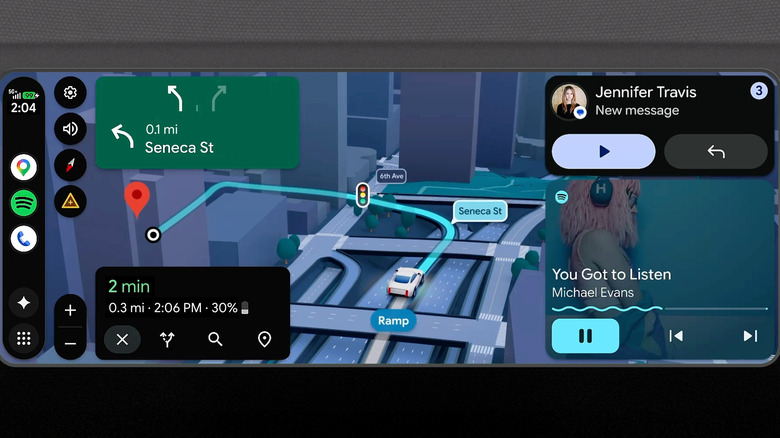
Google is overhauling Android Auto and cars with Google built-in systems. Gemini, of course, is deeply rooted in the new-look Android Auto, which has a refreshed appearance based on the Material 3 Expressive design. Google has retooled Android Auto to fit any shape of infotainment system display.
The company is revamping a string of apps too, including Google Maps. Google is bringing what it calls Immersive Navigation to the app. This is a 3D view that shows structures and terrain, along with details like road lanes, signs and traffic lights. You'll be able to create custom widgets for Android Auto, while media apps like YouTube Music and Spotify are getting a visual refresh.
When you're parked — perhaps while waiting for your EV to recharge — you'll be able to stream video on YouTube and other apps in 60fps full HD. Google says it will start offering this later this year in supported models from BMW, Ford, Genesis, Hyundai, Kia, Mahindra, Mercedes-Benz, Renault, Škoda, Tata and Volvo.
When you hit the road again, the videos will switch to audio-only mode as long as the app supports background audio. Spatial audio is on the way to Android Auto as well, with Dolby Atmos support in select apps and cars, such as BMW, Genesis, Mahindra, Mercedes-Benz, Renault, Škoda, Tata and Volvo models.
If your phone supports Gemini intelligence, you'll be able to use that in Android Auto. Google says that a feature called Magic Cue will be able to deal with something like a friend texting you about an address by looking at other text messages, Gmail and Calendar for the relevant information. If it finds the right details, it will generate a reply, which you can send with a tap. Gemini will also let you order a meal for pickup or delivery using voice commands. Doordash is Google's first partner for this feature.
As for cars with Google built-in, Google is currently deploying Gemini to those systems. Immersive Navigation in Google Maps will have a little something extra in select cars with Google built-in, as it will tap into your vehicle's front-facing camera to offer live lane guidance.