Chris O'Neill

Engadget Editorial Policies

The unique content on Engadget is a result of skilled collaboration between writers and editors with broad journalistic, academic, and practical expertise.

In pursuit of our mission to provide accurate and ethical coverage, the Engadget editorial team consistently fact-checks and reviews site content to provide readers with an informative, entertaining, and engaging experience. Click here for more information on our editorial process.

Stories By Chris O'Neill

  • Tech etiquette tips

    Below are a list of tech etiquette tips that are not only exclusive to the office, these can come in handy for day to day living too. Volume Mind your volume and try not to yell into your smartphone. People speak a lot louder into their phones without knowing it. Space Respect peoples personal space when you are not yelling into your phone, a 'safe cell distance' is regarded as being around 10 feet. Attention Don't check your phone for e-mails or text messages during meetings. Instead, keep your phone on silent or vibrate and pay attention to, or engage those around you. Appearance Dress appropriately for work, try and keep those see through mesh tops, low hanging blouses and tight fitting Lycra shorts for other occasions. Respect If you need to borrow from a colleagues desk - always ask for permission first. Cleanliness Be tidy and clean up your rubbish whether that be by the copier or the canteen. Don't expect others to clean up after you. Gossip Try not to gossip and over sharing your private life should try to be avoided. No one likes or trusts a gossip and we would rather you kept your private life private. Time Be punctual and on time for appointments and meetings.

    By Chris O'Neill Read More
  • The top 5 favorites list: Movies based on video games

    In no particular order: Hitman I loved this adaption of the classic shooter. Timothy Olyphant was perfectly cast as assassin 47 while the movie had some fine action and explosive stunt scenes. Mortal Kombat This was one of the few adaptations that genuinely looked like a video game. Released in 1995, the tale centered around a tournament where the sinister forces of Darkworld slug it out against the good guys of Earth Realm, not much at stake except..erm.. the universe! Great fun that had some well executed fight scenes. Tomb Raider Angelina Jolie was perfectly cast to play Lara Croft. Unfortunately the film was average but it never took itself too serious and certainly had its moments. Resident Evil Mila Jovavich went on to star in another two more Resident Evil's and this series has been the genre's most successful ever. The movie posters caption read - ' A Secret Experience, A Deadly Virus, A Fatal Mistake...' That pretty much sums up this gore fest that has plenty of thrills and excitement to keep the adrenaline flowing. Prince Of Persia Jerry Bruckheimer's adaption of the much loved platformer has it all - sand, sorcery and swordplay. A visual feast featuring some beautiful locations, while Jake Gylennhall does a top job as the Prince. Awesome action and and enjoyable story to go with the fun.

    By Chris O'Neill Read More
  • How to tricks: Television - Projecting an Android Device to your TV Screen Using Miracast

    Did yo know that every android phone using 4.4.2 or higher can project to the television screen using Miracast?Below are simple step by step instructions to achieve this: Open your device's Settings menu. Under "Device," touch Display > Cast screen. Touch the Menu icon [Menu] , then check the box next to "Enable wireless display." Wait for several seconds until your device detects the Miracast dongle, Chromecast dongle, or your TV. Once it shows up in the list, touch the icon to connect. Your device's screen will appear on your TV or monitor. To stop projecting your screen, simply swipe down the notification shade with two fingers from the top of your screen and touch Disconnect.https://www.youtube.com/watch?v=NA3Opudj4VU

    By Chris O'Neill Read More
  • Tips To Secure Yourself Online

    Password Simple rule but one that all too often gets ignored – change your password regularly! Try and use different passwords for your online accounts. If a stranger were to hack your personal email account then they could easily hack all your other accounts with the same password. Try configuring your password so that it will be difficult for the hacker to breach. Do not use your date of birth, surname, or your pets name. Instead, add higher case letters, symbols or numbers to make them safer and more secure. You should also type HTTPS – (hypertext transfer protocol secure) before web addresses. The majority of websites by default will do this when you are entering your password or when you're on websites for shopping or banking, but you can alter the settings on Facebook by going into security settings. Friends Have you ever received a friend request from someone you don't know and with whom you have no mutual friends? Most of us would naturally decline the friend request but sometimes this is not always the case. A lot of people will accept someone if they happen to share a few mutual friends. One should not accept someone on Facebook that they do not know in real life. If you wouldn't do this in the real world then don't do it online. Privacy Today's generation of young adults have almost grown up with social websites like Twitter, MySpace and Facebook. A lot of us would probably find life difficult without these websites. As a result we believe that we know how to navigate these sites and how to protect ourselves, but the truth is we really don't. Some tips you can do to secure your privacy online are: setting your page to private (this prevents people who you are not friends with going through your account), and avoid sensitive or personal information like your address, employment details or even your age. Be yourself Try and be yourself, just because you are online doesn't mean that you can act as a different person. Don't put up posts or statuses that you wouldn't want those close to you to see like your parents, teachers or potential employers. Be careful what you put up as this might be offensive or hurtful to someone. Think before you type because everything can be traced back to you even after you delete it.

    By Chris O'Neill Read More
  • The top 5 favorites list: Podcasts

    In no particular order:Kermode and Mayo's Film ReviewLove these guys, they just ramble on for a couple of hours talking about everything and anything. Mark Kermode reviews the weeks biggest movie releases and gives his verdict in his own inimitable style. Being a movie buff myself I find some of his reviews right on the mark but others way off scale. But its always entertaining and Simon Mayo's astute observations and dry wit compliments Kermode's enthusiastic, almost juvenile personality really well. You can see that they both genuinely enjoy what they do and there is a real matey chemistry between the two. Some great guests as well with A - lst movie stars and directors regularly popping in to discuss their work.http://www.bbc.co.uk/programmes/b00lvdrj/episodes/downloadsJim Harold's Campfire - True Ghost StoriesIf you love to be spooked then look no further than this podcast . Regular listeners ring in to Harold with tales of paranormal phenomena of every type - ghosts, poltergeists, UFOs, you name it. There are some genuinely creepy stories that will have you keeping the bedroom light on.http://jimharold.com/category/the-paranormal-podcast/PitchWhitney Jones and Alex Kapleman talk about their love of music and how it shapes who we are. Great structure to the show, excellent delivery by the hosts and some wonderful stories about the transcendent power of music. A must for music lovers.http://www.pitchpodcast.org/99% InvisibleIts totally silly but i just love this podcast. Host Roman Mars devotes shows to life altering topics such as the history of Wonder Bread, the social impact of cul-de-sacs or where the clicking noise of phones emanate from. Inane and addictive.http://99percentinvisible.org/The Andy Daly Podcast Pilot ProjectAndy Daly is an actor/comedian and master improviser. This show plays to the mans talent and strengths brilliantly. Each episode is a pilot for a different character which Daly assumes and an hour of hilarity ensues. One of the funniest podcasts out there.http://www.earwolf.com/person/andy-daly/

    By Chris O'Neill Read More
  • For Your App-roval - Here Are My Two Favorite Apps

    There are lots of other apps that I love eg. Spotify, Instagram, Google Maps.. but it is these two that have made the greatest impact on my life. My FitnessPal I used to live a sedentary, unhealthy lifestyle which was accompanied with poor eating habits. Working in an office didn't help and I would find myself eating unhealthy snacks and drinking lots of coffee. Things came to a head when my mother passed away because of heart disease. This was smoking and weight related and it was the catalyst for me to start adopting a healthy lifestyle. A friend recommended me this app and it has virtually revolutionized my life since I incorporated it into my fitness routine well over a year ago. The app features a never ending database- some four million + items and a brilliant calorie counting feature. You can enter the types of food you are eating and sync it with your PC/ mobile device/tablet. There are exercise workouts which are varied and never boring, it keeps me motivated and has helped me make better eating choices. It has been extraordinarily transformative in many ways, I feel happier and healthier. I have lost 10.7 kgs and kicked 20 year old smoking habit. This would not have been possible if I didn't have this daily companion informing me, inspiring me and motivating me. I had joined gyms before but usually gave up after two weeks, now with this app I find myself setting goals that I am not only reaching but exceeding. This has got to be my number one app. Wally This is another fantastic app that has helped budget and prioritize my spending. Being prudent with money was never one of my strong points, in fact I was pretty reckless and would often spend on items that I didn't need. Now that I am paying rent and bills, I have to reign in my spending and prioritize my finances otherwise I would end up without a roof over my head! This app is user friendly and easy to use, Wally lets me know where my income is going, sets and adheres to budgets, balances my income and expenses and allows me to reach my financial goals. Now instead of being flat broke at the end of the month surviving on basic rations, there is enough cash in the kitty to indulge myself a little. Peace of mind and sensible money management have been the two great benefits of this app.

    By Chris O'Neill Read More
  • Photonics - Light Technology That Is Revolutionizing Our World

    What is Photonics? Photonics is the field of science and technology to do with detecting and controlling, as well as generating particles of light. Photonics supports daily technological life from smartphones to laptops, to the internet to lighting technology. This technology will have an even more profound effect on our lives and future generations this century, in much the same way electronics had in the last century. Because light transfers data quicker than wires at a much lesser cost, optical fibre has long been the preferred method for telecommunications. This is revolutionizing computing as we know it. Computing systems with the aid of new types of optical chips allow computing systems to work much quicker while taking up less power which is very important as the amount of data we transmit over the internet basically runs everything in today's world. Below are some great resource worth checking out: http://www.canon.com/technology/s_labo/light/index.html http://www.laserfest.org/about/index.cfm https://www.youtube.com/watch?v=6CqT4DuAVxs

    By Chris O'Neill Read More
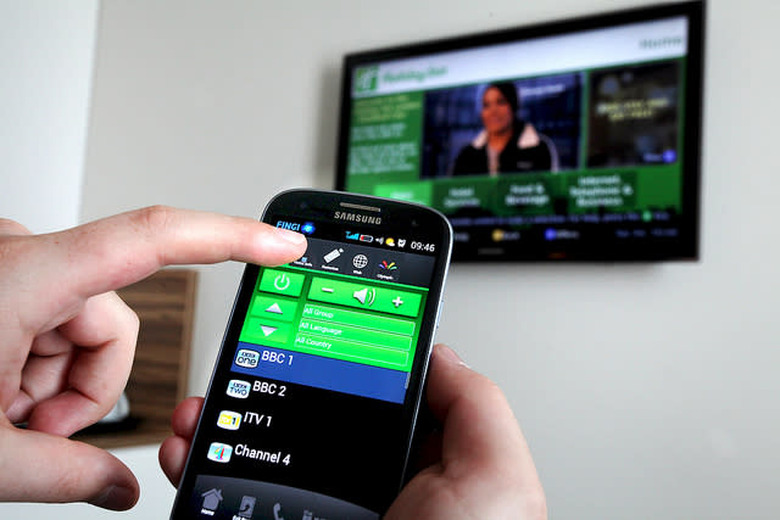
  • How to use your smartphone to control your computer/ TV remotely

    This is handy for a variety of reasons. You may want to watch a video from afar, maybe your computer is connected to a Tv or a projector, this saves you having to go through the hassle of getting up and changing or adjusting anything on the screen. Obviously there are a few others such as streaming photographs and using you phone as a media player. What's out there? Remote Mouse which is compatible with Android , iOS and Windows phones can be downloaded for free in the Play store and has a number of handy features should you need them. It acts as a conventional mouse but its stuffed with loads of different features such as keyboards, shortcuts Ctrl+Alt+Delete, and a multimedia panel for listening to your favourite tunes or watching videos from afar. It's without doubt one of the more in depth examples out there and the free version will give you a good sample of what to expect Mobile Mouse is another example set for iOS and Android release and this offers more or less the same functions like motion controls, keeping tabs on your files remotely, and turn off or put your PC to sleep. You have to download an app and an accompanying desktop app before you get started but this only takes a couple of minutes. If you are a Youtube fanatic you can control your PC or TV on your smartphone with a function called Pair. This allows you watch your favourite Youtube videos without having to leave the comfort of your sofa.

    By Chris O'Neill Read More
  • Microsoft Is Teaching Robots The Art Of Humor

    Everyone finds Robots funny; they have always played the straight man oblivious to any joke played at their expense. Now The New Yorker and Microsoft are attempting to teach a robot to be intentionally funny, so that it can help with its caption contest according to Bloomberg. Since its introduction in 2005, the caption contest has become a firm favorite with New Yorker readers. Readers have to put a caption to a black and white cartoon and the readers send in their best efforts to finish it. It has proven to be too popular and now its editor – Bob Mankoff is being deluged with over 5,000 contest entries each week. This has been difficult on his assistants. "The process of looking at 5,000 caption entries a week usually destroys their mind in about two years, and then I get a new one," Mankoff told Bloomberg. They had to find a way of going through all those entries without becoming completely bored of the humor. Microsoft's solution was to use a robot, so their researchers teamed up with The New Yorker to try and create a robot capable of identifying which of the captions were funny. The researchers fed The New Yorker cartoon and caption data to the robot, attempting to teach it how to differentiate between jokes and similar humor . Although the ''top captions' list didn't align completely with the robot's, all the editors favorites were in the top 55.8% of the robots selections according to Bloomberg. The robot couldn't identify the best and funniest caption, but it was able to discard the majority of truly bad ones. That alone could save at least fifty per-cent the workload of Mankoff's assistants.

    By Chris O'Neill Read More
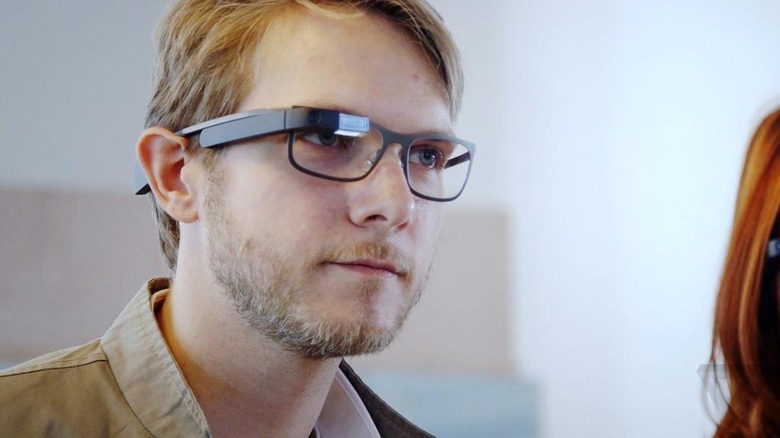
  • Google Glass Is Going To Be Making A Comeback

    Google Glass is making a comeback but instead of pitching it to the general public they are aiming it towards businesses like healthcare, manufacturing and energy with a new version of its wearable devices.Unlike the old version, the new one doesn't come with a wire-like frame to keep the device together. Instead, it has a button and hinge system to connect the mini-computer to different glasses. The exact details about the pricing or timing for the new version hasn't yet been disclosed but according to Re/Code it's expected to come in well below the original price tag of of $1,500 (€1,370) to stay competitive with rival products. The product was retired last January when it closed its Explorer programme. It ceased taking orders for the device but helped other companies that were using it. The Google Glass team relocated to the Nest divison under the supervison of its CEO and co-founder, Tony Fadell. The focus this time is to bring greater reality services to businesses, a change from its original aim of becoming a consumer device when it was first disclosed back in 2012. Privacy concerns were spearked when it was first released because users could take photos or record videos without anyone noticing. The new version will not have the same concerns as it will be designed for private workplaces instead of being utilized in public. https://www.youtube.com/watch?v=D7TB8b2t3QE

    By Chris O'Neill Read More
  • Tiny Robot Can Leap On Water Without Making A Splash

    Seoul National University and Harvard have combined with a team of researchers to create a tiny robot that can jump on water. The miniscule stick robot is able to imitate a waters strider's ability to leap from a solid surface of water with the same power and height.Researchers had to collect water spiders and recorded videos of their movements, analysing the mechanics that permit them to jump on and skim the surface of the water. They discovered that a water spider's legs have slightly curved tips which enable it to take off from the water's surface by rotating their legs inward.To ensure that their robot could do the same , they found that the best way for it to jump was to keep leg to water contact for as long as possible during the actual jump motion..By copying this method, the robot can exert up to 16 times its own body weight without breaking the surface of the water. Robert Woods one of the studies co authors said that it was able to do this by spreading out the push needed to jump.If you apply as much force as quickly as possible on water, the limbs will break through the surface and you won't get anywhere... The resulting robotic insects can achieve the same momentum and height that could be generated during a rapid jump on firm ground – but instead can do so on water – by spreading out the jumping thrust over a longer amount of time and in sustaining prolonged contact with the water's surface.The robot was made by manufacturing folded composite structures that self assemble which allow them to make small machines. According to the research team the robots can be employed in useful endeavors such as carrying out pollution checks in waterways, however they emphasized that their goal wasn't to commercialize or profit from their findings.https://www.youtube.com/watch?v=CnFBXM5641k

    By Chris O'Neill Read More
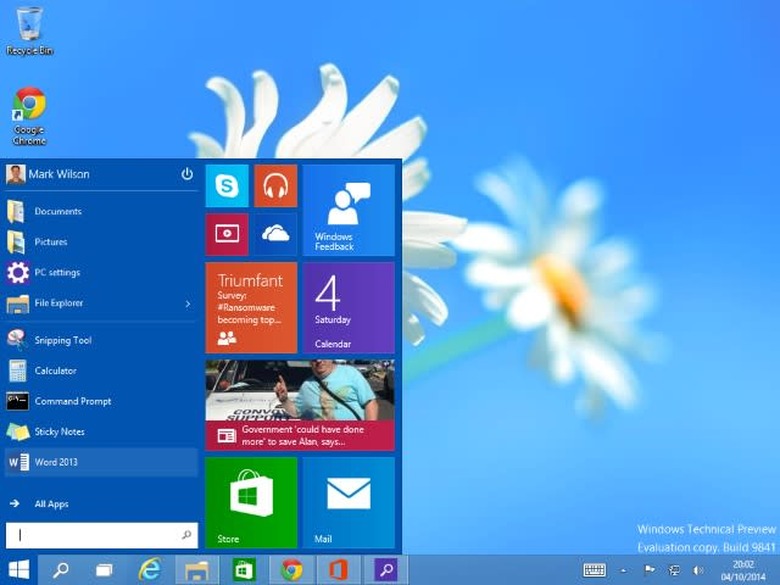
  • Windows 10 Features You Should Know About

    At last! Windows 10 has finally arrived and the upgrade is still rolling out to users around the globe. For those of you who are not familiar with Microsoft's latest flagship, there is a few hidden features that can help you get the maximum out of the system. Here are some to get you started:Have fun with the start menuWhen you open the start button for the first time, you'll notice that it's a hybrid of the original menu and Windows 8 apps. The great thing is that you can customise this by dragging programmes and apps from your menu to the side. You can resize the apps and the section by right-clicking on one and changing it to small, medium or large. This is great for those who have bigger screens to work with as most Microsoft apps incorporate large tiles.When you right-click any app in the Start menu, you can pin it to the taskbar or uninstall it directly from your computer. Very handy indeed .Snapping WindowsResizing a window can be done in two ways. The first is drag it to the top of screen and make it full screen, the other is to drag it to the side to take up only half the screen. When a window is snapped to the side, Windows will show you a quick view of the other app that were opened. Click on one and it will fill up whats left of the remaining space.Download offline MapsThis is a useful feature especially for laptops and tablets with it's ability to download maps or update them. From the maps app, click into settings and select 'Download or update, apps'. Here you will be asked which continent and which country you want before downloading it. It will show you the size of the file in advance so that there won't be any surprises.Create virtual desktopsAnother useful feature to Windows 10 is virtual desktops, handy if your primary desktop gets too cluttered and you want to do a bit of spring cleaning thus allowing you to orgainise your windows better.Press the TaskView button at the bottom or press Windows key + Tab to get the same action. This will allow you to make a new desktop or drag an open app to another one.Record video footage Game DVR permits you to record any open app footage, not just games. Click on Windows Key + G to turn it on and bring up a small, floating dashboard. Press and record any footage you want. Your saved videos can be accessed in the Game DVR section of the Xbox app or inside Video > Captures.Take control of notificationsBy going into Settings > Systems > Notifications and actions. Similar to your phone or tablet, you can control notifications for all apps and services. You can also prioritize specific updates by accessing settings found inside the apps themselves.

    By Chris O'Neill Read More