Steve Sande

Engadget Editorial Policies

The unique content on Engadget is a result of skilled collaboration between writers and editors with broad journalistic, academic, and practical expertise.

In pursuit of our mission to provide accurate and ethical coverage, the Engadget editorial team consistently fact-checks and reviews site content to provide readers with an informative, entertaining, and engaging experience. Click here for more information on our editorial process.

Stories By Steve Sande

  • So long, and thanks for all the fish

    As you may have heard, TUAW is being archived by its parent company AOL. The 10+ years of content that our talented team of writers and editors have crafted are due be folded into our sister site Engadget, where you'll be able to check out the archives. It's been a long haul for us, from the heady early days of Weblogs, Inc. to the banner years when we had our booths at Macworld Expo. But unlike the popular annual Mac conference's official "on hiatus" status, this website will indeed be shutting down. Several of us plan to continue the fun traditions of TUAW, and then take Apple blogging to places where it didn't go on this site. You'll be able to see us over at Apple World Today starting on February 9, 2015, and we hope that you'll not only join us over at our new home, but help us craft a website that will become what you want it to be. As the TUAW blogging team scatters to the four winds, we all want to thank everyone who ever read the site, joined us for a TUAW Talkcast or TUAW TV Live, visited or partied with us at Macworld/iWorld, and followed us on Twitter or Facebook. Wherever we end up, if you see a familiar name on the byline of a post, say hello and let us know that you're still a part of the Apple community. Oh, and if you're not sure about the reference in the title of this post, you really need to read The Hitchhiker's Guide to the Galaxy. TUAW Bloggers, Present and Past Steve Sande (@stevensande, Apple World Today, podcast) Mike Rose (@miketrose, Geekparent, podcast) Victor Agreda, Jr. (@superpixels, site, video channel) Mike Wehner (@mikewehner, Daily Dot) John Michael Bond (@BondJohnBond, blog) Yoni Heisler (@edibleapple) Dave Caolo (@davidcaolo, Apple World Today, blog) TJ Luoma (@tjluoma, blog) Matt Tinsley (@mtinsleymusic, blog) Richard Gaywood (@PenLlawen, blog) Kelly Hodgkins (@kellyhodgkins, blog) Michael Jones (@tuxtoaster) Erica Sadun (@ericasadun, blog) Chris Rawson (@rawsoncj) Mel Martin (@melmazskies, blog) Brett Terpstra (@ttscoff, website) Mike Schramm (@mikeschramm, blog) Megan Lavey-Heaton (@savvyliterate, Namesake Comic) Christina Warren (@film_girl, Mashable) Scott McNulty (@blankbaby) Josh Carr (@joshcarr__ , ECIOV) Nik Fletcher (@nikf) Chris Ullrich (@ChrisU, The FlickCast) Randy Nelson (@DangerPenguin) Shawn "Doc Rock" Boyd (@DocRock, Macuser.Pro) Kelly Guimont (@verso, The Mac Observer) C.K. Sample III (@cksample, Meatgasm) David Chartier (@chartier, Finer Things In Tech) Dan Pourhadi (@pourhadi, blog) Laurie Duncan (@macsamurai, blog) Jan Kabili (@jankabili) Damien Barrett (@damienbarrett) Jay Savage (@jaysavage) Fabien Serriere Barb Dybwad (@doctorparadox, blog) Dan Lurie (blog) Cory Bohon (@coryb, blog) Robert Palmer (@honestcode, blog) Kevin Harter Casey Johnston (@caseyjohnston, Ars Technica) Joachim Bean John Burke Tim Wasson Mat Lu (@matonmacs) Joshua Ellis (@jzellis, blog) Kurtis Seid (@KurtisSeid) Jason Clarke (@jasonclarke) Brett Kelly (@mrbrettkelly, blog) Aron Trimble (@aront, blog) Samuel Gibbs (@samuelgibbs) Giles Turnbull (@gilest, blog) Rick Martin (@1rick, blog) Michael Grothaus (@michaelgrothaus) David Winograd George Tinari (@gtinari) Andy J. Williams Affleck (@aaffleck) Jessica Buchanan Regina Lizik (@ScarletRegina) David Gluckman John Emmert Lauren Hirsch Ken Ray (@macosken, blog) Sang Tang Kent Pribbernow Todd RItter Dan Fellini Lisa Hoover McGreevy (@lisah) Conrad Quilty-Harper Marc Orchant (RIP) Chris White (@chriswhite) Chad Mumm (@chadmumm) Josh Helfferich (@joshhelfferich) Sam Abuelsamid (@samabuelsamid) Justin Esgar (@justinesgar) Dana Franklin Paige Bierma (@paigebierma) Ross Rubin (@rossrubin, Backerjack) Ben Waldie (@applescriptguru) Ilene Hoffman (@ilenesmachine) Melissa Davis (@themacmommy, The Mac Mommy) My sincere apologies to anyone I missed or for anyone whose information is incorrect or missing. Unfortunately, it won't be fixed anytime soon.

    By Steve Sande Read More
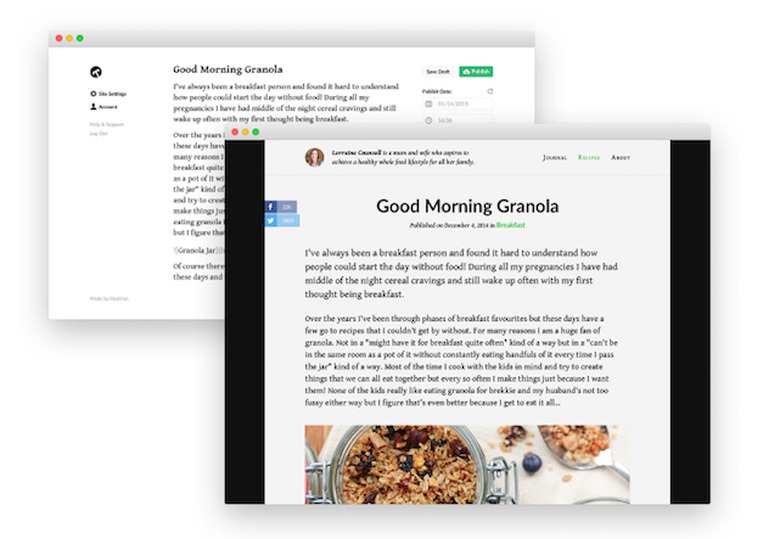
  • Realmac's Typed.com Indiegogo campaign: Building a sustainable blogging service

    Back in the early days of December 2014, TUAW ran a review of Typed (US$19.99), a very minimalist blogging app for OS X from Realmac Software that works with a number of blogging platforms including WordPress and Blogger. Now the company has launched an Indiegogo campaign for Typed.com, billed as a "sustainable blogging service" that will be around for decades to come. As you'll see in the promo video below (featuring former TUAW blogger Nik Fletcher), the team was frustrated with the sheer variety and difficulty of using some of the common tools that were created for blogging. As a result, they created Typed. Now they're planning on a hosting service that works with Typed to make perhaps the easiest blogging system ever. The campaign launched today, and reached its $20,000 goal in hours. The campaign still has 24 days left, and you can pick up an Early Bird perk for $39. Spend $100, and you'll get to beta the Typed service and get a year of service valued at $120.

    By Steve Sande Read More
  • Remember the GT Advanced sapphire facility? It's going to be a command center for Apple

    CNBC reported today that the GT Advanced plant in Mesa, Arizona, originally tasked with the job of making sapphire for screens, buttons, and other bits and pieces of Apple gear, is now going to be taken over by the company that allegedly caused GT Advanced to go out of business -- Apple. Apple will be spending a cool US$2 billion to transform the factory into a data center that will act as a command center for the company's worldwide data network. Arizona Governor Doug Ducey took to Twitter to tout the investment and the jobs (about 150 full-time Apple employees, about 300-500 engineering and construction jobs) that will benefit the state. Ducey has had a good week, with his state playing host to Super Bowl XLIX yesterday and this announcement coming today. I'm pleased to announce #Apple is expanding to #AZ with a $2 billion investment in #Mesa. http://t.co/pfWI8pXALe #AZmeansBiz - Doug Ducey (@dougducey) February 2, 2015

    By Steve Sande Read More
  • Well I hope Neil Young will remember, an iPhone man don't need him around anyhow

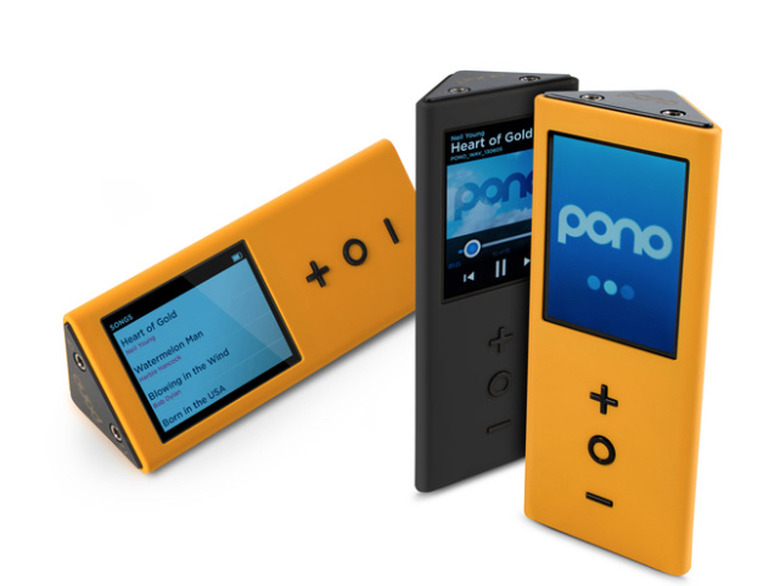
    Remember Neil Young's PonoPlayer? The Kickstarter campaign for the vintage rocker's "revolution in music listening" raised a huge US$6.2 million, with notables like Norah Jones, Elvis Costello and Tom Petty spouting about how the new $400 music playing box made them "feel the music" more than standard digital music players. Well, industry pundit and former professional musician David Pogue took on PonoPlayer in a Yahoo! Tech post last week, finding that a majority of listeners in a blind test actually preferred playback of music from an iPhone over the pricy and oddly-shaped yellow block. I'll let you read the full article from Pogue over at that other site, but the gist of it is that a) most people cannot hear or "feel" the difference of the Pono playback, b) many songs in the Pono store have not yet been remastered in the 192kHz/24-bit format Pono is promising, and c) it's a lot cheaper to buy a pair of good headphones and use your iPhone than buy a new player and re-purchase all of your music. Pogue's "taste test" can be seen below in this little video clip. Enjoy!

    By Steve Sande Read More
  • Apple planning a $5 billion bond offering

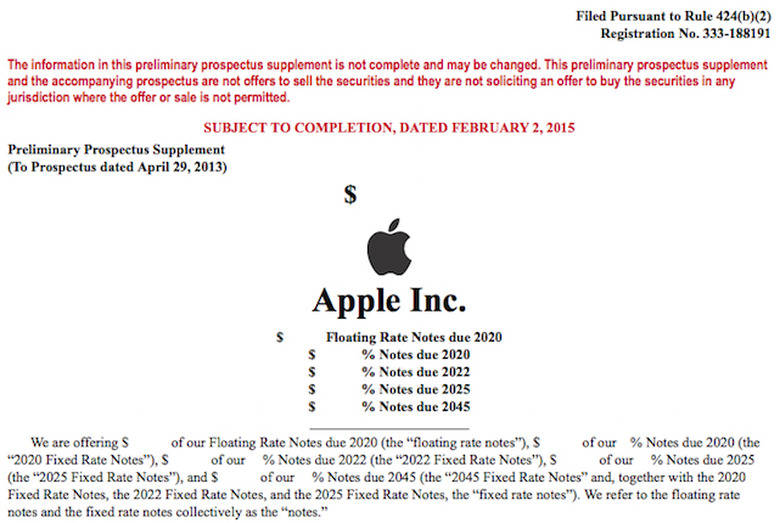
    Thanks to the fun and excitement of financial accounting, even companies with $178 billion in cash need to incur some debt every once in a while. That's exactly what Apple has in store for the near future, filing a bond sale prospectus with the Securities and Exchange Commission in the amount of $5 billion. That amount isn't actually listed in the prospectus; the Associated Press reported the amount earlier today. What will Apple do with that little pile of debt? Probably fund the capital reinvestment program that has been buying back shares of Apple stock and paying quarterly dividends to shareholders. Goldman, Sachs & Co. and Deutsche Bank Securities will handle the bond sale, which is coming at a time when the U.S. bond market is suffering and 30-year bonds are at a record low. Apple has issued other bond offerings in the past, including a $17 billion six-part offering in 2013. At the time, that offering was the largest ever for a US corporation. Another $12 billion bond sale was offered in 2014, and the company made a Euro bond offering late in 2014.

    By Steve Sande Read More
  • TUAW ceasing publication on February 3, 2015

    We're probably the last tech site to report on our own demise, but we ask your forgiveness -- it's been a rough couple of days. Yes, TUAW will be ceasing publication this week. Expect to see our last posts sometime on Tuesday, February 3. You'll probably see some personal farewells from a number of our bloggers between now and then. We have a large, loyal following of readers and we still have the fire in us when it comes to our passion for Apple products. However, TUAW is a small cog in a big machine -- AOL -- and our niche offering did not fit in with the corporate direction for larger content providers such as Engadget and TechCrunch. The corporation is doubling down on all of the large properties, and the resources -- however meager -- being expended on sites like TUAW and Joystiq are being reallocated to fuel that big machine. Like it or not, that's the reality for any major corporation. Don't worry about the TUAW staff; our talent and passion will be put to use elsewhere, and you're sure to see our names pop up wherever there's a need for solid reporting and writing about the world's most successful company -- Apple. We had a great time bringing you the news and reviews on TUAW, and for a while, at least, those articles will be available as part of Engadget. Good luck to all of our readers, stay well, and keep in touch.

    By Steve Sande Read More
  • And a final bonus Caturday: Graham's MacBook Air

    Every once in a while there is a Caturday submission that has such a cute cat and great back story that it just calls out for more than one photo. This kitten is Graham, and owner Rob Waag tells the story: Graham is a seven month old kitten that was rescued by my wife. He had been hit by a car and fractured his pelvis and his rear leg. This picture was taken while he was recovering from surgery. Technically, he had bilateral femoral head ostectomies which only slowed him down for about one week. He took a liking to my wife's MacBook Air. He is one of those cats that is alway the center of your attention. The desktop picture is of my son having a libation shortly after leaving the USMC. The picture's significance is that Graham's fur pattern on his head makes him look like he has a Marine haircut. He has recovered very well. You would not know how severely he was injured. He has found a permanent home with us and has become the love of my daughter's life. In this next photo, Graham appears to be using his feline intelligence to figure out how to pop up the screen on the MacBook Air: And in the last picture below, you can see where Graham's flanks were trimmed for his surgery. He seems to be one very happy fellow, and who can blame him when he has a great family to live with and a warm MacBook Air to lay on? Many thanks to Rob Waag and Graham!

    By Steve Sande Read More
  • Caturday: Jake's keeping your backups safe and warm

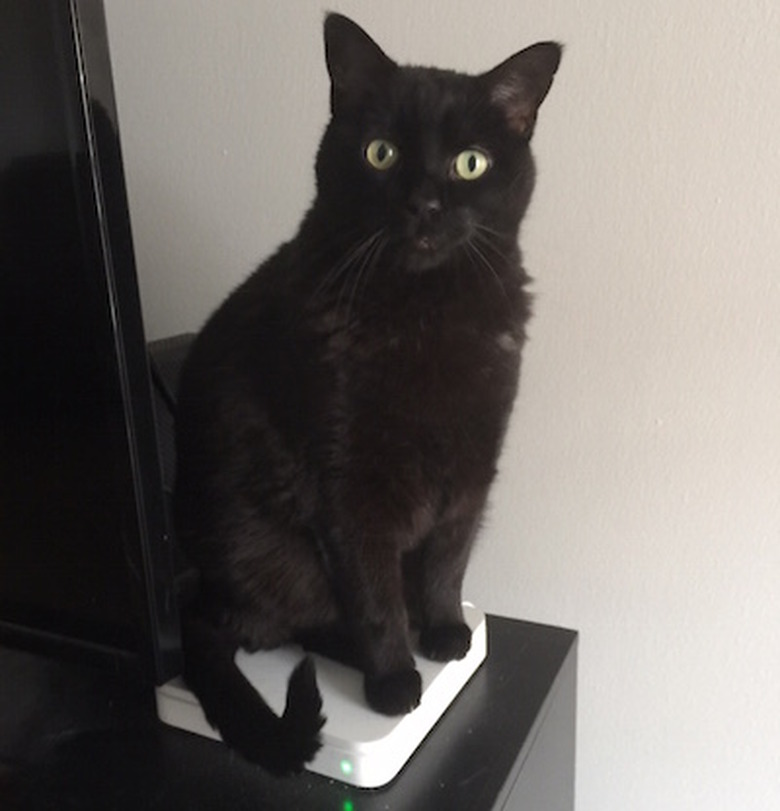
    Want to keep your backups safe, secure and warm? Then hire Jake, this beautiful black cat belonging to TUAW reader Mike Hoffman, to sit atop your Time Capsule. We're sure that he's probably not even sure of his guardian role; Jake probably just likes the warmth and vibration that this Apple product is putting out. Or maybe he's attracted by the contrast to his sleek fur? Many thanks to Mike Hoffman and Jake!

    By Steve Sande Read More
  • Folderol: An amazingly useful OS X utility by one of TUAW's finest

    While we're busy closing down shop here at TUAW, I thought that I'd write one final app review. It's fitting that it's an app by Aunt TUAW herself, Erica Sadun. Folderol (US$2.99) is a surprisingly useful and fun utility that does one thing very well -- it applies custom colors and images to folders in OS X. It's quite easy to use: in its most basic form, launching Folderol displays a small window with the words "Drop Folders Here" on it. There is a palette of colors to select from, as well as a color picker for creating your own bright/obnoxious/pastel/camo hues to color your folders. Drag a folder onto the target and drop it, and it changes to the new color. Don't like the look of your folder? There's a "cleared tint color" to select that sets the folder back to its original blue color. Want to put a picture of your favorite person on a folder full of photos? That's easy, too. There's a box for "Custom Image" -- drag and drop an image onto that box to "load it" into Folderol, then drag the folder onto the "cleared tint" option or one of the color options. If you've selected the "cleared tint" color, the image shows up on the folder. Select one of the color options, and the image is tinted that color and applied to the folder. As you probably know, OS X 10.9 Mavericks introduced the concept of tags, which are organizational tools for folders and files. If you've set up tags in Mavericks or Yosemite, you'll be happy to know that you can use a "tint and tag" menu option to not only change the color of your folders, but apply a tag to them at the same time. If you have a picture that's not the same aspect ratio as the folder, there's a menu setting for "fit image to destination." It's what allowed me to make the nice-looking TUAW folder you see at the top of this post without distorting the classic logo. For anyone who likes to customize his or her Mac, Folderol is a great addition to your bag of tricks.

    By Steve Sande Read More
  • AAPL reaches an all-time high share price

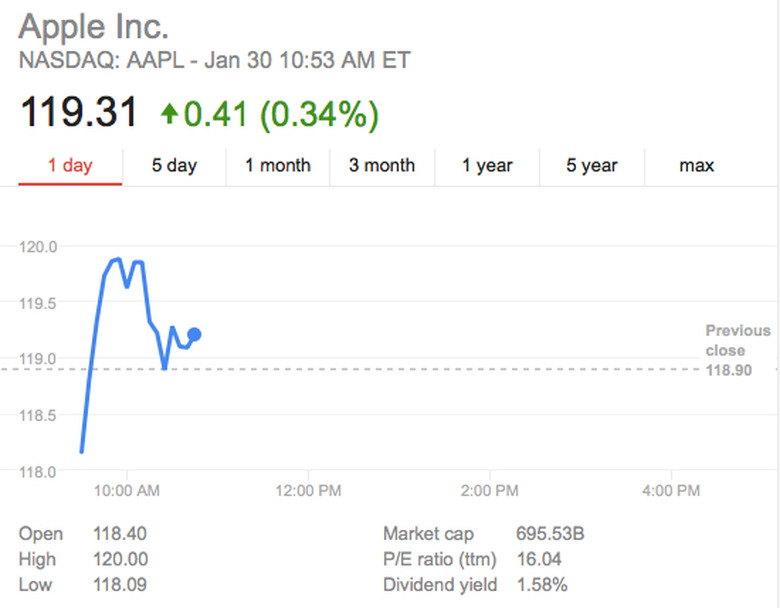
    Not all the news is gloomy today; shares in Apple reached an all-time new high today on analysts at Argus raised their price target to $135 per share with a "buy" rating. The share price peaked at 120.00 at one point this morning, and is currently wavering around the $119 mark.

    By Steve Sande Read More
  • PicoPro: A laser projector about the size of an iPhone 6 Plus

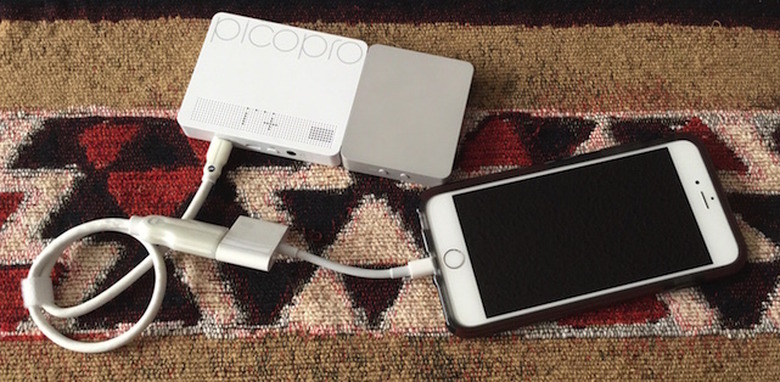
    Several times in the past, TUAW has done reviews of pico projectors - projectors that are so small that they can be slipped into a pocket on a backpack or in a briefcase. Designed to make presentations on the road less burdensome, pico projectors have always had one Achilles Heel - the visual quality of the image they project. A new projector from Celluon called the PicoPro (US$349) aims to bring high resolution and contrast, long battery life, and noise-free operation to tiny projects. The PicoPro was introduced to the world at CES 2015, and TUAW is one of the first sites to get a hands-on look at the new device. Specifications Dimensions: 6 x 3 x .5 inches (152.4 x 76.2 x 12.7 mm) Weight: 6.7 ounces (189.9 grams) Resolution: 1920 x 720p (16:9 aspect ratio) Interface: HDMI/Miracast/DLNA Battery life: 2 hours for wireless, 3+ hours for cabled Contrast Ratio: 80,000 to 1 Design Design-wise, the PicoPro is a tiny box that's smaller in length and width than an iPhone 6 Plus. It's divided into two "sections", one that contains the actual projector and the other containing the various ports (HDMI, micro-USB for charging, headphone). There's no need to focus the PicoPro, as it uses lasers to project the image and has infinite focus. It focuses as sharply an arms-length away from a wall as it does from 10 feet away. The PicoPro comes with a small carrying pouch, and with iOS devices you'll need to supply your own digital AV adapter to connect to the HDMI cable. Unfortunately, PicoPro doesn't support AirPlay, so all iOS and Mac connections will be through the HDMI cable. For those who are fans of this site who use other mobile platforms, a slightly less expensive version called PicoAir is available for $299 that works only with the wireless Miracast and DLNA interfaces. It's a stylish little device, and one you won't be embarrassed to pull out of your briefcase. Function With any projector, the proof is in the viewing. Just how bright is the image, and is it easily readable? Can the projector be used in a bright room, or does it require near-darkness. How much noise does it make? And does it do a good job of projecting Keynote and PowerPoint presentations? To test the PicoPro, I connected it to an iPhone 6 Plus using the Apple Lightning to HDMI connector and an included HDMI cable. My test documents were a number of Keynote presentations that I use while teaching an iOS class. Holding the PicoPro in my hand and wandering around my home office to find "targets", I was able to clearly see the bright image from the projector on a variety of surfaces. Your best bet will probably still be to project onto a reflective screen in a slightly-darkened room, but I was able to project slides onto a textured ceiling in daylight and clearly read all of the text. Even on a very saturated blue wall with some daylight coming through windows, the text on my slides was very readable. The color reproduction of the PicoPro is incredibly good, and the image is sharp from edge to edge. The fact that you never have to focus is worth the price of admission. I don't know how many times I've watched as a hot projector has slowly gone out of focus. There are some additional positives - it's absolutely cool in operation and creates no sound at all. No more raising your voice to be heard over the scream of a cooling fan! Following is a video of the PicoPro from "Eli the Computer Guy" at CES; note that the flickering is due to filming the projection with a digital camera - in reality, the image shows virtually no flicker unless you're moving it around. Conclusion Up to this point, I haven't been impressed with any of the pico projectors I've seen. However, that has changed with the Celluon PicoPro. The image quality and brightness out of this tiny box is stellar, and to think that it does it all without making a sound or getting hot. There are no expensive bulbs to burn out (those often cost just as much as the PicoPro itself!), and using an iPhone, an adapter, and this projector makes for a featherweight presentation tool. My only negative is that the device doesn't support AirPlay. The non-HDMI, wireless-only version of this project will sell for $299, and it would be awesome if Celluon would support iOS - the choice of enterprises everywhere. We were also unable to get word on a shipping date and retail outlets for the PicoPro. Rating: 3-1/2 stars out of 4 stars possible

    By Steve Sande Read More
  • iTunes Connect issues creating havoc for developers

    Twitter is all abuzz this morning with developers who were logging into iTunes Connect - the gateway used to make apps available for sale - and seeing someone else's login information. For example, here's a tweet from Alexander Kuhn, who saw account information for two Conde Nast employees when he tried to log in with his credentials. Serious security problems in iTunes Connect? That's not my account! @AppIeOfflciaI #iTunesConnect /cc @MacRumors pic.twitter.com/pe7iFGtueC - Alexander Kuhn (@ak_ku) January 29, 2015 iTunes Connect is now showing a "temporarily unavailable" banner during login attempts.

    By Steve Sande Read More
  • Microsoft Outlook now available for iOS

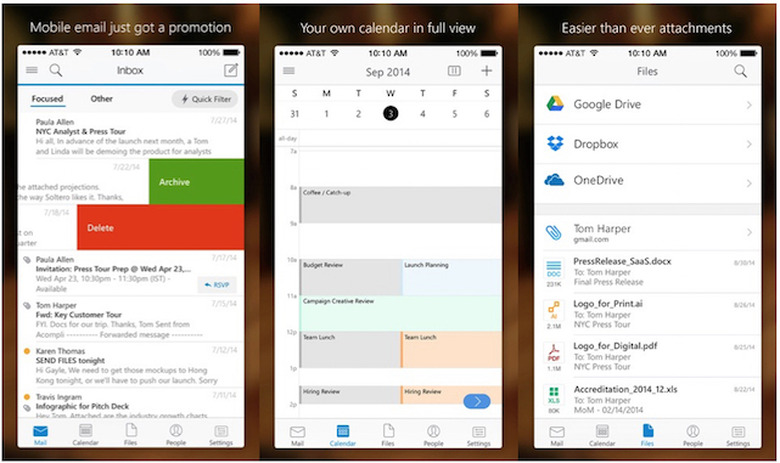
    Just in time for TUAW parent company Aol to migrate all of its employees from Microsoft Outlook to Gmail this weekend, Microsoft today launched Outlook for iOS (free). The universal app is essentially a scaled-down version of the desktop Outlook application, providing compatibility with Exchange servers, Outlook.com and Office 365 services. If you have other mail accounts, such as iCloud, Gmail and Yahoo Mail, you'll be happy to know that the Outlook app also supports those services. Of course, Outlook has always been more than just email. The app makes it simple to view or organize the email inbox, check and update calendars, handle attachments, and more -- all in one app. The Outlook app is an outcome of December's acquisition of email startup Accompli, which had previously created email apps for iOS and Android. Microsoft has been aggressively developing mobile versions of its flagship applications for the two popular mobile platforms, with the Office suite making it to iOS last March followed by updates to add printing and third-party font support. And now, for the details, straight from Microsoft's App Store description: Why use Outlook? Manage your inbox • Outlook automatically triages your inbox for you, surfacing your most important email. Less relevant email is placed in your "Other" inbox. • Swipe to quickly delete, archive, or schedule messages. • Schedule emails and they will return to your inbox at a later time. Your calendar built-in • Switching between your email and calendar apps is a thing of the past. Outlook includes your calendar and notifies you with appointment reminders. • Find available meeting times and share them in email or schedule a meeting. Attachments made easy • View and attach any file from your email, OneDrive, Dropbox, and other accounts with just a few taps. • Send large files even if you haven't downloaded them to your phone. Find anything fast • Filter your inbox to only show messages that are unread, flagged, or have attachments, with a single tap. • Quickly find the right messages, people and files by typing just a few letters. • Outlook shows people you communicate with most often, and lets you conveniently drill down to see all related emails, meetings and files.

    By Steve Sande Read More
  • Google Play may have the downloads, but App Store has the money, honey

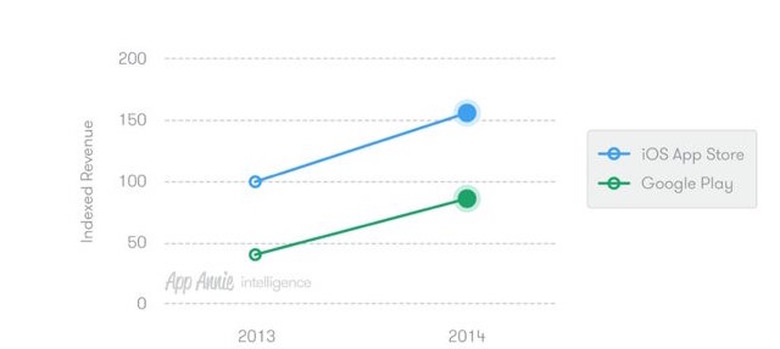
    Mobile analytics firm App Annie released figures today that show that even though the Google Play Store leads the iOS App Store in mobile application downloads by a whopping 60 percent margin, Apple's digital storefront is still where the money is. Despite lagging in total downloads, revenues generated by the iOS App Store were more than 70 percent higher than those from the Google Play Store. Both stores saw significant growth in 2014, with the App Store generating over $10 billion of revenue - that's 40 percent of the total revenue generated by the App Store since it first came online in mid-2008 - in just one year. App Annie also noted that there are three countries that make up the lion's share of app sales - the United States, Japan, and South Korea. And the numbers also showed that males are more likely than females to download games, while females do most of the downloading of social networkng and photo/video apps. The company's data is scoured from analytic code included in products from over 90 percent of the top 100 App Store publishers and from more than 700,000 applications.

    By Steve Sande Read More
  • Have you heard? The iPhone 6 is REALLY LOUD

    (Original photography from pickywallpapers.com, photoshopping by Mike Wehner) You can always tell when it's the day after a big Apple news day, because we end up writing and publishing stories like this... iClarified (via Cult of Mac) recently updated their sound level test for iPhones to add the iPhone 5c, 5s, 6 and 6 Plus. The results will come as no surprise to anyone who owns one of the two newest iPhones - the iPhone 6 is the loudest, at 105.4dBA while the iPhone 6 Plus comes in second at 105.0dBA. The iClarified team found that the iPhone 6 is 10.1dBA louder than the original 2G iPhone. Sound measurements are logarithmic, so that means that the iPhone 6 is about twice as loud than the first iPhone. So, how loud is that iPhone 6 when you have the speaker volume cranked to the max? That's almost as loud as a power mower three feet away, and louder than a snowmobile. NIOSH (National Institute for Occupational Safety and Health) guidelines say that you should be exposed to 100dBA sound levels for less than 15 minutes each day. The moral of the story? Don't crank that iPhone 6 or 6 Plus speaker up to the top level as it can adversely affect your hearing. For your edification, and to keep you from having to read even more articles about Apple's amazing Q1 2015, here's iClarified's video about capturing the sound level readings. Note that the location of the decibel meter varies depending on where the speaker is located on a particular model of iPhone.

    By Steve Sande Read More
  • AAPL share price hovering near all-time high

    Here's a surprise -- usually the day after Apple announces record-breaking financial performance, the stock drops. Today, however, on the heels of truly astounding news and optimistic statements from Apple executives, the share price has been climbing. Based on bad economic news yesterday, the stock markets fell sharply, leaving AAPL at 109.14 per share at the close of trading. This morning, however, the share price opened at 117.62 and has been wavering around that mark. Apple's share price reached an all-time high of 119.00 on November 26, 2014, resulting in a market valuation for the company of $700 billion. Should it reach or surpass that level today or in the near future, we'll be sure to let you know as soon as possible.

    By Steve Sande Read More
  • Apple's last quarter profit the biggest in history for any corporation

    Read that headline again. Apple's most recent quarter (Q1 2015) profit of $18.02 billion is now the biggest ever for all corporations on Planet Earth, ever. The previous winner was Russia's Gazprom (a natural gas extractor), with measly profits of $16.2 billion. Our buds at TechCrunch bring up the fact that this means Apple makes about $8.3 million in profit each and every hour of every day. I think Tim Cook deserves a raise.

    By Steve Sande Read More
  • iMacompanion: Kickstarted accessory puts a USB 3.0 port at the front of your iMac

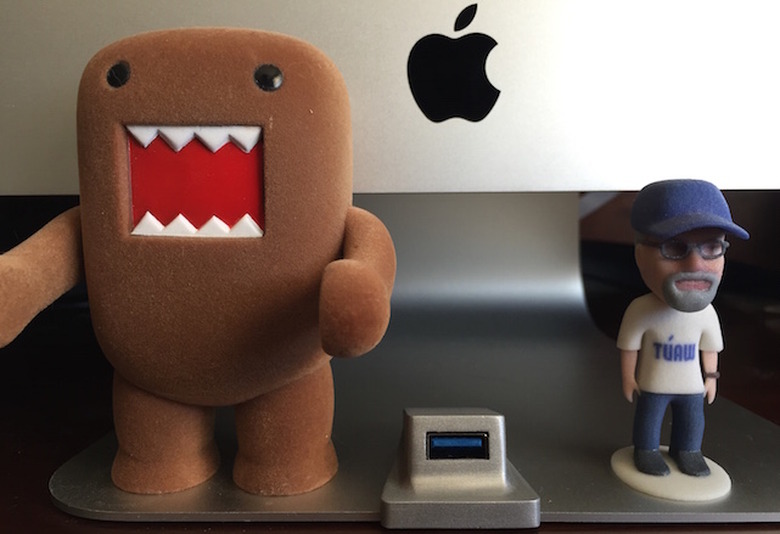
    It's always a pleasure to see projects graduate from Kickstarter or Indiegogo and actually become available for sale. One project that was intriguing a few months ago, the Wiplabs iMacompanion (US$39.99), is now in the BiteMyApple.co and Amazon.com stores. iMacompanion is a USB 3.0 extension port that matches the sleek design of the iMac and adds that port to the front of your iMac where it's easy to get to. Here's our review. Design The brilliant design of the iMacompanion was what drew me - and a number of backers - to the product on Kickstarter. Rather than clip some sort of USB extension to the front of the iMac like the BlueLounge Jimi ($14.95) where it really doesn't look too much like a part of your computer, the designers at Wiplabs made the iMacompanion match the aluminum base of the iMac where it sits. A completely flat USB 3.0 cable then runs under the iMac base and around to the back of your computer where it plugs in. The result? You have a good looking USB port that looks like it actually belongs on the iMac base and is always available should you need to plug something in - without reaching around to the back of the iMac. It's possible to plug a pair of iMacompanions into the ports on the back of the iMac and to place them side by side on the base. The little device comes with a good sticky material on the bottom so that it stays in place on the base when you plug cables or flash drives into it. I had issues with the Jimi occasionally popping out of its USB port if I didn't hold that clip with my hand while plugging something into it. That doesn't seem to be a problem with iMacompanion. Function Installing iMacompanion is simple enough - just peel off the paper backing on the adhesive pad, then stick the little extension onto the base of the iMac. I put it in the center for aesthetic purposes, but you could put it anywhere you desire as long as it's on the front edge of the base. You'll need to tip your iMac to one side to run the flat cable under the base of the computer, but once you've done that you can get back to a normal posture for your iMac. Unsurprisingly, the iMacompanion works just like any USB port. I find it to be extremely useful for using my iPhone 6 Plus with my iMac through the Duet Display app and TenOne Design Mountie, since I no longer have to fish around the back of the iMac to plug in a USB cable. Conclusion iMacompanion is a well-made and good-looking accessory for any iMac made since 2004. It adds a much-needed front USB port without detracting the overall design concept of the iMac. My only complaint? The price. $40 is a bit much for an accessory of this type, and I hope that Wiplabs can work on bringing the price down soon. Unsolicited personal pitch If you're a fan of crowd-funded projects like iMacompanion, join Backerjack's Ross Rubin and me for a half hour of talk each week about a handful of unique and sometimes useful campaigns on The Backerjack Podcast. Rating: 3 stars out of 4 stars possible

    By Steve Sande Read More
  • Apple Pay: Now at 200,000 more locations for self-serve payments

    You've probably never heard of USA Technologies, Inc., but today the company added about 200,000 new Apple Pay acceptance points around the country. The company has been building Near Field Communication (NFC) capabilities into cashless payment products for the past ten years, and it was possible for USA Technologies to switch on the ability to take Apple Pay through remote updates. USA Technologies specializes in payment systems for small-ticket, self-serve retailing industries. That means that starting today, you'll be able to use Apple Pay to make payments on self-serve coffee brewers, vending machines, a number of kiosks, self-service laundries, parking pay stations, and more. While the vending machines probably won't have an Apple Pay sticker on them - at least today - you can look for ePort wireless payment capability. If you see that on the machine or kiosk, pull out your iPhone and give it a try. And buy me a Coke while you're at it, OK?

    By Steve Sande Read More
  • OS X Yosemite 10.10.2, iOS 8.1.3 updates now available

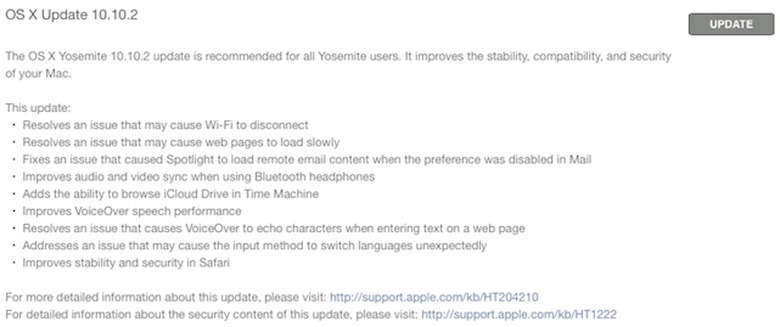
    After quite a few weeks of 10.10.2 release candidates and rumors about iOS 8.1.3, Apple has released the updates today. The OS X Yosemite 10.10.2 update includes fixes for Wi-Fi disconnection errors, slow web page loading, and a nasty potential security bug that caused Spotlight to load remote email content even when the preference was disabled in Mail. If you use Bluetooth headphones, you'll be glad to know that audio and video sync has been approved, and you can now browse iCloud Drive in Time Machine. VoiceOver speech performance has been enhanced, and a bug that caused VoiceOver to echo characters when entering text on a web page has been squashed. Finally, an issue that may cause the input method to unexpectedly switch languages was fixed, and stability and security in Safari has been improved. Whew! You can get that update this very second by pulling up the Mac App Store and clicking that Update button. Likewise, iOS 8.1.3 has finally dropped, with the usual "bug fixes, increased stability, and performance improvements." But wait, there's more! The latest update to iOS (which weighed in at 294 MB on my iPhone 6 Plus) decreases the amount of storage required to perform a software update, fixes an issue that prevented some users from entering their Apple ID password for Messages and FaceTime, and addresses an issue that caused Spotlight to stop displaying app results. It also fixed an issue preventing multitasking gestures from working on iPad, as well as adding new configuration options for education standardized testing. Be sure to tap on Settings > General > Software Update to install iOS 8.1.3. As usual, Apple has made security information about the updates available here.

    By Steve Sande Read More
  • Wall Street analysts make their final Q1 2015 predictions for Apple

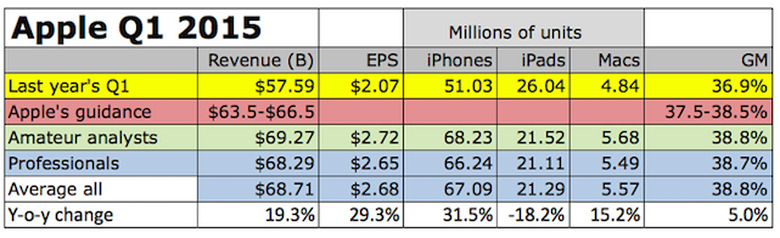
    (Table from Fortune.com, Philip Elmer-DeWitt) With only a few hours to go until Apple releases its Q1 2015 (October 1, 2014 - December 31, 2014) financial results, Fortune's Philip Elmer-DeWitt has pulled together estimates from a number of Wall Street analysts on exactly how they think the company did. The numbers, from 30 professionals and 15 amateurs, are pretty incredible. First, Apple had provided guidance during the last call expecting revenues in the $63.5-$66.5 billion range. The amateurs think it's going to be about $69.27 billion, while the pros are a bit more pessimistic at "only" $68.28 billion. If one looks at the average of all the analysts, that's a year-over-year revenue gain of 19.3 percent over 2014's figure. Earnings are expected to be about $2.68 per share, which is up almost 30 percent year over year. But the big news? Apple's earnings could be the biggest in US corporate history. The current record is held by Exxon, which had a $15 billion third quarter in 2008. The analysts expect Apple to announce sales of 67.09 million iPhones (up 31.5 percent), 21.29 million iPads (down 18.2 percent), and 5.57 million Macs (up 15.2 percent). We'll be live-blogging the earnings call at 5 PM ET (2 PM PT) and would love it if you stopped by to check our commentary on the proceedings. See you then!

    By Steve Sande Read More
  • Sports Illustrated 120 SPORTS channel comes to Apple TV

    Apple's little black box keeps gaining smarts. The Apple TV was updated today with a new channel: the Sports Illustrated 120 SPORTS network. The new channel also has an accompanying iOS app for viewing on the small screen. Sports Illustrated created the 120 SPORTS network last year as a way to stream major sports to fans, including NHL, MLB, NBA, NASCAR, and college leagues. The channel currently features in-game highlights from the recent past as well as replays from the leagues. While users of the 3nd-generation box are able to see 120 SPORTS, the update hasn't yet made it to the 2010-era 2nd-generation Apple TV. Just a few weeks ago, Apple TV gained another sports channel - Tennis Channel Everywhere. Unsurprisingly, that channel serves up on-demand tennis and live matches with an optional annual subscription. Other Apple TV sports channels include WatchESPN, UFC TV, MLB.TV, NFL Now, Red Bull TV, ACC Sports, WWE Network, MLS, MBA, NHL and Willow.

    By Steve Sande Read More
  • Twelve South ParcSlope stand for MacBook provides style and comfort

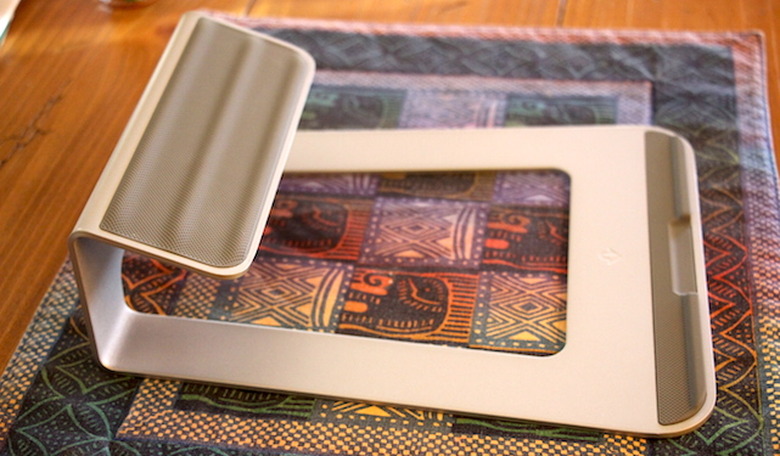
    One of our favorite accessory design shops here at TUAW is Twelve South, and they're our heroes for a couple of reasons. First, they design and manufacture useful and stylish accessories for Apple products only. The second reason? Everything they make is top quality. The latest product to emerge from Charleston, SC is the ParcSlope desktop stand for MacBook (US$49.99). Check out our review, then enter for an opportunity to win a ParcSlope from TUAW and Twelve South. Specifications Dimensions: 2.8" high x 8.3" wide x 9.6" deep (7.1 x 21.1 x 24.3 cm) Weight: 2 pounds (.91 kg) Angle: 18 degrees Design ParcSlope was designed as a hybrid laptop stand instead of the traditional stand that lifts the MacBook off of your desk, requiring you to acquire and use a totally separate keyboard and pointing device. Instead, ParcSlope lifts the back of your MacBook up off of the table, bringing the screen up a bit higher for more comfortable viewing and typing. Made of solid aluminum, ParcSlope works with any MacBook. It doesn't matter if you have a current 11-inch MacBook Air or one of the discontinued 17-inch MacBook Pro monsters, it's going to work for you. As with all other Twelve South accessories, ParcSlope is designed specifically with Apple products in mind. There are some ridges on the top of the unit that allow for screen clearance when the screen is opened on an 11, 13, or 15-inch MacBook (the 17-incher will be off the top of the ParcSlope, so it doesn't need a ridge). There's a silicone lip holding the MacBook in place, and rubber feet on the bottom to keep your desk or table from being scratched. In case you're wondering about the "ParcSlope" name, well - Park Slope is a trendy neighborhood in Brooklyn, NY, and the "Parc" pays respect to Xerox's Palo Alto Research Center (PARC), where Steve Jobs and other Apple employees had their first look at a graphical user interface for a computer. Function My test of the ParcSlope was done with a 13-inch Retina MacBook Pro. Setup of the stand is drop-dead simple; you just put it on the table. You're done. Plop the MacBook Pro on top, open the screen, and get to work. There's some cable management built into ParcSlope as well - there's a hole in the back of the aluminum through which you can weave your power cable, USB cables, Thunderbolt cables (this is perfect with a second display, by the way), you name it. The cables are held in place by the stand when disconnected from the MacBook. Since I usually type on a gently angled Apple Wireless Keyboard that's placed flat onto a desktop, I wasn't sure how I was going to like the steeper angle provided by the ParcSlope. As it was, the higher placement of both the MacBook's screen and having my arms and hands a bit higher up actually felt better than typing on a flat MacBook keyboard. Your mileage may vary; you can get a feel for how the ParcSlope holds the MacBook by grabbing something just under 3 inches in height and sticking it under the back edge of the computer. Conclusion As usual, Twelve South has knocked another one out of the park (or should I say "parc"?) with the ParcSlope. It's solid and should last you through the next ten generations of MacBook, and it makes any MacBook a more comfortable and usable member of the Mac family. Rating: 4 stars out of 4 stars possible Giveaway C'mon, you know you want a ParcSlope of your very own. All you have to do to have a chance at winning one is to fill out the form below. Here are the rules for the giveaway: Open to legal US residents of the 50 United States, the District of Columbia and Canada (excluding Quebec) who are 18 and older. To enter, fill out the form below completely and click or tap the Submit button. The entry must be made before January 30, 2015 11:59PM Eastern Standard Time. You may enter only once. One winner will be selected in a random drawing and will receive a Twelve South ParcSlope valued at $49.95. Click Here for complete Official Rules. Loading...

    By Steve Sande Read More
  • Crazy good Loop Attachment Straitjacket case now available for iPhone 6

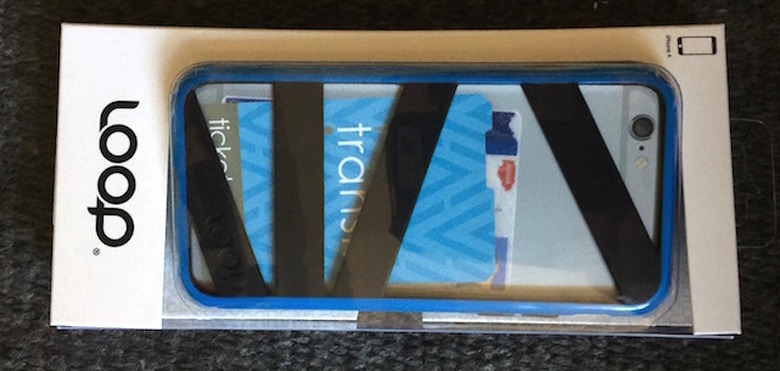
    Chicago-based Loop Attachment is back on our radar again, now that the company has released its unique Straitjacket Case for iPhone 6 ($US34.95). While nothing has changed in this TUAW 3.5-star rated iPhone case in terms of design, materials, or just plain usefulness, it's now available in the larger iPhone 6 size in some eyecatching colors - blue/black, red/black, white/gray, white/mint, and black/gray. I'm not currently using the Straitjacket since I have an iPhone 6 Plus, but I can vouch for just how useful the case is in providing protection for your iPhone while also giving you a place to slide an ID and credit card or two. It has a great grippy feel and really adds a splash of color to your favorite iPhone. And now, one lucky TUAW reader's going to get a blue/black Straitjacket case for iPhone 6 in a giveaway! Here are the rules for the giveaway: Open to legal US residents of the 50 United States, the District of Columbia and Canada (excluding Quebec) who are 18 and older. To enter, fill out the form below completely and click or tap the Submit button. The entry must be made before January 30, 2015 11:59PM Eastern Standard Time. You may enter only once. One winner will be selected in a random drawing and will receive a Loop Attachment Straitjacket for iPhone 6 valued at $34.95. Click Here for complete Official Rules. Loading...

    By Steve Sande Read More
  • Join us tomorrow at 5 PM ET/2 PM PT for Apple Earnings Call Liveblog

    On Tuesday, January 27, 2015 at 5 PM ET (2 PM PT), be sure to join us for our traditional liveblog of the Apple Earnings Call. This quarter's call will be quite fascinating, as we should hear about record iPhone sales thanks to the iPhone 6 and 6 Plus, increasing market share for the Mac family, how Apple Pay is progressing (and contributing to Apple's bottom line) and more. Who knows? Maybe we'll even get an idea of when the Apple Watch will ship! You can listen to the call live through QuickTime streaming, and we'll be providing commentary and analysis as the call progresses. The link for the liveblog is here; please note that we won't be starting the actual event until about 4:50 PM ET, about 10 minutes before Apple goes live.

    By Steve Sande Read More
  • Apple Pay interest high for retailers; PGA Tour to take it starting next week

    The Wall Street Journal said in an article yesterday that Apple Pay is "making progress toward a goal that has eluded other mobile wallets: persuading people to use it." At a supermarket near Zion National Park in Utah, a night manager told the Journal that she estimates that 30 percent of all shoppers are now using the service and that a full five times as many customers use Apple Pay than use competing payment service Softcard. As of now, Apple says that over 220,000 locations in the US accept Apple Pay. The Journal noted that Brian Roemmele, a payments consultant, said "I've never seen a bigger adoption of an alternative-payment system," pointing to Bank of America's recent statement that nearly 800,000 of its customers signed up for Apple Pay in the fourth quarter of 2014. Retail point-of-sale supplier Harbortouch Payments LLC said it has seen a jump from 22 to 68 percent of merchants asking for wireless readers, starting in the month after Apple Pay was announced. Visa's Jim McCarthy, the global head of innovations and strategic partnerships said that "Apple Pay will be the 'reference model' for future mobile-payments services." Even Google is reacting to Apple Pay's wild success, apparently in negotiations to acquire Softcard. In other Apple Pay news, MasterCard announced that the PGA Tour will accept Apple Pay starting at the Phoenix Open in Scottsdale, Arizona this week. In a press release on Business Wire this morning, MasterCard stated: The acceptance of easy-to-use contactless payments, fully integrated into concession technology, is just the beginning of how MasterCard and the PGA TOUR are delivering an enhanced experience to golf spectators. MasterCard cardholders who use Apple Pay at supported course concessions during the Waste Management Phoenix Open – which begins Thursday, January 29th on The Golf Channel – may also get a Priceless Surprise! We're sure to find out more about how Apple Pay is faring from Apple's executives, including CEO Tim Cook and CFO Luca Maestri, during tomorrow's earnings call.

    By Steve Sande Read More