Cosette Jarrett

Engadget Editorial Policies

The unique content on Engadget is a result of skilled collaboration between writers and editors with broad journalistic, academic, and practical expertise.

In pursuit of our mission to provide accurate and ethical coverage, the Engadget editorial team consistently fact-checks and reviews site content to provide readers with an informative, entertaining, and engaging experience. Click here for more information on our editorial process.

Stories By Cosette Jarrett

  • 5 Amazing Things Made Using A 3D Printer

    3D printing has long been the stuff of dreams for many of us who've dreamt of seeing the day when we can simply design and print the gadgets, clothing, and shoes we want and need. What a world it would be if we could all have the hottest clothing trends and the coolest devices without making multiple purchases, right? Although the invention of 3D printing allows us to dream that we might one day have this miraculous tech setup in our own homes, the unfortunate truth is that even bulk manufacturing isn't quite ready to introduce 3D printing into its production efforts. According to industrial manufacturing experts, mass 3D printing manufacturing will require a workforce with specialized individuals to effectively execute a quality 3D printing process at scale. In other words, if you're not an engineer, 3D printing your own smartphone might not be in the cards quite yet. However, that doesn't mean you can't get excited about where things are headed. Here are five awesome things that have been created using 3D printing that illustrate how far the technology has come and where it might be headed. 1. Instruments One seriously awesome thing that engineers have been capable of creating with 3D printing is instruments. From electric guitars to horns and synthesizers, we've been able to create a variety of fully functional instruments with 3D printing alone. You can check out some of the 3D printed instruments here. 2.Custom Cars In 2014, Local Motors created the first 3D printed car made entirely out of 3D printed parts. The car was debuted at the International Manufacturing Technology Show in Chicago that year. The car's creators named it the Strati. The Strati took just 44 hours to build. Local Motors plans to make another version of this vehicle that is road ready. They hope to build a number of micro factories in coming years to produce more 3D printed cars for retail. 3. Fabrics Members of the fashion industry have expressed concern over 3D printing since its introduction. Their fear is that one day consumers will simply be able to print the items they produce to achieve the ultimate knock-offs. For now, 3D printing isn't quite mainstream enough for that to happen. However, the existence of 3D printed fabrics certainly shows promise that 3D printed clothing could be a mainstream option in the future. 4. Buildings Sure, cars, clothing, and instruments are pretty cool, but imagine if homes, restaurants, storefronts, and office buildings could be 3D printed to decrease production costs and increase efficiency? Well, engineers are coming close. Engineering teams have been capable of erecting apartment buildings, office buildings, and life-size castles using components made from a 3D printer. 5. Cameras One of the coolest things we can make from 3D printing might not be the biggest, but it sure is complex. Engineers have created a functional camera, lens and all, using 3D printing. The creator used acrylic to replace glass for the lens. Although the images the camera produces aren't perfect, the imperfections actually give each shot a little more character. You can check out some of the photos taken with the first 3D printed camera here. Although it's not quite possible to 3D print your own car or clothing just yet, these awesome innovations show that it is in fact possible. They might also indicate that 3D printing could go mainstream soon. In fact, back in 2014 Digital Trends predicted that given the field's progression, 3D printing could go mainstream by 2019. Here's hoping!

    By Cosette Jarrett Read More
  • 5 Unexpected Industries that Have Taken Their Operations to the Tech Space

    Technology has made our lives exponentially easier in many ways. From apps to track our eating habits to vacuums that run on their own, our world has become a much more convenient place thanks to innovations within the tech sphere. Although apps and gadgets have been around for quite some time, it's taken a while for industries with an in-person focus to figure out how they can take their operations into the tech space as well. Fortunately, innovators within many of these industries have found solutions to help consumers use technology to access their goods and services without leaving the comfort of their own homes. Here are some interesting ways five unexpected industries are taking their traditionally in-person experiences to the tech space. 1. Therapy Traditionally, therapy has been restricted to in-person visits where the client takes time out of the day to drive all the way to the care provider's office and sit awkwardly while discussing the ins and outs of his or her life. Fortunately, tech has made this process more convenient and a lot less awkward for patients. Sites like Talkspace offer online counseling from professional therapists with a variety of backgrounds and clinical expertise. Patients can simply sign in to their accounts to access quick and affordable therapy when they need it most. Therapy's move to the tech space has a variety of important patient benefits including anonymity, affordability, instant access to help, and therapist matching. 2. General medical practice For the most part, it's best to visit your doctor with pressing concerns. However, how many times have you gone to the doctor and paid a full visit fee, just to be told you've caught the common cold? Many general practitioners are joining networks that allow them to see and sometimes treat patients using video chats. This increased convenience in healthcare helps patients better manage their health by seeing a doctor more quickly to discuss their concerns. It also encourages regular visits among patients who typically avoid the doctor due to rising healthcare costs by offering a more affordable solution. Some of the companies spearheading online healthcare are MeMD and Doctor On Demand, which offer care from healthcare professionals in a variety of medical disciplines to patients who would prefer not to drag themselves to the doctor's office to be seen. 3. Voice coaching and dance instruction Sometimes the biggest thing stopping you from starting a new hobby is the potential embarrassment you'll face when you enter a classroom full of fellow students. This holds especially true for hobbies like singing and dance. Although some Cinderella stories have credited YouTube videos for nurturing talent in these areas, in most cases it will take a lot more than tutorial clips to really build skill in singing and dance. Traditionally this would mean you'd have to subject yourself to studio course. However, tech has ushered in a new era of instruction in the form of comprehensive online courses. One of the most interesting courses I found for aspiring singers is Master Class. This program leads students through courses led by celebs like Christina Aguilera who know and understand some of the best kept secrets to exceling as a singer. Courses like Dance Plug also surprised me with their quality. As a dancer, I wouldn't have thought that the dance world would ever take comprehensive instruction to the tech sphere and be successful with it. However, this program actually offers up awesome instruction from choreographers from across the globe that users can follow in their own homes. 4. Psychic readings Psychic hotlines are nothing new. We've all seen the 1-800 commercials that come on for curious television watchers in the afternoon. Thankfully, psychics are stepping things up a bit by taking their traditionally in-person or over-the-phone process online. The whole experience has become a bit more tailored to users thanks to the transition. According to reviews, you can pick your psychics online and check out previous client feedback to get a better sense for their potential accuracy. You can also check out their full profile pages to find out more about their expertise and background to get a better idea of which psychic might be a best fit for you. Some of the more established psychics taking their operations online are California Psychics and Psychic Source 5. Mainstream Grocery We already knew delivered groceries were a thing for people who make more than us millennials, but now tech is taking the concept mainstream. Retailers like Walmart and Safeway are taking advantage of modern technology to provide their customers with the most convenient grocery shopping process possible. These retailers allow you to order your standard groceries online and have them delivered to your home without the outrageous fees of traditional, fancy fridge stocking companies. Tech is taking over and it's apparent that its grasp is basically limitless if even these traditionally face-to-face industries are cashing in on providing an online platform for consumers. The good news is, the more industries tech touches, the more convenient and affordable our goods and services become.

    By Cosette Jarrett Read More
  • 4 Tech Tips to Help Millennials Get Off Their Assets and Start Investing

    Last year, Forbes made a call for millennials to get off their assets and start investing. According to the article, only 26% of young people under 30 years old are investing in stocks. Although the Forbes writer provided several great tips to help millennials overcome the initial fear of investing, many of the tips left out one key detail that makes millennials feel more comfortable in potentially uncomfortable situations -- technology. Everything from buying a car to tracking health has become exponentially easier and more comfortable for millennials -- thanks to modern technology. Although we're still learning how to become responsible adults, tech provides us with the tools we need to at least fake it until we make it. That's why tech should be the first place our generation looks when it comes to creating and maintaining a solid investment plan. So without further ado, here are four tech tips to help you get off your assets and start investing for your future: 1.Find an online community for support When looking for answers to tough questions, where is the first place you turn? If you're anything like most millennials, your answer is probably "the internet." Although you can't trust everything you read online, it can still be a great place to find communities where you can ask for help on specific investment topics or provide advice for others based on your own experience with investing. If you're into Reddit, you might want to check out the SubReddit for investing for ongoing information and help. For help outside of Reddit, check out sites like MorningStar or the Trade King community for insights from others who've entered the trading industry. 2.Consider working with an online advisor Generations before us took their investment planning needs to the office of a financial planning advisor to seek help putting together a solid plan. If you have a trusted advisor who you'd prefer to meet with in person, great! If not, you could save some money and find more convenience by going with an online advisor. In an article by U.S. News Money, Robert Stammers, director of investor education at the CFA Institute says online advisors "Provide financial advice to people with less money to invest, and at a lower price point." Which seems ideal for newbie investors within the millennial generation. Some of the online advisor firms mentioned as helpful resources for young investors in this article were LearnVest and FutureAdvisor. 3.Use tech to track of your investment's value If you work with your advisor on a regular basis, he or she should be able to help you track your investment(s) over time. Even with his or her support to keep track of the value of your chosen investment(s), it will be important to at least try to track them on your own as well. There are lots of tools available to help investors track the value of their investments through market rises and falls. The trick is finding the right tool to fit your purpose. For example, if you've chosen to invest in a precious metal like gold, you'll want to keep a running record of its value so that you will have some background info to discuss with your advisor during monthly appointments. For this, you could use a gold price chart like this one to track its value trends and get a better understanding of where the market has been, where it's currently standing, and where it might be headed. 4.Use your apps Last but not least, we come to every millennial's favorite smart phone feature -- apps. One of the easiest ways to keep track of your investments on a regular basis is to store your information in an app and check up on it at least daily. If you choose to work with an online advisor, you will have an app available to you where you can easily check your investments and keep your advisor's tips in one place. If you're worried about testing out your trading skills with real money, the app Kapitall offers a game that can help you get started. You are provided a portfolio using pretend money, allowing you to invest throughout the game as though you were actually investing in real markets. This app could help you feel more comfortable with the investment process before you start putting real money at risk. Hopefully this millennial-friendly list of tips will help you as you begin the process of setting up an ongoing investment plan. For more advice, I recommend following influencers in the investment business like Goldman Sachs and U.S. News Money on Twitter for additional articles and one-off tips to help you out as you navigate the waters of investing for the first time.

    By Cosette Jarrett Read More
  • Tips and Tricks to Help You Test Out 2016's Up-And-Coming Games

    Each year, the gaming industry blesses us geeks with a new batch of games from which we can choose our next virtual world of preference. Although it's often sequels of previously popular games that rise to the mainstream surface as the most popular games each year, there are many undiscovered and/or up-and-coming games available to further challenge the skills of seasoned gamers who have been there and done that with heavy hitters like Final Fantasy and Call of Duty. For these gamers looking to find their next challenge, I recommend checking out the following tips and tricks for three up-and-coming games in 2016. 1.BattleBorn Battleborn comes to us from the makers of Borderlands. The backstory begins with a band of powerful heroes who are out to save the last remaining star in the universe from mysterious evil lurking behind every corner. As you play, you build a personal team of heroes who can fight together or individually in their quest to save the universe. Credits are the in-game currency that will be necessary to buy loot packs and other items for the game's heroes. You can earn credits by completing a multiplayer game or story mode game to get started, however, you'll earn more points by completing challenges that will appear in the top left corner of your screen. IGN offers up additional tricks here. If you could use a shortcut during your first go at this game, check out Cheat CC's guide to BattleBorn cheat codes. 2.Stellaris This Paradox Interactive game involves the creation and management of your own empire, exploration of space, diplomacy, and warfare. It is a real-time grand strategy game that is set in space as it might be imagined in 2020. Stellaris players are tasked with the duties of controlling their ships and research vehicles as well as preparation and strategy for combat. Stellaris gamers recommend colonizing early and often in the game so that you have your colony created before you run out of the energy and minerals necessary to build one. It's also recommended to steer clear of overspecializing your warships as it is preferable to spread your military research to make sure you have a variety of weapons. PC Gamer offers up more tips here. This game can be pretty complex for first-timers, so it might be wise to play in a Stellaris trainer before diving in yourself. 3.Overwatch This multiplayer first-person shooter game comes to us from the Blizzard Entertainment labs. Overwatch puts players into two teams of six. Each player selects one of several pre-defined hero characteristics to provide Offense, Defense, Tank, and Support for their team. The game was launched as casual play but Blizzard plans to add competitive versions this summer. According to Overwatch gamers, this game is one of the unique multiplayer shooters on the market. There is a lot more to it than no scope head shots and twitching thumbs. They say you'll need tactics, teamwork, experience, skill, and moxie to succeed in this game. A few tips they offer are to think about your team composition, start simple, choose your heroes wisely, and remember that you don't win by killing. If you're looking for a little more help getting started on this game, you might want to look into a guide that offers an Overwatch trainer and cheats. Ready to take one of these awesome new games for a spin? What are you waiting for?! Take the tips and tricks provided here and let the gaming commence. If you have a suggestion for another up-and-coming game you think fellow readers should know about, let us know in the comments section.

    By Cosette Jarrett Read More
  • Tech Tools to help you Stay Sharp Over Summer Break

    You've worked hard in the classroom all year and now it's finally time for a well-deserved summer break. Although the idea of doing absolutely nothing that involves working out your brain over the break sounds fantastic, we all know what a pain it can be to return to school after a summer of loafing. If you would prefer not to take up summer classes, there are tools available to help you incorporate brain health exercises into your regular routine over the summer. Here are four ways you can use apps, wearables, and online tools to keep your brain sharp over the summer. 1.Fitness Trackers Like the rest of the muscles in your body, your brain requires consistent physical activity for optimal function. According to several studies, just 20 minutes of exercise a day facilitates information processing and memory function. One of the best ways to keep up on your fitness routine over the summer is to track it. If you don't have one yet, it's definitely worth considering looking into your options for wearable fitness trackers. FitBits seem to be the most popular option among millennials today, but there are lots of great options in different price ranges. Wareable.com has put together a solid guide to help you get a feel for the fitness tracker market. 2.Brain Games One of the best ways to keep your brain in shape over the summer is to engage in mentally stimulating activities on a regular basis. If you're not a big fan of reading in your free time, one of the simplest and most fun ways to do this is to play a brain game a day. Brain games are specifically designed to help users train different areas of the brain. There are lots of online options for free brain games. Brain games like this one by Neuronation provide multiple platforms that allow you to train your brain for different strengths like reasoning, memory, and perception. 3.Nutrition planners The food you eat affects your brain functionality more than you may think. Your nutrition has a pretty big impact on your mood and your ability to concentrate. If your plan is to binge on junk food all summer, you might want to think twice. Foods that are high in Omega-3 fatty acids are fantastic for brain function. You can find them in foods like salmon, olive oil, and avocados. According to Harvard Health, 95% of your serotonin is produced in your gut, so focusing on foods with probiotics can also help balance out your moods. To stay on top of foods for healthy brain function, you can look into nutrition tracking apps and diet programs created specifically for brain function. Lose It is a fantastic option that allows you to set goals for specific food intake. 4.Sleep Tracking Tech One of the most important things you should do to support brain health is make sure you are getting quality sleep. Studies show that when humans fail to get enough sleep, concentration, coordination, memory, and mood suffer. This is because sufficient sleep is vital to nervous system function. Sleep Cycle is a popular iOS app that tracks your sleeping patterns to help you track the quality of your sleep. Once it's picked up on your sleeping habits throughout the first night, it can also act as your alarm clock to wake you up at the best possible time according to your sleep cycle. Hopefully the tips and tech tools listed here will help you keep your brain sharp over the summer and have you ready to start back up at school in the fall. If you've found additional tips that have helped you out over past summer breaks, please share them with other readers in the comments below!

    By Cosette Jarrett Read More
  • Three Insta-worthy Trips and Photo Tips For Techie Travelers

    We all know that traveling is all about having unique experiences, but there's no denying that nowadays a major part of it is about sharing photos from your travels with your friends and followers on social. Although it would be ideal to completely unplug when you're visiting a beautiful new place, having your phone or camera with you to snap some quality shots to share later allows you to better remember these amazing moments for years to come. If you're looking for the next trip to fill your Instagram feed with beautiful shots of absolutely amazing places, I've done my research to find a few options. Check out these three insta-worthy vacations, and take note of the tech tips along the way to make sure you get the best shots there when you visit! 1. Iceland Two of Iceland's most popular destinations are the Blue Lagoon and the Golden Circle. These offer incredible views that are unlike any you'll find at another destination. For winter travelers, the Northern Lights are another major attraction. They can be seen from anywhere in the country, but you can also choose to take a tour out of the city to see them in clearer skies. If the Northern Lights aren't an option due to your traveling season, you could take a day trip to Reykjavik instead. The south offers amazing waterfalls, black sand beaches, and views of glaciers and volcanoes. If you plan to use your phone to snap a shot of the Northern Lights in the winter, you'll want to make sure you're set up to take quality photos in the dark. Apps like Night Cap Pro and Cortex Camera that help reduce graininess and enhance light in low light photo situations. 2. Phuket From the gorgeous beaches to the incredible culture, there are many amazing things you can do in Phuket while also having plenty of opportunities to score the perfect insta shots. One of the first and simplest places you can stop for your first photo is Surin Beach. This gorgeous setting fully encompasses the unique beauty of Thailand's shores. For interesting images of the culture at night, you might want to stop by Patong to take in the Thai nightlife. Of course, a visit to James Bond Island or Phi Phi Island is a must if you really want to capture the most beautiful views Thailand has to offer. Another important photo opp is visiting animal sanctuaries. Just be sure to do your research to find a sanctuary that treats its animals ethically. No Insta pic is worth working with someone who mistreats the animal you're photographed with. If you're headed to one of Thailand's gorgeous beaches or islands to snap the perfect Instagram pic, you might want to take into account that it will be BUSY! Fortunately, apps like TouchRetouch make it simple to remove that dude picking at his Speedo next to you or a photo bomber in the background. That way your viewers can focus on the gorgeous landscape instead of the random vacationers who made their way into your shot. 3. Venice Although Venice is full of natural beauty as well, some of the most incredible and unique things you'll see in the city were created by man. From the landmarks to the museums and the Grand Canal, there will be so many incredible opportunities to take an incredible Insta image. Travel experts recommend checking out Bascila Di San Marco and Palazzo Ducale. It's also recommended to take a boat tour down the Grand Canal and visit the Scuola Grande Di San Rocco museum. For this trip, Google Goggles would be a useful app. You could use the app to take photos of famous landmarks and art to have Google help you identify the name of the work. Manual would also be a helpful app as it allows you to adjust shutter speed, ISO, white balance, focus, and exposure before you take the photo for a self-composed shot. This will come in handy when you're trying to get the right photo in front of a certain landmark. So there you have it, three Instaworthy destinations that will leave your profile full of incredible photos of memories and experiences to share with others for years to come. Just remember to use the tips provided to prep your camera for taking awesome photos while you're there! Have an app you'd recommend for better photos in these places? Let me know in the comments below.

    By Cosette Jarrett Read More
  • Map Reveals What Events Your State Actually Cared About This Year

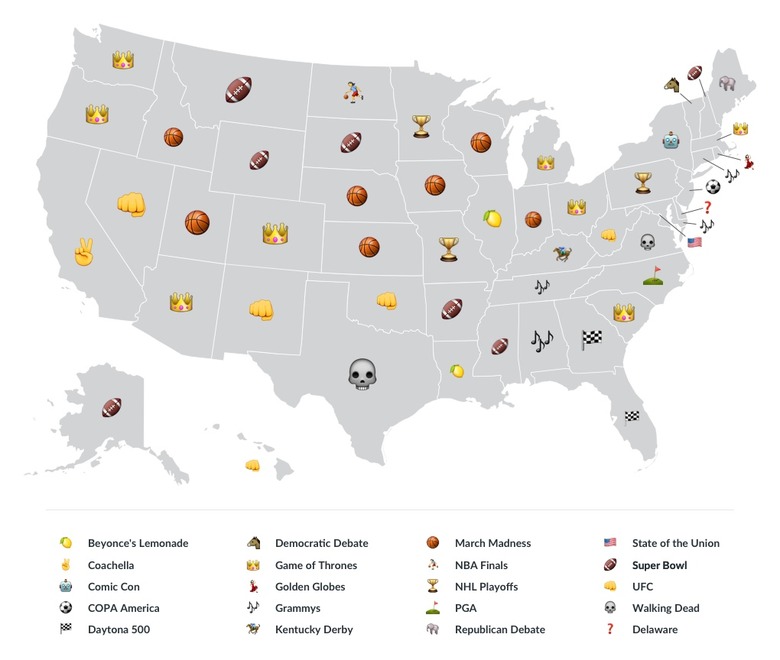
    Google Trends streaming data was pulled by the team at West Frontier to determine which major events each U.S. state has cared about streaming most in 2016. The map indicates that anyone who lives outside of DC, Maine, or Vermont is completely lying when they say they're up-to-date on the latest news in the presidential election. The data also showed that the Midwest streamed March Madness more than any other region in the U.S., and that Queen Bey has single-handedly taken control of streaming activity in Louisiana and Illinois. It also appears that the most streamed 2016 events in the nation were the NBA Finals, March Madness, UFC championship fights, and Game of Thrones episodes. So far this year, our nation cares more about streaming sports and pop culture than streaming important events that could help us determine who the next leader of the free world will be, but it's only June! Maybe we'll buckle down and get a bit more serious in November. There's always hope, right?! Data and map courtesy of West.Frontier.com's media center.

    By Cosette Jarrett Read More
  • Six Long Term Health Tips for Techies

    Today's tech community is highly competitive, driven, and innovative. Although this is fantastic for society's technological progression, it can be seriously taxing on tech workers' health when they let their passion for what they do surpass their care for their health. All too often, you'll find that some of the brightest minds in the tech industry struggle to find time to take care of their personal health. This is probably because the lifestyle of working in front of a computer all day doesn't necessarily nurture the healthiest habits. If you're in the tech sphere and could stand to improve your health habits a bit, the good news is that it's easier than you may think. Here are six simple tips to help you improve your lifestyle for long term health. 1. Maintain your posture Many people write off posture concerns as concerns that are focused mainly on aesthetics. The truth is, posture is much more important than that. The way you walk, sit, and stand now could greatly affect your body's ability to function properly later. If you find yourself at a desk for eight or more hours a day, it's important to make sure you're not slouching the entire time. Try sitting on an exercise ball or invest in a standing desk to decrease your tendency to slouch during the day. If you find that you still have trouble slouching after enlisting one of these methods, it could be time to try orthotic inserts to help correct your posture. There are multiple over the counter and custom orthotic options available. Do your research to find a brand that focuses on postural correction. 2. Refrain from straining your eyes Allowing eye strain now can lead to serious vision problems later in life. This holds especially true for tech workers who stare at a screen for the majority of their days. One of the first and most simple steps you can take is to avoid using your computer in the dark as this causes added strain on your eyes. The next step is to see your optometrist. Even if you feel like your vision is fine, it doesn't hurt to see a professional to get their input. Sometimes they can offer up options for reading glasses that can take some of the strain off of your eyes as you use your computer. If you find that a more permanent form of vision correction is necessary, weigh your options of full-time glasses or surgery. While some tech pros don't mind wearing glasses, others opt for lasik as glasses can be a bit of an annoyance. If you're on the fence, check out this guide to making a decision on whether or not lasik is the best option for you. 3. Get moving and stretching One of the most common mistakes tech workers make is to neglect moving and stretching. When you find a good spot to break in your work, take a walk around your building or maybe even run down to the company gym for a quick 30 minute workout. To get your stretching in, try implementing a few desk yoga stretches throughout the day. One of the best things you can do to get both your movement and stretching in for the day is to take up yoga after work or during your lunch break. If yoga isn't your thing, try a few different activities until you find one that sticks. Your body will thank you years from now when you have healthier joints and a leaner shape thanks to the stretching and exercise habits you implemented earlier in life. 4. Drink more water Whether your vice is orange soda or coffee with heavy creamer, chances are, you could stand to replace a few cups of your favorite beverage with water. For women, the Mayo Clinic recommends an average of 9 cups of water per day. For men, 13 cups of water is recommended. By switching out your favorite beverage with water, you not only bring yourself closer to consuming the recommended amount of water per day, but you also cut out the fat, sugar, and unnecessary calories you would get from soda or other sweetened drinks. 5. Take care of your wrists Wrists often go overlooked when it comes to joint health, however, they are one of the first body parts to wear down on a tech professional. Pay attention to how your wrists feel throughout the day. Do you hold them at a strange angle to type all day? Could you fix this strain with a new keyboard or perhaps a padded mousepad? Maybe the standing desk from tip #1 could help? You should also be sure to stretch your wrists periodically throughout the day. This can be done by simply flexing your wrists against your desk for 10 seconds on each side. There are also numerous wrist exercises you can do to protect your wrists from wear and tear at work. 6. Stock up on healthy snacks Along with the nasty habit of consuming massive amounts of sugary beverages comes the tendency to binge on salty snacks like chips and pretzels. These snacks not only contribute to weight gain with as they are high in calories, but they also contribute to other health problems like high blood pressure since they are high in sodium. To avoid binging on the snacks provided by your company's breakroom, bring your own tasty snacks to eat as you work. Try something tasty like carrots and hummus or celery and Light Laughing Cow cheese. If you're craving something sweet, natural almond butter and apples is an excellent healthy option to satisfy your sweet tooth. The tech world can be stressful at times, that's why techies are notorious for neglecting the long term health risks of their unhealthy habits. The important thing to remember is that no amount of professional pressure is worth compromising your physical health. If you haven't been feeling your best, it might be time to revisit your lifestyle. Hopefully these tips will help!

    By Cosette Jarrett Read More
  • How we can Mend Millennials' Love/Hate Relationship with Cyber Security

    Technology makes the millennial world go round. Our generation is constantly seeking quick solutions with apps and gadgets to make our lives significantly simpler. Although we've developed a strong love affair with the technologies that run our day-to-day lives, our relationship with the cyber security precautions necessary to protect them has historically been a bit rocky. Rather than taking the steps necessary to protect personal information online, millennials are often opting out of the extra work and ignoring important cyber security measures. Sure, it's convenient to throw online caution to the wind now, but what could that cost our generation later? The key to protecting millennials' online is to make cyber security efforts simpler. Here are the five ways I recommend we make online safety easier in our efforts to mend the love/hate relationship between millennials and cyber security. 1.Offer alternative password storage Recent reports show that 59% of millennials are storing passwords in their browsers. Saving your login info in your browser is definitely the simplest way to navigate through your commonly used online profiles, but it also puts you at serious risk for online attacks. Instead of storing your login info in your browser, opt for a more secure storage option. PC World offers up a solid guide to secure password storage options that could help millennials keep track of logins without compromising safety online. 2.Make secondhand devices safer The millennial generation is full of students and entry level employees who are looking to save a buck where they can. This means that when their phones or other devices break, they often look to secondhand options for replacement. Although this can be a safe option, it's important that you take the necessary steps to ensure your online security prior to completing the transaction. For sellers, it's important to make sure all accounts and information linked to your device are removed. Naturally, you should run a factory reset on your iOS or Android device, but you should also remove iCloud and Gmail accounts to make sure your information doesn't get into the wrong hands. For those purchasing a device, it will be important to make sure the seller has removed his or her iCloud or Gmail account from your phone. If the account has yet to be removed, there are now options to help you remove them. If you neglect to remove the previous user's account, they could log in at any time and lock you out of the device you purchased. 3.Compromise on free WiFi (at least use encrypted networks!) Free WiFi at coffee shops and cafes is a fabulous resource for young adults looking to get some work done on the go. The problem is, not all WiFi networks can be trusted. Although it would be ideal to avoid public WiFi all together, that's simply not a reasonable assertion for the millennial generation. A fair compromise would be to suggest that millennials only connect to encrypted networks. Sticking to encrypted networks can also help online users ensure that they are connecting to the official WiFi network at their location and avoid hackers who set up fake networks to lure in unsuspecting internet users. CNET offers up a fantastic guide with additional tips to help internet users stay safe on public WiFi networks. 4.Break trust in emails from "trusted" sources It's not unusual for our banks, utility providers, and housing associations to send us recent account activity updates and statements via email. This has made us fairly trusting of any emails sent from these sources because we can usually assume that they are safe. The problem is, hackers are catching on. A new trend in cybercrime is to send a link in a well-written email that looks like it is from a popular bank or utility company. When a user clicks the link in their fake email, malware is installed on the device. To avoid this scam, be sure to pull up all links sent to you separately in your browser. If the email is from a site you recognize, visit the site itself first then log in through a trusted portal. If it is from a site you do not recognize, use your best judgment to determine whether or not the link can be trusted. Do you know the sender? Does the url look legit? Can you visit the site's home page first? 5.Stress the importance of up-to-date security software One of the most important things the millennial generation needs to understand about cyber security is ignoring security software updates puts them at serious risk for online attacks. Although software update notifications can be a bit annoying, it's worth it to take the time to click through and install the latest version of security software on your device when prompted. The longer a device runs with outdated security software, the more vulnerable it is to online attacks. Whether you yourself are a millennial, or you know a millennial who could stand to shape up their online security game, I hope that you take these tips to heart and start helping yourself and/or others improve your/their relationship with cyber security!

    By Cosette Jarrett Read More
  • The Tech Professional's Guide to Beating Impostor Syndrome in the Workplace

    Feeling completely comfortable dominating a role in your professional career is uniquely challenging in the tech field. Although your knowledge, skill, and ability have landed you in an awesome role, it can be difficult to shake the feeling that at some point, your superiors will "figure out" that you're not innovative or efficient enough to make it in tech. Even when others assure you that those who hired you know that your contribution to the company is valuable, ditching that case of impostor syndrome can seem nearly impossible at times due to the competitive nature of the tech sphere. There's no easy way around self doubt, however, there are baby steps you can take to build your confidence and drop the fear of not measuring up to expectations. If you're having trouble shaking a serious case of impostor syndrome in your new career, check out this guide to help you realize your incredible worth as an innovative mind at your at your company. 1.Celebrate the accomplishments of your peers In the highly competitive tech sphere, it can be difficult to feel legitimately excited about the accomplishments of your coworkers. This isn't to say that you don't want them to do well, but when they achieve higher goals, it can make you feel like you need to step up your game and do the same. One of the largest issues surrounding impostor syndrome is our innate habit to constantly compare ourselves to one another. That's why doing your best to realize that the accomplishments of others don't make your accomplishments any less valuable. In fact, when your whole team is thriving, managers and executives will notice that they've put together a team of top performers that they don't want to lose. 2.Create a mantra for anxious moments Another factor that contributes greatly to feeling self-doubt in a tech-centric workplace is anxiety. When thoughts creep in that maybe you aren't the right man or woman for the job, it can be difficult to feel confident in your work for the rest of the day, week, or even month! Fortunately, there are some steps you can take to sooth your mind and boost your confidence during anxious times like these. One of the best and most simple of these steps is to create a mantra. Effective mantras for self-doubt focus heavily on positive affirmations. These are phrases that you repeat to yourself in your head to remind yourself of what you bring to the table in the workplace. For example, my mantra touches on my work ethic, my ability to learn quickly, and my innovative mind. If you need some help creating your own positive affirmations, this guide has some great tips for getting started. 3.Acknowledge your "wins" at the end of the week After a long week at work, it can be hard to remember the small "wins" you had in the workplace. Sure, larger accomplishments are pretty easy to notice, but they likely won't happen every single week. That's why it's important to focus on every "win," even the small ones. For example, if you made a solid connection with a coworker or manager during the week, count it as a win! If you started a project that has been in your queue for a while, count it as a win for catching up on your workload. Being sure to notice the small achievements you make each week will help you realize your worth and ability in the challenging world of tech. Inc.com provides an awesome guide to celebrating workplace accomplishments. I definitely recommend you check it out! 4.Maintain work-life balance Maintaining work-life balance might seem nearly impossible as you struggle to keep up with an ever-expanding queue of site changes that need to be made, or product modifications that should be addressed sooner than later. However, it's important to remember that it's impossible to do your best work when you have no time to relax and release your stress. Unwinding can be tough for individuals who refuse to stop until a job is done, but there are lots of ways you can ease into achieving better work-life balance that can make the process a bit more comfortable and effective. In fact, the very industry you focus on for work (tech, duh) can help you. Another Engadget article covers the details on using tech to achieve better work-life balance here. 5.Focus on your unique value Arguably, one of the most important things you can do to beat impostor syndrome is to focus on your unique value. Sure, others may have more experience in the tech sphere or perhaps they're out-of-this-world innovators, but that doesn't have anything to do with you. Your value will always be unique in the workplace. Your employers have identified that unique value already. That's why they hired you! Take time to determine your unique value proposition. If you get stuck, try looking at the issue from a branding perspective. Some of the same tactics used to identify a unique value proposition for a brand can be applied to find the unique value proposition of your personal brand. The tech industry can be a tough environment for current and aspiring pros at times. The key to success if remaining confident and hungry for innovation during the process of building upon your expertise to excel in your career. Hopefully these tips will help you shed the imposter syndrome holding you back!

    By Cosette Jarrett Read More
  • Spotify Tries and Fails to Empower Female Steamers on International Women's Day

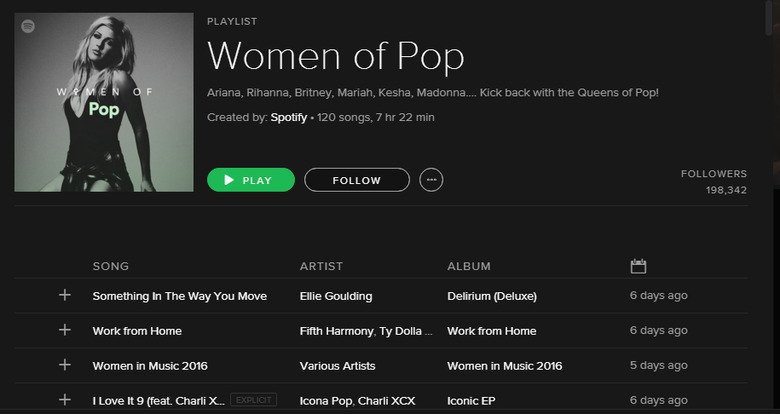
    Women represented 55% of Spotify's user base in the U.S. in 2015. That being said, it's no surprise that the popular music streaming platform decided to join in on the celebration of International Women's Day (IWD) with a set of playlists dedicated to women in the music industry. The collection included playlists for women in multiple genres including Pop, EDM, Hip-Hop, Country, Jazz, etc. Although Spotify's effort to create a playlist for women was admirable, many women (myself included) couldn't quite understand how and why some of the songs on the list were chosen to inspire and empower our gender on our designated day. In fact, the majority of the Women in Pop playlist made me and my female coworkers seriously question the qualifications of the "music specialist" behind its compilation. Did Spotify let an intern take the reins here? Was it an early April Fools' Day joke? Or did Drumpf make a celebrity guest contribution? I get that there is no "perfect" way to portray feminism, but something was seriously off with this playlist. To give you a better idea of what I'm talking about, here are some of the most questionable tracks on the list. 1. Love Me Like You Do – Elli Goulding Remember that movie that had women around the world angry about its portrayal of a controlling relationship as exciting and romantic? Well the theme song for that film made the list! If Spotify was hoping to represent Elli's important contributions as a woman in the music industry, maybe something a little more inspiring like "Anything Could Happen" would be a better choice? 2. Un-Break My Heart – Toni Braxton There were definitely better song choices to represent Toni Braxton than "Un-Break My Heart." She is a strong woman who deserves a spot on this playlist, but why not choose a song that portrays her power rather than her upset surrounding a breakup? Maybe try "He Wasn't Man Enough" or "Yesterday"? 3. Halo – Beyoncé Beyoncé is undeniably a female force beyond measure. That's why it surprised me that out of all of her famous female anthems, Spotify chose "Halo" as her contribution to their IWD playlist. The song is all about her relationship with Jay-Z which is great for those two, but doesn't really do as much for womankind as say "Formation" or "Run the World." 4. Work From Home – Fifth Harmony "Make it clap with no hands..." I could just leave it here with this demanding lyric from the male artist in the song, but that's not even the biggest thing that makes this song a bad fit for celebrating IWD. The track depicts a woman praising her boyfriend for fulfilling his breadwinner role, but explains how she would like him to stay home for some one-on-one time instead. Where is her job? Does she really have nothing better to do than sit at home all day and obsess over her boyfriend? 5. You Drive Me Crazy – Britney Spears All 90s babies know the power of Britney. She was our idol through adolescence and remains an inspiration to us all as we've watched her overcome some seriously trying times. That being said, do you really think "You Drive Me Crazy" is her most influential track for women? I think not! Let's try again with a track like "Stronger", "Womanizer", "Work B**ch", or even "Do Somethin'". 6. The Boy Is Mine – Brandi and Monica Whoever decided that the track about two women fighting over a two-timing guy would serve as a great way to celebrate women overcoming diversity together was seriously confused. If Spotify was hoping to represent these influential women in music, they could have chosen tracks like "Almost Doesn't Count" by Brandi, "So Gone" by Monica, or "It All Belongs to Me" by the duo. 7. Genie In A Bottle – Christina Aguilera Considering that Christina is a woman who's been championing for other women through her music for years, it was almost insulting that Spotify chose her very first song about being trapped in a bottle and needing a man to release her as her sole contribution to the Women of Pop playlist. What about her unapologetic female anthem with Lil Kim, "Can't Hold Us Down?" Or perhaps "Fighter" or "Beautiful?" 8. Candy – Mandy Moore First thing that came to mind upon seeing this track added to the list was, "huh?" It's hard to understand why a song about a woman missing her crush like "candy" made it on a list intended to celebrate strong women. 9. How Do I Live – LeAnn Rimes This song literally describes a woman who doesn't know how she will live without a man if he ever leaves...The answer to her question in "How Do I Live" from 1997 could be answered by a song she released in 2010 titled "Life Goes On". 10. The Heart Wants What It Wants – Selena Gomez Selena's roller coaster ride of a relationship with the Biebs might be the most relevant thing about the singer to whoever created this list, but it's certainly not to most of her fans. A more appropriate Selena track for this list might have been "Perfect". Or, if you insist on making this about her and Bieber, at least choose a song where she comes out on top like "Same Old Love". I'll admit, the playlist did include several awesome tracks like Demi Lovato's "Confident", "No" by Meghan Trainor, and "Roar" by Katy Perry. The problem is, the majority of the list was pretty bad, including additional wtf tracks like "Habits (Stray High)", "Bleeding Love", "With You", and "Because You Loved Me". It's unlikely that the wildly successful streaming platform will stress too much over this small misstep as it continues to entertain its audience of over 75 million users, but I sure do hope they'll at least consider letting a different music expert compile this list in 2017. Better luck next year!

    By Cosette Jarrett Read More
  • ​How the Cloud is Creating Global Opportunities for Local Businesses

    The cloud has long been touted as a savior for casual file sharing via programs like DropBox, iCloud, and Google Drive. As an Engadget reader, I'd assume you use cloud services on a regular basis to share photos with friends and family and backup your iPhone. Although you know the importance cloud technology plays in your personal life, you may not be quite as aware of the benefits it has to offer your small business. According to Right Scale's State of the Cloud survey, 63% of enterprises surveyed are using a private cloud computing system. If you have hopes of taking your business global someday, it might just be in your best interest to follow their lead. Here are five ways your small business can find more opportunities for global expansion by making the switch to cloud computing. 1. Bottom line savings are possible Businesses see a decrease in costs when switching their storage to the cloud as they are able to do more with less. An article on PC Mag reports that some small businesses have saved over $4,000 in upfront costs after switching. Savings like this are possible because costs for things like installation, upgrades, hardware, and IT plummet as a result of operations moving to a virtual location rather than an in-office location. 2. HR has increased flexibility in hiring Remote work has become the ideal employment situation for many sought after candidates. When important content is inaccessible from outside of the office, it's impossible to offer a remote work option to every talented candidate in your industry. By taking your storage operations to the cloud, you significantly increase your HR team's ability to negotiate comfortable remote working contracts with the candidates they want to hire most. 3. Additional opportunities are created for client collaboration If you're a local company that currently stores all data and information on an internal server, it can be difficult to branch out to work with clients from outside of your state due to the inability to securely share important files and data. Storing your sharable documents on the cloud will help your clients more easily access the things you need to work together no matter where your offices fall on a map. Business News Daily explains how the cloud provides a safer platform for data storage in their article on data security. 4. Scalability is possible on a corporate level Cloud data is scalable, which is important when it comes time to change storage needs on a corporate level. When a business switches to cloud storage, it no longer has to take time and money to upgrade servers and expand storage needs. The best part is, a storage change with the cloud is often times immediate. 5. Expansion becomes cost effective An obvious step in taking your small business global is to create additional offices or hubs for your work in additional areas. The problem is, costs involved with building out additional offices in new locations are incredibly high and often times unrealistic for small business owners. When you take your storage operations to the cloud, you lose the need to build an actual office in new locations as your new employees can simply work remotely or from a rented room in a co-working space like Impact Hub. Making your move to the cloud may sound a bit intimidating, but it's actually much easier than you may think. Cloud software companies have refined their data transfer systems to a point where the process of moving your important content away from your current server and to a cloud storage platform is fairly simple on your end. If you're looking to make the switch to cloud computing, start by finding a solid Cloud vendor to help you. Cloud Spector recently conducted a survey to find the top cloud vendors available to help you make the move. The leading vendor in the survey was 1&1, and you can check out the survey results here to see where other top providers lie in the rankings. If you're not sure what to look for in a vendor, Business News Daily offers up an awesome guide here. If you have any thoughts or questions about moving your storage to the cloud, I'd love to hear them! Let me know in the comments below.

    By Cosette Jarrett Read More
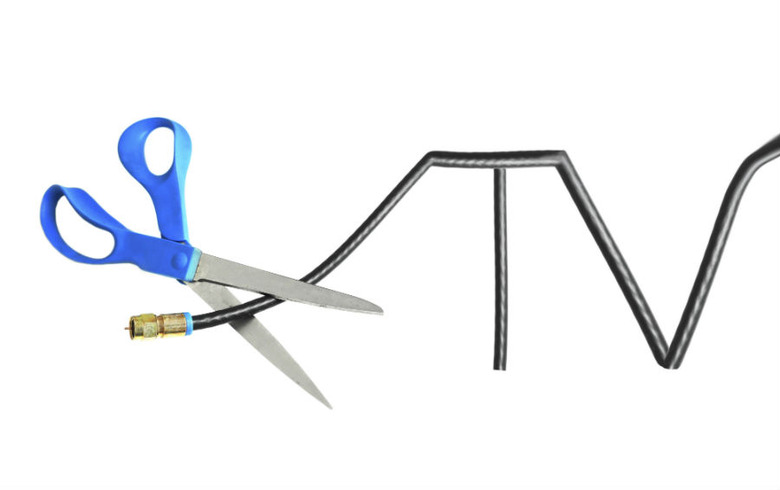
  • 5 Ways to Cut Your Cable Bill Instead of Cutting the Cord

    With the advent of stand-alone streaming TV services, many cable and satellite television subscribers have been abandoning traditional subscriptions for the seemingly greener pastures of Internet streaming. People tired of yo-yoing prices, confusing fees, and channels they don't want are jumping ship and opting for à la carte television from services like Hulu, Netflix, and even individual networks. Yet those subscriptions can add up just as quickly as your cable bill — and they might not be able to deliver the shows you want when you want them. Not all shows and episodes are available on every streaming service, and sometimes you have to pay for specific episodes or shows on top of the monthly fee. If you don't pay attention, you can easily exceed what you're currently forking over for cable. If you're tempted to join the cord-cutting revolution, evaluate your viewing habits and needs before saying farewell to your cable subscription. How many channels do you regularly watch, which shows are you addicted to, and when do you view them? Depending on your viewing habits, sticking with your current subscription may actually be the best way to stay tuned in to your favorite programming — but that doesn't mean you're out of luck when it comes to saving. Here are five ways to cut your cable bill without having to cut the cord. 1. Shop Around There's usually more than one option in town, and it can pay to check out the competition. Find out what other cable and satellite providers are offering in your area and see if your current provider will match their price. If not, you'll know where to get the best deal and can switch to a better package. Get started today by searching for nearby cable providers by ZIP code. 2. Bundle, Bundle, Bundle Many providers will give you a deal if you subscribe to multiple services. Find out if your provider offers a break for customers who bundle phone, Internet, and cable service. Average savings range from $15 to $30 per month, which makes a big difference to your bottom line over a year. Be sure to find out if a contract is required with the bundle, though, and consider whether your needs could change over the time that you might be locked in. 3. Stay in Touch Pay attention to the life of deals you're offered by your cable company and schedule a call for about a month before they're due to run out. Many companies bargain on the fact that customers often don't keep track and will forget that their rates are about to increase. If your free subscription is good for three months, make sure you give your provider a call to cancel or renegotiate before the increase hits your bill. 4. Know Your Priorities When it comes to deals on cable TV, one size does not fit all. The best subscription for you will depend on what shows, channels, and access you need. Don't give into a deal that doesn't make sense for you: if you never watch premium channels, a free subscription to one shouldn't be the reason you sign up. Make a list of the options that mean the most to you, and don't get distracted by offers that don't meet your needs. 5. Downsize Whether it's kids or roommates moving out of the house, having a baby, or changing work demands, your viewing habits are likely to change as other areas of your life change. If you've been catching all your favorites when they air, you might be able to get rid of that DVR. If you rarely have anyone in the guest bedroom, it might be time to shut down cable service to that television. Evaluate your needs and habits and change your plan accordingly. There's no reason to pay for services you're no longer using. It's great to have so many options for catching up with your favorite shows, but too many choices can make it hard to discern what kind of subscription makes the most sense for your wallet. Make your decisions based on your viewing preferences and stay diligent about your subscription. When it comes to cutting the cord, it pays to look before you leap.

    By Cosette Jarrett Read More
  • ​5 Top Tips to Keep Technology Safe on Campus

    College is a place where sharing is encouraged — the sharing of your thoughts and ideas, your feelings and emotions, and, during finals week at least, your late-night caffeine sources. But one thing college students shouldn't be sharing is their technology. Unfortunately, you may already be sharing yours, even if you don't know it.A few common-sense tips can help you be more aware of the dangers of poor Internet security and how to prevent a data breach of your personal information.1. Protect Your PasswordsCreating a strong password is the easiest — and perhaps the most important — way to protect your data. Remember to use unique passwords with a variation of upper- and lowercase letters, numbers, and symbols for every account you set up. You should never use easily identifiable personal information as a password and never share them or write them down where someone else can find them.Once you've chosen a strong password, set up two-factor authentication for your email, bank, and social media accounts. This adds an extra layer of protection to your accounts and can let you know if someone else is trying to access them.If you use group accounts — for instance, if your friends chip in together for a shared Netflix account — be certain those passwords are unique and do not mirror any of your personal passwords.2. Be Careful with Your Wi-FiFree Wi-Fi at the coffee shop while studying is always a big hit with students. It's also a favorite for criminals looking to take advantage of the unencrypted public Wi-Fi connections that make it easy for hackers to slip away with your personal data. Turning a cellphone with unlimited data into a temporary but private hotspot might be a better idea when working in a public area.3. Read Before ClickingIt isn't always necessary to click yes when a message pops up telling you to. It also isn't always legitimate. Before you click on any pop-ups or open any attachments, scan them first and make sure you trust where they are from. You could easily be clicking yes to malware and not software updates.4. Back Up Often, Trust LittleKeep your operating system and antivirus software up to date and back up all of your data often. Change passwords if something seems not quite right with a site or if there is a rumor on campus about a hacking or potential breach. You cannot be too careful.5. Don't Make Theft EasyYour personal computer, cellphone, and other electronic devices are probably some of your most valued possessions. Unfortunately, thieves want them, too. And if your computer is stolen, not only will it be harder to write your term paper, your personal data stored there could be easily compromised as well. The best way to deal with theft is to make it more difficult for those who might be looking to steal your property in the first place. Don't leave electronics lying out in open areas. Never leave electronics in study or common rooms while you are not there. Always keep your data backed up to a secondary storage device or the Cloud. Don't leave a laptop or smartphone in an unlocked car or in a locked car in a place where it is visible. Use a laptop security alarm that will sound an alarm if anyone attempts to remove your secured laptop from its specified location.With a little common sense, you can make it through your four years in college with your technology and your digital footprint intact. Stay aware, and you'll stay safe.

    By Cosette Jarrett Read More
  • Your Tech Checklist for a Successful Semester Abroad

    Congrats on your pending adventure abroad! As you already know, your study escape to a foreign country will be one of the most amazing experiences of your life. However, as with all big ventures, it will take some serious preparation to make it successful. Sure, you've got your cash, laptop, clothes, toiletries, etc. But do you have your tech in order?The right tech can help you create a more seamlessly fantastic experience overseas. No matter where you go to study, tech is a language most students can understand. Check out 6 essential tech items to take with you during your international travels.1.Reliable WifiSolid internet connection will be absolutely essential for a number of reasons. You'll need it to complete your coursework, video call home, find cool attractions and restaurants, and run translation and conversion apps on your phone. Check out flash router options to split WiFi connection with your roommates and/or hosts.When you're on the go or are simply looking to break away from your home or hostel to do some work, the WiFi Finder app can help you find both free and paid WiFi options around your city.2.DropboxA Dropbox subscription will definitely come in handy during your trip of a lifetime! You'll be taking loads of pictures and will more than likely need to store them in a backup space to make room on your phone or camera for more. Dropbox is a cloud storing system that makes this a bit easier. It's a secure place to store your photos and documents then access them from other devices using your password and username later.3.Portable Hard DriveThis may seem a bit old school, but it might be worth keeping a portable hard drive with you as a backup should you lose online access. Once again, you can store your documents and photos like you would on Dropbox, but also have access to them while you're on the plane or in an area without great connection.4.Access to Your Favorite ShowsChances are, you'll find a bit of down time here and there. This is when you'll really appreciate having access to your favorite shows and movies. The easiest solution here would be to sign up for Netflix or Hulu. These will be the most reliable sources for streaming. If you are absolutely in love with a cable series and can't seem to figure out an overseas solution, you can still make your at home cable subscription work for you. Just be sure to choose one of the cable providers with a mobile option.5.Apps to Keep Your Finances in CheckYou've probably already got your credit card/cash situation figured out. That being said, you may not have considered additional options to keep your finances in order. Apps like Venmo will come in handy abroad as you'll more than likely end up going out to eat a lot. This will help you split costs with friends and hosts when you don't have the cash. On top of this, you'll also want to download a good foreign currency converter and research the tipping situation at your destination before you leave.6.Tech Preserving Accessories Your laptop and smartphone are definitely a given on this list. You'll want to make sure you have the right accessories to keep them safe and fully functioning too though. Check out your options for padded laptop carriers and secure phone cases to protect the exterior. Installing solid security software prior to leaving will also be essential to protect your devices and the info stored on them. Few things would be worse for your cash flow than being forced to spend part of your travel budget on a new laptop or phone.Additionally, do your research to find a reliable power pack for each of your devices, as well as converter cords to accommodate the outlets found in your choice destination.

    By Cosette Jarrett Read More
  • Satellite TV Subscriber? How to Get the Best Service for Less Money

    As much as you may love settling in to watch "The Americans" or "House of Cards" each week, you don't want to pay more money than you have to for your satellite TV subscription. Here are 12 easy ways to save money and make sure you're getting the most out of your subscription without having to resort to a TV antenna for local programming. 1. Ensure Proper Installation You're not getting your money's worth out of your satellite TV subscription if you get a signal only half the time. Install your satellite dish so it has a clear line-of-sight to the southern sky, where it won't be obscured by trees or neighboring homes. If possible, opt for professional installation; a satellite TV installer will know how to properly mount your satellite dish in the best position for a clear signal and consistent service. 2. Keep the Satellite's Line-of-Sight Clear Even after your dish is installed in the right position, snow or overgrown trees may obscure its line-of-sight in the future. Make sure to brush snow, fallen leaves, or other debris off your satellite dish promptly and trim back any trees that could interfere with its positioning relative to the southern sky. 3. Read Your Bill Each Month Look over your satellite TV bill monthly. Are there any pay-per-view charges you don't recognize? Has your low introductory rate expired? Immediately report any charges that don't seem right. If you wait too long, your provider may not honor your claim. 4. Take Advantage of Loyalty Rewards Your satellite TV provider may offer loyalty reward points for paying your bills on time, ordering movies on demand, or upgrading your service. Sometimes, you can cash in points for discounts on special events, use the points to pay for on-demand movies or TV shows, or get gift cards. 5. Refer Friends Some satellite TV providers offer gift cards or statement credits when you refer friends to their service. Take advantage of your social media networks, or use old-fashioned word-of-mouth, to refer friends to your favorite satellite TV provider and get paid for watching TV — or at least for talking about it. 6. Take Your Connection With You On the Road Your satellite TV provider may have an option that lets you carry your satellite TV programming with you anywhere for a monthly fee. Rather than using your smartphone data bandwidth to stream movies while you're vacationing, use the self-aiming portable satellite antenna to watch shows on the road, while camping, or in your own backyard. 7. Pick Your Channels and Packages Wisely Think about the channels you watch regularly. Before you switch packages or providers, hold a family meeting to see what your family is willing to give up and what shows they don't want to live without. You might be surprised by their answers, which could result in a less expensive satellite TV package. 8. Consider Other Options There are certain programs, including your favorite sporting events, which you may only be able to get through satellite TV. For anything else, there's Netflix, Hulu, or a host of other streaming television services. If you have a fast Internet connection, you might be able to reduce your satellite TV service to the bare essentials and watch the rest of your favorite shows online. 9. Bundle Services Satellite TV providers often forge partnerships with Internet service providers, resulting in lower overall monthly rates if you bundle your Internet or Voice Over IP home phone service through your satellite TV provider. Purchasing a bundle may also result in hefty sign-up rewards, such as gift cards or low introductory rates for the first year. 10. Reduce the Number of Receivers or Boxes in Your Home Although you'll save only a few dollars per month, the savings can add up over the year if you cut the number of receivers or DVRs on your satellite TV plan. How many TVs in your home do you use for satellite programming on a regular basis? If you tend to use bedroom, basement, or playroom TVs for video games, Blu-rays, or streaming Internet television, it doesn't make sense to pay for a receiver or DVR for that TV. 11. Shop Around for the Best Prices Once you've assessed your family's needs and determined what channels you want and how many receivers and DVRs you require, shop around for the lowest prices. When you compare rates, take into account any additional taxes and fees. You might also factor in gift cards offered as a sign-on bonus, but be sure it's a gift card you'll actually use. Read the fine print carefully to find out your rate after the initial introductory discounts expire, but don't let that be a deciding factor. You can always cancel when the year is up or call to negotiate a lower price. 12. Be Ready to Haggle Whether you're a first-time satellite TV subscriber or are negotiating a new rate, it's important to make a strong case. When you call your provider, be prepared with competitors' pricing for similar packages and your monthly budget for TV service in mind. Insider tip: Ask to speak with the cancellations department, rather than customer service, to get the absolute lowest price your satellite TV provider can offer. Even if you are happy with your service, threatening to cancel because another provider offered you a lower rate can often get your current provider to reduce your bill substantially. Get Ready to Save Money Websites and blogs about saving money often point to lowering your TV bills as an easy way to reduce your monthly household budget. Whether you're looking for big savings or just want to make sure you're getting the best value, we hope these tips help. How have you snagged a great deal for satellite TV? Please share in the comments section below.

    By Cosette Jarrett Read More
  • For your app-roval

    Sometimes, someone special comes into your life. Sometimes, this someone special makes you feel so amazing that you just couldn't imagine life without them. Sometimes, this someone is an app. Yes, your go-to apps have made your life better by leaps and bounds. Whether you're a single lady on the go, or a happy hubby with four kids, there's an app with the ability to make your life exponentially easier. The problem many face is finding their app soulmate. That's where help from friends comes in! The more you share your favorite apps, the more simplicity you can bring into the lives of others. I'll get the sharing started with my list of the top apps I simply could not live without. Enjoy! 1. Word Swag Word Swag is an absolute MUST for social media mavens and blogging gurus. This simple app allows you to create awesome text graphics using your own photos or provided background images with a pre-designed layout for your text. You can change the size, spacing, and color of your text in just minutes. In short, if you're not a designer but you love creating custom content for your blog and social posts, you need a little Word Swag in your life. (Only available in iOS) 2. Flipboard Staying up to date on important current events and news is important.That being said, you probably don't want to consume every bit of random news produced by national and local news sites. Fortunately, Flipboard lets you personalize the news that shows up in your feed. The app is a savior in terms of keeping you in the know without making you scroll through stories that don't fit your interests. iOS Android 3. Followers Plus Admit it, you care about who follows and unfollows you on your favorite social accounts just a little bit. Although Insta and Twitter won't let you know where you stand with your digital friends, Followers Plus will. This app tracks who follows and unfollows you while you're logged in. It can also provide info on who's blocking you and what your average engagement scores look like. iOS Android 4. Uber This app won't work in every city (Vegas! *cough, cough), but where it does work, it's absolutely amazing! Simply input your current location and destination of choice to catch a ride from a trusted ride sharing pro. You don't even need your wallet as the app keeps your payment info for easy fare management. Additionally, you can provide reviews and feedback to help fellow Uber users identify awesome drivers for future trips. AND I've saved the best for last - Uber rides are way cheaper and more enjoyable than taxi rides! iOS Android 5. Hulu Plus Thanks to in-flight Wi-Fi, video streaming apps have become a tech essential for frequent travelers. The Hulu Plus app lets you enjoy your favorite shows and movies from anywhere with a decent Wi-Fi connection, whether that be the local train or somewhere in the air over the Pacific Ocean. Obviously, you can see why life without this app would be MUCH more difficult. iOS Android 6. How Much Speed Do I Need? Ever experience the horror of slow Netflix as you try to work your way through the latest episode of your favorite series? Experience this no more! The How Much Speed do I Need? tool will guide you through a simple process to find out how much speed you need to power up all your gadgets and streaming apps with fast internet connection. Now you can be prepared next time your roommate decides to so rudely research her upcoming term paper on the same night as the release of the new season of OITNB. 7. Spotify Gone are the days of paying a whole $1.99 for access to each of your favorite tracks. The Spotify app lets you stream music right to your phone from custom or pre-made playlists. The only downfall? Like Pandora, you can only skip so many tracks. If you find yourself using Spotify on the daily, I suggest purchasing the premium account for $9.99/month. They also offer a $.99/month deal for the first three months as well as student discounts. iOS Android 8. Soundcloud The EDM scene is just getting bigger and bigger. If you're like me, you probably find yourself at a loss when friends rave about up and coming DJs whose music can't be found in the Top 40. Fortunately, Soundcloud has what you need to catch up. You can check out tracks from new artists and repost them to your profile to stream them when and wherever you'd like. What I love most about this app is that you can check out your friends' reposted tracks for fresh ideas and maybe even conversation starters. iOS Android

    By Cosette Jarrett Read More