Dave Caolo

Engadget Editorial Policies

The unique content on Engadget is a result of skilled collaboration between writers and editors with broad journalistic, academic, and practical expertise.

In pursuit of our mission to provide accurate and ethical coverage, the Engadget editorial team consistently fact-checks and reviews site content to provide readers with an informative, entertaining, and engaging experience. Click here for more information on our editorial process.

Stories By Dave Caolo

  • Apple to open retail store in Tianjin, China on February 7

    China is a big part of Apple's retail future, and its presence is about to expand a bit more. Apple will open a retail store in Tianjin, China on Feb. 7. Apple recently noted its plan to open five new retail stores in five weeks to coincide with the Chinese New Year. The Tianjin store is number four.

    By Dave Caolo Read More
  • Video highlights mural on forthcoming Chongqing Apple Store

    Apple has posted a video on its China retail page highlighting the collaboration that resulted in the mural that currently covers the forthcoming Chongqing store. Navid Baraty and artist Yangyang Pan worked on the mural, which is just stunning. In the video, they each discuss their contributions. Last week, Apple released a video highlighting the calligraphy project meant to promote the upcoming Hangzhou retail store. The company's retail chief Angela Ahrendts has stated that Apple will open five new Chinese retail stores to coincide with the Chinese New Year holiday.

    By Dave Caolo Read More
  • Apple may permit security inspects of products by Chinese government

    The Beijing News is reporting today that Apple's Tim Cook has agreed to security inspections of his company's products by Chinese government officials. According to MacRumors, the inspections will concentrate on identifying back doors that would allow third-party access to stored data. China is an important market for Apple, and this agreement was likely put in place when Tim Cook and the director of China's State Internet Information Office, Lu Wei, met in 2014. Meanwhile, Apple is celebrating the opening of its first store in ​Hangzhou, China in grand style.

    By Dave Caolo Read More
  • Shifts lets you manage your crazy work schedule

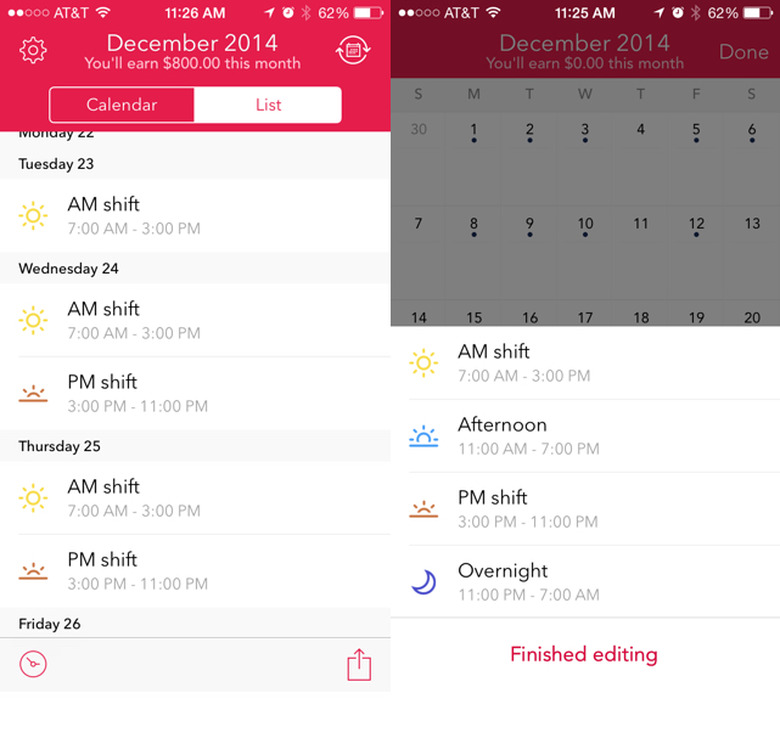
    Years ago, I worked for a residential school. Since the students lived there, employees worked in several shifts: 7:00 AM - 3:00 PM, 3:00 PM to 11:00 PM and an overnight shift that started at 11:00 PM and ended at 7:00 the next morning. There was also a "split" shift that started at 11:00 AM and ended at 7:00 PM. I typically worked 7-3, but would pick up overtime in any and all of the other slots. So, my schedule got crazy. If only I had Stewie's time machine, I would have used it to travel to 2015 and grab Shifts by Snowman (and an iPhone to run it... but let's not get technical). Shifts, which is currently on sale for US$1.99, lets you track your work hours and earnings. Let's take a look. Shift types Begin by creating shift types. While testing the app I pretended it was 1994 (Stewie's time machine again) and entered my old work shifts. Creating a shift type is easy. Tap the "+" at the bottom of the screen to enter the edit screen, and then tap the "+" again. Next, give your shift a name ("AM Shift" for example) as well as a start and stop time. By default, Shifts assumes you're going to work eight hours, and fills the "end" field with a time eight hours after what you enter as the starting time. Next, choose your hourly rate for that shift as well as an icon and a color to represent that type on the calendar. I like the icon/color options a lot. There are 10 icons to choose from, three of which are a sun rising, a sun high in the sky and a sun setting. Perfect for my AM/PM/overnight shifts. There are also 40 colors to choose from, so employ whatever scheme you want there ("Job A" vs. "Job B"; overtime vs. straight time, etc.). Adding shifts to your calendar This is easy, too. Tap the "+" at the bottom of a screen to reveal the list of shift types you've created. Tap the one you'd like to use, and then tap every day that you'll work that type of shift. For example, let say I work The AM shift -- 7:00 AM to 3:00 PM -- Monday - Friday. To note that on my calendar, I tap the bottom "+", select AM Shift and then tap each weekday. The AM shift icon appears with each tap. Likewise, if I've picked up two PM shifts as overtime on Wednesday and Thursday, I switch to the PM shift type and then tap Wednesday and Thursday. By the way, that's called "pulling a double" and it's no fun. You might be thinking, why did you work so many doubles, Dave? Because of the money, honey. Shifts has that covered, too. When you create a shift type, you can note the associated hourly rate. Then, enable earnings calculations in settings, and Shifts will list your potential monthly income at the top of the screen. Cool! Other preferences let you receive alerts around your work schedule, like 15 minutes, an hour or even 24 hours before your shift begins. The app also handles rotations beautifully, if you work a job with rotating schedules. Shifts integrates with your existing calendars, pulling in dates so you can catch any work/life conflicts that may arise. Finally, there's an ample share sheet, so you can keep others abreast of your schedule. I absolutely recommend Shifts to shift workers. It's certainly a lot better than the piece of paper I kept pinned to a bulletin board in 1994. And, on sale! Grab it now, shift workers.

    By Dave Caolo Read More

  • Spotify update lets you preview, save songs quickly

    Music streaming service Spotify has updated its iOS app with a cool new feature that helps you find what you're looking for. It's called Touch Preview and works by briefly playing a portion of a song while you tap-and-hold on its icon. Even if you're already playing another song, that track will pause while you hold and listen, and then resume as you release. Neat, eh? New gestures make it even better. If you like the track you've previewed, swipe right to add it to your collection or swipe left to queue it up for playback. The new features are available as of today, so look for the update in the App Store.

    By Dave Caolo Read More
  • Apple has been adding 1M iBookstore users per week

    Earlier this week, Apple iBooks chief Keith Moerer announced that the company has been gaining about one million iBookstore users per week since the release of OS X Yosemite. The announcement came at the Digital Book World Conference in New York City. The iBookstore comes pre-installed on Yosemite, which likely help customers find it. I'd also suggest that, as Moerer mentioned, the large-screen iPhone 6 and 6 plus make for a more pleasant reading experience.

    By Dave Caolo Read More
  • Sunny for iPhone is gorgeous, relaxing and fun

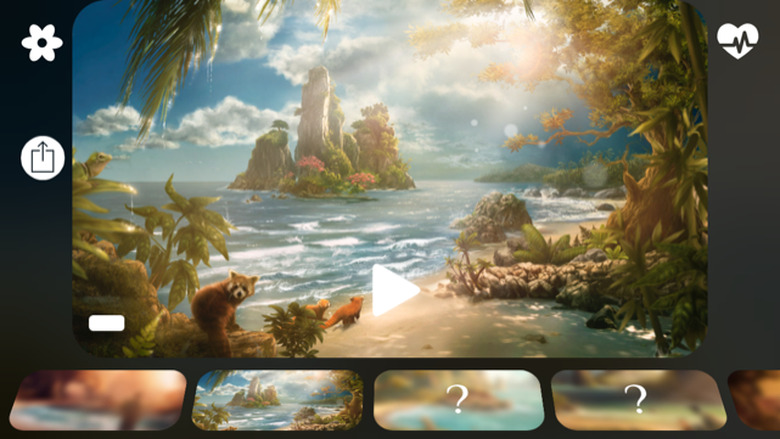
    Last year I wrote a review of Windy, a gorgeous, relaxing app by Taptanium that follows the eponymous character's journey across several lovely settings, complete with stunning visuals and relaxing, stereoscopic sound. Today the same team has released Sunny (free with in-app purchases), a follow-up app that accompanies a new character through a beautiful, parallax-heavy world of calming surf and beautiful bays. The story is broken up into several chapters, each telling a part of Sunny's journey. After weeks at sea, he steps foot onto a mythic land and is compelled by his pet water dragon to journey on. Much like its predecessor Windy, the visuals in Sunny are just terrific. Each parallax-heavy scene (you can adjust exactly how pronounced this effect is) offers much to observe. A single tap hides the on-screen controls, subtle as they are, so you can explore the new "bay" (there are six in total) without distraction. There's even a "secret" bay you can easily unlock, which features a cute red panda. Of course, that made me think of @Darth. Here's what those controls offer. In the upper left there's a timer. Tap it to have the audio end after a prescribed amount of time. Tap the leaf icon in the upper right to read the story that accompanies each scene. It's a single narrative arc that adds a bit of fun to the experience. Not only fun, but "sunrays," which I'll explain later this post. Additional settings let you adjust the audio by increasing or decreasing: 1. Music 2. The patter of rain on a tent 3. The patter of rain on the ground 4. Birdsong Finally, the chapter selector lets you move from chapter to chapter and scene to scene. As long as you've collected enough sunrays, that is. Sunrays are points that you earn to unlock additional chapters, and there are two ways to acquire them. First, simply use the app. When you launch Sunny for the first time, you'll earn sunrays for exploring the options I described above. You can earn more by using the app for three minutes per day. If you're in a hurry you can pay $0.99 to unlock the app entirely. Finally, I've got to mention the sound. Since Sunny was made by the folks behind Thunderspace and Windy (both of which were also updated today), you know it's good. Pop on some headphones and enjoy the effective "3D" sound. Waves seem to crash from left to right, raindrops seem to land above your head and wind swirls in various directions. It's impressive and immersive. I've taken to listening to Sunny while I'm at my desk and it's quite nice. I love my office and all, but I'd much rather be in an idyllic nature setting. Sunny lets me imagine that's where I am.

    By Dave Caolo Read More
  • Clever Apple Store window display

    There's a window display in London's Regent Street Apple Store that's pretty clever. It features a row of iPads, standing up, with Smart Covers that seem to open and close all on their own. Meanwhile, the iPads are running a demo video. It's certainly eye-catching, as you can see it the video below. How does it work? We're going out on a limb to guess that magnets are somehow involved.

    By Dave Caolo Read More
  • First iPhone keynote was eight years ago today

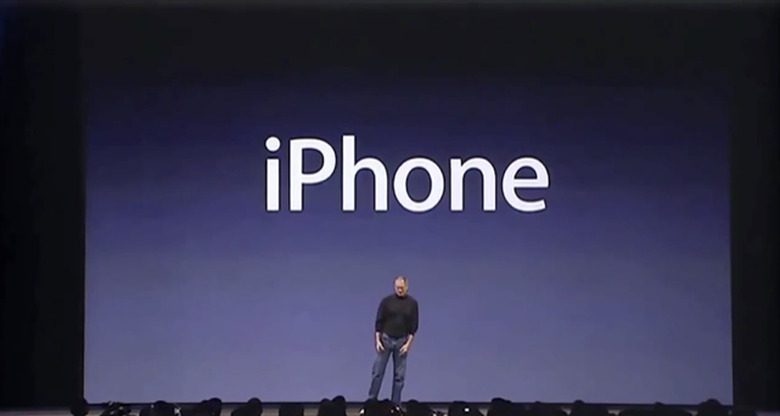
    I never had the privilege of watching Steve Jobs do his thing in person. Instead, I watched his public presentations as many of you did: seated before a glowing computer screen, eager for what was about to unfold. The event I remember most clearly took place on January 9, 2007. Steve took the stage to introduce a product that would change personal technology significantly. I still get chills when Steve does the "These are not three separate devices" bit. Today we know that the iPhones Steve used on stage weren't fully functional, and the threat of his demo going catastrophically wrong was very real. As The New York Times reported in 2013, engineers found a specific progression of tasks that would work, if they were executed in a precise order on stage: "The iPhone could play a section of a song or a video, but it couldn't play an entire clip reliably without crashing. It worked fine if you sent an e-mail and then surfed the Web. If you did those things in reverse, however, it might not. Hours of trial and error had helped the iPhone team develop what engineers called 'the golden path,' a specific set of tasks, performed in a specific way and order, that made the phone look as if it worked." The fact that Steve's fifteen-minute demo went as well as it did is practically a technology miracle. You can watch the historic presentation below.

    By Dave Caolo Read More
  • Finish goes completely free with version 3.0

    Task management app Finish (our full review here) has been updated to version 3.0, which removes all in-app purchases. Now Finish is completely free for all users, so everyone can schedule more than ten tasks, enable the "bother me" notifications and enjoy the other features that have previously been held behind a paywall. This update also fixes several issues that existed in previous versions, and offers improved iOS 8 support. As an aside, it's notable that Finish co-founder Ryan Orbuch has recently implied he's working on something new. Based on his current success at such a young age, I'm eager to see what he has planned.

    By Dave Caolo Read More
  • The Puzlook iPhone case combines a puzzle and photography

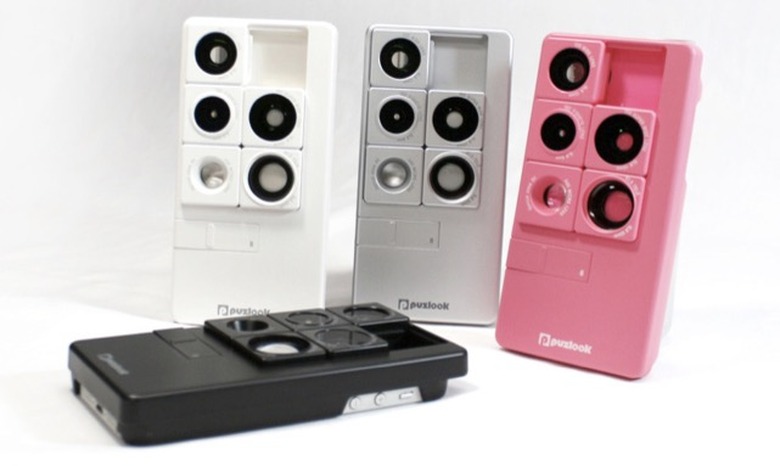
    Well here's something that's...unique. The Puzlook iPhone case contains five lenses to your iPhone to enhance your photography, including wide-angle, macro, telephoto, and fisheye lenses. There's also a tripod mount an integrated 8 GB USB memory stick. What's weird is that the lenses are configured like a sliding tile puzzle. To use the one you're after, you must "solve" it into place. I realize it's just a five-piece puzzle on a six-slot board, so it isn't exactly difficult. But I suspect the novelty would wear off very quickly. But what do I know? The Puzlook is available for the iPhone 5 and 5s only, with a price tag of US$99.

    By Dave Caolo Read More
  • VLC for iOS to return in 2015

    Developer Felix Paul Kühne has confirmed that VLC for iOS will return in early 2015. You'll remember that it disappeared in January of 2014, and Kühne since promised that he has been "working with Apple" on a solution to get it back in the store. The issue that got it booted hasn't been made clear, so we're not sure about the delay. In the meantime, it seems that progress continues. Hopefully it'll return soon, as I know a lot of users are waiting to get it back.

    By Dave Caolo Read More
  • Apple updates return policy in several EU countries

    Apple has adjusted its return policy in several European countries, including the UK, Germany and France. The change lets customers essentially "return" digital purchases within fourteen days of purchase. Qualifying purchases include apps, music and books from the iBookstore. According to Apple, customers can expect their refunds to show up within two weeks of the request being made.

    By Dave Caolo Read More
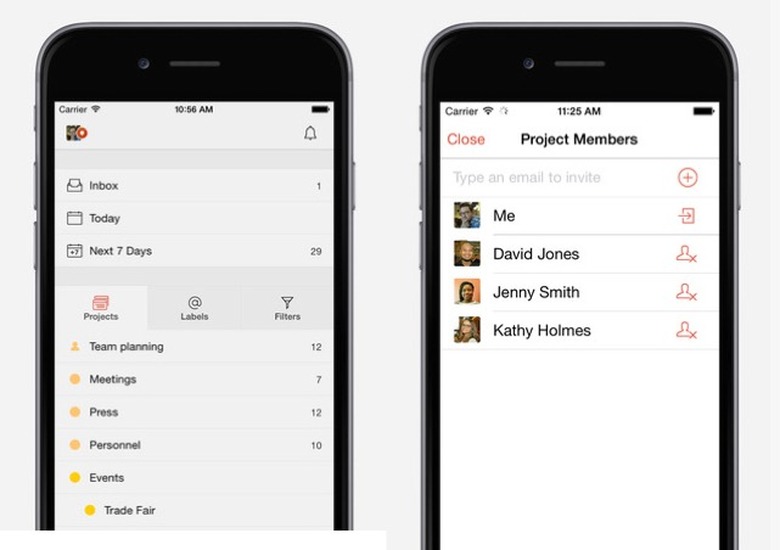
  • My favorite apps for 2014: Dave Caolo

    Look at that, another 12 months are now behind us. We see a lot of apps here at TUAW, and I've narrowed things down to my favorites. Here are the apps I grew to love in 2014. Todoist (Free with a pro option for $29/year). Earlier this year, Jordan Cooper gave me a hard time for switching to-do apps so often. This year I've landed on Todoist, and I'm here to stay. It works on nearly any platform you throw at it, syncs data at lightning speed and is very pretty to boot. Plus, its gimmicky "karma points," which reward you for being a productive person, totally work as a motivator. I'm embarrassed to admit how giddy I get when they increase. My Fitness Pal (Free). Earlier this year my doctor suggested that there ought to be less of me in the world. In other words, lose some weight, tubby! I figured that a gadget-y tool would keep me motivated, and I was right. I used a FitBit and My Fitness Pal (MFP) for the latter half of 2014 and it's been great. MFP grabs data from FitBit and uses it in concert with data light my height, age and weight to pick a daily calorie target for me. Recording what I eat throughout the day is easy with barcode support. It's fun to use and I'm down ten pounds. Thanks MFP and FitBit! Sleepy Fan (US$1.99). When I was young, I became addicted to falling asleep to the soothing white noise of a bedroom fan. Today I still like to hear the gentle wussshhhh as I drift off. I've used Ambiance for a long time, but this year I discovered Sleepy Fan. It's got no huge library of sounds to choose from. Instead, it offers three types of fans and minimal options for customizing the sound they produce. There's a timer and a simple tap-on, tap-off mechanism. I'm getting sleepy just writing about it. Note: some Sleepy Fan users have commented that the "loop point" in the app's audio is obvious and distracting. That has not been my experience, and believe me, I'm very aware of such things. Haunting Melissa 2: Dark Hearts (Free with in-app purchases). The sequel to the iOS-only, episodic horror film Haunting Melissa is more surreal than its predecessor and the production value is even better. The first few chapters, released on a rapid but unpredictable schedule (enable push notifications for occasional, startling prompts to watch), are confounding in a good way: what the heck is going on? Once the story gets moving, its even more satisfying. A must for horror fans. Kingdom Rush: Origins ($2.99). I love tower defense games and KR: Origins is by far my favorite implementation of the genre on the App Store. It combines challenging play, great looks and tons of Easter Eggs (fans of Disney's Fantasia will want to keep their eyes open) into a game with great replayability. Also, you get to control a dragon! KR: Origins is a stellar addition to a stellar franchise. Picturelife (Free with in-app purchases). My struggle with digital photo management is legendary. I have a camera with me at all times, and it's so easy to use, that snapping 200 photos in a day is as easy as ABC. The problem is in storing and sorting the resulting mountain of images. I still don't have a perfect solution, but Picturelife comes close. It automatically backs up all of my snaps so I know they're safe. It sorts them by time so finding what I want is relatively easy. Plus, its "Memories" feature is a very fun way to remember past events.

    By Dave Caolo Read More
  • See what's 'round you with RoundMe

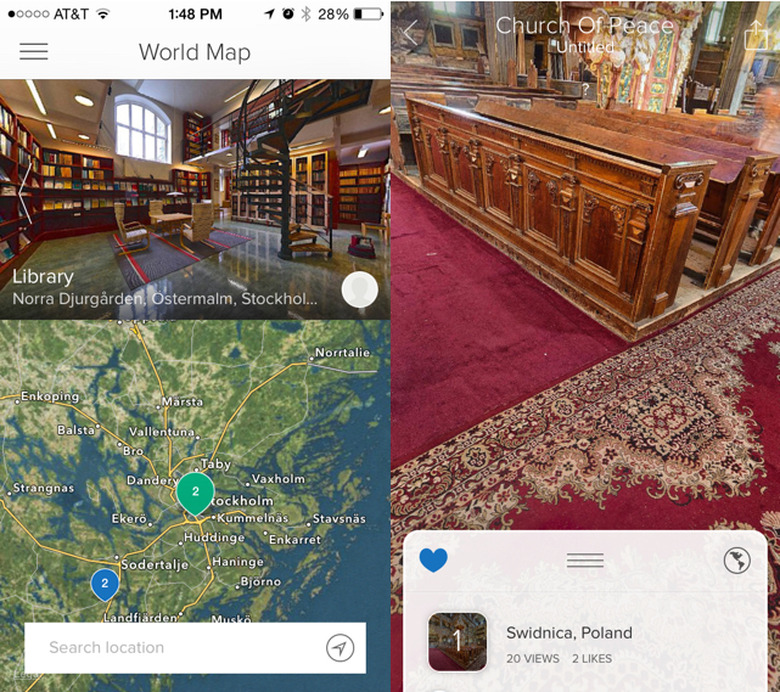
    Anyone who knows me understands that I live with an all-consuming travel lust. There's nothing I like more than going out to see what else is in the world. It's a prohibitively expensive fascination, so I'm often forced to accept compromises. RoundMe for iPhone (free) is so lovely in its execution and delivery, I'm glad to use it to explore this fine planet of ours. RoundMe is a network of user-submitted, panoramic photos, which the service calls "Spaces." As version 1.0 launches today, there's a whole host of gorgeous photos available to explore, all submitted by professional photographers. Upon launching the app, I used its map to navigate to Italy, so I could "revisit" some of the places I saw during my honeymoon, like Rome's Piazza Navona. When you visit a space, you can move your phone in all directions to explore the full panoramic photo. Not all will let you turn a full 360 degrees, but those that do are very impressive. It's a whole lot of fun and I spent a lot of time poking around and exploring both mundane and spectacular sights, from grand cathedrals to modest apartments. It's a whole lot of fun and has some business applications, too. Looking to show off a rental property? Here's a stellar way to do that. Round.me is free and available in the App Store now. I recommend it for exploring the world -- or showing off your own corner -- from the comfort of home.

    By Dave Caolo Read More
  • FullContact keeps contact information in sync

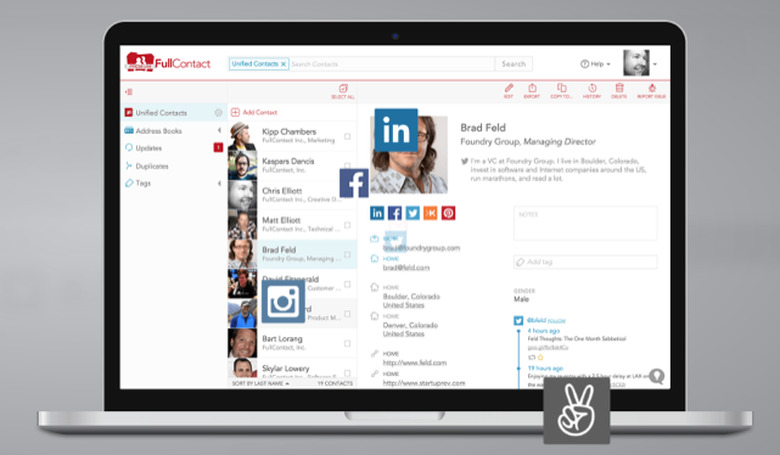
    I let Apple's iCloud manage my contact information, but I understand that not everyone does. If you live on the Google side of contact management, check out FullContact. It's a service that keeps all relevant information in sync between devices, while pulling info in from external sources like LinkedIn and social tools. Here's a look at FullContact. Social media sites and services like LinkedIn encourage people to have multiple online profiles. FullContact lets you pull all of that information into a single contact record, which is very convenient. It also keeps itself updated, so as your connections edit their Instagram account, for example, that change will be reflected in FullContact. I installed FullContact's Chrome plugin and gave it a test via Gmail. I have to say, it's very thorough. Once installed (and after you've signed in via Google+), just click on any email. The app recognizes the people whose addresses are included and, with your go-ahead, it combs LinkedIn, Facebook (again, with your permission), Twitter and more to pull in relevant information. You can also tag each contact for grouping and speedy search later on. For some reason, I had two entries for Victor in my Gmail address book. FullContact recognized this duplicate and offered to fix it by merging the two into one accurate record. It also fixed my malformed phone number by formatting it correctly. FullContact will also correct any misTypEd nameS you have have recorded in haste. All in all, it's a nice little service. The free version lets you manage 5,000 contacts, offers two-Way Sync w/ Google (every 24 hrs), can fix duplicates and "clean up" misspellings, etc. The paid version (US$9.99 per month) supports up to 25K contacts, offers real-time sync and daily contact updates. You'll find full pricing information here.

    By Dave Caolo Read More
  • Checkmark 2.5 adds Today widget, more

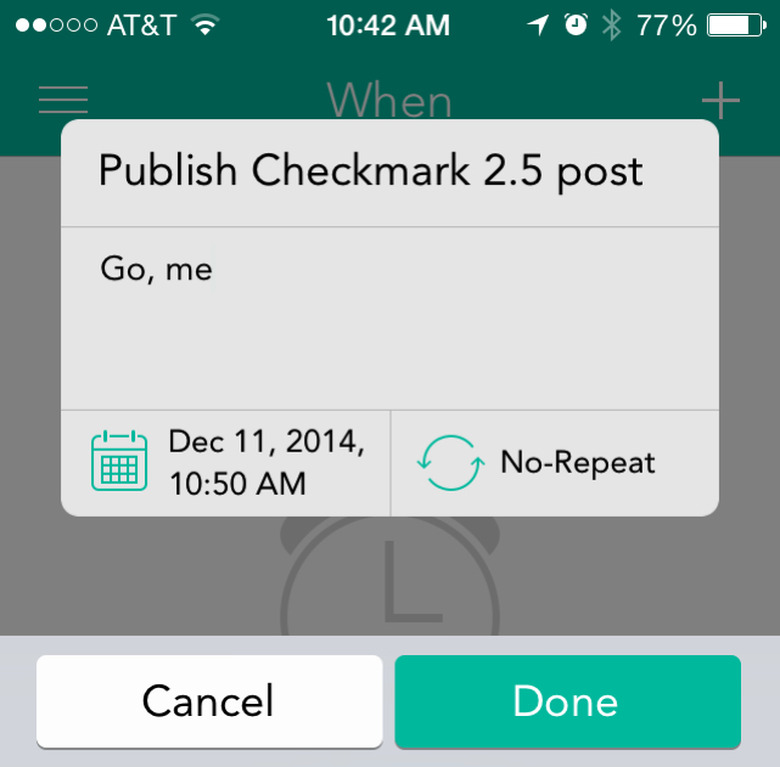
    Not too long ago, I reviewed Checkmark 2 from Snowman, the to-do and reminder app for iPhone that's got a few nice tricks up its sleeve. Do apps have sleeves? In any case, version 2.5 came out this morning (US$9.99, on sale today only for $2.99) and it adds a few more goodies to that tricky repertoire. Here's what's new. Checkmark 2.5 introduces a new Today widget that lets you review your tasks and reminders in the iOS Notification Center. It's amazing how Apple has made this screen so useful with third-party widgets. Additionally, Checkmark 2.5 offers "Interactive Notifications," which I like a lot. If a notification appears while you're using another app, and it's one you've already completed, you can mark it as done right then and there. And nothing feels quite like checking off completed tasks, am I right? I am. Finally, this update is completely ready for your iPhone 6 and its gargantuan sibling, and iCloud reliability has been improved. As I said way back in March, "Checkmark 2 is a pleasure to use."

    By Dave Caolo Read More
  • Roomlia for iPhone offers nice travel booking options

    As Carl Sagan once said, "There are billions and billions of travel apps in the App Store." I'm paraphrasing, but you get the sentiment. Giants like Kayak (which I love) and Travelocity are quite visible while others get less attention. Today I want to point out Roomlia (free) as it's got some very clever features that work quite well. Here's my look at Roomlia for iPhone. Looks Roomlia is a very minimalist, "flat" app. That's mostly a good thing. The hotel review screen is very pretty and legible, with white text on a field of black, which also offsets the colorful photos. The hotel detail screen is text-heavy, but I guess there's no way around that. Other screens like Account Settings and "Other Things" are kind of dull. But that's fine, as Roomlia is more about function than form. Most people don't spend an inordinate amount of time gazing at travel booking apps, so that's fine. Speaking of function, how does Roomlia work? Use For the time being, travel options are limited to several major US cities plus San Juan, Puerto Rico. To get started, tap a city that you'd like to visit. In the examples below, I've chosen Orlando, Florida because I'm one of those Disney people. The app grabs some rates and creates a nice list. Each listing presents a photo, the hotel name, star rating and initial offering. To view the amenities, swipe left on any image. You'll see details like on-site restaurant, pool, free wi-fi and so on. Tap any listing for more details. The detail screen is just that: detailed. You'll find a series of photos as well as the street address and all sorts of details. Buttons at the bottom of the screen let you select arrival and departure dates easily, and a convenient slider lets you adjust how long you'll be at the hotel. Booking is as simple as tapping Book Now. I promised you some cool features, and this is the first. When you view an attractive listing and then hit the back button, the app is smart enough to recognize what you were looking at and suggest a compatible alternative with a fantastic rate. For example, I was browsing three-star hotels in Orlando. After viewing one option, I hit Back and was presented with an exclusive offer for a similar hotel in a similar area. The deal was quite good indeed, and exclusive to Roomlia. As someone who as spent a lot of time hitting the back button over and over in booking apps, I was impressed with this clever implementation. Here's the other feature I liked. Roomlia is so confident in the exclusive rates it has on offer, if you find a better one they'll pay for it. Finally, Roomlia operates on an agency model. That is to say, when you pay and book, you're dealing with the hotel, not Roomlia. Therefore, if there is an issue at the hotel when you arrive, you can deal with them, and not have to worry about getting in touch with a representative at Roomlia. Holiday time is travel time, and Roomlia is worth your attention. Give it a try, and happy traveling.

    By Dave Caolo Read More

  • Dark Hearts brings back iOS-only horror

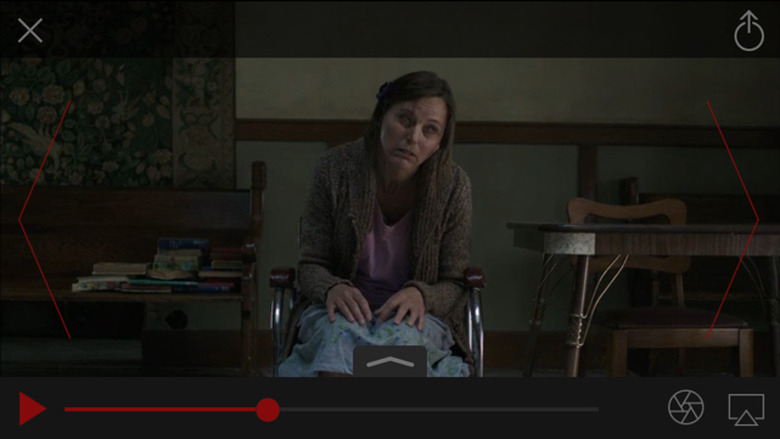
    Last year Hooked Digital Media released Haunting Melissa, a serialized horror movie that was exclusive to iOS. Earlier this week the group released the sequel, Dark Hearts, which picks up where its predecessor left off. There's more creepy goodness here, released one chapter at a time. There are a few fun things about the "Melissa" movies, as I've begun to call them. First, each chapter is released on an unpredictable schedule. Enable notifications for a creepy alert when your next chapter is ready. You'll often hear an eerie whisper or sound effect. It's scared the daylights out of my kids a few times. The other compelling aspect is that subtle aspects change upon multiple viewings. For instance, the second time you watch a given chapter, there might be a ghostly woman standing where the wasn't one the first time you watched it. Hooked calls this technology Dynamic Story Elements, and in fact they invented it. That was a lot of fun with Haunting Melissa, and I look forward to playing with it again in Dark Hearts. All that is well and good, but how's the movie? I've only see the intro blurb and the first chapter, but it feels like the production level has ramped way up. Not that it was ever bad, but you know you're watching a real movie on your device. Dark Hearts is directed by Neal Edelstein, who also produced The Ring among others, which is one of my favorite movies ("Seven days..."). Other niceties include built-in discussion boards and a super easy way to take screenshots for sharing. There are other creepy surprises throughout. I don't want to spoil those, but I will say when you're in the chapter view above, just let it sit for minute or two. Note that you can get the first chapter for free, but subsequent chapters will cost you. A season pass costs US$5.99. I've been a horror fan for many years, and this series is one that I enjoy. Turn down the lights, grab some headphones and figure out what's going on in Melissa's super creepy house.

    By Dave Caolo Read More
  • Kingdom Rush Origins is just as awesome as its predecessors

    If you've played Kingdom Rush or Kingdom Rush Frontiers, you're familiar with this terrific franchise. Kingdom Rush Origins (US$2.99 with in-app purchases), available today, adds to the awesomeness with more cartoonish, fun and challenging tower defense. Looks Kingdom Rush Origins is one of those beautiful games that makes you say, "Oh wow." It's got a fantasy them with a cartoonish feel that immediately engaging and fun. In fact, a sense of fun permeates the whole experience, from the tiniest hero ("You have my sword!") to the sound effects and music. But at its heart, Kingdom Rush Origins is a fun tower defense game. Game play This edition is a prequel to the original Kingdom Rush, if you like a little flavor with your game play. Long before Vez'nan sought to unleash the gem of power, these brave souls fought ogres, worgs and more across the kingdom. Now you can command soldiers, archers, mystics (new) and stone druids (new). In all, there are eight new tower updates with 18 new abilities. You must carefully place the various types of towers along a route that the enemy will take as they march towards the goal. Upgrade towers as you play and unlock special abilities to defeat wave after wave of bad guys. The story gets more epic as you play with tougher enemies and the dawn of the dreaded Twilight Army. In between battles you can use gems and in-game currency (or real currency, if that's OK with you) to buy upgrades and unlock new heroes, each of whom brings a unique skill to the melee. Look, Kingdom Rush is a wildly successful franchise and Origins embodies the "why." Great looks, super fun game play, enjoyable music and fun Easter Eggs (see above). Anyone who loves tower defense games ought to have this on their device.

    By Dave Caolo Read More
  • Stringer is an interesting way to make a playlist

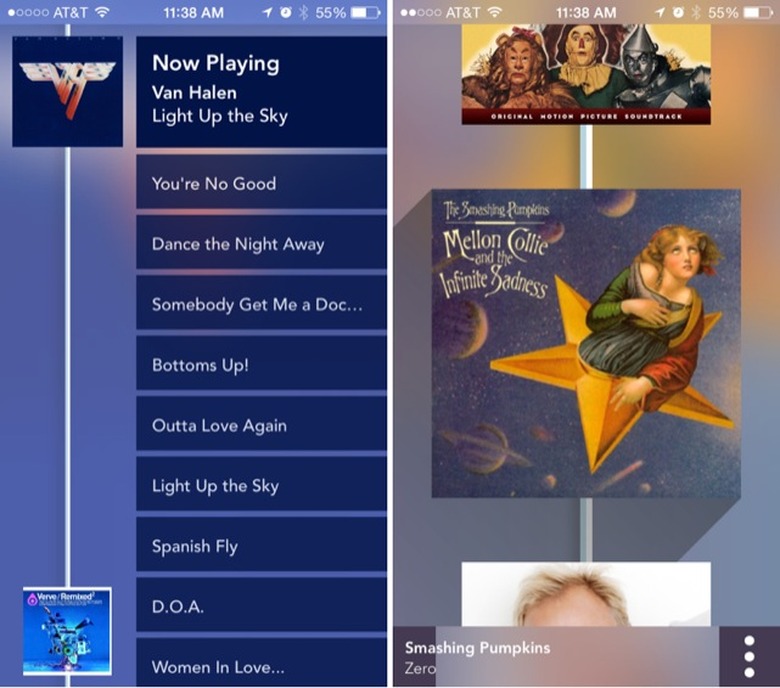
    Stringer for iPhone (free with in-app purchase) is an interesting way to shuffle music music on your iPhone. The app solves what was a problem for me, namely the desire to easily update a custom playlist on the fly. Its UI is quite unique in that it "strings" your music together. Adding music is easy and fun, though the app really is just for people who like to shuffle their music. Here's our look at Stringer. Looks Stringer focuses so closely on the visuals that this aspect deserves a good look. The idea here is that all of your songs are "strung" together, so a long "string" is the app's main feature, and it bisects the screen. The songs in your playlist are "attached" to the string, and the background takes on the colors of the current track. When you swipe left or right to access additional functions -- more on that later in this post -- the string "jiggles" into place as you move it. I'll tell you right now, skeuomorphism opponents will experience debilitating heart palpitations over this app. It's all about albums on a taut, bouncy string that you flick around with your finger. Take deep breaths, people. That's not to say there aren't any flat elements. Other than the stringed album art, everything else is flat enough to slip through a mail slot. So Stringer's looks will either leave everyone happy ("Best of both worlds!") or no one ("Why did they include that aspect?!"). I'm guessing a combination thereof is the most likely. Use Like I said in the intro, Stringer wants to solve a problem, and it does. Here's the scenario. You've set your iPhone to shuffle your Music library. As you're listening, you think, "Ooh, I'd love to hear that other track on this album, too." Apple's Music app lets you "flip over" the current album and select those songs. But doing so pulls you out of shuffle mode. D'oh! What if you wanted to add those to tracks to the current playlist? That's Stringer's bread and butter. While you're "listening to a shuffle" as Stringer's developers call it, simply swipe to the left. The current album's tracks appear along side the string. To add one or more, simply tap and drag it onto the string, thereby modifying the shuffled list on the fly. Neat, huh? You aren't limited to adding songs from the current album, either. After swiping left, swipe down to jump to add music from previously played albums. Note that you can't jump ahead in this way. There are a few other options here. To play/pause a track simply tap its album art. Press-and-hold a song to either mark it as a favorite or to tell Stringer to ignore it in the future. Additionally, the app's settings let you enable shake-to-shuffle, play music stored in iTunes Match and prevent screen lock. For the rest, you'll need to upgrade to premium. Stringer offers additional functionally for a one-time in-app purchase of US$4.99. Specifically, that purchase lets you: See related music. Swipe right to see all the other albums you've got from the current artist Import iTunes playlists Save custom strings for future playback Create strings quickly based on your favorite tracks Conclusion Stringer works great out of the box, and will be fun for people who like to hit "shuffle" and just let the thing run. It gets a lot more useful once you upgrade to premium. The ability to save strings is really nice and you're going to want that. That said, it's not for everyone. For every shuffle addict, I imagine there's someone who wants to hear Escape in its entirety every day. If you're among the former, give Stringer a try. The basic app is free, so why not?

    By Dave Caolo Read More
  • Fleksy breaks Guinness World Record again

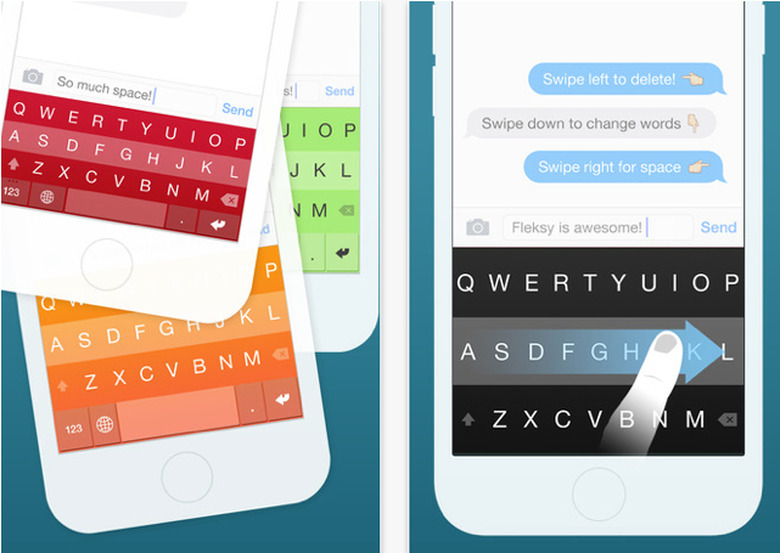
    The Fleksy Keyboard for iOS 8, which we reviewed here, has broken a Guinness World Record for texting speed on a touchscreen device. The previous record holder? Fleksy Keyboard. Marcel Fernandes Filho, 17, was able to use Flesky on his iPhone 6 to type the following in just 17.00 seconds: "The razor-toothed piranhas of the genera Serrasalmus and Pygocentrus are the most ferocious freshwater fish in the world. In reality they seldom attack a human." Previously, the record was held by...Marcel Fernandes Filho, who typed the preceding sentence in 18.19 seconds using Fleksy Keyboard. Are you using third-party keyboards? I've tried several but keep going back to Apple's. Old dog/new tricks I guess. Maybe if I was as fast as Marcel...

    By Dave Caolo Read More
  • BRUVELO would be your iPhone-powered coffee powerhouse

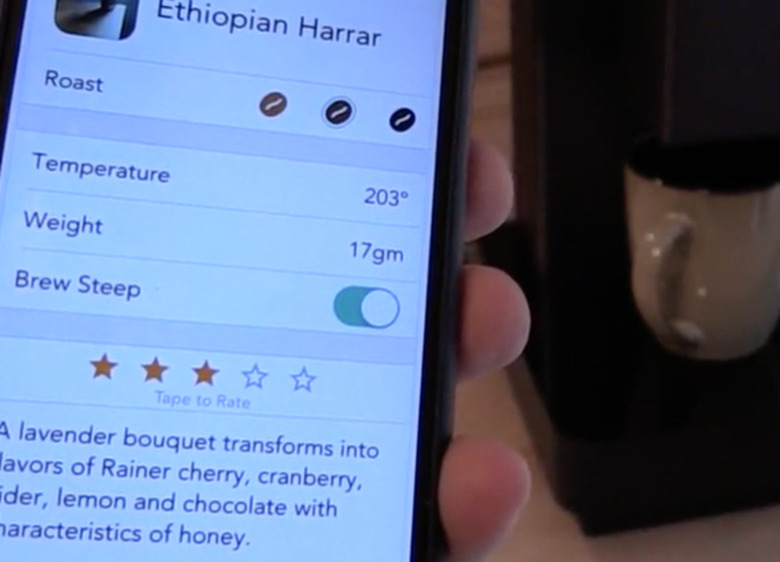
    What is it with Apple fans and coffee? Perhaps it's the fact that you can totally "geek out" on the process, the beans, the hardware and so on. Add your iPhone to the mix and you've got Apple-loving Coffee Nerd Nirvana. BRUVELO is a coffee maker and companion iOS app, currently on Kicktarter, that will scratch your coffee nerd itch. Typically we save items like this for our "Crowdfunding" post, but the clock is ticking on this one and we think it's worth mentioning. Here's where it gets cool. Connect your BRUVELO to WiFi and store a "recipe" on your iPhone. A recipe lets you get as nit-picky as you like, storing bean-specific instructions on steep times, ratios, temperature and more. Then, the next time you've got that bean in the pot, all you need to do is tap the recipe and the BRUVELO executes all of your instructions. From a single tap on you phone. Neat, eh? There's about a week left to back this, as of this writing. If your blood runs as dark as the beans you roast, this might be the connected coffeemaker of your dreams.

    By Dave Caolo Read More

  • Overglide is a game for your iOS notification screen

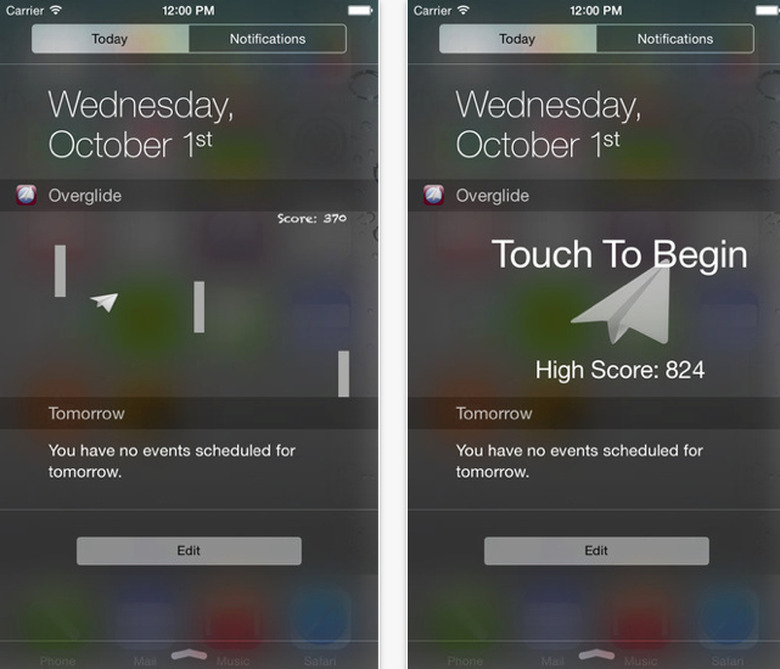
    The "Today" pane of Apple's Notification Center is meant to provide useful, at-a-glance information. That doesn't mean we can't stick a game in there. Check out Overglide (US$0.99), a new game widget for iOS 8. You've got to pilot your paper airplane through a barrage of obstacles, which becomes more difficult the longer you play. It's not the most involved game you'll ever experience, but it's fun knowing it's always a swipe away. Plus, it reminds me of the classic Glider Pro, which I loved back in the day (and is currently out for iOS as well).

    By Dave Caolo Read More
  • Monument Valley update brings new levels

    One of my favorite iOS games of 2014, Monument Valley (US$3.99), has been updated to version 2.0 with all new levels. The beautiful, intriguing puzzler features a young hero who you must guide through several levels of changing, mind-bending architecture before she reachers her ultimate goal: to defeat the meddlesome "crow people." To call Monument Valley pretty is to call the sun warm. It's a stunner and the engaging (and occasionally frustrating) puzzles make it very difficult do put down indeed. Download version 2.0 today and kiss your productivity goodbye.

    By Dave Caolo Read More

  • Burger King app available across the pond

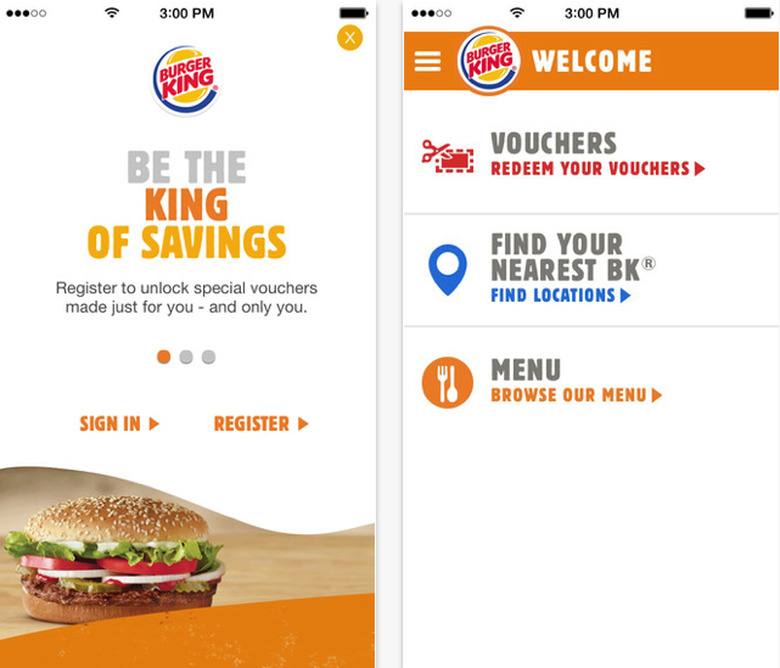
    Good news, far-flung fast food fans. Burger King has announced that its iOS app (free) is now available in the UK and Ireland. What does it offer? Discounts for one, plus an overview of the chain's menu and a convenient way to find the restaurant nearest you. Lastly, it provides nutritional information for those interested. You can grab the app now and be chowing down by lunch time.

    By Dave Caolo Read More
  • Apple partners with Southwest for in-flight Beats Music

    Travelers boarding Southwest planes are about to find a new in-flight entertainment option as Apple/Beats Music has partnered with the airline to offer streaming Beats Music. The whole things starts today and is limited to planes that offer Wi-Fi. The service will be free to Southwest customers, and the on-board experience will offer the same features that earthbound customers enjoy, like The Sentence and curated playlists. All you'll need is a device that can access Wi-Fi and use the browser-based web app. To celebrate the partnership, Southwest has decked out a 737-700 with appropriate graphics.

    By Dave Caolo Read More