Mel Martin

Engadget Editorial Policies

The unique content on Engadget is a result of skilled collaboration between writers and editors with broad journalistic, academic, and practical expertise.

In pursuit of our mission to provide accurate and ethical coverage, the Engadget editorial team consistently fact-checks and reviews site content to provide readers with an informative, entertaining, and engaging experience. Click here for more information on our editorial process.

Stories By Mel Martin

  • Some final thoughts...

    It's been quite a ride for more than 6 years starting when Lead Editor Mike Rose invited me to come aboard after reading some things I had written. The iPhone had been out for less than a year... the Mac was selling but seemed destined to lose the desktop wars. Now Apple is the darling of Wall Street, and has revolutionized mobile communications as surely as it revolutionized home computing with the Apple II in 1977. After almost 700,000 words in almost 2,000 posts, it's been fun and inspiring to watch Apple grow. To have in the palm of your hand a device that can wake you in the morning, bring you the news about anything you are interested in, steer a telescope, take your pulse, introduce you to new people, guide your travels, then put you to bed at night with your favorite music or the sound of the sea is a pretty amazing device, one we take for granted today. My Mac helps me create memorable photos, lets me view the universe from my desktop, and keeps me up to date with family and friends. While not perfect, it is light years beyond my small collection of Windows PC's that never delighted in the way my MacBook Air and MacPro do. TUAW, for lots of reasons beyond our control, has no future, but Apple's burns brightly. It's been great writing about these growing technologies, and seeing and testing apps -- some that were great and some that fell short. All of us here tried to tell the story of Apple and its offspring of hardware and software companies and tell it straight; the good along with the sometimes ugly. It's been a privilege to share my thoughts, whether they reached you at your desktop, on your lap, or in your hand. I loved it when readers would appreciate a tip on a great app, and I loved to hear from developers who got a bad review, took it to heart and made some changes in the inevitable next version. Thanks to all our readers, and thanks to my many colleagues here at TUAW who always went the extra mile to make our little corner of the Apple universe a place worth stopping by.

    By Mel Martin Read More
  • Yahoo updates its news and lifestyle app with more interactive features

    Yahoo has a bunch of apps for iOS, including Yahoo Mail, Weather, Finance and others. The primary Yahoo app (free) is what has just received an update. This app features a blend of news with Yahoo's interactive lifestyle magazines. The Yahoo app has been slightly retooled visually, and there are some nice features that let you swipe across the screen looking at before and after photos, mainly in the lifestyle sections. The new app has more visuals than before. You can turn off any sections you don't want to see. I find the Yahoo News Digest app more useful. The newly designed Yahoo app does a pretty inferior job of mixing ads with content, and the format is just the same. At first glance, ads look like news, making the app more difficult to use than it needs to be. Yes, it says "sponsored" on each ad, but the format is identical to a news story. There are also some just plain awful bugs. The edit page where you decide which content you want displayed is all white, with white on white text. Needless to say, it is very difficult to navigate (see screen shot) or to exit. Someone wasn't paying attention when this update was being tested. Still, Yahoo has a wide range of content and it's all attractively displayed. I think the Yahoo Weather and News Digest apps are better, but if you want a wider barrel of content, this app will be adequate. Lose the deceptively formatted ads and fix the bugs, and this app will be even more useful. The Yahoo app is universal and requires iOS 7 or later. It is optimized for the latest iPhone hardware.

    By Mel Martin Read More
  • Hydra: A powerful and innovative iOS app for High Dynamic Range photography

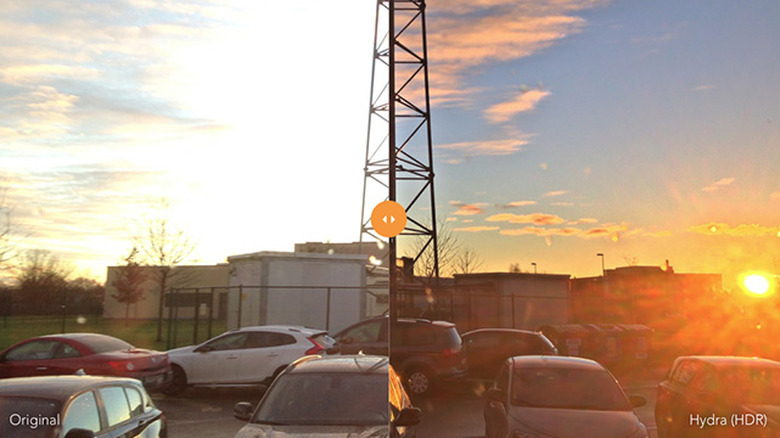
    I've seen so many High Dynamic Range (HDR) apps, some of which have been good, some not so good. Hydra (US$2.99 on sale) from Creaceed is a well thought out and terrific performing photo app with solid features that will improve your images in challenging lighting conditions. It's just been released to the App Store today. Unlike most HDR apps, Hydra can capture video as well as stills. It also has a low light mode that takes up to 40 images and stacks them to reduce noise. A hi-resolution mode claims to give you a 32 MP image from the iPhone's 8 MP camera, and a zoom mode does some fancy pixel manipulation to give you a 2x and 4x zoom that looks quite presentable. Let's start with the HDR mode. HDR is designed for taking pictures with bright highlights and deep shadows. Apple offers an HDR feature built into the Camera app, but it is not as dramatic as what third-party apps can produce. Hydra is automatic. I pointed it to a bright window surrounded by a darkened room and the app quickly decided on 12 exposures. They were quickly assembled and I had a great picture that captured the bright outside details while rendering the shadows inside. One the image is assembled, you have a choice of how far to push the exposure, so I used the medium preset. The video mode also worked well, giving me better exposures than I got using the video mode in the Apple Camera app. The low light mode was really astounding. The app took 20 pictures and stacked them, and the sensor noise was almost completely gone. The original photo without the stacking looked like a blizzard of grain and noise. The zoom mode was also impressive. The app can't break the laws of physics, but every digitally zoomed image I did looked good, and far better than with any other digital zoom I've used. Upscaling images using the 16 MP and 32 MP option also gave finer details than I was seeing in the 8 MP photo. The app lets you save both versions for comparisons. A couple of things to note. You want to hold your camera really steady to avoid the possibility of blur. The Hydra software will try and do the best with what you give it, but a mini tripod or bracing the camera will give you better results. Shooting handheld still produced excellent images, however. I have a few photos attached so you can see how the camera did. Didn't have much sun today, but you can see the improvements in dynamic range and noise. Hydra is a breakthrough HDR app, that adds extra features like HDR video, a decent digital zoom, and amazing noise free low light photos. It's an excellent deal while it is on sale at 40% off, and iOS photo buffs will want this app. You can get some technical details on the app and see some sample images on the Hydra website. Hydra requires iOS 8.1 or later, and it supports the screen resolution of the latest iPhones. Hydra is a universal app and it worked fine on my iPad Air 2, but the best images were with my iPhone 6. Recommended.

    By Mel Martin Read More
  • Wrise is a new and specialized word processor for Mac

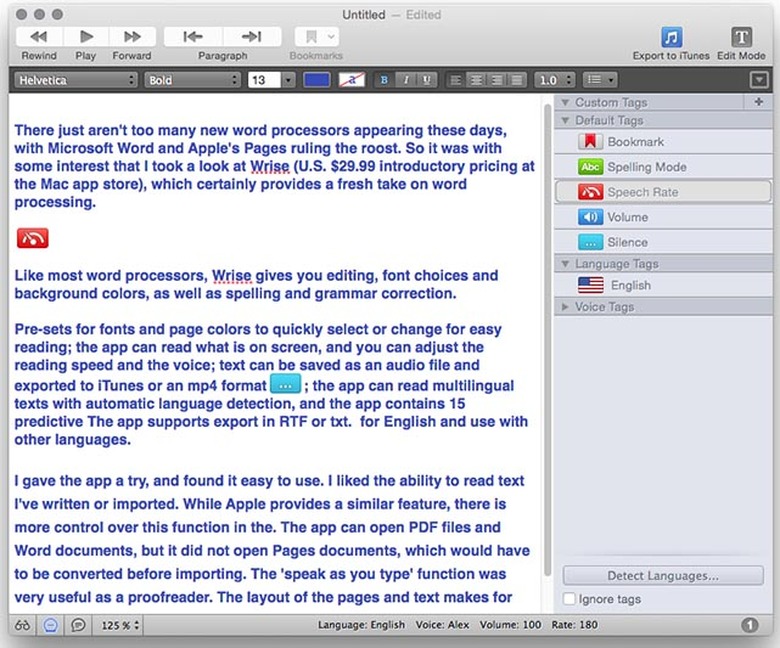
    There just aren't too many new OS X word processing applications appearing these days, with Microsoft Word and Apple's Pages ruling the roost. So it was with some interest that I took a look at Wrise (US$29.99 introductory pricing at the Mac app store), which certainly provides a fresh take on word processing. Like most word processors, Wrise gives you editing, font choices and background colors, as well as spelling and grammar correction. But it also has some very unique features: Pre-sets for fonts and page colors to quickly select or change for easy reading The app can read aloud what is on screen, and you can adjust the reading speed and the voice Text can be saved as an audio file and exported to iTunes or an mp4 format Wrise can read multilingual texts with automatic language detection The app contains 15 predictive dictionaries for English and use with other languages I gave Wrise a try, and found it easy to use. I liked the ability to have it read aloud any text I've written or imported. While Apple provides a similar feature as part of OS X (usually under Edit > Speech in many apps), there is more control over this function in Wrise. The app can open PDF files, plain text and Word documents, but it could not open Pages files, which would have to be converted to Word format before importing. The "speak as you type" function was very useful as a proofreader. The layout of the pages and text makes for really easy reading, more than with other word processors. If you change the font and page colors, it doesn't change the actual document, it just changes the display for easier reading, which is a nice feature. Another unique feature is support of tags. You can add tags inside a document to control reading speed, voice, language and even the volume. Documents can be password protected, and sent for comments in a read-only mode. Wrise supports Apple's dictation feature, so you can turn speech into text, then have the app read it back to you. Wrise allows export in RTF or TXT formats. I'd like to see the app export PDF, Word and Pages. The app is designed to make reading and writing easier, and I think it succeeds there. The developers also think it helps comprehension and composition, and it can be extremely useful for people with dyslexia. Wrise is an interesting and unique product that is going to be of interest to people looking for a different approach to writing and reading. It's not a page layout app like Word or Pages. It's designed for text, and it accomplishes its mission. The $29.99 half-price offer is good until February 15. Wrise requires OS X 10.9 or later and a 64-bit processor.

    By Mel Martin Read More
  • The Lowdown meetings app for iOS is now free and improved

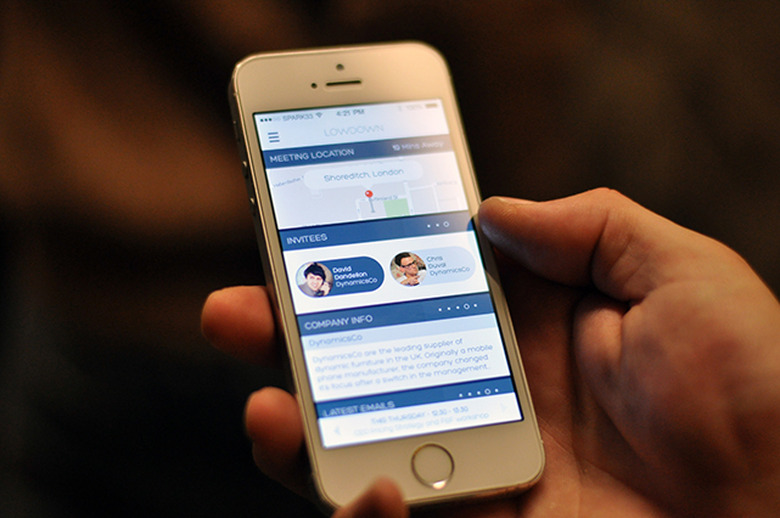
    Lowdown (free) is an intriguing business app that provides briefings on participants and companies you are meeting with, helps you get to the meeting with location information, and tells you when others arrive. When you start you can integrate the app to other services like Linkedin (it's required to use the app), and Twitter. The app connects to your calendar, and lets you create invitations that include maps to the location of the meeting, profiles of the people attending and company info, both of which it draws from Linkedin. It then sends the invites out, using info from your address book When people arrive at the meeting they can tap a button to let others know they have arrived. If you use Google for email, Lowdown also searches relevant emails relating to the meeting. This is a clever idea that consolidates several functions all in one place. Lowdown used to charge a monthly subscription, but now it is free. The company says it will offer special enhanced pay services in the future. The app was easy to set up, and I did set up a couple of dummy meetings as I had nothing really scheduled over the next week. Everything worked as expected, and I thought the design of the screens was very attractive. I was easily moved from function to function. The only thing I didn't like was the absolute dependence on Linkedin. I understand the decision, but not everybody is on it, and some people detest it for all the junk mail and irrelevant material it bombards you with. It would be nice if the app could do some smart searches on Google to add to the information provided. Update: Although my tests didn't show any searches with Google, David Senior, CEO of Lowdown says the app does search Google, Crunchbase, Wikipedia, Facebook and other sources. More sources are coming in February, plus a meeting conformation system. Still, Lowdown is going to be a very useful app for anyone who spends time setting up and attending meetings. At a price of free, it's certainly worth a look, and I recommend it for people in its target audience. Lowdown requires iOS 7.1 or later. The app is not universal, but works fine on iPads. The app is optimized for the iPhone 5.

    By Mel Martin Read More
  • Pandora app updated with a load of new features

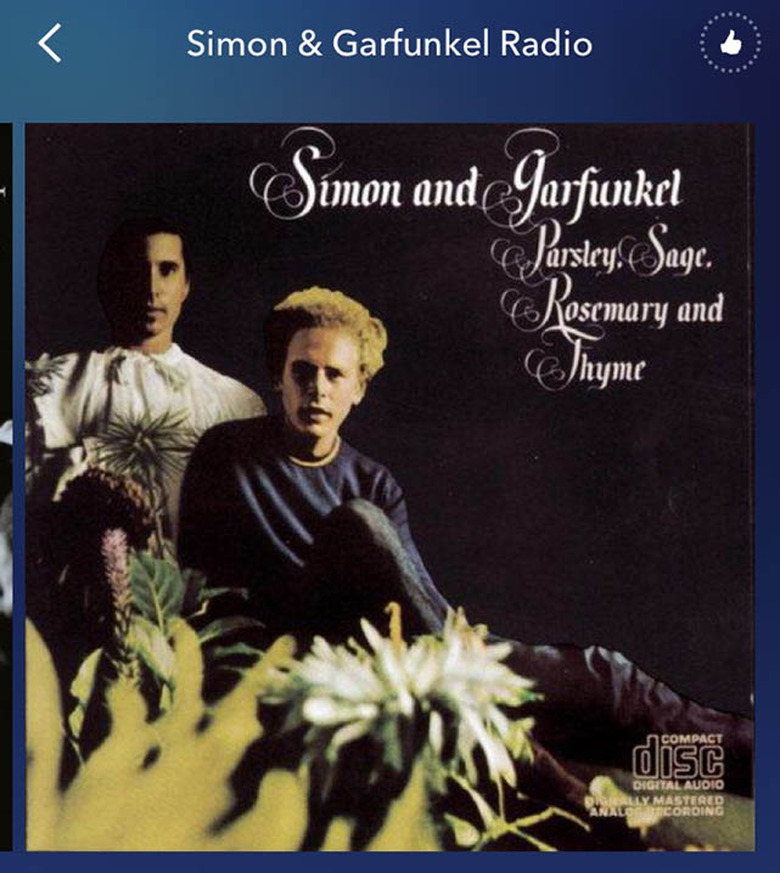
    Pandora has been around since 2008, one of the earliest apps offered for the iPhone. With millions of listeners in the U.S., Australia and New Zealand, the streaming music service has always been one the most popular music apps out there. After what seems an eternity, Pandora for iOS now has some significant feature updates. First off, Pandora has a new and more attractive user interface and design. There are animations and gesture-based movements that fit in well with iOS 8. There are new personalization controls, you can view songs you gave a "thumbs-up" rating to, and there's even a way to change your rating to "thumbs-down" if you decide it's not your favorite. Notification features have been enhanced in the new Pandora, telling you when new music has been added to the stations you've created. The app now, for the first time, supports the resolution of the new iPhones, including the iPhone 6 and 6 Plus Pandora has a lot of competition from services like Rdio, Spotify and iHeart Radio. Many people use the free Pandora service, and paying subscribers are only about five percent of total users as of last year. Free subscribers get a lot of ads. The new Pandora app is universal, and requires iOS 6 or later.

    By Mel Martin Read More
  • iFixit gives you thousands of repair manuals in your pocket

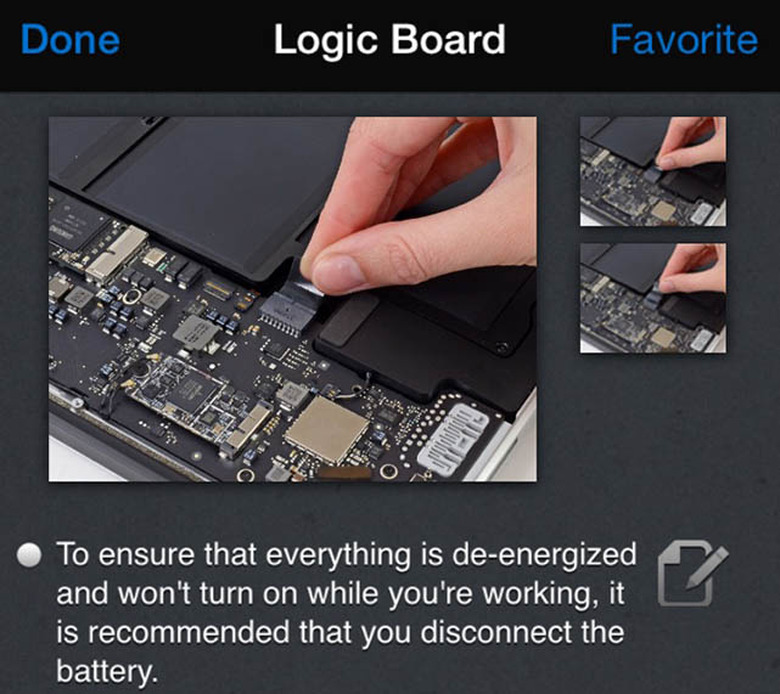
    The iFixit app (free) is a handy little app that gives your Do-It-Yourself repairs a big boost. This app comes from the teardown experts at iFixit, who delight in exploring the inner secrets of your favorite tech (or not-so-techie) hardware. The iFixit app helps you repair just about anything from toilets to garage door openers, cameras, cars, and of course, PCs and Macs. iFixit is divided by categories, or you can search by type of repair or brand name. When you get to Mac, for example, there's a choice of desktops, laptops, or other Mac hardware. You work your way down the list for a specific model, and then the repair options appear. The app tells you what parts you may need and any tools required. Repair steps are in short sections that you swipe to go to the next step and the instructions are usually accompanied by photos. The app reaches out to the internet for much of the information it needs, otherwise iFixit would be an unwieldy and huge app. If you like to do repairs yourself, saving money and extending the life of what you own, the iFixit app is a must. In addition to repair instructions, you can often download a PDF product manual. Any repair can be marked as a favorite for future reference. If you need to order parts, the app tells you where they can be purchased. You can even order tools from iFixit if you don't have them on hand. iFixit works well, and covers thousands of brands and repairs. The app requires iOS 6.1 or later, and it is optimized for the iPhone 5. The app is universal. Free is always good, and iFixit is a really worthwhile app to have.

    By Mel Martin Read More
  • iFilebox is a nice improvement on Apple's notes app

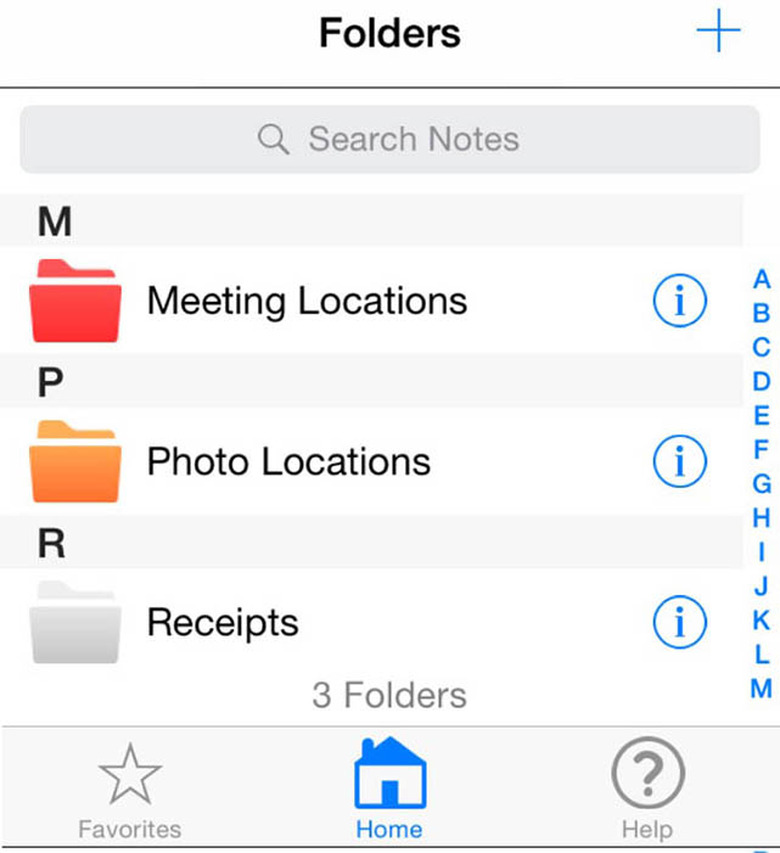
    iFilebox (US$0.99) is a well thought-out addition to your iOS bag of tricks. It lets you create folders, and write notes so you can get organized, and is a nice alternative to Apple's own Notes app. The app supports passwords on folders, keeping them extra private. Notes can be shared via email and the search function works well. The app does not support Apple's Spotlight search, at least for now, but that would be very valuable to add. This is a nice and powerful app. You get a lot of choices, like font selection, and notes can be entered with the keyboard of by voice. There is a pretty comprehensive help menu, but it didn't cover deleting folders. Actually the app follows Apple conventions, swiping a folder to the left gives you the option to delete it. Folders can be designated as favorites for quick access and any note can be bookmarked. The app is easy to use, and features are generally self-evident. As it is now, the app is not universal, and you need an iPad and an iPhone version, which I don't think presents the best deal for users. The two apps don't sync either, which is the way, I think, people with both devices would want this app to work. Having said that, iFilebox is very handy, and does a lot that Apple Notes doesn't do. I recommend this app for people who need an organized way to keep notes, and will hope that it will support Spotlight and syncing soon. At under a dollar, this app can boost your productivity. The app requires iOS 8.1 or later. It's optimized for the iPhone 5.

    By Mel Martin Read More
  • Get the weather and a joke thanks to Funny or Die Weather app

    And now for something completely different. It's a nicely performing weather app, with weather sourced from Weather Underground, and along with the weather you get a joke or funny anecdote. The app, Funny Or Die Weather (free) has the usual stuff you want from a weather app, like current weather, a 5 day forecast, the UV index, sunset and sunrise times, moon phases and tides, but along with that are some nice animations reflecting the current weather and a joke. Sometimes it's silly, sometime a little profane or sarcastic, and it is sure to at least make you grin. It doesn't matter if the weather is good or horrible, a joke will always be there. If you like the humor, you can share it via text, email or social media. You can add multiple locations to the app by zip code or city name, and each city will have different humor when you access it. Funny or Die Weather is certainly unique, and it's free, with no in-app purchases or ads, neither of which would be truly funny. Funny or Die Weather requires iOS 8, and it is optimized for the new iPhones so you get full screen humor. Recommended.

    By Mel Martin Read More
  • RiLAXapp let's you relax from the stresses of the day

    RiLAXapp is a US$0.99 app with one mission: to provide an audio and visual experience to help you unwind. The app features three different scenes -- one with water, another with a crackling flame, and a third with the aurora borealis over some mountains. There are animated visuals and ambient outdoors sounds, along with some faint music. Unlike many apps with relaxing sounds, this app lets you interact with the scene. Tapping on the screen might give you, for example, a bell sound, and drawing on the screen displays animated effects that follow your finger. I found the audio most effective on headphones, especially headphones that cut you off from outside sounds. The environmental sounds are realistic, and there is just a faint hint of music. On-screen controls let you hear just the music or the ambient sounds without the music. I would like to see sliders in RiLAXapp to let me create my own blend. I'm not sure how relaxing it is to watch the animations and play with the screens. My idea of relaxation is to close my eyes and turn off all visual stimulation, but everybody is different and the interactive images may be great for some users. People who like these kinds of apps should also check out Thunderspace and Naturespace. RiLAXapp requires iOS 6 or later and it is optimized for the latest iPhone models.

    By Mel Martin Read More
  • iPhone Market share taking off in Japan and Korea

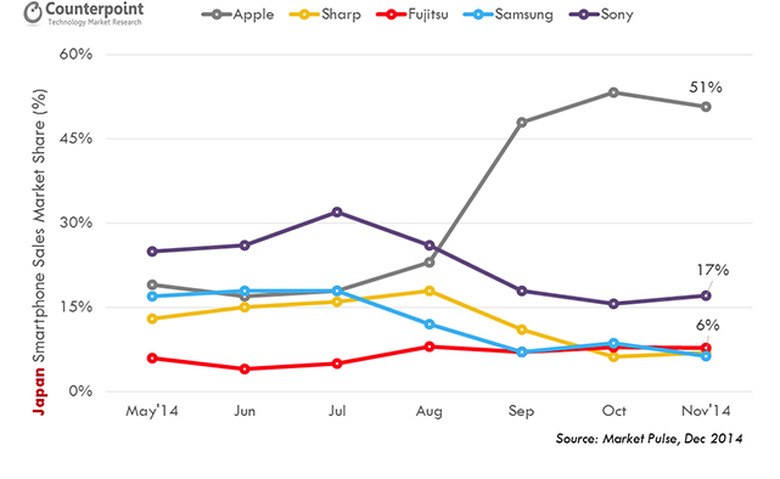
    That's the report from Counterpoint Research. According to the Counterpoint Research, global Apple iPhone sales grew 26 percent annually crossing 20 million unit monthly sales mark for the first time ever in November 2014. Apple's iPhone sales volumes grew across key countries with timely global roll out of the flagship iPhone 6 and iPhone 6 Plus models and was also helped by the relatively lower-priced iPhone 5s and 5c targeting prepaid users in emerging markets. The report adds: "Apple's iPhone market share soared and reached record levels in Japan and Korea markets. In Japan, one of the most premium smartphone markets in the world, Apple captured more than half of the smartphone sales in October as well as November. Japan has been one of the strongest market for Apple and it is becoming increasingly difficult for competition to challenge Apple's dominance in near- to mid-term. Apple will likely benefit from the upcoming Apple Watch with a growing and premium iPhone user-base in this highly advanced consumer market." There's no good news in Korea for Samsung, where the electronics giant has dominated the mobile phone business in its home country. Apple captured one-third of the total smartphone sales in Korea last November. Previously, no company had ever topped 20 percent on Samsung's home turf. In general, many analysts expect the iPhone 6 and 6 Plus to have blow-out numbers for the 4th quarter of 2014 when Apple reports financial results on January 27.

    By Mel Martin Read More
  • Ava Photo cleans up those iPhone portraits

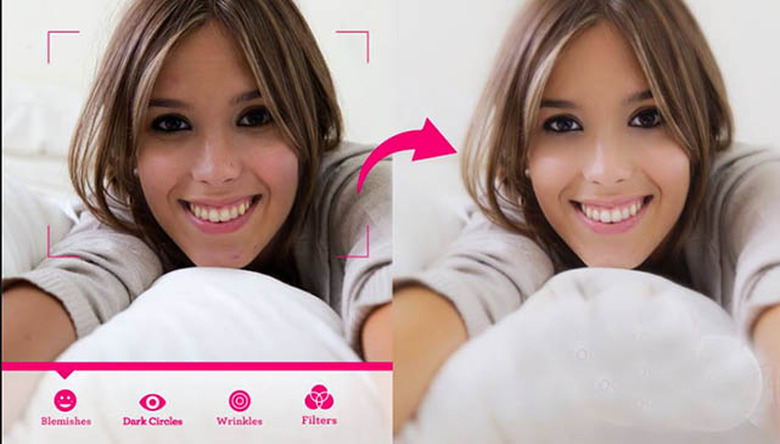
    You have a lot of pictures of friends and families, but you know those pictures don't always capture them at their best. Ava Photo (free until Jan 31) is a sharp little iOS app providing several tools to make those portraits look a lot better and more presentable. There are similar apps that retouch images, but some wind up looking pretty unnatural and obviously "doctored". Some apps let you reshape a face or nose, or change eye color. That's not the purpose of Ava Photo -- it uses a much lighter touch. It cleans up blemishes, smooths skin, removes circles under the eyes, and it has filters designed for portraits to change the color cast. It's easy to undo any changes, and there is a handy button for comparing your changes to the original. Ava Photo also has settings for pictures taken in low light conditions. In my tests, I found I could improve almost any photo of a person, without making it look pasty or phony. Yes, you can push the effects, but nothing forces you to do that. Some photos that could best be described as harsh were softened and looked much more flattering. There are some minor editing tools so you can crop the photos, and you can then save them to your camera roll or share to Instagram. If you don't want to work the various controls yourself, there is an automatic function with several levels of intensity. I preferred to do my own editing. Ava Photo is a nice tool, especially for free during this 100 percent off sale. It's great for selfies or for portraits of any friends or relatives that you'd like to perfect and improve. Ava Photo is not universal, it requires iOS 6 or later, and it is optimized for the latest iPhone sizes.

    By Mel Martin Read More
  • UNU ships an iPhone 6 case that can double your battery life

    Battery cases for the new larger iPhones have been slow in coming, but UNU is now selling a beefy case for the iPhone 6, the DX-6, with great battery life and at a competitive price of US$79.00. The case claims to double your battery life, offering more than 300 hours of standby time, more than 60 hours of music playback, and 18 hours of talk time. Of course those numbers are far greater than an iPhone 6 running on its internal batteries. Mophie has also announced a similar case with a $99.00 price point and a slightly less powerful battery, but it hasn't hit the street quite yet, and UNU hopes to grab a significant share of the market for these battery cases. Specifications Dimensions: 6 x 2.8 x 0.6 inches Weight: 3.36 ounces High grade Li-polymer rechargeable battery Minimum rated talk time: 15 hours Battery: Li-Polymer 3.7V/3000 mAh Design The UNU case is sturdy, with fully covered corners, a raised lip for screen protection, and a solid frame that should protect your iPhone. The phone easily sips in and out of the case. The bottom shell has the Apple Lightning connector, but the case itself charges from an included Micro USB cable. Using the UNU battery case Everything worked as expected. The case was partially charged when unpacked, so an hour or so later I was ready to go. A green LED on the back lets you know the case is fully charged. As your day progresses, you use the iPhone internal battery, and when the battery is nearly depleted you press a button on the back of the DX-6 for 2 seconds. That engages the case battery, and you are all set with the case charging your iPhone 6 quickly back up to 100 percent. It's no different than plugging it into a wall outlet, except you are not tethered. Headphones are often a problem with these cases because the iPhone headphone jack is recessed with the case over the top. UNU provides an extender, but it's something else to carry and hopefully not lose. All other iPhone controls are easily accessible through cut-outs. This is a 4th-generation case for UNU; they've been at it for five years, and they obviously know how to make a good battery case. I do think buying a case like this for an iPhone 6 involves a series of tradeoffs. The iPhone is going to get even bigger (thicker and longer) and it's going get heavier. For use around town where users have plenty of charging opportunities, or in a car with an auto power adapter, the size and weight may outweigh the usefulness. On the other hand, for people who travel and don't have handy sources of AC power this case is a godsend. You can do your regular sync duties with the included cord that also charges the batteries of both your iPhone and the battery case. LED indicators tell you about the status of the battery charge. The case is shipping now in black; white and red are coming very shortly. The UNU DX-6 is available at the usual online outlets like Amazon for a bit less money than the list price. The DX-6 is well built, has a powerful battery, and offers solid protection for your iPhone 6 at a reasonable price.

    By Mel Martin Read More
  • Here's a new iOS app for sending personalized handwritten cards

    There are plenty of greeting card apps for iOS, but this new offering called Lovely Handwritten Cards (free with one in-app option) is tasteful, and lets you truly personalize what you send to others using your own handwriting. You can choose a template from subject areas like Holidays, Birthday, Congratulations, Love, etc. Add any photo from your photo library, which then can be scaled and/or rotated, then use your finger directly on your touchscreen to add your note. There are a variety of ink effects to make your writing look like your own. You also get a choice of different ink colors, as well as line thicknesses. When you are done, your card can be printed, or send it via email or the usual social networks. I think the key word with this little app is tasteful. The templates are nicely done, and you'd have to work to send something that looked bad. For an additional US$0.99 you can get a bunch of extra templates, and that's reasonable enough, but most of the few included templates are just fine. Templates with a lock symbol require the paid set. Lovely Handwritten Cards is a universal app. It requires iOS 7 or later, and at free it is certainly worth a look.

    By Mel Martin Read More
  • Spyglass: A full featured nav app for outdoor enthusiasts

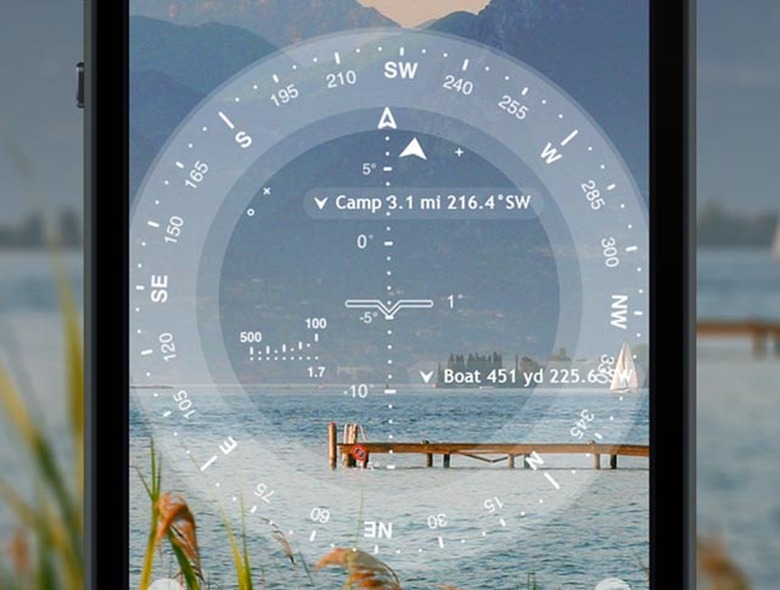
    Spyglass (U.S. $3.99 on sale) is a really complete GPS toolkit for people spending time outdoors or doing off-road navigation. Features are numerous; among them are a heads-up display, a high quality compass with map overlays, a gyrocompass, speedometer, altimeter, astronomical object finder, a sextant, inclinometer, and angular calculator and more. The app makes use of every sensor in your iOS device in a simple to use package. Waypoints can be saved and navigated to by following a simple pointer. Spyglass can track multiple destinations at the same time, and display distances, direction, azimuth, elevation and ETA. A rangefinder measures distances to distant objects. The app can utilize your camera to provide photos with data overlays. Hikers and others going off-road will really be excited about this app. It has a myriad of functions all wrapped up in one place. I tried the app and found it useful, even in urban life. You won't get the most from the app without reading the instructions, and there are some nice videos available as well. This isn't a typical navigation app with streets and hamburger joints; it's a sophisticated tool for finding your way when there are no roads or obvious checkpoints. It's customizable, even to the colors of the displays and the filters over your live picture -- for use at night, for example. I do a lot of landscape photography that involves some hiking and car locating. Spyglass was a trustworthy companion for that endeavor, including estimating my altitude and distance to destinations. Getting back to my car was easy, just a matter of following an on-screen pointer. If Spyglass interests you, there are online videos and a manual you can check before you buy. Spyglass needs iOS 6.1 or later, it's universal and therefore friendly with all iOS hardware, and it's optimized for the iPhone 5. Recommended.

    By Mel Martin Read More
  • Google Maps for iOS gets a welcome update

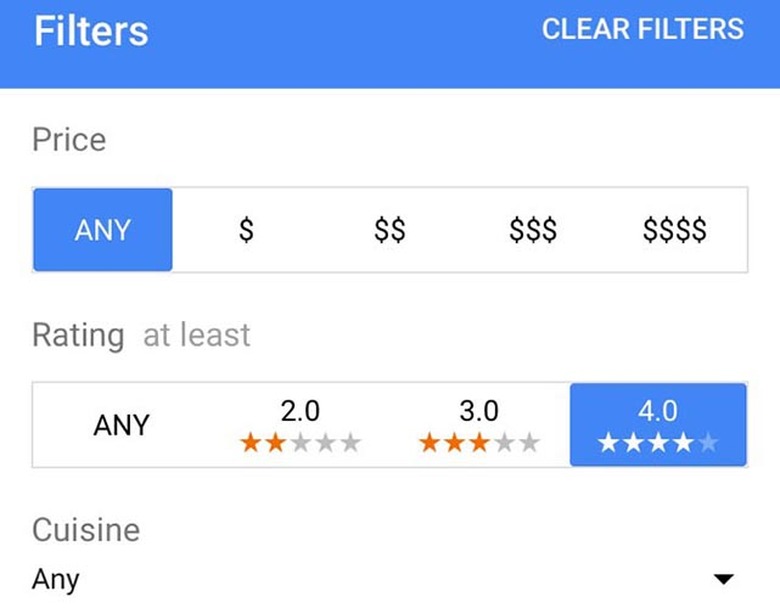
    Google has issued an update to its popular and free Google Maps app for iOS. The update to version 4.2.0 offers filtered restaurant searches that let you specify cuisine type, price and rating, and it gives you weather information from around the world. Another new feature is the ability to drop a pin at your starting and ending points for directions, and you can now add transit directions to your calendar. There are also unspecified 'bug fixes'. Google Maps is still used by a great many iOS users, especially after the sloppy introduction of Apple Maps back in 2012 that even forced Apple CEO Tim Cook to send a letter of apology to iOS customers. Apple Maps has moved forward over the last few years, but it's not likely to top Google in accuracy or depth of information. Google Maps on Android has still more features, including a newly released direction sharing feature which is hopefully headed to iOS soon. Google Maps is a universal app, and it's been optimized for the newest iPhones. It's not a resource hog, and only requires iOS 6 or later.

    By Mel Martin Read More
  • PhotoTime: An incredibly powerful iOS photo organizer and tagging tool

    It's not often an app really impresses me, but PhotoTime (free) does. While many apps, including Apple's Photos app, will tag photos and read EXIF data from your photos, PhotoTime goes a lot deeper. First, you let PhotoTime see your photos, and they are uploaded to the PhotoTime servers. Some very sophisticated software reads the metadata on your pix, but also does face and shape recognition. The images are sent back to your phone with the tags in place. I have lots and lots of photos on my iPhone, and was pretty stunned at the results. I typed 'desert' and got pictures I'd taken in the desert. When the app sees a face, it will ask you to identify it, and in my testing it recognized that person even if lighting and angles changed. What was really impressive is I looked at a photo of my pet bird, and the app correctly identified it as a bird, but also correctly tagged him as a Cockatoo. A picture of a small telescope in my back yard was identified as a telescope, while it also recognized photos of cactus, although sometimes it added 'spire' or 'tall building' to the tags. Of course, it is easy to edit the tags and remove anything that is wrong. Once everything as been tagged, it's easy to locate photos. You can ask for 4th of July or fireworks, Xmas tree photos, or everything taken in Utah, for example. Apple needs this technology badly. The app supports bookmarks and can organize photos around matching characteristics. It's really impressive to work with PhotoTime, and it finally makes your large collection of photos useable. The app also supports tagging photos from Facebook and Instagram. Flickr and Google+ integration is coming soon. The app's privacy policy is a good one. None of your information is sold or shared with third parties. After your photos are tagged they are deleted from the PhotoTime servers, and things sent to PhotoTime and back are identified with a unique anonymous ID, not your name. PhotoTime is both clever and powerful. It's a universal app and optimized for the iPhone 5 and requires iOS 7 or later. I wish this capability was available for my Mac and my large collection of photos. Try this app and see if you are impressed.

    By Mel Martin Read More
  • So, how "engaged" are you with your apps?

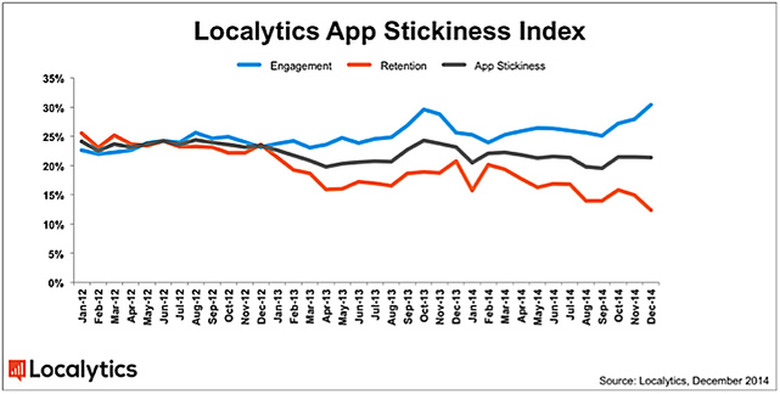
    That's a question app marketing platform Localytics was interested in, and they have provided some enlightening answers in a recent report. The firm defines "engaged" as using the same app 10 or more times per month. The percentage of apps meeting that criteria soared from 25 percent in the third quarter of 2014 to a high of 30 percent in December, 2014. But user retention –- the percentage of users returning to an app within a three-month window –- declined, ending the year at 12 percent as some people abandoned apps when switching over to new devices or upgrading their operating system. According to the research, media and entertainment apps performed the best for overall app stickiness in Q4 2014 peaking at 26 percent, a 4 percent increase over Q3. Localytics defines app "stickiness" as the average of an app's engagement and retention. Business productivity and technology apps experienced the most improvement over the course of 2014, starting at just 15 percent and increasing app stickiness to 23 percent by the end of the year. Travel and leisure apps experienced the biggest increase in the volume of app launches per average user per month growing from 10 in Q3 up to 12 in Q4 –- reflecting the season's Q4 travel trends. Meanwhile, media and entertainment apps remained consistently high with users launching them 12 times per month, on a par with Q3. By contrast, games apps had the lowest number of launches per month, just fewer than eight. The Localytics Indexes provide marketers with a benchmark against which to measure and refine their app engagement strategies. They are compiled through the continuous analysis of 28,000 apps across more than 1.5 billion devices. To see the study in detail, head to this link.

    By Mel Martin Read More
  • CBS relaunches its news app for iOS

    CBS has added features and done some cosmetic cleanup of its free CBS News app. The universal app adds live streaming from CBSN, the network's recently launched 24/7 live streaming feed. Other changes are a completely new design, with more images and full screen galleries.You can select news by type, like tech or sports, and rearrange the menus. You can also find broadcasts from CBS, like the Evening News and 60 Minutes. All in all, this is a nice update, but I think it falls short of what a news junkie would like. Other than menu order, there is really no customization here -- you get what you get. The app has no idea what kind of news mix you want. It's simply not very granular. You can get sports news, but not set the app for "no baseball" for example. News alerts are whatever CBS wants you to see, but you can't customize those either. The design of the app is very readable, and while the fonts are available in three sizes, I think they are all too big and the app shows a lot of white space that is wasted. CBS bills itself as 'always on' with its new streaming feature, but several times all I got was a commercial followed by a screen that said "we'll be right back." That's not always on. I will say that the video streaming, when it is there, is of very high quality, and it is full screen. Perhaps the worst fumble is that there is no local news. Nothing. Zip. CBS has affiliates all over the country. Where is any targeted local news? If Microsoft can figure this out for their news app, so can CBS. I should note that NBC doesn't offer local news it it's app either, and ABC News offers local videos, and asked my location, but couldn't find a thing to show me. Yes, many affiliates have their own local apps, but why can't local news be embedded in the CBS app? The CBS News app is nice looking, but it's lacking in features that serious news consumers will want. The app is universal, and works well on an iPad in landscape mode. It requires iOS 7 or later and has been optimized for all the new iPhones. The app is a great start, but has a way to go.

    By Mel Martin Read More
  • Watermark Plus adds watermarks to your photos quickly and easily

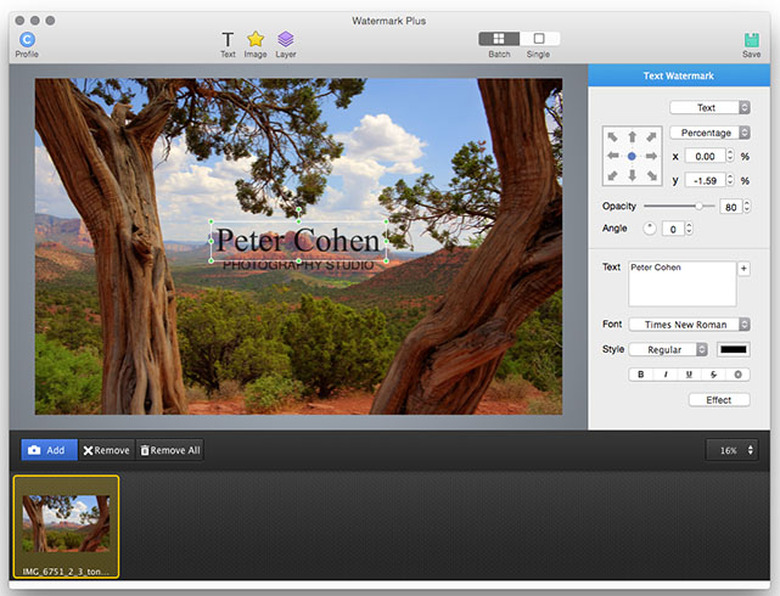
    Watermark Plus ($19.90) is a nifty app that pros and others wanting to protect their digital image creations will appreciate. You can create watermarks on your own, or use any of several templates provided. The app supports JPEG, TIFF, BMP and PNG formats. You have control of position, font, opacity and colors. Even better, you can apply your watermark to hundreds of photos at once by dragging a folder over a target on the app screen. If the photos are of varying sizes, the app places the watermark in the right place -- a lower corner, top centered, whatever you choose. The app also supports inserting EXIF data into your images in any way you specify including -- of course --the date. I tried the app on a large folder of images and it worked as well as I expected. Not everyone will need watermarks, but as we increasingly send our pictures to photo sharing sites and the web in general, watermarking becomes more and more important. Watermark Plus also allows you to batch resize photos by width, height, percentage, or fit to a particular size. The app will also convert your photos from one format, like TIFF for example, to JPEG or any other supported format. All in all, Watermark Plus is a handy application for both professional photographers and people serious about keeping some control of their work. The app is available by download from the developer's website, not the Mac App Store. It's currently $10.00 off the usual list price of $29.90. Help is included in the app, but it's really not that difficult to run.

    By Mel Martin Read More
  • iPhone 5 is the top Flickr camera in 2014

    It used to be when you thought of the top cameras being used by photographers, you probably thought of Canon and Nikon. That's not necessarily true these days. Thanks to the EXIF data that is embedded in our digital photos, it's pretty easy to find out exactly what the top cameras are. Photo website PetaPixel gives us a peek into the 2014 camera stats from photo sharing site Flickr, and the times they are a-changing. Canon is still the most popular camera brand for Flickr posters (13.4%), followed by Apple (9.6%), Nikon (9.3%) and Samsung (5.6%). Just looking at smartphones posting to Flickr, Apple's iPhone 5 wins with 10.6%, with the runners up being the iPhone 4S (7%), the iPhone 4 (4.3%), the iPhone 5c (2.0%) and the Samsung Galaxy S3 with 1.2%. That iPhone 5c number seems pretty surprising. It probably is really surprising to Samsung. Last year's number had Nikon as the second most popular brand, and Apple and Nikon have traded places in 2014. The top smartphone cameras are the same as 2013, and those Apple iPhones rank number 1, 2 and 3. The new iPhone 6, which wasn't available during a good part of 2014 has sent 1% of Flickr photos, ranking in 7th place among smartphones. Apple's iPad and iPad mini offered 0.8% and 0.6% respectively. When the iPhone was announced eight years ago few would have guessed that Apple would wind up a popular and dominating camera maker, but that is exactly what has happened. You can see the two-year comparisons on this chart from PetaPixel.

    By Mel Martin Read More
  • Microsoft courts iOS users with Office Sway

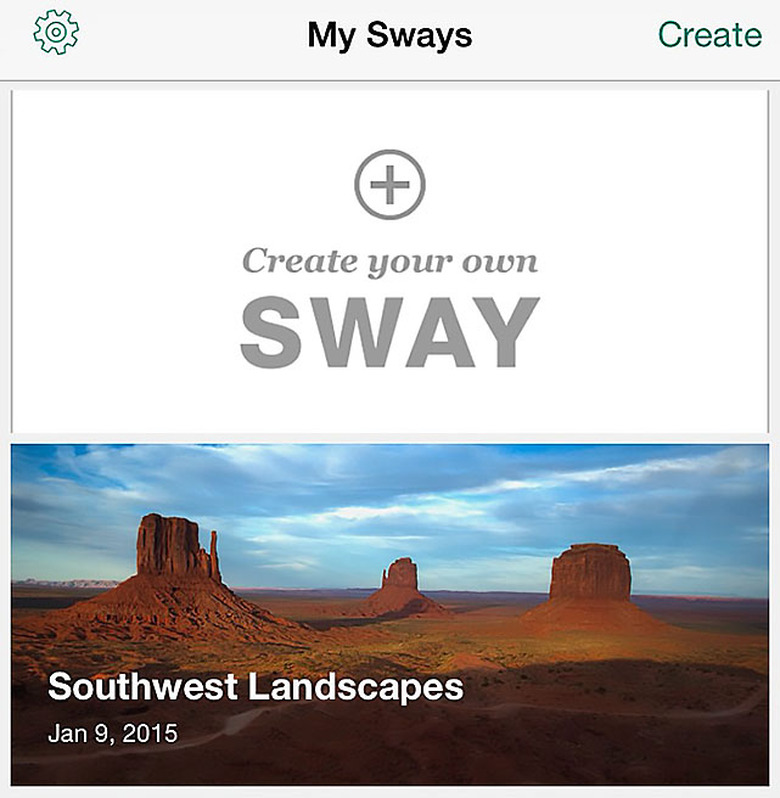
    Office Sway (free) is a personal or business presentation app for iOS that lets you easily create simple web-based canvases of photos and text on your iPhone and share them on any mobile device or the web. This just-released app is yet another in an increasing large collection that Microsoft is offering on iOS, after years of neglect while the company pushed users to its own OS and mobile devices. The app is clever, but not deep with features. You can combine headers, text, photos, and captions to make a simple but attractive presentation while you are on the go. The content automatically resizes to fit the display device. Captions can also be dictated, which is a clever idea for those on the go. Editing is easy, with just a tap or a drag to change text or move images. When you are done, send your creation via email or Messages, and you can also post to various social networks. The recipient gets a link to click on. If you make changes in your presentation, the changes are synced on the web and all your devices. I thought the app worked well, but Microsoft made some bewildering choices. The app only works in portrait mode, and it's not universal, which seems odd since the iPad would be a great platform for this app. Maybe later. I did have one problem, and it's not a small one. The app gives you the ability to forward your presentations to others. I did some test emails with two different accounts and nothing ever showed up in my inbox. Microsoft server problems? Don't think of this as an Apple Keynote or Microsoft Powerpoint substitute. It's quick and easy, but there are no animations, no transitions, and no fancy effects. Still, the output looks good, and the app makes some nice stylistic choices and gives you a bit of latitude how things are formatted. Office Sway was in beta for quite some time, and had only a limited iOS release last October, but now it's in the App Store and everyone can give it a try. I expect the app will gain some features, and hopefully go iPad native. It's nice to see Microsoft cozying up to iOS users. It's partly driven by the lack of sales of Windows mobile devices, and the company is figuring out that Android and iOS are where they need to be. Office Sway is not available everywhere, and so far it seems limited to English-speaking countries. Office Sway requires iOS 8 and it's optimized for the latest Apple iPhones. It requires a free Microsoft login so your content can sync. It does not requires an Office 365 subscription. I would say Office Sway is a good start at an app that will surely become more interesting and full-featured.

    By Mel Martin Read More
  • Airmail updates a popular Apple Mail alternative

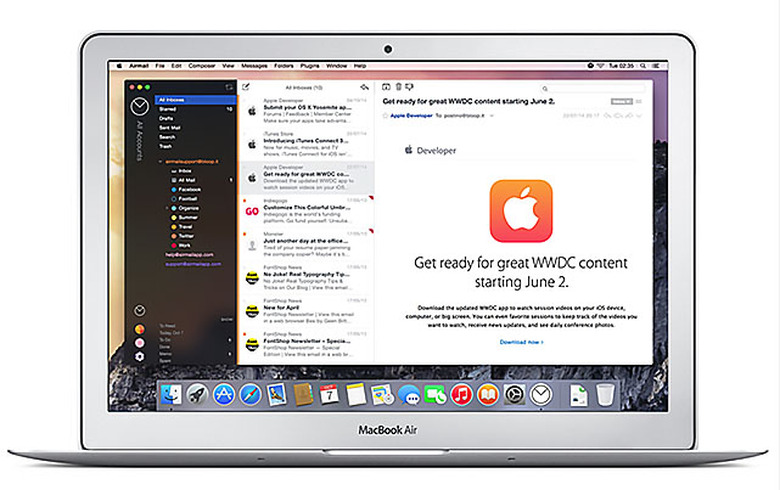
    While Apple Mail for OS X is in widespread use and generally popular, it hasn't stopped developers from coming out with competing products that add to or extend the Apple Mail feature set. Postbox and Mail Pilot are a couple of good options, and Airmail, which I'm looking at today, has had good reviews as well. Airmail just released a big update to version 2.0 (US $9.99 in the Mac app store) that has added some very Yosemite-friendly features like iCloud Account sync, iCloud attachment, upload and link sharing, extensions to send mail from other apps and the ability to reply to messages from a notification banner. The app supports many mail protocols including Exchange, iCloud, Gmail, IMAP, POP3, Google Apps, Yahoo!, AOL, Outlook.com, and Live.com. I was especially happy to see POP3 legacy support, as many third-party mail apps are dropping it. I gave the app a try, and it quickly imported my Apple mail account. The design of the app is very clean, and I liked the integration with Apple's Calendar, Reminders, and other apps like Evernote, 2Do and Omnifocus. The app also supports a variety of plug-ins, and has a menubar icon. Apple, are you listening? Attachments can link to Google Drive, Dropbox, CloudApp, Droplr and FTP. As I used the app, I wished for the ability to customize the buttons in the app. While Airmail's UI sports a very clean design, I'd like to eliminate some buttons that I don't use, and add some I think are essential. For example, a print button is totally absent from the toolbar. Of course you can print from the file menu, but an app with this number of features could really benefit from user customization. The app worked properly with an old POP3 account. Search is very fast, and returned results are accurate. While I don't use Gmail, some users have reported issues with accessing Gmail with Airmail. The app imported my folders from Apple Mail, but none of my Smart Folders. The developers say that feature is forthcoming. There is an extensive rules feature in Airmail, but I didn't want to re-create my Apple Mail rules from scratch. Messages can be marked as spam, and the app provides a unified inbox if you want one. Airmail also supports Apple's Time Machine, and has features almost too numerous to detail. A look at the app's web page will give you more insight into what Airmail can do, including offering extensive foreign language support. There is a lot to like about Airmail. A few tweaks and I could be convinced to replace my Apple Mail client. As it stands now, Airmail is very good, extremely fast, and has many features Apple Mail doesn't have, but lacks a few critical features Apple does provide in the default mail app. Airmail requires OS X 10.8 or later and a 64-bit processor.

    By Mel Martin Read More
  • Custom Keyboard for iOS gives your keyboard a totally new look

    With all of the new iOS 8 keyboard apps, we're seeing new functions, languages and features. Custom Keyboard (US$0.99) gives the standard iOS keyboard a completely new look based on what you want. It's appearing in the App Store today. Custom Keyboard provides control of backgrounds, colors, fonts, shadows and even animations for key pop-ups. It's easy to use, and is quite effective. Like all keyboard utilities, you run the app, save the results, and then switch to the customized iOS keyboard from your current keyboard by tapping the "globe" icon. You can see some of the controls and variety of colors below in my screen captures. The app supports more than 40 languages, and also lets you customize key click sounds. You can also use a photo as a background to the keyboard. Originally, I thought the app was just a way to make some outlandishly colored keyboards that were fun but not very useful. With a little effort, I could actually design keyboards that were easier on the eyes than the stock Apple design, with more pleasing fonts. I also liked the option to have the numeric keys on the same keyboard as the character keys, making typing faster. The little touches like double tapping the space bar for a period are retained with these keyboards, or can be turned off in preferences. Of course, the keyboard you design appears in any app where a keyboard is used, and you can easily switch back to the stock keyboard or another keyboard you may have installed. Of course the keyboards look nice, but then I miss using Swype and some of the other functions I get with third-party keyboards. It would be nice to be able to combine features of multiple custom keyboards for a really tailored experience. I liked Custom Keyboard and will continue to use the design I worked out with the app. Custom Keyboard requires iOS 8, and it's universal. I've tested it on both an iPad Air and an iPhone 6 and saw no issues.

    By Mel Martin Read More
  • Stay Focused provides focus stacking on your iPhone

    (Image by Muhammad Mahdi Karim CC BY-SA 3.0) Stay Focused (free with in-app purchases) is an interesting app that does a very complex function for photographers called Focus Stacking. You take a series of photos, from 2 to 100, with different focus points selected. Then your photos are sent up to the developer server, and returned to you with all points of the photo in focus. This capability is really important when doing macro-photography and other focus-intensive photography, like wanting objects up close and in the far distance in focus. Using the app is not as simple as pushing a button, but instructions are provided on the first screen and a detailed tutorial follows. I was able to take some pictures that gave me the equivalent of nearly perfect depth of field, meaning objects up close, in the mid-range, and in the distance were all in focus. Stay focused is certainly not a simple point and shoot. There are controls for manual exposure and color, live previews of the extremes of the focus range, and many options for sharing your photos. The uploads can take a few minutes, and the app does not currently upload smoothly in the background, but a fix is coming for that. When the server has processed your photo it gets downloaded back to you. The app gives you 10 uploads to try the service out, then wants to sell you additional uploads at a price: US$0.99 for two or $4.99 for 15 uploads. Over time, that is going to run into money. What the app does is impressive, and photographers are going to be really appreciative of what has gone in to making the app work. On the other hand, a casual photographer isn't going to want to keep paying to upload images, and a pro may have other software approaches to doing this with a DSLR. Zerene Stacker ($89) and Helicon Focus (pricing from $30-$240) both run on OS X. If you plan to do a lot of focus stacking, the Mac options might be more economical. Stay Focused worked well, and it is pretty amazing to do this work on an iOS device, even if it requires an upload to create the final image. Stay Focused requires iOS 8 or later.

    By Mel Martin Read More
  • Air Camera + lets you stream your iDevice camera to you AppleTV

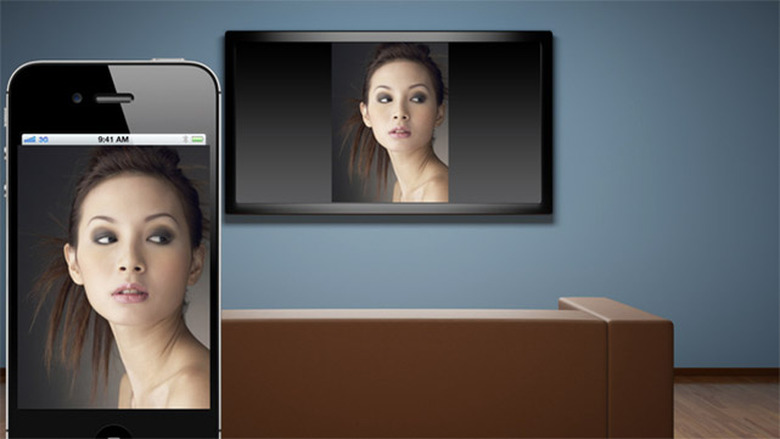
    Here's something a little different: Air Camera + (US$2.99) is a streaming app that captures the video and audio from your iPhone or iPad and streams it to your AppleTV. Beyond that, the app allows you to add real-time effects like sepia tones or cartoon-type effects. The app supports both the front and rear facing cameras on any iDevice. Air Camera + also allows you to record the stream, then play it back later on your iPhone or iPad and stream it back to your AppleTV. To get the app running, pull up your iOS controls from the bottom of your screen and select AirPlay and Mirroring. Then, whatever your camera sees, your Apple TV will as well. Of course you don't need the app to get video to the AppleTV using mirroring, but the recording and effect generation functionality comes from Air Camera +. This latest version of the app also features a kind of fake 3D that can be viewed with red/cyan 3D glasses, but it's not going to be very realistic as you are only using one camera. The app lets you choose different resolutions for your streamed image... my older AppleTV only does 720P but the picture was very detailed. Streaming options also include 640x480 and 1920x1080. When you first start to stream, it may take several seconds for the video to appear on your TV, so don't give up. I really couldn't think of a personal use-case for the app, but I'm impressed with the idea and some people may find this really helpful -- perhaps in a lecture hall or for viewing small objects on a large screen as part of some demonstration. I'm sure some creatives out there will find some really good ideas for this app. Air Camera + is a universal app, and it's optimized for the iPhone 5 and 6 phones. It only requires iOS 6 or later.

    By Mel Martin Read More
  • iSmartAlarm rolls out new devices and features

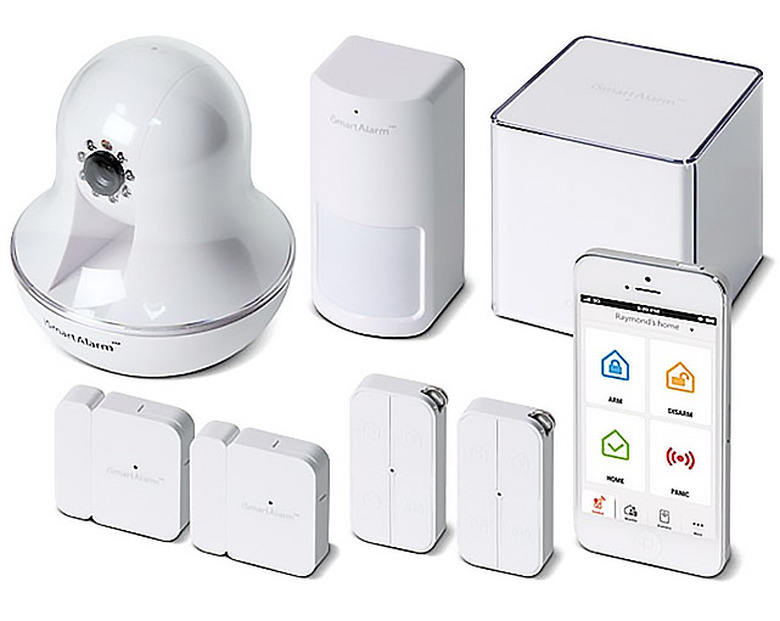
    I looked at the iSmartAlarm system last year and found it really useful and easy to install. I appreciated that, unlike most security systems, there was no subscription or recurring charges. Buy the gear, add more devices if you want them, and you're done. Now the iSmartAlarm system has been considerably enhanced, most notably with a new camera called the iCamera KEEP, a smart switch for remotely controlling electrical outlets, and a new smoke alarm system. Functionality I was sent a sample system to set up, which was easy enough to do. An attractive cube (called the CubeOne) is the central unit. You plug it into a router port, and configure it via an iOS app. Then various smart devices can be added, including motion detectors, window sensors, cameras, and the new iSmartAlarm Smart Switch. As you activate each device it is recognized, and you can add a label, like 'Kitchen Camera' or 'Front Window'. The new camera, iCamera Keep, is quite sophisticated. It's designed to work with the iSmartAlarm Home Security System or as a stand-alone Wi-Fi device. It has 1280x720 resolution, motion and sound detection, and free on-demand streaming video control and cloud-storage, all with no fees or contracts. The motorized unit allows for wide range pan-tilt, night vision, multiple user support, as well as multi-iCamera support. Users will receive text, phone call, email, and push notifications on their smartphones in case of emergency or user-defined rules and conditions. The new Smart Switch allows users to remotely control their electrical outlets, see when their lighting is turned on or off, ensure potentially dangerous appliances are turned off when not in use, and monitor energy usage. Automated schedules can be set up to secure the premises, to create the impression of a family at home, and provide physical safety so the user will never have to walk into a dark home again. Multiple Smart Switches can cross-communicate with other devices in the smarthome ecosystem to automatically turn on lights or other devices in case of a break-in. All these new components worked well, and were easy to set up. Current users of the original iSmartAlarm system can add these new components, although a quick firmware update may be required. Other new features I didn't test are the new smoke alarm which works standalone or can be integrated into the full system. The company has also announced compatibility with Z-Wave devices, allowing even further monitoring and interaction. Cost Pricing of the system depends on what components you add. A starter system that includes one CubeOne, two Door/Windows Sensors, one Motion Sensor, two Remote Tags, and iSmartAlarm stickers for added protection is US$199.00. A Premium package with an iCamera is an additional $149.00. Other devices can be bought a la carte. The new iCamera KEEP ships this month for $149.99, and the new smart switch is $39.99. Conclusion The already excellent iSmartAlarm system has been considerably advanced with new devices and services. It is simple to set up on your own, and the lack of recurring fees is a real plus. Everything is controllable remotely with an iOS app. The iSmartAlarm system can provide real piece of mind when you are home and are away. The fact that the software keeps getting updated for new features and new hardware like remote controlled AC outlets is a real plus.

    By Mel Martin Read More