Michael Rose

Engadget Editorial Policies

The unique content on Engadget is a result of skilled collaboration between writers and editors with broad journalistic, academic, and practical expertise.

In pursuit of our mission to provide accurate and ethical coverage, the Engadget editorial team consistently fact-checks and reviews site content to provide readers with an informative, entertaining, and engaging experience. Click here for more information on our editorial process.

Stories By Michael Rose

  • Mac 101: Option-select those columns

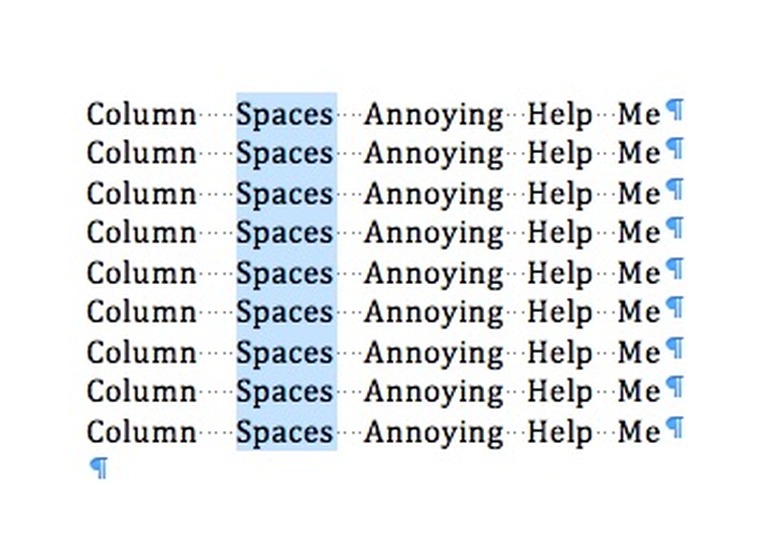
    It's fitting that this is my last Mac 101 tip for TUAW, because it's one of the first "whoa, how did you do that?" tricks I learned as a desktop publishing newbie way, way back in the day. Like, Word and PageMaker on System 5, 1988-vintage back in the day, when I was learning how to write, edit and lay out the entertainment section of Carnegie Mellon's campus paper The Tartan from my patient (mostly) mentor and boss, Bruce Kasrel. Say someone has sent you a Word file with tabular data in it. Unfortunately, they haven't used actual tabs -- that would be too easy (one could copy and paste into Excel or Numbers). No, in this case they've created the columns with spaces, and the data you actually need (like a set of prices, or dates of events) is in one of the columns. Rather than laboriously copying and pasting a row or cell at a time, try this: hold down the Option key and drag just around the "column" that you want to copy. Watch how the selected area behaves like a marquee in a drawing app, rather than a normal word processing/sequential selection. Take a moment to enjoy your secret knowledge. If that's not exciting enough, try this on for size: the same trick works in Adobe Reader, so if you need to extract a column of data from a table in a PDF, give the option-select tip a try. For more option key goodness (and there are a lot of good things it can do!) check out this rundown over at Cult of Mac. (In other tech news from my alma mater, today we learned that CMU and Uber are teaming up to develop the future of autonomous taxis. "Welcome, Mr. Jetson, sit back and enjoy the ride.")

    By Michael Rose Read More
  • Live at 10pm tonight: It's The End Of The World As We Know It, final Sunday "Talkcast"

    It may be Superbowl Sunday, but for those of us who have enjoyed reading, contributing to or editing The Unofficial Apple Weblog it's anything but super. As you all know, our parent company has lowered the curtain on this motley crew, and we are set to officially cease publication on Tuesday of next week. For me personally, TUAW's finale is surprisingly emotional. I mused on Twitter that the outpouring of positive feedback and gratitude is a bit like surreptitiously attending your own funeral; comments like these from Federico Viticci, Xeni Jardin, Harry McCracken and Rene Ritchie remind me that the work we've done here over the past decade has not gone unappreciated. It's hard to believe that it was more than eight years ago when Laurie Duncan and Scott McNulty first welcomed me aboard as a shiny new blogger; I never could have imagined the wonderful people I'd meet and work with, great products I'd review, or the strange media experiences I'd have. Recent days have seen far less of me here than I'd have liked, as my day job demanded the bulk of my time and attention. (My entire tenure with the site was as a freelancer, but prior to 2013 my full-time gig was more compatible with my secret identity as a Mac blogger.) With Tuesday's closure, there will be a lot of stories unwritten and reviews undone -- particular apologies to David Sparks, whose great ebook on presentations still sits at the top of my "posts to be written" pile. Still, there was one key appointment at TUAW that I tried to make every week. For almost seven years of Sundays, when 10 pm Eastern (and 7 pm Pacific, and 5 pm Hawaii time) rolled around, you could find the TUAW team holding forth live on our weekly Talkcast show. From the very first episodes in August of 2007 up to our final broadcast in July of 2014, we tried to connect our enthusiasm for TUAW's coverage with the strong opinions and great information that our audience members brought to bear. Always an audio-only affair (despite some flirtations with visual media, and the success of our sister TUAW TV Live show hosted by Steve Sande and Shawn "Doc Rock" Boyd), the radio call-in style show featured a rotating team of hosts, a lineup of occasional all-star guests, and the ever-present gallery of readers, listeners and fans who rapidly became a part of the site family. You all rock, and we miss you (which is why Kelly Guimont and I have continued to podcast on The Aftershow). So, we're going to go around one last time. Tonight at 10 pm ET, we're doing a live Hangout -- with video this time! -- to cheer all of you and thank you for your years of support. The TUAW TV Live team is also planning a farewell show for Tuesday afternoon, with exact details to be determined, but for tonight we're gonna party like it's 1999! You can join the Hangout on Air by visiting our G+ Events page, or simply watch via the embedded video below. Can't wait to see you.

    By Michael Rose Read More
  • Venerable sound capture app Audio Hijack reimagined for v3

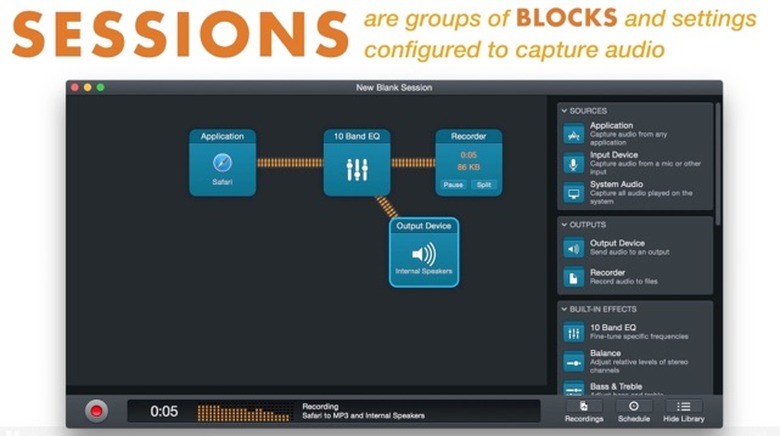
    For an independent app developer, a 13-year run with a flagship app is nothing to sneeze at. When that flagship app owns its particular niche of the OS X ecosystem as thoroughly as Rogue Amoeba's Audio Hijack, however, that kind of longevity is less surprising. Since 2002, chief amoeba Paul Kafasis and his merry band have been improving and enhancing Audio Hijack/Audio Hijack Pro alongside the company's other production-centric products. Despite all the attention lavished on AHP's core "capture live audio from any app" functionality, it wasn't necessarily the easiest tool to love from a usability perspective. Podcasters and broadcasters found ways to use AHP to record independent sides of a Skype conversation, for instance, but the mixing option to accomplish that common task was tucked away in a complex plugin matrix. And the basic Audio Hijack vs. Pro distinction created some consumer confusion. With the announcement today of Audio Hijack 3 (no more Pro), an entirely rebuilt app with a classy new UI, those concerns are now in the past. The new Audio Hijack looks fantastic; it uses a simple, easy to understand block-based interface that still delivers enormous capture, routing, filtering and archiving power for almost anything audio-related that might happen on your Mac. Select a predefined "session template" to put together the core inputs and outputs you need, or build your own from scratch. Drag in a origin block to define an audio source -- an app, voice calls, system audio, microphones or even a record player -- then connect further blocks to record the signal (with clear time-elapsed and filesize indicators plus pause and split controls), listen and monitor on headphones, perform EQ or noise filtering, and even use the Audio Unit plugins familiar from the old AHP app. The system is slick enough for you to throw in a meter or filter mid-flow while you're recording audio and it doesn't miss a step. The new-look app comes with a generous upgrade policy; owners of any previous version of Audio Hijack can license the new AH3 for $25, versus the full purchase price of $49. Anyone who bought the existing product after mid-February 2014 (when the beta of AH3 was announced) is entitled to upgrade for free. It may take some getting used to for AHP veterans, but there's a lot of awesome under the hood here to go with the shiny facade; download the trial, and check out the great interview with Paul over at Jason Snell's Six Colors.

    By Michael Rose Read More
  • Scannable app supercharges Evernote scanning on the go

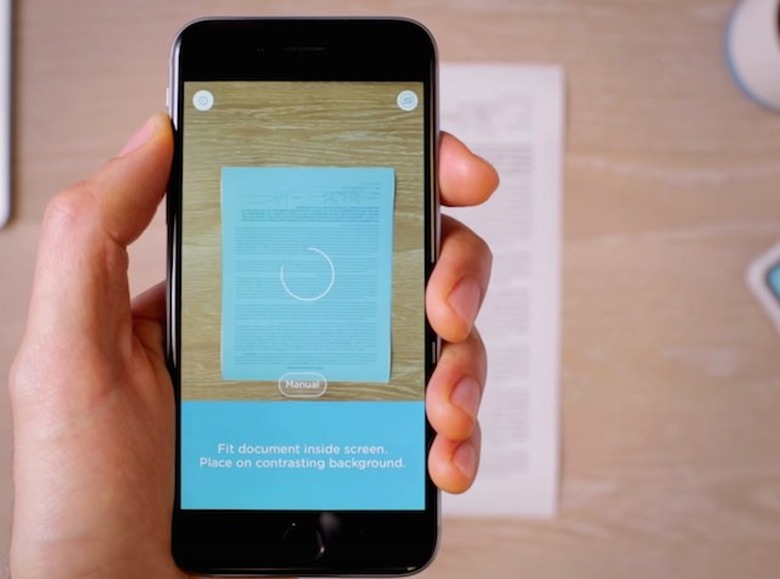
    It's been a year since Evernote's Phil Libin (a/k/a TUAW's favorite CEO) responded to user criticism by vowing to double down on the quality and performance of the "outboard brain" cloud app's core functionality. Despite the occasional misstep, the company's managed to improve the basic Evernote platform while continuing to introduce new features, apps and brand extensions -- including a partnership with LinkedIn, expanding the Evernote Market and delivering all-new versions of the Evernote app for both the Mac and for iOS 8. Now the elephant factory has pushed its latest mobile app out of beta and into production. Scannable for iOS delivers quick and easy scanning to Evernote with a minimum of configuration. Whether you're snapping Post-It notes or capturing business cards, Scannable is intended to make it as fast as possible (and get it all into Evernote, of course). When you launch the Scannable app, the camera immediately begins looking for a "document" -- something vaguely rectangular that stands out against the background. As soon as it finds the edges and you hold still enough, a round countdown icon appears over the highlighted document onscreen; then, poof, it's scanned and saved. No shutter button needed! A simple timeline of past scans shows up for you to approve, share, export and upload as required, but you can set Evernote upload as the default/automatic action and the app will simply push your scans to the service. The edge detection, cropping and deskewing that Scannable does is quite impressive. I'm a fan of powerful document scanner apps like Jotnot which allow you to manually define the edges of a document, turning a rhombus into a nice rectangle; Scannable simply does this on its own, with no real intervention needed. Sometimes if there's a particularly dark top or bottom edge on a document it might overcrop a bit, but in most cases it's spot on. If a specific document proves too baffling for the edge checker, you can switch into manual targeting mode to capture whatever you need. Scannable goes beyond the iPhone's camera with its ability to remote-control the US$495 ScanSnap Evernote Edition sheetfed desktop scanner (a rebranded version of Fujitsu's well-reviewed ScanSnap iX500). If the phone and the scanner are on the same Wi-Fi network, you can walk up to the scanner, scan and then work with the results on your phone. I didn't have the chance to try out this feature, but in an office equipped with a ScanSnap EE it certainly seems like it would be a pleasant addition. The killer use case for Scannable, in my brief testing, is business card scanning. The last app I used consistently for scanning cards was LinkedIn's CardMunch, which shut down in May of last year (roughly simultaneous with Evernote's deal with LinkedIn). Now, by connecting a LinkedIn account to the Scannable app, you can power through a stack of business cards in seconds, with solid OCR and a very good hit rate for contacts connecting to their LinkedIn profiles. Evernote's standalone Hello app (for keeping track of who you meet and when you met them) does one-off business cards reasonably well, but Scannable is much faster for a bulk scanning job after a trade show or day-long meeting. Once they're scanned, it's one tap to save them into your iPhone's Contacts list. With Hello, Food, Skitch and the flagship Evernote app all offering various scanning capabilities into the Evernote ecosystem, not to mention all the third-party apps that support Evernote as a destination, users have nothing but choices when capturing a whiteboard, flyer or business card. Scannable's value is the streamlined, single-tasker approach it takes to getting things captured quickly and in a near-touchless manner. For that, it deserves a try-out spot on your homescreen.

    By Michael Rose Read More
  • My top five products of 2014: Mike Rose

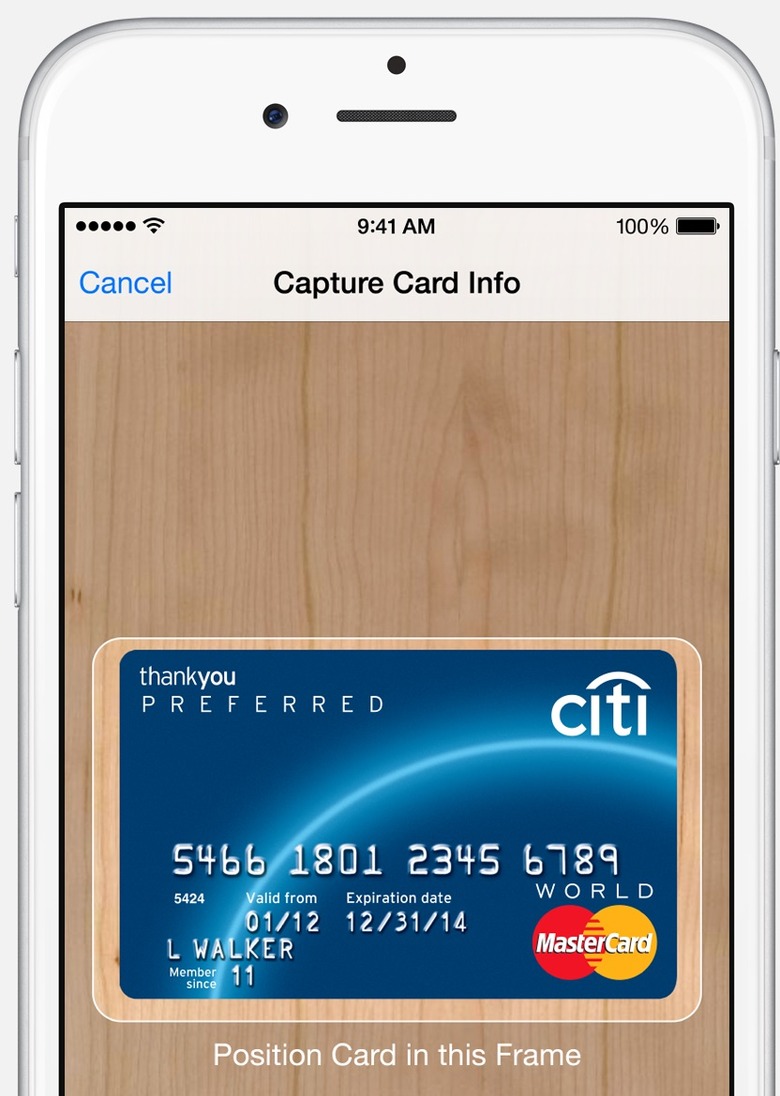
    It's been all apps, all the time around here as we wrap up our favorites of 2014. For a change of pace, I thought I'd pull together my favorite five products that don't necessarily require a visit to the App Store. Apple Pay & Touch ID (included with iPhone 6/6 Plus, coming for Watch). It doesn't feel good to skip an iPhone generation, as much as we claim to be "waiting for the next one" or "really fine with the phone I have now." In my case, a work-owned iPhone 5 was holding its own when the 5s premiered, and I couldn't really justify forking over the monthly service costs for a second phone. As a result, my first real Touch ID experience, on my recently upgraded 6 Plus, coincided almost exactly with the launch of Apple Pay. I can't say it strongly enough: Apple Pay is what Touch ID was built for, and it's one of the most vivid examples of Apple's user-first interaction design I've ever had the pleasure of using. Touch ID on its own is dandy; the iOS 8-enabled use of the thumbprint unlock in third-party apps (1Password! Finally!) and in the App Store makes it especially useful, as if unlocking your device at a touch wasn't enough. (I'd only had my new phone a few days before I found myself grumbling as I picked up my iPad -- "What, I gotta put in my passcode? Like a caveman?") But oh my, Apple Pay. Putting the power of the payment network and NFC hardware behind that little fingerprint sensor triggers a seismic shift in the way I think about using my iPhone every day. From prescriptions at Duane Reade to supplies at Staples to rides in NYC taxicabs, I'm constantly looking for new places to pay with a touch. No surprise that Apple's feel-good payment platform is beginning to transform our relationship with the overstuffed old-fashioned wallet. STM Linear for MacBook Air 13" (stmbags.com, about US$60). I'll confess that when I bought myself an STM Linear shoulder bag, it was a consolation purchase; my original object of desire was the elite and often sold-out Tom Bihn Ristretto. I was looking for a shoulder bag in a vertical profile, keeping the laptop upright and providing a lean silhouette as I carried my gear around at trade shows or meetings. Since the Bihn bag wasn't in stock when I went looking, I fell back to the STM -- and I haven't regretted it for a moment (nor did I mind that the STM bag is about half the price of the Ristretto). The Linear has enough space for the MacBook, an iPad, cables cords etc. without feeling cramped or overpacked, and the smaller capacity vs. a messenger bag or backpack keeps me from overloading when I step out the door. The Roost Stand (therooststand.com, $75). After meeting the Denver-based Roost team at Macworld/iWorld in the wake of their successful Kickstarter, I thought this unusual foldout laptop stand would be a great fit for my desk. It's portable, light and tough as a Colorado winter, and can be adjusted as needed to hold most portables securely. What I didn't expect was how viral the Roost would become; at least four co-workers have gone ahead and bought their own Roosts in the months since. If you work in an office, be sure to put your name on your Roost so it doesn't wander off. iMac Retina 5K (apple.com, starting at $2499). Who says the desktop is dead? Apple's jaw-dropping all in one model reset the notion of what a desktop PC should look like, even with a wallet-busting sticker price (in fairness, Dell's 5K monitor alone would have cost as much as the iMac, if not for a price drop after Apple's introduction). The Retina iMac is so delicious that even jaded tech writers find themselves compelled, like the NY Times' Farhad Manjoo, to take one home and give it a prominent place on their desks. I haven't replaced my 2011-vintage iMac just yet, but when I do I'll be saving up for the Big Kahuna. Jawbone ERA (jawbone.com, $99/$129 with charging case). I have never had much luck with Bluetooth headsets; whether it's fit or function, they just don't seem to work for me. Other than LG's Tone Pro around the neck headphones -- which provide great stereo sound at the cost of mediocre phone calls and "looking like a huge dork" -- I hadn't found a solid choice. That's why I've been so pleased with the new-generation Jawbone ERA, which works great for phone calls and conferences without being horribly obvious. Jawbone's noise reduction is adequate to a busy city street, and with the current firmware the hardware button can serve as a mute switch on calls (life-changing). The ERA is not cheap, but if you've struggled to find a headset that works the way you do, it's worth a look. Honorable Mention: Pebble (getpebble.com, $99/$199). It's black-and-white, not color. It's not touchable or speakable. It is decidedly not an Apple watch, but in many ways it's a better first wearable than a yet-to-ship Watch could be. Why do I enjoy my Pebble? Five days or more of battery life, for one thing. Waterproof enough to wear in the shower. Notifications that let me see who's calling, emailing, texting or tweeting at me without having to haul the 6 Plus out of my pocket fifteen times an hour. And a reasonably active app/developer community delivering cool hacks on a regular basis. No, I won't promise not to look longingly at the next shiny device coming from Cupertino soon. But I'll be looking with the benefit of a lot of experience with the first generation of wrist-based tech.

    By Michael Rose Read More
  • No Comment: CBS iPad app just needs you to sign right here

    Really, CBS app? We understand the pride that comes with being "America's Most Watched Network," but one set of terms and conditions is plenty for most network applications that let you watch full episodes -- two at the most. Not for you! Four separate user agreements that nobody will bother to read? That level of attention to detail and user experience merits this weekend's No Comment.

    By Michael Rose Read More
  • Microsoft adds free editing, iPhone version, and Dropbox to iOS Office apps

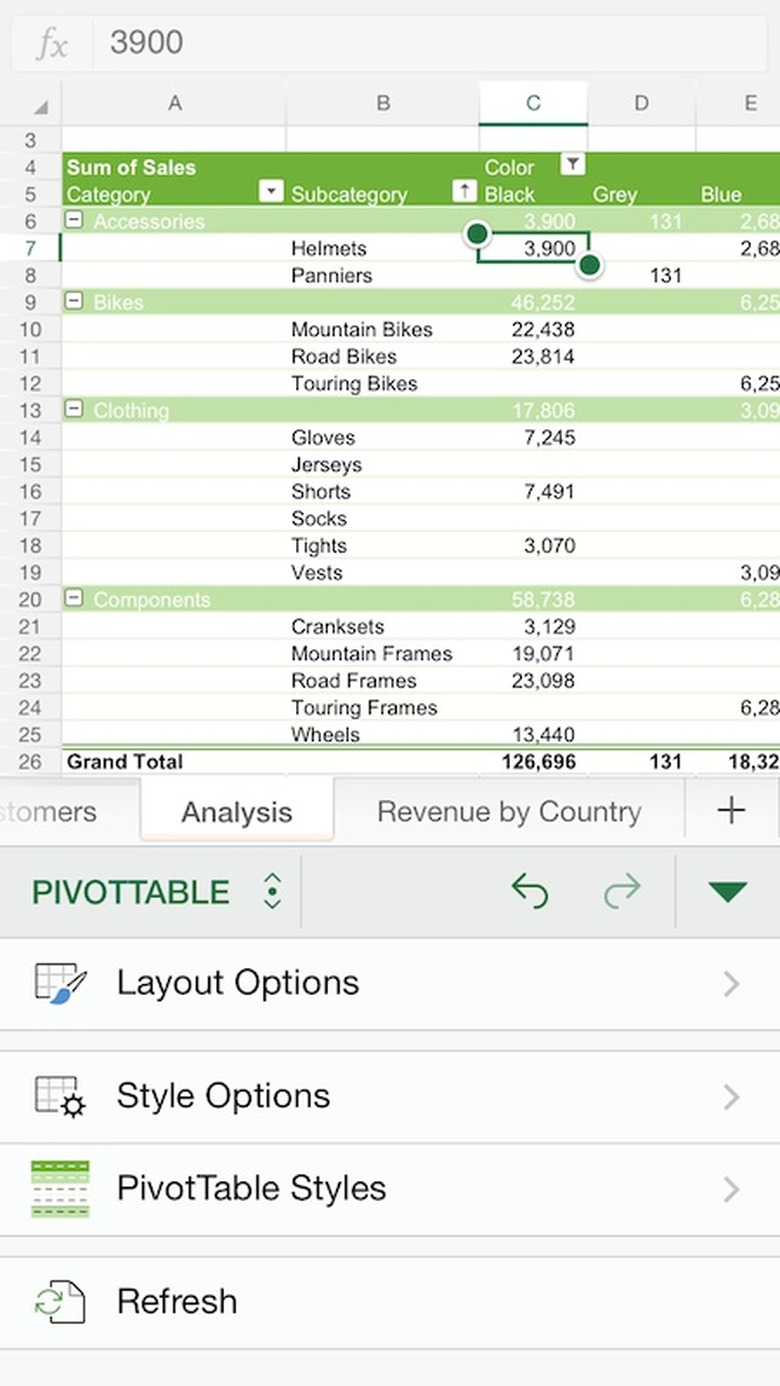
    The universe of productivity apps on iOS expanded considerably when Microsoft announced its iPad versions of Word, Excel and PowerPoint back in March 2014. Without an Office 365 subscription, however, users were limited to read-only file access; not terribly productive. Even with the addition of a monthly subscription option in September, many of the millions of people who downloaded Office apps on iPad couldn't do much in the way of content creation. Today the landscape shifts again as Microsoft has enabled basic editing and file creation in the free Office apps, no Office 365 subscription required -- although "advanced" editing features and PowerPoint's presenter view remain reserved to those with an active Office 365 Home or Business subscription. Otherwise, anyone with a free Microsoft login can use the apps at will. Those apps now also have a new home on iPhone, with optimized UI for the smaller screen devices. The same free/subscribed split applies to the iPhone versions, but basic copy editing and modification are accessible to all. Microsoft has also expanded the cloud storage options for Office iOS by adding Dropbox support -- see the partnership announcement from earlier this week -- alongside MS's OneDrive (which itself got a big boost for paying users with the rollout of unlimited storage). There's also a preview Android release of Office, and a logical commitment to Windows 10 Touch versions down the road. There's always the risk of some user confusion when freemium apps are feature-limited, and that's especially true of productivity apps; there may be a takeaway of "the iPhone version of Office can't do X" when in fact it can, if you choose to subscribe to Office 365. With some careful UX work and a clear message about what is and isn't enabled for free users, Microsoft may be able to avoid this trap and deliver a great tool for many iOS aficionados. Update: word from the Office team is that if users try to use the advanced features and go beyond the free core editing/viewing/printing documents and basic PowerPoint presentation tools, they will hit a paywall. When that happens, they will get notified that what they want to do requires an upgrade to an Office 365 subscription -- which they can purchase immediately in-app.

    By Michael Rose Read More
  • Tim Cook comes out: "I'm proud to be gay"

    In a Bloomberg BusinessWeek essay published this morning, Apple CEO Tim Cook affirmed that he is gay, something that had long been spoken of within the tech community (and sometimes accidentally in the mainstream media). In his own words: While I have never denied my sexuality, I haven't publicly acknowledged it either, until now. So let me be clear: I'm proud to be gay, and I consider being gay among the greatest gifts God has given me. Being gay has given me a deeper understanding of what it means to be in the minority and provided a window into the challenges that people in other minority groups deal with every day. It's made me more empathetic, which has led to a richer life. It's been tough and uncomfortable at times, but it has given me the confidence to be myself, to follow my own path, and to rise above adversity and bigotry. It's also given me the skin of a rhinoceros, which comes in handy when you're the CEO of Apple. Cook's decision to publicly discuss his sexuality was made despite his desire to maintain a modicum of privacy and keep the focus on Apple's products. In the final analysis, this was overcome by the realization that his story might serve to help others: I don't consider myself an activist, but I realize how much I've benefited from the sacrifice of others. So if hearing that the CEO of Apple is gay can help someone struggling to come to terms with who he or she is, or bring comfort to anyone who feels alone, or inspire people to insist on their equality, then it's worth the trade-off with my own privacy. You can read Cook's entire piece on the Bloomberg BusinessWeek website, where you can also see a video clip of his address in Alabama confronting his ancestral state's record on gay rights. Update: Comments will be closed and deleted if participants cannot find a way to stay on topic and be civil.

    By Michael Rose Read More
  • First hour of Tim Cook's interview with Charlie Rose is live

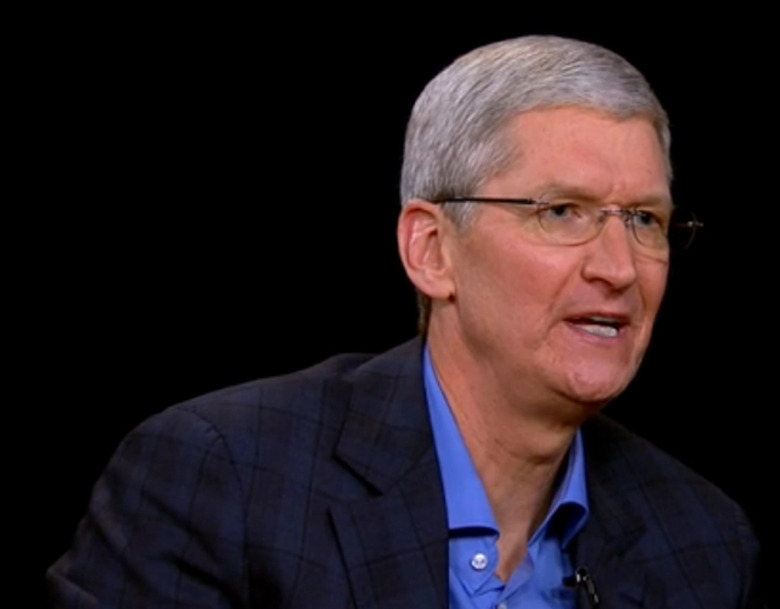
    If you haven't seen enough of Apple's Tim Cook over the past few days, you're in luck. The soft-spoken CEO sat down for a two-hour interview with PBS anchor (and MacBook Air gravity defender) Charlie Rose. The first part of that conversation is streaming via the Hulu service; the second part of the interview will air on Monday. It's worth a look, either as embedded below or directly on Hulu's site. Non-US users may or may not be able to get to that video; unfortunately that's outside our control. It also appears that the CharlieRose.com website is now offline... wonder what caused that? Quite a bit of the interview focuses on the transition from Steve Jobs's tenure as CEO to Cook's leadership. Apparently, Cook was surprised when he originally got the call from Jobs in 2011 asking him to take over as Apple's #1. Cook also cites the dynamism of Apple's current executive and creative team, including new retail lead Angela Ahrendts. He refers to Google as Apple's primary competitor and lays it on the line on the craptastic v1 of iOS Maps: "We screwed up." Of course, no Apple exec interview is complete without some hints and teasing. When Rose nudges Cook on the question of an Apple television product, he responds "TV is one of those areas we continue to have great interest in; I choose my words carefully there." As Cook walks through the app launcher on his Watch, he notes "I may have some things on here that you shouldn't see just yet." Oh, Tim, you cad. [hat tip The Verge & Engadget]

    By Michael Rose Read More
  • Think iCloud's two-factor authentication protects your privacy? It doesn't

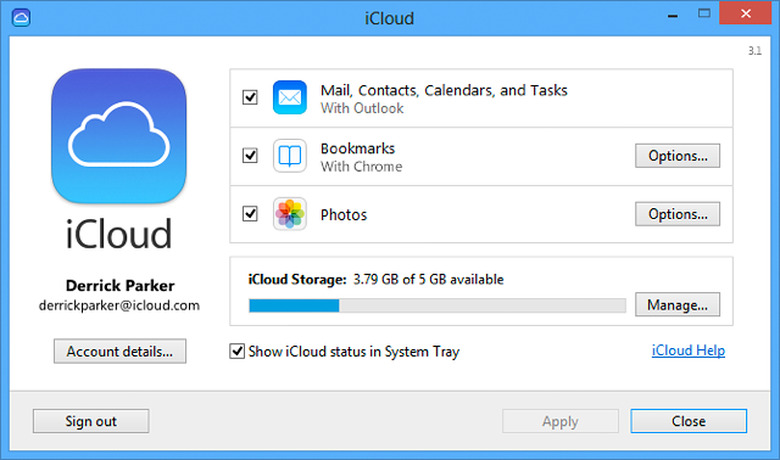
    As the forensic analysis of the weekend's celebrity intimate photo leak continues, plenty of attention is being focused on iCloud's photo storage as a likely vector for the criminal theft of the images. Proof of concept code for a brute-force attack on iCloud passwords (via the Find My iPhone API) was revealed late last week, and subsequently blocked off by Apple in a fix to the FMI service. Update 2:53 pm ET 9/2: Apple has released a statement confirming that the company's investigation found no evidence that any of its services were compromised; the accounts affected were attacked using conventional (security question/username) password reset methods. Of course, there are plenty of other ways to break into an account, including using easily-discoverable personal information to socially engineer tech support reps and get a password reset done on the fly. To combat this and other bad behaviors, Apple (along with other online giants like Google, Dropbox etc.) has built out an optional two-factor authentication scheme (2FA) for iCloud. Simply turn it on, register your iOS devices, and you'll be shielded from hacks and phishing attempts. Unfortunately, Apple's 2FA protection doesn't go as far as you might think. I noticed yesterday that our friend and former colleague Christina Warren's post at Mashable gave extra credit to 2FA: If [two-factor auth is] enabled, this means that before a new computer or device can gain access to your iCloud data, you must approve that device with a four-digit authentication code (sent to your phone via SMS) or grant access from another enabled machine. It's true that if you want to register a new "trusted" iOS device, you'll need 2FA. If you're not doing that, however, 2FA on iCloud is only triggered by a short list of interactions: getting Apple ID support from Apple; signing into the My Apple ID management console; or making an iTunes, App Store or iBooks purchase from a new device. [Update: At the end of June 2014, several outlets including Mashable, Cult of Mac and, well, TUAW all reiterated this AppleInsider report about iCloud.com testing 2FA challenges for webmail, calendar, contacts and other services. As you can easily confirm yourself by walking over to the nearest unfamiliar computer and logging into iCloud.com, this security feature has not been rolled out to all iCloud users as of September 2014.] If you're not doing one of these specific things, you are not required to enter the confirmation code from your known device to clear 2FA. It's pretty clear that Apple's doing its best to guard your wallet with this implementation -- anything that might cause a credit card charge via an unfamiliar iOS device is going to force you to authenticate. Other than that, 2FA doesn't get involved in guarding your privacy as far as I can tell. [Both security research firm Elcomsoft and the estimable Ars Technica made a similar set of points about iCloud/Apple ID 2FA back in 2013. --MR] I made a slightly narrower assumption (in response to a Next Web commenter) in my post yesterday about the photo theft: In theory, [adding an iCloud account to a new Mac or PC] should trigger a notification email to the account owner that a new device is connected -- but of course, if the hacker has the victim's account password, they've also got access to the iCloud email and could quickly delete the inbound email alert. It turns out that I was also being more generous than wise in assuming that iCloud would proactively send an email alert when photos or bookmarks were synced to an unknown computer. I decided to test that assumption, using a fresh (spun up and installed from scratch) Windows 8 virtual machine running on Parallels 10. After installing the iCloud Control Panel for Windows (as seen above), I logged in with my iCloud credentials and checked off the options to synchronize bookmarks and photos with my new, never-before-seen PC. Within a few minutes, my photo stream photos downloaded neatly into the appropriate folders and my bookmarks showed up in my Windows-side browser, and nary a 2FA alert to be seen. I turned to my iCloud email account to wait for the obligatory "Your account was accessed from a new computer" courtesy alert... which never arrived. A moment's consideration of the consequences of having either your iCloud Photo Stream or your Safari bookmarks available to anyone who has uncovered your iCloud password should be enough to realize that this is a strange and potentially troubling omission from iCloud's security and notification regimen. Sure, it would be aggravating to get an email notification every time you access iCloud webmail from a new computer (although there should be some fraud catching algorithm in place to note that I'm probably not logging in simultaneously in New York and New Caledonia, for instance); but the act of adding a new computer to sync photos and bookmarks should be relatively infrequent and almost certainly merits a quick heads-up to the user. If indeed the iCloud photo stream was the hack vector for this high-profile series of thefts, the lack of any alert when a new computer syncs with Photo Stream might have made it a lot easier for the criminals to operate undetected for so long.

    By Michael Rose Read More
  • iCloud password hack published, blocked as celebrity photo theft confirmed [Updated: Apple comment]

    If you've been enjoying the US holiday weekend away from sources of news, well done. If not, you may well have seen reports of a large cache of explicit photos of celebrities being published to 4chan's image boards, including Academy Award winner Jennifer Lawrence, supermodel Kate Upton and other female and male actors. The publisher apparently was seeking Bitcoin contributions in exchange for the images. While several of the people pictured in the image cache have called the images fakes, others have acknowledged that the photos of them were unaltered. Update 9/2: Apple has released a statement confirming that the company's investigation found no evidence that any of its services were compromised; the accounts affected were attacked using conventional (security question/username) password reset methods. Update 2:35 pm ET: Over at The Guardian, tech reporter Charles Arthur summarizes the current thinking about the image release from security researchers. Some are surmising that these images were gathered over months or years (the earliest timestamps are from 2011, the most recent from last month) and then the repository itself was hacked or stolen. iCloud is still under scrutiny as a vector for gaining access to private images. Update 6:50 pm ET: Re/code has a statement from Apple on the story; spokesperson Natalie Kerris says the company takes user privacy very seriously and is actively investigating. Early reports noted the alleged hacker's assertion that an iCloud exploit was used to gain access to the target accounts and harvest the images. That has not been confirmed in any way (security researchers are eyeing several other services including Dropbox as potential attack vectors), but both The Next Web and our own former contributor Richard Gaywood took note of the release this weekend of an iCloud password crack tool that could, theoretically, have been used to attack specific iCloud accounts. Our sister site Engadget has a good overview of how the attack would have worked. The "ibrute" tool leveraged a security oversight -- a lack of brute-force protection -- within Apple's Find My iPhone tool. After the code was in the wild for a couple of days, Apple apparently patched the flaw, so the code is now only a proof of concept demonstration. The core functionality was pretty simple: given a target iCloud account ID, ibrute would simply run through a list of the 500 most commonly used passwords that complied with Apple's password rules (sourced from the infamous RockYou hack that revealed millions of real-world passwords) and try to nail down the password for the account. Since the Find My iPhone API did not throttle or lock out after a certain number of guesses in a given time period, it was possible to "brute force" passwords without tripping any security alarms. This lockout is where Apple has now changed things; trying random passwords via the Find My iPhone API will now lock your account after five attempts. One Next Web commenter pointed out that just having the iCloud password doesn't necessarily mean you have instant access to iCloud's Photo Stream; you would still need to log in via an iOS device, via iPhoto on a Mac or the iCloud control panel on a Windows PC. In theory, that should trigger a notification email to the account owner that a new device is connected -- but of course, if the hacker has the victim's account password, they've also got access to the iCloud email and could quickly delete the inbound email alert. [Update 9/2: Thinking that iCloud would send an email was over-optimistic; see here.] Apple's two-factor authentication setting for iCloud does require entering a security code for certain kinds of account actions, but it's not clear that "accessing Photo Stream photos from a new PC" is one of the triggers. (I'm testing this now.) [Test and documentation show it's not one of the triggers.] As our friend Christina Warren noted in her solid summary of iCloud security over at Mashable, we don't know at this stage whether or not iCloud is implicated as a vector for this most public hack; that said, there are steps you can take today (complex, longer passwords; avoiding password reuse; 2-factor auth; turning off iCloud backup for photos if they are sensitive or compromising) which will provide you better security and more peace of mind regardless.

    By Michael Rose Read More
  • Intuit releases Quicken 2015 for Mac, with stock tracking

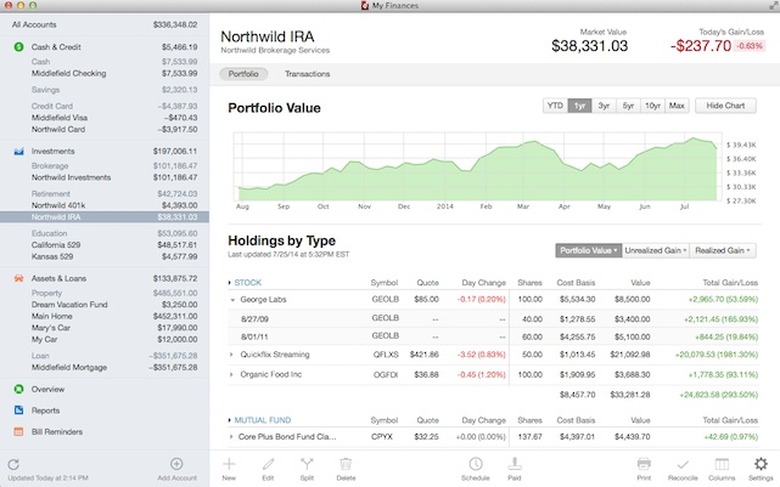
    Loyal users of Quicken for Mac, Intuit's flagship personal finance manager, have not had the easiest road over the past few years. The product froze in amber with the Quicken 2007 release, which remained on its legacy PowerPC code base well past the best-if-used-by date; while Quicken Essentials, released in 2010 with input from the Mint.com team, delivered a shiny new money management experience, it also lacked many Q2007 features (integrated bill payments, investment management) that users counted on. Many unsuspecting Quickenians upgraded their Intel Macs from 10.6 Snow Leopard to 10.7 Lion without fully realizing that Apple's move to drop Rosetta support from the Mac's OS meant that Quicken 2007 would never launch again. To Intuit's credit, the wailing and gnashing of teeth of customers was heard and acknowledged; in March 2012 it released a Lion-compatible version of Quicken 2007 which remains on sale today. Still, the anxiety around Quicken for Mac created opportunity for competing apps to haul in some market share, including the capable iBank (now at v5, including bill pay and other marquee Quicken features plus QIF data import). Intuit is now aiming to turn those Mac personal finance users back into Quicken loyalists with the shiny, mobile-savvy release of Quicken 2015 for Mac. Never mind that 2015 is still months away; the US$74.99 rebuilt flagship app delivers some key functionality, including synchronized iOS and Android mobile apps that allow you to take receipt photos on the go; detailed investment tracking that can support tax reporting requirements; and a revived, Mint-y fresh user interface that makes it easy to see where your money is going. Quicken 2015 is built atop the Quicken Essentials codebase (rather than the PowerPC legacy of Quicken 2007), but it's decidedly its own, more capable product that was guided by customer input and lots of public beta testing. These new features are great, and Intuit says that additional features will be delivered as free upgrades to the base 2015 edition. Unfortunately, it isn't committing to which features will be added -- and there's a pretty long list to choose from, including a few crowd favorites (integrated bill payment, calendar/12-month view, loan amortization) that are in Quicken 2007 and/or Quicken for Windows, but still aren't part of Quicken 2015. Intuit has posted a comparison chart where users may vote for the features they would like to see sooner rather than later -- vote early and often. Personal financial management is a conservative corner of the software market, and adopters of a particular application are often resistant to change for change's sake (it's only your life savings, after all). Users who depend on a specific tool in Quicken 2007 that isn't yet implemented in Quicken 2015 will likely have the same reaction they did to Quicken Essentials -- a more or less polite "No thank you." But for those who don't need those particular pieces (or are willing to wait) and who haven't jumped to an alternative, it's certainly a cheerful bit of news that Intuit has renewed its commitment to the Mac market with Quicken 2015. You can buy Quicken 2015 online today as a download from Intuit, via the Mac App Store or via Amazon software delivery. Boxed availability at retail is scheduled for October 2014. There is no trial version of the $74.99 application, but there is a 60-day money back guarantee if you find that the new app does not suit your requirements.

    By Michael Rose Read More
  • Navdy gives your car an iPhone-linked HUD

    We love our cars, and we love our iPhones, but sometimes we don't love them so much together. Navigation and entertainment apps provide a wonderful road trip experience, but controlling those apps by touch or by voice is tougher -- and more dangerous -- than it should be, even using clever clips to attach the phone to the car. There's a fundamental incompatibility between paying attention to a tiny touchscreen at arm's length and paying attention to large amounts of kinetic energy embodied in a massive chunk of steel and plastic moving at 100 km/h. Apple's CarPlay shim for iPhone 5+ devices will address some of those command and control issues (if you buy a new car, or refit your stereo with an aftermarket unit) by relocating the functional display of the phone to the dashboard, reskinning the UI for simplicity, and enabling both physical switches and Siri-based voice controls for functional operations. That still doesn't clear the biggest hurdle: keeping your eyes on the road as you drive, rather than pulling your focus back to the center console and degrading your driving attention. The limitations of in-dash or phone displays have led to some creative solutions like the HUDWAY directions app, Sygic's HUD feature in its nav app, Garmin's HUD (Head Up Display) unit and others. The app-only solutions are fine at night, but they suffer in the sunlight (not to mention lightly braising your phone as it sits on the dash). Garmin's LED-based unit is fine but inflexible, and only works with the company's nav apps. The upcoming Navdy HUD, however, aims for more flexibility and a slick set of interaction modes combined with a full-featured, correctly distanced projection setup that makes it appear as though the display (driven by your iPhone or Android phone) is floating two meters away over the road ahead. Navdy can draw power and data from your car's diagnostic (OBD-II) port, which lets Navdy display speed and distance-to-empty while opening up the possibility of future features to analyze and manage driving and performance data. All this savvy will come at a price, however: Navdy's pre-order cost of US$299 (versus a regular retail price of $499 when it ships in early 2015) is 2x the Garmin unit's price, although Garmin's HUD only works if you buy one of the company's $30+ nav apps to drive it. The Navdy unit, which will connect to the dash via a combined silicon friction mount and a magnetic interlock, will support nav apps like Google Maps and music apps like the built-in iTunes app, Pandora, Spotify and more. The UI of those apps is distilled down to create a "glanceable" experience, keeping only the critical information a driver needs and eliminating any excess chrome or distractions from the HUD. Even multitasking will be driver-friendly; any incoming call or SMS will only take over a part of the display, leaving speed and next turn visible at all times. Of course, SMS or iMessage alerts can be read aloud; with parental controls, they can be disabled entirely while the car is in motion. The voice and gesture controls of Navdy take the HUD experience to the next level. Dictating messages or directions can be done with Siri natively, but Navdy adds a noise-cancelling mic directly in front of the driver's mouth to improve recognition performance. Gestures can accept or turn down an incoming call, change music tracks and more via left/right swipes and a thumbs-up. Navdy talks to your phone via Bluetooth, and since it uses the OBD port for power it won't clog up your 12v/cigarette lighter plug. For cars made before 1996, Navdy will offer an optional 12v adapter to use instead of the OBD connector. The display quality, in the preproduction unit I examined, was very good. The "floating" effect is quite solid and there was no eyestrain or other sense of looking at something that wasn't really there. With a real-world placement on a hot dashboard in the bright sun, your mileage may vary, but Navdy's founders believe they can deliver HUD technology that will work for both everyday and performance drivers in any kind of driving conditions. Both the discount and full-price Navdy may seem quite steep; it's tough to put $300 into a device that you haven't seen in action. But if the Navdy team can deliver on all the functionality they plan to package into the unit, my feeling is that it will be worth the cost. You can read more about Navdy and place a pre-order at www.navdy.com. Navdy's launch video (produced by the delightful and talented Adam Lisagor) is embedded below.

    By Michael Rose Read More
  • Retina MacBook Pro gets a processor bump across the line

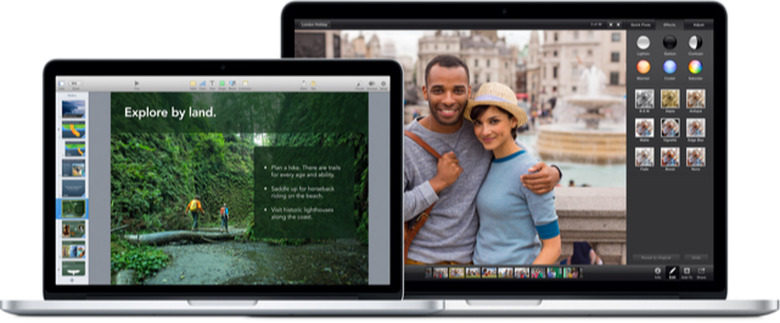
    Eagle-eyed Apple Store watchers noticed the company's online commerce site taking a brief nap this morning, and sure enough when it woke up again something new had arrived: revised models of the 13" and 15" MacBook Pro, with faster Intel Haswell processors and a unified floor on RAM capacity (8 GB for the 13" models, 16 GB for the 15" models), which previously dropped to 4 and 8 GB respectively for the "budget" configuration in each size. You can compare the current MBPs seen here to last week's model seen here via archive.org. Default processor speeds on the 13" model went from 2.4/2.6 GHz i5 dual-core processors up to 2.6/2.8 GHz; BTO options for the 13" include a 3.0 GHz dual-core i7 chip. On the 15" model, both standard configs received a similar clock bump to their i7 quad-core CPUs (2.0/2.3 up to 2.2/2.5), with the fastest BTO processor now at a spicy 2.8 GHz. The price on the higher-end config of the 15" also drops $100 to $2499, as does the price of the non-Retina 13" MBP (from $1199 to $1099) which is unchanged from a spec perspective. These updates (which were hinted at a couple of days earlier via an iPad spec display in a Chinese store, of all places) should be available to ship immediately; if you bought a Retina MBP in the past 14 days in an Apple Store (and possibly at other authorized retailers) you may return it for restocking and move up to the newer model. As MacRumors notes, this is not the "big leap" to Intel's Broadwell chipset that is anticipated for next year's MBPs, but it certainly is welcome in the meantime. Thanks to everyone who sent this in.

    By Michael Rose Read More
  • Get emergency iPhone-to-iPhone connections with GoTenna

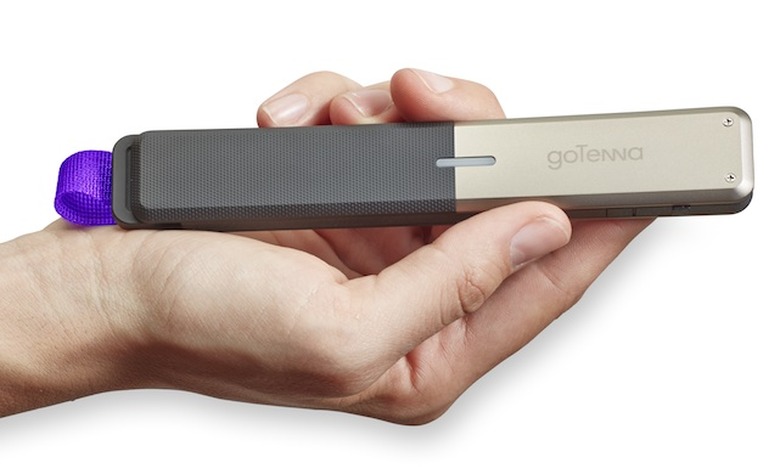
    In October of 2012, a huge swath of the northeastern US got smacked by Hurricane Sandy. Adding to the post-storm challenges of power, transport, fuel supply and housing shortages, the communications infrastructure suffered major outages that made recovery and response even harder. With up to 25% of New York City's cell towers inoperative, even a charged phone might as well have been stone dead. It was the experience of Sandy that sparked Brooklyn's sibling entrepreneurs Daniela and Jorge Perdomo to create GoTenna, the new grid-independent mobile wireless device for emergencies and more. The GoTenna device -- a slim, gray, waterproof plastic external antenna/transceiver about the size of a campground butane lighter -- connects iPhones to each other for text and location messaging even when there's no cell service available. Today's pre-order launch allows early buyers to get a pair of GoTennas for $149.99, a 50% discount off of the retail price when they ship in late autumn 2014. GoTenna CEO Daniela Perdomo told TUAW that living through the hurricane made it clear to her and her brother how valuable a truly grid-free communications tool would be to supplement conventional wireless coverage in an emergency. First responders, insurance adjusters, NGOs/relief workers and plain old citizens or disaster preppers living in high-risk areas (Tornado Alley, the Gulf Coast) may indeed be looking for that "portable insurance policy" of having a GoTenna in a go bag or glove compartment, but there are several applications for the device beyond getting ready for the end of the world. Think of all the times when it would be helpful to connect with friends or family in spite of poor or unavailable cell coverage. Traveling overseas and want to avoid roaming charges? Unable to get through in a parade or festival crowd? Concerned that a particular text exchange might invite undue scrutiny from your carrier or the Feds? GoTenna's point to point architecture, lack of a central server and end to end encryption for messages might fit the bill. The GoTenna app also includes preloadable offline maps, custom-developed by the company, that allow you to visualize your location or a friend's without needing access to Apple or Google's maps, or the expensive licensing of maps from an existing provider. With a Bluetooth LE pairing to your iPhone, the GoTenna should last about 72 hours in average use and will stay charged on the shelf for over a year; it recharges via a standard Micro USB connector that you could hook up to your BioLite camp stove or other mains-free charger. (John Levy, the BioLite board chairman, is also an advisor/ investor for GoTenna.) With a 9600 bps data rate more akin to the modems of yesteryear than the LTE chipsets of today, you won't be sending any selfies or cat videos through GoTenna -- but that's not really the point. The devices also can't form a mesh network due to current FCC rules, so for now it's point-to-point only; however, you can send a "shout" message to any friends with GoTennas in range, or issue an emergency message that will go to all nearby GoTennas whether they "know" you or not. As the GoTenna gets closer to production, we'll revisit and review the product in the field to find out just how effective it is in urban and rural settings.

    By Michael Rose Read More
  • Beyond Swift: visit Apple's official blogs of yesteryear

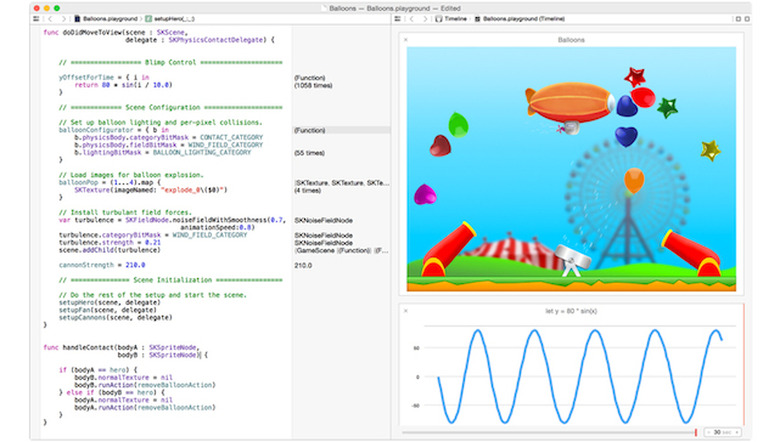
    The introduction of Apple's programming language Swift at WWDC represents a departure from tradition in several ways. If an entirely new coding dialect wasn't enough, last week the company also launched a blog specifically focused on Swift. The new blog is aimed at developers working to adopt Swift, delivering tips and tricks to ease the learning curve. Any gesture of glasnost from Apple is newsworthy -- but something about the Mac Observer's headline Apple Launches Swift Developer Blog, Its First Ever Blog didn't ring quite right. As Macworld's story points out, Apple's Developer Connection site has included a blog for quite some time, even if the overall tone was more "bulletins from headquarters" and less "fireside chat." There are also developer-centric blogs that come under Apple's ownership umbrella (although they don't live on the apple.com domain) for both Safari's Webkit engine and the Mac OS Forge open source projects hub. What if we scan even further back into the mists? Indeed, there have been several past appearances of "official" Apple blogs for some segments of the company's business. In 2008, we saw the launch of an official MobileMe blog (which initially boiled down to "Sorry, our bad" in light of the CEO's reaction to the less-than-stellar online product). That site continued to see intermittent posts until 2011 and the beginning of the iCloud transition. Before there was MobileMe, there was .Mac, and naturally that included a .Mac blog of tips and tricks. That site first appeared in 2006... and then ceased updating later in 2006, from January to July to be specific. Neither of those sites, however, beat out the earliest Apple-hosted official blog I've been able to spot: the Apple Education blog, founded in November of 2004 and featuring a rotating cast of student authors. The honor of being the first contributor went to a recent University of Colorado at Boulder grad and newly minted Apple hire, one Dave Morin... whom you may have heard of: he's now the co-founder and CEO of Path. This blog actually made it past its first anniversary, with the final post coming in December of 2005. With luck and dedication, the Swift blog may indeed escape the "Apple official blog curse" and celebrate several birthdays. We're rooting for it. Meanwhile, if you know of an earlier Apple blog, let us know in the comments!

    By Michael Rose Read More
  • TUAW Talkcast, 10 pm ET tonight: World Cup Hangover edition + special news

    Tonight on the TUAW Talkcast: it's our World Cup hangover edition. Oh, our aching heads. We'll raise a stein of Pilsner to the victorious German national team, talk about how Amazon and Samsung are starting to see some of the agita that plagued Apple in recent years, and on top of all that: a very special announcement about the future of the TUAW Talkcast. We'll see you there! Reminder on new-style talkcasting: With some help from the fine folks at Fuze, we're using the Fuze Meeting system to record the show. This should let everyone listen in live -- and, if you want, raise your hand as you would in the Talkshoe room to get unmuted and chime in. You can join the call in progress (meeting # is 20099010) at 10 pm ET from any computer via this link; if you download the Mac or Windows Fuze clients ahead of time, you'll get better audio and a slicker experience, but browser-only will work fine. Just click the phone icon to join the audio once you're in. Using an iPhone or iPad? Grab the native clients from the App Store and get busy. (Even Android users can join the party.) Still feel like using the conventional phone dial-in? Just call 201-479-4595 and enter the meeting number 20099010, then press #. While the Fuze web and native clients have a chat channel, we'd like to reserve that for host participants, requests to talk and other real-time alerts... so the full-on chat for the show is already in this post, and we'll be popping in right at 10 pm tonight. You'll need Twitter, Facebook or Chatroll credentials to participate in the chat. We'll remind everyone to check back in at that time.

    By Michael Rose Read More
  • Blend CRM and on-the-go email with Cirrus Insight Mobile

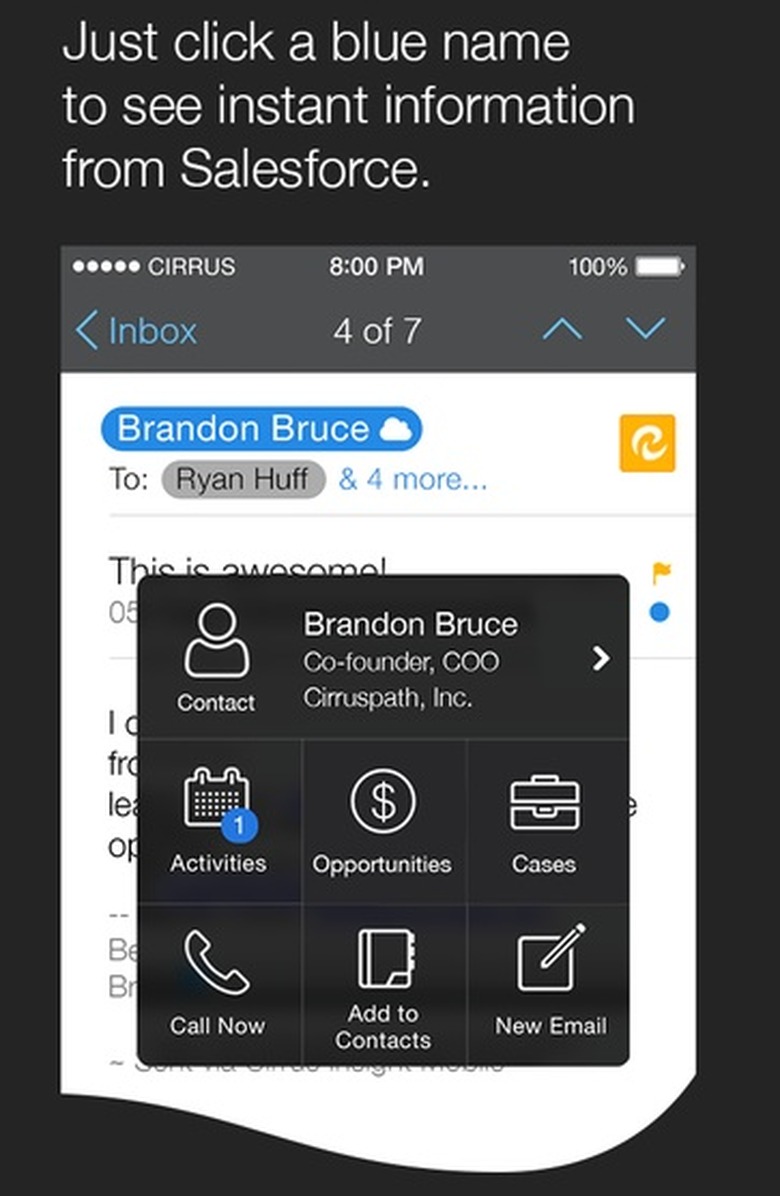
    Accessing information about customers while on the go used to be tough, but it's gotten a lot easier. For companies that use the Salesforce Sales Cloud as their CRM (customer relationship management) system, the mobile story has been greatly enhanced over the past year as several divergent salesforce.com-published iOS and Android apps have been unified onto the Salesforce1 platform and phone/tablet app. Now with a few taps, it's simple to interact with contacts, accounts, potential new business opportunities or any custom-developed objects in the CRM database. [Please note: when not blogging for TUAW, my day job is at salesforce.com.] There's always room for more innovation: Cirruspath, an ISV known for its leading Gmail integration for Salesforce, wants to add another dimension to the mobile experience for Sales Cloud users. The just-released Cirrus Insight Mobile app (free for iPhone, but requires a Cirrus subscription or 14-day trial in Sales Cloud to work) aims to tie email and sales activities more closely together by replacing the native Mail or Gmail client on your phone entirely. Swapping mobile mail clients is a big deal (just ask users of Tempo, Hop, Mailbox and many others), so Cirrus needs to deliver some desirable features to make it worth a user's while to learn the new UI. Top of the list is when-opened notification; nothing makes salespeople happier than knowing exactly when that email has been opened or read, so they can reach out and connect while the latest offer is right at the top of the customer's to-do list. Cirrus's client can invisibly add a tiny tracker graphic to any outbound message (similar to YesWare and other add-ins for Gmail), which then "phones home" as soon as the email is opened. In addition to the trackable emails, Cirrus also makes it extremely easy to add or log emails to the appropriate CRM customer record with a minimum of steps. Creating new customers, accounts, cases or opportunities can be done directly from the app, along with calendar functions to schedule events or meetings. Although you don't have to save emails into a Salesforce context, doing so enables the free Cirrus Analytics app to dig into your sending records to see what's most effective at reaching customers. Cirrus Insight Mobile works with Gmail, Lotus Notes, Outlook/Exchange and any other email system that supports either ActiveSync or IMAP for mailbox access (if your corporate admin doesn't permit IMAP, you'll be out of luck for now). It's iPhone only at launch, with iPad (and Android phone/tablet) versions on the roadmap. Obviously, any app that wants to be the front end for your mobile email experience should be trustworthy; here's the Cirrus policy statement for reference. As mentioned, the app itself is free but you need an underlying Cirrus Insight subscription -- $19 per user per month, on an annualized basis (for Gmail/Google Apps users; Outlook and Notes have a custom pricing scheme). Note: I work for salesforce.com; Cirruspath is an independent vendor.

    By Michael Rose Read More
  • TUAW Talkcast 2014-06-15: Father's Day Edition!

    New dial-in experience! Set up Fuze Meeting before the show if you want to join in live. It's Father's Day, and we're pulling away from our BBQ comas long enough to talkcast tonight -- but with a 10 minute delayed start! See you at 10:10 pm ET. Reminder on new-style talkcasting: With some help from the fine folks at Fuze, we're using a new system to record the show. This should let everyone listen in live -- and, if you want, raise your hand as you would in the Talkshoe room to get unmuted and chime in. You can join the call in progress (meeting # is 20099010) at 10 pm ET from any computer via this link; if you download the Mac or Windows Fuze clients ahead of time, you'll get better audio and a slicker experience, but browser-only will work fine. Just click the phone icon to join the audio once you're in. Using an iPhone or iPad? Grab the native clients from the App Store and get busy. (Even Android users can join the party.) Still feel like using the conventional phone dial-in? Just call 201-479-4595 and enter the meeting number 20099010, then press #. While the Fuze web and native clients have a chat channel, we'd like to reserve that for host participants, requests to talk and other real-time alerts... so the full-on chat for the show will appear in this very post at 10 pm tonight. You'll need Twitter, Facebook or Chatroll credentials to participate in the chat. We'll remind everyone to check back in at that time.

    By Michael Rose Read More
  • Osmo extends iPad kids' gaming to the physical world

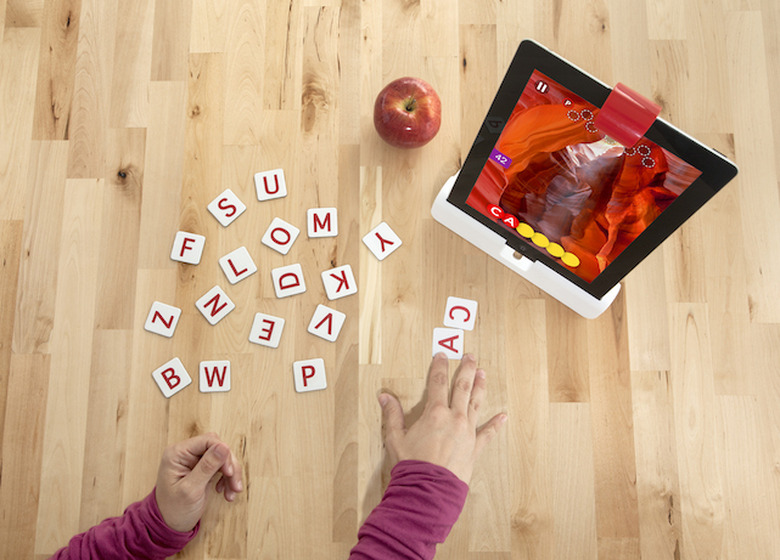
    In a few short years, the iPad has gone from geeky luxury item to a ubiquitous, incredibly popular device -- and that's especially true with the fickle, frantic audience we call "the kids." Little hands love Apple's portable, touchable tablet... maybe a little bit too much. Parents and educators may be wondering if all this tablet time is the best way to engage and entertain young minds that learn most effectively by engaging with the physical world along with the virtual one. This tension between the allure of the iPad and the need to keep kids connected to reality is why the current pre-launch campaign for Osmo is so intriguing. With a remarkably simple hardware mirror module + stand to reorient the iPad's front-facing camera down towards a tabletop, plus some very clever software and visual recognition engineering, Osmo creates a "tangible play" experience that helps kids get out of the locked-in relationship with the iPad screen, and reconnects them to the people and objects around them. Osmo's three announced games -- Words, Tangram, and Newton -- all take advantage of the downward-view camera and the iPad's processing power to recognize what players are doing with real objects in the real world. For Tangram, it's geometric primitives assembled to match the onscreen design; with Words, players toss letters into the play zone to help answer clues. Newton is a "dots to target" puzzle game with a twist; the falling balls bounce off a drawing, objects or even a finger visible in the play field. It's easier to understand once you see it in action, as below. According to co-founder/CEO and ex-Googler Pramod Sharma, the kids in the promo video had never used or even seen the Osmo apps before they stepped in to be filmed. Their interactions and first impressions are what you see here. Osmo's pre-launch approach follows the example of a couple of other "quasi-crowdfunded" products, where the funding campaign is effectively an advance sale program; unlike many Kickstarter or Indiegogo hardware projects, the design and development of Osmo was locked pre-campaign. That didn't hold back its popularity, though; the product hit its $50,000 presale target within a few hours of the May 22 launch, and the second batch of pre-order units is now up for grabs. To sweeten the deal for early adopters (who get a $49 purchase price, versus the launch amount of $99 per Osmo, and additional $5 discounts for referrals), the company is promising that backers will get free downloads of any additional games released in the first two years of Osmo's sales. They'll also get a two-year replacement warranty if they lose any game pieces. With a target audience of kindergarteners through 12-year-olds, the Osmo market is nice and wide; schools and educators that have had a chance to help play-test and refine the product are expressing early enthusiasm for it. At the moment, however, it's parents and kids that Osmo wants to reach in advance of its late summer on-sale date. If it looks good to you, the pre-order desk is open.

    By Michael Rose Read More
  • Dish Network's mistake is a blast from the Mac past

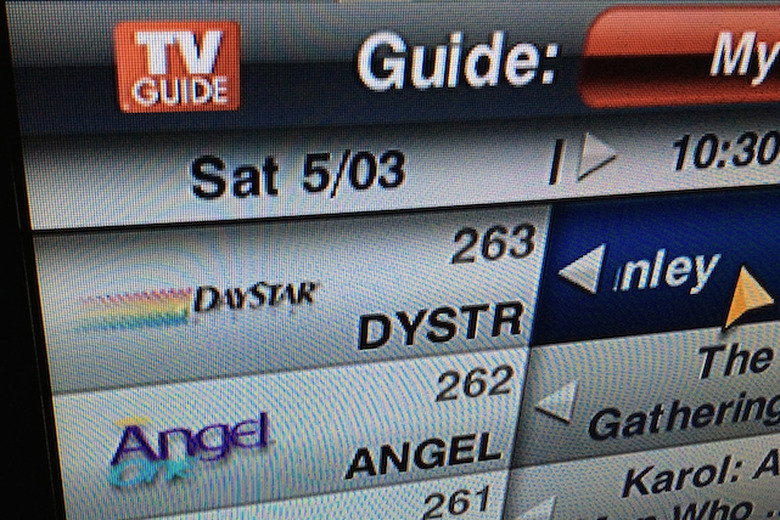
    It's not often that the onscreen programming guide for your cable or satellite TV service can trigger an unexpected wave of Mac nostalgia, but that's exactly what happened to me this weekend. As a Dish Network subscriber, I'm reasonably familiar with the available channel lineup, but most of the time I leave the EPG set to only show high-definition channels. On Saturday night, I wanted to catch a few minutes of the White House Correspondents' Dinner on C-SPAN (yes, it's a wild and crazy party all the time up in here), but I couldn't find the channel right away -- because it was only available in standard-def. Simple enough to fix; I switched the EPG view to show all channels and began scrolling through the listings. As I passed through the mid-200s channels, mostly populated with religious and inspirational programming, one unfamiliar network caught my eye, as seen in the photo above. It seemed impossible... but sure enough, the logo for the Daystar network actually appeared to be the same as the branding for DayStar Digital, the defunct Mac accelerator and clone maker. "That's awfully unlikely," I thought. A quick check of the real Daystar network's website and Wikipedia listing showed that indeed, the logo for the network is entirely dissimilar from the CMYK-comet logo for the hardware maker. What's going on? If I had to hazard a guess, chances are that whoever at Dish is responsible for getting those network logos into the guide may not have looked too closely at the source for this particular channel's branding, even though the channel listing on the Dish website uses the right image. Looking for "Daystar Logo" on Wikipedia does come up with a first result of the DayStar Digital logo -- but the next one down is for the TV network. We'll follow up with Dish and see if they acknowledge or fix the error. In the meantime, enjoy this tiny taste of Mac history right there on your TV screen.

    By Michael Rose Read More
  • For Mom: Korus delivers wireless audio without hassles

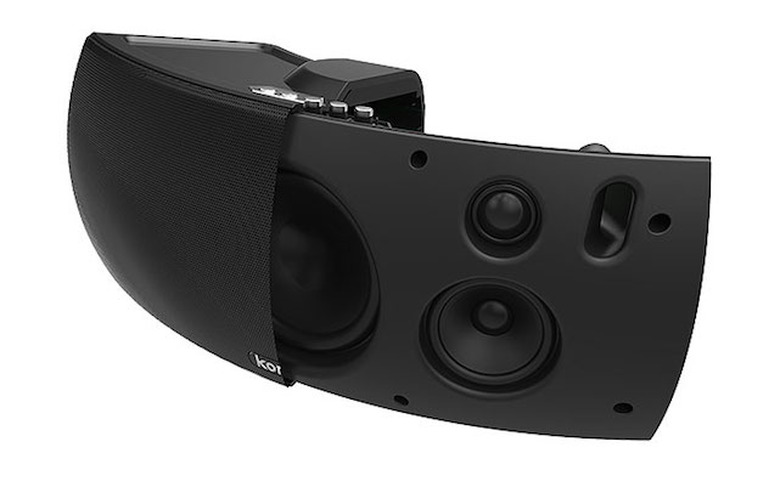
    Given the wide assortment of wireless audio technologies in today's ecosystem, it's easy to get bogged down in sound quality and engineering specs. What's not so easy is explaining to a parent or less tech-savvy relative how they should use their devices and connections amongst the current crop of systems and speakers. Between the industry leader Sonos, Apple's native AirPlay, a wide variety of Bluetooth-connected portable speakers and the evolving multi-vendor Play-Fi standard, there are plenty of good choices -- but each of those approaches requires setup, syncing and pairing before you can get to the actual, fun playing-of-the-music part. That's why the alternative approach taken by Korus with its v400s and v600s wireless speakers is so intriguing, especially as a gift or recommendation for Mother's Day. I wouldn't want to have to explain Bluetooth pairing or WPA2 Wi-Fi encryption to my mom just so she could play music wirelessly, and with the Korus speakers I wouldn't have to. All the Korus speakers use a small dongle called a Baton to connect sources to speakers, and as soon as you plug the Baton into your Lightning port, 30-pin iOS port or computer's USB port, you can stream clear audio up to 65 feet (quite a bit longer than Bluetooth) at an audiophile-friendly 480kbps bit rate. No configuration, no tweaking, no pairing and no aggravation required. Both speakers come in a basic piano black finish that's unfussy and handsome, although it might not be to every decorator's taste. (Korus has a promotional deal with Dancing With The Stars, so Mom may have already spotted the units on TV.) The Baton-to-speaker connection is based on a protocol called SKAA, which makes me want to put on my black suspenders and play some English Beat. Korus licenses the SKAA tech from audio chipset designer Eleven Engineering, which also provides the wireless interconnect underpinnings for several other speaker makers. Using the SKAA-based Batons, each speaker can cycle through up to four connected devices by pressing the connect button on the very minimalist control cluster. Additionally, it's easy to combine up to four Korus speakers together for multi-room listening. There's even an iOS app to control the relative volume of the teamed speakers. Korus sells the shelf-sized, corded v400s and the room-filling, nominally portable (it can run off D batteries for a rated 90 hours) v600s in bundles with all the available Batons (Lightning, 30-pin, USB) plus two device charging cables that sleeve over a connected Baton to charge your phone or iPad while you listen. The v400s bundle is currently $350 and the v600s is $450, discounted quite a bit from the nominal list price (and with free shipping, at the moment). That's roughly comparable with the Sonos component pricing, but the big difference is that the Korus units aren't trying to be part of a bigger music management picture, library consolidation or streaming service approach -- they're just going to play what you're playing on your iPhone, iPad or computer, end of story. (There's not a Baton for Android or Windows Mobile devices, at least not yet, but the speakers do include a standard 3.5mm audio input jack.) Simplicity is commendable, but what about streaming and sound quality? I tested both the v400s and v600s speakers in my house, with plenty of wireless chatter and interference to keep them honest. To my surprise, I was able to easily stream to the kitchen or living room from my iPhone in the furthest corner of the second floor -- a range where Bluetooth would have given up completely and even Wi-Fi streaming might have been touch and go. I stepped out to the backyard and even over 50 feet away I could still hear the music playing with no skips or slurs noticeable. Korus does acknowledge that you may sacrifice some range if you're using the charging cable while streaming, but within 20-30 feet I didn't perceive any issues. Korus also claims near real-time synchronization between device and speaker for drift-free playback on videos or gaming, which held up in a brief iPad video playback test. Both speakers also delivered clear, room-filling sound without distortion or static. I'm not a particularly audiophilic listener, but I found the smaller v400s to be great for bedroom or kitchen audio when playing classical, jazz or rock. The larger v600s delivers more low-end sound and held up very well in the living room with high dynamic range tracks from iTunes Plus and Spotify. I didn't try out the USB version of the Baton, but it seems like a good fit for karaoke, video streaming or other Mac-centric playback. Of course, the obvious drawback of a dongle-centric system like the Baton is that teensy adapters have an unfortunate tendency to wander away and go missing. With a $50 retail price tag for a new Baton, losing one is no small matter. I would have loved to have seen a small storage panel or other way of securing the Batons to/inside the speaker when they're not in use, but barring that there are always other ways to solve the problem. The Korus speakers aren't a minor investment, and certainly if you're planning out a high-end wireless home system they may not be the complete package. If, however, you want to put good sound in a convenient location and you don't want to worry about fussy networking or having to configure visiting devices just so they can join the playback party, give the Korus chorus a listen. Rating: Three out of four stars possible

    By Michael Rose Read More
  • Hands on with Henge's Gravitas: one hefty dock, many devices

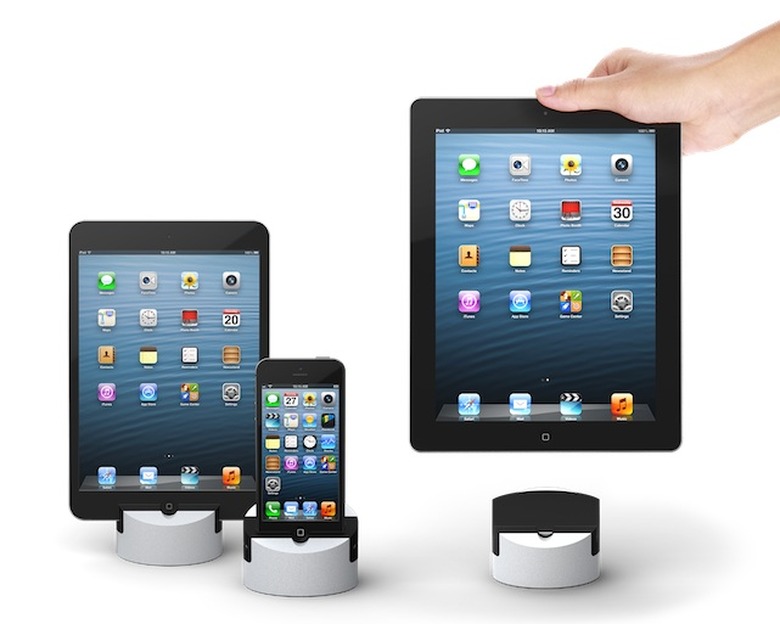
    If Asimov's famous Three Laws of Robotics had been focused on a more mundane technological achievement, like iOS device docks, the first law might well have been "A dock shall not cause harm to a device, or through instability allow a device to come to harm." By that standard, the US$89 Gravitas dock from Henge is fully compliant; its ample mass and interchangeable inserts mean that your iPhone or iPad are staying exactly where you put them. (Development of the second and third laws of device docks is left as an exercise for the reader.) The Gravitas, which we first saw on display at Macworld/iWorld in 2013, is now available in either Lightning or 30-pin flavors. It's a dense hunk of metal that's almost uncomfortably heavy to hold in one hand (mass of 1.17kg, weighing 2.54 pounds). The cylindrical dock has a downward-angled face bisected by the device slot, which is designed to adapt to any compatible iOS gadget (depending on the port type) by swapping in the appropriate plastic insert. The dock's desk-hugging textured bottom and sheer heft mean that you can confidently insert or remove your iPad without worrying that it may go flying across your cubicle. The back of the Gravitas features a USB "A" connector (more on that below) and a 3.5mm audio-out jack, allowing you to connect the Gravitas to conventional powered speakers or even headphones. I used the Gravitas with both an iPhone 5 and an iPad Air on my desk, and, as befitting a not-particularly-inexpensive chunk of gear, it certainly caught the eye of passerby. Both devices fit into their assigned inserts (which are easy to swap once you get the hang of pulling on both sides of the dock at once), and showed to best effect. The iPhone in particular looked very sharp, like a museum piece on a plinth. The iPad, however, ended up a little bit more vertical than I liked for easy viewing when I was sitting at my desk -- I resorted to tucking my Smart Cover under the front edge of the Gravitas to provide a little shimming and tilt the dock back. Your individual ergonomics, of course, may vary -- using the Gravitas as a charging station with a photo slideshow on the iPad lock screen is bound to elicit appreciative murmurs from your neighbors. About that USB connector, though: the Gravitas comes with and requires an unusual USB A female - A female cable, which is rarely seen in the wild. Most older peripherals like printers and hubs use an A-B cable, so buyers are likely to have a few of those kicking around; a USB mini or micro cable (often used for non-Apple phones, scanners, microphones or external battery packs) would also be a lot easier to source from the junk drawer, if necessary. Building the dock to use the A-A cable means that anyone wanting to deploy the Gravitas in multiple locations/with different computers needs to be packing a spare cable or remember to take the supplied one along. The thing is so massive, though, that I don't see many users relocating it frequently. There are certainly cheaper docks on the market with a good deal of flexibility, but if you want to showcase your iDevice in a set-it-and-it's-grounded way while preserving the ability to change out inserts on the fly, the Gravitas delivers. You can order one direct from Henge for $89, or two for $149. (Your UPS guy may give you a cross look if you order more than two.) Rating: 3 stars out of 4 stars possible

    By Michael Rose Read More
  • Viva Mavericks: OS X Beta Seed program now open to all

    Really, who among us hasn't wanted to run a presumptively unstable operating system? Until today, the delights of beta releases of OS X were reserved to those who signed up for Apple's developer program (and paid the $99 fee to enroll). That fun and frolic is now open to anyone 18 and over with an Apple ID, via the new OS X Beta Seed program. [As noted on Daring Fireball, before now the OS X Beta Seed program was invitation-only for non-developers. -Ed.] Simply sign in at Apple's beta site, agree to the terms and conditions (including a prohibition on sharing information about the beta versions), and activate the Mac you want to use with the provided Beta Access Utility. Once you're live, the beta builds of OS X will appear in the Mac App Store. It should go without saying that you need to back up thoroughly before updating to an unreleased Mavericks build; you also should not run beta software on any machine you need for production, time-critical or revenue-generating activities. If you can't live without your Mac, don't dance on the bleeding edge! [hat tip Engadget]

    By Michael Rose Read More
  • Talkcast tonight: Fire TV, iPhone-first development, and more!

    New dial-in experience! Set up Fuze Meeting before the show if you want to join in live. It's Sunday night, and if you're not returning to Westeros for the fourth season of GoT, it's time for the TUAW talkcast! In today's mobile startup landscape, the overcaffeinated, optimistic founders of the Next New Awesome have one big platform choice to make -- iPhone first, or Android first? In the US, despite shifting market share numbers, the answer is overwhelmingly "iPhone first," but some developers go another way. Tonight's TechCrunch story from Emu's Dave Feldman explains why the text-message startup chose to build for Android first, and why after sixteen months the team reversed course, pulled the Android version and pivoted back to the iPhone. We'll discuss this, plus Amazon Fire TV versus the world; Apple's acquisition of Novauris lends hope for a smarter Siri; what Apple's hiring history means for the company's presumed foray into fitness and fashion; Mozilla's challenging week... and more! Tonight, we're also welcoming special guests: The Mac Observer's Jeff Gamet and the Pioneer Press's Julio Ojeda-Zapata. If you haven't seen Julio's recent post and video detailing how he covered a coal plant demolition in Minnesota, or his son's crowdsourcing effort to send his robotics team to a national competition, please check them out. Reminder on new-style talkcasting: With some help from the fine folks at Fuze, we're using a new system to record the show. This should let everyone listen in live -- and, if you want, raise your hand as you would in the Talkshoe room to get unmuted and chime in. You can join the call in progress (meeting # is 20099010) at 10 pm ET from any computer via this link; if you download the Mac or Windows Fuze clients ahead of time, you'll get better audio and a slicker experience, but browser-only will work fine. Just click the phone icon to join the audio once you're in. Using an iPhone or iPad? Grab the native clients from the App Store and get busy. (Even Android users can join the party.) Still feel like using the conventional phone dial-in? Just call 775-996-3562 and enter the meeting number 20099010, then press #. While the Fuze web and native clients have a chat channel, we'd like to reserve that for host participants, requests to talk and other real-time alerts... so the full-on chat for the show will appear in this very post at 10 pm tonight. You'll need Twitter, Facebook or Chatroll credentials to participate in the chat. We'll remind everyone to check back in at that time.

    By Michael Rose Read More
  • Microsoft Office for iPad announcement, live from San Francisco

    (Thanks for joining us and bearing with our liveblog hiccups! Meanwhile, the rest of our team is over at Moscone Center following along with the Macworld/iWorld keynote session!) (So, Office looks pretty good -- but has the ecosystem moved on past Office for iPad users? We'll see... --MR) (Nadella is wrapping up.) We want our applications to run cross-platform great. We're not holding anything back. What motivates us is the reality of our customers. (not fear/guarding turf, is the implication. --MR) You'll hear more about the innovations/intersection between mobile and cloud. How does Windows integrate here? More soon. Enterprise Mobility Suite manages complexity of a heterogenous environment "Enables IT to be heroes because they enable their users." For Office365, building a great user experience. Rich developer surface area, so they can go after a very wide opportunity. 10:30 Nadella back onstage. "Great focus and great care to make sure Office on every device shines through." 10:28: Moving on to developer audience. Showing DocuSign on iPhone integrated with Azure AD and Office365. 10:24 Now showing the Windows Azure AD application integrations, with SSO and two-factor auth. (You can tell by the volume of typing in the room that this does not have the crowd appeal of the iPad info. --MR) 10:22 Now showing the enterprise management portal for mobile devices. Can manage your connected devices from a browser. (Similar to MDM offerings from JAMF, AirWatch, etc.) FREEMIUM MODEL for read-only access; with Office 365 subscription, you get full edit. (These apps have a menu bar. Really quite intriguing. --MR) PowerPoint: Lots of expectation of people presenting on the iPad -- transitions and effects preserved. Annotations and laser-pointer options too. Unique to Office on the iPad are chart suggestions -- using my data, with a preview of what it's going to look like. "This is not the ported Windows or Mac app, or the iPhone app." 10:18 Excel has a custom numeric keyboard. 10:16 am: Simultaneous multiple users editing a doc in OneDrive. Can also be confident that everything is going to look like we want it, and fidelity across devices. Showing Word working with photos in native iPad mode. 11 am PT today Word, Excel and Powerpoint go live in the App Store for users. 10:12AM Demo time with Julia White. 10:12AM First step in creating a cloud for everyone on every device 10:11AM Sorry for the technical difficulties folks. Now talking about BYOD. 10:10AM Developers also looking for a canvas to innovate, build on the scenarios that Microsoft is working on -- want a big surface area to work upon. 10:09AM Nadella: People have a set of activities that we do. 10:07AM (There are two iOS devices on the table here) 10:07AM Magical coming together of cloud and mobile -- that intersection is what we want to talk about today. 10:06AM Focusing on a mobile first / cloud first world 10:05AM Use all the insight gained by reasoning over this data. 10:05AM Computing will be ubiquitous; interactions will be digitized. 10:04AM Focused on ubiquitous computing and ambient intelligence. 10:04AM Satya Nadella: Our team is really ready for innovation... one aspect of it to talk about today. What can we as a company do to serve our customers better. 10:03AM "Despite having spent 22 years at MS, seeing it anew" 10:02AM "Day 52 for me -- but who's counting" 10:02AM CEO is here 10:02AM 9:59AM Briefing about to kick off... introductions/preamble 9:58AM sorry for the massive image. 9:58AM Themed M&Ms and pillows seem to indicate an Office theme... :) 10:00AM 9:59AM Briefing about to kick off... introductions/preamble 9:58AM Themed M&Ms and pillows seem to indicate an Office theme... :) 9:57AM Good morning/afternoon everyone! Mike Rose here, reporting live from Microsoft's event in San Francisco. We're going to be live at Microsoft's announcement at One Kearny in San Francisco! Join us at 10 am PT/1 pm ET for updates and insights from the event. You can read more about the anticipated topic (Office for iPad!) in our preview post here. Microsoft is also webcasting the session here.

    By Michael Rose Read More
  • Join us for the Microsoft announcement liveblog, 10am PT/1pm ET Thursday

    All the signs are pointing to an Office for iPad announcement coming tomorrow from Microsoft's new CEO Satya Nadella. While the software giant's product teams were long suspected of having a finished iPad version of the PC and Mac productivity suite ready to ship, the priority for Microsoft was to get a touch-enabled revamp of the PC version (codenamed "Gemini") to market first. That's no longer the plan, according to ZDnet's Microsoft beat lead Mary Jo Foley. Along with many other MS mavens, Foley believes that Office for iPad -- which would presumably be tied to an Office 365 subscription -- will be announced tomorrow, with the Gemini version of touch-Office coming later on. The announcement may also touch on MS's management options for mixed-platform networks, covering a new MEMS product (Microsoft Enterprise Mobility Suite) that would provide tools for network administrators and IT leads to handle their increasingly diverse, BYOD-enabled environments. If the thought of a Microsoft announcement in San Francisco on the first day of Macworld/iWorld suggests pretty clearly to you that MS wants to get the attention of Apple aficionados, you're not alone. That's why we'll be attending and liveblogging the announcement tomorrow, providing commentary and reactions during the event and afterward. Microsoft will also be webcasting the event. Will March 27, 2014 be the day that future tech pundits point to as the transition from the PC to the post-PC era? Tune in to find out. Yes, the photo is of ancient MS-DOS boxes; as it happens, Microsoft released the source code for early versions of DOS this week.

    By Michael Rose Read More