

Everything announced at Apple's WWDC 2026 keynote
Siri AI is finally almost here and Liquid Glass will look a little less liquid soon.
It's that time of year when developers who create apps and tools for Apple's ecosystem and your friendly neighborhood tech journalists gather around at Apple Park and remotely to learn what's coming to the company's operating systems later this year. Apple's Worldwide Developer Conference kicked off today with, as ever, the keynote that contained the bulk of the major announcements.
There's something a bit different about this year's WWDC. This is Tim Cook's last one as Apple CEO before he steps down and cedes the role to John Ternus, the company's senior vice president of hardware engineering, on September 1. Ternus' appointment might shed some light on where the company is going next, hopefully with a larger focus on hardware innovation. However, WWDC is all about the software side of things.
Here's our breakdown of everything Apple announced during its WWDC 2026 keynote.
Siri AI
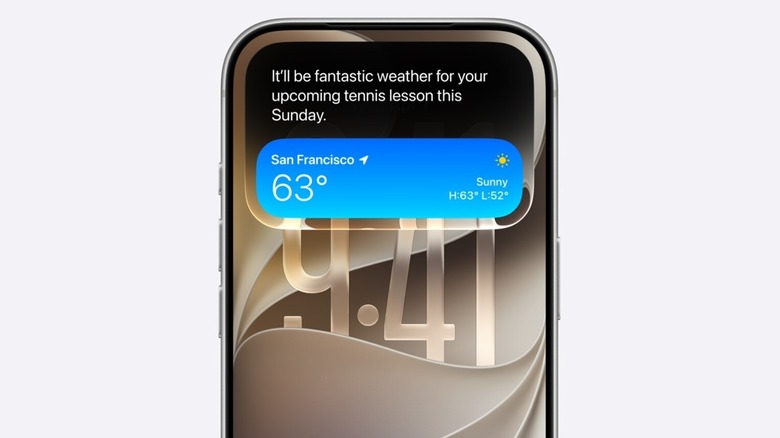
Ahead of WWDC, it was widely expected that Apple would place a heavy emphasis on its (delayed) overhaul of Siri, which it first demoed at the 2024 edition of the event. The company confirmed back in January that a "more personalized Siri" was coming this year, and that it would be powered by Google's Gemini models. This updated version of the assistant is called Siri AI.
Among other things, Siri AI will have some visual updates. On iPhones with a Dynamic Island, a Siri animation will appear there when it's dealing with a request (rather than the bottom of the screen, as things are currently).
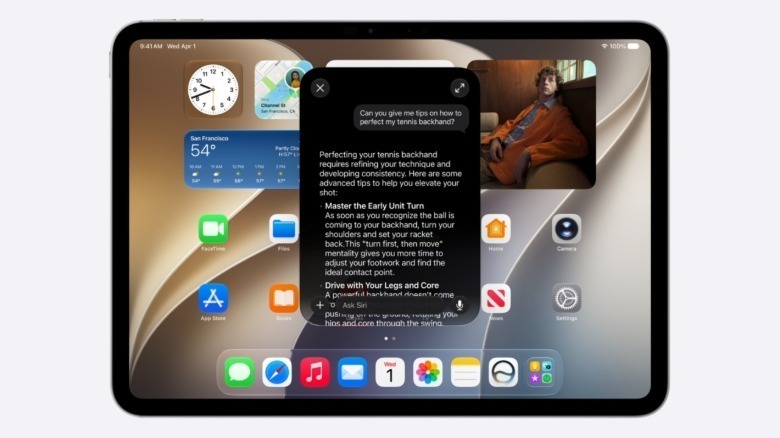
You can still use the "Hey Siri" wake word or the power button to activate the assistant. However, in iOS 27, swiping down from the middle of the screen will bring up a Siri AI interface. You can then ask the assistant a question or get it to search for something. Responses will pop up in a card, and you can continue a conversation with the chatbot.
You might ask Siri AI to add a specific photo to a shared family album, remind you when a lottery for concert tickets takes place or suggest recipes for countries who are being represented at the World Cup for your watch party. It can offer feedback on documents as well.
Siri AI will be baked into Spotlight search on macOS Golden Gate. It will also be able to take action based on what's on your screen. By way of example, Apple suggested that, while you're looking at a photo of your shed, you might ask Siri AI how to best put together a maker space inside it.
Using the screenshot tool on Mac, you'll be able to — for instance — look at a festival schedule, pick the performances you're interested in and add them to your calendar with Siri AI. Expect to be able to ask Siri AI questions about what your iPhone's camera is seeing too. (This all sounds very much like the visual search features Google has offered for quite some time). Apple Vision Pro will support such Visual Intelligence features as well.
Elsewhere, Apple is promising major improvements to voice dictation with Siri AI. The more conversational approach Apple is taking for its long-standing assistant is exemplified by a dedicated Siri chatbot app. You'll be able to ask it questions; generate text and images; analyze files; and more. Apple is seemingly looking to make Siri a one-stop shop for all your information needs. You'll have the ability to customize the expressiveness of Siri AI's voice, as well as its rate of speech.
Along with iOS, iPadOS and macOS, Siri AI will be available on watchOS, visionOS, CarPlay and AirPods. (Speaking of AirPods, a customizable EQ feature will be available in iOS 27.)
 Apple
Apple
Siri AI will initially be available in English. Apple said it will add support for more languages soon. According to Apple, "Apple Intelligence and Siri AI in iOS 27, iPadOS 27, macOS 27, watchOS 27, and visionOS 27 are available on iPhone 16 models or later, iPhone 15 Pro, iPhone 15 Pro Max, iPad mini (A17 Pro), iPad models with M1 or later, Mac with M1 or later, Apple Vision Pro, Apple Watch Series 10 or later, Apple Watch Ultra 2 or later, and Apple Watch SE 3 when paired with an Apple Intelligence-enabled iPhone nearby."
Developer betas of Apple's latest operating systems are available today. As always, iOS 27, iPadOS 27, watchOS 27, macOS Golden Gate and so on will be available to everyone on supported devices this fall.
However, Siri AI will not be available in the EU on iOS 27 and iPadOS 27, at least not initially. And since watchOS 27's implementation of Siri AI requires an iPhone with Siri AI, it won't be available on the Apple Watch as well. Apple is blaming the Digital Markets Act for the delay. However, the company says Siri AI will be available in the EU on macOS 27 and visionOS 27.
Apple Intelligence
As for Apple Intelligence (which is powering Siri AI), the company had some news to share on that front. Apple Intelligence will power new features in — among others — Safari, Messages and Passwords. Apple is rolling it into the Shortcuts app and Home app as well.
In Safari, Apple Intelligence will be able to smartly organize your tabs into topics, which sounds genuinely useful. It can also notify you of changes to a web page, such as for a product price drop or restock (or perhaps a change to a company's terms of service so you can get a heads up when it's shoving generative AI features no one asked for into its products.) On top of that, you'll be able to generate custom Safari extensions by describing what you want.
Apple Intelligence will enable you to strengthen weak and/or compromised login credentials in Passwords with a single tap, which also seems useful. The Passwords app will then be able to update those credentials on the relevant website for you.
Messages will have a smart reply function, which will apparently mimic your writing style (this holds true for Mail too). In Calendar, you'll be able to add or modify an event by describing it. Apple Intelligence will be able to add contacts and locations as well.
Image Playground will soon allow users to generate photorealistic slop and Lock Screen wallpapers. The company claims Apple Intelligence will help users "make incredible edits" in the Photos app, such as being able to virtually reframe a photo. An Extend tool will allow users to expand an image (this sounds like a feature Photoshop has had since 2023). All images you generate or photos you tweak using Apple Intelligence will have a SynthID watermark.
Soon, Apple Intelligence will be able to proofread text for you, including in third-party apps. It will seemingly be able to offer you suggestions on how to improve your writing too. (No, thank you! I will continue to take full ownership of my typos and grammatical errors. Or, more likely, blame my editors for accidentally introducing them because my writing is obviously faultless.)
In addition, Apple Intelligence will turbocharge some accessibility features. Apple says VoiceOver will offer "richer descriptions" of images, while users will be able to press the iPhone's Action Button to ask questions about what the camera is seeing and receive "detailed responses." With Voice Control, they'll also be able to describe various buttons and controls from across iOS without having to remember the specifics. Accessibility Reader, meanwhile, will support summaries and translations.
Design and performance updates
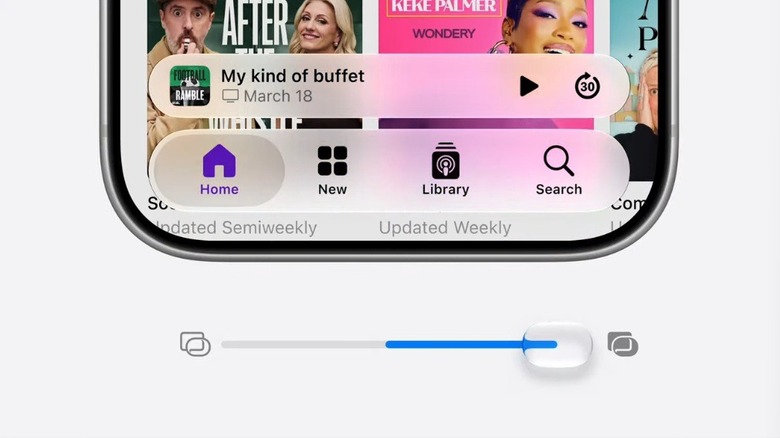
Apple is making some some welcome changes to the Liquid Glass language that it foisted upon users with last year's OS updates. This year, the company is changing the default look of Liquid Glass. It's also adding an opacity slider so you can decide how transparent you want it to look.
The company is making some other design changes to macOS. Expect a more uniform toolbar across apps. Sidebars will stretch to the edges of the screen to help minimize distractions. All macOS windows will have a tighter corner radius, and Apple is refreshing app icons.
On the performance side, Apple is promising a lot of improvements, with speed boosts of up to 80 percent for AirDrop transfers, messages loading in Mail and playback starting in Apple Music, among other things. Apps will launch up to 30 percent faster, Apple claims, while photos will appear in your camera roll up to 70 percent faster as well. As for switching to a cellular connection when you move out of range of Wi-Fi? Yup, that should happen faster too.
There's some very positive news for all those for folks still rocking older iPhones. The company says it modified the CPU scheduler to help many of those devices feel faster. Since iOS 27 will work on all models that support iOS 26, those with an iPhone 11 or later should feel the benefit after they update.
Apple has also revamped search across iOS, iPadOS and macOS. The company says it rebuilt the foundation of search that powers Spotlight, Mail and Photos so that it's more stable and efficient. This infrastructure will seemingly start indexing new files and data "almost immediately."
Speaking of Photos, iCloud shared albums will now work with full-resolution photos. This will be supported in Android and Windows as well.
Parental controls and child safety features
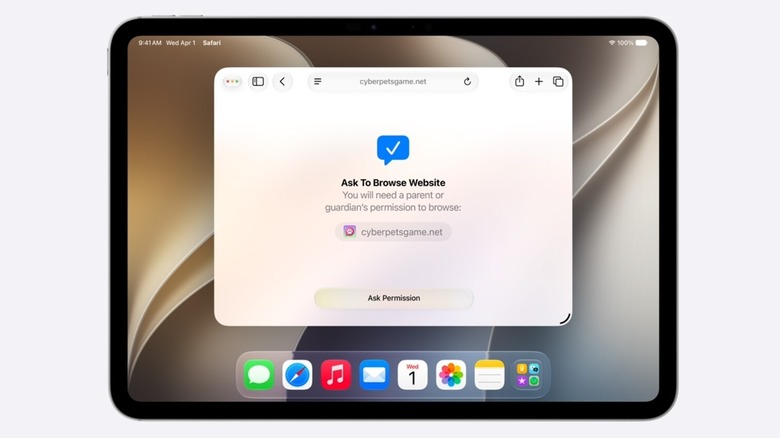
Parental controls and child safety features got some time in the limelight during the WWDC keynote. This is particularly notable given the increased scrutiny that governments around the world are giving tech companies on this subject.
Parents and guardians will soon be able to set up child accounts. These will be mandatory for those under 13 and can remain in place until the age of 18. Apple says a child account "enables safeguards across the system, tailored to the child's age."
Parents can decide who their child can contact via Phone, FaceTime and Messages, and determine which apps and websites they can access. Youngsters can request permission to access a certain website in Safari, just as they can ask to download an app that's blocked for them by default. Parents will have more granular control over app time limits, and get a better picture of how their kids are using their devices with the redesigned Screen Time feature.
On top of that, parents will have a new way to set up an Apple Watch for kids who do not have their own iPhone. Apple is offering parents resources to help parents make decisions on these factors too. All of these changes seem fairly sensible.
Update, June 9, 2026, 12:21PM ET: This story originally stated that watchOS 27 would run Siri AI in the EU. However, since publishing, Apple updated its press release about Siri AI limitations in the EU to note that it'll only be available on macOS 27 and visionOS 27 initially. We've updated the section discussing the EU-specific delay of Siri AI to note that.